Keyword research can get complicated very quickly.
Search for the “best keyword research tool” and you will find platforms promising:
- Billions of keywords.
- Accurate difficulty scores.
- Competitor intelligence.
- Content gaps.
- AI recommendations.
- Search trends.
- Backlink data.
- Rank tracking.
- Complete SEO strategies.
All of that can be useful.
But a blogger with 15 published articles does not have the same research needs as a website with 500.
That is where I think many keyword-tool comparisons go wrong.
They focus on:
Which tool has the most features?
I think the better question is:
Which tool helps you make the next useful decision for your blog?
A complete beginner may need help finding:
- What their audience is asking.
- Which subjects belong together.
- What their first 20 articles could cover.
- Whether the niche has enough depth.
A growing blogger may already have hundreds of ideas.
They may need help deciding:
- Which keyword is realistically competitive.
- Which existing pages could improve.
- What competitors are ranking for.
- Which content gaps deserve attention.
- Whether several keywords belong on one page.
- Which articles should be updated first.
And an established website earning meaningful income from organic traffic may genuinely benefit from the depth offered by platforms such as Ahrefs or Semrush.
Ahrefs’ Keywords Explorer currently covers tens of billions of topics and includes keyword ideas, clustering and detailed metrics, while Semrush’s Keyword Magic Tool draws on a database of more than 27 billion keywords.
Impressive?
Absolutely.
Necessary for someone planning their first parent blog?
Probably not.
This guide is therefore not going to rank tools purely by the size of their databases.
Instead, I am comparing them based on how useful they are for real bloggers at different stages.
My shortlist includes:
- Jaaxy.
- LowFruits.
- KeySearch.
- Ubersuggest.
- Ahrefs.
- Semrush.
- Google Keyword Planner.
- Google Search Console.
There are also some genuinely useful free tools that we will look at later.
The aim is to help you work out:
- What you actually need.
- What you can use for free.
- When paying becomes worthwhile.
- Which tool fits the problem you are trying to solve.
Because more keyword data does not automatically lead to better content.
Sometimes it just gives you a much bigger spreadsheet to ignore.
The best keyword research tool depends on your blogging stage. Jaaxy is best for beginner content planning, LowFruits for lower-competition opportunities, KeySearch for affordable all-round SEO, Ubersuggest for broader SEO analysis, and Ahrefs or Semrush for advanced research. Google Search Console is the best free option once your site has ranking data.
Quick Answer: What Is the Best Keyword Research Tool for Bloggers?
There is no single keyword research tool I would recommend to every blogger.
My choices depend on where you are in the blogging journey.
Best Keyword Research Tools for Bloggers: Quick Answer
Best for Complete Beginners
Jaaxy
Best when you need questions, related topics and help building a content plan.
Best for Lower-Competition Opportunities
LowFruits
Best when you want to analyse real SERPs and identify weaker competitors.
Best Affordable All-Rounder
KeySearch
Best for growing bloggers who want keyword, competitor, optimisation and tracking tools together.
Best SEO Step-Up
Ubersuggest
Best when you already have content and want broader SEO and competitor insights.
Best for Serious SEO Research
Ahrefs
Best for established sites that can genuinely use deep keyword and competitor data.
Best Full Marketing Suite
Semrush
Best for advanced SEO, competitive intelligence and wider marketing research.
Best Free Google Research
Google Keyword Planner
Useful for keyword ideas and understanding whether search demand exists.
Best for Keywords You Already Rank For
Google Search Console
Often the most valuable research source once your website has real search data.
My recommendation for most new bloggers: start simple. Use Jaaxy if you already have access through Wealthy Affiliate, or begin with free tools. Upgrade when keyword research or SEO analysis genuinely becomes the thing slowing you down.
LowFruits currently focuses strongly on long-tail keyword discovery, bulk SERP analysis, keyword clustering and identifying “Weak Spots” where lower-authority sites are already ranking.
KeySearch now combines keyword research with competitor analysis, SERP analysis, rank tracking, SEO audits and content optimisation.
Ubersuggest similarly extends beyond keywords into competitor research, site audits and rank tracking.
That is why I would not put all four tools into the same bucket.
They may all contain keyword research.
They do not solve exactly the same problem.
How I Chose the Best Keyword Research Tools
I did not choose these tools simply because they are popular.
I wanted a shortlist that represents the different stages a blogger may actually go through.
That means including tools for:
- Complete beginners.
- Bloggers building their first content clusters.
- Newer websites looking for realistic opportunities.
- Growing blogs needing competitor analysis.
- Established publishers requiring deeper SEO data.
- Bloggers who are not ready to pay anything yet.
I also wanted to avoid creating a list of 25 nearly identical tools.
More choices are not always more helpful.
If several platforms solve the same basic problem, I would rather show you the strongest use cases than make you compare endless feature tables.
My Main Criteria
I judged each tool against seven questions.
1. Does It Find Useful Content Opportunities?
A good keyword tool should do more than generate thousands of phrases.
It should help you find something you can realistically turn into useful content.
That could mean:
- A reader question.
- A supporting article.
- A commercial comparison.
- A content cluster.
- A low-competition opportunity.
- An existing article worth updating.
The number of keywords is less important than the number of useful decisions you can make from them.
2. Does It Help You Understand Search Intent?
Search intent is the reason behind the search.
Someone searching:
“best email marketing platform for bloggers”
probably needs something different from someone searching:
“how does email marketing work?”
A keyword tool can give you metrics.
But you still need to understand what the searcher expects to find.
This is why I place a lot of value on tools that help you:
- Inspect live search results.
- Group related terms.
- Understand competing content.
- Find question-based keywords.
Ahrefs now includes intent information within Keywords Explorer, while Semrush includes search intent among Keyword Magic Tool metrics.
Even then, I would still inspect important Google results manually.
3. Does It Help Assess Competition?
Competition matters.
But this is also where bloggers can become too dependent on scores.
Different tools calculate difficulty differently.
Ahrefs describes Keyword Difficulty as an estimate of how difficult it may be to rank in Google’s top ten.
LowFruits takes a different approach by analysing the actual SERP and highlighting lower-authority websites or other potential Weak Spots already ranking.
KeySearch provides difficulty scoring alongside competitor insights.
These are useful signals.
They are not guarantees.
A number cannot completely explain:
- Search intent.
- Content quality.
- Topical relevance.
- Brand authority.
- The usefulness of your own article.
- Whether Google actually wants your type of page.
We will come back to this later because I think keyword difficulty is one of the most misunderstood parts of keyword research.
4. Does It Help You Prioritise?
This is especially important for busy bloggers.
Finding 500 possible keywords is easy.
Deciding which five deserve your limited time is harder.
A useful tool should help you move from:
“Here are loads of ideas.”
to:
“These are the opportunities worth looking at next.”
That could happen through:
- Weak-SERP analysis.
- Difficulty scores.
- Existing rankings.
- Competitor gaps.
- Search intent.
- Reader relevance.
- Content clustering.
The best research should reduce decisions rather than create hundreds more.
5. Does It Actually Save Time?
This is one of my biggest tests for any blogging tool.
A tool is not saving time merely because it generates results quickly.
If it gives you 10,000 keywords and you spend the next afternoon sorting them, it may have created work.
For a busy parent blogger, I want tools that help answer:
- What should I write?
- Which idea should come first?
- Is this opportunity realistic?
- Does this need a separate article?
- Which existing post needs attention?
The result should be a clearer next action.
6. Can You Act on the Data?
Interesting data and actionable data are not the same thing.
A useful keyword discovery should lead towards something such as:
- Write this article.
- Expand this cluster.
- Merge these overlapping keywords.
- Update this old post.
- Improve this section.
- Ignore this opportunity.
- Monitor this query.
- Investigate this competitor.
If nothing changes because of the research, the data has very little practical value.
7. Is It Worth the Price at Your Blogging Stage?
This is probably the most important consideration for Flex For Families readers.
A platform can be excellent software and still be a poor purchase for you.
Ahrefs currently offers extremely deep keyword research across a huge database, and Semrush offers a similarly enormous keyword dataset alongside broader marketing tools.
That does not mean a beginner automatically needs either one.
If you have:
- Ten articles.
- Five hours a week.
- Little Search Console data.
- More ideas than publishing time.
your bottleneck probably is not access to another 27 billion keywords.
It is more likely:
- Content direction.
- Publishing consistency.
- Understanding your audience.
- Learning search intent.
- Creating a connected website.
Pay for deeper tools when deeper research becomes useful.
Not because an SEO dashboard looks impressive.
Quick Note: I’m John Crossley, founder of Flex For Families. I review online business opportunities through the lens of family life, focusing on costs, time commitments, risks, and whether they genuinely help parents create more flexibility.
What Makes a Good Keyword Research Tool for Bloggers?
A good keyword tool should help you make better content decisions.
For me, that means it should ideally help with some combination of:
Discovery
Can it uncover:
- Questions.
- Long-tail phrases.
- Related subjects.
- New content opportunities?
Validation
Can it help assess:
- Competition.
- Search demand.
- SERP strength.
- Search intent?
Organisation
Can it help group:
- Similar keywords.
- Content clusters.
- Related topics.
- Editorial priorities?
Competitive Research
Can it reveal:
- Competitor keywords.
- Successful pages.
- Content gaps.
- Backlink opportunities?
Existing Content
Can it help improve:
- Posts already receiving impressions.
- Articles close to stronger rankings.
- Declining content.
- Pages missing relevant subtopics?
Usability
Can a normal blogger understand what the tool is telling them?
This matters more than SEO software companies sometimes admit.
Value
Does it solve enough real problems to justify its cost?
| Tool | Best For | Main Strength | Best Blogging Stage |
|---|---|---|---|
| Jaaxy | Beginner content planning | Questions, topics and content direction | Starting out |
| LowFruits | Lower-competition opportunities | Weak-SERP analysis | New and growing blogs |
| KeySearch | Affordable all-round SEO | Research, competitors and tracking | Growing blogs |
| Ubersuggest | Accessible SEO analysis | Keywords, competitors and site analysis | Growing blogs |
| Ahrefs | Deep SEO research | Large datasets and competitor intelligence | Established sites |
| Semrush | Full marketing and SEO research | Keyword depth and wider competitive intelligence | Established businesses |
| Google Keyword Planner | Free Google keyword ideas | Demand and keyword discovery | Any stage |
| Google Search Console | Existing ranking opportunities | Real queries your site already appears for | Once search data appears |
Google Search Console deserves its place here because its Performance report shows the actual queries that cause your site to appear in Google Search, alongside performance data you can use to improve SEO.
That makes it fundamentally different from a traditional keyword database.
It is telling you:
This is what Google already associates with your website.
As a site grows, that can become enormously valuable.
My Early Recommendation
If you are just starting a blog, I would not rush into an expensive keyword platform.
Your priority is probably:
- Understand the audience.
- Find useful questions.
- Build the first content clusters.
- Publish consistently.
- Learn what Google begins associating with your website.
Jaaxy or free tools can be enough for that stage.
If you already know what you want to write but struggle to decide which opportunities are realistic, LowFruits becomes more interesting because of its SERP-first approach.
If your blog is growing and you need:
- Competitor research.
- Keyword validation.
- Tracking.
- Auditing.
- Content optimisation.
KeySearch or Ubersuggest become stronger candidates.
Ahrefs and Semrush make much more sense when deeper SEO research genuinely influences business decisions rather than simply satisfying curiosity. Both now offer very large keyword datasets and more sophisticated research capabilities.
The progression I would use is:
Start with audience understanding → add opportunity analysis → add deeper SEO data only when you can act on it.
That will be the framework we use throughout the rest of this guide.
1. Jaaxy — Best for Beginner Content Planning
Jaaxy is the keyword research tool within Wealthy Affiliate.
Best For
Jaaxy is my pick for:
- Complete beginners.
- Wealthy Affiliate members.
- Reader-question research.
- Content ideas.
- Editorial clusters.
- Bloggers who need direction more than deep SEO analysis.
Jaaxy is a little different from most of the other tools in this guide.
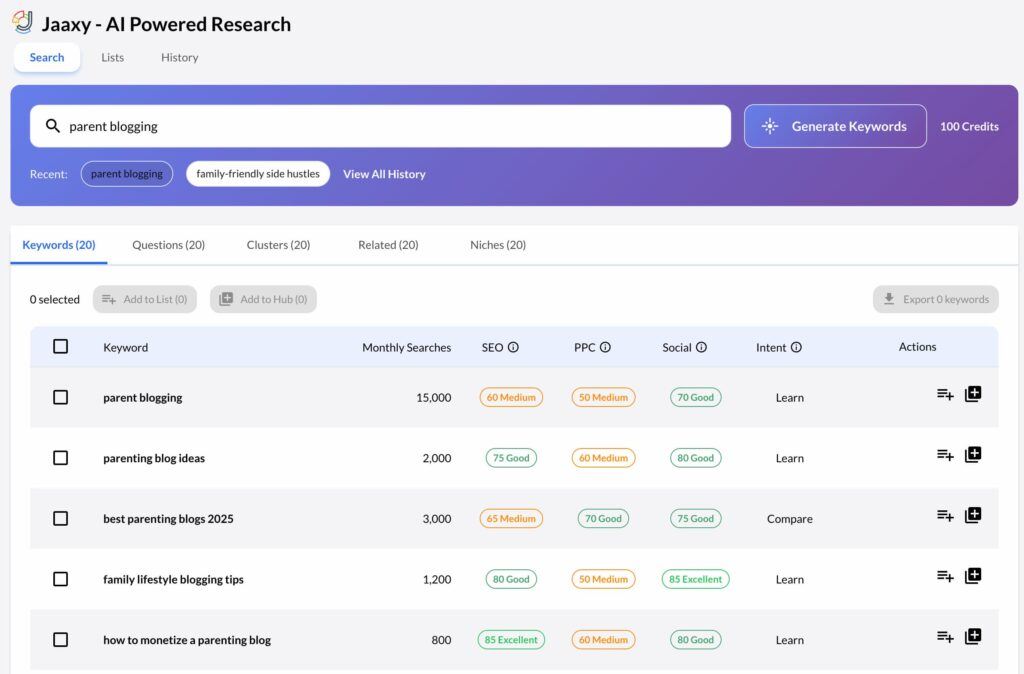
It can perform traditional keyword and competition research, but the reason I find it useful today is its ability to expand a focused subject into:
- Keywords.
- Questions.
- Related topics.
- Content clusters.
- Niche directions.
Wealthy Affiliate now positions Jaaxy as its AI-powered research platform for discovering lower-competition keyword opportunities, while Jaaxy itself continues to provide keyword, market and competition research.
For a beginner blogger, that broader discovery process can be more useful than receiving hundreds of metrics.
The question is often not:
“What is the search volume?”
It is:
“What should I actually write about next?”
Why I Chose Jaaxy
I use Jaaxy as part of my own Wealthy Affiliate workflow.
The areas I find most useful are:
- Questions.
- Related.
- Clusters.
They help me explore what someone might need before and after the original search.
One of my best examples came from researching:
How to start a parent blog
That produced around 20 possible content ideas.
I did not automatically publish everything Jaaxy suggested.
I reviewed the ideas and selected 11 that fitted:
- The Flex For Families audience.
- The wider parent-blogging journey.
- Topics where I could provide useful guidance.
- Existing or planned content clusters.
Several of those articles are now ranking.
That does not mean Jaaxy caused those rankings.
The useful part was that it helped turn one focused idea into an actionable editorial roadmap.
Continue with Jaaxy
If you want a deeper look at the platform, check out the links below:
And for readers who want the actual workflow:
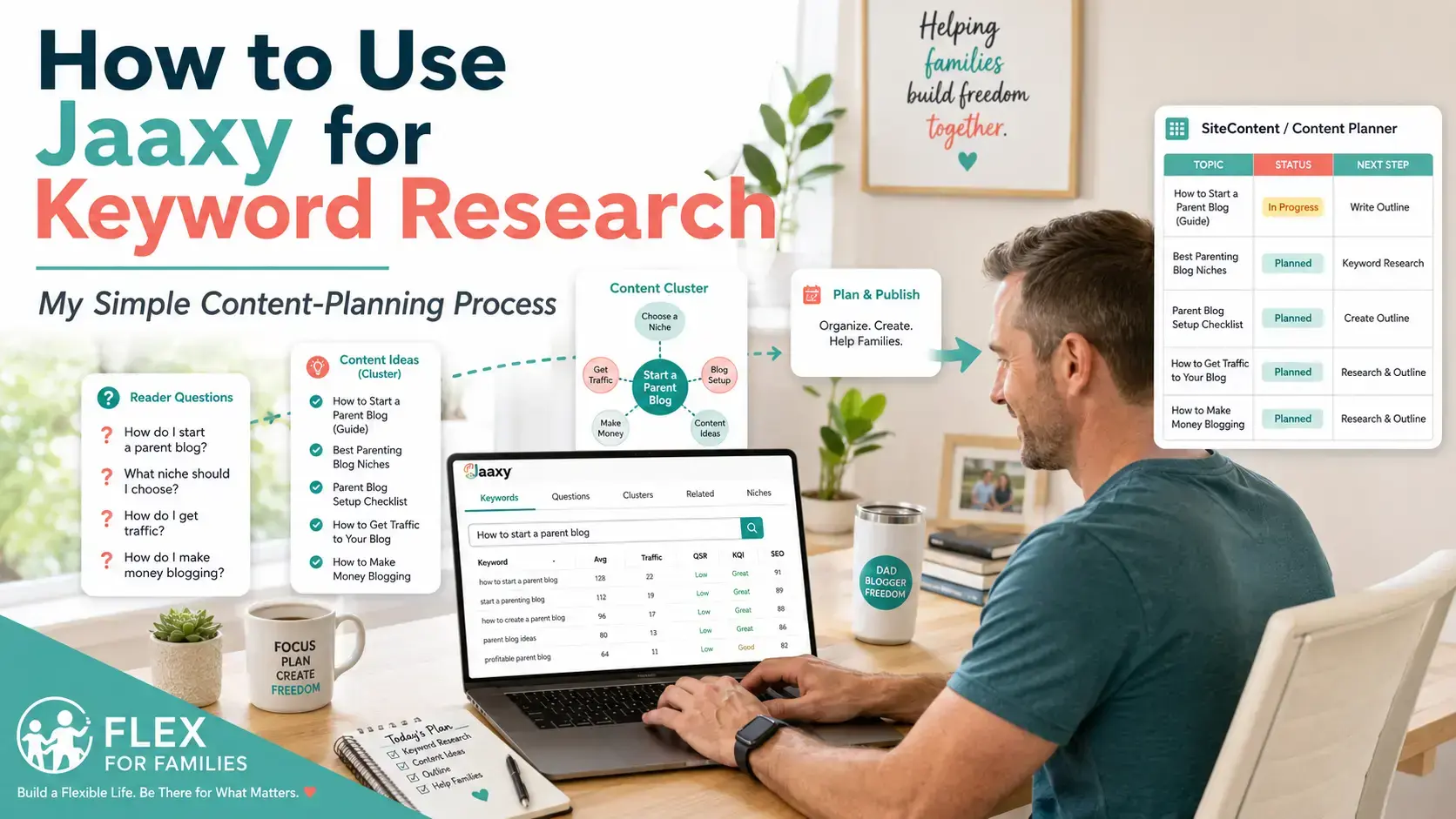
→ See How I Use Jaaxy for Keyword Research
Jaaxy’s Main Strength
Jaaxy’s biggest strength is content discovery.
It is well suited to bloggers asking:
- What questions should I answer?
- Which related topics belong together?
- Could this become a content cluster?
- Does this niche have enough depth?
- What should I publish next?
That makes it especially helpful during the first stage of building topical authority.
Where Jaaxy Falls Short
Jaaxy would not be my first choice when the main need is:
- Detailed backlink analysis.
- Advanced competitor research.
- Full site auditing.
- Sophisticated rank tracking.
- Deep SERP analysis across a mature website.
Jaaxy does offer competition-analysis features, including search-result analysis, but its strongest role in my workflow remains topic and content planning rather than acting as my complete SEO-management platform.
I still validate important decisions using:
- Google.
- Google Search Console.
- Other SEO tools.
- Manual SERP checks.
Who Should Use Jaaxy?
Choose Jaaxy when:
- You already belong to Wealthy Affiliate.
- You are building your first content plan.
- You need help finding reader questions.
- You want connected article ideas.
- You prefer a simple research workflow.
Who Should Skip Jaaxy?
Look elsewhere when:
- You already have plenty of content ideas.
- Competitor analysis is your main priority.
- You need backlinks, audits and tracking in one platform.
- You do not use the wider Wealthy Affiliate ecosystem.
Jaaxy Compared With Other Tools
This is also a natural place to send readers into the comparison cluster:
Need stronger SERP analysis?
→ Jaaxy vs LowFruits
Want a broader SEO platform?
→ Jaaxy vs KeySearch
Already use Ubersuggest?
→ Jaaxy vs Ubersuggest
These links help readers self-select rather than forcing Jaaxy as the recommendation for everyone.
My Jaaxy Verdict
Best for: Beginner content planning
Jaaxy is not the most advanced SEO platform in this guide.
That is not why it earns a place.
It earns a place because it helps beginners turn a niche or audience problem into useful things they can actually publish.
For a new blogger, that can be more valuable than another dashboard full of numbers.
2. LowFruits — Best for Finding Lower-Competition Opportunities
Best For
LowFruits is my pick for:
- Long-tail keyword research.
- Lower-authority websites.
- Weak-SERP analysis.
- Bloggers who already have plenty of ideas.
- Prioritising which opportunities may be more realistic.
LowFruits approaches keyword research differently from Jaaxy.
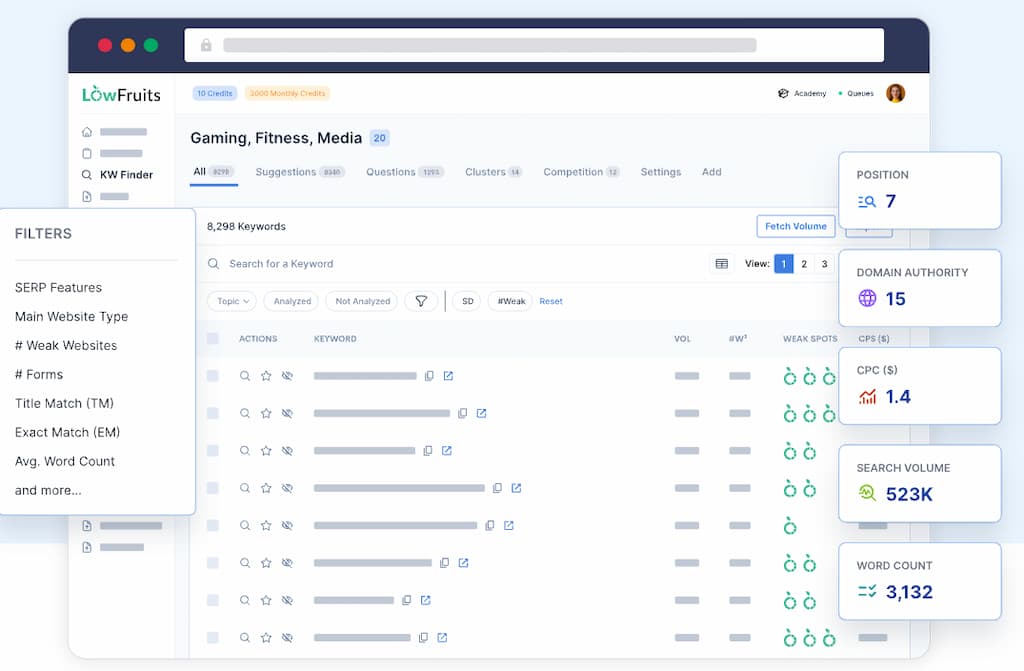
Instead of focusing primarily on expanding the reader journey, its standout feature is analysing the actual search results for signs of weaker competition.
Its Keyword Finder can bulk-analyse keywords and identify what LowFruits calls Weak Spots within SERPs.
These Weak Spots can include lower-authority sites appearing prominently in the results, which may indicate that a smaller or newer website has a more realistic opportunity to compete.
Why I Chose LowFruits
There is a common stage in blogging where ideas stop being the problem.
You already have:
- 50 possible articles.
- Several unfinished clusters.
- A list of reader questions.
- More topics than available writing time.
The problem becomes:
Which one should I prioritise?
That is where LowFruits becomes interesting.
Instead of generating another mountain of possibilities, it helps analyse which ideas may have weaker competition in the current SERPs.
LowFruits’ Main Strength
The strongest LowFruits workflow is:
Keyword list → SERP analysis → Weak Spots → Priority opportunities
LowFruits also supports keyword clustering, which can help organise closely related phrases before creating unnecessary overlapping content.
For busy bloggers, that can save time in two ways:
- You can prioritise opportunities that appear more achievable.
- You may avoid creating several separate articles targeting essentially the same topic.
Where LowFruits Fits Best
LowFruits makes particular sense when:
- Your niche is already clear.
- You know your audience.
- You can generate content ideas easily.
- You need help deciding which opportunities deserve priority.
- Your site is still developing authority.
That makes it a logical step after the earliest content-planning phase.
Where LowFruits Falls Short
LowFruits is more specialised than KeySearch, Ubersuggest, Ahrefs or Semrush.
Its strength is also its limitation.
If you want one platform covering:
- Deep backlink analysis.
- Full technical audits.
- Extensive rank tracking.
- Broad competitive intelligence.
- A complete SEO-management workflow.
you may prefer a wider SEO suite.
LowFruits is more compelling when you specifically care about:
Where are the weaker search results I may realistically be able to compete with?
Who Should Use LowFruits?
Choose LowFruits when:
- You have a newer or growing site.
- You want long-tail opportunities.
- You need help prioritising keywords.
- You value actual SERP evidence.
- You already know what niche you are targeting.
Who Should Skip LowFruits?
It may be unnecessary when:
- You are still choosing a niche.
- You mainly need content ideas.
- You need an all-in-one SEO platform.
- You rarely publish enough to need bulk opportunity analysis.
Continue With LowFruits
If you want a deeper look at the platform, check out the links below:
Want the complete platform breakdown?
→ Read My LowFruits Review 2026
Trying to decide whether you need ideas or SERP analysis?
→ Read Jaaxy vs LowFruits
Want to compare LowFruits with a broader SEO suite?
→ Read LowFruits vs KeySearch
My LowFruits Verdict
Best for: Finding lower-competition opportunities
LowFruits is particularly useful when you have moved beyond:
“What could I write?”
and started asking:
“Which of these ideas gives my website a realistic opportunity?”
That narrower focus makes it one of the most interesting specialist keyword tools for newer and growing blogs.
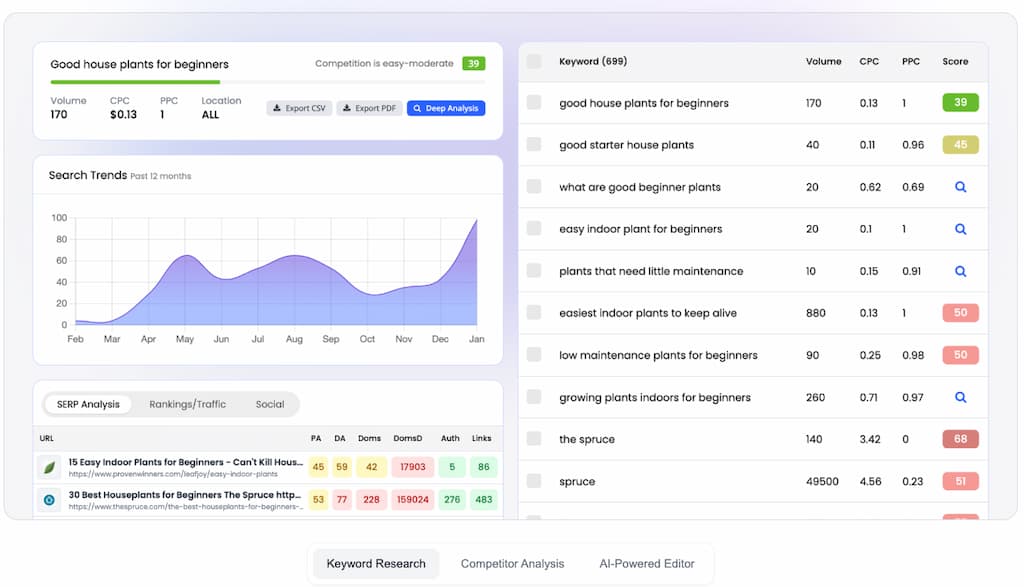
3. KeySearch — Best Affordable All-Round SEO Tool
Best For
KeySearch is my pick for:
- Growing bloggers.
- Affordable standalone SEO.
- Keyword difficulty analysis.
- Live SERP research.
- Competitor research.
- Rank tracking.
- Site auditing.
- Bloggers ready for more than content ideas.
KeySearch sits in an interesting middle ground.
It is far broader than a specialist keyword tool, but it is positioned as a more affordable alternative to some of the major premium SEO platforms.
Its current toolkit includes:
- Keyword research.
- Competitor analysis.
- SERP analysis.
- Rank tracking.
- SEO audits.
- Long-tail keyword discovery.
- AI-assisted content optimisation.
- YouTube analysis.
That makes it more accurately described as an SEO suite than simply a keyword tool.
Why I Chose KeySearch
KeySearch makes sense when the blog has moved beyond the early planning stage.
You may already have:
- A clear niche.
- Dozens or hundreds of posts.
- Search Console data.
- Existing rankings.
- Content that needs updating.
Your questions are now different.
Instead of:
“What should I publish?”
you may be asking:
- Which keyword is less competitive?
- What pages currently rank?
- What are my competitors doing?
- Which content is underperforming?
- Are my important keywords improving?
- Are there technical SEO issues?
KeySearch can support all of those jobs within the same platform.
KeySearch’s Main Strength
The biggest appeal is breadth without immediately jumping to premium-suite territory.
A possible workflow becomes:
Keyword → SERP → Competitors → Content → Rank Tracking → Audit
That means one subscription can potentially replace several separate SEO tools.
For busy bloggers, consolidation can be more valuable than having the absolute deepest dataset.
Where KeySearch Beats Simpler Keyword Tools
Compared with Jaaxy or LowFruits, KeySearch becomes stronger when you need ongoing SEO management.
It can help with:
- Competitor gaps.
- Search-result analysis.
- Existing content.
- Technical SEO.
- Ranking performance.
- YouTube keyword opportunities.
This makes it particularly attractive as a next-stage SEO tool.
Where KeySearch Could Be Too Much
A complete beginner may not need:
- Site audits.
- Rank tracking.
- Backlink data.
- Detailed competitors.
- Advanced SERP analysis.
More capabilities mean more things to learn and more reports to review.
A new blogger may be better served by publishing their first useful content rather than studying every available metric.
Who Should Use KeySearch?
Choose KeySearch when:
- Your niche is established.
- You publish consistently.
- You want a standalone SEO suite.
- You need competitor research.
- You want ranking and site-health data.
- You are not ready to justify premium Ahrefs or Semrush pricing.
Who Should Skip KeySearch?
It may be unnecessary when:
- You are still choosing a niche.
- You mainly need reader questions.
- You have very little existing content.
- You already subscribe to another full SEO suite.
Continue With KeySearch
If you want a deeper look at the platform, check out the links below:
Want the complete platform breakdown?
→ Read My KeySearch Review 2026
Already use Jaaxy?
→ Read Jaaxy vs KeySearch
Choosing between specialist SERP analysis and broader SEO?
→ Read LowFruits vs KeySearch
My KeySearch Verdict
Best for: Affordable all-round SEO
KeySearch is probably one of the most balanced choices for a growing blogger.
It provides much more than keyword ideas without immediately requiring the budget or complexity of the biggest SEO platforms.
4. Ubersuggest — Best Accessible SEO Step-Up
Best For
Ubersuggest is my pick for:
- Bloggers with an existing site.
- Keyword validation.
- Competitor research.
- Site audits.
- Rank tracking.
- Backlink insights.
- Bloggers who want broader SEO data without starting with a heavyweight enterprise platform.
Ubersuggest is another tool that has grown far beyond basic keyword suggestions.
The current platform supports:
- Keyword research.
- Competitor analysis.
- Site audits.
- Daily rank tracking.
- Content and keyword ideas.
- AI visibility research.
It is designed as an all-in-one SEO platform rather than simply a keyword generator.
Why I Chose Ubersuggest
I have used the free version of Ubersuggest within my own research workflow.
What I like about it is that it provides a relatively approachable bridge between basic keyword research and deeper SEO analysis.
It can help answer questions such as:
- What is the estimated search volume?
- How difficult does the keyword appear?
- What are competitors ranking for?
- Which pages are bringing them traffic?
- Does my site have SEO issues?
- Are my rankings moving?
Ubersuggest’s keyword research currently surfaces metrics such as search volume and difficulty, while its wider platform includes competitor tracking and site audits.
Ubersuggest’s Main Strength
The strongest reason to use Ubersuggest is not that it produces more ideas.
It is that it helps analyse and manage an existing SEO strategy.
Its workflow can look like:
Keyword → Metrics → Competitors → Audit → Track → Improve
That is more useful once the blog already has enough content to analyse.
Competitor Research
Ubersuggest can track competitor information involving:
- Keywords.
- Keyword gaps.
- Traffic.
- Backlinks.
That can reveal useful opportunities.
But competitor research needs discipline.
You do not need to copy every successful article another website publishes.
The question should still be:
Does this topic genuinely help my audience and belong on my site?
Site Auditing and Rank Tracking
Ubersuggest also includes SEO auditing designed to identify issues and provide guidance for fixing them.
Its rank-tracking features can monitor keyword positions over time.
These functions become increasingly useful as a site grows because the problem is no longer simply finding another article idea.
You now have an existing asset to maintain.
Where Ubersuggest Falls Short
The broader toolkit can be excessive for a complete beginner.
Someone with:
- Ten posts.
- No meaningful Search Console data.
- An unclear niche.
- An inconsistent publishing routine.
probably does not need to spend hours examining backlinks and technical reports.
The free access can be helpful for learning, but the paid platform makes more sense when the data changes real decisions.
Who Should Use Ubersuggest?
Choose Ubersuggest when:
- You already have a blog.
- You want deeper SEO validation.
- You are researching competitors.
- You want audits and rank tracking.
- You need more data than beginner keyword tools provide.
Who Should Skip Ubersuggest?
It may not be the right priority when:
- You are still choosing your niche.
- You struggle to generate content ideas.
- You are not publishing consistently.
- You already use another broad SEO suite.
Continue With Ubersuggest
If you want a deeper look at the platform, check out the links below:
Want my deeper assessment?
→ Read My Ubersuggest Review 2026
Trying to decide between audience-led planning and SEO analysis?
→ Read Jaaxy vs Ubersuggest
My Ubersuggest Verdict
Best for: An accessible step into broader SEO analysis
Ubersuggest makes more sense when you already have something to analyse.
It can help validate opportunities, understand competitors and monitor an existing website without immediately moving into the most expensive end of the SEO-tool market.
For many bloggers, that can be the right next step after simple keyword and content planning.
How These Four Tools Fit Together
These first four tools represent four very different blogging needs.
Which of These Keyword Tools Fits Your Current Problem?
Jaaxy
Your problem:
“I need to know what useful content to create.”
Best answer: Questions, related topics and content planning.
LowFruits
Your problem:
“I have ideas, but which ones might be easier to compete for?”
Best answer: Weak-SERP analysis and opportunity prioritisation.
KeySearch
Your problem:
“I need one affordable platform for wider SEO work.”
Best answer: Keywords, competitors, optimisation, audits and tracking.
Ubersuggest
Your problem:
“I have a website and want more SEO data to improve it.”
Best answer: Validation, competitors, audits and performance analysis.
The key: Do not choose the tool with the longest feature list. Choose the tool that solves the problem slowing your blog down today.
5. Ahrefs — Best for Serious SEO Research
Best For
Ahrefs is my pick for:
- Established blogs.
- Deep keyword research.
- Serious competitor analysis.
- Content gaps.
- Advanced SEO teams.
- Publishers who can actually act on large datasets.
Ahrefs is one of the most powerful SEO platforms in this guide.
Its Keywords Explorer currently covers around 28.7 billion topics and can generate keyword ideas, cluster them and provide detailed metrics for prioritisation.
It also offers much more than keyword research.
The wider Ahrefs platform includes:
- Competitor research.
- Backlink analysis.
- Rank tracking.
- Site audits.
- Content research.
- AI-search visibility tools.
For established sites, that depth can be extremely valuable.
For a brand-new parent blogger?
It can be spectacular overkill.
Why I Chose Ahrefs
Ahrefs belongs on this list because it can answer SEO questions that simpler tools cannot.
For example:
- Which keywords drive traffic to competitors?
- Which pages attract the most backlinks?
- Which topics are missing from my website?
- How difficult is a keyword likely to be?
- Which competing pages are strongest?
- What related keyword clusters exist?
- Where are larger content opportunities?
That matters when SEO is already an important source of traffic or revenue.
At that stage, deeper data can influence real business decisions.
Ahrefs’ Main Strength
Ahrefs’ biggest advantage is depth.
Its keyword tools can provide:
- Search-volume estimates.
- Keyword Difficulty.
- SERP information.
- Related terms.
- Clustering.
- Search-intent information.
- Large-scale keyword analysis.
Ahrefs defines Keyword Difficulty as an estimate of how difficult it may be to rank in Google’s top ten results.
That can help shortlist opportunities.
But I would never use KD as an automatic green or red light.
A low score does not guarantee that your page deserves to rank.
You still need to check:
- Search intent.
- Who currently ranks.
- Whether the SERP suits your type of website.
- Whether you can create something genuinely useful.
Where Ahrefs Fits Best
Ahrefs becomes much more attractive when:
- You already have substantial content.
- Organic search materially matters to the business.
- You regularly analyse competitors.
- You actively build or monitor links.
- Multiple content decisions depend on SEO research.
- The platform saves enough time to justify the cost.
This is where the value calculation changes.
A £100+ SEO platform can be expensive for a hobby blog.
It may be cheap compared with the decisions it supports for an established content business.
Free Ahrefs Tools Are Worth Knowing About
You do not need a paid Ahrefs subscription to get some value from the platform.
Ahrefs currently offers a free Keyword Generator that provides keyword ideas for Google, Bing, YouTube and Amazon, together with search-volume and Keyword Difficulty data.
It also provides a free Keyword Difficulty Checker without registration.
For many newer bloggers, those free tools may be enough.
That is an important distinction:
You can benefit from Ahrefs data without immediately paying for the full platform.
Where Ahrefs Falls Short for Beginners
The biggest issue is not quality.
It is necessity.
A complete beginner could easily spend hours:
- Comparing difficulty scores.
- Studying backlink profiles.
- Investigating competitors.
- Building huge keyword lists.
without publishing anything.
That is not a tool problem.
It is a stage problem.
Who Should Use Ahrefs?
Choose Ahrefs when:
- Your site is established.
- SEO generates meaningful traffic.
- You need deep competitive intelligence.
- You manage large content libraries.
- Keyword and backlink research influence revenue.
Who Should Skip Ahrefs?
It may be unnecessary when:
- You are building your first 20–30 articles.
- You mainly need topic ideas.
- You are not using the data you already have.
- Your budget would be better spent elsewhere.
Continue With Ahrefs
If you want a deeper look at the platform, check out the links below:
Want my full assessment of the platform?
→ Read My Ahrefs Review 2026
Trying to decide between the two big premium platforms?
→ Read Ahrefs vs Semrush
Looking for something more affordable?
→ Check out KeySearch, Ubersuggest, or my Best SEO Tools for Bloggers guide.
My Ahrefs Verdict
Best for: Serious SEO research
Ahrefs is one of the most capable keyword and competitor-research platforms available.
But capability and suitability are not the same thing.
For established publishers, the depth can be extremely valuable.
For beginners, free Ahrefs tools may provide enough insight without paying for a platform they are not yet ready to use.
6. Semrush — Best Full Marketing and SEO Suite
Best For
Semrush is my pick for:
- Established businesses.
- Advanced SEO teams.
- Large-scale keyword research.
- SEO plus PPC research.
- Competitive intelligence.
- Businesses needing a wider marketing platform.
Semrush is another heavyweight platform.
Its Keyword Magic Tool currently draws from a database of roughly 27 billion keywords and provides information including:
- Search volume.
- Keyword Difficulty.
- Search intent.
- Cost per click.
- Related keyword groups.
Semrush also offers a wider keyword-research ecosystem including:
- Keyword Overview.
- Keyword Gap.
- Keyword Strategy Builder.
- Topic Research.
- Competitor keyword analysis.
Why I Chose Semrush
Semrush belongs here because it goes beyond blogging SEO.
It supports a much wider marketing workflow.
A business may use it for:
- SEO.
- Competitor research.
- PPC.
- Keyword planning.
- Content strategy.
- Technical auditing.
- Rank tracking.
- Broader marketing intelligence.
That makes it extremely powerful.
It also makes it far more than most beginner bloggers need.
Semrush’s Main Strength
The main strength is breadth combined with enormous keyword depth.
Keyword Magic Tool can:
- Generate huge keyword lists.
- Group terms into subtopics.
- Identify long-tail searches.
- Show search intent.
- Compare difficulty.
- Filter opportunities.
That is valuable when you are building large SEO strategies.
It is less valuable when your real problem is:
“I have two hours tonight. Which article should I finish?”
Keyword Intent Is Particularly Useful
Semrush includes search intent as part of its keyword metrics.
That can help separate searches that are:
- Informational.
- Commercial.
- Transactional.
- Navigational.
This is useful when planning content across different stages of a reader journey.
For example:
A guide answering:
“How does affiliate marketing work?”
serves a very different purpose from:
“Best affiliate marketing course for beginners.”
Both may belong on the same website.
They should not necessarily be treated as the same content opportunity.
Where Semrush Fits Best
Semrush becomes more attractive when:
- The site is part of a wider business.
- SEO and paid search both matter.
- You need serious competitor intelligence.
- Several people work on content.
- You need one broad marketing platform.
- Keyword decisions are made at scale.
Where Semrush Is Too Much
A new blogger may use 5% of the platform.
The rest becomes:
- Expense.
- Complexity.
- Extra dashboards.
- More reports to understand.
That is not good value simply because the software is excellent.
Who Should Use Semrush?
Choose Semrush when:
- You need a full marketing suite.
- You manage serious SEO campaigns.
- Competitor research matters heavily.
- PPC and SEO overlap.
- Your business can justify advanced software.
Who Should Skip Semrush?
It may be excessive when:
- You are a solo beginner.
- You mainly need keyword ideas.
- You have a small content library.
- You are not yet acting on Search Console data.
Continue With Semrush
If you want a deeper look at the platform, check out the links below:
Want my full platform assessment?
→ Read My Semrush Review 2026
Comparing it with Ahrefs?
→ Read Ahrefs vs Semrush
Not ready for premium pricing?
→ Check out KeySearch, Ubersuggest, or my Best SEO Tools for Bloggers guide.
My Semrush Verdict
Best for: Full marketing and SEO research
Semrush is probably more platform than most bloggers need.
For established businesses, that is exactly its strength.
For a beginner, it can be like buying the entire workshop when all you need today is a screwdriver.
7. Google Keyword Planner — Best Free Google Keyword Idea Tool
Best For
Google Keyword Planner is best for:
- Free keyword discovery.
- Understanding broad search demand.
- Commercial keyword research.
- Finding related terms.
- Bloggers who already have a Google Ads account.
Google Keyword Planner is primarily built for advertisers rather than bloggers.
Google describes it as a tool for discovering new keywords related to a business and viewing estimates of the searches those terms receive and the cost to target them.
That means its data is framed around paid-search campaigns.
But bloggers can still use it as another research signal.
Why It Belongs on This List
Keyword Planner has one obvious advantage:
It comes directly from Google.
You can use it to:
- Discover keyword ideas.
- See estimated demand.
- Explore related terminology.
- Understand commercial interest.
- Compare groups of terms.
For free research, that makes it worth knowing about.
The Important Limitation
Google Keyword Planner is built for Google Ads, not content SEO.
Its main purpose is to help advertisers plan Search campaigns.
That means it does not provide the same blogging workflow as:
- Jaaxy.
- LowFruits.
- KeySearch.
- Ahrefs.
- Semrush.
It will not necessarily tell you:
- Whether a small blog can realistically rank.
- Whether weak websites already appear in the SERP.
- Whether a question deserves a standalone article.
- How strong competing pages actually are.
Access Is Not Completely Frictionless
Google currently says users must complete their Google Ads account setup, including billing information, to access basic Keyword Planner features such as generating new keyword ideas.
So while Keyword Planner itself is not a paid SEO subscription, I would not describe it as a completely account-free tool.
That is worth explaining clearly to beginners.
Where Keyword Planner Is Most Useful
I would use it as a supporting research source, not my entire keyword strategy.
It can help answer:
- Does search demand appear to exist?
- What related commercial terms are people using?
- Which variations might be worth investigating?
- Are advertisers willing to pay for clicks in this space?
Then validate important ideas elsewhere.
Who Should Use Google Keyword Planner?
Use it when:
- You already have Google Ads access.
- You want another source of keyword ideas.
- Commercial intent matters.
- You are happy to validate SEO competition separately.
Who Should Skip It?
It may not be worth the setup when:
- You want a simple blogging-specific tool.
- You need difficulty or SERP analysis.
- You do not use Google Ads.
- Free autocomplete and Search Console already meet your needs.
My Google Keyword Planner Verdict
Best for: Free Google keyword ideas and demand signals
Keyword Planner is useful.
But it is an advertising tool being repurposed for SEO research.
Treat the data as another signal rather than a complete content strategy.
8. Google Search Console — Best for Keywords You Already Rank For
Best For
Google Search Console is my pick for:
- Existing blogs.
- Content updates.
- Finding near-page-one opportunities.
- Discovering unexpected queries.
- Understanding what Google already associates with your website.
- Research based on your own real search data.
Google Search Console is not a traditional keyword research platform.
It is something more interesting once your website has data.
Google describes Search Console as a free service that helps website owners monitor, maintain and troubleshoot their presence in Google Search.
Its Performance report shows how a site performs in Google Search results.
This includes data such as:
- Queries.
- Clicks.
- Impressions.
- Positions.
- Pages.
Why Search Console Is One of My Favourite Research Sources
Most keyword tools tell you:
What might be an opportunity.
Search Console tells you:
What Google is already testing your website for.
That is incredibly useful.
You may discover an article receiving impressions for a phrase you never deliberately targeted.
That creates questions such as:
- Should I improve the existing section?
- Does this deserve a new article?
- Is the query relevant to the page?
- Could better internal links help?
- Is the post already close to stronger rankings?
These opportunities are based on your actual website.
Not a generic keyword database.
The Best Search Console Opportunity: Queries Already Getting Impressions
Imagine an article ranks:
- Position 45 for one query.
- Position 18 for another.
- Position 9 for a third.
The position-nine query deserves attention.
You already know:
- Google considers the page relevant.
- The page is appearing.
- Search demand exists.
- You may be within reach of more visibility.
That can be much more actionable than researching a completely new phrase.
Search Console Is Also Excellent for Content Updates
Google’s Search Console Insights reporting highlights clicks, impressions, top content, trending content and search queries, and Google specifically suggests using it to identify opportunities for new or improved content.
That makes Search Console particularly useful once the blog has a substantial archive.
You can use it to find:
- Posts losing clicks.
- Queries gaining impressions.
- Pages almost ranking well.
- Unexpected keyword opportunities.
- Existing posts worth refreshing.
Where Search Console Falls Short
Search Console cannot tell you much about opportunities your site has never appeared for.
That is the biggest limitation.
If Google has never associated your site with a topic, Search Console cannot magically show the wider keyword universe.
It also does not provide the same depth for:
- Competitor research.
- Backlinks.
- Keyword difficulty.
- Market-wide keyword discovery.
That is why it complements rather than replaces other tools.
Who Should Use Search Console?
Everyone with an established website.
Once useful data appears, I would check Search Console before paying for more keyword ideas.
It is particularly powerful for bloggers who already have dozens or hundreds of articles.
Who Should Skip It?
Nobody with a live blog should really skip Search Console.
The only limitation is timing.
A brand-new website may have very little data initially.
At that stage, discovery tools become more useful.
My Google Search Console Verdict
Best for: Keywords your site already has a relationship with
For a growing blog, Search Console can become one of the most valuable keyword research tools you have.
And it costs nothing.
Before searching another database for 5,000 new ideas, I would always check whether Google is already showing you 20 opportunities hiding inside the content you have published.
How the Eight Main Tools Compare
At this point, the tools divide fairly naturally into four groups.
Content Discovery
Jaaxy
Best when you need:
- Questions.
- Ideas.
- Content clusters.
- Direction.
Opportunity Analysis
LowFruits
Best when you need:
- Weak SERPs.
- Long-tail opportunities.
- Prioritisation.
Affordable Wider SEO
KeySearch and Ubersuggest
Best when you need:
- Keyword validation.
- Competitors.
- Audits.
- Tracking.
- Optimisation.
Advanced SEO and Marketing
Ahrefs and Semrush
Best when you need:
- Huge datasets.
- Serious competitor intelligence.
- Large-scale SEO.
- Advanced workflows.
Free First-Party Research
Google Keyword Planner and Search Console
Best when you need:
- Google keyword ideas.
- Real data from your existing site.
- Research without another SEO subscription.
The key is not moving through this list as though each more expensive tool is an upgrade.
It is choosing the category that matches the job you actually need to do.
Best Free Keyword Research Tools for Bloggers
You do not need a paid keyword research tool to start a blog.
In fact, many beginners can get surprisingly far using a combination of free resources.
The trick is not collecting as much data as possible.
It is knowing what each free tool is actually useful for.
My preferred free research stack includes:
- Google Search.
- Google Search Console.
- Google Keyword Planner.
- Ahrefs free tools.
- Ubersuggest free searches.
- KeySearch free tools.
- LowFruits’ initial research features.
- Google Trends.
Used together, these can help with:
- Finding ideas.
- Understanding reader questions.
- Checking demand.
- Validating opportunities.
- Monitoring existing rankings.
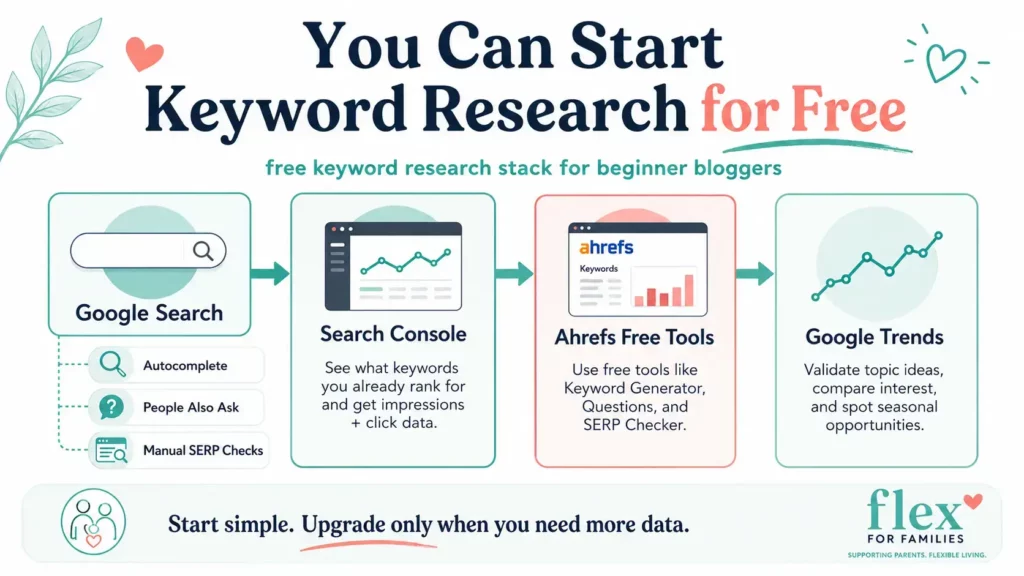
Google Search — Best Free Tool for Understanding Search Intent
This is still one of the most useful keyword research tools available.
And it is completely free.
Before creating an important article, I often manually search the phrase in Google.
I want to see:
- What type of pages rank.
- Which websites appear.
- Whether Google prefers guides, products, videos or discussions.
- How thoroughly the topic is already covered.
- Whether smaller sites are appearing.
- What questions Google connects with the search.
This tells me something no keyword-difficulty score can fully explain:
What does Google believe the searcher actually wants?
Use Google Autocomplete
Start typing your topic into Google.
Autocomplete may reveal:
- Longer searches.
- Common wording.
- Specific concerns.
- Different angles.
For example:
Starting with:
parent blogging
could lead towards:
- parent blogging ideas.
- parent blogging income.
- parent blogging niches.
- how to start a parenting blog.
These are not automatic article recommendations.
They are research clues.
Use People Also Ask
People Also Ask can be useful for discovering:
- Supporting questions.
- FAQ ideas.
- Subheadings.
- Related article opportunities.
Again, the goal is not to copy Google’s questions mechanically.
Use them to better understand the wider problem.
Use Related Searches
The searches shown around the results can reveal adjacent topics and terminology worth investigating.
These can sometimes help build the next part of a content cluster.
Google Search Console — Best Free Tool Once You Have Rankings
Once your site has enough search data, Google Search Console becomes one of my favourite keyword research sources.
Instead of telling you what might work, it shows you queries your site is already appearing for.
Look for:
- High-impression queries.
- Keywords around positions 8–20.
- Unexpected phrases.
- Posts gaining visibility.
- Pages losing clicks.
- Searches closely related to existing content.
These are often easier opportunities to act on because Google already sees some relevance.
A Simple Search Console Workflow
- Open the Performance report.
- Look at queries generating impressions.
- Filter for positions roughly 8–20.
- Check which page is ranking.
- Review whether the page fully answers the query.
- Improve the content where it genuinely helps.
- Strengthen relevant internal links.
- Monitor what happens.
Sometimes improving what already exists is more useful than finding another brand-new keyword.
Google Keyword Planner — Best Free Tool for Demand and Commercial Clues
Google Keyword Planner is primarily an advertising tool.
But it can still help bloggers with:
- Keyword ideas.
- Broad demand estimates.
- Related phrases.
- Commercial-intent clues.
- CPC information.
I would not rely on it alone for organic SEO decisions.
It does not tell you enough about:
- SERP strength.
- Content quality.
- Website authority.
- Whether a smaller site can realistically compete.
Use it as a supporting signal.
Ahrefs Free Keyword Tools — Best Free SEO Data
Ahrefs offers several useful free tools.
These can help with:
- Keyword ideas.
- Difficulty estimates.
- Search-volume information.
- YouTube keywords.
- Amazon keywords.
- Bing keywords.
This gives beginners access to some Ahrefs-style research without immediately paying for the full platform.
That is usually where I would begin.
If free Ahrefs tools answer the question, there is no reason to rush into a premium subscription.
Ubersuggest Free Searches — Best Free Taste of a Wider SEO Platform
Ubersuggest provides limited free access.
This can help you test:
- Keyword ideas.
- Search volume.
- SEO difficulty.
- Competitor information.
- Website insights.
The limits can become restrictive with regular use.
But for someone learning SEO, the free access provides enough information to understand whether the paid platform would genuinely help.
KeySearch Free Tools — Best Free Specialist Utilities
KeySearch also offers standalone free tools.
These can include useful functions for:
- Keyword difficulty.
- Long-tail discovery.
- Keyword clustering.
- Niche ideas.
- SEO content analysis.
That makes KeySearch worth exploring even if you are not ready for a subscription.
I particularly like this approach because you can test a specific job before paying for a broader toolkit.
LowFruits — Best Free Starting Point for SERP-Led Research
LowFruits is primarily a paid specialist tool, but you can still explore its workflow before committing heavily.
Its real value comes from analysing search results for weaker competition.
For beginners, the important lesson is not necessarily:
“Buy LowFruits.”
It is:
“Look at who actually ranks before deciding a keyword is easy or difficult.”
That mindset can be applied manually too.
Google Trends — Best Free Tool for Checking Interest Over Time
Google Trends is useful when you want to understand:
- Whether interest is rising.
- Whether a topic is seasonal.
- Whether two phrases are becoming more or less popular.
- Whether demand varies geographically.
It is particularly useful for avoiding misleading snapshots.
A keyword may look interesting today but have:
- Declining interest.
- Strong seasonality.
- Short-lived hype.
Trends adds useful context.
My Recommended Free Keyword Research Stack
If I were starting from scratch and wanted to spend nothing, I would use:
My Free Keyword Research Stack
1. Google Search
Understand intent, competing pages and real search-result patterns.
2. Search Console
Find real queries your website already appears for.
3. Ahrefs Free Tools
Get keyword ideas and another view of competition.
4. Google Trends
Check whether interest is growing, falling or seasonal.
For most beginners, this is enough to start. Upgrade when the research becomes too slow, fragmented or limited—not because another blogger says you need a premium SEO stack.
Best Keyword Research Tool by Blogging Stage
The tool I would recommend changes as the blog develops.
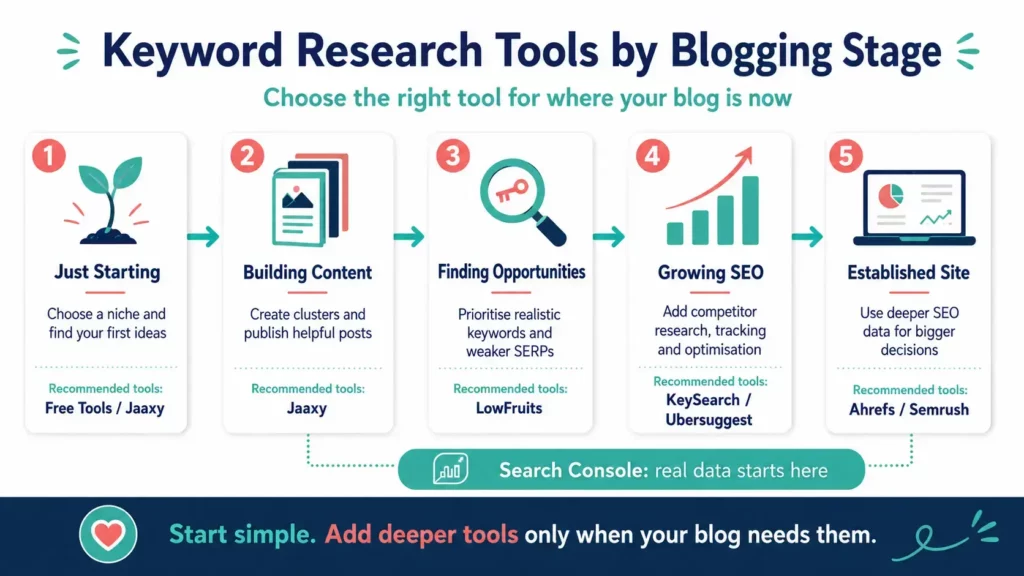
That is why I do not think there is one universal winner.
Stage 1: Choosing a Niche and Planning Your First Articles
Best Choice: Jaaxy or Free Tools
At this stage, your biggest challenges are usually:
- Understanding the audience.
- Choosing a niche.
- Finding useful questions.
- Planning the first articles.
- Building consistency.
You probably do not need:
- Detailed backlink analysis.
- Rank tracking.
- Advanced site audits.
- Huge competitor databases.
Best tools:
- Jaaxy.
- Google Search.
- Google Autocomplete.
- People Also Ask.
- Google Trends.
Focus on:
What does this audience genuinely need help with?
Not:
“Which keyword has the prettiest SEO score?”
Stage 2: Building the First Content Clusters
Best Choice: Jaaxy + Manual Validation
Once the niche is clearer, you need to connect related articles.
This is where Jaaxy’s:
- Questions.
- Related.
- Clusters.
can become particularly useful.
Then validate the most important ideas with:
- Google.
- Ahrefs free tools.
- Ubersuggest free searches.
Main goal:
Build useful topical depth without publishing lots of overlapping content.
Stage 3: New Blog With Plenty of Ideas
Best Choice: LowFruits
Eventually, many bloggers reach the opposite problem.
They do not need more ideas.
They need help prioritising.
You may have:
- 50 draft topics.
- Several incomplete clusters.
- More ideas than available time.
This is where LowFruits becomes more valuable.
The question becomes:
Which opportunities appear more realistic for my current website?
Best for:
- Weak SERPs.
- Long-tail opportunities.
- Prioritisation.
- Smaller websites trying to find realistic openings.
Stage 4: Growing Blog With Real Search Data
Best Choice: KeySearch or Ubersuggest
At this stage, you probably have:
- A clear niche.
- Dozens or hundreds of articles.
- Search Console data.
- Existing rankings.
- Older posts requiring updates.
Now you need more than keyword discovery.
You may want:
- Competitor research.
- Rank tracking.
- Site auditing.
- Content optimisation.
- Stronger keyword validation.
KeySearch
Best when you want an affordable all-round SEO platform.
Ubersuggest
Best when you want an approachable step into broader SEO analysis.
Stage 5: Established Content Business
Best Choice: Ahrefs or Semrush
At this stage:
- Organic traffic matters commercially.
- Competitor intelligence affects strategy.
- Content decisions happen at scale.
- Backlinks may matter significantly.
- Multiple people may work on SEO.
That is where premium platforms become easier to justify.
Ahrefs
Best for:
- Deep SEO research.
- Backlink intelligence.
- Competitor analysis.
- Serious content research.
Semrush
Best for:
- SEO plus wider marketing.
- Competitive intelligence.
- PPC overlap.
- Large-scale keyword planning.
Stage 6: Mature Blog With Hundreds of Posts
Do Not Forget Google Search Console
At this stage, Search Console may be one of the most valuable tools in the entire workflow.
You can use it to find:
- Existing queries.
- Near-page-one rankings.
- Content losing visibility.
- Unexpected opportunities.
- Pages worth refreshing.
A mature site should not spend all its time finding new keywords.
Sometimes the biggest opportunity is improving what already exists.
| Blogging Stage | Main Problem | Best Tool |
|---|---|---|
| Choosing a niche | What should I cover? | Jaaxy / Free tools |
| Building first clusters | Which topics belong together? | Jaaxy |
| New blog with many ideas | Which opportunities should I prioritise? | LowFruits |
| Growing blog | How do I improve SEO performance? | KeySearch / Ubersuggest |
| Established business | I need deep competitive intelligence. | Ahrefs / Semrush |
| Mature content library | What should I update? | Google Search Console |
Best Keyword Research Tool by Use Case
Sometimes blogging stage is not enough.
You may need one particular job done well.
Here is how I would choose by use case.
Best for Complete Beginners: Jaaxy
Jaaxy wins when you need help understanding:
- What to write.
- What readers are asking.
- What topics belong together.
Especially useful for Wealthy Affiliate members.
Best for Reader Questions: Jaaxy
The dedicated Questions approach makes it easier to think from the reader’s perspective rather than simply collecting phrases.
Best for Content Clusters: Jaaxy
Its combination of:
- Questions.
- Related.
- Clusters.
makes it particularly useful for editorial planning.
Best for Weak SERPs: LowFruits
This is LowFruits’ specialist strength.
Use it when you want to identify search results where lower-authority competitors already appear.
Best for Long-Tail Opportunities: LowFruits
Especially useful for newer websites looking for narrower searches that may provide a more realistic opening.
Best for Affordable All-Round SEO: KeySearch
KeySearch provides a strong balance of:
- Keyword research.
- SERP analysis.
- Competitor tools.
- Rank tracking.
- Site auditing.
Without immediately jumping to the biggest premium platforms.
Best Accessible SEO Step-Up: Ubersuggest
Ubersuggest is particularly useful when you want:
- More traditional keyword data.
- Competitor research.
- Audits.
- Ranking insights.
but are not ready for the complexity or expense of Ahrefs or Semrush.
Best for Competitor Research: Ahrefs
When competitor analysis becomes a serious business task, Ahrefs is one of the strongest tools in the group.
Its broader SEO dataset can help investigate:
- Competitor keywords.
- Pages.
- Backlinks.
- Content gaps.
Best for Backlink Research: Ahrefs
Backlink analysis is one of Ahrefs’ best-known strengths.
This becomes more valuable once link profiles genuinely influence your SEO decisions.
Best for Full Marketing Intelligence: Semrush
Semrush is the better fit when the need extends beyond organic blogging SEO.
That may include:
- PPC.
- Competitor research.
- Keyword strategy.
- Wider marketing intelligence.
Best for Huge Keyword Research Projects: Semrush
The sheer breadth of Keyword Magic Tool makes Semrush particularly well suited to large-scale research and complex content strategies.
Best Free Tool for Search Intent: Google
No dashboard replaces checking the actual search results.
Search Google before committing to important content.
Best Free Tool for Existing Opportunities: Google Search Console
Search Console wins when you want to understand:
- What Google already associates with your website.
- Where impressions are appearing.
- Which posts may be close to stronger rankings.
Best Free Tool for Broad Demand: Google Keyword Planner
Useful for another view of search demand and commercial intent.
Best Keyword Research Tool by Use Case
| What You Need | My Pick |
|---|---|
| Complete beginner | Jaaxy |
| Reader questions | Jaaxy |
| Content clusters | Jaaxy |
| Weak SERPs | LowFruits |
| Long-tail opportunities | LowFruits |
| Affordable full SEO toolkit | KeySearch |
| Accessible SEO analysis | Ubersuggest |
| Competitor research | Ahrefs |
| Backlink research | Ahrefs |
| Full marketing suite | Semrush |
| Large-scale keyword research | Semrush |
| Understanding search intent | Google Search |
| Existing keyword opportunities | Google Search Console |
| Free keyword demand research | Google Keyword Planner |
| Existing Wealthy Affiliate members | Jaaxy |
What If Two Tools Both Fit?
That does not automatically mean you need both.
For example:
Jaaxy + LowFruits
Could work well when:
- Jaaxy generates the editorial plan.
- LowFruits helps prioritise the opportunities.
Jaaxy + KeySearch
Could work when:
- Jaaxy handles reader-led discovery.
- KeySearch handles wider SEO validation and management.
Free Tools + Ubersuggest
Could work when:
- Google provides ideas and intent.
- Search Console provides existing data.
- Ubersuggest fills in competition and competitor research.
Search Console + Ahrefs
Could make sense for an established site where:
- Search Console shows what is happening.
- Ahrefs helps explain the wider competitive landscape.
The important question is:
Does the second tool solve a different problem?
If both platforms are mainly giving you another version of the same keyword list, paying for both may not add much.
For busy bloggers, the simplest useful stack usually wins.
More Keyword Data Is Not Always Better

One of the biggest traps in keyword research is assuming that more data automatically means better decisions.
It does not.
A keyword tool may give you:
- 10,000 ideas.
- Search-volume estimates.
- Difficulty scores.
- CPC data.
- Competitor metrics.
- Content gaps.
- Trend data.
- SERP features.
That can look incredibly impressive.
But if you only have a few hours a week to work on your blog, the real question is:
What are you going to do with all of it?
For a busy blogger, more information can sometimes create more work rather than save time.
A New Blogger Does Not Need 10,000 Keywords
Imagine you have:
- 12 published articles.
- Five hours a week for blogging.
- A new website.
- Very little Search Console data.
- A niche you are still learning.
You probably do not need a platform showing you millions of possible searches.
You need something much simpler:
- Five useful article ideas.
- A logical order to publish them.
- An understanding of what your audience needs.
- Confidence that the topics belong together.
That is why I tend to favour simpler content-planning tools at the beginning.
The best keyword research result is not:
“I found 5,000 keywords.”
It is:
“I know what my next five useful articles should be.”
The Problem Changes as Your Blog Grows
Now imagine the opposite situation.
You have:
- 300 published posts.
- Years of Search Console data.
- Several ranking clusters.
- Older content losing visibility.
- Hundreds of possible new ideas.
You probably do not need another tool that mainly gives you more things to write.
You may need help answering:
- Which existing posts are close to stronger rankings?
- Which competitors are gaining ground?
- Which articles have lost clicks?
- Where are the content gaps?
- Which opportunities are realistic?
- Which pages deserve updating before creating anything new?
At this stage, deeper SEO data becomes more valuable.
The tool has not necessarily become “better.”
Your problem has changed.
The Tool Should Match the Bottleneck
I think this is one of the simplest ways to choose an SEO tool.
Ask:
What is slowing me down right now?
If your problem is:
“I do not know what to write.”
You need content discovery.
“I have too many ideas.”
You need prioritisation.
“I do not know whether the keyword is realistic.”
You need SERP and competition analysis.
“My site has lots of content but growth has slowed.”
You may need:
- Search Console analysis.
- Competitor research.
- Auditing.
- Content updating.
“I manage SEO at scale.”
That is where deeper platforms become much easier to justify.
More Features Can Create More Decisions
This matters particularly for busy parents.
Every extra report creates another possible task.
You can very quickly end up thinking:
- Should I update this article?
- Should I build links to that one?
- Should I target this keyword?
- Should I create this cluster?
- Should I analyse this competitor?
- Should I run another audit?
- Should I fix this score?
That can feel productive.
It can also become sophisticated procrastination.
A useful tool should reduce uncertainty.
It should not leave you with 47 new tabs and no article published.
My Rule: Research Until the Next Action Is Clear
I do not think keyword research needs to continue until every possible metric has been checked.
For me, the research has done its job when I can answer:
- Who is this content for?
- What problem does it solve?
- Does the topic fit the site?
- Is the search intent clear?
- Is the opportunity worth the time?
- What should I do next?
Once that becomes clear, more data may add very little.
Why Bigger Keyword Databases Are Not Automatically Better
Huge keyword databases are useful for:
- Large websites.
- Agencies.
- Competitive industries.
- International SEO.
- Large-scale content planning.
- Sophisticated search analysis.
They are not automatically more useful for:
- A beginner.
- A solo blogger.
- Someone with limited publishing time.
- A site still building its first topical clusters.
A database containing billions of keywords is an impressive technical achievement.
But your blog still only needs the next right keyword.
What Busy Bloggers Actually Need
For most busy bloggers, I would prioritise:
- Relevance.
- Search intent.
- Audience usefulness.
- Competition.
- Fit with existing content.
- Ability to publish something genuinely useful.
- Time required.
Search volume matters.
Keyword difficulty matters.
Competitor data matters.
But none of those should replace the bigger question:
Does creating this content make sense for my audience and my website?
Why Keyword Difficulty Scores Disagree
Keyword Difficulty is one of the most useful and most misunderstood SEO metrics.
Most keyword tools provide some version of it.

Depending on the platform, you may see:
- KD.
- SEO Difficulty.
- Competition scores.
- Opportunity scores.
- Weak-spot indicators.
The problem is that these scores are not universal measurements.
Each platform calculates difficulty differently.
That means the same keyword can look:
- Easy in one tool.
- Medium in another.
- Difficult somewhere else.
That does not necessarily mean one of them is wrong.
They may simply be measuring different things.
How Keyword Difficulty Is Usually Calculated
Different SEO platforms use different formulas.
Some rely heavily on:
- Backlinks.
- Domain authority.
- Page authority.
- Ranking-page strength.
Others may also consider:
- Search intent.
- SERP composition.
- Content strength.
- Website authority.
- Search-result volatility.
LowFruits takes a noticeably different approach by looking for weaker competitors already ranking in the live SERP rather than relying only on a single abstract score.
That is one reason it can feel more intuitive for smaller sites.
Instead of asking:
“Is this keyword KD 18 or KD 27?”
you are asking:
“Are websites like mine actually appearing in the results?”
That is a much more practical question.
A Keyword Difficulty Score Is an Estimate
The key word here is:
Estimate
No SEO platform knows Google’s full ranking system.
A keyword difficulty score cannot perfectly measure:
- Your topical authority.
- Your brand.
- Your experience.
- Your internal linking.
- Your content quality.
- How well you satisfy search intent.
- Whether Google wants a different page type.
- How competitive the SERP may become next month.
That is why I treat difficulty as a filter rather than a final decision.
Why the Same Keyword Can Look Different Across Tools
Imagine a keyword where the top ten results include:
- Two huge authority websites.
- Three mid-sized niche sites.
- Two forums.
- Two small blogs.
- One weak article.
One tool may focus heavily on the backlink strength of the top-ranking pages.
That may produce a high difficulty score.
Another may notice that several lower-authority sites are ranking.
That may produce a much more optimistic score.
Both views are useful.
They are answering slightly different questions.
The SERP Matters More Than the Score
This is why I still manually check important keywords.
I want to know:
- Who is ranking?
- What type of content is ranking?
- Are there small niche sites?
- Are forums appearing?
- Are the current articles actually good?
- Is the search intent obvious?
- Can I add something useful?
A difficulty score might say:
Easy
But if Google clearly prefers ecommerce category pages and you are planning a blog article, it may still be a poor target.
Likewise, a keyword might have a higher difficulty score but show several specialist blogs ranking with highly relevant content.
That could still be worth investigating.
Do Not Chase Low KD for the Sake of It
This is another common mistake.
A low difficulty score can feel like a green light.
But an easy keyword may still be useless if:
- It has no real audience relevance.
- The intent is wrong.
- It does not connect to your wider site.
- You have nothing meaningful to add.
- It attracts the wrong visitor.
I would rather target a slightly more competitive keyword that perfectly fits the reader journey than chase a random “easy” term simply because a tool coloured it green.
My Simple Keyword Difficulty Check
For an important article, I would use this order:
Step 1: Check the Tool
Look at:
- Difficulty.
- Search volume.
- Opportunity indicators.
Step 2: Check the SERP
Search the keyword manually.
Step 3: Look at Who Ranks
Are there:
- Specialist sites?
- Smaller blogs?
- Forums?
- Major brands?
Step 4: Check Search Intent
Does Google want:
- A guide?
- A comparison?
- A product page?
- A list?
- A video?
Step 5: Ask Whether You Can Compete on Usefulness
Can you create something:
- More helpful?
- More current?
- Better organised?
- More relevant?
- More experience-led?
Only then would I decide whether the keyword deserves time.
My Real Keyword Research Workflow
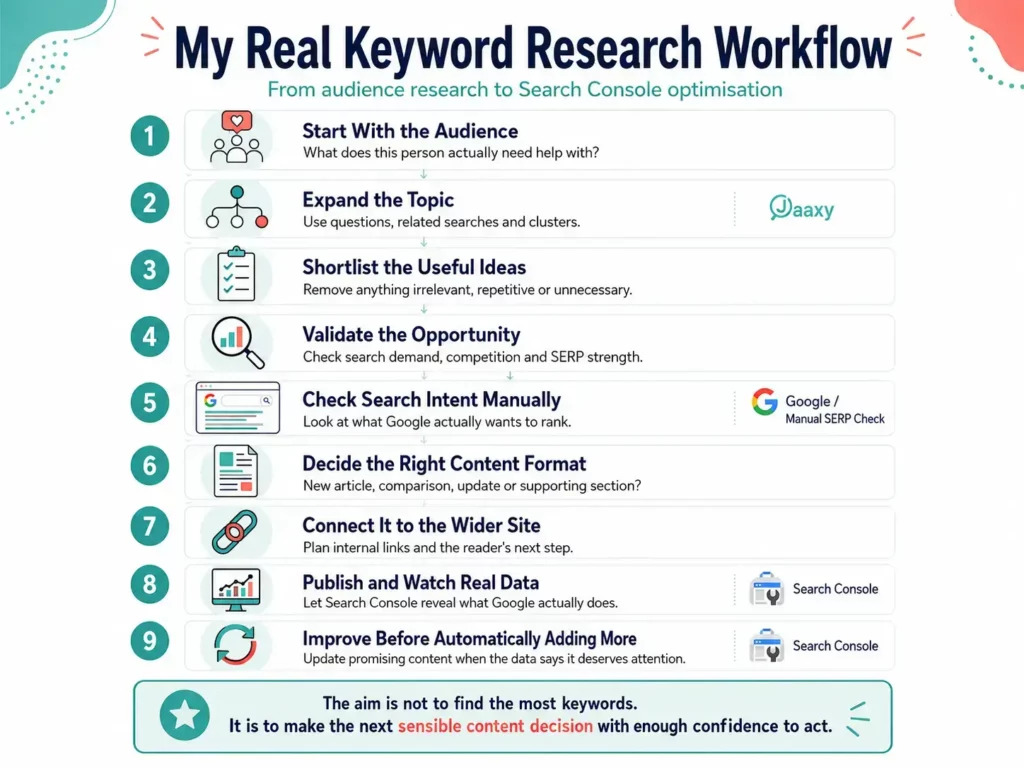
I do not use one tool for everything.
My keyword research is more of a workflow.
Different tools help at different stages.
That has become increasingly important as Flex For Families has grown.
Early on, I needed ideas.
Now I also need to:
- Build clusters.
- Improve existing content.
- Understand ranking opportunities.
- Prioritise what deserves time.
Here is the process I tend to follow.
Step 1: Start With the Audience
I do not start with a difficulty score.
I start with:
What might this person actually need help with?
That could come from:
- Existing content.
- Comments.
- Search Console.
- A product review.
- A question I have seen repeatedly.
- A wider blogging journey.
For example, if someone is researching:
“How to start a parent blog”
they may also need help with:
- Choosing a niche.
- Finding article ideas.
- Making time to blog.
- Building an email list.
- Monetisation.
- Keyword research.
The search is one moment in a much bigger journey.
Step 2: Expand the Topic
This is where I often use Jaaxy.
I will look at:
- Questions.
- Related.
- Clusters.
- Keywords.
The aim is not to keep every result.
It is to understand the surrounding topic.
I want to know:
- What else is the reader asking?
- What comes before this?
- What comes next?
- Which articles could naturally support each other?
That is how I try to build clusters rather than isolated posts.
Step 3: Shortlist the Useful Ideas
This is one of the most important steps.
I deliberately remove ideas.
I ask:
- Does this genuinely fit Flex For Families?
- Can I help with it?
- Does it overlap with another article?
- Would it add something useful to the cluster?
- Is it worth the time?
My earlier Jaaxy example is a good illustration.
One search produced around 20 possible ideas.
I did not publish 20 posts.
I selected 11.
That filtering matters.
Step 4: Validate the Opportunity
Once an idea looks useful, I validate it.
Depending on the topic, I may use:
- Google Search.
- Google Search Console.
- Ahrefs free tools.
- Ubersuggest.
- LowFruits-style SERP analysis.
- Other keyword tools.
I am looking for:
- Search demand.
- Competition.
- Existing results.
- Related terminology.
- Whether the idea looks realistic.
Step 5: Check Google Manually
This remains one of the most important steps.
I want to see the actual SERP.
I look at:
- Page types.
- Brands.
- Specialist websites.
- Forums.
- Content quality.
- Recency.
- Search intent.
This can completely change my decision.
A tool may suggest a keyword looks attractive.
The SERP may tell me otherwise.
Step 6: Decide What the Content Should Actually Be
This is where keyword research turns into content strategy.
I ask:
- Is this one article or several?
- Does it belong inside an existing article?
- Is this a comparison?
- Is it a guide?
- Is it an FAQ?
- Should it update something already published?
Not every keyword deserves a new URL.
Sometimes the best SEO decision is improving an existing page.
Step 7: Connect It to the Wider Site
Before publishing, I think about:
- What should link to this?
- What should this article link to?
- Which cluster does it belong to?
- What is the reader likely to need next?
This is particularly important for Flex For Families because I want content to feel like a journey rather than isolated SEO pages.
Step 8: Publish, Then Let Real Data Take Over
Once the article is live, keyword tools become less important.
Real data starts becoming more useful.
That means checking Search Console for:
- Impressions.
- Queries.
- Clicks.
- Positions.
- Unexpected search terms.
Sometimes Google shows me opportunities I never researched beforehand.
Those can become:
- Content updates.
- New sections.
- Supporting articles.
- Internal-link opportunities.
Step 9: Improve Existing Content Before Automatically Creating More
This has become increasingly important as the site has grown.
I do not want to keep publishing endlessly while older content sits untouched.
If Search Console shows:
- Strong impressions.
- Position 11.
- Relevant queries.
- A page that could clearly be improved.
that may be a better use of time than writing something new.
Keyword research is not only about finding the next article.
It is also about deciding:
Where can the content I already have work harder?
My Real Keyword Research Workflow
What does this person actually need help with?
Use questions, related searches and clusters.
Remove anything irrelevant, repetitive or unnecessary.
Check search demand, competition and SERP strength.
Look at what Google actually wants to rank.
New article, comparison, update or supporting section?
Plan internal links and the reader’s next step.
Let Search Console reveal what Google actually does.
Update promising content when the data says it deserves attention.
The aim is not to find the most keywords. It is to make the next sensible content decision with enough confidence to act.
The Main Lesson From My Workflow
The biggest change in how I approach keyword research is that I no longer treat the keyword as the starting and ending point.
The keyword is one signal.
The bigger picture includes:
- The reader.
- The topic.
- The content cluster.
- Search intent.
- Competition.
- Existing site data.
- What I can genuinely add.
That is why I am comfortable using several tools rather than trying to find one platform that does everything perfectly.
Each one helps answer a different question.
And once that question is answered, I move on.
Research should help you publish better content.
It should not become the job.
Do You Need More Than One Keyword Research Tool?
Not necessarily.
Using several keyword tools can be useful.
It can also become an expensive way of collecting the same information three times.
The question I would ask is:
Does each tool solve a different problem?
If the answer is yes, combining tools can make sense.
If the answer is:
“They all give me keyword ideas, search volume and a difficulty score.”
you may be paying for overlap.
When Two Tools Can Work Well Together
Some combinations make sense because the tools perform different jobs.
Jaaxy + LowFruits
This is probably one of the clearest examples.
You could use:
Jaaxy for:
- Reader questions.
- Related topics.
- Content clusters.
- Building the editorial roadmap.
Then use:
LowFruits for:
- SERP analysis.
- Weak Spots.
- Long-tail validation.
- Prioritising which ideas to tackle first.
The workflow becomes:
Discover → shortlist → analyse → prioritise
That is genuinely complementary.
If this sounds close to what you need, you can also link here to:
Jaaxy + KeySearch
This combination could make sense for a growing blog.
Use:
Jaaxy for:
- Audience-led research.
- Questions.
- Content planning.
Then:
KeySearch for:
- Keyword difficulty.
- Competitor analysis.
- Rank tracking.
- Audits.
- Ongoing SEO management.
That gives you a clear split between:
What should I create?
and:
How is my SEO performing?
For a deeper comparison:
Jaaxy + Ubersuggest
This follows a similar pattern.
Jaaxy helps with:
- Content direction.
- Reader needs.
- Editorial planning.
Ubersuggest helps with:
- Validation.
- Competition.
- Site analysis.
- SEO performance.
That is why I would not automatically treat Ubersuggest as a Jaaxy replacement.
They are more useful at different stages of the workflow.
→ Jaaxy vs Ubersuggest
Google Search Console + Almost Anything
Search Console combines well with most keyword tools because it provides something the others cannot:
Your own real Google data.
A research tool might suggest:
- Possible opportunities.
- Estimated difficulty.
- Competitor keywords.
Search Console tells you:
- What your site is already appearing for.
- Which pages are gaining impressions.
- Which queries are close to stronger rankings.
- What Google already associates with your content.
That makes it an excellent reality check.
Ahrefs or Semrush + Search Console
This becomes more useful for established sites.
The premium tool gives you:
- Market-wide research.
- Competitor intelligence.
- Backlink data.
- Content gaps.
Search Console gives you:
- Your real performance.
- Actual impressions.
- Real query trends.
- Existing opportunities.
That is a much stronger combination than using two premium platforms just because both have impressive dashboards.
When Multiple Tools Become Overkill
You probably do not need several paid platforms when:
- You rarely publish.
- You have little existing traffic.
- You do not check Search Console.
- You already have hundreds of unused keyword ideas.
- You are not acting on competitor research.
- Several tools are telling you roughly the same thing.
There is also a hidden cost.
Every additional platform creates:
- Another dashboard.
- Another scoring system.
- Another dataset.
- Another report.
- Another thing to learn.
And sometimes the numbers disagree.
That can actually make the decision harder.
My Rule for Adding Another Tool
Before paying for another SEO platform, I would ask:
- What problem am I trying to solve?
- Can my existing tools already solve it?
- What decision will the new data help me make?
- How often will I use it?
- Will it save more time than it creates?
- Does the expected value justify the cost?
If I cannot answer those questions clearly, I probably do not need the tool yet.
Who Does Not Need a Paid Keyword Tool Yet?
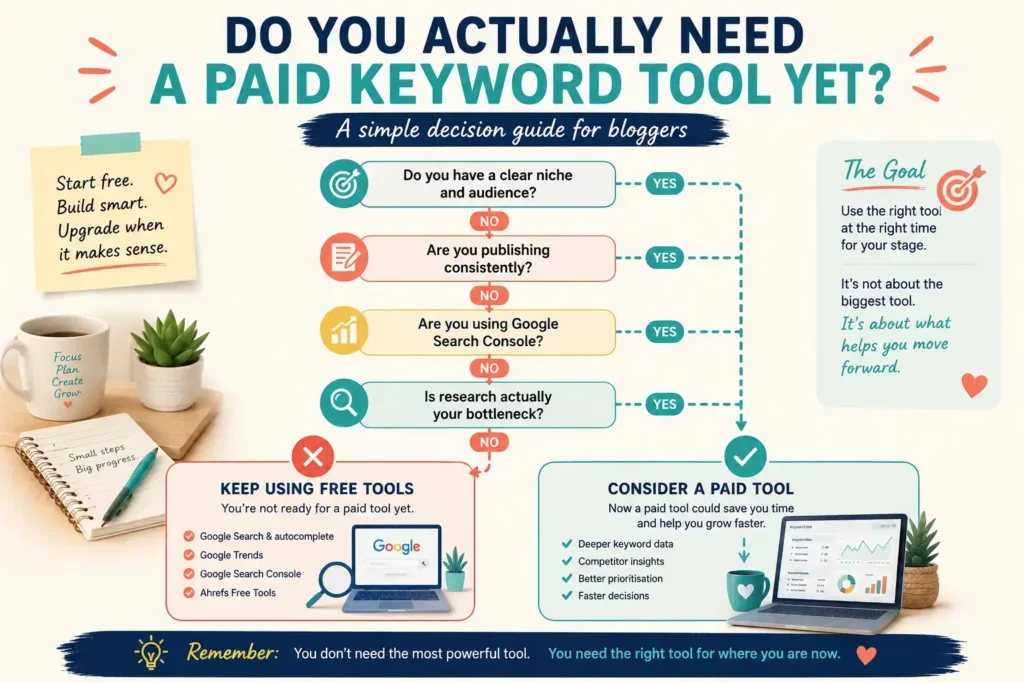
There is a point in almost every blogging journey where buying a keyword tool feels like progress.
Sometimes it is.
Sometimes it is just easier than doing the work already in front of you.
You probably do not need to pay for keyword research software yet if any of the following applies.
1. You Have Not Chosen a Clear Niche
If you are still trying to decide:
- Who the blog is for.
- What problem you solve.
- What you want to write about.
premium SEO data is unlikely to fix that.
Your first job is audience clarity.
A free research process is usually enough while you explore.
2. You Already Have More Ideas Than You Can Publish
This is a big one.
If you already have:
- 50 article ideas.
- 20 drafts.
- Three unfinished clusters.
you probably do not need another keyword generator.
Your bottleneck is execution.
A better question might be:
Which of these existing ideas should I publish first?
That could justify LowFruits-style prioritisation.
But it does not justify buying more software just to generate idea number 51.
3. You Are Not Publishing Consistently
No keyword tool can compensate for never turning research into useful content.
If research happens every week but publishing happens once every two months, the problem is not a lack of keyword data.
The priority should be a realistic content routine.
4. You Have Not Learned Basic Search Intent
Before paying for advanced metrics, learn to recognise what Google appears to want.
Search a keyword manually.
Look at the results.
Ask:
- Are these guides?
- Product pages?
- Videos?
- Forums?
- Comparisons?
- Tools?
That simple skill will help you use every paid SEO platform more effectively later.
5. You Are Not Using Google Search Console
Once a site has enough data, Search Console should be part of the workflow.
If you are paying for more keyword ideas while ignoring:
- Actual impressions.
- Real queries.
- Existing ranking opportunities.
you may be looking in the wrong place.
6. You Never Update Existing Content
Keyword research is not only about creating new articles.
If you have dozens or hundreds of published pages but never revisit them, your next SEO investment may not need to be another discovery tool.
You may get more value from:
- Search Console.
- Content updating.
- Internal linking.
- Improving existing pages.
7. You Are Ignoring the Research You Already Have
If your current platform has:
- Saved keywords.
- Content ideas.
- Competitor reports.
- Ranking data.
and none of it gets used, another subscription will not solve the problem.
More data is only useful when it changes an action.
8. Your Blogging Income Does Not Justify the Cost
This matters.
I do not think a blogger should feel pressured into paying for expensive SEO software simply because professional marketers use it.
A tool should earn its place.
That might mean:
- It saves significant time.
- It helps increase revenue.
- It improves important decisions.
- It replaces several other subscriptions.
- It supports a growing business.
Until then, free or lower-cost tools may be the more sensible choice.
Do You Need a Paid Keyword Tool Yet?
You probably do NOT need one yet if:
- You are still choosing your niche.
- You already have more ideas than publishing time.
- You are not publishing consistently.
- You are not checking search intent manually.
- You have not set up or used Search Console.
- You rarely update existing content.
- You are ignoring research you already have.
Remember: Buying better research software does not fix a publishing problem.
My Overall Recommendation
If you have read this far, you may still be wondering:
Which keyword research tool would I actually choose?
My answer depends on your stage.
If You Are a Complete Beginner
Start simple.
Use:
- Google Search.
- Autocomplete.
- People Also Ask.
- Google Trends.
- Free SEO tools.
If you are already using Wealthy Affiliate, I would use Jaaxy as part of that membership rather than immediately paying for another platform.
It is particularly useful for:
- Reader questions.
- Content ideas.
- Topic clusters.
- Building the first editorial roadmap.
→ See How I Use Jaaxy for Keyword Research
If You Have Plenty of Ideas but Need Better Opportunities
Look at LowFruits.
Its SERP-led approach is useful when the question becomes:
Which of these topics might be more realistic for my site?
That is a different problem from content discovery.
→ Read My LowFruits Review 2026
If Your Blog Is Growing
KeySearch is probably my favourite middle-ground option in this guide.
It gives you:
- Keyword research.
- Competitor analysis.
- SERP analysis.
- Tracking.
- Audits.
- Content tools.
Without immediately moving into the premium end of SEO software.
Ubersuggest is another good option if you prefer its workflow or want a relatively approachable broader SEO platform.
→ Read My KeySearch Review 2026
→ Read My Ubersuggest Review 2026
If You Run an Established Content Business
Ahrefs or Semrush make much more sense.
At this stage, you may genuinely need:
- Deeper competitive intelligence.
- Large-scale keyword analysis.
- Backlink research.
- Content gaps.
- Advanced SEO workflows.
The additional data becomes easier to justify when SEO decisions influence meaningful revenue.
My Keyword Tool Recommendation by Stage
Just Starting
Free Tools / Jaaxy
Focus on your audience, questions and first content clusters.
Need Better Opportunities
LowFruits
Prioritise realistic long-tail and weaker-SERP opportunities.
Growing Blog
KeySearch / Ubersuggest
Add competitor research, tracking, audits and deeper SEO analysis.
Established Business
Ahrefs / Semrush
Use premium depth when the data can influence meaningful business decisions.
The Tool I Would Start With
If someone were starting their first blog today, I would not tell them to buy the most advanced SEO platform they could afford.
I would tell them to understand their audience first.
Then:
- Find the questions people actually have.
- Build useful content around those questions.
- Learn how search intent works.
- Publish consistently.
- Watch what Google starts responding to.
- Add deeper SEO tools when a real need appears.
That approach may feel less exciting than buying an all-in-one SEO suite.
But it keeps the focus where it belongs.
On helping the reader.
Final Thought Before Choosing Any Keyword Tool
A keyword tool cannot tell you whether you genuinely understand the person behind the search.
It cannot replace:
- Experience.
- Judgement.
- Empathy.
- Useful examples.
- A clear content strategy.
The software helps with signals.
You still make the decision.
So my overall recommendation is simple:
Choose the smallest toolset that gives you enough information to make the next good content decision.
Then get back to creating something useful.

About the Reviewer
Hi, I’m John Crossley, founder of Flex For Families.
I’m a parent, blogger, and online business owner who helps families find realistic ways to create more flexibility through blogging, affiliate marketing, and online business.
Like many people, I’ve spent years researching online opportunities, testing platforms, and learning how to separate genuine business models from expensive hype. I’ve also experienced the frustration of chasing opportunities that promised freedom but demanded more time away from family.
Today, I use that experience to review courses, side hustles, AI opportunities, and online business programmes through a simple lens:
Will this genuinely help parents create more flexibility, or will it create more pressure?
Every review on Flex For Families focuses on costs, time commitments, risks, and realistic expectations, so you can make informed decisions before investing your time or money.
Final Verdict: What Is the Best Keyword Research Tool for Bloggers?
There is no single winner for every blogger.
And after comparing the tools in this guide, I think that is actually the most useful conclusion.
Each tool has a different sweet spot.
Best for Complete Beginners: Jaaxy
Jaaxy gets my recommendation for beginners because it helps answer one of the most important early questions:
What useful content should I create?
Its Questions, Related and Clusters features fit naturally into content planning, particularly if you already have access through Wealthy Affiliate.
My Rating: 4.0/5
Best for: Beginner bloggers, content planning and Wealthy Affiliate members.
Best for Finding Lower-Competition Opportunities: LowFruits
LowFruits becomes more useful once ideas are no longer the problem.
Its SERP-led approach and Weak Spot analysis help identify opportunities where smaller websites may have a realistic chance of competing.
My Rating: 4.4/5
Best for: New and growing sites looking for realistic long-tail opportunities.
Best Affordable All-Rounder: KeySearch
KeySearch is probably the strongest balance of functionality and practicality for a growing blogger.
It moves beyond basic keyword discovery into:
- Competitor research.
- Rank tracking.
- Auditing.
- SERP analysis.
- Content optimisation.
My Rating: 4.4/5
Best for: Growing bloggers wanting one affordable SEO platform.
Best Accessible SEO Step-Up: Ubersuggest
Ubersuggest is a useful bridge between simple keyword research and more advanced SEO software.
It makes particular sense when you already have a website and need:
- Keyword validation.
- Competitor research.
- Audits.
- Ranking insights.
My Rating: 4.3/5
Best for: Bloggers moving into broader SEO analysis.
Best for Serious SEO Research: Ahrefs
Ahrefs is the strongest option here when SEO research becomes a serious business activity.
Its depth around:
- Keywords.
- Competitors.
- Backlinks.
- Content gaps.
is difficult to match.
But most beginners do not need that level of power.
My Rating: 4.6/5
Best for: Established content businesses and serious SEO research.
Best Full Marketing Suite: Semrush
Semrush offers enormous SEO depth alongside a much broader marketing toolkit.
It makes the most sense when keyword research is only one part of a larger digital-marketing operation.
My Rating: 4.6/5
Best for: Established businesses, agencies and advanced marketing teams.
Best Free Tool for Existing Opportunities: Google Search Console
This may be the least glamorous choice.
It may also become one of the most valuable.
Once your website has enough data, Search Console shows you what is really happening.
That makes it incredibly useful for finding:
- Existing opportunities.
- Near-page-one queries.
- Content worth updating.
- Unexpected searches.
My Rating: 5/5 for Value
Best for: Any blogger with enough existing Google Search data.
My Overall Winner?
I would not give one tool the crown.
Instead:
Best Keyword Research Tools for Bloggers: Final Winners
Best Beginner Tool
Jaaxy
For questions, ideas and content planning.
Best Opportunity Finder
LowFruits
For weaker SERPs and long-tail prioritisation.
Best Growing-Blog Tool
KeySearch
For affordable broader SEO management.
Best Premium SEO Tool
Ahrefs
For established sites needing serious SEO depth.
Best Free Tool
Google Search Console
For real opportunities already appearing on your site.
My strongest advice is still:
Do not buy the most powerful keyword tool. Buy—or use—the one that solves the problem you actually have.
For many new bloggers, that may mean paying nothing at all.
Continue Reading: Build the Right Keyword Research Toolkit
If you want to go deeper into any of the tools mentioned in this guide, these are the next resources I would recommend.
Want to Understand Jaaxy Better?
Jaaxy Review 2026
See where Jaaxy performs well, where it falls short and whether it is worth using as part of Wealthy Affiliate.
How to Use Jaaxy for Keyword Research
See the actual workflow I use for finding questions, related ideas and content clusters.
→ See My Jaaxy Keyword Research Process
Comparing Jaaxy With Other Tools?
Jaaxy vs LowFruits
Best if you are deciding between content discovery and finding weaker SERPs.
Jaaxy vs KeySearch
Best if you are deciding between beginner content planning and a wider SEO toolkit.
Jaaxy vs Ubersuggest
Best if you want to understand the difference between content planning and broader SEO analysis.
→ Compare Jaaxy vs Ubersuggest
Looking for a Specialist Keyword Tool?
LowFruits Review 2026
See whether its Weak Spot approach makes sense for your site.
KeySearch Review 2026
Explore one of the more affordable all-round SEO platforms for growing bloggers.
LowFruits vs KeySearch
Compare specialist SERP opportunity research with a broader SEO suite.
→ Compare LowFruits vs KeySearch
Ready for Broader SEO Tools?
Ubersuggest Review 2026
See how its keyword research, competitor tools and wider SEO features fit a growing blog.
Ahrefs Review 2026
See whether Ahrefs is worth the investment or whether its free tools are enough for now.
Semrush Review 2026
Explore what Semrush offers and whether its extensive feature set is realistic for your blogging stage.
Ahrefs vs Semrush
Compare the two heavyweight SEO platforms directly.
Still Building Your Blogging Foundation?
Keyword research matters.
But it is only one part of building a useful blog.
If you are still working out:
- Your niche.
- Your content direction.
- Your weekly blogging routine.
- Your income goals.
- How to fit blogging around family life.
Start with the basics first.
Not Ready to Pay for a Keyword Tool Yet?
You do not need an expensive SEO subscription to start making progress.
The free Parent Blogging Starter Kit gives you practical resources to help you plan:
- Your niche.
- Your first content ideas.
- Your weekly blogging routine.
- Your income goals.
- Your blogging roadmap.
- How to build around limited time.
Not Ready to Pay for a Keyword Tool Yet?
You do not need another subscription to start building your blog. The free Parent Blogging Starter Kit gives you practical resources to choose your niche, plan your content and build around the time you actually have.
Get the Free Parent Blogging Starter KitFamily-first. Practical. No hype.
Frequently Asked Questions: Best Keyword Research Tools for Bloggers
What is the best keyword research tool for bloggers?
There is no single best tool for every blogger. Jaaxy is particularly useful for beginners and content planning, LowFruits for lower-competition opportunities, KeySearch for affordable all-round SEO, Ubersuggest for broader SEO analysis, and Ahrefs or Semrush for advanced research.
What is the best keyword research tool for beginners?
Jaaxy is my preferred beginner option because it helps with reader questions, related ideas and content clusters. Free tools such as Google Search, Google Trends and Ahrefs’ free keyword tools can also be enough when starting out.
What is the best free keyword research tool?
Google Search Console is my favourite free option once a website has enough search data. For a brand-new blog, Google Search, Google Trends and free keyword tools from platforms such as Ahrefs can all be useful.
Do bloggers need a keyword research tool?
No. You can start keyword research manually using Google Search, autocomplete, related searches, Search Console and other free tools. Paid software becomes useful when it saves time or solves a specific research problem.
Is Jaaxy good for keyword research?
Yes, particularly for beginner bloggers, reader questions, related topics and content planning. I find it most useful as an audience-led discovery tool rather than as a complete advanced SEO platform.
Is LowFruits better than Jaaxy?
It depends on the job. Jaaxy is stronger for generating reader questions and planning content clusters. LowFruits is stronger for analysing SERPs and finding potentially lower-competition opportunities.
Is KeySearch good for bloggers?
KeySearch can be a strong option for growing bloggers because it combines keyword research with competitor analysis, SERP research, rank tracking, audits and content optimisation.
Is Ubersuggest good for keyword research?
Ubersuggest provides useful keyword information alongside broader SEO features such as competitor analysis, site auditing and rank tracking. It makes more sense once you have an existing site to analyse.
Is Ahrefs worth it for bloggers?
Ahrefs can be extremely valuable for established blogs that rely heavily on SEO, but the full platform may be excessive for beginners. Its free keyword tools can be a sensible starting point.
Is Semrush worth it for bloggers?
Semrush is powerful but best suited to established businesses and users who need wider SEO and marketing capabilities. Most beginner bloggers will not need everything it offers.
Are keyword difficulty scores accurate?
They are useful estimates, not guarantees. Different tools calculate difficulty differently, so you should also inspect the actual search results, search intent and types of sites already ranking.
Can I use more than one keyword research tool?
Yes, particularly when they solve different problems. For example, you might use Jaaxy for content discovery and LowFruits for SERP analysis. You do not necessarily need multiple tools that largely provide the same data.
How much should a beginner spend on keyword research tools?
Potentially nothing. Beginners can make significant progress with free research tools. A paid platform is worth considering when it genuinely saves time, improves decisions or solves a limitation in your current workflow.
Does keyword research guarantee Google rankings?
No. Keyword research helps identify and understand opportunities, but rankings depend on many factors including search intent, content quality, competition, site relevance and Google’s wider ranking systems.
Let’s Chat
Keyword research can become one of those blogging subjects where the more you learn, the more complicated it seems.
So I would love to know:
Which keyword research tool are you currently using?
Are you:
- Using free tools?
- Using Jaaxy?
- Trying LowFruits?
- Considering KeySearch or Ubersuggest?
- Already using Ahrefs or Semrush?
- Or wondering whether you actually need any of them?
And if you have tried more than one, which tool has genuinely helped you make better content decisions?
Leave a comment below.
Your experience may help another blogger who is trying to work out which tool fits their stage.