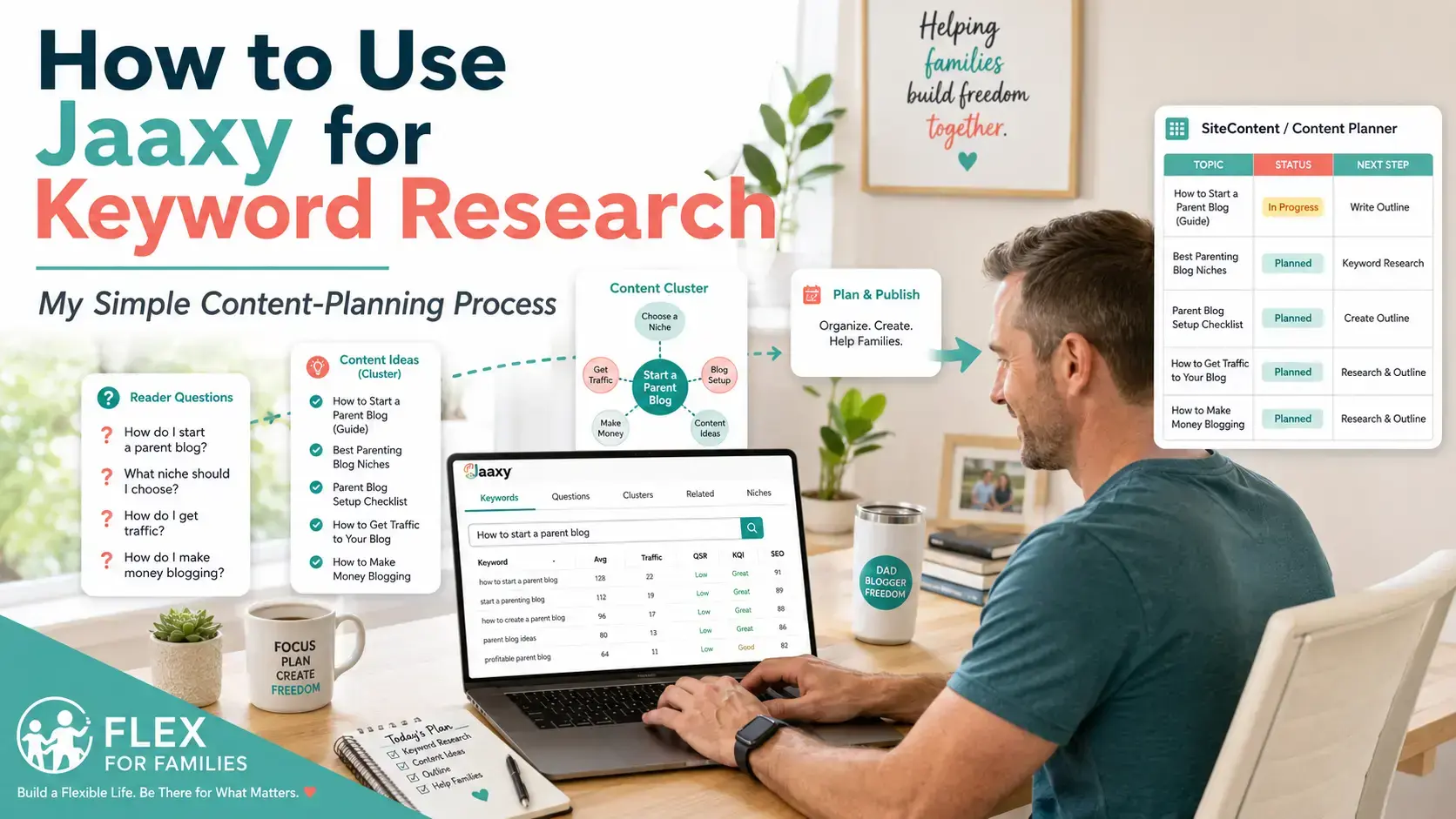
Jaaxy can generate a lot of keyword and content ideas from one search.
But that does not automatically mean every suggestion deserves to become a blog post.
When you first open the redesigned Jaaxy inside Wealthy Affiliate, it can be tempting to enter a broad topic, explore every result and start adding dozens of ideas to your content plan.
That approach can quickly create problems.
You may:
- Waste AI credits on searches that are too broad.
- Choose topics that do not closely fit your audience.
- Create several articles targeting the same search intent.
- Add content that weakens rather than strengthens your niche.
- Build an overwhelming publishing list you never realistically complete.
The real value of Jaaxy is not the number of ideas it can generate.
It is how effectively you can turn one focused topic into a smaller group of useful, connected articles.
That is how I now use it.
I do not open Jaaxy and ask it to decide what Flex For Families should cover.
I begin with a topic that I already know matters to my audience.
I then use Jaaxy to uncover:
- Specific reader questions.
- Related subjects.
- Supporting article ideas.
- Possible content clusters.
- Different ways people may search for help.
- Gaps within my existing content.
One of my most successful searches began with the phrase:
How to start a parent blog
Jaaxy produced around 20 possible keyword and content ideas.
I reviewed them carefully and selected 11 that were genuinely relevant enough to become articles.
Several of those posts are now ranking, and I still have additional ideas from that original search waiting in my content plan.
That result did not come from publishing every suggestion Jaaxy generated.
It came from filtering the ideas, grouping them logically and choosing the topics that best supported my audience and wider website.
In this guide, I will show you the exact process I use to:
- Choose a focused seed topic.
- Run the search in Jaaxy.
- Review the Questions results.
- Explore Related topics.
- Group useful ideas into content clusters.
- check Keywords and Niches.
- Remove duplicate or unsuitable suggestions.
- Validate the strongest opportunities.
- Move selected ideas into SiteContent.
- Build a realistic publishing plan.
I will also explain how I make better use of Jaaxy’s AI credits and avoid the mistakes that can leave beginners with lots of ideas but no clear strategy.
The goal is not to run as many searches as possible.
It is to get more useful content from each search you run.
Quick Answer: My Jaaxy Keyword Research Process
Jaaxy works best when you use it to expand a focused topic that already fits your audience and content strategy.
- Choose a focused audience problem.
Avoid broad searches and begin with a topic that clearly identifies what your reader needs help with. - Review the Questions results first.
Separate the suggestions into standalone articles, supporting sections and ideas to ignore. - Explore Related topics.
Look for the questions or problems your reader may need help with next. - Group suitable ideas into clusters.
Organise connected articles around one central pillar or subject. - Check Keywords and Niches.
Use them for alternative wording, long-tail phrases and possible subtopics without allowing them to change your entire website direction. - Remove weak or overlapping ideas.
Merge suggestions that target the same intent and reject anything that does not clearly fit your audience. - Validate the strongest opportunities.
Review Google, Search Console and other research sources before deciding to publish. - Send selected ideas into SiteContent.
Add useful notes, internal-link targets and their place within the wider content cluster. - Choose a realistic publishing order.
Treat the content cluster as a long-term roadmap rather than a deadline.
My main advice: Use Jaaxy as a content-expansion tool—not as a machine that tells you exactly what to publish. The suggestions give you possibilities. Your knowledge of your audience determines which ideas are worth using.
What You Need Before Using Jaaxy
You can technically open Jaaxy and begin searching without doing any preparation.
However, the quality of your results will depend heavily on how clearly you understand your website.
The tool can generate keywords, questions and clusters.
It cannot decide:
- Who your audience should be.
- What your website should become known for.
- Which problems your brand is best placed to solve.
- Whether a topic fits your long-term strategy.
- Which suggestions should be ignored.
Before running a search, you should have at least a basic understanding of your audience, niche and main content areas.
You do not need to have everything perfectly planned.
You simply need enough direction to recognise whether the results belong on your site.
1. Know Who You Want to Help
The strongest keyword research begins with a clear reader.
For Flex For Families, I am not writing for everyone interested in blogging or making money online.
My main audience includes busy parents who want to build flexible income around work and family life.
That changes which topics are relevant.
For example:
How to start a blog
is broad.
How to start a parent blog
is more closely aligned with the audience I want to help.
How to start a parent blog while working full-time
is even more specific.
Each additional detail gives Jaaxy a clearer understanding of the problem you want to explore.
Before searching, ask:
- Who is this information for?
- What stage are they at?
- What are they struggling with?
- Why would they search for this?
- What makes their situation different?
The clearer your reader is, the easier it becomes to recognise useful results.
2. Understand What Your Website Helps With
Your website needs boundaries.
Without them, keyword research can send you in dozens of unrelated directions.
Flex For Families covers areas such as:
- Starting and growing a blog.
- Affiliate marketing.
- Realistic online income.
- Flexible side hustles.
- Blogging around work and family life.
- Tools, courses and resources for beginners.
That does not mean every remotely related idea belongs on the site.
A keyword involving cryptocurrency, ecommerce stock management or corporate SEO may technically connect with online income or marketing.
However, it may not support the central purpose of Flex For Families.
Before using Jaaxy, try to describe your website in one sentence:
My website helps [audience] achieve [outcome] by providing [type of support].
For example:
Flex For Families helps busy parents build flexible income through realistic blogging, affiliate marketing and side-hustle guidance.
That sentence becomes a useful content filter.
When Jaaxy generates an idea, you can ask whether it supports that promise.
3. Identify Your Main Topic Areas
You do not need a complicated website architecture before using Jaaxy.
However, it helps to know your main topic areas.
For a parent-blogging website, these might include:
- Starting a blog.
- Choosing a niche.
- Planning content.
- Keyword research.
- Growing traffic.
- Building an email list.
- Monetising content.
- Managing time.
These areas give your research some structure.
A Jaaxy suggestion may become:
- A new pillar article.
- A supporting article.
- A section within an existing guide.
- An FAQ.
- An idea that does not fit anywhere.
If an idea cannot be connected naturally to one of your main topic areas, it may not belong on the site.
4. Choose a Topic You Already Know Matters
I get the best results from Jaaxy when I begin with a topic that already has a reason to exist.
That reason might be:
- A reader asked a question.
- An existing article is attracting traffic.
- Search Console shows related impressions.
- A pillar page needs more support.
- The Business Hub suggested a relevant subject.
- I have noticed a clear gap in the website.
- The topic supports an important product, service or lead magnet.
My “how to start a parent blog” search worked because it connected naturally with:
- The Parent Blogging Hub.
- My Starter Kit.
- My blogging guides.
- My Wealthy Affiliate content.
- Questions newer parent bloggers regularly ask.
I was not using Jaaxy to discover a random direction.
I was using it to explore a direction that already made sense.
5. Check What You Have Already Published
Before generating new ideas, review your existing content.
You may already have an article that:
- Targets the same keyword.
- Answers the same question.
- Could be expanded.
- Needs updating.
- Could absorb the new idea as an additional section.
This helps prevent keyword cannibalisation, where several pages compete for very similar searches.
It also stops your content calendar from filling up with unnecessary posts.
Sometimes Jaaxy will generate a strong idea, but the best response is not to create another article.
It may be better to:
- Add a new section to an existing guide.
- Refresh an older post.
- Add an FAQ.
- Strengthen internal links.
- Retarget an article that is not performing.
Keyword research should help improve the website you already have—not simply increase the number of pages.
6. Decide What You Want From the Search
Do not open Jaaxy without knowing what type of result would be useful.
You might be trying to:
- Find one standalone article.
- Expand a pillar page.
- Build a complete content cluster.
- Find FAQ questions.
- Plan an email series.
- Identify supporting social posts.
- Explore whether a topic belongs within your niche.
Your goal affects how you review the results.
If you need one article, you may focus mostly on Questions and Keywords.
If you want a wider content plan, Related and Clusters become much more important.
A clear purpose also makes it easier to stop researching once you have found what you need.
7. Check Whether the Topic Supports a Wider Goal
The strongest content usually leads somewhere.
That does not mean every post needs to make a sale.
It means each article should support the reader journey and the wider purpose of the website.
A topic may lead naturally towards:
- Another helpful guide.
- A pillar page.
- An email sign-up.
- A free resource.
- A relevant product review.
- A recommended training platform.
- A future comparison article.
For example, articles within the parent-blogging cluster may lead towards:
- The Parent Blogging Hub.
- The Parent Blogging Starter Kit.
- The Wealthy Affiliate review.
- Keyword-research tutorials.
- Email-list guidance.
- Realistic income content.
That connection helps turn keyword ideas into a deliberate content strategy.
My Pre-Search Jaaxy Checklist
Before using AI credits on a new Jaaxy search, I ask:
Before You Search in Jaaxy
- Does this topic clearly fit my niche?
- Is it relevant to the audience I want to help?
- Am I solving a real reader problem?
- Is my search specific enough to produce focused results?
- Could this topic support several useful questions or articles?
- Do I already have content covering the same intent?
- Could an existing article be updated instead?
- Does this subject support a pillar page, content cluster or wider goal?
- Do I know what I want to find from this search?
- Am I prepared to ignore ideas that do not fit?
You do not need a perfect answer to every question.
The checklist is simply there to stop you opening Jaaxy, entering a vague phrase and hoping the platform will create your entire content strategy.
Why This Preparation Saves AI Credits
Jaaxy’s redesigned research uses Wealthy Affiliate AI credits.
Those credits may also be used across other tools inside the platform.
A little preparation therefore has a practical benefit.
Instead of running several broad searches such as:
- Blogging.
- Make money.
- Affiliate marketing.
- Work from home.
you can perform one more focused search such as:
How to start affiliate marketing as a busy parent
That gives the platform:
- A clear subject.
- A defined audience.
- A likely problem.
- A stronger content direction.
The results are more likely to be useful, and you are less likely to need several follow-up searches simply to narrow the topic down.
The goal is not to avoid using your credits.
It is to make each search worth using.
The Mindset to Take Into Jaaxy
The most important thing to remember is:
Jaaxy generates possibilities. You create the strategy.
You do not need to publish every keyword.
You do not need to create every article within a suggested cluster.
And you do not need to change your niche because the Niches section produces an interesting idea.
Use Jaaxy to expand your thinking.
Then use your knowledge of your audience, website and goals to decide what happens next.
My Step-by-Step Jaaxy Keyword Research Process
Once you understand your audience and know which part of your website you want to expand, you are ready to begin researching.
The process itself is straightforward.
The important part is not simply knowing where to click.
It is knowing what to look for, which suggestions deserve further research and when you already have enough ideas.
Here is the exact process I follow.
Step 1: Choose a Focused Seed Topic
A seed topic is the phrase you enter into Jaaxy to begin your research.
It does not need to be your final article title or exact target keyword.
Its job is to give Jaaxy enough information to understand the subject you want to explore.
A useful seed topic usually contains at least one of the following:
- A clear audience.
- A specific problem.
- A desired outcome.
- A stage in the reader’s journey.
- A defined subject within your niche.
For example:
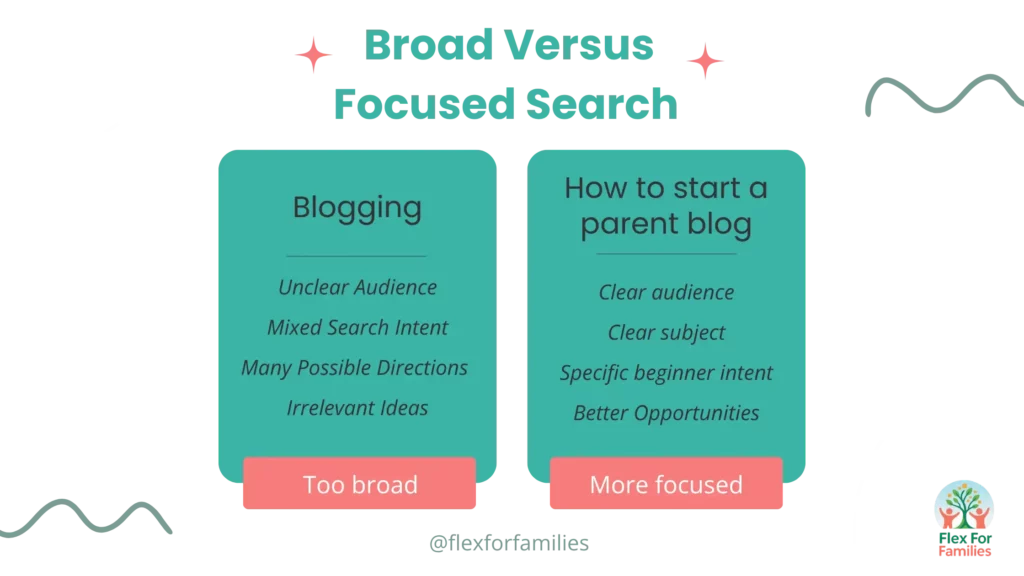
| Too broad | Better seed topic |
|---|---|
| Blogging | How to start a parent blog |
| SEO | SEO for new parent bloggers |
| Affiliate marketing | Affiliate marketing for busy parents |
| Email marketing | Email lists for beginner bloggers |
| Side hustles | Flexible side hustles for working parents |
| Blog traffic | How to grow traffic to a new parent blog |
The stronger searches give Jaaxy more context.
They are also more likely to produce ideas that fit the website you are actually building.
My Seed-Topic Formula
A simple formula you can use is:
Topic + Audience + Problem or Outcome
Examples include:
- Blogging + parents + finding enough time.
- Affiliate marketing + beginners + choosing products.
- Email marketing + new bloggers + building a first list.
- Keyword research + parent bloggers + finding article ideas.
You do not need to force all three elements into every search.
The formula is simply a way to make the subject more focused.
What I Avoid
I try not to begin with:
- One-word topics.
- Entire industries.
- Vague income phrases.
- Subjects outside my main content areas.
- Questions I cannot realistically answer.
- Topics chosen only because they sound profitable.
For example, a search such as:
Make money online
could produce hundreds of directions.
Most would not support the specific mission of Flex For Families.
A search such as:
How can parents make money from a blog?
gives Jaaxy a much clearer problem to investigate.
Once you have shortlisted relevant Jaaxy ideas, a specialist tool such as LowFruits can help investigate which keywords may have weaker competition. See my full Jaaxy vs LowFruits comparison.
Step 2: Run the Search and Review the Whole Screen
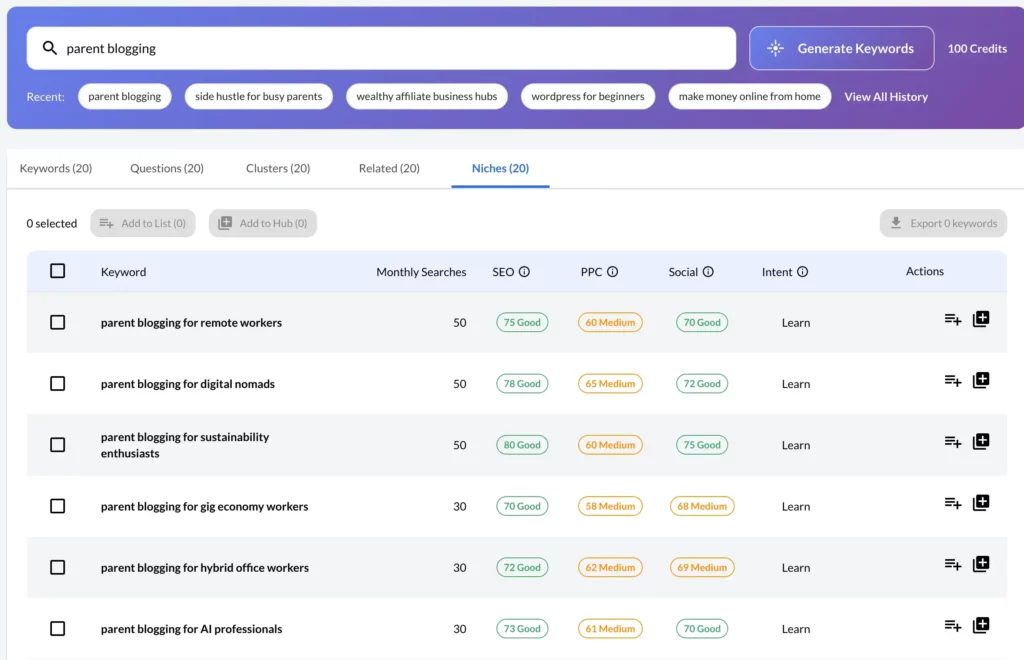
Once you enter the phrase, Jaaxy generates results across five main views:
- Keywords
- Questions
- Clusters
- Related
- Niches
Before clicking through everything, I take a moment to look at the overall direction of the results.
I ask:
- Does Jaaxy appear to understand the topic?
- Are the suggestions aimed at the right audience?
- Are the results specific enough?
- Is the search producing distinct ideas?
- Does the subject have enough depth to explore further?
Sometimes the first search immediately produces strong results.
Sometimes it reveals that the phrase is still too broad.
If the results feel disconnected, I do not automatically run several more searches.
I first consider whether I can improve the wording.
For example:
Start a blog
could become:
How to start a blog as a working parent
That small change may produce much more relevant questions and related topics.
Do Not Save Everything Immediately
The first results can feel exciting.
You may suddenly see dozens of possible articles.
However, saving everything creates a new problem.
You end up with a huge content list containing:
- Repetitive topics.
- Weak ideas.
- Articles aimed at the wrong reader.
- Suggestions that should be sections rather than posts.
- Content you will probably never publish.
I initially review the results without committing to every idea.
The filtering comes first.
The planning comes afterwards.
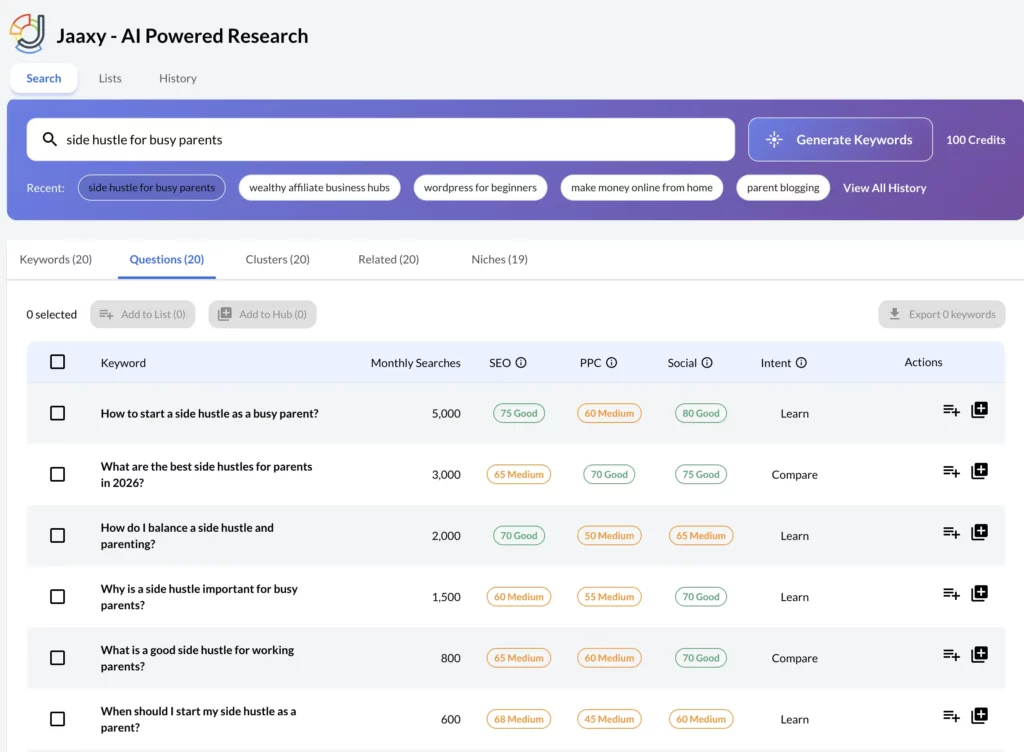
Step 3: Review the Questions Results First
Questions is usually my first stop.
It is the Jaaxy view I find most useful because it reveals the specific concerns behind a broader topic.
For example, a search around starting a parent blog may produce questions involving:
- Cost.
- Time.
- Niche selection.
- Content ideas.
- Technical ability.
- Traffic.
- Monetisation.
- Balancing blogging with family life.
Each question gives you a clue about what the reader wants to understand.
However, not every question needs its own article.
I divide the results into three groups.
Group 1: Standalone Article Ideas
A question may deserve a full article when it:
- Has a clear and distinct search intent.
- Needs more than a short answer.
- Fits your target audience.
- Supports your wider content strategy.
- Allows you to include useful examples or experience.
- Is not already covered properly elsewhere.
Examples might include:
- How much time do you need to start a blog?
- How much does it cost to start a parent blog?
- Can parents really make money blogging?
- Is blogging still worth starting in 2026?
- How long does it take to get blog traffic?
Each question could support a detailed article with its own purpose.
Group 2: Supporting Sections or FAQs
Some questions are useful, but too narrow for a complete article.
They may work better as:
- An H2 or H3.
- A quick-answer section.
- An FAQ.
- A paragraph within a larger guide.
- An email or social post.
Examples might include:
- Do I need to blog every day?
- Can I start with a free website?
- How long should my first article be?
- Do I need social media immediately?
These questions still have value.
They simply do not need another URL.
Group 3: Ideas to Ignore
I reject a question when it:
- Targets the wrong audience.
- Falls outside the site’s purpose.
- Repeats something already covered.
- Has unclear intent.
- Would produce a very thin article.
- Does not allow me to add anything helpful.
- Is only loosely connected to the original topic.
Ignoring ideas is part of good keyword research.
The goal is not to prove that Jaaxy generated a lot of content.
The goal is to find the small number of suggestions that genuinely strengthen the website.
A Simple Questions Filter
For each question, I ask:
- Is this something my audience would genuinely ask?
- Does it need a full article?
- Do I already answer it elsewhere?
- Can I add experience, clarity or practical help?
- Does it connect naturally with another important page?
If the answer is mostly no, I leave it out.
Step 4: Explore Related Topics
Once I have reviewed the direct questions, I move to Related.
This section helps reveal what the same reader may need next.
That is slightly different from finding variations of the original keyword.
For example, someone researching how to start a parent blog may also need help with:
- Choosing a niche.
- Planning a weekly schedule.
- Finding article ideas.
- Learning SEO.
- Starting an email list.
- Promoting content.
- Understanding affiliate marketing.
- Setting realistic income expectations.
Those topics may not all contain the phrase “start a parent blog.”
However, they belong within the same reader journey.
Think Beyond the First Search
A useful content strategy should anticipate what happens after the reader solves the first problem.
The journey might look like this:
Start a blog
→ Choose a niche
→ Plan content
→ Find keywords
→ Publish consistently
→ Build traffic
→ Start an email list
→ Monetise
The Related section can help uncover these transitions.
That is why I often find it more useful than a traditional list of keyword variations.
How I Use Related Results
I use them to identify:
- Supporting articles.
- Missing steps in a reader journey.
- Internal-link destinations.
- New pillar-page sections.
- Topics for an email sequence.
- Follow-up social content.
- Gaps in the existing website.
I do not automatically add every related idea to the same cluster.
Some may belong elsewhere on the site.
The important thing is to recognise the connection and decide whether it supports the reader naturally.
Step 5: Use Clusters to Organise the Strongest Ideas
After reviewing Questions and Related, I move into Clusters.
By this stage, I already have a sense of which suggestions are genuinely useful.
The Clusters view helps organise those ideas around connected themes.
For example, a parent-blogging cluster might contain several groups.
Cluster 1: Starting the Blog
Possible articles:
- How to start a parent blog.
- How much does starting a blog cost?
- How much time do you need?
- Which blogging platform should you choose?
- Can you blog while working full-time?
Cluster 2: Choosing What to Write About
Possible articles:
- How to choose a parent-blog niche.
- Parenting blog niche ideas.
- How to find blog-post topics.
- How to use keyword research.
- How to build a content calendar.
Cluster 3: Growing the Blog
Possible articles:
- How to grow blog traffic.
- Why blogging feels slow at first.
- When to start an email list.
- How frequently should you publish?
- How long does SEO take?
Cluster 4: Making Money
Possible articles:
- Affiliate marketing for parent bloggers.
- How much traffic do you need to make money?
- Is blogging passive income?
- Can parents make £500 a month blogging?
- What does first-year blogging income look like?
Each group supports a different stage of the journey while remaining connected to the central subject.
Choose a Pillar Article
Most clusters benefit from having one broader article that acts as the main guide.
For this example, the pillar might be:
How to Start a Parent Blog
Supporting articles can then explore individual questions in more detail.
The pillar should link to the supporting posts.
The supporting posts should link back to the pillar and to each other where relevant.
This creates a clear structure for both readers and search engines.
Avoid Overlapping Articles
Content clusters can create duplication if you are not careful.
For example:
- How to start a blog as a parent.
- How parents can start blogging.
- Starting a parent blog from home.
- Beginner parent-blogging guide.
These may sound like four articles.
They may actually target the same intent.
In that situation, I would normally choose one strong primary article rather than creating several competing pages.
The other wording can be used naturally within the same post.
My Cluster Test
Before keeping two similar ideas as separate articles, I ask:
Would someone searching these phrases expect meaningfully different pages?
If the answer is no, the ideas probably belong together.
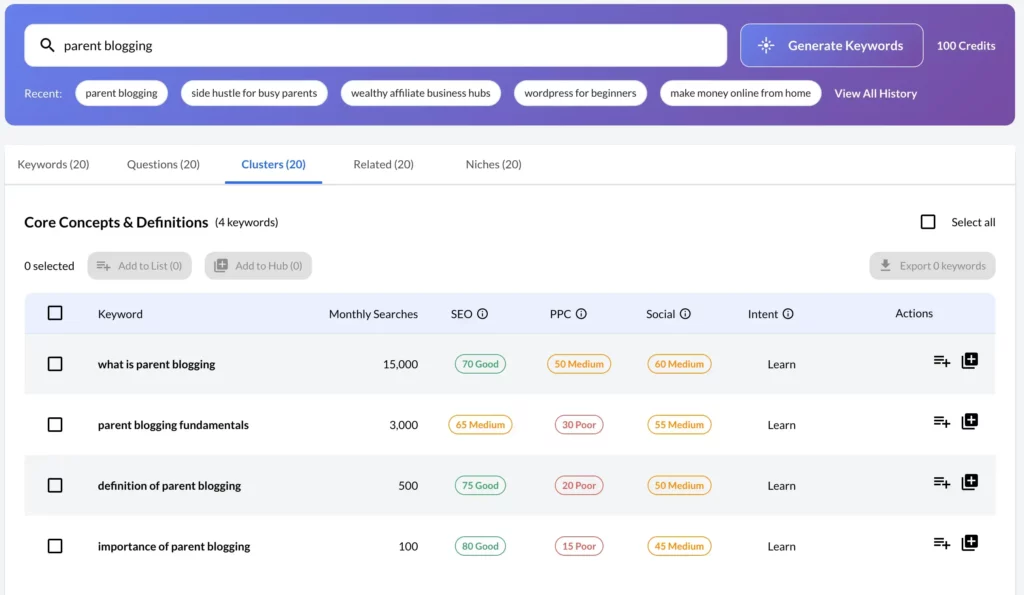
Step 6: Review the Keywords View
After Questions, Related and Clusters, I return to Keywords.
The Keywords tab is useful for understanding how people may phrase the topic.
It can help uncover:
- Long-tail searches.
- Alternative wording.
- More specific versions of the idea.
- Possible article-title language.
- Supporting phrases to include naturally.
- Search-intent differences.
For example:
- Start a parent blog.
- How to start a parent blog.
- Starting a blog for mums.
- Starting a blog while working full-time.
- Beginner blogging tips for parents.
These phrases may all relate to the same broad subject.
They do not necessarily require separate articles.
How I Use Keyword Variations
I use keyword variations to improve one article rather than creating a new post for every phrase.
They can help shape:
- The title.
- The introduction.
- Headings.
- FAQ wording.
- Image alt text.
- Internal-link anchors.
- Related examples.
The main article should still be written for the reader.
I do not try to force every phrase into the content.
Search Volume Is Not the Only Consideration
A keyword with a higher estimated search volume is not automatically the best option.
I also consider:
- How well it fits the audience.
- Whether the intent is clear.
- Whether my website has relevant authority.
- Whether I can create something genuinely useful.
- Whether the subject supports an important content cluster.
- Whether it leads naturally towards another helpful resource.
A lower-volume phrase may be much more valuable if it attracts exactly the right reader.
Step 7: Use the Niches View Carefully
The Niches section can suggest broader markets, audiences or directions connected to the topic.
It can be useful when:
- You are still shaping a website idea.
- You want to identify possible sub-niches.
- You are exploring a new content category.
- You want to understand different audience groups.
- You are considering future products or monetisation routes.
However, this is the view where beginners may be most tempted to change direction unnecessarily.
A new niche suggestion can sound exciting.
That does not mean it belongs on your current website.
Questions to Ask Before Following a Niche Idea
Before expanding into a suggested niche, ask:
- Does it serve the same audience?
- Does it fit the website’s mission?
- Can I create useful content from experience or research?
- Does it connect naturally with my existing articles?
- Will readers understand why this subject is on the site?
- Does it create a realistic monetisation opportunity?
- Am I interested enough to cover it consistently?
If the idea fails several of these tests, save it elsewhere or ignore it.
Do Not Let Jaaxy Redefine Your Brand
Jaaxy can help expand your niche.
It should not decide your entire brand.
Some of my earlier content ideas were reasonable in isolation but did not fit closely enough with the direction Flex For Families eventually developed.
That is why I now use a much stricter audience and mission filter.
An interesting keyword is not enough.
The article also needs to make sense as part of the website.
Step 8: Create a Shortlist
Once I have explored all five views, I do not move every result into my planner.
I create a shortlist.
A useful shortlist might contain:
- One pillar article.
- Three to six strong supporting articles.
- Several FAQ or section ideas.
- A few lower-priority future topics.
- Ideas to merge into existing content.
This feels much more manageable than saving 20 or 30 suggestions without a clear order.
My Shortlisting Categories
I usually think in terms of:
Write
A strong standalone article that clearly fits the audience.
Update
An idea that would improve an existing post.
Add
A useful section or FAQ rather than another article.
Save
A relevant idea for later.
Reject
A suggestion that does not fit or duplicates another page.
This simple classification stops Jaaxy research from becoming an ever-growing list of unfinished intentions.
Example Shortlist
| Idea | Decision |
|---|---|
| How to start a parent blog | Write as pillar |
| How much time does blogging take? | Write |
| Do you need to blog every day? | Add as FAQ |
| How much does starting a blog cost? | Write |
| Start a corporate parenting publication | Reject |
| Best free blogging platform | Add to existing guide or future post |
| Parent-blog content ideas | Write |
| Blogging schedule for working parents | Save or write |
| How to make money blogging | Too broad—refine |
The decision is based on strategy, not simply whether Jaaxy produced the phrase.
Step 9: Record Why Each Idea Matters
Before moving an idea into SiteContent, I add a short note explaining:
- Who the article is for.
- What question it answers.
- Where it fits within the cluster.
- Which existing pages should link to it.
- What the reader may need next.
- Which CTA is most relevant.
For example:
Article
How Much Time Do You Really Need to Start a Blog?
Reader
A busy parent worried they cannot fit blogging around work and family life.
Purpose
Set realistic expectations and demonstrate how small time blocks can still create progress.
Internal links
- How to Start a Parent Blog.
- Why Blogging Works for Busy Parents.
- Parent Blogging Hub.
- Starter Kit.
CTA
Download the Weekly Blogging Planner within the Starter Kit.
That small amount of planning makes the final article much more purposeful.
What You Should Have at the End of the Walkthrough
After completing this process, you should not simply have a long keyword list.
You should have:
- A focused seed topic.
- A set of real reader questions.
- Related topics that extend the reader journey.
- One or more logical content clusters.
- A clear pillar article.
- A shortlist of supporting posts.
- FAQ and section ideas.
- Duplicate suggestions removed.
- Irrelevant ideas rejected.
- A reason for publishing each selected article.
That is the difference between keyword generation and content planning.
Jaaxy supplies the raw ideas.
Your filtering turns them into a strategy.
Step 10: Validate the Strongest Ideas
Jaaxy helps me discover potential topics.
It does not make the final publishing decision for me.
Before committing time to an article, I usually complete a few additional checks to make sure the idea genuinely deserves a place on Flex For Families.
The amount of validation depends on the topic.
I do not need to spend an hour analysing every simple question.
However, I want enough evidence to understand:
- What the reader is really looking for.
- What type of content Google currently rewards.
- Whether I already have a realistic angle.
- Whether the topic fits my wider website.
- Whether creating a new article is better than updating an old one.
This final check helps prevent me from filling the site with articles that sound relevant but do not have a clear purpose.
Check the Search Intent
Search intent describes what someone is hoping to find when they enter a phrase into Google.
A keyword may look perfect in Jaaxy but lead to search results that do not match the article you planned to write.
For example, someone searching:
Parent blog
might be looking for:
- Parenting blogs to read.
- Examples of successful parent blogs.
- Advice on starting one.
- A particular website or brand.
- Guest-post opportunities.
The phrase alone does not tell you which interpretation Google currently favours.
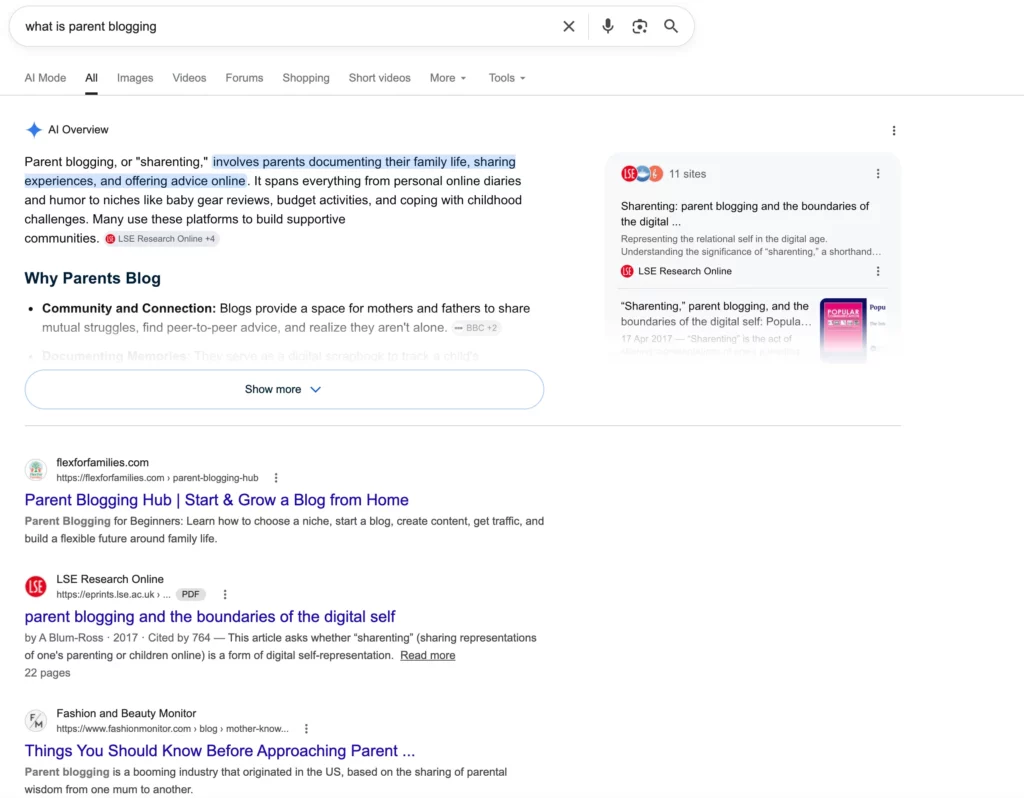
That is why I search the topic manually.
I review the first page and ask:
- Are the results guides, lists, products or homepages?
- Are they aimed at beginners?
- Do they answer the same question I intend to answer?
- Would my article naturally belong beside them?
- Is Google showing a different interpretation of the phrase?
If the results do not match my planned article, I may refine the keyword or choose a clearer question.
Review the Websites Already Ranking
I also look at the types of websites appearing on the first page.
I am not searching for an exact formula that guarantees a ranking.
I am trying to understand the competitive environment.
I look for:
- Smaller niche websites.
- Independent bloggers.
- Large publishers.
- Forums or community discussions.
- Outdated articles.
- Thin or generic content.
- Articles that do not fully serve my target audience.
The presence of major websites does not always mean the topic is impossible.
Likewise, the presence of smaller websites does not automatically mean it will be easy.
The important question is whether I can create something meaningfully useful and closely matched to the search.
Look for a Clear Flex For Families Angle
A topic may be relevant to blogging without being especially relevant to Flex For Families.
I therefore ask:
What makes my version of this article worth publishing?
The answer may be:
- Advice specifically for busy parents.
- A realistic time-based approach.
- Personal experience.
- A family-first perspective.
- Beginner-friendly explanations.
- An honest discussion of limitations.
- A practical workflow.
- A connection to flexible income.
For example, there are already thousands of articles about starting a blog.
My angle is not simply another technical setup guide.
It is helping a parent understand how to start and grow a blog around work and family responsibilities.
That difference gives the article a clearer audience and purpose.
Check Existing Search Console Data
Google Search Console is especially useful when the website already has related content.
I may look for:
- Queries where an existing article receives impressions.
- Related phrases appearing unexpectedly.
- Pages sitting close to page one.
- Topics Google already associates with the site.
- Questions that could be answered through an update.
This can reveal that I do not need a completely new article.
For example, Jaaxy may generate a question that is already appearing in Search Console for an older post.
In that situation, I may add a new section to the existing article instead.
That can be a better use of time than creating another page from scratch.
Use Other SEO Tools Where Helpful
I sometimes check a promising idea in:
- Ubersuggest.
- Ahrefs’ free tools.
- Google Trends.
- Google Search Console.
- Manual Google searches.
I do not believe every keyword needs to be analysed through several platforms.
That can become another form of procrastination.
I use extra tools when they help answer a specific question.
For example:
- Is the topic seasonal?
- Are people searching for different wording?
- Which competing pages attract traffic?
- Is an older article already ranking for related terms?
- Are there weaker or more specialised sites in the results?
Jaaxy gives me the idea.
The additional research helps me understand the opportunity.
Decide Whether to Write, Update or Merge
After validation, I choose one of three main actions.
Write a New Article
I choose this when the topic:
- Has distinct search intent.
- Deserves a detailed answer.
- Fits the audience.
- Supports the wider cluster.
- Is not already covered properly.
Update an Existing Article
I choose this when:
- The question already fits an older post.
- Search Console shows related impressions.
- The existing article needs more depth.
- A separate page would create unnecessary overlap.
Merge Several Ideas
I choose this when multiple Jaaxy suggestions are simply different versions of the same reader need.
For example:
- How much time does blogging take?
- How many hours should a blogger work?
- Can you blog for 30 minutes a day?
These could potentially sit inside one strong article rather than becoming three competing posts.
My Validation Checklist
Before I Commit to a Jaaxy Idea
- Does the Google search intent match the article I want to create?
- Does the topic clearly fit my target audience?
- Can I add a useful Flex For Families angle?
- Do I already have an article covering the same intent?
- Would updating an existing post be more useful?
- Does the idea support an important content cluster?
- Can I link naturally to and from relevant pages?
- Is the topic worth the time required to create it?
- Does the article lead the reader towards a helpful next step?
Step 11: Send the Best Ideas Into SiteContent
Once I have filtered and validated the ideas, I move the strongest ones into the Wealthy Affiliate SiteContent Planner.
This is one of the most convenient parts of using Jaaxy inside Wealthy Affiliate.
The research does not need to remain inside a keyword report.
A selected topic can become part of the wider writing workflow.
What I Add to the Planner
I do not add only the keyword.
Where possible, I also record:
- The working title.
- The target reader.
- The main question.
- The search intent.
- The article’s place within the cluster.
- Internal links to include.
- The most relevant CTA.
- Notes from the Jaaxy results.
- Whether the article is new or an update.
This gives me a much better starting point when I eventually sit down to write.
I am not trying to remember why I saved the topic several weeks earlier.
The reasoning is already there.
Example SiteContent Planning Note
Working title
How Much Time Do You Really Need to Start a Blog?
Target reader
A busy parent who worries that blogging requires several hours every day.
Main intent
Provide a realistic explanation of the time needed to start and grow a blog.
Cluster
Starting a Parent Blog.
Internal links
- How to Start a Parent Blog.
- Why Blogging Works for Busy Parents.
- Parent Blogging Hub.
- Parent Blogging Starter Kit.
Primary CTA
Download the Weekly Blogging Planner.
Supporting questions
- Is 30 minutes enough?
- Do you need to blog every day?
- How many hours should a beginner spend each week?
This turns a keyword into a proper article brief.
Add Internal Links Before Writing
I like to think about internal links during planning rather than leaving them until the article is finished.
For each new idea, I ask:
- Which existing article should link to this?
- Which pillar page does it support?
- What should this article link to next?
- Does it connect with a review, tutorial or lead magnet?
- Will it help strengthen an older page?
This makes the cluster more deliberate.
It also means the new article is not published as an isolated page.
Choose the Most Relevant CTA
The CTA should match the reader’s stage.
A beginner article may lead towards:
- The Parent Blogging Starter Kit.
- The Parent Blogging Hub.
- The Wealthy Affiliate review.
- A related tutorial.
A keyword-tool tutorial may lead towards:
- The Jaaxy review.
- The Wealthy Affiliate review.
- The Best Keyword Research Tools guide.
- A practical next-step resource.
The CTA does not need to be aggressively promotional.
It should help the reader continue naturally.
Step 12: Choose a Realistic Publishing Order
One productive Jaaxy search can generate more content than you can publish immediately.
That is a good result.
It should not become a new source of pressure.
When my parent-blog search produced 11 worthwhile article ideas, I did not try to publish all 11 at once.
I treated them as a roadmap.
Some became priorities.
Others waited until they fitted naturally into my wider schedule.
Start With the Pillar Article
If the cluster has a clear central guide, I usually begin there.
The pillar gives the supporting articles somewhere to link back to.
It also creates a useful overview for readers who need broader help.
For this example, the pillar would be:
How to Start a Parent Blog
That article can introduce the full journey and link towards more detailed supporting guides.
Publish the Most Important Reader Problems Next
After the pillar, I prioritise the questions most likely to stop the reader from making progress.
For a busy parent, those may include:
- Do I have enough time?
- How much will it cost?
- What niche should I choose?
- What should I write about?
- Can blogging realistically make money?
These questions deserve priority because they address the biggest doubts and barriers.
Add Supporting Articles Gradually
Once the foundation is in place, I can add supporting posts covering:
- Keyword research.
- Email marketing.
- Traffic growth.
- Affiliate marketing.
- Content planning.
- Realistic income timelines.
Each new article strengthens the cluster and gives the existing pages more internal-link opportunities.
There is no need to complete the whole cluster within one month.
Balance Informational and Commercial Content
A strong cluster should not consist entirely of reviews or promotional articles.
It should include genuinely useful informational content.
For example:
Informational
- How to start a parent blog.
- How much time blogging takes.
- How to choose a niche.
- How to plan content.
- Why blogging feels slow initially.
Commercial or decision-focused
- Wealthy Affiliate Review.
- Jaaxy Review.
- Best Keyword Research Tools.
- Blogging course comparisons.
- Hosting and software reviews.
The informational articles build trust and attract readers.
The commercial articles help readers make informed decisions when they are ready.
Consider What Already Needs Updating
New content should not always take priority over existing articles.
I may delay a new Jaaxy idea if:
- An older article is close to ranking well.
- A review needs a current update.
- A pillar page lacks internal links.
- Search Console shows a clear opportunity.
- The new idea can wait without weakening the cluster.
The best publishing schedule balances new articles with strategic updates.
My Simple Priority System
I organise selected ideas into three groups.
Priority 1: Publish Soon
These ideas:
- Support a central pillar.
- Answer an urgent reader question.
- Fill a clear gap.
- Connect with current site goals.
- Have a strong audience fit.
Priority 2: Publish Later
These ideas are valuable but less urgent.
They may:
- Support a later stage of the journey.
- Need more research.
- Depend on another article being published first.
- Fit a future campaign or series.
Priority 3: Keep as Supporting Ideas
These may become:
- FAQs.
- Email topics.
- Social posts.
- Sections in existing articles.
- Future updates.
This stops every suggestion becoming another large writing commitment.
A Content Cluster Is a Roadmap, Not a Deadline
This is probably the most important publishing lesson.
Jaaxy may give you enough ideas for several months.
That does not mean you are behind if you do not publish them immediately.
A content cluster is there to show:
- Where the site could grow.
- Which articles connect.
- What the reader may need next.
- Which gaps remain.
- How future posts can support existing content.
It should make blogging feel more organised—not more overwhelming.
Example Publishing Order
For a parent-blogging cluster, I might use this sequence:
- How to Start a Parent Blog
- How Much Time Do You Really Need to Start a Blog?
- Parenting Blog Niche Ideas
- What Nobody Tells You About Starting a Blog as a Parent
- Why Every Parent Blogger Needs an Email List
- How Long Does It Take to Make Money Blogging?
- Is Blogging Passive Income?
- Best Keyword Research Tools for Bloggers
- Jaaxy Review
- How to Use Jaaxy for Keyword Research
That order gives readers a natural progression from beginning the blog towards research, traffic and monetisation.
The exact order can change depending on:
- Current rankings.
- Seasonal opportunities.
- Search Console data.
- Your promotional priorities.
- The time available.
Step 13: Publish and Connect the Articles
Publishing the article is not the end of the process.
Once a new post goes live, I connect it with the rest of the cluster.
That means:
- Adding links from older articles.
- Linking the new post back to the pillar.
- Updating the pillar page.
- Adding links to relevant reviews or tutorials.
- Including the article in email or social content.
- Monitoring its early Search Console data.
This is how the cluster becomes a working part of the site rather than a collection of separate posts.
Link From Existing Content
New articles often need internal links pointing towards them.
I review older pages and ask where the new article would genuinely help the reader.
For example, an article about starting a parent blog could link naturally to:
- A guide about finding enough time.
- A niche-selection article.
- The Jaaxy tutorial.
- The Parent Blogging Hub.
- The Starter Kit.
The link should make sense in context.
It should not be added simply because the keyword exists.
Update the Pillar Article
When a supporting article is published, I add it to the central pillar where appropriate.
This keeps the pillar current and helps readers explore the subject in greater depth.
Over time, the pillar becomes a genuine hub rather than a static article.
Monitor Search Console
After publishing, I use Search Console to watch for:
- Impressions.
- Unexpected queries.
- Average positions.
- Related questions.
- Opportunities to improve headings.
- Signs that Google sees a different intent.
Early data may reveal new content ideas or suggest that an existing section needs strengthening.
That feedback can become the starting point for the next Jaaxy search.
The Complete Jaaxy Workflow
My Complete Jaaxy Content-Planning Workflow
Choose a topic that clearly fits the audience.
Review Questions, Related, Clusters, Keywords and Niches.
Keep, merge, update, save or reject each idea.
Check search intent, competition and existing content.
Add the reader, intent, links and CTA in SiteContent.
Choose a realistic order instead of publishing everything.
Create genuinely useful content for the intended reader.
Add internal links and monitor the results in Search Console.
Remember: The aim is not to publish every suggestion Jaaxy produces. The aim is to identify the small number of ideas that genuinely strengthen your website and help your audience.
Case Study: How One Jaaxy Search Became 11 Parent-Blogging Articles
The clearest example of how I use Jaaxy came from one focused search:
How to start a parent blog
I chose that phrase because it already matched an important part of Flex For Families.
It connected naturally with:
- The Parent Blogging Hub.
- My guides for beginner bloggers.
- The Parent Blogging Starter Kit.
- My content about blogging around work and family life.
- Wealthy Affiliate and Jaaxy tutorials.
- Questions I know busy parents regularly worry about.
I was not asking Jaaxy to find a completely new direction for the website.
I was using it to explore a topic that already fitted the audience and the wider content strategy.
That distinction mattered.
What Jaaxy Generated
The search produced around 20 possible keywords, questions and related content ideas.
At first glance, that looked like a ready-made publishing schedule.
However, I did not assume all 20 deserved their own articles.
Some suggestions:
- Covered almost the same search intent.
- Were too narrow for a complete post.
- Worked better as sections or FAQs.
- Did not fit the Flex For Families audience closely enough.
- Overlapped with articles already published or planned.
- Needed refining before they could become useful topics.
After reviewing the results, I selected 11 ideas that were strong enough to become articles.
Several of those posts are now ranking, while other ideas from the original research remain in my content plan.
The value did not come from accepting all 20 suggestions.
It came from reducing them to the 11 that made sense for the site.
How One Jaaxy Search Became a Content Plan
Focused seed search
Ideas generated
Articles selected
Posts now ranking
The important lesson: Jaaxy generated the possibilities, but audience fit, search intent and content strategy determined which ideas became articles.
How I Decided Which Ideas Made the Cut
I did not use one keyword metric or competition score to make the decision.
Each idea had to pass several practical tests.
1. Did It Fit the Flex For Families Audience?
The first question was:
Would a busy parent who wants to start or grow a blog genuinely need help with this?
That immediately removed ideas aimed at:
- Corporate content teams.
- Large publishing businesses.
- Advanced SEO agencies.
- Bloggers with completely different goals.
- Audiences outside the family-first focus of the website.
A topic could be related to blogging and still be wrong for Flex For Families.
Relevance to the subject was not enough.
It also needed relevance to the reader.
2. Did It Answer a Distinct Question?
Several suggestions may appear different while targeting almost identical intent.
For example:
- How much time does blogging take?
- How many hours should a beginner blogger work?
- Can you start a blog with 30 minutes a day?
- Do you need to blog every day?
These do not necessarily need four separate articles.
The first three could form the core of one detailed guide, while the final question might work as a section or FAQ.
I kept an idea as a standalone article only when it answered a meaningfully different reader need.
3. Could It Support a Helpful Full Article?
Some ideas were useful but did not need 1,500 or 2,000 words.
A narrow question may be better used as:
- An FAQ.
- An H2 within a larger article.
- A quick-answer box.
- A social-media post.
- An email topic.
Creating a separate page for every small question can lead to thin content and unnecessary overlap.
I wanted the 11 selected articles to have enough depth to be genuinely useful.
4. Did It Support the Wider Parent-Blogging Journey?
I looked at how each idea fitted within the journey a new parent blogger may follow.
That journey includes questions such as:
- Can I realistically fit blogging into family life?
- What should I blog about?
- How do I choose a niche?
- How often should I publish?
- How long will progress take?
- When should I build an email list?
- How can a blog eventually make money?
The strongest ideas supported one of these stages.
This allowed the articles to connect naturally rather than becoming isolated posts.
5. Could I Add a Useful Personal Angle?
I also considered whether I could offer more than a generic summary.
My strongest articles tend to include:
- My own experience.
- Realistic expectations.
- Mistakes I have made.
- A busy-parent perspective.
- Practical examples.
- Honest limitations.
- Advice shaped by building Flex For Families around a full-time job and family responsibilities.
A keyword may have potential, but I still need a reason for my version of the article to exist.
6. Did I Already Have Similar Content?
Before adding an idea to the list, I checked whether an existing post already covered it.
Sometimes the right decision was to:
- Update an older article.
- Add a new section.
- Improve the FAQ.
- Change the title or focus.
- Strengthen internal links.
Not every new keyword needs a new page.
Sometimes Jaaxy helps reveal how an existing article can become stronger.
7. Could the Article Lead Somewhere Useful?
Each selected article needed a natural place within the wider reader journey.
That might mean linking towards:
- The Parent Blogging Hub.
- The Parent Blogging Starter Kit.
- A related tutorial.
- The Wealthy Affiliate review.
- The Jaaxy review.
- A guide about traffic, email or monetisation.
The CTA did not always need to be commercial.
It simply needed to help the reader take a sensible next step.
How the 11 Articles Worked Together
The selected ideas did not all target the same stage of blogging.
They helped build a broader journey around starting and growing a parent blog.
The cluster included topics covering areas such as:
Starting and Mindset
- What starting a blog as a parent is really like.
- How much time a beginner needs.
- Why blogging can feel slow initially.
- What happens during the first six months.
Planning and Building
- Choosing suitable topics.
- Understanding realistic publishing schedules.
- Creating content in small pockets of time.
- Building an email list early.
Traffic and Progress
- How long it takes to receive traffic.
- Why early progress is difficult to see.
- How consistent content begins to compound.
Monetisation and Expectations
- How long it can take to make money.
- Whether blogging is genuinely passive income.
- What realistic blogging income may look like.
Not every article came directly from an exact Jaaxy phrase.
Some ideas were refined, combined or rewritten to match the Flex For Families audience more closely.
That is an important part of the process.
A keyword tool gives you a starting point.
It does not have to write your final title or dictate the exact article angle.
Why Several of the Articles Began Ranking
I cannot claim that Jaaxy alone caused the posts to rank.
Search performance depends on many factors, including:
- Search intent.
- Content quality.
- Competition.
- Website authority.
- Internal links.
- Topical relevance.
- How well the article answers the question.
- Google’s understanding of the wider website.
However, the Jaaxy research helped me begin with ideas that were:
- Focused.
- Connected.
- Relevant to the audience.
- Closely aligned with the site.
- Suitable for internal linking.
- Part of a wider subject rather than random standalone posts.
That gave the articles a stronger foundation.
The research also helped me see the parent-blogging topic as a cluster rather than one broad article.
Instead of trying to answer every possible concern in a single guide, I could create dedicated posts for the questions that deserved more depth.
What I Would Do Differently Now
The process was successful, but I would refine it further today.
I would be even stricter about:
- Checking existing content before saving new ideas.
- Identifying overlapping search intent earlier.
- Planning internal links before writing.
- Recording the reader and CTA inside SiteContent.
- Deciding the publishing order at the start.
- Separating urgent articles from useful future ideas.
- Saving Questions that belong as FAQs rather than posts.
I would also resist the temptation to treat the entire result set as an immediate to-do list.
Eleven useful ideas do not need to become 11 urgent deadlines.
They can support the website gradually.
What This Case Study Proves
The success of the search did not come from entering a magic keyword.
It came from four things working together:
- The seed topic already matched my audience.
- I filtered the results rather than accepting everything.
- The selected ideas supported one connected content area.
- I turned the ideas into useful articles over time.
Jaaxy helped uncover the opportunities.
Human judgement turned them into a content strategy.
How to Avoid Wasting Jaaxy AI Credits
The redesigned Jaaxy uses Wealthy Affiliate’s AI-credit system.
Those credits may also be shared across other tools within the platform, including AI writing and image features.
That means keyword research needs to be more deliberate than it was with the older version.
I do not think you should become afraid of using credits.
They are there to be used.
However, you should try to make each search produce something useful.
1. Decide What You Need Before Opening Jaaxy
Before starting a search, know whether you want:
- One article idea.
- A set of FAQs.
- A broader content cluster.
- Supporting topics for a pillar.
- Ideas for an email series.
- A niche direction to investigate.
Without a clear goal, it is easy to explore several tabs, run multiple searches and still finish without a usable plan.
2. Avoid One-Word Searches
Broad searches often require more follow-up research.
Examples include:
- Blogging.
- SEO.
- Money.
- Parenting.
- Affiliate marketing.
These phrases give Jaaxy very little context.
A more focused search such as:
Affiliate marketing for busy parents
is more likely to produce relevant ideas immediately.
3. Include the Audience or Problem
Adding the audience, problem or outcome can improve the search significantly.
Compare:
Email marketing
with:
How new parent bloggers can build an email list
The second phrase gives Jaaxy much clearer direction.
It may also produce useful questions for articles, FAQs and emails within one result set.
4. Check Your Business Hub Ideas First
The Wealthy Affiliate Business Hub may already contain relevant content suggestions.
Before spending credits on Jaaxy, review what you already have.
You may find:
- A useful seed topic.
- An idea worth expanding.
- A missing supporting article.
- A subject that needs more reader questions.
Jaaxy can then be used to deepen an existing idea rather than starting another disconnected search.
5. Search Once, Then Explore Every View
A strong search can produce material across:
- Keywords.
- Questions.
- Related topics.
- Clusters.
- Niches.
Review the complete result set before running another search.
One focused search may give you:
- Several standalone posts.
- Multiple FAQs.
- Email ideas.
- Social-media topics.
- A content cluster.
- Internal-link opportunities.
Do not run another search simply because you have not yet reviewed everything from the first one.
6. Save the Useful Results Immediately
If you find strong ideas, record them while the reasoning is fresh.
Save:
- The working title.
- The reader.
- The main intent.
- Supporting questions.
- The cluster.
- Internal-link opportunities.
- The CTA.
- Whether it should be a post, update or FAQ.
This prevents you from rerunning the same search later because you cannot remember what you found.
7. Do Not Chase Perfect Keywords
It is easy to spend credits trying slightly different versions of the same phrase.
For example:
- Start a parent blog.
- How to start a parent blog.
- Starting a blog as a parent.
- How parents can begin blogging.
These may all lead to broadly similar ideas.
Once you have enough relevant material, stop searching and start filtering.
More results do not necessarily create a better plan.
8. Use Free Tools for Validation
You do not need another Jaaxy search for every unanswered question.
You can validate ideas through:
- Google search results.
- People Also Ask.
- Google autocomplete.
- Google Search Console.
- Google Trends.
- Existing analytics.
- Your own website search.
- Reader questions and comments.
Jaaxy can generate the initial possibilities.
Free sources can help confirm whether they are worth pursuing.
9. Reuse One Search Across Different Formats
A useful Jaaxy result can support much more than blog articles.
One search may provide:
- Blog-post ideas.
- FAQs.
- Email topics.
- Facebook posts.
- Pinterest content.
- YouTube video ideas.
- Lead-magnet sections.
- Updates to older content.
This improves the value of every credit used.
A narrow question that does not need a full article may still become an excellent email or social post.
10. Know When to Stop
Keyword research can feel productive even when it has become avoidance.
At some point, you have enough information to act.
I stop when I have:
- A clear pillar or main article.
- Several useful supporting ideas.
- The main questions readers need answered.
- A sensible publishing priority.
- Enough validation to begin writing.
The aim is not to build the longest possible keyword list.
It is to create the next useful piece of content.
Get More Value From Every Jaaxy Search
- Begin with a topic that already fits your audience.
- Include the reader, problem or desired outcome.
- Decide what you want to find before searching.
- Review Business Hub suggestions first.
- Explore all five Jaaxy views before running another search.
- Save useful results and planning notes immediately.
- Avoid repeatedly searching small variations of the same phrase.
- Use Google and Search Console for free validation.
- Turn results into posts, FAQs, emails and social content.
- Stop researching once you have a clear next step.
My rule: The goal is not to run more Jaaxy searches. It is to get more useful content from each search you run.
Broad Search Versus Focused Search
| Broad search | Focused search |
|---|---|
| Produces mixed ideas | Produces more relevant ideas |
| Has unclear audience | Identifies who needs help |
| May require repeated searches | Can generate a usable cluster |
| Increases the risk of wasted credits | Makes each search more deliberate |
| Encourages random content | Supports an existing site direction |
A focused search is not guaranteed to produce perfect ideas.
It simply gives Jaaxy better information to work with.
The Biggest Credit-Wasting Mistake
The biggest mistake is not using the wrong keyword.
It is searching without knowing what you will do with the results.
You may discover 30 ideas and still have no plan because you have not decided:
- Who the content is for.
- Which ideas deserve articles.
- How the posts connect.
- What should be published first.
- Which topics already exist on the site.
Preparation and filtering matter more than the sheer number of results.
Final Lesson From the Case Study
My “how to start a parent blog” search was worthwhile because one focused topic created a long-term content roadmap.
It gave me around 20 possibilities.
I reduced those to 11 useful articles.
Several are now ranking.
Other ideas remain available for future content.
But I would not have achieved the same result by publishing every suggestion or relying only on Jaaxy’s data.
The strongest outcome came from combining:
Focused research + audience knowledge + careful filtering + consistent publishing
That is the simple content-planning process I now try to follow every time I use Jaaxy.
Common Jaaxy Keyword Research Mistakes
Jaaxy can save a lot of time when you use it with a clear purpose.
However, it can also leave you with a long list of disconnected ideas if you treat every result as an instruction.
These are the most common mistakes I would avoid.
1. Starting With a Topic That Is Too Broad
Broad searches give Jaaxy very little information about the audience or problem you want to explore.
For example:
Blogging
could lead in almost any direction.
A more focused search such as:
How to start a parent blog while working full-time
gives Jaaxy a clearer subject, audience and challenge.
You may still need to filter the results, but you are starting from a much stronger position.
2. Treating Every Suggestion as a New Article
Not every keyword or question needs its own page.
Some ideas are better used as:
- An FAQ.
- An H2 or H3.
- A paragraph within an existing article.
- An email topic.
- A social-media post.
- A future update.
Creating a new article for every small variation can lead to thin content and several pages competing for the same search intent.
3. Ignoring Your Existing Content
Before adding a Jaaxy idea to your publishing schedule, check what is already on your website.
You may already have a post that:
- Answers the question.
- Ranks for related phrases.
- Could be expanded.
- Needs a clearer heading.
- Would benefit from a new FAQ.
- Should be updated rather than replaced.
Keyword research should improve your existing website, not automatically make it larger.
4. Choosing Topics Outside Your Audience
A suggestion can be relevant to blogging without being right for your particular blog.
Flex For Families helps busy parents build flexible income around work and family life.
That means an idea aimed at large corporate marketing teams may be related to SEO or content creation, but it probably does not belong within my content strategy.
The topic and the intended reader both need to fit.
5. Creating Several Articles With the Same Intent
Keyword tools often produce multiple versions of the same basic question.
For example:
- How much time does blogging take?
- How many hours should a beginner blogger work?
- Can you blog for 30 minutes a day?
- Do bloggers need to work every day?
These ideas may belong inside one detailed article.
Before separating similar phrases, ask:
Would someone searching these phrases expect meaningfully different answers?
When the answer is no, combine them.
6. Trusting Keyword Metrics Without Checking Google
Jaaxy can help you discover ideas, but no single metric tells you everything about ranking difficulty.
Before writing, check:
- The dominant search intent.
- The types of pages ranking.
- Whether Google prefers guides, lists, products or forums.
- Whether your planned article belongs naturally within the results.
- Whether you can add a useful and distinctive angle.
A promising score does not guarantee that an article is right for your website.
7. Publishing in the Order Jaaxy Presents the Ideas
The order in which results appear does not need to become your publishing order.
Your priorities should reflect:
- The reader journey.
- Existing content gaps.
- Pillar-page support.
- Search Console opportunities.
- Current website goals.
- The time you realistically have available.
A lower result may be strategically more important than the first suggestion displayed.
8. Saving Ideas Without Planning Them
A keyword alone may not mean much when you return to it several weeks later.
When you save an idea, also record:
- Who the article is for.
- What question it answers.
- Its place within the content cluster.
- Whether it is a new article or an update.
- Internal links to include.
- The most suitable CTA.
This turns the keyword into a useful brief.
9. Forgetting Internal Links
A content cluster works because the articles support one another.
When you plan a new article, decide:
- Which existing page should link to it.
- Which pillar it supports.
- What the new article should link towards.
- Whether an older article needs updating after publication.
Do not wait until months later to think about how the pages connect.
10. Continuing to Research After You Have Enough
Keyword research can feel productive because you are still working on the blog.
However, it can also become a way to delay writing.
Once you have:
- A focused topic.
- A clear reader.
- A confirmed search intent.
- A useful article angle.
- Supporting questions.
- A realistic next step.
you probably have enough to begin.
More keyword variations will not necessarily improve the article.
My Reusable Jaaxy Content-Planning Template
You can use the following template after each Jaaxy search.
It works whether you are planning one article or an entire content cluster.
Jaaxy Content-Planning Template
1. Seed Topic
What focused topic am I researching?
____________________________________________
2. Target Reader
Who needs help with this subject?
____________________________________________
3. Main Problem or Outcome
What is the reader trying to solve or achieve?
____________________________________________
4. Questions
Which questions deserve full articles?
____________________________________________
____________________________________________
Which questions should become sections or FAQs?
____________________________________________
____________________________________________
5. Related Topics
What might the reader need help with next?
____________________________________________
____________________________________________
6. Content Cluster
What is the main pillar article?
____________________________________________
Which supporting articles belong around it?
____________________________________________
____________________________________________
____________________________________________
7. Existing Content
Do I already have a related article?
____________________________________________
Should I write, update, merge, add or reject?
____________________________________________
8. Search Intent
What does Google currently show for this search?
____________________________________________
____________________________________________
9. My Useful Angle
What can I add that makes this article worth publishing?
____________________________________________
____________________________________________
10. Internal Links
Which pages should link to this article?
____________________________________________
Where should this article lead next?
____________________________________________
11. CTA
What is the most helpful next step for the reader?
____________________________________________
12. Priority
Publish soon, publish later or use as supporting content?
____________________________________________
Final check: Does this idea clearly help my audience and strengthen the website I am trying to build?
You do not need to complete every field for every small article.
The template is there to make sure the important decisions happen before you begin writing.
Final Verdict: Is Jaaxy Useful for Keyword Research?
Jaaxy has become a much more useful part of my content-planning process since it was redesigned and integrated more closely with Wealthy Affiliate.
I find it particularly useful for:
- Discovering reader questions.
- Exploring related topics.
- Building possible content clusters.
- Expanding Business Hub suggestions.
- Turning one focused subject into several connected ideas.
- Moving selected topics into SiteContent.
Its biggest strength is not that it gives me one perfect keyword.
It is that it helps me explore the wider opportunity around a topic that already matters to my audience.
However, Jaaxy does not remove the need for judgement.
I still need to decide:
- Whether the topic fits Flex For Families.
- Whether the reader needs a full article.
- Whether the search intent matches my plan.
- Whether similar ideas should be combined.
- Whether an existing post should be updated.
- Whether the article supports a wider content goal.
I also do not rely on Jaaxy as my only source of SEO information.
I use Google, Search Console and other tools where they help me validate a promising topic.
My “how to start a parent blog” search is a good example of Jaaxy working well.
One focused search produced around 20 possibilities.
I selected 11 ideas that genuinely fitted the website.
Several of the resulting articles are now ranking, and other ideas remain available for future content.
That did not happen because I followed every suggestion blindly.
It happened because the initial research was combined with audience knowledge, filtering, validation and consistent publishing.
My verdict: Jaaxy works best as a content-expansion and planning tool. Begin with a focused topic, explore Questions and Related, organise the strongest ideas into clusters, and then use your own judgement to decide what deserves to be published.
Want a Closer Look at the New Jaaxy?
Is Jaaxy Still Worth Using in 2026?
In my full Jaaxy review, I take a closer look at the redesigned platform, including:
- Keywords, Questions, Clusters, Related and Niches.
- How Jaaxy works inside Wealthy Affiliate.
- The shared AI-credit system.
- What happened to QSR.
- What I like and what could still be improved.
- Whether Jaaxy offers enough value in 2026.
See the Wider Wealthy Affiliate Platform
Jaaxy Is Only One Part of Wealthy Affiliate
Jaaxy now connects with the Business Hub, SiteContent, training and other tools inside Wealthy Affiliate.
My full Wealthy Affiliate review explains how the wider platform works, what is included, the current strengths and limitations, and who I believe it is best suited to.
Read My Wealthy Affiliate Review →Ready to Start Building a Blog Around Family Life?
Ready to Start Building a Blog Around Family Life?
You do not need to have your entire content strategy figured out before you begin.
The free Parent Blogging Starter Kit gives you practical resources to help you choose a direction, plan your time and turn your ideas into realistic next steps.
- Parent Blog Niche Finder.
- 50 Blog Post Ideas.
- Weekly Blogging Planner.
- Income Tracker.
- Blogging Roadmap.
- Family Flexibility Planner.
- Nap Time Blogging Checklist.
Build your blog one manageable step at a time, around the life and responsibilities you already have.
Frequently Asked Questions
How do you use Jaaxy for keyword research?
Begin with a focused topic that fits your audience. Review the Questions, Related, Clusters, Keywords and Niches views, then shortlist the ideas that have distinct intent and support your wider website. Validate the strongest topics in Google before moving them into your content plan.
What should I search for in Jaaxy?
Search for a specific audience problem or desired outcome rather than entering a broad one-word subject. For example, “how to start a parent blog” is likely to produce more focused ideas than simply searching for “blogging.”
Which Jaaxy section is most useful?
I use Questions most frequently because it helps uncover the specific concerns readers have around a topic. I then use Related and Clusters to understand the wider reader journey and organise potential supporting articles.
Can Jaaxy help you find blog-post ideas?
Yes. One focused search can generate questions, related topics, keyword variations and possible content clusters. However, you should filter the results carefully because not every suggestion needs to become a standalone article.
Can you use Jaaxy to build a content cluster?
Yes. Jaaxy can help reveal a central pillar topic and related supporting questions. You should still remove duplicate ideas, check search intent and organise the articles around the needs of your audience.
Should you trust every Jaaxy keyword?
No. Jaaxy should be treated as a research and idea-discovery tool. Check whether the keyword fits your audience, matches Google’s current search intent and deserves a new article before adding it to your publishing schedule.
How can you avoid wasting Jaaxy AI credits?
Choose a focused seed topic, decide what you want from the search, review every Jaaxy view before searching again and save useful results immediately. You can then use Google and Search Console for additional free validation.
Can Jaaxy keywords be sent to SiteContent?
Jaaxy is integrated with the wider Wealthy Affiliate workflow, allowing selected ideas to be moved into SiteContent. I recommend adding the intended reader, search intent, internal links and CTA so the keyword becomes a proper article brief.
Is Jaaxy suitable for beginners?
Yes. Jaaxy presents keyword, question and content ideas in a beginner-friendly format and connects with other Wealthy Affiliate tools. Beginners still need to learn how to filter suggestions, understand search intent and avoid publishing several articles that target the same question.
Do I need another SEO tool alongside Jaaxy?
Not necessarily when you are starting, but Jaaxy does not cover every part of SEO. I also use manual Google research, Google Search Console and other tools when I need additional information about search intent, current rankings or competition.
Let’s Chat
Have you used the redesigned Jaaxy yet?
I would love to know:
- Which research view do you find most useful?
- Do you prefer Questions, Related or Clusters?
- Have you ever turned one keyword search into a complete content plan?
- What is the biggest challenge you face when choosing blog-post topics?
Share your experience in the comments below.
Keyword research does not need to produce hundreds of ideas.
Sometimes one carefully chosen topic is enough to give your blog a clear direction for months.
More options. More flexibility. More family time.