

When you are trying to grow a blog, social media can quickly become another full-time job.
You write the blog post.
- Then you need a Facebook post.
- Then an Instagram post.
- Then a Pinterest pin.
- Then a caption.
- Then another variation.
- Then another platform asks for a different image size.
That is exactly why tools like Content360 sound so appealing.
I first came across Content360 through a Facebook ad. It promised a way to create and schedule social media content across multiple platforms, with AI helping to generate posts and images.
At the time, I was still in the early stages of building Flex For Families and trying to get a lot of content out quickly.
So the idea made sense.
A tool that could help me create social posts, schedule them across different platforms, and save time felt like a useful investment. Especially as it was available as a one-time payment rather than another monthly subscription.
But after using it, I eventually moved away from Content360.
- Not because it was useless.
- Not because it was a bad tool.
But because I realised something important.
Automation only helps when it fits your workflow.
For me, the image upload limits and AI-generated posts started creating more friction than they solved. The social posts did not quite sound like me, and I found myself going back to posting directly on Facebook, Instagram, and Pinterest.
That is why this review is not going to be another “AI tool changed everything” post.
Instead, I want to answer a more useful question.
Is Content360 genuinely helpful for busy bloggers, or is it another tool that sounds better in theory than it feels in practice?
In this review, I will explain why I bought Content360, what it actually does, what I liked, why I stopped using it, and who I think it is best suited for in 2026.
Tool: Content360
Type: AI social media content and scheduling tool
Best For: Bloggers and creators who want a lower-cost way to schedule content across multiple platforms and experiment with AI-generated social posts.
Not Ideal For: Bloggers who already have a clear brand voice, need full control over images, or prefer posting directly through platforms like Facebook and Pinterest.
Verdict: Content360 has useful features, especially multi-platform posting, AI post generation, and the ability to schedule content from one dashboard. The one-time payment model also makes it more attractive than tools with ongoing monthly fees.
However, I stopped using it because it did not fully fit my workflow. The image size limit created extra steps, and the AI-generated posts did not quite match the Flex For Families voice. For newer bloggers still finding their voice, it may be helpful. For more established brands, it may need too much editing.
My Rating: ⭐⭐⭐⭐ 4.3/5
Why I Bought Content360
I didn’t go looking for another AI tool.
Content360 found me.
Like many bloggers, I saw an advert on Facebook promoting it as an AI-powered platform that could create and schedule social media content across multiple channels.
At the time, it seemed to solve a genuine problem.
I was building Flex For Families, publishing lots of new content, and trying to establish a presence on Facebook, Instagram, and Pinterest.
Writing one blog post was only half the job.
I then needed to create:
- A Facebook post
- An Instagram post
- Pinterest content
- Different captions
- Different image sizes
Every new article created another list of social media tasks.
When I saw that Content360 was available as a one-time purchase rather than another monthly subscription, I decided to give it a try.
The promise was simple.
Create content once.
Use AI to generate social posts.
Schedule everything from one dashboard.
Spend less time managing social media.
It sounded like exactly what a busy parent blogger needed.
What I Was Hoping It Would Do
I wasn’t expecting Content360 to magically grow my blog.
What I wanted was something much simpler.
I wanted to spend less time moving between different social media platforms and more time creating helpful content.
If one tool could help me organise my posting schedule and remove some repetitive tasks, I felt it would be worth the investment.
What I Learned
Content360 did save time in some areas.
But it also taught me an important lesson.
The best tool isn’t always the one with the most features.
It’s the one that fits naturally into the way you already work.
That became one of the biggest takeaways from using Content360, and it’s something I’ll come back to throughout this review.
Quick Note: I’m John Crossley, founder of Flex For Families. I review online business opportunities through the lens of family life, focusing on costs, time commitments, risks, and whether they genuinely help parents create more flexibility.
What Is Content360?
Content360 is an AI-powered social media management platform designed to help creators, bloggers, and small businesses create and publish content across multiple social media channels.
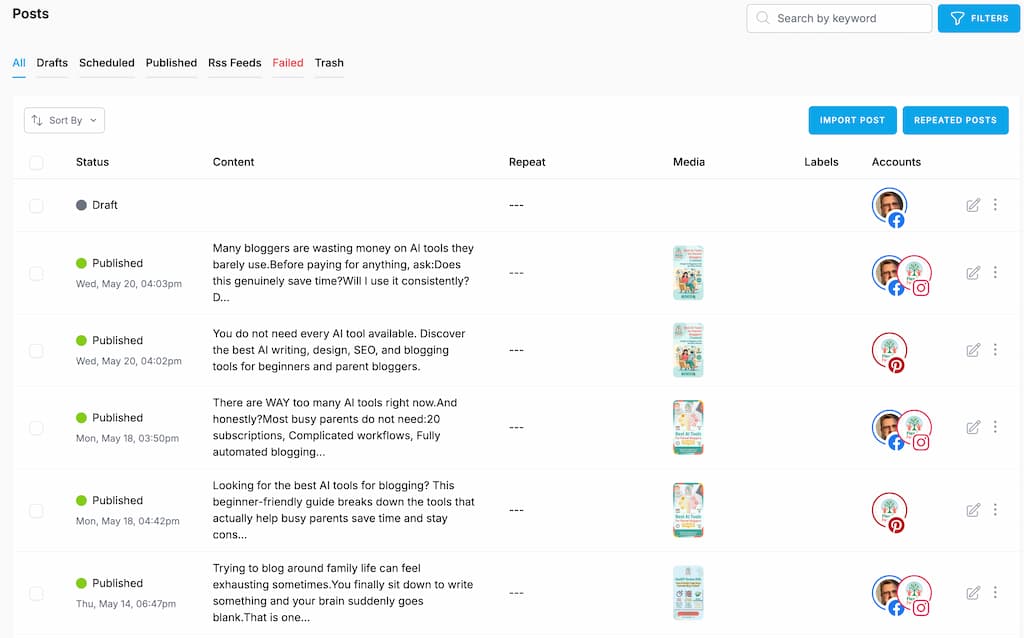
Instead of writing every post manually, the platform combines AI writing tools with social media scheduling to speed up your workflow.
The idea is simple.
Rather than jumping between Facebook, Instagram, Pinterest, and other platforms individually, you manage everything from one place.
What Can Content360 Do?
Depending on the plan you choose, Content360 includes features such as:
- AI-generated social media posts
- AI image generation
- Multi-platform scheduling
- Social media calendar
- Content organisation tools
- Post repurposing
- Basic analytics
The aim is to reduce the amount of time you spend creating and publishing content.
Who Is It Designed For?
Content360 is aimed at:
- Bloggers
- Content creators
- Small business owners
- Affiliate marketers
- Anyone managing multiple social media accounts
If you’re publishing content regularly across several platforms, having everything in one dashboard can be appealing.
Is It an AI Writer or a Scheduling Tool?
In reality, it’s both.
The AI helps generate ideas and draft posts.
The scheduling tools help you publish those posts across different platforms.
For some creators, that’s a powerful combination.
For others, the AI may simply become a starting point that still needs plenty of editing.
My First Impression
When I first started using Content360, I thought the concept was excellent.
Bringing AI writing and social media scheduling together made sense.
The question wasn’t whether the platform had useful features.
It was whether those features genuinely made my workflow easier.
As you’ll see throughout this review, the answer wasn’t quite as straightforward as I expected.
See Content360 in Action
Reading about a tool is helpful, but sometimes it’s easier to understand it when you can actually see the dashboard and features in action.
The video below provides a walkthrough of the Content360 platform, showing how it works, what the interface looks like, and how you can create and schedule social media content across multiple platforms.
As you watch, think about one question:
Would this simplify your workflow, or would it add another layer to it?
That’s ultimately what determines whether a tool like Content360 is worth using.
After you’ve watched the demo, keep reading to see how my own experience compared and why I eventually chose a simpler workflow for Flex For Families.
What Content360 Actually Does
Content360 is designed to simplify one of the biggest challenges bloggers face:
Turning one piece of content into multiple social media posts.
Instead of writing separate updates for Facebook, Instagram, Pinterest, and other platforms, Content360 uses AI to help generate content and lets you schedule it from one dashboard.
For creators publishing regularly, that’s an attractive proposition.
AI-Generated Social Posts
One of Content360’s headline features is its AI writer.
You can provide a blog post, topic, or prompt, and it will generate social media captions for different platforms.
This can be useful when you’re staring at a blank screen or need a starting point.
The important thing to remember is that AI should help you create content, not replace your own voice.
Multi-Platform Scheduling
This was the feature that interested me most.
Rather than logging into Facebook, Instagram, and Pinterest separately, Content360 lets you schedule posts from a single calendar.
For anyone managing several social platforms, that’s a genuine time saver.
AI Image Generation
Content360 also includes AI image creation.
This can be useful for creating quick graphics to accompany your posts, particularly if you don’t already have a design workflow.
If you already use tools like Canva or WA ImageStudio, you may find yourself sticking with those instead.
Content Calendar
Everything sits inside a single publishing calendar, making it easier to see what content is scheduled across different platforms.
That visual overview can help you stay organised, especially if you’re publishing several blog posts each month.
My Take
I think Content360 succeeds in bringing lots of useful features together.
The question isn’t whether it can create and schedule content.
It can.
The more important question is whether it actually saves you time once it becomes part of your everyday workflow.
For me, that answer turned out to be more complicated than I expected.
Why I Stopped Using Content360
This is probably the most important section of the review.
Because I didn’t stop using Content360 because it was a bad product.
I stopped using it because it no longer suited the way I wanted to work.
The Image Size Problem
The biggest frustration was something quite practical.
I create many of my graphics using WA ImageStudio, and the PNG files it produces are often larger than 10MB.
Content360 has an upload limit, so those images wouldn’t upload without me converting them to JPEG first.
That doesn’t sound like a major issue.
But when you’re publishing regularly, those extra steps soon add up.
Ironically, uploading the same images directly to Facebook and Pinterest wasn’t a problem.
Eventually, I realised I was creating extra work just to use the scheduling tool.
The AI Didn’t Sound Like Me
The second reason was even more important.
The AI-generated posts were perfectly usable.
But they weren’t me.
Flex For Families has developed its own voice over time.
I want readers to feel like they’re hearing from a real parent who’s been through the same challenges they face.
I found myself rewriting almost every AI-generated post to sound more like my own writing.
At that point, the time-saving benefit started disappearing.
Native Platforms Became Simpler
As Flex For Families grew, I found myself using Facebook and Pinterest directly more often.
The native scheduling tools continued to improve, and I realised I didn’t actually need another platform sitting in the middle.
My workflow became simpler.
And simpler usually means more sustainable.
Would I Buy It Again?
Yes, I probably would.
Not because I still use it every day.
But because it helped me understand what I actually needed from a social media tool.
It also reminded me that buying software isn’t the same as solving a problem.
My Biggest Lesson
One thing I’ve learned through building Flex For Families is this:
The best tool isn’t always the one with the most features.
It’s the one that removes friction from your workflow.
For me, posting directly to Facebook and Pinterest turned out to be easier than trying to automate everything through another platform.
That doesn’t mean Content360 won’t be the right choice for someone else.
It simply means your tools should fit the way you work, rather than forcing you to change your workflow to fit the tool.
Content360 Features Explained Simply
Content360 packs quite a few features into one platform, but you don’t need to use everything to get value from it.
Here’s a simple breakdown of what each feature is designed to do.
AI Social Post Generator
This is the feature most people buy Content360 for.
You give the AI a prompt, topic, or piece of content, and it generates social media posts for platforms like Facebook and Instagram.
For overcoming writer’s block, it’s genuinely useful.
Just don’t expect it to sound exactly like you without some editing.
Best for: Creating first drafts and generating ideas quickly.
Multi-Platform Scheduling
Rather than logging into each social network separately, Content360 lets you schedule posts from one dashboard.
For creators managing several platforms, this can save a significant amount of time.
Best for: Bloggers posting consistently across multiple social media accounts.
AI Image Generation
Content360 can also generate images using AI.
If you don’t already use Canva or another design tool, this is a nice addition.
Personally, I preferred creating images with WA ImageStudio, so I didn’t use this feature as much.
Best for: Quick graphics and simple social media visuals.
Content Calendar
The built-in calendar lets you see all your scheduled posts in one place.
It’s an easy way to keep your publishing organised and spot any gaps in your schedule.
Best for: Bloggers who like planning their content in advance.
Social Media Management
Instead of opening multiple browser tabs every time you want to publish content, Content360 brings everything together into a single workspace.
That’s one of its biggest strengths.
Best for: Saving time when managing several platforms.
Which Features Matter Most?
Looking back, the feature I found most valuable wasn’t the AI.
It was the ability to manage multiple social platforms from one place.
That’s where Content360 offers the biggest practical benefit.
Does AI Really Save Time?
This is probably the question that matters more than anything else.
After all, most AI tools promise the same thing.
“Save hours every week.”
The reality is a little more nuanced.
Yes… AI Can Save Time
If you’re struggling to write social posts from scratch, AI can be incredibly helpful.
Instead of staring at a blank page, you have something to work with almost instantly.
That alone can speed up your workflow.
But Only If You Don’t Rewrite Everything
This is where my experience changed.
I found that most of the AI-generated posts needed editing before I was happy to publish them.
They were perfectly readable.
They just didn’t sound like Flex For Families.
As my brand developed, I wanted my posts to feel more personal and reflect my own experiences.
The more established your brand becomes, the more important your voice becomes.
AI Works Best as an Assistant
Today, I see AI very differently.
I don’t expect it to create finished content.
I expect it to help me:
- Generate ideas
- Create first drafts
- Overcome writer’s block
- Speed up repetitive tasks
That’s where AI delivers the most value.
My Verdict
Can AI save time?
Absolutely.
Can it replace your writing?
Not if you’re trying to build a brand that people trust.
For me, AI works best when it helps me write faster, not when it tries to write instead of me.
AI Is a Starting Point, Not Your Brand
One of the biggest lessons I’ve learned from using AI tools like Content360 is this:
AI can help you create content. It can’t create your voice.
When I first started blogging, I probably would have been happy publishing AI-generated posts with only minor edits.
At that stage, I was still finding my own style.
Today, it’s different.
Flex For Families has its own personality, tone, and way of helping people.
That’s something AI can’t fully replicate.
People Follow People
Readers don’t return because your content sounds polished.
They come back because they recognise your perspective.
Your stories.
Your experiences.
Your way of explaining things.
Those are the things that build trust over time.
Use AI to Remove Repetitive Work
This is where I think AI is at its best.
Let it help you:
- Brainstorm ideas
- Create rough drafts
- Suggest headlines
- Repurpose content
- Beat writer’s block
Then step in and make the content yours.
Don’t Let AI Become Your Workflow
One mistake I think many bloggers make is trying to automate everything.
Ironically, that often creates more work because they spend so much time fixing AI output.
Instead, build your workflow around your own knowledge and experience.
Use AI where it genuinely saves time.
Ignore it where it gets in the way.
My Biggest Takeaway
The tools I continue using are the ones that quietly remove friction from my workflow.
The tools I stop using are usually the ones that ask me to change the way I naturally work.
For me, Content360 reinforced an important lesson.
AI is a brilliant assistant.
But your experience, your personality, and your voice are still your biggest advantage as a blogger.
Content360 vs Native Scheduling
One of the biggest reasons I eventually stopped using Content360 was because the platforms themselves kept improving.
Facebook, Instagram, and Pinterest all offer their own scheduling tools.
That made me ask an important question:
Do I actually need another platform sitting in the middle?
For me, the answer eventually became no.
What Native Scheduling Does Well
Today, posting directly through the platforms gives me:
- Full image quality without upload restrictions
- Access to the latest platform features
- Fewer tools to manage
- A simpler workflow
When I upload directly to Facebook or Pinterest, I know exactly how my content will appear.
There are no extra export steps or compatibility issues.
Where Content360 Has the Advantage
That doesn’t mean Content360 doesn’t have benefits.
It still offers:
- One dashboard for multiple platforms
- AI-generated captions
- A central content calendar
- The ability to schedule everything at once
If you’re managing several social accounts every day, that’s a real convenience.
Why I Chose the Simpler Option
For Flex For Families, I realised I wasn’t saving time anymore.
I was creating images in WA ImageStudio, converting them so they met Content360’s upload limits, checking the AI output, then scheduling the posts.
Eventually, it became easier to post directly.
Sometimes the simplest workflow is also the fastest.
My Recommendation
If you’re posting to multiple platforms every day, Content360 could still save you time.
If you’re publishing a few quality posts each week, don’t overlook the native scheduling tools.
They’re free, they’ve improved a lot, and they may already do everything you need.
Content360 vs Tailwind
Although both tools help you publish content, they’re built for slightly different audiences.
Choose Content360 If…
Your goal is to manage multiple social media platforms from one place.
Content360 combines:
- AI-generated social posts
- AI image creation
- Facebook scheduling
- Instagram scheduling
- Pinterest scheduling
- A central content calendar
It’s designed to be an all-in-one social media tool.
Choose Tailwind If…
Pinterest is your main focus.
Tailwind specialises in:
- Pinterest scheduling
- SmartSchedule
- Pinterest analytics
- Pinterest-focused workflows
- Tailwind Create
If most of your traffic comes from Pinterest, Tailwind offers more platform-specific features.
Which Offers Better AI?
Content360 places much more emphasis on AI content creation.
Tailwind includes AI tools too, but they’re designed to support Pinterest rather than replace your social media workflow.
That said, I found myself editing AI output from both tools.
Neither could fully capture the Flex For Families voice.
Which One Would I Recommend?
It depends on the problem you’re trying to solve.
If you need one dashboard for several social platforms, Content360 makes more sense.
If Pinterest is your primary traffic source and you want advanced scheduling features, Tailwind is the stronger option.
My Verdict
Personally, I no longer use either platform.
Today, I post directly to Facebook and Pinterest because that’s the workflow that fits my business best.
But if I had to choose between the two today, I’d base my decision on one simple question:
Am I trying to manage multiple platforms, or am I trying to grow Pinterest traffic?
Answer that, and the right tool usually becomes obvious.
If you’d like to read more about Tailwind before deciding, take a look at my Tailwind Review, where I compare its features, pricing, and whether it’s worth paying for before your blog starts getting traffic.
Should New Bloggers Use Content360?
This is probably the question I wish I’d asked myself before buying it.
Not because I regret purchasing Content360.
But because I now understand that the right tool at the wrong time is still the wrong investment.
My Answer
For most brand-new bloggers, I’d say no, at least not yet.
When you’re just starting out, your biggest challenges aren’t scheduling posts or generating AI captions.
They’re usually:
- Publishing your first blog posts.
- Finding your writing style.
- Learning where your audience spends time.
- Creating a consistent routine.
Content360 doesn’t solve those problems.
It helps once you’ve already built that foundation.
Build Your Process First
One thing I’ve learned from building Flex For Families is that every new tool should remove friction.
If you don’t have a regular publishing routine yet, there isn’t much to automate.
I’d rather see a new blogger:
- Write one helpful blog post each week.
- Create a few Pinterest pins.
- Share it on Facebook.
- Repeat consistently.
Once that starts becoming difficult to manage, that’s the time to look at automation.
When Content360 Starts Making Sense
I think Content360 becomes much more valuable if you:
- Publish several pieces of content each week.
- Post across multiple social platforms.
- Already have an established brand voice.
- Want to save time by managing everything from one place.
At that stage, it becomes a productivity tool rather than another distraction.
My Recommendation
Don’t buy Content360 because it promises to save time.
Buy it when you’re busy enough that it actually will.
Content360 Review: Pros and Cons
Every tool has strengths and weaknesses.
Content360 is no different.
Here’s what stood out to me after using it.
Pros
One-Time Purchase
One of Content360’s biggest advantages is that it isn’t another monthly subscription.
Compared with many social media scheduling tools, that can make it much more affordable over the long term.
Multi-Platform Scheduling
Managing Facebook, Instagram, Pinterest, and other platforms from one dashboard genuinely saves time.
This was easily my favourite feature.
AI Helps You Get Started
The AI can generate captions, ideas, and first drafts in seconds.
It’s particularly useful when you’re staring at a blank screen.
Clean, Organised Workflow
Having your scheduled content displayed in one calendar makes it easier to stay organised and maintain a publishing routine.
Good Value for Established Creators
If you’re posting frequently across multiple platforms, Content360 offers plenty of functionality for the price.
Cons
AI Doesn’t Replace Your Voice
This was my biggest issue.
The AI-generated posts often needed rewriting before they sounded like Flex For Families.
Over time, that reduced the time-saving benefit.
Image Upload Restrictions
The image size limit created unnecessary extra work because I had to convert files before uploading them.
Posting directly to Facebook and Pinterest didn’t have the same issue.
Some Features May Go Unused
Depending on your workflow, you may not use every AI feature or scheduling option.
It’s worth asking whether you’ll actually benefit from everything included.
Not Essential for New Bloggers
If you’re only publishing occasionally, native scheduling tools may already do everything you need.
My Overall Take
Content360 delivers on many of its promises.
The key question isn’t whether it’s a good platform.
It’s whether it genuinely fits the way you like to create content.
For me, simplicity eventually won.
Who Is Content360 Best For?
After using Content360 myself, I don’t think it’s a tool for every blogger.
But I do think it’s the right fit for certain creators.
Content360 Is Best For:
Bloggers Managing Multiple Social Platforms
If every new blog post needs to be shared across Facebook, Instagram, Pinterest, and other channels, Content360 can simplify that process.
Managing everything from one dashboard is a real advantage.
Content Creators Who Want AI Assistance
If you’re comfortable using AI as a brainstorming partner rather than a finished solution, Content360 can speed up content creation.
It works best when you see AI as an assistant, not a replacement.
Established Bloggers
Once you’ve developed your own writing style and know how you want your content to sound, you’ll be in a much better position to use AI effectively.
You’ll know what to keep, what to edit, and what to ignore.
Bloggers Looking for a Lower-Cost Alternative
Because Content360 is available as a one-time purchase, it can work out cheaper than subscription-based social media tools for some users.
Content360 May Not Be Right For:
Brand-New Bloggers
If you’re still finding your voice, I’d focus on writing your own content first.
Learning how to communicate with your audience is a skill that’s difficult to outsource.
Bloggers Who Prefer Simplicity
If you’re happy posting directly to Facebook, Pinterest, or Instagram, you may not need another platform in your workflow.
That’s the conclusion I eventually reached.
Bloggers Who Already Have a Strong Design Workflow
If you already use tools like Canva or WA ImageStudio, you may not get much value from Content360’s AI image features.
My Recommendation
I think Content360 sits in an interesting place.
It’s not a tool I’d recommend as one of the first purchases for a new blogger.
But once you’re publishing regularly across several platforms, it can become a useful way to save time and stay organised.
As with every tool I review on Flex For Families, my advice is the same.
Start by building the habit.
Then buy the tools that help you keep it.

About the Reviewer
Hi, I’m John Crossley, founder of Flex For Families.
I’m a parent, blogger, and online business owner who helps families find realistic ways to create more flexibility through blogging, affiliate marketing, and online business.
Like many people, I’ve spent years researching online opportunities, testing platforms, and learning how to separate genuine business models from expensive hype. I’ve also experienced the frustration of chasing opportunities that promised freedom but demanded more time away from family.
Today, I use that experience to review courses, side hustles, AI opportunities, and online business programmes through a simple lens:
Will this genuinely help parents create more flexibility, or will it create more pressure?
Every review on Flex For Families focuses on costs, time commitments, risks, and realistic expectations, so you can make informed decisions before investing your time or money.
Final Verdict: Is Content360 Worth It in 2026?
After using Content360 myself, I think it’s a good tool.
I just don’t think it’s the right tool for every blogger.
What I Liked
Content360 delivers on many of its promises.
It gives you:
- AI-assisted content creation
- Multi-platform scheduling
- A central content calendar
- A one-time purchase instead of another monthly subscription
If you’re publishing regularly across several social platforms, those features can genuinely save time.
Why I Moved On
As Flex For Families grew, I realised I valued simplicity more than automation.
Posting directly to Facebook and Pinterest fitted my workflow better.
I also found myself rewriting most of the AI-generated content because it didn’t sound like my brand.
Eventually, I was spending more time editing than I was saving.
That’s not a criticism of Content360.
It’s simply a reminder that the best tool is the one that fits the way you naturally work.
My Recommendation
If you’re an established blogger managing several social media platforms, Content360 is well worth considering.
If you’re just starting your blogging journey, I’d focus on building your content, finding your voice, and creating a consistent publishing routine first.
Those things will have a much bigger impact than any AI tool.
Once you’ve built that foundation, you’ll be in a much better position to decide whether Content360 will genuinely save you time.
My Rating
⭐⭐⭐⭐ 4.3/5
Content360 is a capable social media management platform with some genuinely useful AI features.
I simply believe that your workflow should determine whether you need it, not clever marketing.
Build Your Blog Before You Build Your Tool Stack
The biggest lesson I’ve learned is that successful blogs aren’t built by buying every new AI tool. They’re built by consistently creating helpful content.
If you’re just getting started, download my free Parent Blogging Starter Kit. It will help you build strong foundations before deciding which tools are worth investing in.
Get the Parent Blogging Starter Kit →
Family-first blogging. Simple systems. Real progress.
Frequently Asked Questions
What is Content360?
Content360 is an AI-powered social media management platform that helps bloggers and content creators generate, organise, and schedule posts across multiple social media platforms from a single dashboard.
Is Content360 worth it?
It depends on your workflow. If you’re managing several social media accounts and want to save time, Content360 offers good value, especially with its one-time purchase model. If you’re a new blogger, you may be better off focusing on creating content before investing in automation.
Does Content360 use AI?
Yes. Content360 includes AI tools for generating social media posts and images. I found them useful for creating first drafts, but I still preferred editing everything so it matched my own brand voice.
Is Content360 better than Tailwind?
They’re designed for different purposes. Content360 is an all-in-one social media management platform, while Tailwind specialises in Pinterest marketing. If Pinterest is your main traffic source, Tailwind is probably the stronger choice. If you manage several social platforms, Content360 may be a better fit.
Is Content360 suitable for beginners?
It can be, but I don’t think most beginners need it immediately. I’d recommend learning how to create content consistently before adding another tool to your workflow.
Why did you stop using Content360?
I found that posting directly to Facebook and Pinterest better suited my workflow. I also ran into image upload limits and spent too much time editing AI-generated content to match the Flex For Families brand voice.
Can AI replace writing social media posts?
In my experience, no. AI is excellent for generating ideas and creating first drafts, but your own voice and experience are what make your content memorable.
Let’s Chat
Now I’d love to hear your thoughts.
Have you tried Content360 or another AI social media tool?
Did it genuinely save you time, or did you find yourself editing the AI output more than you expected?
I’m also curious about your workflow.
- Do you schedule everything in advance?
- Do you post directly on each platform?
- Or are you still looking for a system that fits the way you work?
There’s no perfect answer.
The best workflow is the one you’ll actually stick to.
Share your experience in the comments below. Your insights could help another busy parent decide whether Content360 is the right fit for their blogging journey.