

If you are trying to grow a blog with Pinterest, Tailwind is probably one of the first tools you will hear about.
It gets recommended everywhere.
- Blogging courses.
- Pinterest tutorials.
- Facebook groups.
- YouTube videos.
And the promise sounds perfect for busy parent bloggers.
Create your pins.
Schedule them in advance.
Let Tailwind keep your Pinterest account active while you get on with family life.
That sounds brilliant.
But here is the question I think more new bloggers should ask:
Is Tailwind worth paying for before you actually have traffic?
Because there is a big difference between needing a scheduling tool and needing a Pinterest strategy.
I briefly tested Tailwind’s free version years ago on my previous site, Smart Passive Income Success. These days, I do not use Tailwind on Flex For Families.
Instead, I focus mainly on Pinterest and Facebook and post directly onto those platforms.
That does not mean Tailwind is bad.
It means I want to look at it honestly from the perspective of a busy parent blogger trying to decide where their time and money should go.
In this review, I will break down what Tailwind does, how the free plan works, what the paid plans offer, how it compares to Pinterest’s own scheduler, and whether it is worth paying for before your blog has consistent traffic.
If you are trying to grow your blog without adding another monthly cost too early, this review should help.
Tool: Tailwind
Type: Pinterest and social media scheduling tool
Best For: Bloggers who already create regular Pinterest content and want to save time by scheduling pins in advance.
Not Ideal For: Brand-new bloggers with little content, no Pinterest rhythm yet, or limited traffic who may not need another paid tool straight away.
Verdict: Tailwind can be a useful time-saving tool for bloggers who already use Pinterest consistently. It helps with scheduling, content planning, analytics, and staying active without logging in every day.
However, I would not treat Tailwind as a shortcut to traffic. If you are still building your blog, creating content, and learning Pinterest basics, the free Pinterest scheduler may be enough until you have a clearer strategy.
My Rating: ⭐⭐⭐⭐ 4.2/5
What Is Tailwind?
Tailwind is a social media scheduling tool best known for helping bloggers plan and publish Pinterest content more efficiently.
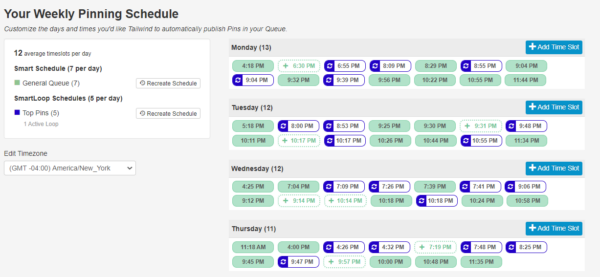
Instead of logging into Pinterest every day to upload new pins, Tailwind allows you to create a batch of content, schedule it in advance, and let it publish automatically.
For busy parent bloggers, that’s an appealing idea.
Rather than squeezing Pinterest into your day between school runs and bedtime routines, you can dedicate an hour each week to planning your content and let Tailwind handle the publishing.
What Does Tailwind Do?
Tailwind includes several tools designed to make Pinterest marketing easier, including:
- Pin scheduling
- SmartSchedule posting times
- Tailwind Create for designing graphics
- AI-assisted caption writing with Ghostwriter
- Pinterest analytics
- Basic social media scheduling for other platforms
The goal isn’t to replace your Pinterest strategy.
It’s to make that strategy easier to manage.
Is Tailwind Officially Approved by Pinterest?
Yes.
One reason Tailwind became so popular is that it’s an official Pinterest Partner.
That means it connects to Pinterest through approved methods rather than relying on unofficial automation.
For bloggers, that’s reassuring because you’re using a tool designed to work alongside Pinterest rather than around it.
Tailwind Isn’t a Traffic Shortcut
This is worth emphasising.
Tailwind doesn’t magically increase your traffic.
It won’t make poor content rank.
It won’t guarantee viral pins.
Instead, it helps you stay consistent.
And consistency is often one of the biggest challenges for busy bloggers.
My Take
I can completely understand why Tailwind appeals to bloggers.
If you’re publishing new content regularly and Pinterest is one of your main traffic sources, scheduling everything in one sitting could save a significant amount of time.
The question isn’t whether Tailwind is useful.
The real question is whether it’s the right investment for where your blog is today.
Why Pinterest Still Matters for Parent Bloggers
Every year someone claims that Pinterest is dead.
And every year, bloggers continue getting traffic from it.
The reason is simple.
Pinterest isn’t really a social media platform.
It’s a visual search engine.
People visit Pinterest looking for answers, inspiration, and ideas.
That makes it a fantastic fit for blog content.
Pinterest Users Are Looking for Solutions
Think about the kinds of things parents search for:
- Meal ideas
- Parenting tips
- Home organisation
- Family budgeting
- Craft activities
- Blogging advice
- Side hustle ideas
Those aren’t just social posts.
They’re topics people actively search for.
If your blog helps answer those questions, Pinterest can become a valuable source of long-term traffic.
Pins Have a Longer Lifespan
Unlike many social platforms where posts disappear from feeds within hours, Pinterest content can continue appearing in search results for months or even years.
A single well-designed pin can drive visitors long after you’ve published it.
That’s one reason Pinterest remains attractive for bloggers.
It Fits Around Family Life
One thing I like about Pinterest is that it doesn’t demand constant attention.
You don’t need to be online every day replying to comments or chasing trends.
You can create pins when you have time, publish them consistently, and let Pinterest continue working in the background.
For busy parents, that’s a huge advantage.
Why I Still Use Pinterest
Although I no longer use Tailwind, Pinterest remains one of the platforms I focus on for Flex For Families.
I create pins, publish them directly, and use Pinterest as another way for parents to discover my content.
It’s a slower strategy than chasing viral social media trends.
But it’s also one that can keep sending visitors to your blog long after you’ve finished creating the content.
My Advice for New Bloggers
Before worrying about scheduling tools, focus on learning how Pinterest works.
- Create helpful blog posts.
- Design eye-catching pins.
- Understand Pinterest keywords.
- Publish consistently.
Once you’ve built that habit, you’ll be in a much better position to decide whether a tool like Tailwind is worth adding to your workflow.
Because automation works best when you already have a process worth automating.
What Tailwind Actually Does
At its core, Tailwind is designed to solve one problem:
It helps you stay consistent on Pinterest without having to post manually every day.
If you’re publishing new blog posts regularly, creating multiple pins, and trying to build traffic, that can be a real time saver.
Rather than logging into Pinterest every morning, you can create your content in batches and let Tailwind publish it automatically.
That’s where its value lies.
Scheduling Your Pins
Tailwind’s biggest feature is its scheduling tool.
You can upload multiple pins at once, choose when they should be published, and let Tailwind spread them out over days or weeks.
For busy parents, that means you could spend an hour on Sunday planning your Pinterest content instead of trying to remember to pin something every evening.
Finding the Best Posting Times
Tailwind includes SmartSchedule, which recommends publishing times based on when your audience is most active.
Rather than guessing when to post, the platform aims to help your pins appear when they’re more likely to be seen.
It isn’t a guarantee of more traffic, but it does remove a lot of the guesswork.
Creating Pins More Quickly
Tailwind also includes Tailwind Create, which helps you generate Pinterest graphics using templates and your brand colours.
It’s designed for speed rather than advanced design work.
If you’re already comfortable using Canva, you may still prefer Canva’s flexibility.
But for bloggers looking to create simple pins quickly, it’s a useful addition.
AI Writing Assistance
Tailwind’s Ghostwriter feature uses AI to help generate:
- Pinterest titles
- Pin descriptions
- Social media captions
Like most AI tools, it works best as a starting point.
I’d still recommend editing everything so it sounds like you and matches your brand voice.
Analytics
Tailwind also provides reporting on how your pins are performing.
You can see which pins receive the most engagement and identify patterns that may help shape future content.
The analytics won’t create traffic by themselves.
But they can help you make better decisions over time.
My Take
Looking at everything Tailwind offers, I think its biggest strength isn’t any single feature.
It’s bringing several Pinterest tasks together in one place.
If you’re managing a growing Pinterest strategy, that convenience can be valuable.
The question is whether you need that convenience yet.
Tailwind Features Explained Simply
Tailwind includes quite a few features, but you don’t need to use them all on day one.
In fact, I’d recommend starting with the basics and only exploring additional tools as your blog grows.
Here’s a simple breakdown of the features that matter most.
SmartSchedule
This is Tailwind’s headline feature.
It automatically schedules your pins throughout the week using recommended posting times.
Instead of deciding when to publish every individual pin, Tailwind builds a posting schedule for you.
Best for: Bloggers who want consistency without logging into Pinterest every day.
Tailwind Create
Tailwind Create helps you turn blog posts into Pinterest graphics using ready-made templates.
It’s quicker than designing everything from scratch and works well for creating batches of pins.
Best for: Bloggers who want simple pin designs without spending hours creating graphics.
Ghostwriter AI
Ghostwriter uses artificial intelligence to help write:
- Pin titles
- Descriptions
- Social captions
It’s a useful time saver, but I’d always recommend reviewing the content before publishing.
Your personality is still one of your biggest strengths.
Best for: Beating writer’s block and speeding up content creation.
Pinterest Analytics
Tailwind’s analytics dashboard helps you understand which pins are performing well.
You can identify trends, spot your most successful content, and decide what to create more of.
For newer bloggers, it’s easy to become overwhelmed by the numbers.
Focus on simple questions like:
- Which pins get the most clicks?
- Which topics perform best?
- Which designs attract attention?
Those insights are often more valuable than chasing every available metric.
Best for: Bloggers who want to improve their Pinterest strategy over time.
Communities
Tailwind Communities allow users to share and discover content from other creators.
They were once one of Tailwind’s standout features.
Today, they’re less of a deciding factor than they used to be.
While they can still be useful for networking and finding niche content, I wouldn’t choose Tailwind solely because of Communities.
Best for: Bloggers who enjoy collaborating with others in their niche.
Multi-Platform Scheduling
Although Tailwind is best known for Pinterest, it also supports scheduling for other social platforms.
That can be useful if you prefer managing multiple channels from a single dashboard.
Personally, I now post directly to Pinterest and Facebook, so this isn’t a feature I’d pay for.
But bloggers managing several platforms may appreciate the convenience.
Which Features Matter Most?
If you’re considering Tailwind, I wouldn’t worry about learning every feature immediately.
Instead, focus on these three:
- SmartSchedule
- Tailwind Create
- Basic Analytics
Those alone provide most of the value for bloggers.
Everything else can be explored later as your blog and Pinterest strategy become more established.
Tailwind Pricing (2026): What Does It Actually Cost?
One of the biggest questions bloggers ask is:
“When should I start paying for Tailwind?”
It’s a fair question.
Every monthly subscription adds up, especially when you’re already paying for hosting, a domain name, and perhaps Canva or an email marketing platform.
The good news is that Tailwind offers a free plan, so you can try the platform before deciding whether it’s worth upgrading. It also offers several paid plans that unlock higher posting limits, more analytics, and additional AI features. Pricing and features can change over time, so it’s always worth checking Tailwind’s latest plans before subscribing. (Tailwind)
Here’s how I’d think about each option.
Free Plan
The free plan is designed to help you explore the platform without committing financially.
It’s ideal if you want to:
- Learn how Tailwind works
- Schedule a small number of posts
- Test whether it fits your workflow
The posting limits mean you’ll outgrow it if Pinterest becomes a major traffic source, but it’s an excellent place to begin.
Pro Plan
The Pro plan is where Tailwind starts making sense for many bloggers.
It increases your posting allowance and unlocks more advanced features, including analytics, design credits, and AI tools. If you’re publishing content consistently and pinning throughout the week, this is likely the plan you’d consider first. (Tailwind)
Advanced and Higher Plans
These plans are aimed at creators managing multiple brands, large publishing schedules, or client accounts.
For most parent bloggers, they’re probably more than you need.
Is Tailwind Good Value?
That depends on one question.
How much time is it actually saving you?
If Tailwind saves you several hours every month and helps you stay consistent on Pinterest, the subscription could easily justify itself.
But if you’re only publishing one or two blog posts each month, it’s much harder to make the numbers work.
My Advice
I wouldn’t upgrade simply because someone says every blogger should use Tailwind.
Upgrade when you reach the point where manual scheduling is slowing you down.
That’s when tools like Tailwind become an investment rather than an expense.
Tailwind Free Plan: Is It Enough?
If you’re a brand-new blogger, this is probably the most important question you can ask.
And my answer might surprise you.
For many beginners, yes, Tailwind’s free plan is enough.
What Is the Free Plan Designed For?
The free plan isn’t intended to grow a large Pinterest account.
Instead, it’s designed to help you answer one simple question:
“Does Tailwind fit the way I like to work?”
It gives you the opportunity to:
- Explore the Tailwind dashboard
- Schedule a limited number of pins
- Try features like Tailwind Create
- See whether the workflow saves you time
I actually think that’s a smart approach. It allows you to test the platform before committing to another monthly subscription.
When Will You Outgrow the Free Plan?
If Pinterest becomes an important part of your traffic strategy, you’ll eventually want more flexibility.
That’s when the paid plans start to make sense.
You might need:
- More scheduled posts
- More design credits
- Better analytics
- Access to additional AI features
The key word is eventually.
My Advice for New Parent Bloggers
This is where my opinion differs from many Tailwind reviews.
If your blog only has a handful of posts and you’re still learning how Pinterest works, I wouldn’t rush into a paid plan.
I’d spend my time:
- Publishing more blog posts
- Creating multiple pins for each article
- Learning Pinterest keywords
- Building a consistent pinning routine
Those activities are far more likely to grow your traffic than paying for a scheduling tool too early.
When Would I Upgrade?
I’d seriously consider upgrading when:
- You’re publishing new content consistently
- Pinterest is already sending you traffic
- Manual scheduling is becoming time-consuming
- You know you’ll use the additional features every month
At that point, Tailwind becomes a tool that helps you scale an existing system, rather than trying to create one.
My Verdict
One thing I genuinely like about Tailwind is that you don’t have to commit straight away.
The free plan gives you the chance to experiment without any financial pressure.
If I were starting a new blog today, that’s exactly where I’d begin.
- Learn Pinterest first.
- Build a content library.
- Develop a consistent workflow.
Then decide whether Tailwind will genuinely save you enough time to justify the upgrade.
For most busy parent bloggers, that’s a much lower-risk approach than paying from day one.
Tailwind vs Pinterest Scheduler
One of the biggest reasons I wanted to refresh this review is because Pinterest has changed.
A few years ago, Tailwind was almost essential if you wanted to schedule your pins.
Today, that’s no longer the case.
Pinterest now includes its own built-in scheduler, which means every blogger has a free way to plan content in advance.
So the real question becomes:
Is Tailwind worth paying for when Pinterest already lets you schedule pins?
What Pinterest’s Native Scheduler Does Well
Pinterest’s scheduler is surprisingly capable.
It allows you to:
- Schedule pins directly inside Pinterest
- Plan content in advance
- Stay consistent without another subscription
- Work from the platform you’re already using
For many new bloggers, that’s all you need.
It’s simple, free, and removes another monthly expense while you’re still building your blog.
Where Tailwind Has the Advantage
Tailwind offers more than just scheduling.
It also gives you:
- SmartSchedule recommendations
- Batch scheduling
- Pin creation tools
- AI writing assistance
- More detailed analytics
- Multi-platform scheduling
If you’re managing dozens of pins each week, those features can save a lot of time.
Which One Would I Choose?
If I were starting a brand-new blog today, I’d begin with Pinterest’s own scheduler.
Why?
Because I’d rather spend my budget on:
- Hosting
- Email marketing
- Creating great content
Once Pinterest became an established traffic source and manual scheduling started taking too much time, that’s when I’d revisit Tailwind.
My Verdict
For beginners, Pinterest’s native scheduler is often enough.
For bloggers with an established Pinterest strategy who want to save time and streamline their workflow, Tailwind becomes much more compelling.
In other words:
Start simple. Automate later.
Tailwind vs Canva Scheduler
Another alternative worth considering is Canva.
Many bloggers already use Canva to design their Pinterest graphics, so it’s natural to ask whether its Content Planner can replace Tailwind.
The answer depends on what you’re looking for.
What Canva Does Well
If you’re already designing every pin in Canva, the Content Planner offers a convenient workflow.
You can:
- Design your graphics
- Schedule them
- Keep everything in one place
That means one less tool to learn.
For bloggers who value simplicity, that’s a real advantage.
Where Tailwind Pulls Ahead
Tailwind was built specifically with Pinterest in mind.
Compared with Canva, it offers:
- More Pinterest-focused scheduling
- SmartSchedule recommendations
- Dedicated Pinterest analytics
- Ghostwriter AI
- Better workflow for managing large numbers of pins
If Pinterest is a major part of your traffic strategy, those extra features may justify the subscription.
Which One Do I Prefer?
Personally, I don’t currently use either platform for scheduling.
I create my pins and post directly to Pinterest.
That approach works well for where Flex For Families is today.
But if I had to choose between the two, I’d ask myself one question:
Do I need better Pinterest tools, or do I simply want an easier way to publish my designs?
If it’s the first, Tailwind is probably the stronger choice.
If it’s the second, Canva may already do everything you need.
My Recommendation
For most new parent bloggers, I’d keep things as simple as possible.
If you’re already paying for Canva Pro and only publish a handful of pins each week, there’s a good chance Canva’s scheduler will be enough.
If Pinterest grows into one of your biggest traffic sources and scheduling starts becoming a bottleneck, that’s when Tailwind becomes much easier to justify.
Like most blogging tools, the right time to buy it isn’t at the beginning.
It’s when it solves a problem you actually have.
Should New Bloggers Pay for Tailwind Before They Have Traffic?
If you’ve read this far, you can probably guess my answer.
In most cases, no.
That doesn’t mean Tailwind isn’t a good tool.
It means I think timing matters.
One mistake I see new bloggers make is buying too many tools before they’ve built the habits those tools are designed to support.
Build the System Before You Automate It
Imagine you’ve published:
- Five blog posts
- Ten Pinterest pins
- One pin every couple of weeks
At that stage, Tailwind isn’t solving your biggest problem.
Your biggest problem is creating enough content.
Automation only becomes valuable when you already have something worth automating.
Where I’d Spend My Money First
If you’re working with a limited budget, I’d prioritise:
- Reliable hosting
- A custom domain
- Learning how Pinterest works
- Creating helpful blog content
- Building an email list
Those investments will usually have a bigger impact than paying for a scheduling tool.
When Tailwind Starts Making Sense
I’d seriously consider Tailwind if:
- You’re publishing at least one new blog post each week.
- You’re creating multiple pins for every article.
- Pinterest is already sending you regular traffic.
- You’re struggling to keep up with manual scheduling.
At that point, Tailwind helps you save time rather than trying to create momentum.
The Flex For Families Approach
One of the ideas you’ll see throughout Flex For Families is this:
Buy tools to solve problems, not because other bloggers say you need them.
Every subscription should earn its place.
If Tailwind gives you back several hours every month, that’s a worthwhile investment.
If it sits unused because you’re still learning the basics, it’s simply another monthly bill.
My Recommendation
If you’re a brand-new parent blogger, I’d start with Pinterest’s free scheduler.
Learn what types of pins work.
Build a consistent publishing habit.
Create a library of helpful content.
Then, when your workflow becomes difficult to manage, take another look at Tailwind.
You’ll get far more value from it at that stage than you would on day one.
Does Tailwind Actually Increase Pinterest Traffic?
This is probably the biggest question people have about Tailwind.
And the honest answer is:
Not directly.
Tailwind doesn’t have a special relationship with Pinterest’s algorithm that automatically gives your pins more visibility.
What it does do is make it easier to stay consistent.
And consistency is often one of the biggest factors behind long-term Pinterest growth.
What Tailwind Can Help With
Tailwind can make it easier to:
- Publish pins regularly
- Schedule content in advance
- Keep your Pinterest account active
- Save time on repetitive tasks
- Identify which pins perform well
Those things can contribute to better results over time.
But they aren’t guaranteed to increase traffic on their own.
What Actually Drives Pinterest Traffic?
In my opinion, successful Pinterest strategies are built on four foundations:
- Helpful blog content
- Eye-catching pin designs
- Good Pinterest keyword research
- Consistent publishing
Tailwind can support the fourth point.
It can’t replace the other three.
A Tool Isn’t a Strategy
This is an important distinction.
Some reviews make it sound as though installing Tailwind will suddenly unlock Pinterest traffic.
I don’t think that’s realistic.
A scheduling tool is just that.
A tool.
Your results will still depend on the quality of your content and how well it matches what Pinterest users are searching for.
Think of Tailwind as a Time Saver
For me, the biggest benefit of Tailwind isn’t traffic.
It’s time.
If it helps you stay organised and consistent while juggling work, family life, and blogging, then it has done its job.
Any traffic growth is a result of that consistency, not the software itself.
My Verdict
Can Tailwind help you grow Pinterest traffic?
Yes, indirectly.
By making it easier to publish consistently, it supports one of the habits that successful Pinterest bloggers tend to have.
But if you’re looking for a shortcut to more clicks, saves, or visitors, Tailwind isn’t it.
Focus on creating content people genuinely want to find.
Then use Tailwind to help you deliver that content consistently.
Tailwind Review: Pros and Cons
Like any blogging tool, Tailwind has strengths and weaknesses.
The key is understanding whether those strengths solve a problem you actually have today.
Pros
Saves Time
This is Tailwind’s biggest advantage.
Instead of logging into Pinterest every day, you can batch your content, schedule it in advance, and let Tailwind publish it automatically.
For busy parents, that can mean more time creating content and less time managing social media.
Encourages Consistency
Consistency is one of the biggest challenges in Pinterest marketing.
Tailwind makes it easier to keep publishing, even during busy weeks when family life takes priority.
Beginner-Friendly Interface
Despite having plenty of features, Tailwind is relatively easy to navigate.
Most bloggers can learn the basics without spending days watching tutorials.
Helpful AI and Design Tools
Features like Tailwind Create and Ghostwriter can speed up your workflow.
They won’t replace your creativity, but they can reduce the time spent designing graphics and writing descriptions.
Useful Analytics
The reporting tools help you understand which pins are performing well and where you should focus your efforts.
That information becomes more valuable as your Pinterest account grows.
Official Pinterest Partner
Because Tailwind is an approved Pinterest Partner, you can use it with confidence, knowing it integrates properly with the platform.
Cons
Another Monthly Subscription
This is probably the biggest drawback.
If you’re already paying for hosting, Canva Pro, an email platform, and other blogging tools, another subscription may not be the best use of your budget.
Not Essential for Beginners
If you’re still learning Pinterest, Tailwind may solve a problem you don’t have yet.
Many new bloggers can achieve good results using Pinterest’s own free scheduler.
Doesn’t Guarantee More Traffic
Tailwind makes scheduling easier.
It doesn’t guarantee that your pins will perform better.
Traffic still depends on the quality of your content, your pin designs, and your Pinterest strategy.
Some Features May Go Unused
Depending on how you work, you may never use features like Ghostwriter or Communities.
It’s worth asking whether you’re paying for tools you’ll actually use every week.
Learning Curve
While Tailwind is beginner-friendly overall, it still takes time to understand the dashboard, analytics, and different scheduling options.
My Overall Take
Tailwind is a solid tool.
The question isn’t whether it’s good.
The question is whether it’s the right tool for your current stage of blogging.
For established Pinterest users, it can save a significant amount of time.
For brand-new bloggers, I think there are usually better places to invest first.
Who Is Tailwind Best For?
Tailwind isn’t a must-have tool for every blogger.
But for the right person, it can be a fantastic investment.
Here’s who I think will benefit the most.
Tailwind Is Best For:
Bloggers Who Already Get Pinterest Traffic
If Pinterest is already sending visitors to your blog, Tailwind can help you build on that momentum.
Scheduling content in advance allows you to stay consistent without needing to log in every day.
Busy Parent Bloggers
If you’re balancing blogging with work, school runs, and family life, batching your Pinterest content can make a real difference.
Spending one hour scheduling pins for the week is often much easier than trying to remember to post every day.
Content-Rich Blogs
Tailwind works best when you have plenty of content to promote.
If you’re regularly publishing blog posts and creating multiple pins for each one, you’ll get much more value from its scheduling features.
Bloggers Managing Multiple Platforms
If you’re posting across Pinterest and other social channels, Tailwind’s multi-platform scheduling can help keep everything organised in one place.
Tailwind May Not Be Right For:
Brand-New Bloggers
If you’ve only published a handful of blog posts, I’d focus on creating more content before investing in scheduling software.
Content is the foundation.
Automation comes later.
Bloggers on a Tight Budget
When money is limited, I’d prioritise:
- Hosting
- Your domain name
- An email marketing platform
- Learning resources
Those investments are likely to have a greater impact in the early stages.
Bloggers Who Prefer Native Tools
Pinterest’s built-in scheduler has improved considerably.
If you’re happy posting directly through Pinterest and your workflow is manageable, you may not need Tailwind at all.
Casual Pinterest Users
If you only create a few pins each month, it’s difficult to justify paying for automation.
The free scheduler will probably meet your needs.
My Recommendation
I see Tailwind as a tool for growth, not a tool for getting started.
Once you’ve built a library of content, developed a consistent Pinterest strategy, and find yourself wishing there were more hours in the day, Tailwind starts to make a lot of sense.
Until then, keep things simple.
Learn the platform.
Create helpful content.
And only add new tools when they genuinely help you move faster.
Final Verdict: Is Tailwind Worth Paying for Before You Have Traffic?
After researching Tailwind, testing its free version in the past, and comparing it with the alternatives available today, my conclusion is quite simple:
Tailwind is an excellent tool, but not every blogger needs it immediately.
What Tailwind Gets Right
Tailwind solves a genuine problem.
It helps bloggers:
- Schedule Pinterest content in advance
- Stay consistent
- Save time
- Understand what’s working through analytics
If Pinterest is already an important part of your traffic strategy, those benefits can easily justify the subscription.
Where I Think Some Reviews Get It Wrong
Many reviews make Tailwind sound like the secret to Pinterest success.
I don’t believe that’s true.
The real drivers of Pinterest traffic are:
- Helpful blog content
- Well-designed pins
- Good keyword research
- Consistent publishing
Tailwind supports that process.
It doesn’t replace it.
My Recommendation
If you’re a brand-new blogger with only a handful of posts, I’d start by using Pinterest’s free scheduler.
Learn how Pinterest works.
Build your content library.
Create multiple pins for each article.
Once manual scheduling starts becoming a chore, that’s when Tailwind becomes a smart investment.
My Rating
⭐⭐⭐⭐ 4.2/5
Tailwind is one of the best Pinterest scheduling tools available today.
I simply don’t think every new blogger needs to pay for it from day one.
Build the habit first.
Then invest in the tools that help you do more of what already works.
Want More Pinterest Traffic Without Feeling Overwhelmed?
Before investing in more blogging tools, focus on building the right foundations. My free Parent Blogging Starter Kit will help you create content, attract readers, and grow your blog one simple step at a time.
Get the Parent Blogging Starter Kit →
Simple steps. Family-first blogging. Progress over perfection.
Frequently Asked Questions
Is Tailwind free?
Yes. Tailwind offers a free plan that lets you explore the platform and schedule a limited number of posts. It’s a good way to test whether Tailwind fits your workflow before upgrading.
Is Tailwind worth paying for?
It depends on where you are in your blogging journey. If Pinterest is already sending you traffic and you’re publishing content consistently, Tailwind can save you a lot of time. If you’re just starting out, the free plan or Pinterest’s native scheduler may be enough.
Does Tailwind increase Pinterest traffic?
Not directly. Tailwind helps you stay consistent by scheduling your content, but traffic still depends on creating helpful blog posts, attractive pin designs, and using good Pinterest SEO.
Is Tailwind an official Pinterest Partner?
Yes. Tailwind is an official Pinterest Partner, meaning it connects to Pinterest using approved integrations.
Is Tailwind better than Pinterest’s built-in scheduler?
Tailwind offers more advanced features, including SmartSchedule, analytics, AI writing tools, and multi-platform scheduling. Pinterest’s native scheduler is free and is often sufficient for new bloggers.
Is Tailwind better than Canva’s scheduler?
If your main focus is Pinterest, Tailwind offers more Pinterest-specific features. If you simply want to design and schedule graphics from one place, Canva’s Content Planner may be enough.
Should beginners use Tailwind?
Beginners can certainly try Tailwind’s free plan, but I wouldn’t recommend paying for it until you’ve built a consistent blogging and Pinterest routine.
What do you use for Pinterest?
Today, I post directly to Pinterest rather than using Tailwind. I prefer keeping my workflow simple and only adding paid tools when they solve a genuine problem.
Let’s Chat
Now I’d love to hear from you.
Do you use Tailwind, Pinterest’s built-in scheduler, Canva, or do you still post everything manually?
Everyone’s workflow is different, and there’s no single “right” way to manage Pinterest.
Some bloggers love automating everything.
Others prefer keeping things simple and posting directly.
I’d also be interested to know where you are in your blogging journey.
- Are you just getting started with Pinterest?
- Have you already seen traffic from it?
- Has Tailwind saved you time, or did you decide it wasn’t worth the cost?
Share your experience in the comments below.
The more perspectives we have, the easier it becomes for other parent bloggers to decide which approach is right for them.




I’ve been up in the air about adding Pinterest to my stable of Social Media accounts. Tailwind seems to add another layer to it. I definitely don’t want to be Pinning all day, Ha, Ha. You’ve really made me think about how this can help me move forward with my business by incorporating Tailwind.
Your clear and precise review is a BIG help. You’ve saved me a lot of research time and John, it is much appreciated.
Thanks so much — I really appreciate that! I completely get where you’re coming from. Pinterest can feel like a whole new world at first, and the idea of “Pinning all day” is exactly what I wanted to avoid too! That’s honestly where Tailwind makes all the difference — it lets you stay consistent without being constantly online.
What I love most is how it helps you batch and schedule everything in one go, so you can focus on creating great content instead of managing endless Pins. Once it’s set up, it pretty much runs quietly in the background while still driving steady traffic.
I’m glad the review helped clarify things — and if you do decide to give Pinterest a try, Tailwind’s SmartLoop and analytics tools are great starting points. Out of curiosity, what kind of business or content are you planning to promote on Pinterest?
John
This was a solid and practical review, John. I’ve used Tailwind before, though not as consistently as I should have. It really does take the pressure off when life gets busy. I’m curious, though, do you think Tailwind’s Communities are still as effective in 2025, or have most bloggers shifted toward group boards and collaborations instead? Where I come from, we say, sticks in a bundle are unbreakable. Collaboration still feels like the heart of growth.
John
Hey John,
Thanks so much — I really appreciate that! You’re absolutely right, Tailwind shines most when life gets hectic. Once it’s set up, it quietly keeps your content moving, even when you can’t be everywhere at once.
I love that saying — “sticks in a bundle are unbreakable.” It captures the spirit of collaboration perfectly. In 2025, I’d say Tailwind Communities are still valuable, especially for niche-specific sharing and steady traffic, but their impact depends on how active the members are. Some Communities thrive, while others have slowed down.
More bloggers are definitely combining them with group boards, collab Pins, and even content swaps through Facebook or Slack groups. The real growth still comes from connecting with others — whether that’s inside Tailwind or through your own network of like-minded creators.
Out of curiosity, have you found a particular type of collaboration that’s worked best for your content — Communities, group boards, or partnerships?
John