
If you are anything like me, you’ve probably spent most of your blogging journey focused on getting traffic.
- Writing blog posts.
- Learning SEO.
- Creating Pinterest pins.
Trying to get people to visit your website in the first place.
But eventually, a different question appears:
What happens when people leave?
Because the reality is that most visitors won’t come back.
They might read a blog post, find it useful, and then disappear forever.
That is what led me to start thinking more seriously about email marketing on Flex For Families.
I had already created my Parent Blogging Starter Kit.
I had set up Kit to manage subscribers and email sequences.
But I needed a better way to turn visitors into email subscribers.
That’s when I discovered Poptin.
I’ll be honest.
- I wasn’t looking for advanced conversion optimisation software.
- I wasn’t running A/B tests.
- I wasn’t trying to squeeze every possible subscriber out of my traffic.
I simply wanted a popup that looked professional, connected easily to Kit, and helped me give visitors a clear opportunity to join my email list.
After using Poptin for several weeks, I think it does that very well.
In this review, I’ll show you how I use Poptin on Flex For Families, what features I like most, whether the free version is enough for new bloggers, and whether I think it is worth using if you’re trying to grow your first email list.
If you’re building a blog around family life and wondering whether popups are worth it, this review should help.
Question: Do popups actually work for bloggers?
Answer:
Yes, popups can help bloggers grow their email lists by presenting a lead magnet or signup form at the right time. While they won’t create traffic or replace quality content, they can increase the number of visitors who become email subscribers when used strategically.
Tool: Poptin
Type: Popup and lead generation software
Best For: Bloggers who want a simple way to capture more email subscribers without needing technical skills
Not Ideal For: Large businesses looking for advanced conversion optimisation and complex testing features
Verdict: Poptin is one of the easiest popup tools I’ve used. The free version gave me everything I needed to create a professional popup, connect it to Kit, and start building my email list on Flex For Families.
I particularly like the template selection, the simple editor, and the ability to trigger popups based on scroll percentage and exit intent. While I haven’t explored the advanced paid features yet, the free plan has already proven useful for a growing blog.
My Rating: ⭐⭐⭐⭐ 4/5
Why I Chose Poptin for Flex For Families
For a long time, I didn’t worry too much about popups.
Like many bloggers, I was focused on creating content, improving SEO, and trying to get more visitors to the site.
The problem was that visitors were arriving and leaving without any clear next step.
That became more obvious once I created the Parent Blogging Starter Kit.
I had a free resource.
I had Kit set up to manage subscribers.
But I needed a better way to put that offer in front of visitors.
What I Was Looking For
My requirements were actually pretty simple.
I wanted a tool that could:
- Create professional-looking popups
- Connect easily with Kit
- Trigger at the right time
- Work without needing technical skills
- Offer a free plan while the site was still growing
I wasn’t looking for enterprise-level marketing software.
I wasn’t trying to optimise every tiny conversion percentage.
I just wanted a straightforward way to help readers discover the Starter Kit.
Why I Ended Up Choosing Poptin
When I started researching popup tools, Poptin kept appearing near the top of recommendation lists.
It had:
- Positive reviews
- A generous free plan
- Direct Kit integration
- A reputation for being beginner-friendly
That made it an easy choice to test.
My Setup Experience
The actual popup creation process was surprisingly simple.
I chose a template, customised the design, added my text, and connected it to my email signup process.
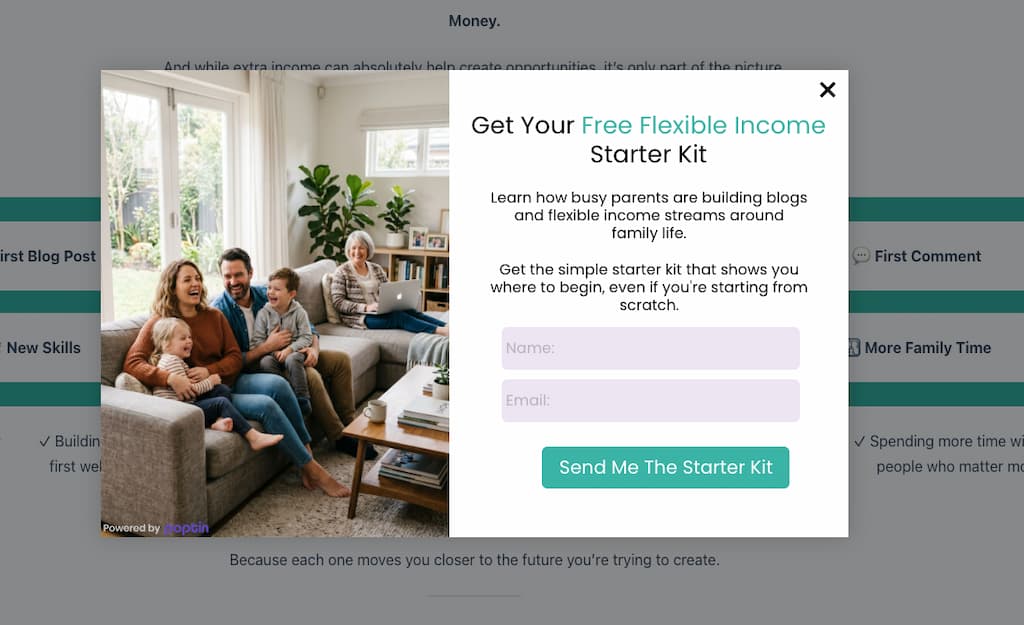
Most of the setup felt straightforward.
The only part that needed a little extra work was getting everything connected correctly inside Kit.
That wasn’t really a Poptin issue.
It was more about understanding how Kit handles forms and subscribers.
Once that was sorted, everything worked exactly as expected.
How I Use It Today
Right now, Poptin helps promote the Parent Blogging Starter Kit across Flex For Families.
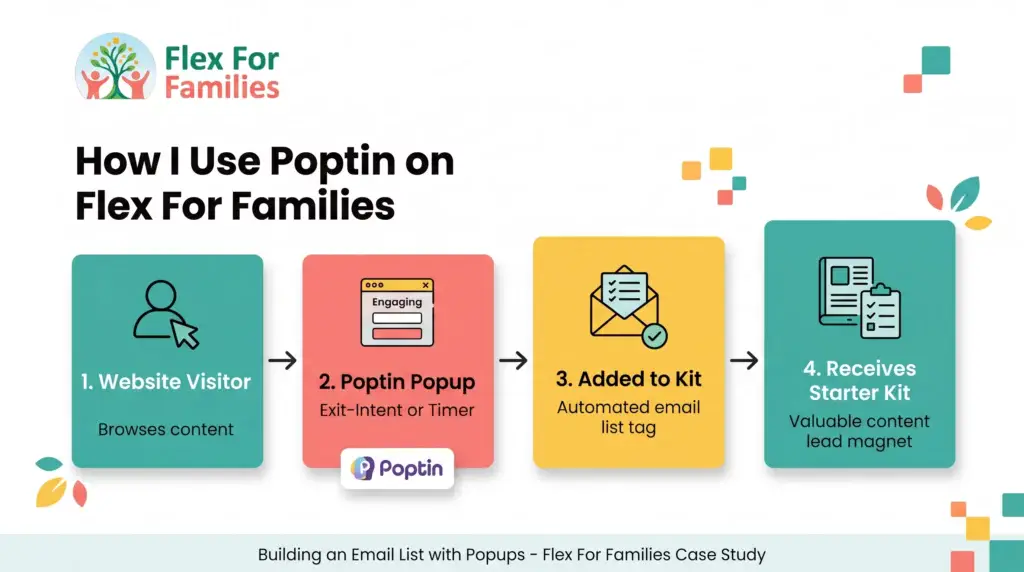
I currently use:
- Scroll percentage triggers
- Exit intent triggers
This means visitors see the offer after they’ve engaged with the content, rather than immediately after arriving.
That creates a much better experience than throwing a popup in someone’s face the moment they land on the site.
My First Impressions
It’s still relatively early days, so I can’t sit here and claim it has transformed the business overnight.
What I can say is this:
- The popup looks professional.
- The design process was easy.
- The integration works.
And it gives visitors a clear opportunity to join my email list before they leave.
For where Flex For Families is right now, that’s exactly what I wanted it to do.
Sometimes the best tools are not the ones with the most features.
They’re the ones that solve a specific problem simply and effectively.
So far, that’s been my experience with Poptin.
Quick Note: I’m John Crossley, founder of Flex For Families. I review online business opportunities through the lens of family life, focusing on costs, time commitments, risks, and whether they genuinely help parents create more flexibility.
What Is Poptin?
Poptin is a pop-up and lead-generation tool designed to help website owners turn more visitors into subscribers, leads, and customers.
In simple terms, it helps you show targeted messages to visitors at the right time.
For bloggers, that usually means:
- Growing an email list
- Promoting a free resource
- Encouraging newsletter signups
- Reducing visitor drop-off
Rather than hoping someone notices a signup form hidden in your sidebar, Poptin allows you to place your offer directly in front of them.
What Can Poptin Create?
Poptin can be used to create:
- Popups
- Exit-intent popups
- Slide-ins
- Lightboxes
- Full-screen overlays
- Embedded forms
Most bloggers will probably spend their time using a combination of popups and slide-ins.
How It Works
The process is fairly straightforward.
- Create a popup.
- Choose when it appears.
- Connect it to your email platform.
- Publish it on your website.
Visitors then see your offer based on rules you choose.
For example:
- When they reach 50% of a page
- When they’re about to leave
- After spending a certain amount of time on a page
That’s exactly how I use it on Flex For Families.
What Makes Poptin Different?
There are lots of popup tools available.
What stood out to me was how beginner-friendly Poptin feels.
You don’t need:
- Coding knowledge
- Design experience
- Marketing expertise
The templates do most of the heavy lifting for you.
That makes it particularly appealing for new bloggers who are already learning WordPress, SEO, email marketing, and content creation.
The Main Goal
At the end of the day, Poptin exists to solve one problem:
Helping more visitors take action before they leave your website.
Whether that action is joining your email list, downloading a freebie, or exploring another resource, that’s the job Poptin is trying to do.
Why Parent Bloggers Need More Than a Sidebar Form
When most people start blogging, they add a simple email signup form to their sidebar and assume that will be enough.
I did exactly the same thing.
The problem?
Most visitors never see it.
The Reality of Website Visitors
Think about your own browsing habits.
When was the last time you carefully examined someone’s sidebar?
Most people:
- Read the article
- Find the information they need
- Leave
They never notice the signup form sitting quietly on the side of the page.
That means you can be missing opportunities to connect with readers who genuinely enjoyed your content.
Traffic Is Hard to Earn
As bloggers, we spend countless hours:
- Writing content
- Learning SEO
- Creating Pinterest pins
- Sharing posts online
Getting visitors is hard work.
So it makes sense to give those visitors a clear next step before they leave.
Why I Added a Popup
This was one of the reasons I decided to add Poptin to Flex For Families.
I already had the Parent Blogging Starter Kit.
I already had Kit collecting subscribers.
But I realised many visitors were leaving without ever seeing the offer.
The popup solved that problem.
Instead of hoping someone discovers the Starter Kit, I can now present it to them at a relevant moment.
The Key Is Timing
One thing I was worried about initially was annoying visitors.
Nobody likes aggressive popups that appear the second a page loads.
That’s why I use:
- Scroll percentage triggers
- Exit-intent triggers
This means visitors only see the popup after they’ve engaged with the content or when they’re about to leave.
It feels much less intrusive.
Why Email Subscribers Matter More Than Page Views
Page views are great.
Subscribers are better.
A page view lasts a few minutes.
An email subscriber gives you the opportunity to continue helping someone long after they’ve left your website.
That is why growing an email list should be a priority from the beginning.
And that is why I believe most parent bloggers need more than a simple sidebar form.
You need a system that actively helps readers discover the value you are offering.
For me, that’s where Poptin fits into the picture.
If you’re not convinced email marketing matters yet, start with my guide on why every parent blogger needs an email list.
How I Use Poptin on Flex For Families
One thing I want to be clear about in this review is that I’m not using Poptin in a complicated way.
I’m not running dozens of popups.
I’m not constantly A/B testing designs.
And I’m not trying to squeeze every possible conversion from my traffic.
Instead, I’m using it to solve a very specific problem.
Promoting the Parent Blogging Starter Kit
The main purpose of my popup is to promote the Parent Blogging Starter Kit.
When someone visits Flex For Families, I want them to have a clear opportunity to:
- Discover the starter kit
- Join the email list
- Continue learning after they leave the site
Poptin helps me do that automatically.
Connecting Visitors to Kit
When someone enters their email address, the details are sent directly to Kit.
From there:
- The subscriber is added to my email list
- The starter kit is delivered
- The welcome sequence begins
Once everything was connected correctly, the process became completely automated.
Using Scroll Percentage Triggers
One feature I particularly like is the ability to show the popup after someone has engaged with the content.
Rather than interrupting readers immediately, my popup appears once they have scrolled down the page.
This means:
- They’ve already shown interest
- They’ve consumed some content
- The offer feels more relevant
From a reader experience perspective, I much prefer this approach.
Using Exit Intent
I also use exit-intent triggers.
This allows the popup to appear when someone looks like they are about to leave the website.
Think of it as a final opportunity to say:
“Before you go, would you like this free resource?”
Sometimes visitors are not ready to subscribe.
Sometimes they are.
Exit intent simply gives them the option.
Why This Setup Works for Me
What I like most is that the setup stays out of the way.
I do not need to manage it daily.
I do not need to constantly adjust settings.
The popup quietly does its job in the background while I focus on creating content.
For a busy parent blogger, that is exactly how a tool should work.
Poptin captures the subscriber. Kit handles everything that happens afterwards.
Poptin Features Explained Simply
One thing I appreciate about Poptin is that it does not overwhelm you with complicated marketing jargon.
Most of the important features are easy to understand, even if you have never used a popup tool before.
Here are the features I think bloggers will care about most.
Ready-Made Templates
If you’re not a designer, this is a huge time saver.
Poptin includes a library of templates that you can customise with:
- Your text
- Your colours
- Your images
- Your branding
This is exactly how I created my popup on Flex For Families.
Instead of starting from a blank screen, I simply customised an existing design.
Drag-and-Drop Editor
The editor is very straightforward.
You can:
- Move elements around
- Change text
- Adjust images
- Modify layouts
Without needing any coding knowledge.
For beginners, that simplicity is a big advantage.
Scroll Trigger Popups
This allows your popup to appear once a visitor reaches a certain percentage of the page.
For example:
- 25%
- 50%
- 75%
I use this feature because it lets readers engage with the content before seeing the offer.
Exit Intent Technology
Exit intent detects when someone appears ready to leave your site.
At that point, the popup appears with your offer.
This is one of the most popular features because it creates an opportunity to capture subscribers who might otherwise disappear forever.
Email Marketing Integrations
Poptin connects with many popular email platforms.
Including:
- Kit
- Mailchimp
- ActiveCampaign
- MailerLite
- Constant Contact
For me, the Kit integration was one of the biggest reasons I chose the platform.
Targeting Rules
You can choose:
- Which pages display popups
- When they appear
- How often visitors see them
This helps avoid showing the same popup repeatedly.
Analytics
Poptin provides basic performance reporting so you can see:
- Views
- Conversions
- Conversion rates
I have not spent much time analysing these yet because my focus is still on building traffic.
But the data is there when you need it.
A/B Testing (Paid Plans)
More advanced users can test different versions of popups to see which performs better.
This is not something I currently use.
At this stage, I need more traffic before optimisation becomes a priority.
My Favourite Features
If I had to pick the features that mattered most to me, they would be:
- Template library
- Kit integration
- Scroll percentage triggers
- Exit intent popups
Those four features allowed me to create a professional-looking popup without needing technical skills or a marketing background.
For most parent bloggers, that will probably be more than enough.
Creating Your First Popup With Poptin
One thing I quickly discovered about Poptin is that you do not need any design experience to get started.
If you can edit text and click a few buttons, you can build a popup.
That is important because most bloggers already have enough to learn without adding graphic design to the list.
Step 1: Choose a Template
The easiest way to start is by selecting one of Poptin’s templates.
You’ll find options for:
- Lead magnets
- Newsletter signups
- Discount offers
- Exit-intent popups
- General announcements
I started with a template rather than designing from scratch.
It saved a lot of time.
Step 2: Customise the Design
Once you’ve chosen a template, you can make it your own.
For example, you can change:
- Headlines
- Images
- Colours
- Buttons
- Form fields
For Flex For Families, I customised the popup to match the branding of the Parent Blogging Starter Kit.
The process felt very similar to using Canva.
Everything is visual and easy to adjust.
Step 3: Add Your Offer
Before creating any popup, think about what you’re asking visitors to do.
A popup works best when it offers something useful.
Examples include:
- A free checklist
- A starter guide
- A workbook
- A resource library
- An email newsletter
For me, that offer is the Parent Blogging Starter Kit.
Step 4: Choose When It Appears
This is where Poptin becomes more powerful than a simple signup form.
You can decide:
- When the popup appears
- Who sees it
- How often they see it
My preferred settings are:
- Scroll percentage triggers
- Exit-intent triggers
This allows visitors to engage with the content before seeing the popup.
Step 5: Connect Your Email Platform
The final step is connecting your popup to your email marketing platform.
In my case, that meant connecting Poptin to Kit.
Once that was done, everything became automated.
When I first started using Poptin, I was looking for something simple that could help me promote my Parent Blogging Starter Kit without adding another complicated tool to my workflow. This short walkthrough shows just how easy it is to create your first popup.
Watching this reminded me why I chose Poptin in the first place. The platform focuses on getting you up and running quickly, which is exactly what busy parent bloggers need when they’re already juggling content creation, email marketing, and family life.
My Advice for New Bloggers
Keep it simple.
Do not spend hours tweaking colours, fonts, and animations.
Focus on:
- A clear headline
- A useful offer
- A simple design
- A working integration
You can always optimise later.
Right now, the goal is to start collecting subscribers.
I designed my Parent Blogging Starter Kit graphics using Canva before using Poptin to promote them.
Poptin and Kit Integration
One of the main reasons I chose Poptin was because it integrates directly with Kit.
Since Kit manages my email list and automations, I needed a popup tool that could connect everything together without complicated workarounds.
Thankfully, Poptin does that very well.
Why This Integration Matters
A popup is only useful if it actually sends subscribers somewhere.
When someone enters their email address, you want the process to happen automatically.
For example:
- Visitor enters email address.
- Subscriber is added to your email list.
- Lead magnet is delivered.
- Welcome sequence begins.
That is exactly how my setup works on Flex For Families.
My Experience Connecting Poptin to Kit
The popup side of the setup was straightforward.
- Creating the design was easy.
- Choosing triggers was easy.
- Connecting everything to Kit required a little more learning.
That was not really a Poptin issue.
It was more about understanding how Kit handles subscribers, forms, and automations behind the scenes.
Once I worked through that process, everything started working smoothly.
What Happens Now
Today, when someone joins through my popup:
- Their details are sent to Kit
- They receive the Parent Blogging Starter Kit
- They enter my welcome email sequence
The entire process runs automatically.
That means I can focus on creating content while Kit and Poptin handle subscriber management in the background.
Why This Is Valuable for Parent Bloggers
As parents, we are often working in small pockets of time.
The last thing we want is to manually:
- Send resources
- Manage spreadsheets
- Track subscribers
- Follow up individually
Automation removes those tasks.
Once the system is working, every subscriber receives the same experience without any extra effort from you.
My Overall Verdict on the Integration
The Poptin and Kit combination has worked really well for Flex For Families.
Poptin handles the subscriber capture.
Kit handles the subscriber journey.
Together, they create a simple system for growing an email list without adding extra admin work.
For parent bloggers, that is exactly the kind of setup I like to see.
If you’re considering Kit for your email marketing, here’s my full review and how I use it at Flex For Families.
Poptin Free vs Paid: Do Most Bloggers Need to Upgrade?
One of the reasons I decided to try Poptin in the first place was because of the free plan.
When you’re building a blog, costs can add up quickly.
You might already be paying for:
- Hosting
- A domain name
- Email marketing
- Canva Pro
- WordPress plugins
Adding another monthly subscription is not always appealing.
That is why I was pleased to see that Poptin’s free plan includes enough functionality for many new bloggers.
What You Get With Poptin Free
The free plan gives you access to the core features most bloggers need:
- Popup creation
- Templates
- Drag-and-drop editor
- Scroll triggers
- Exit-intent popups
- Email integrations
- Basic analytics
In fact, everything I currently use on Flex For Families is covered by the free version.
That is one of the reasons I rate the tool highly.
I have been able to build a professional-looking popup without paying anything extra.
What the Paid Plans Add
The paid plans introduce more advanced features, including:
- Higher visitor allowances
- More popups
- Advanced targeting
- A/B testing
- Additional integrations
- More detailed analytics
These features are valuable if you have significant traffic and want to optimise conversions.
Do Most Parent Bloggers Need the Paid Version?
Honestly?
Probably not straight away.
If you are:
- Building your first blog
- Growing your first email list
- Learning email marketing
- Still working on traffic
The free plan is likely enough.
At this stage, getting a popup live is far more important than testing ten different versions of it.
When I Would Consider Upgrading
For me, an upgrade would make sense if:
- Traffic increased significantly
- I wanted to run A/B tests
- I needed more advanced targeting
- I started actively optimising conversion rates
Right now, my focus is on attracting more visitors.
There is little point obsessing over conversion optimisation before you have meaningful traffic to optimise.
The Mistake Many Bloggers Make
A lot of bloggers spend money on advanced tools too early.
They buy software packed with features they never use.
Then wonder why their blogging costs keep growing.
I prefer a simpler approach:
- Get traffic.
- Build your email list.
- Learn what works.
- Upgrade when you actually need the extra features.
That is exactly how I view Poptin.
My Recommendation
Start with the free plan.
Build your popup.
Connect it to your email platform.
Start collecting subscribers.
Only upgrade when you reach the point where the additional features solve a real problem.
For most parent bloggers, that point will come much later than they think.
My Honest Take
The fact that I am happily using the free version is probably one of the strongest endorsements I can give.
Poptin has solved the problem I bought it for without forcing me into an expensive subscription.
And in a world where many blogging tools seem determined to upsell you at every opportunity, that is refreshing.
Do Popups Actually Work? My Honest Experience So Far
Let’s address the question most bloggers are really asking.
Do popups actually work?
The honest answer is:
They can, but they are not magic.
It Is Still Early Days for Me
At the time of writing, Flex For Families is still in the traffic-building stage.
I’m not getting tens of thousands of visitors every month.
So I can’t sit here and claim that Poptin has generated hundreds of subscribers or transformed my business overnight.
That would not be honest.
What I can do is share my experience so far.
What Has Improved
Before adding Poptin, visitors had to actively find my signup opportunities.
That usually meant:
- Scrolling to the bottom of a page
- Spotting a form in the content
- Visiting a dedicated landing page
Many visitors probably never saw those opportunities.
Now, the Parent Blogging Starter Kit is much more visible.
Visitors are presented with a clear next step before they leave the site.
That alone makes the setup feel more effective.
The Popup Looks Professional
One thing I was pleasantly surprised by was how polished the popup looks.
- It does not feel spammy.
- It does not look out of place.
And because I was able to customise the design, it fits naturally with the Flex For Families branding.
That was important to me.
I Like the Timing Controls
The biggest reason I avoided popups for years was because I hate intrusive websites.
You know the type.
- The popup appears the second you arrive.
- Then another one appears five seconds later.
- Then another asks you to enable notifications.
That is not the experience I wanted.
Using scroll percentage and exit-intent triggers allows me to be much more selective.
Visitors only see the popup after engaging with the content or when they are about to leave.
That feels much more respectful.
The Bigger Lesson
What Poptin has really taught me is this:
Getting traffic and converting traffic are two different skills.
Most bloggers spend all their time thinking about traffic.
Very few think about what happens after visitors arrive.
- A popup will not fix poor content.
- A popup will not create traffic.
- A popup will not build trust on its own.
But if someone already likes your content, it can give them a simple way to stay connected.
My Honest Verdict
Do popups work?
Yes.
But only when they support a good offer.
In my case, the popup is promoting the Parent Blogging Starter Kit.
Without that offer, the popup would be far less useful.
The popup is simply the bridge between the visitor and the resource.
What I Think Matters Most
If you are a new blogger, I would focus on this order:
- Create helpful content.
- Build a useful free resource.
- Set up an email list.
- Add a popup to promote it.
That is exactly the path I followed with Flex For Families.
And so far, Poptin has done exactly what I wanted it to do.
It gives visitors a clear opportunity to join my email list before they leave.
For a free tool, that is a pretty good result.
- The most important thing is having a useful offer. Here’s the resource I use to grow my email list.
Poptin vs OptinMonster
If you spend any time researching popup software, you’ll quickly come across OptinMonster.
In fact, it is probably the biggest name in the popup and lead generation space.
So how does it compare to Poptin?
Where OptinMonster Wins
OptinMonster is built for marketers who want to optimise conversions aggressively.
It offers:
- Advanced targeting rules
- Extensive A/B testing
- Detailed analytics
- Behaviour-based campaigns
- More sophisticated optimisation tools
For large websites with significant traffic, those features can be extremely valuable.
Where Poptin Wins
For most parent bloggers, simplicity matters more than advanced optimisation.
Poptin offers:
- A free plan
- Easier setup
- Simple integrations
- Beginner-friendly templates
- Less of a learning curve
Most importantly, I was able to create a working popup without feeling like I needed a marketing qualification first.
The Cost Difference
This is one of the biggest factors.
Poptin’s free plan allowed me to get started immediately.
OptinMonster is generally a premium product designed for businesses that are already generating traffic and actively optimising conversions.
For a new blogger, that can feel like overkill.
Which Would I Choose?
If you have:
- A growing blog
- An email list to build
- Limited traffic
- A limited budget
I’d choose Poptin.
If you have:
- High traffic volumes
- A dedicated marketing strategy
- A focus on conversion optimisation
OptinMonster may be worth the extra investment.
Winner for Parent Bloggers
Poptin
Not because it has more features.
Because it solves the core problem without adding unnecessary complexity.
For most parent bloggers, that’s exactly what matters.
Poptin vs Thrive Leads
Thrive Leads is another popular option, particularly among WordPress users.
Unlike Poptin, Thrive Leads is part of the wider Thrive Themes ecosystem.
That creates a slightly different experience.
Where Thrive Leads Wins
Thrive Leads offers:
- Deep WordPress integration
- Extensive form types
- Advanced targeting
- Detailed reporting
- Strong conversion-focused features
If you already use several Thrive products, it can fit neatly into your existing setup.
Where Poptin Wins
For me, the biggest advantage was simplicity.
With Poptin:
- I didn’t need to install a large suite of tools
- Setup was straightforward
- The templates looked good immediately
- The Kit integration was easy to connect
I was able to focus on creating the popup rather than learning another platform.
Which Is Easier for Beginners?
In my opinion, Poptin.
Thrive Leads is powerful, but there are more settings, more options, and more things to learn.
That can be great later.
It can also feel overwhelming when you’re still building your first email list.
Pricing Considerations
Thrive Leads is typically purchased as part of the broader Thrive Suite ecosystem.
That can offer excellent value if you plan to use:
- Thrive Architect
- Thrive Quiz Builder
- Thrive Apprentice
- Other Thrive products
But if your only goal is adding a popup to your blog, Poptin may be the simpler and more affordable route.
Which Would I Choose?
For Flex For Families, I would still choose Poptin.
It solved the specific problem I needed to solve:
Helping more visitors discover and subscribe to the Parent Blogging Starter Kit.
No extra complexity required.
Winner for Parent Bloggers
Poptin
Especially for bloggers who want something simple, affordable, and easy to set up.
You can always move to a more advanced solution later if your needs grow.
Poptin Review: Pros and Cons
No popup tool is perfect.
Poptin does a lot of things well, but there are a few limitations worth considering before you sign up.
Pros
Easy to Set Up
One of the biggest strengths of Poptin is how quickly you can get started.
You don’t need:
- Coding skills
- Design experience
- Marketing expertise
I was able to create a professional-looking popup in a relatively short amount of time.
Excellent Free Plan
This is probably Poptin’s biggest advantage.
The free plan includes enough functionality for most new bloggers to:
- Create popups
- Capture subscribers
- Connect email platforms
- Use exit intent
- Use scroll triggers
Many competing tools charge for features that Poptin includes for free.
Simple Kit Integration
Since I use Kit for email marketing, this was important.
Once connected, subscribers automatically flow into my email list and receive the Parent Blogging Starter Kit.
That automation saves time and reduces manual work.
Professional Templates
The template library made it easy to create a popup that matched the look and feel of Flex For Families.
I never felt like I was starting from scratch.
Flexible Trigger Options
I particularly like:
- Scroll percentage triggers
- Exit-intent triggers
These allow me to show popups at more natural moments instead of interrupting visitors immediately.
Beginner-Friendly
This is one of the easiest popup tools I’ve used.
Everything feels intuitive.
For parent bloggers who are already learning WordPress, SEO, Pinterest, and email marketing, that simplicity is valuable.
Cons
Poptin Branding on the Free Plan
The free version includes Poptin branding.
Personally, this doesn’t bother me.
The popup still looks professional.
But some bloggers may prefer a completely white-label experience.
Advanced Features Require Paid Plans
Features such as:
- A/B testing
- Advanced targeting
- Higher visitor allowances
Are reserved for paid users.
That is fairly standard, but worth noting.
Analytics Are Not My Main Reason for Using It
Poptin includes reporting, but I wouldn’t choose the platform specifically for deep analytics.
My focus is currently on growing traffic and subscribers rather than obsessing over conversion metrics.
You Still Need a Good Offer
Poptin can help people see your offer.
It cannot make a weak offer attractive.
If your lead magnet is poor, a popup alone won’t fix that problem.
My Overall Take
The pros comfortably outweigh the cons.
For a blogger looking to build an email list without spending a fortune, Poptin offers an excellent balance between simplicity, functionality, and affordability.
That is a big reason why it earned an 8/10 from me.
Who Is Poptin Best For?
Not every blogging tool is right for every blogger.
The good news is that Poptin has a fairly clear audience.
Poptin Is Perfect For:
New Bloggers
If you’re building your first blog and want to start collecting email subscribers, Poptin is an excellent starting point.
The learning curve is small and the free plan gives you room to grow.
Parent Bloggers
This is where I think Poptin really shines.
As parents, we often have limited time.
Poptin helps automate subscriber collection without creating extra work.
Once it is set up, it largely runs in the background.
Bloggers Building Their First Email List
Many bloggers wait too long to start building an audience.
Poptin makes it easier to capture subscribers from day one.
Bloggers Using Lead Magnets
If you offer:
- Checklists
- Workbooks
- Guides
- Resource libraries
- Freebies
Poptin can help more visitors discover those resources.
Bloggers Using Kit
Since the integration works well, Poptin and Kit make a strong combination for new bloggers.
Poptin captures the subscriber.
Kit handles the relationship.
Poptin May Not Be Ideal For:
Advanced Marketers
If you’re running large-scale campaigns and constantly testing conversion rates, you may eventually want something like OptinMonster.
Businesses Obsessed With Conversion Optimisation
Poptin includes optimisation tools, but there are platforms built specifically for advanced conversion testing.
Bloggers Without an Email Strategy
If you don’t have:
- A lead magnet
- An email list
- A follow-up sequence
A popup probably shouldn’t be your first priority.
Focus on creating the foundations first.
My Recommendation
If you’re a parent blogger trying to:
- Build your first email list
- Deliver a free resource
- Grow your audience
- Keep costs under control
Poptin is one of the easiest tools I can recommend.
It does exactly what most bloggers need without introducing unnecessary complexity.
And for many parent bloggers, that is more valuable than having hundreds of advanced features they’ll never use.

About the Reviewer
Hi, I’m John Crossley, founder of Flex For Families.
I’m a parent, blogger, and online business owner who helps families find realistic ways to create more flexibility through blogging, affiliate marketing, and online business.
Like many people, I’ve spent years researching online opportunities, testing platforms, and learning how to separate genuine business models from expensive hype. I’ve also experienced the frustration of chasing opportunities that promised freedom but demanded more time away from family.
Today, I use that experience to review courses, side hustles, AI opportunities, and online business programmes through a simple lens:
Will this genuinely help parents create more flexibility, or will it create more pressure?
Every review on Flex For Families focuses on costs, time commitments, risks, and realistic expectations, so you can make informed decisions before investing your time or money.
Final Verdict: Is Poptin Worth It for Parent Bloggers?
If you’re building a blog and want to grow an email list, I think Poptin is well worth considering.
Not because it has hundreds of advanced features.
Not because it promises overnight results.
But because it solves a genuine problem.
It helps visitors discover your offer before they leave your website.
For me, that offer is the Parent Blogging Starter Kit.
Poptin allows me to present that resource at the right time through scroll triggers and exit-intent popups, while Kit handles the subscriber journey behind the scenes.
What I Like Most
The biggest strengths are:
- Easy setup
- Professional templates
- Excellent free plan
- Smooth Kit integration
- Beginner-friendly design
Most importantly, it helped me create a popup that looks professional without requiring technical skills.
What I Wouldn’t Expect
I wouldn’t buy Poptin expecting it to magically grow your blog.
It won’t.
A popup cannot replace:
- Helpful content
- SEO
- Traffic generation
- A good lead magnet
Those things still matter most.
My Biggest Takeaway
If there is one lesson I’ve learned, it is this:
Blogging fundamentals matter more than popup software.
Create valuable content.
Build a useful free resource.
Start an email list.
Then use a tool like Poptin to help more people discover it.
In that role, Poptin works extremely well.
Want to see all the tools I use to build Flex For Families? Check out my Blogging Tools & Resources page.
My Rating
⭐⭐⭐⭐⭐ 4/5 (8/10)
A simple, affordable, beginner-friendly pop-up tool that does exactly what most parent bloggers need it to do.
Want More Than Just Traffic?
Building a blog is not just about getting visitors. It’s about creating an audience you can help long after they leave your website.
If you’re ready to learn how blogging, email marketing, and lead magnets fit together, start with the Parent Blogging Starter Kit.
Build your blog. Grow your audience. Create more flexibility.
FAQ: Poptin Review for Busy Parent Bloggers
What is Poptin?
Poptin is a popup and lead generation tool that helps website owners capture more email subscribers through popups, slide-ins, and signup forms.
Is Poptin free?
Yes. Poptin offers a free plan that includes popup creation, templates, email integrations, scroll triggers, and exit-intent popups.
Does Poptin work with Kit?
Yes. Poptin integrates directly with Kit, allowing subscribers to be added automatically to your email list and email sequences.
Do popups actually work?
They can. Popups are most effective when paired with a useful offer, such as a lead magnet, checklist, or free guide. They are not a replacement for quality content or traffic generation.
Is Poptin easy to use?
Yes. One of Poptin’s biggest strengths is its beginner-friendly setup. Most bloggers can create and publish their first popup without needing technical skills.
What triggers can you use in Poptin?
Poptin supports several trigger types, including scroll percentage triggers, exit-intent popups, time delays, and page targeting rules.
Is Poptin worth paying for?
For many new bloggers, the free plan is enough. Paid plans become more valuable when you need advanced targeting, A/B testing, or higher visitor limits.
What do I use Poptin for on Flex For Families?
I use Poptin to promote the Parent Blogging Starter Kit, capture email subscribers, and connect visitors directly to my Kit email marketing system.
Let’s Chat
Have you added a popup to your blog yet?
Or are you still relying on sidebar forms and hoping visitors subscribe on their own?
I’d love to hear your experience.
Have you tried:
- Poptin?
- OptinMonster?
- Thrive Leads?
- Another popup tool?
And if you’re not using a popup yet, what’s holding you back?
- Worried about annoying visitors?
- Not sure what to offer?
- Still building traffic?
- Unsure how to connect everything together?
Drop a comment below and let me know.
Building an email list can feel overwhelming at first, but sometimes one simple tool can make the process much easier.