
Creating original images for a blog or social media campaign can take longer than expected.
You need the idea, the right prompt, a suitable image size, and a file format that works well on your website. Even then, the first result may need several edits before it feels right.
That is why I was interested when Wealthy Affiliate launched Kre8or AI.
Kre8or is a standalone AI image creation platform built by the founders of Wealthy Affiliate. It combines image generation with remixing, creator profiles, community challenges, voting, and referral opportunities.
I have spent several hours testing the platform, creating original images, exploring the remix features, and looking through the community challenges.
I have also compared the results with images created using ChatGPT.
So far, I have used Kre8or to create:
- Family-focused blogging images
- Social media concepts
- A magazine cover remix
- A futuristic family exploration vehicle
- Images based on the same prompts I used with ChatGPT
My early impression is positive.
Kre8or is easy to use, fast, and genuinely fun to explore. The image quality is strong, and the ability to export images as WEBP is particularly useful for bloggers.
However, it is still an AI image tool.
The quality of your results will depend heavily on your prompt, your creative direction, and how clearly you understand the image you want to create.
In this Kre8or AI review, I will share my first-hand experience, show you real examples, explain how the platform works, and help you decide whether it is worth using for your blog or social media content.
Heads Up
I have been a Wealthy Affiliate member since 2016.
Kre8or AI was created by Wealthy Affiliate founders Kyle Loudoun and Carson Lim, but it operates as a separate platform with its own membership and credit system.
I am currently using the Spark annual plan, which cost me $99 for the year.
This review is based on my personal experience using Kre8or. I will update it as I spend more time with the platform and as new features are introduced.
This article may contain affiliate links. If you purchase through one of these links, I may earn a commission at no extra cost to you. This does not affect the opinions shared in this review.
Kre8or AI Quick Verdict
Kre8or AI is a polished and enjoyable image creation platform that offers more than standard AI image generation.
The image quality is on par with other leading AI tools I have used, including ChatGPT. Kre8or also adds useful features such as image remixing, community challenges, voting, creator profiles, flexible quality settings, and WEBP exports.
For me, its strongest use case is likely to be social media campaigns and branded blog graphics.
I can work with ChatGPT to shape the concept and refine the prompt, then use Kre8or to create, remix, and export the final image.
The platform is easy enough for beginners, but good prompting still matters. Kre8or cannot automatically understand your brand, audience, or preferred visual style unless you provide that context.
Best for: Bloggers, social media creators, affiliate marketers, small businesses, and visual content creators
Plan tested: Spark annual plan
Main strengths: Strong image quality, easy workflow, remix tools, community features, and WEBP export
Main limitation: The quality of your results still depends heavily on your prompts
My early rating: 4.4 out of 5
My recommendation: Kre8or is worth considering if you create images regularly and want a dedicated AI platform for blog and social media visuals.
Try Kre8or AI for Yourself
See What You Can Create With the Free Account
The best way to decide whether Kre8or fits your workflow is to test it with a real project. Try creating a blog hero image, a social graphic, or your first remix before deciding whether you need a paid plan.
Start Creating With Kre8or AI →Start with the free account, test the image quality and workflow, and only upgrade if it genuinely saves you time.
Affiliate disclosure: This link may be an affiliate link, which means I may earn a commission if you make a qualifying purchase, at no extra cost to you. I only recommend tools I have personally tested and believe may be useful for busy parent bloggers.
🛠️ The Blogging Tools I Personally Recommend
Kre8or AI is one of the latest tools I’ve been testing, but creating great images is only one part of building a successful blog.
I’ve put together a complete guide to the blogging tools, courses and resources I genuinely recommend after years of building websites, growing traffic and earning affiliate income.
Inside You’ll Find:
- ✅ My favourite AI tools for bloggers
- ✅ Blogging courses worth considering
- ✅ SEO and keyword research tools
- ✅ Website hosting recommendations
- ✅ Email marketing platforms
- ✅ The tools I use every week on Flex For Families
Every recommendation is based on my own experience. If I wouldn’t use it myself, it doesn’t make the list.
What Is Kre8or AI?
Kre8or AI is an AI image-creation platform that lets you generate, remix, share, and export original visuals from written prompts.
At its simplest, you describe the image you want, choose your settings, and let Kre8or create it for you.
However, Kre8or is trying to offer more than a standard prompt-to-image tool.
The platform also includes:
- Image remixing tools
- Creator profiles
- A community feed
- Creative challenges
- Community voting
- Image sharing
- Referral opportunities
- Different image quality and export settings
This gives Kre8or a more collaborative feel than many AI image tools.
With ChatGPT, I usually create an image, download it, and move on to the next task.
Kre8or encourages you to explore what other people are creating, vote on challenge entries, experiment with remixes, and share your own work.
That community element will not matter to everyone, but it gives the platform more personality.
For bloggers, affiliate marketers, and social media creators, Kre8or could be used to create:
- Blog featured images
- Pinterest Pins
- Facebook graphics
- Instagram visuals
- Magazine-style covers
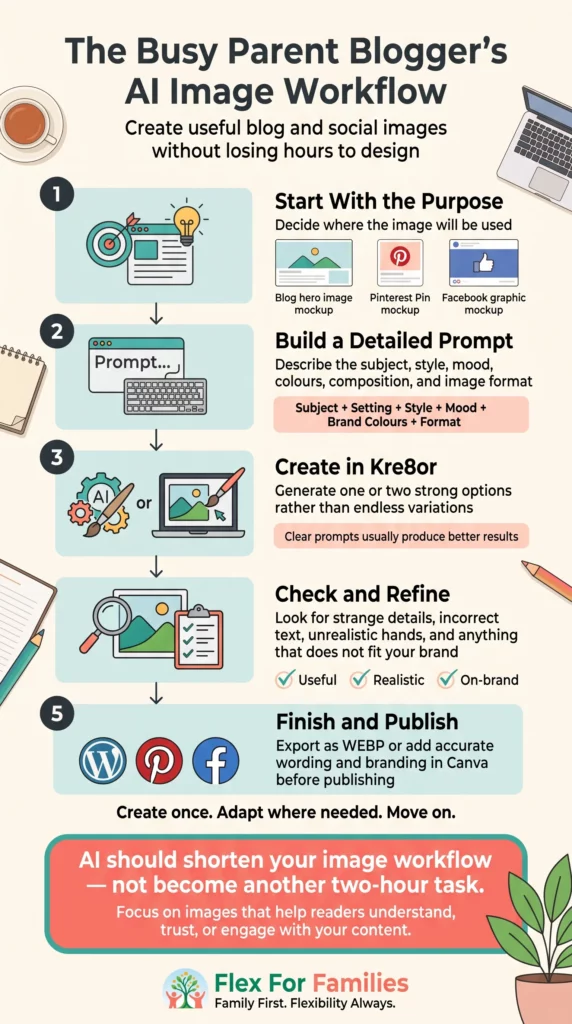
- Infographics
- Product mockups
- Digital device mockups
- Branded illustrations
- Promotional campaign images
- Creative challenge entries
The platform has broad appeal, but my main focus throughout this review is whether Kre8or is practical for busy parent bloggers.
A tool may produce impressive visuals, but that does not automatically mean it saves time.
The real question is whether Kre8or can help you move from an idea to a usable image without creating hours of extra prompting, editing, and file conversion.
So far, I think it has real potential.
Is Kre8or AI worth it?
Kre8or AI is worth considering if you regularly create blog or social media images and want an easy-to-use AI image generator with Remix, community features, and WEBP exports. After testing a paid Spark membership, I found it produced high-quality visuals and fit well into my blogging workflow, although prompt quality still has a big impact on the final results.
Who Created Kre8or AI?
Kre8or AI was created by Kyle Loudoun and Carson Lim, the co-founders of Wealthy Affiliate.
Wealthy Affiliate is an online platform that provides website-building tools, affiliate marketing training, keyword research, hosting, and a community for people building online businesses.
I have personally been a Wealthy Affiliate member since 2016, so I was naturally interested when I saw that Kyle and Carson were launching a separate AI image platform.
However, Kre8or is not simply another feature included inside Wealthy Affiliate.
It is a separate platform with its own:
- Website
- Membership plans
- Credit system
- Creator community
- Referral programme
That distinction is important.
You do not need to be a Wealthy Affiliate member to use Kre8or, and joining Wealthy Affiliate does not automatically give you a Kre8or membership.
Wealthy Affiliate already has its own ImageStudio tool, but Kre8or feels like a more dedicated creative platform.
It places more emphasis on image generation, remixing, social interaction, challenges, creator discovery, and flexible image exports.
This means the two tools may appeal to different users.
Someone building a blog through Wealthy Affiliate may use ImageStudio as part of their existing workflow.
Someone focused mainly on Facebook, Instagram, Pinterest, visual content, or personal branding may prefer Kre8or as a standalone platform.
It also gives people another potential route into online business.
A creator could build an audience around the images they produce, share their work through social media, and potentially earn referral commissions without running a traditional blog.
That does not guarantee income, but it creates a different opportunity from the standard blogging and affiliate marketing route.
Quick Note: I’m John Crossley, founder of Flex For Families. I review online business opportunities through the lens of family life, focusing on costs, time commitments, risks, and whether they genuinely help parents create more flexibility.
My First Impressions of Kre8or AI
My first impression of Kre8or was that it felt easy to use.
I did not need to work through a long tutorial before creating my first image.
I entered a prompt, selected the image settings, and received the result in less than a minute.
I was not timing every generation, but I never felt as though I was waiting for long.
The platform also feels slicker than I expected.
The image creation process is clean, the export options are practical, and the community features make it more enjoyable to explore.
Kre8or Is Fun to Use
This may sound like a minor point, but Kre8or is fun.
You can browse other people’s creations, experiment with unusual ideas, remix existing concepts, and vote on challenge entries.
That gives you a reason to explore beyond the image you originally planned to create.
It also helps when you are short of ideas.
Seeing how other creators interpret a prompt can spark a completely different direction for your own image.
Of course, that could also become a distraction if you only logged in to create one quick Facebook graphic.
Busy parents may need to resist the temptation to spend an hour scrolling through creative experiments when they planned to spend ten minutes making a social post.
Still, I prefer a platform that makes creativity enjoyable over one that feels like another piece of software I have to learn.
The Image Quality Is Strong
The image quality has been on par with the results I get from ChatGPT.
That does not mean every image will be perfect.
AI image generators can still create strange details, unexpected people, awkward text, or design choices you did not request.
However, when I gave Kre8or a clear and detailed prompt, the result was strong.
I tested the same futuristic exploration vehicle prompt in both ChatGPT and Kre8or.
The two images were surprisingly similar.
Both tools understood the main concept:
- A futuristic family exploration vehicle
- Six large all-terrain wheels
- A premium, rugged design
- A dramatic mountain environment
- Water splashing around the vehicle
- A cinematic hero-shot composition
Kre8or added people to the scene, which gave its version more of a lifestyle and family-adventure feel.
ChatGPT kept the vehicle as the sole focus.
Neither interpretation was wrong.
They were simply different creative decisions based on the same prompt.
That comparison reinforced something important.
The tool matters, but the prompt matters just as much.
Prompting Still Takes Practice
Kre8or cannot automatically understand the Flex For Families brand.
It does not know that I prefer:
- Teal and coral accents
- Realistic family situations
- Warm, natural lighting
- Parents working around family life
- Practical images instead of exaggerated luxury
- A calm, encouraging atmosphere
I need to include those details in the prompt.
This is the same with any AI tool.
When I first started working with ChatGPT to create visuals, it took time to develop prompts that consistently reflected my brand.
Now the results are stronger because the instructions are clearer and the tool has more context about what I am trying to achieve.
I expect the same will happen with Kre8or.
As I build a library of tested prompts, I should be able to create consistent Flex For Families visuals much faster.
The Export Options Stood Out
One of the first practical features I noticed was the ability to export images as WEBP files.
That matters to me as a blogger.
The images I currently create with ChatGPT are usually downloaded as PNG files.
Before uploading them to WordPress, I often need to use another programme to convert them into WEBP format.
Kre8or removes that extra step.
I can choose the quality of the image and download it in a website-friendly format.
That may sound like a small advantage, but small steps add up when you are publishing hundreds of blog posts and social media graphics.
Anything that removes part of the editing or conversion process has practical value.
The Community Feels Different
The community element is one of Kre8or’s clearest differences.
You can look through images created by other members, vote on challenge entries, and see how people have interpreted the same brief.
The challenges are particularly interesting.
They encourage you to create something outside your normal content plan.
For example, one challenge asked members to design their dream vehicle with no restrictions on budget, engineering, or the laws of physics.
I created a futuristic hybrid exploration vehicle for me, Gem, and Will.
The idea was a comfortable family vehicle that could travel across land, water, and potentially through the air.
It had to feel futuristic, but still engineered and believable.
This is not an image I originally planned to create for Flex For Families.
However, the result gave me something original to share, a useful example for this review, and a direct way to test how Kre8or interpreted a detailed creative brief.
That is where the challenge feature becomes more than a gimmick.
It pushes you to experiment.
My Early Verdict
After a few hours of testing, my first impression is positive.
Kre8or feels:
- Easy to learn
- Fast
- Creative
- Collaborative
- Practical for website images
- Well suited to social content
I am not ready to say that it will replace every other design or AI tool I use.
However, I can already see it becoming part of my social media workflow.
My likely process will be:
- Develop the concept with ChatGPT.
- Refine the prompt until it clearly describes the goal.
- Generate the image inside Kre8or.
- Use the remix tools when they add something useful.
- Export the final result as a WEBP file.
- Upload it directly to my blog or social campaign.
That combination gives me the strategy and prompting support of ChatGPT, with the dedicated image creation, remixing, community, and export features of Kre8or.
How Does Kre8or AI Work?
Kre8or is straightforward to use, even if you have never created an AI image before.
The basic process is:
- Decide what you want to create.
- Write a prompt describing the image.
- Choose your image settings.
- Generate the image.
- Review the result.
- Remix or refine it if needed.
- Export it in your preferred format.
The interface guides you through the process without making it feel overly technical.
That matters for busy parent bloggers.
You do not want to spend half an hour learning a complicated design platform when you only need one image for a Facebook post.
Step 1: Start With an Idea
Every Kre8or image begins with an idea.
That idea could be simple:
A parent working on a laptop while their child colours beside them.
Or it could be far more detailed:
A futuristic six-wheeled family exploration vehicle travelling through a mountain river at sunset.
The clearer your idea is, the easier it becomes to write an effective prompt.
You do not need to know every detail before you start.
However, it helps to think about:
- What the image is for
- Who or what should appear
- The setting
- The visual style
- The colours
- The lighting
- The mood
- The image orientation
- Whether you need space for text
For example, a blog hero image may need a wide landscape format with room for a headline.
A Pinterest Pin needs a vertical composition.
A Facebook graphic usually works better as a square image.

Step 2: Write Your Prompt
You enter a written description of the image you want Kre8or to create.
My first family-focused prompt was:
A warm, modern illustration of a parent working on a laptop at the kitchen table while their child colours beside them. Bright natural light, tidy home, realistic family life, calm atmosphere, teal and coral accents, suitable for a family blogging website.
Kre8or produced a strong image from that prompt.
It understood the family setting, the home-working theme, and the calm visual style.
However, the result did not automatically look exactly like Flex For Families.
That requires more brand context.
For a more consistent branded image, I could expand the prompt to include:
- The Flex For Families teal and coral colour palette
- Warm, natural lighting
- Realistic family life
- A modern but lived-in home
- A clear area for a headline
- A parent who looks focused rather than stressed
- A subtle Flex For Families logo placement
Good prompting is usually a process rather than a single instruction.
You may need to generate an image, review what worked, and then improve the prompt.
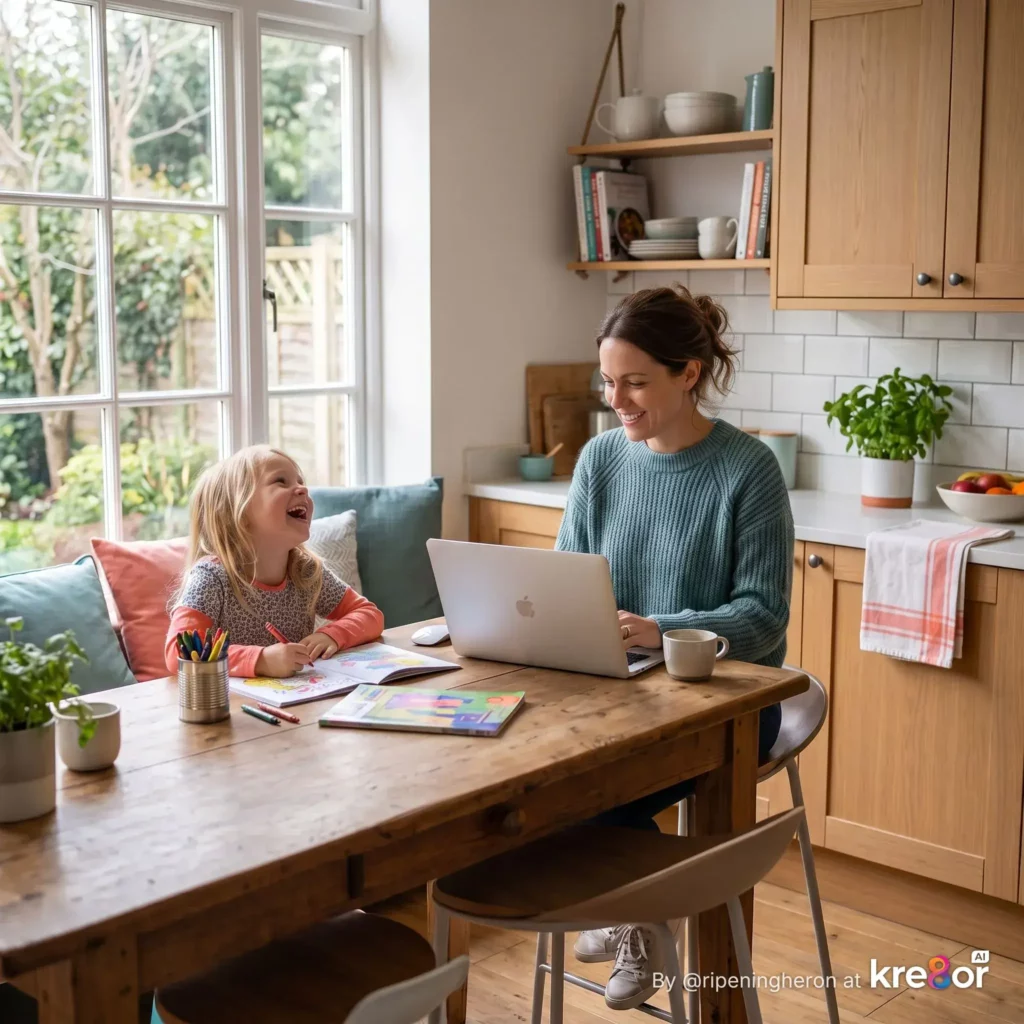
Suggested image caption:
My first family-focused image created with Kre8or AI.
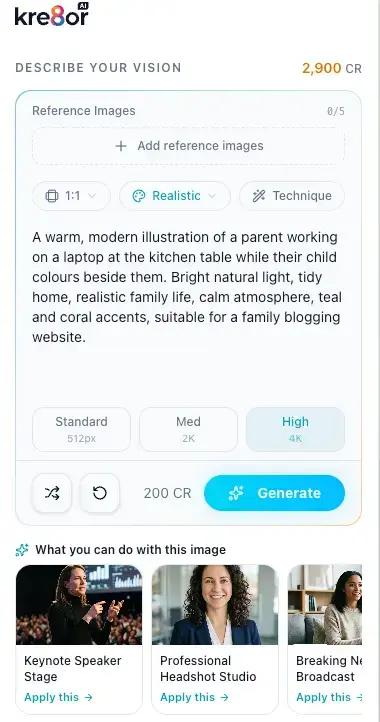
Step 3: Choose Your Image Settings
Kre8or allows you to choose settings before generating the image.
These settings help control the quality and format of the result.
The exact choice will depend on where you plan to use the image.
For example:
- Landscape images work well for blog headers and website banners.
- Square images suit Facebook and Instagram.
- Vertical images are better for Pinterest.
- Higher-quality images may be useful for detailed graphics or printed materials.
- Lower file sizes may be more practical for website use.
One feature I particularly like is having control over the final export.
I do not always need the largest possible image.
For a blog, I want a strong visual that looks clear without slowing down the page.
Step 4: Generate the Image
Once you submit the prompt, Kre8or creates the image.
During my testing, the generation process usually took less than one minute.
I was not timing each result, but it never felt slow enough to interrupt my workflow.
That makes it practical for creating social media visuals in short time blocks.
You could generate a Facebook image during a lunch break or create a Pinterest graphic after the children have gone to bed.
The speed does not remove the need to review the result carefully.
Check for:
- Strange hands or facial features
- Unwanted people
- Incorrect text
- Objects that do not make sense
- Brand colours that are slightly off
- Important details placed too close to the edge
- A lack of space for your headline
AI images can look impressive at first glance while still containing small mistakes.
Step 5: Review the Result
Once your image is ready, look at it as something you might actually publish.
Do not judge it only by whether it looks attractive.
Ask:
- Does it match the original brief?
- Does it fit the intended platform?
- Does it reflect your audience?
- Is the subject clear?
- Does it look believable?
- Can you add text without covering important details?
- Does it fit your brand?
- Would you stop scrolling if you saw it on Facebook?
This is where your judgement still matters.
AI can create the image, but it cannot decide whether that image is right for your audience.
For Flex For Families, I may reject an image that looks polished if it feels too luxurious, too corporate, or too far removed from realistic family life.
Step 6: Remix the Image
If you like the starting image but want to take it in a different direction, you can use the remix feature.
This was one of the first features I tested.
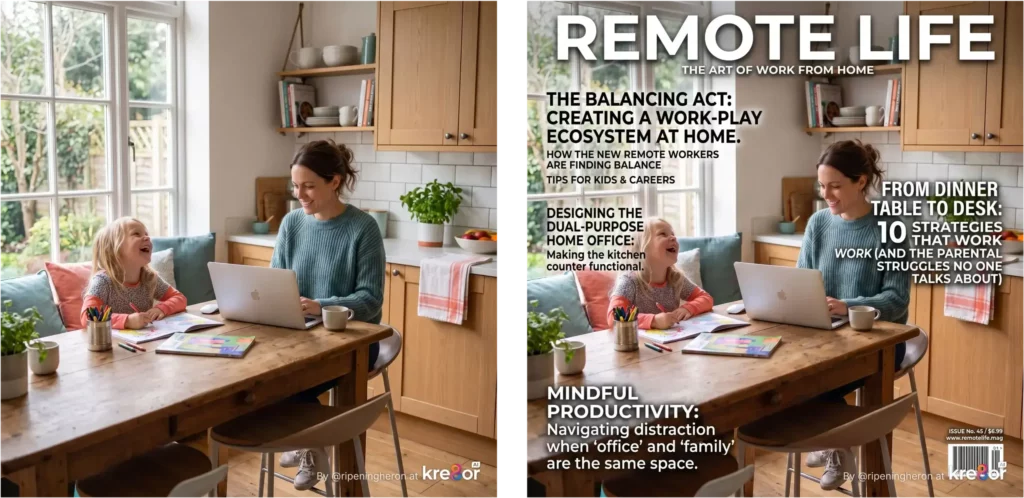
I started with the parent working at the kitchen table while their child coloured beside them.
I then remixed the image as a Remote Life magazine cover.
The original family scene remained recognisable, but Kre8or transformed it into a different type of visual.
That showed me how remixing could help repurpose one idea across several formats.
For example, you could turn:
- A blog illustration into a magazine cover
- A product image into a promotional advert
- A landscape scene into a social graphic
- A website screenshot into a laptop mockup
- A logo into part of a branded environment
- A simple image into a more unusual campaign concept
I would not use remixing for every image.
Some remix options are more quirky than practical.
However, that does not make them pointless.
A more unusual visual may attract attention on social media precisely because it looks different from a standard blog graphic.

Step 7: Export Your Image
Once you are happy with the result, you can export the image.
This is one of Kre8or’s most practical features for bloggers.
The platform allows you to choose the quality of the export and download images in formats that include WEBP.
WEBP is useful for websites because it can provide strong image quality with a smaller file size than many PNG files.
With ChatGPT, I currently download images as PNG files and use another programme to convert them to WEBP before uploading them to WordPress.
Kre8or removes that extra step.
It is a small workflow improvement, but it matters when you create images regularly.
What Can You Create With Kre8or AI?
Kre8or can create far more than standard blog illustrations.
The platform could suit a wide range of creators, including bloggers, small businesses, teachers, coaches, affiliate marketers, authors, Etsy sellers, and social media creators.
For a parent blogger, the most practical uses include the following.
Blog Hero Images
You can create original landscape images for blog posts and reviews.
These could show:
- A parent building a blog from home
- Someone researching keywords
- A blogger checking website traffic
- A family enjoying more flexible time
- A visual representation of an online tool
- A realistic home-working scene
For this review, I plan to create the hero image using Kre8or.
That will allow readers to judge the quality of the platform from the moment they arrive on the page.

Pinterest Pins
Pinterest relies heavily on visuals.
Kre8or could help create:
- Vertical blog graphics
- Step-by-step illustrations
- Checklist images
- Inspirational visuals
- Before-and-after concepts
- Tool-review Pins
- Prompt examples
You may still want to add final text inside Canva or another design tool if you need exact typography.
AI image generators can struggle with longer text.
However, Kre8or can create the main background, scene, or illustration.
Facebook and Instagram Graphics
This may become my main use for Kre8or.
Facebook campaigns often need a steady stream of fresh visuals.
You could create:
- Square promotional graphics
- Storytelling images
- Quote backgrounds
- Discussion starters
- Poll images
- Behind-the-scenes visuals
- Original campaign concepts
Because Kre8or is quick to use, it could help create several visuals around one campaign without relying on the same stock photo repeatedly.
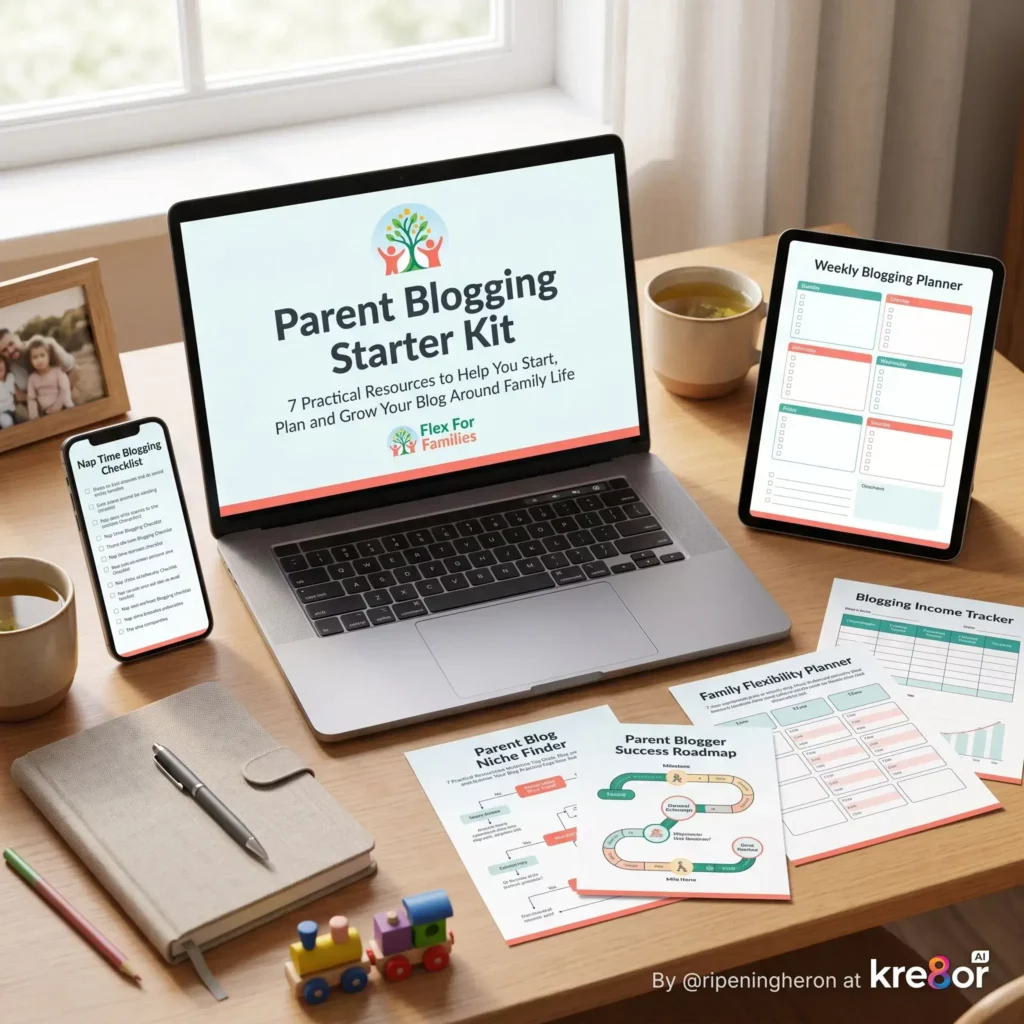
Mockups
The remix feature can help place your work into a more polished presentation.
For example:
- A website shown on a laptop screen
- A lead magnet displayed on a tablet
- A course displayed across several devices
- A logo built into a real or imagined setting
- A book cover displayed as a physical product
These images can make digital products feel more tangible.
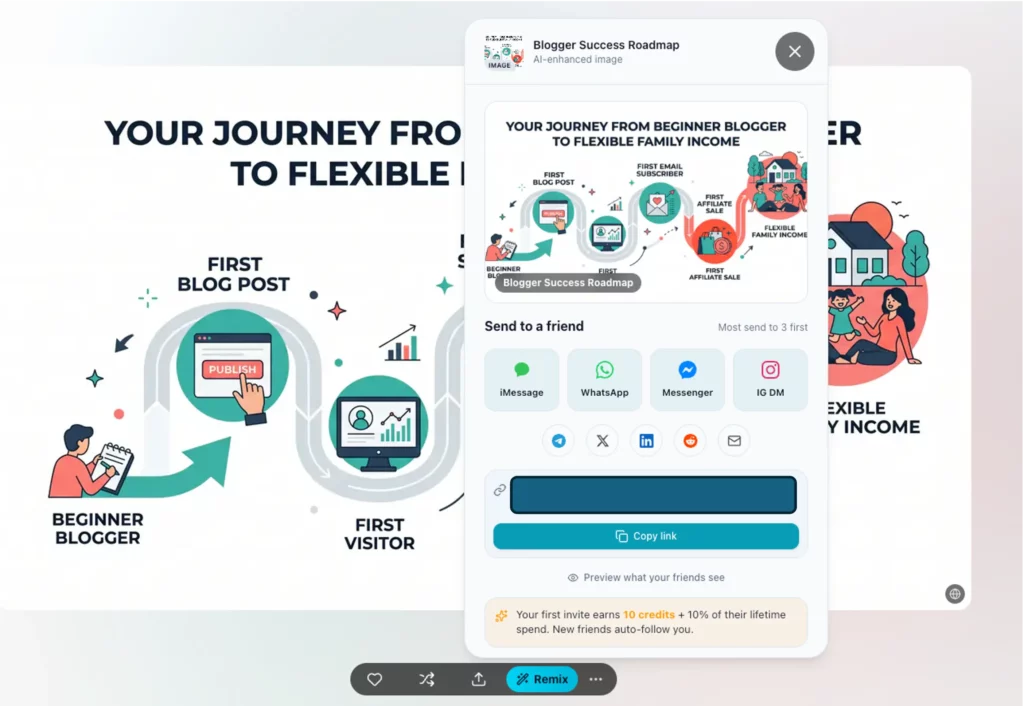
Infographics
Kre8or may also help create visual explanations and simple infographic concepts.
Possible topics include:
- The parent blogging journey
- Five steps to start a blog
- How affiliate marketing works
- A weekly blogging schedule
- The route from first post to first commission
- How AI supports a blogging workflow
I would test any infographic carefully before publishing it.
AI tools can still make mistakes with text, numbers, and labels.
The strongest workflow may be to use Kre8or for the visual concept and then add the final wording manually.
Creative Campaign Images
Kre8or also gives you room to create images that are less directly connected to a blog post.
That could include:
- Fantasy scenes
- Futuristic vehicles
- Travel concepts
- Magazine covers
- Product ideas
- Seasonal campaigns
- Branded creative challenges
These images can help your social channels feel more varied and personal.
They also give your audience something to react to.
A question such as “Which AI created the better dream vehicle?” may generate more conversation than another standard promotional post.
My Kre8or AI Examples
I wanted this review to include real examples rather than repeating claims from a sales page.
The following images came from my own time using Kre8or.
Example 1: A Parent Blogger Working Beside Their Child
My first prompt focused on the core Flex For Families audience.
The prompt was:
A warm, modern illustration of a parent working on a laptop at the kitchen table while their child colours beside them. Bright natural light, tidy home, realistic family life, calm atmosphere, teal and coral accents, suitable for a family blogging website.
Kre8or created a warm and usable image.
The result captured:
- A parent working from home
- A child happily occupied nearby
- A calm family environment
- A modern illustration style
- The balance between work and family life
It also showed how important the prompt is.
The teal and coral colours were present, but the image did not automatically match every part of my brand.
With a few more details about layout, logo placement, clothing, and the exact colour palette, I could make future versions more consistent.
Example 2: The Remote Life Magazine Cover Remix
I then used the remix feature to turn the original image into a Remote Life magazine cover.
The remix kept the central family-working concept but gave it a more editorial style.
This could work well as:
- A Facebook post
- A Pinterest graphic
- A campaign teaser
- A fictional magazine concept
- A visual used to start a discussion about remote work
The result needed a few tweaks, particularly around text and branding.
However, it showed how one starting image could lead to a completely different creative asset.
Would I turn every blog graphic into a magazine cover?
Probably not.
Could this kind of remix generate attention on social media?
Yes.

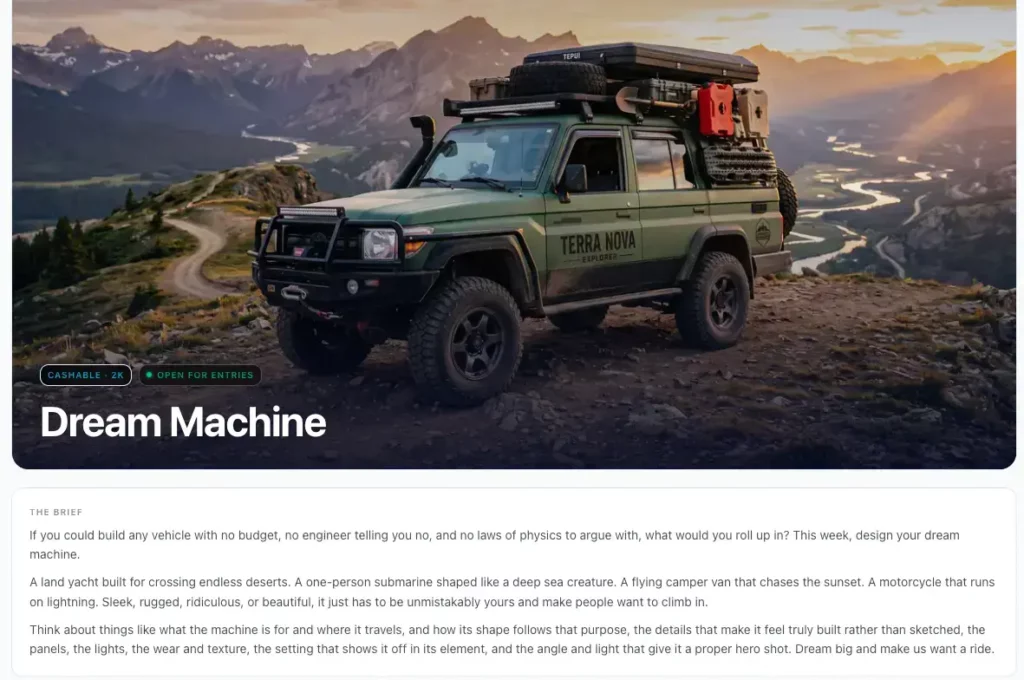
Example 3: My Dream Family Exploration Vehicle
Kre8or regularly runs community challenges.
One challenge asked users to design a dream vehicle with no limits on budget, engineering, or the laws of physics.
I decided to create a futuristic hybrid vehicle for me, Gem, and Will.
The vehicle needed to:
- Travel across almost any terrain
- Provide comfort for long family journeys
- Work in both driven and autonomous modes
- Explore land and water
- Feel futuristic
- Look engineered rather than sketched
- Be shown in action
The final prompt described a premium six-wheeled expedition rover travelling through a mountain river at sunset.
Kre8or produced a strong cinematic result.
The vehicle looked rugged, premium, and capable.
It also added people to the vehicle, even though the vehicle itself was intended to remain the main focus.
In this case, that choice helped communicate that it was built for a family adventure.

Example 4: Same Prompt in Kre8or and ChatGPT
To make the comparison fairer, I used the same detailed vehicle prompt in both Kre8or and ChatGPT.
The overall results were surprisingly similar.
Both tools produced:
- A six-wheeled futuristic rover
- A premium white and dark-metal body
- Large panoramic windows
- Mountain scenery
- A shallow river
- Dramatic cinematic lighting
- A rugged expedition feel
The differences were mainly in interpretation.
ChatGPT kept the vehicle as the sole focus and produced a polished concept-car hero shot.
Kre8or included people and created more of an active family-adventure scene.
I liked both results.
This comparison did not prove that one tool was clearly better than the other.
It proved that both tools could understand a strong prompt and produce a high-quality image.

This is why I do not think the conversation should only be about which AI image tool is best.
The more useful question is:
Which tool fits your workflow, and can you consistently give it the context needed to create something useful?
For me, Kre8or’s advantages include its dedicated visual workflow, remixing, community features, challenges, and WEBP exports.
ChatGPT remains useful for developing the concept, improving the prompt, and deciding what the image needs to achieve.
My Thoughts on Kre8or’s Remix Feature
One of the first features I wanted to test was Remix.
Most AI image generators allow you to create an image from a prompt.
Kre8or goes a step further by letting you transform an existing image into something new.
That sounds like a small feature on paper, but it opens up some interesting possibilities.
My First Remix
I started with a simple illustration of a parent working on a laptop while their child coloured beside them.
It was exactly the sort of image I could imagine using on Flex For Families.
Instead of creating another image from scratch, I chose to remix it.
I selected the Remote Life magazine style.
Within moments, Kre8or transformed the original illustration into a magazine cover.
The core scene remained recognisable, but the presentation felt completely different.
It suddenly looked like something that could be shared as part of a social campaign rather than simply sitting at the top of a blog post.
Why Remix Matters
At first, I wondered whether remixing was simply a novelty.
After experimenting with it, I think it has practical value.
Imagine you’ve created a blog hero image.
Instead of designing several completely different graphics, you could remix the original into multiple styles for different platforms.
For example:
- Turn a blog hero image into a magazine cover.
- Create a promotional poster from the same artwork.
- Experiment with different artistic styles.
- Generate social media graphics based on an existing image.
- Produce several campaign ideas without starting again.
That could save both time and creative energy.
It Won’t Replace Good Design
Remixing is not a substitute for thoughtful design.
Sometimes the result will be excellent.
Other times it may introduce changes you were not expecting.
You still need to decide whether the new version supports your original message.
For example, the magazine cover looked great visually, but I would still want to adjust the typography before publishing it.
That’s not really a criticism of Kre8or.
It’s simply recognising that AI is generating artwork, not finished marketing campaigns.
My Verdict on Remix
This ended up being one of my favourite features.
Not because I’ll use it every day, but because it encourages experimentation.
It helps answer the question:
“What else could this image become?”
That mindset is useful when you’re trying to create several pieces of content from one original idea.
Overall, I’d call Remix one of Kre8or’s standout features.
Community, Challenges and Voting
This is probably the biggest difference between Kre8or and most AI image generators I’ve used.
Most AI tools are private.
You create your image, download it, and move on.
Kre8or feels much more like a creative community.
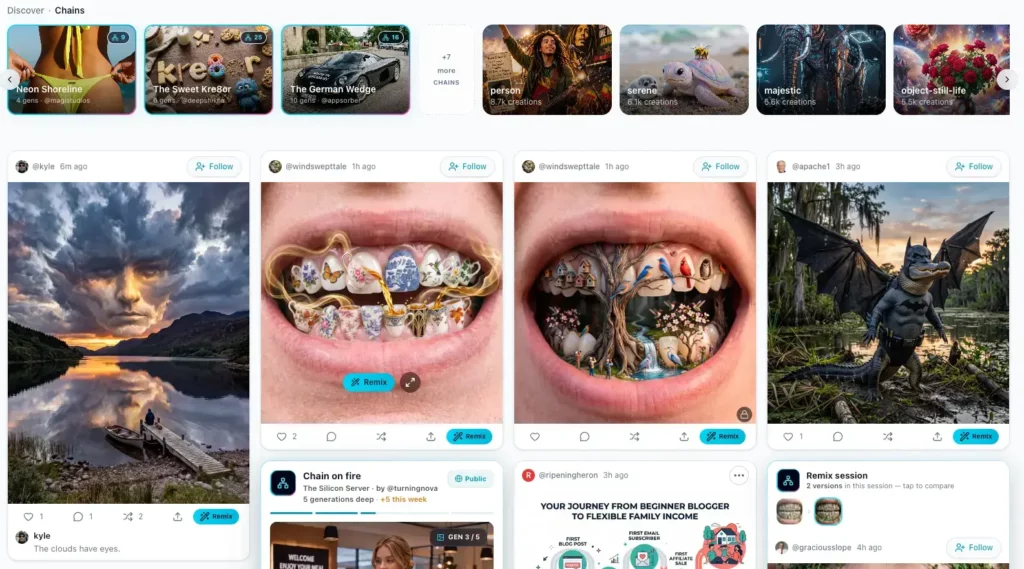
Community Feed
The community feed lets you browse images created by other members.
That might sound simple, but I found it surprisingly useful.
Sometimes you don’t need another tutorial.
You simply need inspiration.
Seeing how other creators approached a similar idea often sparked ideas I wouldn’t have considered myself.
It reminded me a little of browsing Pinterest.
You rarely copy what you see.
Instead, one idea leads to another.
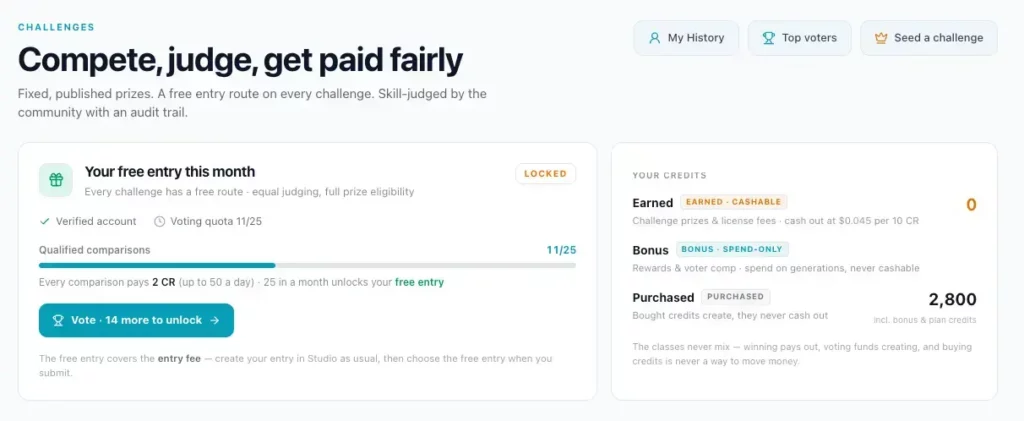
Weekly Challenges
The challenges were the feature I enjoyed most.
Each challenge encourages everyone to tackle the same creative brief while interpreting it in their own way.
When I was testing Kre8or, one challenge asked members to design their dream vehicle.
There were almost no limits.
That freedom encouraged creativity rather than simply trying to generate another blog graphic.
Instead of treating it like a competition, I treated it as a way to push the AI further.
That led to my futuristic family exploration vehicle.
Would I ever need that image for Flex For Families?
Probably not.
Did it teach me more about prompting?
Absolutely.
It also showed how consistent prompting can produce surprisingly cinematic results.
Voting
After browsing the challenge entries, you can vote for your favourites.
Again, this sounds like a small feature.
But it creates engagement rather than simply generating images in isolation.
It also exposes you to different prompting styles.
Sometimes you’ll see an image and immediately think:
“I wouldn’t have thought of that.”
Those moments are often where you learn the most.
Is The Community Worth Joining?
If you’re only interested in generating images as quickly as possible, you may never use these features.
However, if you enjoy creativity, experimenting with prompts, and seeing what other people are building, they make the platform feel far more engaging.
For me, the community transforms Kre8or from being just another AI tool into something that feels alive.
Image Quality and Prompting
One question I had before using Kre8or was simple.
Can it actually produce high-quality images?
After testing it for several hours, I’d say yes.
The image quality is excellent.
However, there’s something even more important.
AI Doesn’t Read Your Mind
The quality of an AI image is usually a reflection of the quality of the prompt.
That’s true whether you’re using:
- Kre8or
- ChatGPT
- Midjourney
- Flux
- Stable Diffusion
The AI only knows what you tell it.
If you write:
Parent blogging.
You’ll probably receive a generic image.
If you describe:
- the setting
- lighting
- atmosphere
- colours
- composition
- audience
- emotion
- camera angle
- artistic style
the results become dramatically better.
That’s exactly what I experienced with Kre8or.
My Prompting Process
By the end of my testing I found myself following the same routine each time.
- Decide what I actually want the image to achieve.
- Think about who will see it.
- Describe the scene in detail.
- Include colours and atmosphere.
- Mention where the image will be used.
- Generate.
- Refine if necessary.
It isn’t complicated.
But it is deliberate.
The better your brief, the better the image.
Can Beginners Use It?
Yes.
You don’t need to become an expert prompt engineer overnight.
You’ll still produce attractive images with fairly simple prompts.
The difference is consistency.
As you build a library of prompts that match your own brand, every new image becomes easier to create.
I suspect that’s exactly what will happen with Flex For Families over the coming months.
I’ll gradually build a collection of prompts for:
- Hero images
- Pinterest Pins
- Facebook graphics
- Infographics
- Mockups
- Product illustrations
Eventually, creating new branded visuals should become much faster.
That’s where AI starts saving time rather than creating extra work.
Export Options
Exporting an image isn’t the most exciting feature in any AI platform.
But it can make a real difference to your workflow.
This was one of the first practical advantages I noticed with Kre8or.
Multiple Export Options
Once your image is ready, you can choose how you want to download it.
That includes different quality settings and formats.
The option that immediately caught my attention was WEBP.
As someone publishing hundreds of blog posts, that matters.
Why WEBP Matters
Most of my ChatGPT images are downloaded as PNG files.
Before uploading them to WordPress, I usually:
- Open another application.
- Convert the PNG to WEBP.
- Save the new version.
- Upload it to WordPress.
It isn’t difficult.
But it is another job.
Kre8or removes that extra step.
Being able to download a WEBP image directly saves a little time on every image.
One image isn’t significant.
Hundreds of images certainly are.
Small Improvements Add Up
One of the themes you’ll notice throughout this review is that Kre8or doesn’t necessarily revolutionise every part of image creation.
Instead, it improves lots of small parts of the workflow.
- Faster exports.
- Built-in remixing.
- Community inspiration.
- Challenge ideas.
- WEBP downloads.
None of those features would convince me on their own.
Together, though, they create a smoother experience.
As someone juggling blogging around family life, those small-time savings are exactly the sort of improvements I appreciate.
Kre8or AI vs Wealthy Affiliate ImageStudio
Because Kre8or was created by the founders of Wealthy Affiliate, one obvious question is:
How is it different from Wealthy Affiliate’s existing ImageStudio?
The two tools overlap because both can create AI-generated images.
However, they feel designed for different purposes.
Wealthy Affiliate ImageStudio
ImageStudio sits inside the wider Wealthy Affiliate platform.
It is useful when you are already working on your website and need an image for a blog post, page, or content project.
The convenience is the main attraction.
You can research a topic, write your article, create an image, and continue building your site without leaving Wealthy Affiliate.
That makes sense for beginners who want everything in one place.
Kre8or AI
Kre8or feels more like a dedicated creative platform.
The emphasis is not only on generating one image and returning to your article.
It also encourages you to:
- Explore other creators’ work
- Enter creative challenges
- Vote on challenge entries
- Remix images into new formats
- Develop a creator profile
- Share your work
- Export images using different quality options
- Participate in the referral programme
That gives Kre8or a broader identity.
It could appeal to bloggers, but it could also suit social media creators, digital artists, marketers, coaches, and small businesses that have no interest in joining Wealthy Affiliate.
Which Uses Fewer Credits?
From my early testing, Kre8or appears to use credits more efficiently than ImageStudio.
That could make it more practical for people who create images regularly.
However, I would not choose between the two platforms based only on credits.
The more important difference is the workflow.
ImageStudio makes sense when you want a quick image while working inside Wealthy Affiliate.
Kre8or makes more sense when image creation itself is a larger part of your content strategy.
Which One Would I Use?
I can see myself using both.
I would use ImageStudio when I am already inside Wealthy Affiliate and need a straightforward image for a post.
I would use Kre8or when I want to:
- Build a visual campaign
- Experiment with several concepts
- Create social media graphics
- Enter a challenge
- Remix an existing image
- Export directly as WEBP
- Develop a more consistent image workflow
That is why I do not see Kre8or as a simple replacement for ImageStudio.
It feels more like the next step for creators who want greater control and a more focused visual platform.
Can Kre8or Replace Canva?
Not completely.
At least, not for the way I currently work.
Canva and Kre8or solve different problems.
Where Kre8or Is Stronger
Kre8or is better suited to creating the original visual concept.
You can describe a scene, character, product, setting, or campaign idea and generate something unique.
That is very different from searching through templates and stock elements.
For example, Kre8or can create:
- A realistic parent-blogging scene
- A futuristic exploration vehicle
- A fictional magazine cover
- An original social media concept
- A branded illustration
- A fantasy or cinematic campaign image
This gives you far more creative freedom than starting with a standard template.
Where Canva Is Still Stronger
Canva remains more reliable for precise design work.
That includes:
- Adding exact headlines
- Using consistent fonts
- Positioning logos
- Creating multi-page documents
- Designing printables
- Building presentation slides
- Reusing templates
- Aligning text and graphical elements
- Creating graphics with accurate wording
AI image tools can still struggle with text.
A visual may look excellent, but the writing inside it can be misspelt, distorted, or completely invented.
That is where Canva still earns its place.
My Likely Workflow
For many images, I expect my workflow will be:
- Create the original visual inside Kre8or.
- Export it in the correct format.
- Open it in Canva if I need precise text or branding.
- Add the final title, logo, or call to action.
- Export the finished social graphic.
This does not mean every Kre8or image needs Canva.
A blog hero image or supporting illustration may be ready to use immediately.
However, for Pinterest Pins and Facebook graphics with important text, Canva may still be the safer final step.
Am I Using Canva Less?
Yes.
I already use Canva less than I did before AI image tools became part of my workflow.
I no longer need to build every image from stock photos, icons, and templates.
AI can now produce the main visual much faster.
However, I do not think Canva has become irrelevant.
Its role is changing.
Instead of using it to create everything from scratch, I increasingly use it to finish, resize, brand, or add accurate text to an AI-generated image.
My Verdict
Kre8or can replace some of what I previously did inside Canva.
It can probably replace:
- Searching for stock images
- Building simple illustrated scenes
- Creating generic image backgrounds
- Producing several visual concepts manually
It is less likely to replace:
- Exact text layouts
- Reusable branded templates
- Workbooks and downloads
- Presentations
- Multi-page documents
- Detailed graphic design
For bloggers, the strongest combination may be Kre8or for creation and Canva for finishing.
Can Kre8or Replace ChatGPT for Image Creation?
For me, the answer is also no.
However, that is not because Kre8or’s image quality is weaker.
The images I have created so far are comparable with the results I get from ChatGPT.
The difference is how I use each tool.
What ChatGPT Does Well
ChatGPT helps me develop the idea before the image is created.
I can explain:
- The purpose of the article
- The Flex For Families audience
- The message I want to communicate
- The platform the image will appear on
- My brand colours
- The emotional tone
- What has worked in previous images
- What I want to avoid
We can then develop the concept together.
That is particularly useful when I do not yet know what the image should look like.
For example, I may know that I need a hero image for a review, but not whether it should show:
- A parent using the software
- A dashboard on a laptop
- Several floating image examples
- A before-and-after comparison
- A visual representation of saved time
ChatGPT helps shape that strategy.
What Kre8or Does Well
Kre8or is more focused on the image creation experience itself.
It gives me:
- A dedicated visual platform
- Fast generation
- Remixing
- Creator inspiration
- Community challenges
- Voting
- Export controls
- WEBP downloads
That makes the creation and publishing stage feel smoother.
The Same-Prompt Test
My dream vehicle comparison showed that both platforms could produce high-quality results from the same prompt.
The vehicles were surprisingly similar.
Both understood the core design, environment, lighting, and cinematic style.
Kre8or added people inside the vehicle, while ChatGPT kept the focus almost entirely on the machine.
That was not a quality issue.
It was simply a difference in interpretation.
The Real Advantage of ChatGPT
ChatGPT already understands much more about Flex For Families because I have used it extensively while developing the website.
It knows that my content is aimed at busy parents.
It understands that I want realistic imagery rather than exaggerated promises of luxury.
It knows my preferred colours, tone, recurring visual themes, and the broader purpose of the brand.
Kre8or does not automatically have that context.
I need to put it into the prompt.
That may change as I build a reusable prompt library, but it is an important distinction.
My Likely Long-Term Workflow
I currently see the two tools working together.
My likely process is:
- Use ChatGPT to plan the visual.
- Develop and refine the prompt.
- Generate the image in ChatGPT or Kre8or.
- Compare the results when the image is important.
- Use Kre8or for remixing and export options.
- Use Canva only when precise text or further design work is needed.
That may sound like more tools rather than fewer.
However, it does not mean using every tool for every image.
The aim is to use the right tool at the right stage.
For a simple supporting image, I may create it entirely inside Kre8or.
For a more important campaign, I may develop the concept in ChatGPT, generate several versions in Kre8or, and finish the best result in Canva.
My Verdict
Kre8or can compete with ChatGPT on image quality.
It may even offer a better dedicated workflow for creating, remixing, sharing, and exporting images.
However, ChatGPT remains more useful to me as a strategic creative partner.
So I do not see Kre8or replacing ChatGPT.
I see it becoming a valuable companion to it.
Which Tool Should Bloggers Use?
The answer depends on what you are trying to achieve.
| Your main need | Best fit |
|---|---|
| Developing ideas and refining prompts | ChatGPT |
| Generating and remixing original images | Kre8or |
| Creating precise text layouts and templates | Canva |
| Producing a quick image while working inside Wealthy Affiliate | ImageStudio |
| Exporting AI images directly as WEBP | Kre8or |
| Creating workbooks, PDFs, and multi-page designs | Canva |
| Exploring community challenges and creator inspiration | Kre8or |
The most important point is that you do not need every tool when starting a blog.
A beginner could easily create images using one platform and add another only when their needs become clearer.
More software does not automatically lead to better content.
For busy parent bloggers, the best tool is usually the one that helps you create something useful without turning a simple image into a two-hour project.
Kre8or AI Credits and Pricing
Kre8or uses a credit-based system.
Each time you generate, remix, or take certain actions inside the platform, credits are deducted from your balance.
The number of credits used may vary depending on factors such as:
- The type of creation
- The image quality
- The resolution
- Whether you generate or remix
- Participation in certain challenges
This means the headline subscription price is only part of the picture.
The more important question is how many usable images you can create before your monthly credits run out.
The Kre8or Spark Plan
I joined Kre8or on the Spark annual plan and paid $99 for the year.
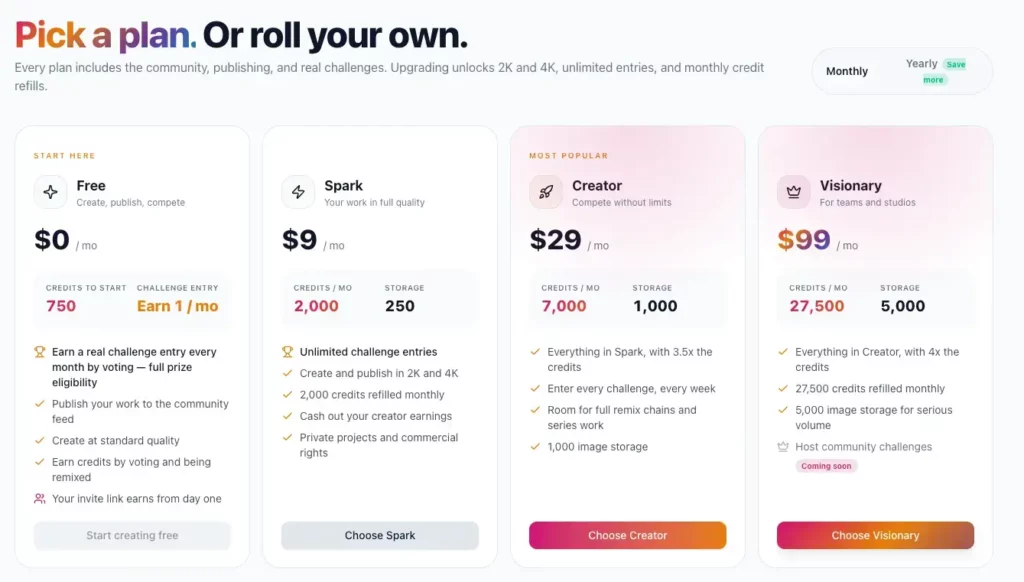
At the time of writing, the monthly Spark plan is advertised at $9 per month and includes 2,000 credits refilled each month. Kre8or also lists private projects, commercial rights, and the ability to cash out creator earnings among the paid membership benefits.
Based on my early use, Spark feels like a sensible starting point for:
- Bloggers creating a few images each week
- People producing occasional social graphics
- Creators experimenting with Remix
- Anyone testing whether Kre8or fits their workflow
- Small businesses that do not need high-volume production
I would not automatically recommend starting on a larger plan.
It makes more sense to see how quickly you actually use the credits.
Are There Other Kre8or Plans?
Yes.
Kre8or also advertises larger paid plans for people who create images at a higher volume.
The current membership page identifies Creator as the most popular option, while the entry-level Spark plan provides 2,000 monthly credits.
Higher plans may make sense for:
- Social media managers
- Agencies
- Full-time content creators
- Businesses producing daily graphics
- People managing several brands
- Creators running image-led Facebook pages
- Anyone regularly producing content for clients
However, most beginner bloggers will not need the largest allowance immediately.
Buying more credits does not automatically make your content better.
You still need a useful idea, a strong prompt, and a reason for creating the image.
[Publishing reminder: Check the live pricing page immediately before publishing, as plans, credit allowances, launch offers, and annual discounts may change.]
Is There a Free Option?
Kre8or has offered free starting credits and promotional access to Spark during its launch period.
An official launch announcement stated that new users could receive a free month of Spark and 2,000 credits, described as enough for approximately 20 image creations. However, that offer was explicitly time-sensitive, so readers should check the current registration page rather than assume it is still available.
That is enough to explore the platform and decide whether you enjoy the workflow.
A free account is useful for testing:
- The creation interface
- Prompt quality
- Image styles
- Generation speed
- Basic platform navigation
- Whether the results suit your brand
I would use the free credits deliberately.
Instead of generating random images, prepare three or four realistic tasks you would normally complete for your website or social accounts.
For example:
- Create one blog hero image.
- Create one square Facebook image.
- Create one vertical Pinterest concept.
- Test a remix.
- Download the best result.
That will tell you far more than creating twenty unrelated fantasy pictures.
How Quickly Do Kre8or Credits Run Out?
This depends entirely on how you use the platform.
Someone creating one or two standard images each week may find the Spark allowance comfortable.
Someone generating several alternatives for every Facebook post could use the credits much faster.
Challenges may also require credits.
For example, an official Kre8or launch post described an entry fee of 500 credits for certain paid challenges, with participation and voting forming part of the reward structure. Challenge terms may differ, so check the specific brief before entering.
That means you need to distinguish between:
- Credits used for practical content
- Credits used for experimentation
- Credits used for Remix
- Credits spent entering challenges
There is nothing wrong with using credits for fun.
The community and creative experimentation are part of the appeal.
However, if you bought Kre8or mainly to produce blog images, it is worth keeping an eye on where your allowance is going.
Kre8or Credits Compared With ImageStudio
From my early experience, Kre8or appears to use credits more generously than Wealthy Affiliate’s ImageStudio.
I have been able to experiment without feeling that every small test is rapidly eating through the allowance.
That said, I have only used Kre8or for a few hours so far.
I want to test it across several complete content campaigns before making a firm judgement about long-term value.
This is one area I plan to update after using the platform for:
- Blog hero images
- Three Pinterest Pins
- Three Facebook graphics
- Remixes
- Challenge entries
- Supporting article images
That will give me a much better picture of how far 2,000 monthly credits go for a working blogger.
Is the Spark Plan Good Value?
At the price I paid, I think Spark offers reasonable value.
The annual cost works out at less than the price of many standalone blogging or design tools.
It also includes more than image generation.
You are getting access to:
- AI image creation
- Remixing
- Higher-quality exports
- WEBP downloads
- Private creations
- Commercial usage rights
- Community challenges
- Creator features
- Potential creator earnings
Whether it is good value for you depends on how often you create images.
If you only need one blog image per month, a separate subscription may be unnecessary.
If you regularly produce blog posts, Pinterest Pins, Facebook graphics, and campaign images, the time savings could justify the cost.
My Pricing Verdict
The Spark plan feels like the right level for my current needs.
I would rather start with a modest allowance and see whether Kre8or becomes part of my regular workflow than pay for a large credit package I may not use.
My advice for busy parent bloggers is simple:
Start with the smallest suitable option, track how much you genuinely use it, and upgrade only when the platform is saving you enough time to justify the extra cost.
What I Like About Kre8or AI
After spending several hours using Kre8or, there is already plenty I like about the platform.
1. It Is Easy to Use
Kre8or does not feel intimidating.
You can create an account, enter a prompt, select your settings, and generate an image without working through hours of training.
That makes it accessible to beginners.
There are more features to explore as you spend time inside the platform, but you do not need to understand everything before creating something useful.
2. The Image Quality Is Strong
The images I have created have been comparable with the results I receive from ChatGPT.
Kre8or handled detailed concepts well, including:
- Realistic family scenes
- Magazine-style graphics
- Futuristic vehicles
- Cinematic environments
- Social media concepts
The dream vehicle test was particularly impressive because Kre8or and ChatGPT produced surprisingly similar interpretations of the same prompt.
3. Generation Is Fast
During my testing, images were normally ready in less than a minute.
That makes Kre8or realistic for people working in short time blocks.
You do not have to set aside an entire evening to create one supporting image.
4. WEBP Export Is Genuinely Useful
This is not the most glamorous feature, but it may be one of the most practical for bloggers.
Being able to export directly as WEBP removes an extra conversion step before uploading an image to WordPress.
That saves only a small amount of time per image.
Across hundreds of images, it becomes significant.
5. Remix Encourages Content Repurposing
The Remix feature allows you to take an existing visual and explore what else it could become.
My original parent-and-child illustration became a Remote Life magazine cover.
That showed how one idea could potentially support several pieces of content.
For busy creators, repurposing matters.
You do not always need another completely separate idea.
Sometimes you need a fresh way to present the idea you already have.
6. The Community Adds Inspiration
The community feed, challenges, and voting make Kre8or more engaging than a private image generator.
Browsing other entries can help when your own ideas feel a little flat.
The official platform announcements also position challenges as a way to reward creation, participation, and voting rather than making every competition purely winner-takes-all.
I particularly like seeing how differently people interpret the same brief.
7. Challenges Help Improve Your Prompting
The dream vehicle challenge pushed me to create something I would never normally make for Flex For Families.
To achieve the result I wanted, I had to think about:
- Purpose
- Engineering
- Terrain
- Comfort
- Family use
- Camera angle
- Lighting
- Motion
- Atmosphere
That process improved the prompt.
The lesson can then be applied to more practical images.
8. It Has Uses Beyond Blogging
Kre8or is not limited to featured images.
It could be used for:
- Facebook content
- Digital product mockups
- Branded characters
- Creative campaigns
- Client work
- Photo transformations
- Original content pages
- Community projects
That makes the subscription easier to justify if visual content is a major part of your online strategy.
9. It Works Well Alongside ChatGPT
I do not have to choose one tool and abandon the other.
ChatGPT can help me shape the concept and improve the prompt.
Kre8or can then handle generation, remixing, creator features, and export.
That combination currently feels stronger than expecting one platform to do everything.
10. It Is Fun
This deserves a place on the list.
Kre8or makes creating images enjoyable.
That matters because a tool you enjoy using is more likely to become part of your routine.
The slight danger is spending all evening designing impossible vehicles when you were supposed to create one blog graphic.
Ask me how I know.
What Could Be Better?
Kre8or has made a strong first impression, but it is not perfect.
It is also a new platform, so I expect several parts of the experience to change over time.
1. Good Results Still Depend on Good Prompts
Kre8or is easy to use, but that does not mean every prompt will produce exactly what you imagined.
A vague instruction is likely to produce a generic result.
You still need to think about:
- Composition
- Style
- Lighting
- Colours
- Audience
- Image purpose
- Platform dimensions
- Space for text
Beginners may initially assume the AI will understand more context than it actually does.
2. It Does Not Know Your Brand Automatically
ChatGPT already has a lot of context about Flex For Families because I have spent months developing content and imagery with it.
Kre8or does not automatically know:
- My audience
- My preferred visual style
- My teal and coral branding
- The type of parent imagery I prefer
- What I want to avoid
- How realistic I want the scenes to feel
I need to include that information in the prompt.
A reusable brand profile, saved prompt framework, or style memory would make this much easier.
[Publishing reminder: Check whether Kre8or introduces saved brand settings, style profiles, or reusable prompt features before the review goes live.]
3. Text Inside Images May Still Need Editing
AI-generated text remains unpredictable.
A magazine cover or promotional graphic may look polished while containing:
- Misspellings
- Invented words
- Distorted letters
- Inconsistent fonts
- Unusable headlines
For important social graphics, I would still add the final wording inside Canva.
This means Kre8or may create the visual, but not always the completely finished asset.
4. Credits Can Encourage Overthinking
Credit systems can make users hesitate.
You may find yourself wondering:
- Is this prompt detailed enough?
- Should I generate another version?
- Is the improvement worth the credits?
- Should I save my allowance for another campaign?
That is not unique to Kre8or.
However, transparent usage information is important so creators understand what each action will cost before clicking.
5. The Community Can Become a Distraction
The community is one of the platform’s strengths.
It can also become a spectacular little time thief.
You may log in to create one Pinterest image and end up browsing flying houses, medieval cats, dream vehicles, and tiny cafés built inside acorns.
For time-poor bloggers, the answer is not to avoid the community.
It is to use the platform with a purpose.
6. I Need More Time to Judge Consistency
I have created several strong images, but a few hours of testing is not enough to judge long-term reliability.
I still want to see how Kre8or performs when I need:
- Consistent characters
- Matching images across a campaign
- Repeatable brand styling
- Accurate product mockups
- Infographics
- Images with detailed instructions
- Several platform sizes based on one concept
I will update this review as I use it for real Flex For Families campaigns.
7. Another Subscription Is Still Another Subscription
Even an affordable tool adds to your monthly or annual costs.
Bloggers can easily accumulate subscriptions for:
- Hosting
- Email marketing
- Keyword research
- AI writing
- Image creation
- Social scheduling
- SEO tools
- Canva
- Plugins
Kre8or needs to save time or improve your content enough to justify its place in that stack.
A fun tool is not automatically an essential tool.
Who Is Kre8or AI Best For?
Kre8or has broad creative appeal, but certain users are more likely to get real value from it.
Bloggers Who Publish Regularly
A blogger creating several posts each month may use Kre8or for:
- Hero images
- Supporting illustrations
- Product mockups
- Infographics
- Pinterest Pins
- Facebook graphics
The WEBP export is particularly useful for this group.
Social Media Creators
Social creators may be one of the strongest audiences for Kre8or.
The platform suits people who need:
- Fresh visuals
- Repeatable content concepts
- Image-led campaigns
- Before-and-after posts
- Discussion starters
- Original themed pages
- Several versions of one idea
An official Kre8or strategy post has highlighted image-led Facebook pages, transformation content, restoration concepts, and consistent visual formats as possible use cases. Any income figures discussed around these strategies remain estimates rather than guarantees.
Affiliate Marketers
Affiliate marketers can use Kre8or to support:
- Product reviews
- Comparison posts
- Tutorials
- Promotional campaigns
- Social traffic
- Lead magnets
- Branded resource pages
The images still need to support genuinely useful content.
A beautiful graphic cannot rescue a weak review.
Small Businesses
Small businesses could use Kre8or to create:
- Campaign concepts
- Product scenes
- Promotional visuals
- Seasonal graphics
- Social content
- Branded characters
- Mockups
It may reduce reliance on generic stock photography.
Coaches and Course Creators
Coaches could create visuals for:
- Lesson content
- Social posts
- Course launches
- Workbooks
- Presentation backgrounds
- Marketing campaigns
Canva would probably still be useful for final layouts and accurate wording.
Teachers and Educational Creators
Kre8or could help teachers produce:
- Story prompts
- Character scenes
- Historical concepts
- Classroom visuals
- Creative worksheets
- Illustrations
Any factual or historical imagery should still be checked carefully.
AI can create something convincing without creating something accurate.
Authors and Storytellers
Authors may enjoy using Kre8or for:
- Character concepts
- Fictional locations
- Book promotion
- Mood boards
- Story scenes
- Cover ideas
It could be particularly useful during the early creative stage.
Designers and Agencies
Higher-volume users may use Kre8or for:
- Client concepts
- Campaign exploration
- Rapid prototypes
- Mood boards
- Social media batches
- Several brand accounts
They are also more likely to need a larger credit allowance.
People Who Enjoy Creative Communities
Some users will join mainly because they enjoy making and sharing creative work.
The challenges, voting, creator profiles, and community feed give Kre8or more personality than a basic generation tool.
That audience may value the platform even when the images are not connected to a business.
Who May Not Need Kre8or?
Kre8or may not be necessary if:
- You rarely create images.
- Your existing AI subscription already meets your needs.
- You only use stock photos.
- You mainly create text-based documents.
- You need precise typography more than original artwork.
- You are already paying for several underused tools.
- You do not want another credit-based platform.
There is no prize for owning the largest collection of blogging software.
Use Kre8or when it solves a real problem.
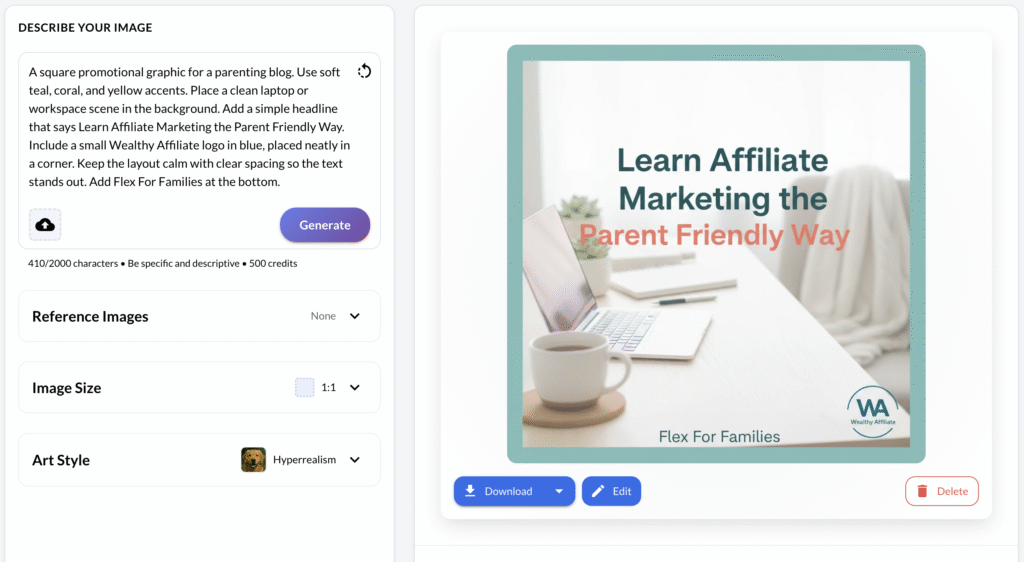
For me, that problem is creating more original blog and social images without turning every graphic into a lengthy Canva project.
Is Kre8or Good for Busy Parent Bloggers?
I think Kre8or could be a genuinely useful tool for busy parent bloggers.
However, that answer comes with an important condition.
It is useful when it simplifies your image workflow.
It is not useful if you spend two hours generating endless alternatives for an image that readers will glance at for five seconds.
That distinction matters.
Where Kre8or Can Save Time
Parent bloggers often need visuals for several different places:
- Blog hero images
- Supporting article images
- Pinterest Pins
- Facebook posts
- Instagram graphics
- Lead magnets
- Email promotions
- Product or course reviews
Creating each one manually can become another job on an already crowded list.
Kre8or can help by turning a written idea into an original visual quickly.
During my testing, images were generally ready in less than a minute.
That means I could realistically create an image during a short blogging session rather than setting aside an entire evening for design work.
The direct WEBP export also removes one of the small conversion tasks I normally complete before uploading an image to WordPress.
None of these time savings is enormous on its own.
Together, they can make publishing feel smoother.
It Can Reduce Reliance on Stock Images
Stock photography is convenient, but it also has limitations.
You may find:
- The same images appearing on several websites
- Family scenes that feel staged
- Home offices that look unrealistically perfect
- Limited representation of different family situations
- Images that do not match the exact message of your article
Kre8or gives you more control.
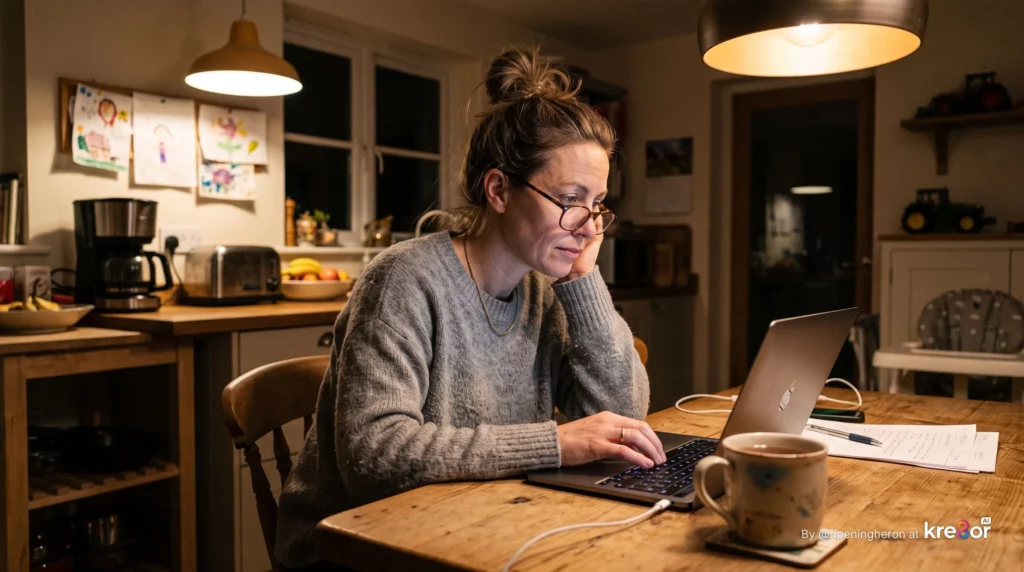
You can describe the scene you actually need.
For example:
A tired but determined parent working on a laptop at the kitchen table after the children have gone to bed, cup of tea nearby, realistic family home, warm evening lighting, hopeful rather than overwhelmed.
That is far more specific than searching a stock library for “parent working from home”.
It Helps When You Are Short of Ideas
One of the hardest parts of creating images is not always the design.
It is deciding what to create.
Kre8or’s community feed, challenges, and Remix features can help break that creative block.
You can browse other creators’ work, see how people have interpreted a challenge, or take one of your existing images in a completely different direction.
That can be helpful after a long day when your creative energy has quietly packed a suitcase and left the building.
However, there is a balance.
Browsing for inspiration can quickly become scrolling for entertainment.
I would use Kre8or with a clear goal:
- Decide what the image needs to achieve.
- Prepare the prompt.
- Generate one or two strong options.
- Select the best version.
- Move on.
It Can Support Content Repurposing
Busy parents do not always have time to create a completely separate campaign for every platform.
Kre8or’s Remix feature could help turn one visual idea into several assets.
For example:
- A blog hero image
- A magazine-style Facebook graphic
- A Pinterest background
- A promotional poster
- A device mockup
You may still need Canva for exact wording or final branding.
However, starting with one strong visual concept is often faster than designing every asset from scratch.
It Is Beginner-Friendly
You do not need professional design skills to use Kre8or.
The basic creation process is straightforward:
- Enter a prompt
- Choose your settings
- Generate
- Review
- Export
The more difficult part is learning to communicate what you want.
That becomes easier with practice.
I would encourage a beginner to create a small reusable prompt framework rather than writing every prompt from nothing.
For example:
Create a [format] image for a blog aimed at busy parents. Show [main scene]. Use warm natural lighting, a realistic family setting, teal and coral accents, and leave clear space for [headline or logo]. The mood should feel practical, calm, and encouraging rather than luxurious or exaggerated.
That framework can then be adapted for each article.
It Will Not Replace Your Judgement
Kre8or can generate an attractive image.
It cannot decide whether that image is right for your reader.
You still need to check:
- Whether the family situation feels realistic
- Whether the visual supports the article
- Whether anything looks strange or misleading
- Whether the image fits your brand
- Whether text is accurate
- Whether the file is suitable for the website
- Whether creating the image was actually worth your time
This is particularly important when using AI for parenting, finance, health, education, or product-related content.
A convincing image is not necessarily a factual image.
You Do Not Need It on Day One
A new blogger does not need a collection of paid tools before publishing their first post.
You can start with:
- Free stock images
- A free Canva account
- Images available within your existing blogging platform
- Free AI credits
- Simple graphics without elaborate design
Kre8or becomes more valuable when you are publishing regularly and visual content is becoming a genuine part of your workflow.
That may be from the beginning if Pinterest or Facebook is central to your traffic strategy.
For someone publishing one article every few weeks, the free option or an existing image tool may be enough.
My Verdict for Busy Parent Bloggers
Kre8or is a strong fit for parent bloggers who:
- Publish consistently
- Create social media content
- Want more original visuals
- Dislike spending hours inside design software
- Need images in several formats
- Enjoy experimenting with AI
- Will genuinely use the monthly credits
It is less essential for someone who rarely creates images or already has an AI tool that completely meets their needs.
The real value is not that Kre8or can create impressive artwork.
It is whether it helps you publish useful content more consistently while protecting your limited time.
For my own workflow, I think it has the potential to do that.
The Kre8or Referral Programme
Kre8or also includes a built-in referral programme.
This allows creators to earn commissions when they introduce new users to the platform.
According to Kre8or’s current terms, referrals earn 10% commission on credit purchases made by customers who joined through their referral link, for as long as those people remain customers.
That lifetime element makes the programme more interesting than a one-off referral payment.
However, it is important to understand exactly what is being rewarded.
You are not being paid simply because someone creates a free account.
Commission is tied to qualifying customer spending.
Where Do You Find Your Referral Link?
Kre8or has an Earn area where creators can access and monitor their referral activity.
Depending on the current dashboard, this may include:
- A personal referral link
- Click tracking
- Sign-up statistics
- Commission information
- Payout progress
- Campaign tracking
- A shareable QR code
How Could Bloggers Promote Kre8or?
The most obvious route is a detailed review like this one.
However, a referral link becomes more useful when it is supported by genuinely helpful content.
Possible supporting articles include:
- How to Use Kre8or AI
- Best Kre8or Prompts for Bloggers
- How to Create Pinterest Images With Kre8or
- Kre8or vs Canva
- Kre8or vs ChatGPT
- Kre8or vs Wealthy Affiliate ImageStudio
- How Kre8or Credits Work
- Kre8or Remix Tutorial
- Best AI Image Tools for Bloggers
You could also share your real creations through:
- YouTube
- Email newsletters
- Tutorials
- Social media challenges
- Prompt case studies
The strongest referral content will show what the platform actually does.
Simply telling people that an AI tool is amazing is unlikely to build much trust.
Showing the prompt, the result, the edits, the credit cost, and how you used the image is far more persuasive.
Could Social Creators Use the Referral Programme?
Yes.
Kre8or is designed around sharing and community as well as image creation.
Its founders have described a wider creator economy where users may earn from referrals and from activity around creative work, including people remixing shared creations.
The current Kre8or homepage also promotes the ability to create, remix, and potentially earn when others interact with your work.
That means someone may be able to promote Kre8or without operating a traditional review blog.
For example, they could build:
- An image-led Facebook page
- A Pinterest account featuring AI concepts
- A YouTube channel sharing prompt experiments
- A themed creator profile
- A social series comparing AI tools
As always, the income opportunity should be kept in perspective.
A referral system gives you a way to earn.
It does not give you an audience.
You still need useful content, traffic, trust, and consistent promotion.
Disclosure Matters
Anyone promoting Kre8or should clearly disclose the referral relationship.
Readers should know when you may earn a commission from their purchase.
That disclosure should be easy to see rather than buried at the bottom of the page.
For this review, I would include:
- The existing disclosure in your Heads Up section
- A short disclosure near the main Kre8or call to action
- A clear note around any pricing or recommendation button
Is the Referral Programme a Reason to Join?
Not by itself.
I would never recommend paying for a tool only because it has an affiliate programme.
You should first decide whether Kre8or is useful for your own content.
Using the platform gives you:
- Genuine examples
- Honest advantages and disadvantages
- Real screenshots
- A better understanding of the credits
- More credible tutorials
- Personal results to share
That experience is what gives the referral opportunity value.
The commission is a useful extra.
It should not be the reason you pretend to like a platform you do not actually use.
Is Kre8or AI Worth It?
Based on my early experience, I think Kre8or is worth considering for creators who regularly need original images.
I paid $99 for the annual Spark plan, and I am comfortable with that decision so far.
The platform has been:
- Easy to use
- Fast
- Enjoyable
- Capable of producing strong images
- Useful for remixing
- Practical for website exports
- More engaging than a standard image generator
However, “worth it” depends on your existing workflow.
Kre8or Is More Likely to Be Worth It If You:
- Publish several blog posts each month
- Create regular Facebook or Pinterest content
- Want to move away from generic stock photos
- Need original campaign visuals
- Will use WEBP exports
- Enjoy experimenting with visual concepts
- Want access to Remix and community challenges
- Plan to promote Kre8or through useful content
- Do not already have another tool that handles all of this well
Kre8or May Not Be Worth It If You:
- Create images only occasionally
- Already pay for an AI tool that meets your needs
- Mainly need accurate text-based graphics
- Prefer working from Canva templates
- Do not want to manage credits
- Tend to buy tools and then forget about them
- Are still struggling to publish your first few blog posts
The last point is important.
A new image tool will not fix an unclear niche, weak content, or a lack of publishing consistency.
It can support your strategy.
It cannot replace one.
Is the Free Membership Worth Trying?
Yes.
Kre8or currently allows people to join for free and begin with starter credits after verifying their account. The exact allowance or introductory offer may change, so check the live page when joining.
That gives you a low-risk way to test:
- Image quality
- Prompting
- Speed
- Workshops or guided creation
- Remix
- The community
- Export options
- Whether you actually enjoy using it
I would complete a genuine mini-project before deciding whether to upgrade.
Create something you would otherwise have made in Canva or sourced from a stock library.
Then ask:
- Was the result usable?
- How many attempts did it take?
- Did it save time?
- Did it fit your brand?
- Would you use the platform every month?
- Does the paid plan solve a real need?
Does Kre8or Replace Other Subscriptions?
Possibly, but not automatically.
It may reduce your need for:
- Paid stock-image libraries
- Some Canva design work
- Separate image-conversion tools
- Other standalone AI image generators
It is less likely to replace:
- ChatGPT for strategy and prompt development
- Canva for precise text and layouts
- Professional editing software
- A social scheduling platform
- Your wider blogging tools
For me, Kre8or is not replacing ChatGPT.
It may replace some of the manual image work I previously completed in Canva.
That still gives it a useful place in the workflow.
My Early Value Verdict
At this stage, I would describe Kre8or as a useful creative tool rather than an essential blogging expense.
That is not faint praise.
Most blogging tools are not essential.
They earn their place by making a repeated task easier, quicker, or better.
Kre8or appears capable of doing that for visual content.
The Spark plan feels reasonably priced for someone who will use it throughout the month.
The free account is the more sensible starting point for anyone who is unsure.
My Recommendation
Try Kre8or with a specific project rather than joining simply to explore.
Create:
- One blog hero image.
- One Facebook graphic.
- One Pinterest visual.
- One remix.
- One image based on a detailed brand prompt.
If the platform helps you produce those assets faster and the results are good enough to publish, the paid plan may be worth it.
If you spend most of your time correcting images, rewriting prompts, or moving everything into Canva anyway, your existing workflow may be better.
For me, the early signs are positive.
I expect to continue using Kre8or alongside ChatGPT, particularly for social campaigns, blog graphics, creative experiments, and direct WEBP exports.
I will update this review once I have used it across several complete Flex For Families campaigns.
[CTA placement suggestion: Add a Kre8or-specific call-to-action box here inviting readers to start with the free account. Include a visible affiliate disclosure immediately below the button.]
Try Kre8or AI for Yourself
See What You Can Create With the Free Account
The best way to decide whether Kre8or fits your workflow is to test it with a real project. Try creating a blog hero image, a social graphic, or your first remix before deciding whether you need a paid plan.
Start Creating With Kre8or AI →Start with the free account, test the image quality and workflow, and only upgrade if it genuinely saves you time.
Affiliate disclosure: This link may be an affiliate link, which means I may earn a commission if you make a qualifying purchase, at no extra cost to you. I only recommend tools I have personally tested and believe may be useful for busy parent bloggers.
🛠️ The Blogging Tools I Personally Recommend
Kre8or AI is one of the latest tools I’ve been testing, but creating great images is only one part of building a successful blog.
I’ve put together a complete guide to the blogging tools, courses and resources I genuinely recommend after years of building websites, growing traffic and earning affiliate income.
Inside You’ll Find:
- ✅ My favourite AI tools for bloggers
- ✅ Blogging courses worth considering
- ✅ SEO and keyword research tools
- ✅ Website hosting recommendations
- ✅ Email marketing platforms
- ✅ The tools I use every week on Flex For Families
Every recommendation is based on my own experience. If I wouldn’t use it myself, it doesn’t make the list.
Best Kre8or AI Alternatives
Kre8or is not the only AI image tool available.
The right alternative depends on whether you need:
- Better prompt support
- More precise design tools
- A stronger community
- Higher-volume image generation
- A platform you already pay for
- More control over text and layout
Here are the alternatives I would consider.
1. ChatGPT
ChatGPT is the closest alternative in my own workflow.
I already use it extensively to:
- Develop image ideas
- Improve prompts
- Create blog hero images
- Generate Pinterest concepts
- Produce Facebook graphics
- Refine visual branding
- Plan complete content campaigns
The biggest advantage is context.
ChatGPT already understands Flex For Families, the audience, the tone, the colours, and the type of imagery I prefer.
That reduces the amount of brand information I need to repeat in every prompt.
The image quality is also comparable with Kre8or based on the examples I have created so far.
ChatGPT May Be Better If You Want:
- Help developing the original concept
- Prompt-writing support
- A tool that also assists with content, SEO, planning, and research
- Ongoing brand context
- A conversational creative process
- One subscription covering several types of work
Kre8or May Be Better If You Want:
- A dedicated image-generation platform
- Remix features
- Direct WEBP exports
- Community challenges
- Voting and creator profiles
- A visual creator economy
- A more focused image workflow
For me, these tools work better together than as direct replacements.
2. Canva
Canva is not a direct AI-image replacement, but it remains one of the strongest design alternatives.
It is particularly useful when you need control over:
- Text
- Fonts
- Logos
- Alignment
- Templates
- Brand consistency
- Multi-page designs
- Printables
- Presentations
Kre8or is better at generating the original scene or visual concept.
Canva is better at turning that image into a polished graphic with accurate wording.
Canva May Be Better If You Mainly Create:
- Pinterest Pins with headlines
- Facebook graphics with precise text
- Workbooks
- Lead magnets
- Presentations
- Printable planners
- Branded templates
- Multi-page documents
Kre8or May Be Better If You Mainly Need:
- Original illustrations
- Realistic scenes
- Creative campaign ideas
- Unique visual concepts
- AI-generated backgrounds
- Remixable artwork
I increasingly use AI to create the main visual and Canva to finish it.
That combination is often more practical than asking either platform to do everything.
3. Wealthy Affiliate ImageStudio
Wealthy Affiliate members already have access to ImageStudio inside the wider platform.
That makes it a convenient alternative for people who mainly need images while creating blog content.
Its biggest advantage is integration.
You can work on your website, write content, and create a supporting image without moving between several platforms.
ImageStudio May Be Better If You:
- Already use Wealthy Affiliate
- Need occasional blog images
- Prefer an all-in-one platform
- Do not need community or creator features
- Want a simple built-in workflow
Kre8or May Be Better If You:
- Create images regularly
- Want more creative tools
- Need Remix
- Want direct export controls
- Enjoy challenges and community features
- Are not a Wealthy Affiliate member
- Want a standalone creative platform
Kre8or feels broader and more image-focused.
ImageStudio feels more like a convenient blogging feature.
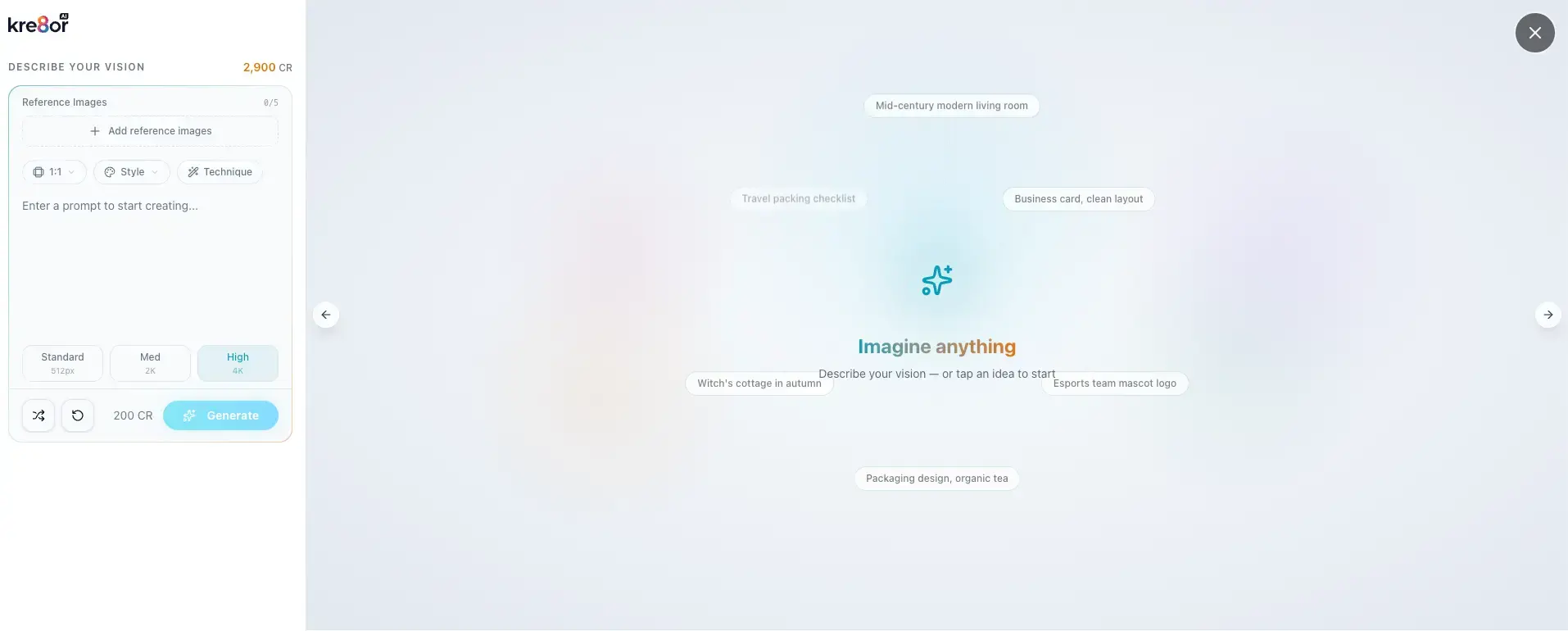
4. Midjourney
Midjourney is well known for producing highly polished and artistic AI images.
It may appeal to creators who prioritise:
- Cinematic visuals
- Detailed fantasy scenes
- Strong artistic styles
- High-end concept art
- Dramatic compositions
It can produce striking results, but the workflow may feel less beginner-friendly than Kre8or.
It may also be more than a typical parent blogger needs for standard blog and social images.
Midjourney May Be Better If You Want:
- Advanced artistic results
- Highly stylised imagery
- Concept art
- Fantasy or cinematic visuals
- More control through advanced prompts
Kre8or May Be Better If You Want:
- A simpler learning curve
- Community challenges
- Blogger-friendly exports
- Remixing
- A more approachable creator platform
For most beginners, ease of use matters more than achieving the most technically impressive image possible.
5. Adobe Firefly
Adobe Firefly may suit creators already using Adobe products.
Its main appeal is how it fits into a professional creative workflow.
It can be useful for:
- Generating images
- Editing existing visuals
- Expanding backgrounds
- Removing objects
- Producing design variations
- Working across Adobe applications
Adobe Firefly May Be Better If You:
- Already use Photoshop or Adobe Express
- Need more advanced editing
- Work professionally with visual assets
- Want AI integrated into a wider design suite
Kre8or May Be Better If You:
- Want something simpler
- Do not use Adobe tools
- Prefer a community-based platform
- Want a lower-friction image workflow
- Mainly create blog and social content
Adobe may offer more editing depth.
Kre8or may feel more accessible.
6. Leonardo AI
Leonardo AI is another dedicated image-generation platform with a wide range of creative controls.
It may appeal to creators who want:
- More advanced settings
- Different generation models
- Greater style control
- Character creation
- Game assets
- Detailed concept work
The extra control can be valuable.
It can also make the platform feel more complicated.
Leonardo AI May Be Better If You Want:
- Advanced generation controls
- Several image models
- Character consistency
- More technical customisation
- A wider range of creative settings
Kre8or May Be Better If You Want:
- A simpler interface
- Quick results
- Social community features
- Challenges and voting
- Direct WEBP exports
- Less technical setup
For busy parent bloggers, simplicity can be more valuable than an endless list of settings.
7. Free Stock Image Libraries
Free stock photography remains a perfectly reasonable alternative.
Sites offering royalty-free images can be useful when you need:
- A quick blog image
- A generic business scene
- A simple background
- A real photograph
- Something without generation credits
Stock images do not require prompt writing.
They can also be more appropriate when realism or factual accuracy matters.
However, they are less flexible.
You may struggle to find the exact family scene, working environment, or emotional tone your article needs.
Stock Images May Be Better If You:
- Rarely create images
- Need something quickly
- Prefer real photography
- Do not want another subscription
- Are still testing your blog idea
Kre8or May Be Better If You:
- Need original visuals
- Want more control over the scene
- Publish regularly
- Create several social graphics
- Want a distinctive visual style
There is no reason you cannot use both.
A good blog can combine stock photography, screenshots, original photos, and AI-generated visuals.
Which Kre8or Alternative Is Best?
Here is how I would simplify the decision.
| Choose this tool if your main priority is… | Best option |
|---|---|
| Developing concepts and improving prompts | ChatGPT |
| Precise text, templates, and layouts | Canva |
| Quick image creation inside Wealthy Affiliate | ImageStudio |
| Artistic and cinematic AI images | Midjourney |
| Professional editing and Adobe integration | Adobe Firefly |
| Advanced image controls | Leonardo AI |
| Free real photography | Stock image libraries |
| Dedicated creation, Remix, community, and WEBP exports | Kre8or |
The best alternative is not always the most powerful platform.
It is the one that fits your actual publishing workflow.
For me, the strongest combination is currently:
ChatGPT for planning, Kre8or for image creation and Remix, and Canva when I need accurate text or final design work.
That may change as I spend more time using Kre8or.

About the Reviewer
Hi, I’m John Crossley, founder of Flex For Families.
I’m a parent, blogger, and online business owner who helps families find realistic ways to create more flexibility through blogging, affiliate marketing, and online business.
Like many people, I’ve spent years researching online opportunities, testing platforms, and learning how to separate genuine business models from expensive hype. I’ve also experienced the frustration of chasing opportunities that promised freedom but demanded more time away from family.
Today, I use that experience to review courses, side hustles, AI opportunities, and online business programmes through a simple lens:
Will this genuinely help parents create more flexibility, or will it create more pressure?
Every review on Flex For Families focuses on costs, time commitments, risks, and realistic expectations, so you can make informed decisions before investing your time or money.
Why You Can Trust This Kre8or Review
I have been building websites and using affiliate marketing tools since 2016. I joined Kre8or using my own paid Spark membership and spent several hours creating images, testing Remix, exploring the community, entering a challenge, comparing results with ChatGPT, and reviewing the export and credit system. This review is based on that hands-on experience rather than repeating claims from the sales page.
Final Verdict: Is Kre8or AI Worth Using?
Kre8or has made a strong first impression.
It is easy to use, enjoyable to explore, and capable of creating images that compare well with the results I have produced using ChatGPT.
The platform also offers more than basic image generation.
Its strongest features include:
- Fast AI image creation
- High-quality results
- Remixing
- Direct WEBP exports
- Community inspiration
- Creative challenges
- Voting
- Creator profiles
- A built-in referral programme
The combination of image generation and community features helps Kre8or stand out.
It feels less like a blank AI tool and more like a place where creators can experiment, share ideas, and develop their skills.
What Impressed Me Most?
The image quality was the first thing that impressed me.
Using the same detailed dream vehicle prompt in Kre8or and ChatGPT produced remarkably similar results.
Both understood the concept, environment, design, and overall atmosphere.
Kre8or also added its own creative interpretation by including people inside the vehicle.
The Remix feature was another highlight.
Turning a realistic parent-blogging image into a Remote Life magazine cover showed how one visual idea could become several different pieces of content.
The direct WEBP export may be less exciting, but it could become one of the most useful features in my regular blogging workflow.
Is Kre8or Perfect?
No.
The platform still depends heavily on prompt quality.
It does not automatically understand your brand, audience, or preferred style.
AI-generated text may need correcting.
The credit system may encourage some users to overthink each generation.
The community can also become a distraction when you only intended to create one quick graphic.
I also need more time to judge:
- Brand consistency
- Character consistency
- Long-term credit usage
- Infographic accuracy
- Multi-image campaigns
- Whether it genuinely reduces my Canva workload
That is why I consider this an early hands-on verdict rather than the final word on the platform.
Who Should Try Kre8or?
I would recommend trying Kre8or if you:
- Regularly create blog or social media images
- Want more original visuals
- Are tired of generic stock photos
- Enjoy experimenting with AI
- Want a dedicated image workflow
- Value Remix and community features
- Need direct WEBP downloads
- Are willing to improve your prompting
I would be more cautious if you:
- Rarely create images
- Already have an AI tool that meets your needs
- Mainly need precise text-based designs
- Are still paying for several tools you barely use
- Want AI to produce a perfect finished graphic from a vague instruction
My Early Rating
Kre8or AI Overall Score
Very Good – Promising for Regular Content Creators
Why 4.4/5? Kre8or combines strong image quality, an easy workflow, useful WEBP exports, Remix, and engaging community features. I have reduced the score slightly because results still depend heavily on prompting, and I need more time to judge long-term credit value and brand consistency.
Try Kre8or AI for Yourself
See What You Can Create With the Free Account
The best way to decide whether Kre8or fits your workflow is to test it with a real project. Try creating a blog hero image, a social graphic, or your first remix before deciding whether you need a paid plan.
Start Creating With Kre8or AI →Start with the free account, test the image quality and workflow, and only upgrade if it genuinely saves you time.
Affiliate disclosure: This link may be an affiliate link, which means I may earn a commission if you make a qualifying purchase, at no extra cost to you. I only recommend tools I have personally tested and believe may be useful for busy parent bloggers.
Frequently Asked Questions About Kre8or AI
Is Kre8or AI free?
Kre8or offers a free account that allows new users to explore the platform and test its image-generation features.
The exact number of free credits or any introductory offer may change, so check the current membership page before joining.
I recommend using the free account for a genuine project, such as creating a blog hero image or social media graphic, rather than generating random images purely to use the credits.
How much does Kre8or AI cost?
Kre8or uses a credit-based membership system with free and paid options.
I purchased the Spark annual plan for $99, although prices, credit allowances, and promotional offers may change.
Check the live Kre8or pricing page for the latest membership details before upgrading.
What are Kre8or credits used for?
Credits are used when you generate images and use certain creative features within Kre8or.
Credit usage may vary depending on the type of creation, settings selected, Remix activity, or participation in certain challenges.
You can monitor your remaining allowance from inside your account.
Can I use Kre8or images on my blog?
Kre8or’s paid plans include commercial usage rights, making the platform suitable for creating images for blogs, websites, social media, and other business content.
You should still check the current membership terms for the plan you select, particularly if you intend to use images for client work, products, advertising, or resale.
Can Kre8or create Pinterest and Facebook images?
Yes.
Kre8or can generate visuals suitable for Pinterest, Facebook, Instagram, blog posts, and other content platforms.
You can describe the intended format, composition, subject, and space needed for a headline within your prompt.
However, I would normally add important wording, branding, and final layout elements in Canva because AI-generated text can still contain mistakes.
Does Kre8or export images as WEBP?
Yes, Kre8or provides WEBP as an export option.
This is particularly useful for bloggers because WEBP files can provide good image quality at a smaller file size than some traditional formats.
You should still resize and compress images appropriately before uploading them to WordPress.
What is Kre8or Remix?
Remix allows you to take an existing creation and transform it into a new visual concept.
For example, I used Remix to turn a family-blogging illustration into a Remote Life magazine cover.
It can be useful for repurposing one idea into different campaign visuals rather than creating every image from scratch.
Is Kre8or better than ChatGPT for creating images?
Neither tool is automatically better for every task.
Kre8or provides a dedicated image workflow with Remix, community features, creative challenges, and direct WEBP exports.
ChatGPT is particularly useful for developing ideas, improving prompts, and creating visuals with an understanding of the wider content strategy and brand context.
My current preference is to use them together rather than treating one as a complete replacement for the other.
Can Kre8or replace Canva?
Kre8or may replace some of the time you spend sourcing or creating the main visual for a graphic.
Canva remains stronger for precise text, fonts, templates, layouts, presentations, workbooks, and multi-page documents.
A practical workflow is to create the original image in Kre8or and use Canva only when the design needs accurate wording or additional branding.
Is Kre8or part of Wealthy Affiliate?
Kre8or was created by Kyle Loudoun and Carson Lim, the founders of Wealthy Affiliate.
However, Kre8or operates as a separate standalone platform with its own accounts, memberships, credits, community, and referral programme.
You do not need to be a Wealthy Affiliate member to use Kre8or.
What is the difference between Kre8or and Wealthy Affiliate ImageStudio?
ImageStudio is an image-generation feature built into the Wealthy Affiliate platform.
It is convenient for members who need occasional images while creating content within Wealthy Affiliate.
Kre8or is a broader standalone creative platform offering features such as Remix, creator profiles, community challenges, voting, exports, and its own credit system.
Does Kre8or have an affiliate programme?
Kre8or includes a referral programme that allows eligible creators to earn commission from qualifying customer purchases made through their referral link.
Commission rates, qualifying purchases, payment requirements, and other terms may change, so check the current Kre8or referral terms before promoting it.
Always disclose clearly when your content contains a referral or affiliate link.
Is Kre8or suitable for beginners?
Yes.
The basic creation process is straightforward, and you do not need professional design experience to begin generating images.
However, image quality still depends on the instructions you provide.
Beginners will usually get better results by describing the subject, setting, style, lighting, mood, composition, colours, and intended use of the image.
Is Kre8or good for busy parent bloggers?
Kre8or can be a good fit for parent bloggers who regularly create blog and social media images.
Its speed, original visuals, Remix feature, and WEBP exports may reduce the time spent searching stock libraries or designing every image manually.
It becomes less valuable when image creation turns into endless experimentation, so it helps to begin each session with a specific purpose.
Is Kre8or AI worth paying for?
Kre8or may be worth paying for if you regularly create images and the platform saves you time or improves your visual content.
It may be unnecessary if you rarely need images or already have another subscription that fully covers your needs.
My early experience with the Spark annual plan has been positive, but I recommend starting with the free account and testing it with a real content project before upgrading.
Let’s Chat
Have you tried Kre8or AI yet?
I would love to know what you have been creating and how you think it compares with tools such as ChatGPT, Canva, or Wealthy Affiliate ImageStudio.
Perhaps you have used it to create:
- Blog images
- Pinterest Pins
- Facebook graphics
- Creative challenge entries
- Remixes
- Product mockups
- Something wonderfully strange that served no business purpose whatsoever
Leave a comment below and let me know:
What did you create first, and did Kre8or produce the result you had imagined?
I am still testing the platform across real Flex For Families content campaigns, so I will continue updating this review as I learn more about its credits, image consistency, Remix features, and long-term value.
Your experience may also help another busy parent decide whether Kre8or would genuinely save them time or simply give them another tool to manage.