
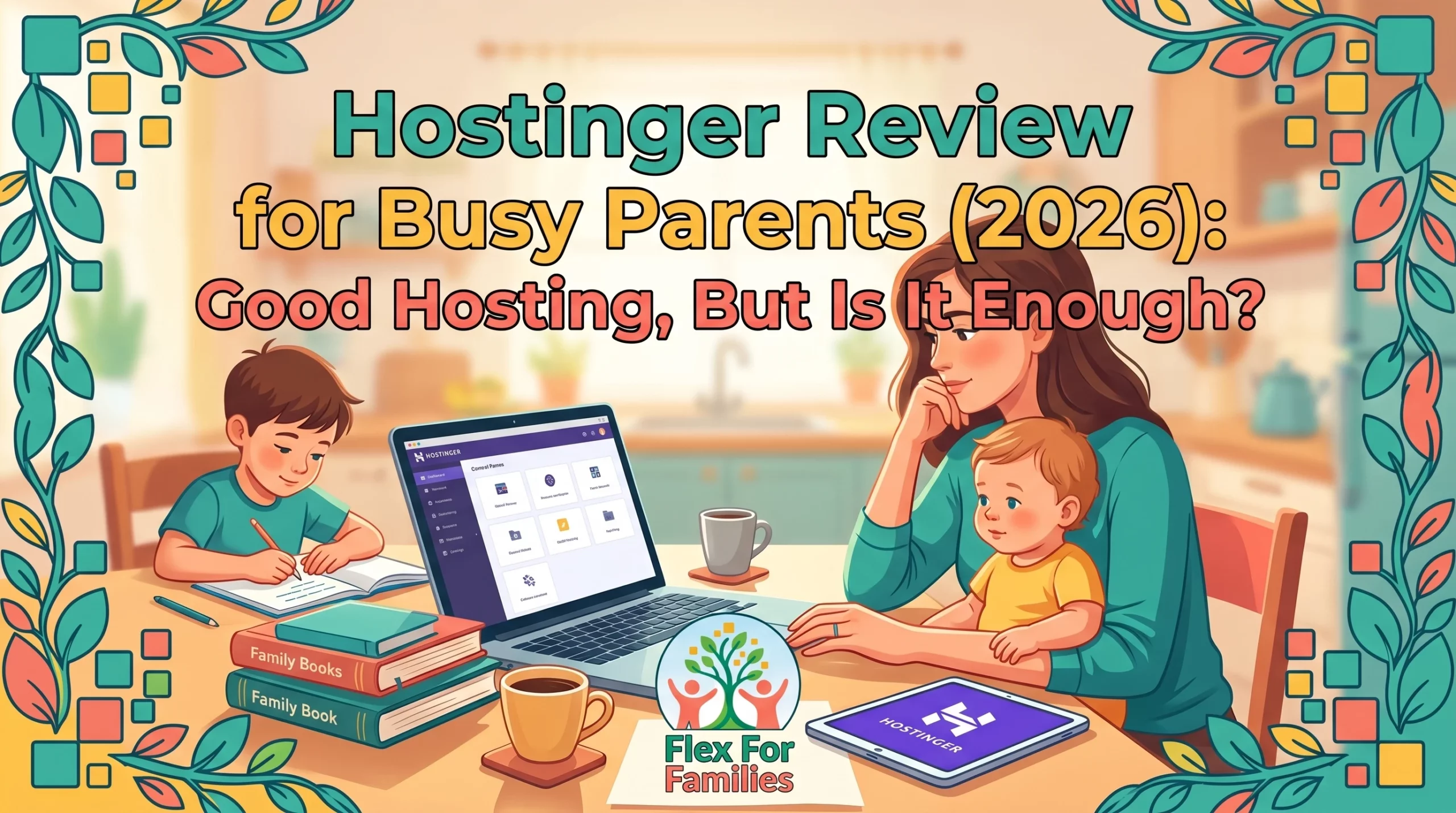
If you’re thinking about starting a blog, one of the first decisions you’ll face is where to host your website.
That’s where Hostinger often comes up.
It’s one of the most popular hosting companies for beginners, mainly because of its low prices, simple setup process, and beginner-friendly dashboard.
On the surface, it looks like an easy choice.
You can get a website online quickly, install WordPress in a few clicks, and start publishing content without spending a fortune.
For busy parents looking to build a blog around family life, that sounds ideal.
But here’s the question that matters most.
Is Hostinger actually enough to help you build a successful blog?
Because while hosting gets your website online, it doesn’t teach you how to create content, get traffic, or make money from your blog.
In this review, I’ll break down exactly what Hostinger offers, what it costs, what real users think about it, and whether it’s the right choice for parents starting their blogging journey.
I’ve spent years building websites and learning affiliate marketing, so I’ll also show you where Hostinger fits into the bigger picture and where many new bloggers get stuck.
Before you spend money on hosting, let’s make sure you’re investing in the right things first.
Is Hostinger worth it for beginner bloggers?
Hostinger is a good choice for beginner bloggers who want affordable website hosting and an easy-to-use platform. However, while Hostinger helps you get a website online, it does not provide blogging training, traffic strategies, or affiliate marketing support, which many new bloggers need to succeed.
Company: Hostinger
Founded: 2004
Type: Website hosting provider
Best For: Beginners who want affordable website hosting
Not Ideal For: Parents who also need blogging training, SEO guidance, affiliate marketing support, and a clear roadmap
Verdict: Hostinger is a strong budget hosting option for getting a WordPress website online. It is affordable, beginner-friendly, and offers good value for people who already know what they are doing.
But hosting is only one part of building a blog. It will not teach you how to create content, get traffic, or earn through affiliate marketing. For busy parents starting from scratch, that support matters.
What Is Hostinger?
Hostinger is a web hosting company that helps people create and run websites online.
Founded in 2004, it has grown into one of the most popular hosting providers for beginners thanks to its affordable pricing, simple setup process, and beginner-friendly tools.
In simple terms, if your blog is your house, Hostinger is the land it sits on.
Without hosting, your website can’t be viewed by anyone on the internet.
Hostinger offers a range of services including:
- WordPress hosting
- Shared hosting
- Cloud hosting
- Domain registration
- Business email hosting
- Website builder tools
- AI-powered website and content tools
For most parent bloggers, the main attraction is WordPress hosting.
With just a few clicks, you can:
- Register a domain name
- Install WordPress
- Launch a website
- Start publishing content
You don’t need technical skills or coding knowledge to get started.
That’s one of the reasons Hostinger has become so popular with beginners.
Quick Note: I’m John Crossley, founder of Flex For Families. I review online business opportunities through the lens of family life, focusing on costs, time commitments, risks, and whether they genuinely help parents create more flexibility.
What Makes Hostinger Different?
Hostinger positions itself as a low-cost alternative to some of the bigger hosting companies.
The main selling points are:
✔ Affordable introductory pricing
✔ Beginner-friendly dashboard
✔ Fast website speeds
✔ AI website creation tools
✔ One-click WordPress installation
✔ Free SSL certificates
✔ Free domain on some plans
For someone starting their very first blog, that combination can look very appealing.
And to be fair, Hostinger does a good job of making the technical side of launching a website feel less intimidating.
The bigger question is whether hosting alone is enough to help you succeed.
We’ll come back to that later in this review.
Why Parents Consider Hostinger
When you’re a busy parent, you’re usually looking for three things when starting a blog:
- Something affordable
- Something simple
- Something that doesn’t require hours of technical learning
That’s exactly where Hostinger appeals.
Most parents aren’t looking to become website developers.
They just want a place to publish content, share ideas, and potentially build an income stream around family life.
Hostinger promises to make that process easy.
The Budget-Friendly Appeal
One of the biggest barriers for new bloggers is the fear of spending money before they know whether blogging will work.
Hostinger’s introductory pricing removes some of that concern.
Compared to many hosting providers, the upfront cost is relatively low.
That makes it easier to take the first step.
The Simplicity Factor
Parents already have enough on their plates.
School runs.
Work commitments.
Family responsibilities.
The last thing most people want is a complicated hosting dashboard that requires hours of tutorials to understand.
Hostinger’s control panel is designed to be much simpler than traditional hosting platforms.
Tasks like:
- Installing WordPress
- Creating email addresses
- Managing domains
- Setting up backups
can usually be completed with a few clicks.
The “I Just Want To Get Started” Factor
This is probably the biggest reason people choose Hostinger.
They want to stop researching and finally launch their blog.
Hostinger makes that part relatively straightforward.
You can buy hosting today and have a website online within an hour.
That’s a genuine advantage.
Where Many Parents Get Stuck
The challenge is that getting a website online isn’t the same as building a successful blog.
This is where many new bloggers hit a wall.
- They buy hosting.
- They install WordPress.
- They publish a few posts.
Then they realise they don’t know:
- What to write about
- How to get traffic
- How SEO works
- How affiliate marketing works
- How blogs actually make money
That’s not Hostinger’s fault.
It’s simply not what hosting companies are designed to teach.
Hostinger helps you launch a website.
Building a blog business is a completely different skill set.
And understanding that difference can save new bloggers a lot of frustration.
Hosting Features Explained Simply
One thing Hostinger does well is making technical hosting features sound less intimidating.
If you’re brand new to blogging, here’s what the main features actually mean in plain English.
One-Click WordPress Installation
This is probably the most important feature for new bloggers.
Instead of manually installing WordPress yourself, Hostinger does most of the work for you.
A few clicks later, your blog is ready to go.
For beginners, this removes a lot of technical stress.
Free SSL Certificate
An SSL certificate is what puts the little padlock icon next to your website address.
It helps keep your site secure and tells visitors that your website is trustworthy.
Google also expects websites to use SSL.
Hostinger includes this for free on most plans.
Free Domain Name
Some Hostinger plans include a free domain for the first year.
This means you can register something like:
- yourfamilyblog.com
- yourblogname.co.uk
without paying separately for the domain initially.
Just remember that domain renewals usually apply after the first year.
Website Backups
Imagine spending months building your blog and then accidentally breaking something.
Backups are your safety net.
Hostinger automatically creates backups so you can restore your site if something goes wrong.
This is one of those features you hope you never need, but you’ll be grateful it’s there if you do.
Email Accounts
Many plans allow you to create professional email addresses such as:
instead of using a Gmail address.
This can make your blog look more professional when reaching out to brands or responding to readers.
AI Website Builder
Hostinger has invested heavily in AI tools.
You can answer a few questions about your website and the platform will generate a starter website for you.
For complete beginners, this can make getting started feel much faster.
AI Content Tools
Some plans also include AI writing and content generation tools.
These can help with:
- Website copy
- Blog post ideas
- Basic content drafts
Personally, I would treat these as a starting point rather than a finished solution.
As I’ve found with many AI tools, your personality and experience are what make content stand out.
Performance and Speed
Website speed matters.
Visitors don’t like waiting for pages to load.
Neither does Google.
Hostinger generally performs well for beginner websites and small blogs.
For most parent bloggers starting out, you are unlikely to outgrow the platform for quite some time.
What Most Beginners Actually Need
The truth is that new bloggers don’t need dozens of advanced hosting features.
Most parents simply need:
✔ Reliable hosting
✔ WordPress installation
✔ Security
✔ Backups
✔ Decent speed
✔ Affordable pricing
Hostinger covers those basics well.
That’s a big reason it remains one of the most recommended hosting providers for beginners.
How Easy Is Hostinger for Beginners?
This is where Hostinger probably shines the most.
Many hosting companies still feel like they were designed by developers for developers.
Hostinger feels different.
The platform is clearly built with beginners in mind.
The Setup Process Is Straightforward
After signing up, Hostinger guides you through the process step by step.
You’ll typically:
- Choose a hosting plan
- Register a domain
- Install WordPress
- Access your website dashboard
Most of this can be completed without needing any technical knowledge.
For many people, that’s a huge relief.
The Dashboard Is Beginner Friendly
Instead of using the traditional cPanel interface that many hosting companies rely on, Hostinger uses its own custom dashboard.
Everything is organised clearly.
Tasks such as:
- Managing your website
- Creating email addresses
- Viewing backups
- Checking performance
are easy to find.
You don’t feel like you’re navigating a control panel from 2005.
Support Is Available When You Need It
Hostinger offers live chat support and a large knowledge base.
If you get stuck, there are usually guides available to walk you through common tasks.
That said, support is mostly chat-based rather than phone-based.
Some people love that.
Others prefer being able to speak to someone directly.
The Learning Curve Is Low
Compared to many hosting platforms, Hostinger has a fairly gentle learning curve.
That’s important for busy parents.
You don’t want to spend your evening watching tutorials just to figure out how to update your website.
Most basic tasks can be learned quickly.
The Real Beginner Question
The bigger question isn’t:
“Can I use Hostinger?”
Most people can.
The better question is:
“Do I know what to do once my website is online?”
That’s where hosting and blogging become two different things.
Hostinger makes getting started easier.
It doesn’t teach:
- Content strategy
- SEO
- Affiliate marketing
- Traffic generation
- Monetisation
Those are the skills that ultimately determine whether a blog succeeds.
And that’s often where new bloggers need the most help.
One thing Hostinger does well is making website setup relatively straightforward. If you’d like to see the dashboard and setup process before signing up, this walkthrough gives a useful behind-the-scenes look at the platform.
As you can see, getting a website online isn’t particularly difficult with Hostinger. The challenge most parents face comes after that. Creating content, getting traffic, and learning how blogging actually works is where the real learning curve begins.
Hostinger AI Tools: Helpful Shortcut or Marketing Hype?
One area where Hostinger has invested heavily in recent years is artificial intelligence.

If you’ve looked at their sales pages, you’ve probably seen mentions of:
- AI Website Builder
- AI Content Generator
- AI Blog Tools
- AI Logo Creator
- AI SEO Assistance
On the surface, it sounds impressive.
The promise is simple:
“Let AI do the hard work so you can launch your website faster.”
As a busy parent, that’s naturally appealing.
But how useful are these tools in reality?
The AI Website Builder Is Probably the Most Useful
This is where Hostinger’s AI tools make the most sense.
You answer a few questions about your website:
- What your site is about
- Who your audience is
- What type of website you want
Hostinger then generates a starter website for you.
For someone who finds blank pages intimidating, this can be genuinely helpful.
It won’t create the perfect website.
But it can get you moving faster.
AI Content Generation Is More Questionable
Hostinger can also generate content.
This is where I become a little more sceptical.
As I’ve discovered with tools like LinkArtemis and many other AI writing platforms, AI can produce content quickly.
The problem is that quick content isn’t always good content.
It often lacks:
- Personality
- Experience
- Original insights
- Your unique voice
For a brand like Flex For Families, that matters.
Parents connect with real stories, experiences, and lessons learned.
AI can’t replace that.
AI Is Better as a Starting Point
This is how I use AI across my own websites.
Not as a replacement for writing.
As a brainstorming partner.
AI can help you:
✔ Generate ideas
✔ Create outlines
✔ Overcome writer’s block
✔ Speed up research
But the final article still needs your experience, opinions, and perspective.
That’s what makes content useful.
The Risk New Bloggers Face
One thing I worry about with AI website builders and AI content tools is that they can create the illusion of progress.
You can generate:
- A website
- A homepage
- A few blog posts
…all within an hour.
It feels productive.
But traffic, trust, and income don’t come from publishing content quickly.
They come from creating content that genuinely helps people.
That’s much harder to automate.
My Verdict on Hostinger’s AI Features
I wouldn’t call them hype.
Some of the tools are genuinely useful.
Especially the website builder and setup tools.
But I also wouldn’t buy Hostinger because of the AI.
I would buy Hostinger because it’s affordable hosting.
The AI features are a nice bonus.
For most parent bloggers, the fundamentals still matter far more:
- Choosing the right niche
- Creating helpful content
- Learning SEO
- Understanding affiliate marketing
- Staying consistent
AI can support those activities.
It can’t replace them.
The Bottom Line
Hostinger’s AI tools can help you launch faster.
They cannot build a successful blog for you.
Think of them as shortcuts for setup, not shortcuts to success.
Current Hostinger Pricing (At The Time of Writing)
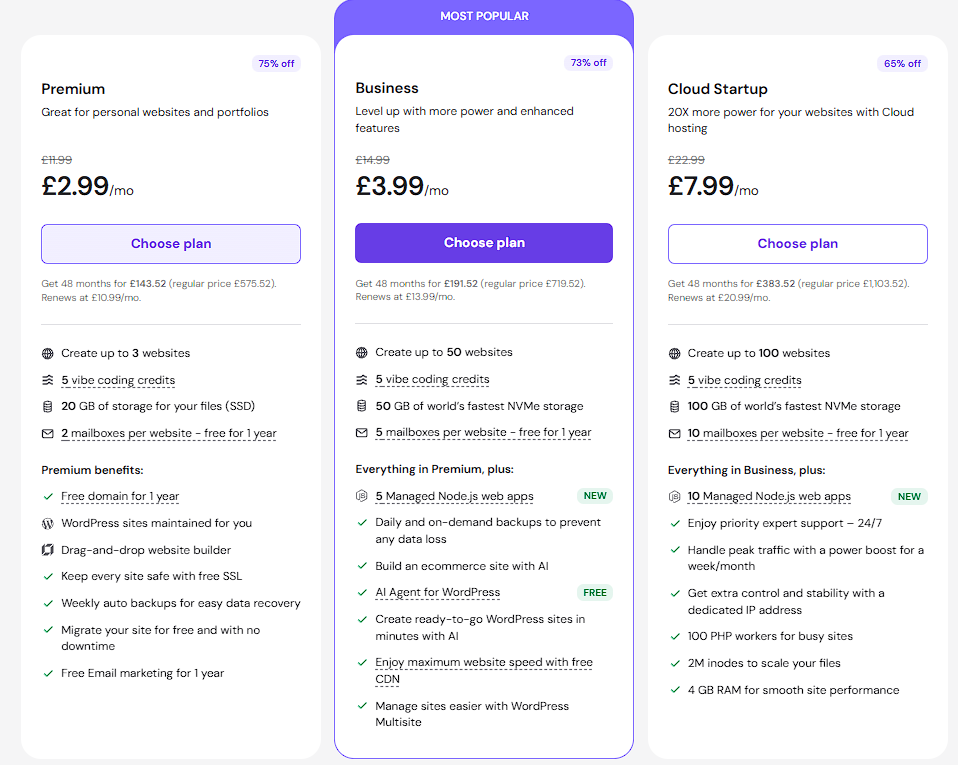
Hostinger regularly runs promotions, but at the time of writing the main plans most bloggers will consider are:
| Plan | Introductory Price | Renewal Price |
|---|---|---|
| Premium Web Hosting | £2.99/month | £10.99/month |
| Business Web Hosting | £3.99/month | £13.99/month |
For most new parent bloggers, the Premium plan is likely the best starting point.
It includes everything needed to launch a blog without paying for features you’re unlikely to use immediately.
What’s Included?
Depending on the current promotion, Hostinger often includes:
✔ Free domain name for the first year
✔ Free professional email for the first year
✔ WordPress hosting
✔ SSL certificate
✔ Backups
✔ AI website tools
✔ Customer support
At first glance, that’s a lot of value for a relatively small monthly cost.
The Important Things To Know
This is where many beginners get caught out.
The free domain and email are typically promotional benefits.
After the first year, renewal costs apply.
The same is true for hosting itself.
Your renewal rate will be significantly higher than the introductory price.
That’s normal across most hosting companies, but it’s worth budgeting for before you sign up.
What About The AI Tools?
Hostinger includes access to several AI-powered features, but some tools have usage limits depending on the plan you’re on.
As AI features continue to evolve, Hostinger may also introduce premium AI functionality or usage restrictions in the future.
My advice is simple:
Buy Hostinger for the hosting.
Treat the AI features as a bonus.
The real value comes from reliable hosting, not from AI writing tools.
Which Plan Would I Choose?
If I were starting a brand-new blog today, I’d choose the Premium plan.
It offers the best balance between:
- Cost
- Features
- Simplicity
Most new bloggers won’t need the additional resources included in the Business plan straight away.
You can always upgrade later if your traffic grows.
Real User Reviews
Whenever I review a product or service, I like to look beyond the sales page.
What do actual customers say?
Because marketing tells you what a company wants you to hear.
Reviews tell you what users actually experience.
What People Like About Hostinger
Across Trustpilot, review sites, and blogging communities, several positives appear consistently.
Users often praise:
- Affordable pricing
- Easy setup process
- Beginner-friendly dashboard
- Good website speed
- Helpful live chat support
- Straightforward WordPress installation
For first-time website owners, these are important benefits.
Many users specifically mention how easy it was to launch their first website.
That’s exactly what Hostinger is designed to do.
Common Complaints
No hosting company gets perfect reviews.
Hostinger is no exception.
The most common criticisms include:
- Renewal prices being higher than promotional prices
- Support response times varying during busy periods
- Upsells during checkout
- Advanced users eventually needing more powerful hosting
None of these are unique to Hostinger.
You’ll find similar complaints across most major hosting companies.
What Stands Out
The overall pattern is fairly clear.
Most people seem happy with Hostinger when:
✔ They’re starting a new website
✔ They want affordable hosting
✔ They need something simple
Problems tend to appear when:
✘ Expectations are unrealistic
✘ Users need advanced features
✘ People focus only on the low introductory price
My Take on the Reviews
The feedback aligns with what I would expect.
Hostinger appears to do a good job at its primary goal:
Helping beginners get a website online quickly and affordably.
What I don’t see in the reviews is evidence that Hostinger helps people become successful bloggers.
And that’s an important distinction.
Hosting can provide the platform.
It can’t provide the strategy.
The bloggers who succeed usually learn:
- Content creation
- SEO
- Affiliate marketing
- Audience building
Whether they host their site with Hostinger, Bluehost, SiteGround, or somewhere else becomes much less important than those skills.
That’s why I see Hostinger as a solid hosting company, but not necessarily a complete solution for new bloggers.
Hostinger vs Bluehost
If you’re looking for beginner-friendly hosting, there’s a good chance you’re comparing Hostinger and Bluehost.
- Both are popular.
- Both are aimed at beginners.
- Both make it easy to get a WordPress website online.
So which one is better for parents starting a blog?
Quick Comparison
| Feature | Hostinger | Bluehost |
|---|---|---|
| Starting Price | ✔ Lower | ➖ Higher |
| Renewal Pricing | ✔ Generally Lower | ✘ Often Higher |
| WordPress Installation | ✔ Easy | ✔ Easy |
| Dashboard | ✔ Modern & Simple | ➖ Traditional |
| Free Domain | ✔ First Year | ✔ First Year |
| Free Email | ✔ First Year | Limited on some plans |
| AI Website Tools | ✔ Included | ✔ Included |
| Customer Support | ✔ Live Chat | ✔ Chat & Phone |
| Beginner Friendliness | ✔ Very Good | ✔ Good |
Where Hostinger Wins
Hostinger’s biggest advantage is value.
You get:
- Lower entry pricing
- Modern dashboard
- Good performance
- Generous features
For parents watching every pound, that’s attractive.
The platform also feels more modern and easier to navigate.
Where Bluehost Wins
Bluehost has been around a long time and remains one of the biggest names in WordPress hosting.
Some users prefer:
- Phone support
- Brand recognition
- Longer track record
For complete beginners who like being able to speak to someone, Bluehost may feel more reassuring.
My Verdict
If I were choosing purely on hosting today, I’d probably lean towards Hostinger.
- The pricing is competitive.
- The dashboard is beginner-friendly.
- The feature set is strong.
That said, neither platform solves the biggest challenge most new bloggers face.
Getting traffic.
That’s where hosting becomes only one piece of the puzzle.
A fast website is useful.
Knowing how to grow it is what actually matters.
Hostinger vs Wealthy Affiliate
This comparison comes up more often than you might think.
Not because Hostinger and Wealthy Affiliate are direct competitors.
They’re not.
They solve different problems.
Quick Comparison
| Feature | Hostinger | Wealthy Affiliate |
|---|---|---|
| Website Hosting | ✔ | ✔ |
| Domain Registration | ✔ | ✔ |
| WordPress Websites | ✔ | ✔ |
| AI Tools | ✔ | ✔ |
| Blogging Training | ✘ | ✔ |
| SEO Training | ✘ | ✔ |
| Affiliate Marketing Training | ✘ | ✔ |
| Community Support | ✘ | ✔ |
| Keyword Research Tool | ✘ | ✔ |
| Step-by-Step Roadmap | ✘ | ✔ |
What Hostinger Gives You
Hostinger provides the technical foundation.
You get:
- Website hosting
- Domains
- Security
- Website management tools
In other words, Hostinger gives you a website.
What Wealthy Affiliate Gives You
Wealthy Affiliate gives you the website plus the education.
You get:
- Hosting
- Training
- Community support
- Affiliate marketing lessons
- SEO training
- Keyword research tools
- Website building guidance
For someone starting from scratch, those additional pieces can be valuable.
The Question Most Parents Should Ask
When I started online, I didn’t struggle with buying hosting.
I struggled with everything that came after.
Questions like:
- What should I write about?
- How do I get traffic?
- How does affiliate marketing work?
- How do blogs actually make money?
Hosting companies don’t teach those skills.
That’s not their job.
Which One Should You Choose?
If you already know how blogging works and simply need hosting, Hostinger is a solid choice.
If you’re starting from scratch and want guidance alongside your hosting, Wealthy Affiliate may be the better fit.
My Personal Take
Hostinger is a hosting company.
Wealthy Affiliate is a blogging and affiliate marketing platform that includes hosting.
That’s an important distinction.
Most parents don’t need help buying hosting.
They need help building a blog that actually goes somewhere.
And that’s where training, support, and a roadmap often become more valuable than the hosting itself.
What should you write about? How do you get traffic? How does affiliate marketing actually work?
That’s exactly why I created the Parent Blogging Starter Kit. It walks you through the fundamentals and helps you avoid the mistakes most new bloggers make.
Hostinger Review: Pros and Cons
Before deciding whether Hostinger is right for you, it helps to look at both the strengths and limitations.
Pros
✔ Very affordable introductory pricing
Hostinger is one of the cheapest reputable hosting providers available, making it attractive for parents starting a blog on a budget.
✔ Easy-to-use dashboard
The custom hPanel is beginner-friendly and much easier to navigate than some traditional hosting control panels.
✔ Fast website performance
Hostinger generally performs well for page speed, uptime, and reliability, which is important for SEO and user experience.
✔ Free domain included
Many plans include a free domain name for the first year, helping reduce startup costs.
✔ AI tools included
The AI website builder, content tools, and setup assistants can help beginners get online faster.
✔ Good option for getting a website live quickly
If your only goal is to launch a website, Hostinger makes the process relatively straightforward.
Cons
✘ Renewal prices are significantly higher
The low introductory price looks great, but costs increase substantially after the first term.
✘ Hosting only solves one piece of the puzzle
Hostinger helps you build a website, but it doesn’t teach you:
- How to choose a niche
- How to create content
- How to get traffic
- How affiliate marketing works
✘ AI tools have limitations
The AI features can speed up setup, but they won’t replace a content strategy or help you build a unique brand voice.
✘ Additional costs can add up
The free domain and email marketing tools are only included for a limited period. Ongoing costs may increase as your blog grows.
✘ Limited community support
Unlike blogging platforms that include training communities, you’re largely responsible for figuring things out yourself.
The Bottom Line
Hostinger is very good at what it does.
The challenge is that hosting alone doesn’t help you build a successful blog.
Most new bloggers don’t fail because of hosting.
They struggle because they don’t know what to do after the website is live.
Who Is Hostinger Best For?
Not every hosting solution fits every parent.
Here’s where Hostinger makes sense and where it may fall short.
Hostinger Is Great For:
Parents Who Already Know How Blogging Works
If you already understand:
- Content creation
- SEO
- Affiliate marketing
- Traffic generation
Hostinger can be a low-cost place to host your website.
Budget-Conscious Beginners
If keeping startup costs low is your main priority, Hostinger offers one of the cheapest entry points into blogging.
DIY Learners
If you’re happy watching YouTube tutorials, reading blog posts, and figuring things out yourself, Hostinger gives you the tools to get started.
Bloggers Managing Multiple Websites
Once you know what you’re doing, Hostinger’s plans can be a cost-effective way to host several sites.
Hostinger May Not Be Ideal For:
Complete Beginners
If you’re asking:
- What should I blog about?
- How do I get traffic?
- How does affiliate marketing work?
Then hosting is only one small piece of what you need.
Parents Looking For Step-by-Step Guidance
Hostinger gives you hosting.
It doesn’t provide a structured blogging roadmap or coaching on how to build an online income stream.
People Wanting Community Support
Many new bloggers benefit from having:
- Training
- Community support
- Feedback
- Accountability
Hostinger isn’t designed for that.
Parents Looking For an All-in-One Blogging Platform
If you want hosting, training, support, keyword research, and affiliate marketing education all in one place, there are better options available.
My Take
If you already know how to build and grow a website, Hostinger is a solid hosting company.
If you’re a busy parent starting from scratch, the bigger question isn’t:
“Which hosting company should I choose?”
It’s:
“How do I actually build a blog that gets traffic and earns money?”
That’s where most beginners need help first. Hosting is important, but it’s only one piece of the puzzle.
A website gives you somewhere to publish content. But you’ll also need a way to capture subscribers and build an audience. That’s where tools like Kit and Poptin come in.

About the Reviewer
Hi, I’m John Crossley, founder of Flex For Families.
I’m a parent, blogger, and online business owner who helps families find realistic ways to create more flexibility through blogging, affiliate marketing, and online business.
Like many people, I’ve spent years researching online opportunities, testing platforms, and learning how to separate genuine business models from expensive hype. I’ve also experienced the frustration of chasing opportunities that promised freedom but demanded more time away from family.
Today, I use that experience to review courses, side hustles, AI opportunities, and online business programmes through a simple lens:
Will this genuinely help parents create more flexibility, or will it create more pressure?
Every review on Flex For Families focuses on costs, time commitments, risks, and realistic expectations, so you can make informed decisions before investing your time or money.
Final Verdict: Is Hostinger Worth It for Busy Parents?
Hostinger is a good hosting company.
The platform is affordable, beginner-friendly, fast, and packed with useful features. If your goal is simply to get a website online, Hostinger does a solid job.
That’s why millions of website owners use it.
But here’s the question I think parents should ask before buying any hosting:
“What happens after my website is live?”
Because hosting doesn’t teach you:
- How to choose a niche
- How to create content people actually search for
- How to get traffic
- How affiliate marketing works
- How to build income around family life
That’s where most new bloggers struggle.
So Is Hostinger Worth It?
Yes, if:
- You already understand blogging
- You know how to get traffic
- You simply need affordable hosting
Probably not as your first step if:
- You’re completely new to blogging
- You want guidance and support
- You need help building an online business, not just a website
For most parents starting from scratch, I believe learning the process is more important than choosing a hosting company.
A great website with no strategy rarely gets results.
A simple website with the right guidance can.
🚀 Want More Than Just Hosting?
If you’re a busy parent looking to build a blog around family life, I recommend starting with a platform that teaches you how to blog, get traffic, and earn income, not just where to host your website.
I’ve put together a free guide that walks you through the approach that’s helped me avoid scams and build my online business around family commitments.
👉 Get the Parent Blogging Starter Kit
More flexibility. More options. More time for what matters most.
Hostinger FAQ
Is Hostinger good for beginners?
Yes. Hostinger is one of the more beginner-friendly hosting providers available. Its custom dashboard is easy to use, and setting up a WordPress website is straightforward, even if you’ve never built a website before.
Is Hostinger worth the money?
For hosting alone, yes. Hostinger offers excellent value, especially during introductory pricing periods. Just be aware that renewal prices are significantly higher than the advertised entry rates.
Can I start a blog with Hostinger?
Absolutely. Hostinger provides everything needed to launch a WordPress blog, including hosting, a free domain on many plans, and one-click WordPress installation.
Does Hostinger help you make money blogging?
Not directly. Hostinger provides the technical infrastructure for your blog, but you’ll still need to learn content creation, SEO, traffic generation, and monetisation strategies.
Is Hostinger better than Bluehost?
For pricing and performance, many bloggers prefer Hostinger. It tends to offer better introductory value and a more modern user experience. Bluehost benefits from stronger brand recognition and official WordPress recommendations.
Is Hostinger better than Wealthy Affiliate?
They serve different purposes.
Hostinger provides hosting.
Wealthy Affiliate provides hosting, training, community support, keyword research tools, and affiliate marketing education.
If you’re an experienced blogger, Hostinger may be enough.
If you’re starting from scratch, Wealthy Affiliate offers much more guidance.
Does Hostinger include AI tools?
Yes. Hostinger includes several AI-powered tools such as website generation, content assistance, and branding features. They can help speed up setup, but they won’t replace a solid blogging strategy.
Can you use Hostinger for multiple websites?
Yes. Depending on the plan you choose, you can host multiple websites under a single account.
Let’s Chat
Have you looked at Hostinger for your website?
What attracted you most?
- The low introductory pricing?
- The AI website builder?
- The beginner-friendly setup?
- Or were you simply looking for an alternative to Bluehost?
I’d be interested to hear where you are in your blogging journey too.
Are you:
- Still researching hosting options?
- Building your first website?
- Moving from another host?
- Already blogging and looking to reduce costs?
Drop a comment below and let me know. I’d love to hear your experience and help point you in the right direction.