


AI writing tools are everywhere right now.
And if you are trying to build a blog around work, parenting, family responsibilities, and limited time, it can feel difficult to know which tools are actually helpful and which ones simply create more overwhelm.
After tools like ChatGPT exploded in popularity, many bloggers started looking for alternatives that felt:
- More natural
- Less robotic
- Easier to read
- Less overwhelming to use
That is where Claude has started gaining attention.
A lot of content creators now describe Claude as:
- Calmer
- Cleaner
- More conversational
- Better for long-form writing
Especially compared to ChatGPT.
But is that actually true?
And more importantly:
Does Claude genuinely make blogging easier for busy people with limited time?
That is what I want to explore in this honest review.
Because while Claude is impressive in many ways, I also think it is important to stay realistic about what AI tools can and can’t do.
- Claude will not magically build a successful blog for you.
- It will not replace your experiences or creativity.
- And it definitely does not remove the need for editing and strategy.
But when used properly, it can absolutely help simplify parts of the blogging process.
Especially if:
- You struggle with blank-page overwhelm
- You want cleaner first drafts
- You dislike robotic AI writing
- You want help organising ideas faster
- You are trying to blog consistently around family life
In this review, I will break down:
- What Claude AI actually does well
- How it compares to ChatGPT
- Whether it is beginner-friendly
- Realistic blogging workflows
- Pricing and limitations
- And whether it is genuinely worth using for bloggers and content creators
Because the real question is not: “Can AI write content?”
The real question is: “Can AI realistically help busy bloggers create useful content without making everything feel more complicated?”
Quick Verdict: Is Claude AI Worth It for Bloggers?
Tool: Claude AI by Anthropic
Best For: Bloggers, writers, parent creators, and content creators who want more natural-sounding AI writing and cleaner long-form content support.
Free Version Available? Yes
Paid Plan Starts At: Around $20/month for Claude Pro
Ease of Use: Beginner-friendly
Best Feature: Natural conversational writing that often feels less robotic than other AI tools.
Biggest Drawback: Fewer advanced tools and integrations compared to ChatGPT.
What I Like
- Very natural writing style
- Strong readability for long-form content
- Helpful for outlining and organising ideas
- Less overly enthusiastic than some AI tools
- Simple interface that feels less overwhelming
What I Do Not Like
- Still requires editing and fact-checking
- Can sometimes feel too wordy
- Fewer advanced workflow features than ChatGPT
- Less flexible for broader AI tasks outside writing
Overall Verdict
Claude AI is one of the best AI writing tools for bloggers who value readability and natural conversational content. It works especially well for long-form writing and idea organisation. While it is not as feature-heavy as ChatGPT, many bloggers may actually prefer its calmer and more human-sounding writing style.
One thing I will say early is this.
The “best” AI tool often depends less on features and more on how the writing feels to you personally.
- Some bloggers prefer ChatGPT’s flexibility.
- Others prefer Claude’s readability and calmer tone.
Personally, I think Claude works best as a writing companion rather than a full AI productivity platform.
And for bloggers who care about sounding human, that can be a very important difference.
If you are still comparing different AI platforms, you may also want to read my guide to the best AI tools for bloggers, where I break down which tools are best for writing, SEO, workflows, and content creation without adding unnecessary overwhelm.
What Is Claude?

Claude is an AI assistant created by Anthropic.
Like ChatGPT, it allows you to type prompts and receive AI-generated responses in a conversational format.
You can use Claude for:
- Brainstorming ideas
- Writing content
- Outlining blog posts
- Summarising information
- Rewriting drafts
- Organising notes
- Generating social content
- Simplifying complex topics
On the surface, it looks very similar to ChatGPT.
But once you start using it, the experience feels noticeably different.
A lot of bloggers describe Claude as:
- Calmer
- Cleaner
- More natural sounding
- Less robotic
- Easier to read
Especially for long-form writing.
That difference is one reason Claude has become increasingly popular with writers and content creators.
Claude Focuses Heavily on Writing Quality
One thing that stands out quickly with Claude is the writing flow.
Compared to many AI tools, Claude often produces content that feels:
- Less overly polished
- Less repetitive
- Less “salesy”
- More conversational
For bloggers, that matters.
Especially if you want content that sounds more human and less like AI-generated marketing copy.
Now, that does not mean Claude magically writes perfect articles.
It can still:
- Makes mistakes
- Repeats ideas sometimes
- Needs editing
- Requires fact-checking
But many people find the raw drafts easier to work with compared to other AI platforms.
Claude Is Designed to Feel More Thoughtful
Anthropic positions Claude differently from many AI companies.
The platform focuses heavily on:
- Safety
- Readability
- Thoughtful responses
- Conversational clarity
And honestly, you can feel some of that in the output.
Claude often:
- Explains things more carefully
- Avoids overly aggressive marketing tone
- Sounds less hyperactive
- Creates smoother transitions
That calmer writing style may appeal strongly to bloggers who dislike the “AI hype” feeling many tools produce.
The Interface Is Simple and Clean
One thing I genuinely like about Claude is the simplicity.
The interface feels uncluttered.
You are not immediately hit with:
- Dozens of buttons
- Complicated dashboards
- Advanced workflow systems
- Endless settings
For beginners, that simplicity is helpful.
Especially for busy parents who already feel overwhelmed trying to learn blogging and content creation.
Claude feels more like: “Open the tool and start writing.”
That lower friction matters.
Claude Handles Long-Form Content Well
This is one of Claude’s strongest features.
Claude is particularly good at:
- Long-form blog drafts
- Summarising large amounts of text
- Restructuring articles
- Improving readability
- Maintaining conversational flow
This makes it useful for:
- Blog posts
- Newsletters
- Guides
- Tutorials
- Educational content
Especially if your writing style is naturally conversational.
Claude vs ChatGPT at a High Level
At a simple level, I would describe the difference like this:
ChatGPT
Feels like:
- A flexible AI productivity assistant
- Broader feature set
- More tools and integrations
- Stronger all-rounder
Claude
Feels like:
- A calmer writing-focused assistant
- Cleaner long-form content support
- More natural readability
- Simpler writing workflows
Neither is objectively “better” for everyone.
It really depends on:
- Your workflow
- Your writing preferences
- Your goals
- How much complexity you want
Claude Still Requires Human Input
This part is important.
Just because Claude sounds more natural does not mean you should publish everything untouched.
AI-generated content still needs:
- Editing
- Fact-checking
- Personal experience
- Human perspective
- Originality
Especially in blogging.
The strongest blogs are still built around:
- Trust
- Personality
- Lived experience
- Helpfulness
AI can support that process.
But it can’t replace it.
My Honest First Impression of Claude
Honestly, I understand why many bloggers like Claude.
The writing often feels:
- Easier to read
- Less exhausting
- Less robotic
- More human
That alone makes it appealing for content creators who care heavily about tone and readability.
At the same time, it is important not to over-romanticise AI tools.
Claude still works best when used:
- Realistically
- Selectively
- Alongside human creativity and editing
That balance is what makes AI genuinely useful long term.
Who Is Claude Best For?
Claude is not necessarily the best AI tool for everyone.
But I do think it fits certain types of bloggers extremely well.
Especially people who care more about:
- Readability
- Writing flow
- Simplicity
- Conversational tone
Than advanced AI features or complicated automation systems.
That is one reason I think Claude may appeal strongly to many parent bloggers and beginner content creators.
Claude Is Best For…
Bloggers Who Want More Natural Writing
This is probably Claude’s biggest strength overall.
A lot of AI-generated content online feels:
- Robotic
- Repetitive
- Overly polished
- Emotionally flat
Claude feels softer and more conversational by comparison.
That doesn’t mean it sounds perfectly human.
But many bloggers find they need to do:
- Less rewriting
- Less tone adjustment
- Less “de-AI-ing” of content
Compared to some other platforms.
If you care heavily about writing tone and readability, Claude is definitely worth considering.
Parent Bloggers
Honestly, Claude fits the Flex For Families audience very naturally.
Many parents are not trying to build giant AI content systems.
They simply want help:
- Organising ideas
- Reducing overwhelm
- Creating content faster
- Improving readability
- Maintaining consistency around family life
Claude works well for that because the interface feels calm and straightforward.
It doesn’t immediately throw:
- Complicated workflows
- Endless tools
- Automation systems
At you.
That lower mental load matters.
Especially when your brain already feels full from everyday life.
Bloggers Creating Long-Form Content
Claude handles long-form writing particularly well.
This makes it useful for:
- Detailed blog posts
- Tutorials
- Guides
- Storytelling content
- Educational articles
The writing often flows more naturally across longer sections compared to some AI tools that become repetitive quickly.
That is a major advantage for bloggers publishing:
- In-depth content
- Pillar posts
- Evergreen guides
Beginners Who Feel Overwhelmed by AI
Some AI tools can feel intimidating very quickly.
You open them and suddenly see:
- Dashboards
- Templates
- Workflows
- Automations
- Integrations
- Endless settings
Claude feels simpler.
- You open it.
- You start chatting.
- You work on your content.
That simplicity makes it approachable for beginners who:
- Are new to blogging
- Are new to AI
- Don’t want complicated systems
Writers Who Care About Tone
This is another area where Claude stands out.
If your priority is:
- Conversational writing
- Smoother readability
- Softer tone
- More thoughtful explanations
Claude may genuinely feel better to use.
This is especially true for niches where:
- Trust matters heavily
- Emotional connection matters
- Storytelling matters
Like:
- Parenting
- Lifestyle blogging
- Coaching
- Personal development
- Beginner education
Affiliate Marketers Who Want More Human-Sounding Content
Affiliate content can become very generic with AI if you are not careful.
Claude often helps reduce that slightly because the drafts tend to feel:
- Less sales-heavy
- Less pushy
- More conversational
That can help affiliate content feel more trustworthy when combined with:
- Honest opinions
- Realistic expectations
- Personal experience
Of course, editing still matters enormously. Please don’t publish AI-generated content without a proofread.
Who Claude May NOT Be Best For
Claude may feel limited if you want:
- Advanced AI workflows
- Heavy integrations
- Image generation tools
- Automation systems
- Broad multi-tool functionality
This is where ChatGPT often feels more flexible overall.
Claude is more focused on:
- Writing
- Conversation
- Readability
- Organisation of ideas
Rather than trying to become an “everything platform.”
The Biggest Mistake Beginners Make With Claude
The biggest mistake is assuming: “More natural AI writing means no editing is needed.”
That is not true.
Claude may still:
- Makes factual mistakes
- Repeats itself sometimes
- Needs structure improvements
- Requires human insight
The output may sound more natural initially, but it still benefits massively from:
- Personal stories
- Editing
- Simplification
- Original perspective
My Honest Take
I think Claude is one of the strongest AI tools available for bloggers who prioritise:
- Readability
- Conversational tone
- Simplicity
- Calmer workflows
It feels especially well-suited to:
- Parent bloggers
- Beginner creators
- Part-time bloggers
- Writers who dislike robotic AI content
And honestly, that makes it a very interesting alternative to ChatGPT for many people.
Main Features of Claude
Claude is not packed with as many flashy AI features as some competitors.
And honestly, I think that is partly why some bloggers like it. Simple, does it, right?
Instead of trying to become an all-in-one productivity system, Claude feels more focused on:
- Writing
- Readability
- Organisation
- Conversation
That simpler approach can feel refreshing if you are overwhelmed by complicated AI tools.
Here are the features that matter most for bloggers and content creators.
Conversational AI Chat
At its core, Claude works through a simple conversational interface.
You type prompts naturally and Claude responds in a chat format.
For example, you can ask it to:
- Outline blog posts
- Rewrite sections
- Brainstorm ideas
- Simplify paragraphs
- Generate headlines
- Summarise notes
- Organise messy drafts
The experience feels smooth and beginner-friendly.
You do not need technical knowledge to start using it effectively.
Strong Long-Form Writing Support
This is probably Claude’s standout feature for bloggers.
Claude handles long-form writing particularly well compared to many AI tools.
It produces:
- Smoother transitions
- Cleaner explanations
- More readable paragraphs
- Less repetitive flow
This makes it especially useful for:
- Detailed blog posts
- Tutorials
- Evergreen guides
- Educational content
- Storytelling-style articles
A lot of bloggers specifically switch to Claude because the writing feels more natural over longer sections.
Content Rewriting and Simplification
Claude is very strong at improving readability.
You can paste rough drafts into the tool and ask it to:
- Simplify wording
- Shorten sentences
- Improve flow
- Make content more conversational
- Remove jargon
- Restructure awkward sections
This is genuinely useful for bloggers who:
- Overcomplicate their writing
- Struggle with clarity
- Want a more natural tone
I actually think this is one of the best uses of AI overall.
Helping sharpen your writing instead of replacing it.
Summarising and Organising Information
Claude is also very good at handling large amounts of text.
For example, it can help:
- Summarise notes
- Organise ideas
- Restructure messy drafts
- Simplify research
- Pull out key points
This becomes especially useful if your content process feels disorganised.
Many busy bloggers already have ideas.
The challenge is usually turning those ideas into structured content efficiently.
Claude helps reduce that friction.
Brainstorming Support
Like ChatGPT, Claude works well for brainstorming.
You can use it for:
- Blog post ideas
- Content clusters
- FAQ topics
- Pinterest title ideas
- Email concepts
- Content angles
Again, the value here is not necessarily originality.
It is momentum.
Sometimes having something to react to helps you move forward faster.
Natural Tone and Readability
This is not officially listed as a “feature,” but honestly it is one of Claude’s biggest advantages.
Claude sounds:
- Calmer
- Less aggressive
- Less robotic
- Less overly enthusiastic
That matters because many AI tools can feel exhausting after a while.
Especially if every response sounds:
- Overly excited
- Sales-heavy
- Unnaturally polished
Claude’s tone often feels easier to work with for conversational blogging.
Large Context Handling
Claude is also known for handling large amounts of information well.
For bloggers, this can help with:
- Long articles
- Detailed outlines
- Content restructuring
- Analysing bigger drafts
This becomes useful when working on:
- Pillar posts
- Long tutorials
- Multi-section guides
Where maintaining consistency across large pieces of content matters.
Simple Interface
This might sound small, but I think it matters.
Claude’s interface feels:
- Clean
- Uncluttered
- Focused
- Less overwhelming
For busy parents and beginner bloggers, that simplicity can actually improve consistency.
Because tools that feel mentally heavy often get avoided.
Simple systems are easier to maintain long term.
Where Claude Feels More Limited
This is important too.
Compared to ChatGPT, Claude currently feels weaker in areas like:
- Advanced integrations
- Image generation
- Broader AI tool ecosystems
- Workflow customisation
- Automation flexibility
If you want an AI platform that tries to do everything, ChatGPT may feel stronger overall.
Claude feels more specialised in:
- Writing
- Readability
- Conversation
My Overall Thoughts on the Features
I think Claude’s biggest strength is not feature quantity.
It is writing quality and usability.
For bloggers who:
- Care about readability
- Dislike robotic AI tone
- Want calmer workflows
- Prefer simplicity
Claude can feel genuinely enjoyable to use.
And honestly, that matters more than many people realise.
Because the easier a workflow feels, the more likely you are to stay consistent with it long term.
How Claude Helps Bloggers and Content Creators
This is where Claude starts becoming genuinely interesting for bloggers.
Because while many AI tools focus heavily on:
- Automation
- Scaling content
- Advanced workflows
Claude feels more focused on:
- Clarity
- Readability
- Idea organisation
- Conversational writing
That difference matters.
Especially if you are trying to build a blog that still feels personal and human.
It Helps Reduce Writing Friction
A lot of blogging frustration comes from friction.
Not necessarily lack of ideas.
But:
- Difficulty getting started
- Mentally organising thoughts
- Rewriting awkward sections
- Overthinking structure
Claude helps reduce that friction.
For example, instead of staring at a blank page, you can ask Claude to:
- Create a rough outline
- Organise messy notes
- Simplify your ideas
- Generate headline options
- Restructure sections logically
That helps you move forward faster.
Especially during low-energy work sessions.
It Helps Bloggers Sound More Conversational
This is probably Claude’s biggest advantage overall.
Many AI tools create writing that feels:
- Overly polished
- Robotic
- Emotionally flat
- Too “marketing focused”
Claude sounds calmer and more natural.
That can help bloggers:
- Maintain readability
- Create smoother flow
- Avoid robotic phrasing
- Improve conversational tone
Especially in niches where trust matters heavily.
For example:
- Parenting
- Lifestyle blogging
- Beginner education
- Personal blogging
- Coaching-style content
It Works Well for Long-Form Blog Posts
Claude is particularly useful for:
- Pillar posts
- Tutorials
- Educational content
- Storytelling articles
- Detailed guides
Because it generally maintains readability better across longer sections.
This can save bloggers time when:
- Outlining large articles
- Restructuring drafts
- Simplifying explanations
- Improving transitions
Long-form content often becomes mentally draining to organise manually.
Claude helps lighten some of that load.
It Helps Organise Scattered Ideas
Honestly, many bloggers already know what they want to say.
The problem is turning messy thoughts into clear content.
You may already have:
- Notes
- Voice memos
- Unfinished drafts
- Random ideas
- Scattered research
Claude is very good at helping organise those ideas into:
- Logical sections
- Cleaner outlines
- Readable structures
That can make content creation feel less overwhelming.
It Helps Improve Readability
This is one of my favourite use cases.
You can paste rough writing into Claude and ask it to:
- Simplify wording
- Shorten sentences
- Improve flow
- Make content more conversational
- Remove unnecessary complexity
That is especially useful if:
- You naturally overwrite
- Your drafts feel messy initially
- You struggle with clarity
And honestly, improving readability is one of the most valuable blogging skills overall.
It Supports Consistency
Consistency is where many blogs struggle.
Not because people lack motivation.
Usually because:
- Life gets busy
- Energy drops
- Content creation feels mentally exhausting
Claude helps reduce the mental effort involved in:
- Planning
- Structuring
- Rewriting
- Organising content
That makes it easier to keep publishing consistently.
And consistency matters far more than publishing huge amounts of AI content quickly.
It Helps Bloggers Who Feel Intimidated by AI
This is another underrated strength.
Some AI tools feel:
- Technical
- Busy
- Complicated
- System-heavy
Claude feels simpler.
The interface stays focused on:
- Writing
- Conversation
- Organisation
That can feel far less intimidating for beginners.
Especially people who:
- Are new to AI
- Are already overwhelmed
- Want simple workflows
It Works Well Around Family Life
This is where Claude fits the Flex For Families audience very naturally.
Many parents are blogging:
- During nap time
- After bedtime
- Between responsibilities
- In short work sessions
Claude works well in those smaller windows because it quickly helps:
- Organise thoughts
- Create outlines
- Simplify drafts
- Improve readability
You do not need huge uninterrupted work sessions to benefit from it.
Where Bloggers Still Need to Be Careful
Even though Claude sounds more natural than many AI tools, it still has limitations.
It can still:
- Make factual mistakes
- Repeat ideas
- Overexplain topics
- Create generic content
- Sound too polished at times
Editing still matters enormously.
The strongest blogs still rely heavily on:
- Real experiences
- Human stories
- Personal perspective
- Honesty
- Trust-building
Claude can support those things.
But it cannot replace them.
My Honest Take
I think Claude works best for bloggers who:
- Value readability
- Want calmer workflows
- Dislike robotic AI writing
- Want support organising ideas faster
It is not really about replacing blogging skills.
It is about making the writing process feel smoother and less mentally exhausting.
And for busy bloggers, that can make a very real difference.
What It’s Like to Use Claude
One of the first things I noticed about Claude is that it feels calm.
That may sound strange for a software review, but honestly, it matters.
A lot of AI tools feel noisy very quickly.
You log in and immediately see:
- Dashboards
- Templates
- Automation systems
- Endless settings
- Dozens of features competing for attention
Claude feels simpler.
- You open the chat.
- You start typing.
- You work on your content.
That lower mental load makes the experience feel surprisingly approachable.
Especially for busy bloggers already juggling a lot mentally.
The Interface Feels Clean and Focused
Claude keeps the interface very minimal.
That simplicity makes it easy to:
- Brainstorm ideas
- Draft content
- Organise thoughts
- Rewrite sections
- Continue conversations naturally
There is very little setup involved.
For beginners, that helps reduce intimidation significantly.
You do not feel like you need to “learn a system” before becoming productive.
The Writing Style Feels Different
This is the biggest difference most bloggers notice immediately.
Compared to many AI tools, Claude feels:
- Calmer
- Softer
- More readable
- Less robotic
- Less aggressively polished
The writing tends to flow naturally in a way many bloggers appreciate.
Especially if you dislike:
- Overhyped marketing tone
- Unnatural enthusiasm
- Repetitive AI phrasing
Now, this does not mean Claude magically sounds perfectly human.
You can still tell AI helped create the content.
But many people find the drafts easier to edit and shape into natural writing.
Conversations Feel More Natural
Claude often feels more conversational during back-and-forth discussions.
For example, you can:
- Refine outlines gradually
- Simplify sections step by step
- Ask follow-up questions naturally
- Reshape ideas conversationally
That workflow feels less mechanical than some AI systems.
Instead of: “Generate complete article instantly.”
Claude often feels more like: “Let’s work through this together.”
That softer workflow may appeal strongly to bloggers who want support rather than full automation.
It Handles Large Amounts of Text Well
One area where Claude genuinely stands out is handling longer pieces of content.
You can work through:
- Long blog drafts
- Detailed notes
- Large outlines
- Long-form guides
Without the tool struggling too quickly.
This becomes useful for bloggers creating:
- Pillar posts
- Tutorials
- Educational content
- Evergreen guides
Because maintaining consistency across large articles matters.
The Learning Curve Is Fairly Gentle
Compared to many AI tools, Claude feels beginner-friendly.
You do not need:
- Advanced prompting knowledge
- Complicated workflows
- Automation systems
To start getting useful results.
That said, better prompts still improve output quality enormously.
For example:
Weak prompt: “Write a blog post about blogging.”
Stronger prompt: “Create a conversational outline for busy parents wanting to start a blog around family life and flexible income.”
The more context you provide, the more useful Claude becomes.
If you want to see how Claude AI actually works in practice, this recent tutorial gives a detailed walkthrough of the platform, interface, and core features for beginners.
One thing I like about Claude is that the experience stays relatively simple compared to many AI tools. You can start getting useful results fairly quickly without needing complicated workflows or technical setup.
It Still Requires Editing
This is important.
Even though Claude often sounds more natural than other AI tools, it still:
- Repeats itself
- Overexplains sometimes
- Creates generic sections
- Needs fact-checking
- Misses emotional nuance occasionally
You still need to shape the content.
Especially if you want:
- Originality
- Trust
- Personality
- Authentic perspective
The best results happen when AI supports your writing instead of replacing it completely.
Claude Feels Less “System Heavy”
This is actually one reason I think some bloggers may prefer it over ChatGPT.
ChatGPT is incredibly flexible, but it can also become:
- Feature-heavy
- System-heavy
- Workflow-heavy
Very quickly.
Claude feels more focused.
You mainly open it to:
- Think
- Write
- Organise
- Refine ideas
That simplicity can help reduce overwhelm.
Especially for beginners.
Using Claude Around Family Life
This is another area where Claude fits well.
Many parents are not sitting down for:
- 5-hour writing sessions
- Advanced automation building
- Complex AI workflows
They are trying to:
- Make progress consistently
- Simplify content creation
- Reduce mental exhaustion
- Work around family routines
Claude works well during:
- Nap time
- Evenings
- School runs
- Short bursts of available time
Because the workflow feels lightweight and flexible.
My Honest Experience Using Claude
Honestly, I understand why so many writers enjoy using Claude.
The experience feels:
- Calmer
- More readable
- Less mentally draining
- Less “AI noisy”
That simplicity is genuinely valuable.
Especially in a world where many productivity tools are becoming increasingly complicated.
At the same time, it is still important to keep expectations realistic.
Claude is a support tool.
Not a replacement for creativity, experience, or strategy.
That balance matters enormously for long-term blogging success.
AI Workflow Ideas and Realistic Use Cases for Claude
Claude works best when used as part of a simple blogging workflow.
Not a complicated AI system.
Not a “publish 100 articles automatically” setup.
Just practical support that helps reduce mental load and save time.
Honestly, I think that is why Claude fits busy bloggers so well.
The platform naturally encourages:
- Slower workflows
- Thoughtful writing
- Idea organisation
- Readability improvements
Rather than chasing endless automation.
A Simple Claude Blogging Workflow
Here is a realistic example of how a busy parent blogger could use Claude during a normal week.
Step 1: Brainstorm a Topic
You sit down with limited time and ask:
“Give me beginner-friendly blog post ideas for parents wanting flexible income from home.”
Claude generates topic ideas you can build from.
Again, not every idea will be amazing.
But it removes the pressure of trying to think of everything from scratch.
Step 2: Build a Conversational Outline
Next, you ask Claude to create a rough structure.
For example:
“Create a conversational outline for a beginner blog post about starting a parenting blog.”
Claude is particularly good at creating:
- Logical flow
- Readable sections
- Softer conversational transitions
That makes outlining feel easier.
Step 3: Add Your Own Experiences
This is the part that matters most.
Instead of publishing the AI output directly, you:
- Add real stories
- Include personal opinions
- Simplify sections further
- Adjust the tone
- Make it sound like you
That human layer is what creates trust.
Especially in blogging niches where personal experience matters heavily.
Step 4: Use Claude for Refinement
Once your draft exists, Claude becomes very useful for:
- Improving readability
- Shortening paragraphs
- Simplifying explanations
- Restructuring sections
- Making content flow better
This is honestly one of the strongest uses of AI overall.
Helping improve your writing instead of replacing it.
Step 5: Create Supporting Content
Claude can also help generate:
- Pinterest descriptions
- Email drafts
- Social captions
- FAQ ideas
- Meta descriptions
- CTA variations
Again, this saves time on repetitive tasks without fully automating your content process.
If you want to see a simple example of how bloggers are using Claude AI in real content workflows, this short tutorial gives a practical, beginner-friendly overview.
The biggest takeaway here is that AI works best when it supports your workflow instead of trying to completely replace it. Even small time savings on outlining, drafting, and organising ideas can make blogging feel much more manageable.
Realistic Use Cases for Bloggers
Here are the areas where I think Claude genuinely helps busy content creators most.
Organising Messy Ideas
A lot of bloggers already know what they want to say.
The challenge is organising it clearly.
You may already have:
- Rough notes
- Scattered ideas
- Unfinished drafts
- Voice memos
- Random thoughts saved in your phone
Claude is excellent at helping structure those ideas into:
- Cleaner outlines
- Readable sections
- Logical flow
That can make blogging feel far less overwhelming.
Improving Readability
This is one of Claude’s biggest strengths.
You can paste rough content into Claude and ask it to:
- Simplify wording
- Improve flow
- Reduce repetition
- Shorten sections
- Make content more conversational
For bloggers who naturally overwrite or overcomplicate things, this is extremely useful.
Helping Restart Momentum
This is underrated.
Many bloggers lose momentum after:
- Busy periods
- Family disruptions
- Burnout
- Breaks from content creation
Claude can help reduce restart friction by:
- Summarising unfinished drafts
- Suggesting ways to continue posts
- Reorganising messy content
- Refreshing old ideas
Sometimes that support is enough to help you start moving again.
Creating Long-Form Content
Claude works particularly well for:
- Tutorials
- Evergreen guides
- Educational posts
- Detailed reviews
- Storytelling-style content
Because it generally maintains readability well across longer pieces.
This makes it useful for bloggers creating in-depth articles rather than short AI-generated filler content.
Supporting Part-Time Blogging
Most parent bloggers are not blogging full-time.
They are building content around:
- Work
- Family responsibilities
- School runs
- Limited energy
- Inconsistent schedules
Claude works well because you can make progress in smaller sessions.
For example:
- Outlining one section
- Refining one paragraph
- Reorganising one draft
That lighter workflow feels manageable.
What I Think Beginners SHOULD Use Claude For
If you are new to AI blogging tools, I think Claude works best for:
- Outlining
- Simplifying writing
- Improving readability
- Restructuring content
- Brainstorming ideas
- Organising drafts
- Simple.
- Practical.
- Low stress.
What I Think Beginners SHOULD Avoid
I would avoid:
- Fully AI-written blogs
- Mass AI publishing
- Publishing without editing
- Chasing complex automation systems
- Relying on AI for expertise entirely
Those shortcuts usually create:
- Generic content
- Weaker trust
- Burnout
- Blogs that feel impersonal
Long term, readers still connect most with:
- Honesty
- Experience
- Personality
- Clarity
My Honest Take on Claude Workflows
I think Claude is one of the best AI tools for bloggers who want:
- Calmer workflows
- More natural writing
- Less mental overwhelm
- Support organising ideas
It feels less like a productivity machine and more like a writing companion.
And honestly, for many busy bloggers, that is probably the better fit.
Pros and Cons of Claude
After spending time using Claude for blogging and content creation, I can definitely see why many writers prefer it.
Especially bloggers who care heavily about:
- Readability
- Conversational tone
- Calmer workflows
- Less robotic AI writing
Claude feels noticeably different from many AI tools in those areas.
At the same time, it is important to stay realistic.
- Claude is still an AI tool.
- It still makes mistakes.
- And it still requires human input to create genuinely strong content.
Here is my honest breakdown of the strengths and weaknesses.
Pros of Claude AI
Let’s run through the things I liked about Claude AI:
Very Natural Writing Style
This is Claude’s biggest advantage overall.
Compared to many AI tools, Claude produces writing that feels:
- Smoother
- Softer
- More conversational
- Less aggressively polished
For bloggers, that matters enormously.
Especially if you want content that feels approachable and human.
Strong Readability for Long-Form Content
Claude handles long-form writing particularly well.
It generally maintains:
- Cleaner structure
- Smoother flow
- Less repetition
- More readable transitions
Across larger articles.
That makes it very useful for:
- Tutorials
- Pillar posts
- Educational content
- Detailed blog guides
Beginner-Friendly Interface
Claude feels simple to use.
You are not immediately overwhelmed by:
- Dashboards
- Automation systems
- Endless tools
- Complicated workflows
That simplicity makes it approachable for:
- Beginners
- Part-time bloggers
- Busy parents
who simply want help writing and organising ideas.
Helpful for Organising Ideas
Claude is excellent at:
- Restructuring messy drafts
- Organising scattered notes
- Simplifying explanations
- Improving content flow
This can save a surprising amount of mental energy during content creation.
Less “AI Hype” Feeling
This is harder to explain, but honestly important.
Claude often feels calmer and more thoughtful compared to AI tools that constantly sound:
- Overly enthusiastic
- Hyper-marketing focused
- Unnaturally polished
For bloggers who dislike that tone, Claude can feel much easier to work with.
Works Well in Short Work Sessions
Claude fits very naturally around busy family life.
You can quickly:
- Brainstorm ideas
- Refine sections
- Simplify drafts
- Outline posts
During smaller work sessions.
That flexibility makes blogging feel more manageable.
Cons of Claude AI
There will always be a few things that you need to know before deciding if it’s right for you. Here are my concerns:
Still Requires Editing and Fact-Checking
Even though Claude sounds more natural than many AI tools, it still:
- Makes factual mistakes
- Repeats itself
- Creates generic sections
- Overexplains topics sometimes
You still need:
- Editing
- Fact-checking
- Human perspective
- Personal experience
To create strong blog content.
Fewer Features Than ChatGPT
This is probably Claude’s biggest weakness overall.
Compared to ChatGPT, Claude currently feels:
- Less flexible
- Less feature-rich
- Less integrated
- More writing-focused only
If you want:
- Image generation
- Advanced workflows
- Broad integrations
- Custom AI systems
ChatGPT will probably feel stronger overall.
Can Sometimes Feel Too Wordy
Claude often explains things carefully, which can be good.
But sometimes the responses become:
- Overly detailed
- Repetitive
- Longer than necessary
This means trimming and simplifying still matters.
Especially for blog readability.
Smaller Ecosystem and Fewer Tutorials
Because ChatGPT dominates the AI conversation online, there are:
- More tutorials
- More integrations
- More prompt libraries
- More workflow guides
Available for ChatGPT users.
Claude’s ecosystem is still growing.
Easy to Over-Rely on AI
This is not unique to Claude, but it still matters.
If you rely too heavily on AI, your content can gradually lose:
- Originality
- Personality
- Emotional connection
- Unique perspective
That is why your own voice still matters enormously.
Especially in blogging.
Subscription Costs Add Up Over Time
Like many AI tools, costs can build quickly once you start adding:
- AI subscriptions
- SEO tools
- Design tools
- Scheduling tools
That is why I always recommend keeping workflows simple initially.
Especially for beginners.
My Overall Thoughts on the Pros and Cons
I think Claude is one of the best AI tools available right now for bloggers who value:
- Readability
- Conversational writing
- Calmer workflows
- Simplicity
It feels particularly well-suited to:
- Parent bloggers
- Beginner bloggers
- Part-time creators
- Writers who dislike robotic AI tone
At the same time, it is important not to over-romanticise AI.
Claude still works best when:
- Paired with human editing
- Combined with personal experience
- Used realistically
- Focused on supporting workflows rather than replacing creativity
That balance is where AI becomes genuinely useful long term.
Pricing and Is Claude Worth It?
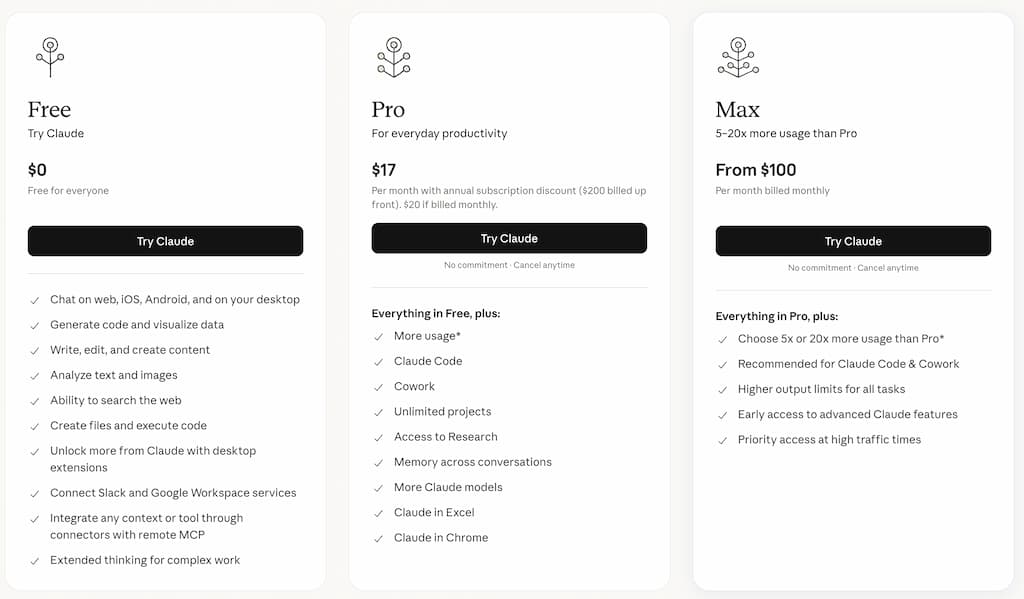
One thing I appreciate about Claude is that you can start using it for free.
That gives beginners a chance to experiment with AI writing tools before committing to another monthly expense.
And honestly, that matters.
Because blogging can already feel expensive when you start adding:
- Hosting
- Domains
- Email marketing tools
- SEO software
- Design tools
- AI subscriptions
The last thing most beginners need is another tool they barely use.
Claude Free Plan
Claude offers a free version that is surprisingly capable for many bloggers.
You can still use it for:
- Brainstorming ideas
- Outlining posts
- Rewriting drafts
- Simplifying content
- Organising notes
- Generating social captions
If you are completely new to AI, the free version is a very good place to begin.
Especially if:
- Your blog is still small
- You are learning blogging basics
- You only create content occasionally
- You are testing whether AI actually helps your workflow
Honestly, many beginners do not need the paid version immediately.
Claude Pro
Claude also offers a paid version called Claude Pro, which currently costs around $20/month.
The paid plan generally includes:
- Higher usage limits
- Access during busy periods
- Faster performance
- Access to more advanced Claude models
For bloggers using AI regularly, those upgrades can become helpful over time.
Especially if you:
- Write consistently
- Create long-form content often
- Use AI daily
- Rely heavily on AI-supported workflows
Is Claude Pro Worth Paying For?
Honestly, I think this depends heavily on how you use AI.
Claude Pro Is Probably Worth It If You:
- Blog consistently
- Create long-form content regularly
- Care heavily about readability
- Dislike robotic AI tone
- Use AI to support writing workflows frequently
- Value calmer and more conversational drafts
If Claude helps reduce:
- Writing friction
- Mental overwhelm
- Time spent restructuring drafts
Then the subscription can become fairly easy to justify.
Especially for busy bloggers trying to create content around limited time.
The Free Version Is Probably Enough If You:
- Are still experimenting with AI
- Blog occasionally
- Are learning content creation basics
- Only need help brainstorming or outlining
- Are trying to keep blogging costs low
There is absolutely no rush to upgrade immediately.
The Hidden Cost Most Bloggers Ignore
This matters more than many people realise.
The real cost of AI tools is often not the subscription itself.
It is:
- Tool overload
- Complicated workflows
- Subscription stacking
- Mental overwhelm
- Constantly chasing “better” AI systems
A lot of bloggers end up paying for:
- Multiple AI writers
- SEO tools
- Social schedulers
- Automation platforms
- Design software
Before they have even built consistent blogging habits.
That can become exhausting very quickly.
Claude vs ChatGPT Pricing
At the time of writing, Claude Pro and ChatGPT Plus sit at fairly similar pricing levels.
So for most bloggers, the real difference is not cost.
It is:
- Workflow preference
- Writing style preference
- Feature needs
ChatGPT Often Feels Better For:
- Flexibility
- Advanced tools
- Integrations
- Broader AI workflows
Claude Often Feels Better For:
- Readability
- Conversational flow
- Calmer writing support
- Long-form content refinement
That difference matters far more than a few pounds or dollars monthly.
Where Wealthy Affiliate Fits Into This Conversation
This is another reason platforms like Wealthy Affiliate can appeal to beginners.
A lot of new bloggers end up trying to piece together:
- AI tools
- SEO software
- Hosting
- Blogging education
- Affiliate marketing training
From separate subscriptions.
That can become:
- Expensive
- Confusing
- Overwhelming
Wealthy Affiliate takes a more all-in-one approach by combining:
- Blogging training
- AI-supported writing tools
- Keyword research
- Hosting
- Community support
Inside one beginner-friendly platform.
That will not suit everyone.
But for busy parents trying to simplify blogging and AI workflows, having fewer moving parts can feel much easier to manage. If you want to check it out, here’s my Wealthy Affiliate review.
My Honest Verdict on Pricing
I think Claude offers good value overall.
Especially for bloggers who prioritise:
- Readability
- Conversational writing
- Calmer workflows
- Simplicity
The free version is strong enough for many beginners.
And the paid version becomes easier to justify once blogging becomes a more regular part of your workflow.
The biggest thing I would avoid is:
- Collecting too many AI subscriptions too quickly.
Simple systems are usually easier to maintain long term.
Biggest Limitations of Claude
Even though I genuinely like Claude for blogging, it is still important to understand its limitations realistically.
Because no AI tool is perfect.
And honestly, a lot of AI marketing online creates unrealistic expectations.
Claude can absolutely help:
- Improve workflows
- Reduce writing friction
- Organise ideas
- Support content creation
But it still has clear weaknesses that bloggers need to understand before relying on it too heavily.
It Still Produces AI-Sounding Content Sometimes
Even though Claude often sounds more natural than many AI tools, it can still create writing that feels:
- Overly polished
- Emotionally flat
- Repetitive
- Slightly generic
Especially if:
- Prompts are vague
- Context is limited
- Editing is skipped
You can usually improve this significantly by:
- Adding personal stories
- Simplifying sections
- Rewriting transitions
- Adjusting tone manually
But the human layer still matters enormously.
Claude Cannot Replace Personal Experience
This is especially important for bloggers.
Claude can help organise ideas and improve readability, but it cannot replace:
- Lived experience
- Emotional nuance
- Real-world lessons
- Personality
- Trust-building stories
That human perspective is often the most valuable part of a blog.
Especially in niches like:
- Parenting
- Lifestyle blogging
- Personal development
- Affiliate marketing
AI can support those conversations.
It cannot truly replace them.
Fact-Checking Is Still Essential
Claude can still:
- Invent information
- Provide outdated advice
- Misunderstand context
- Create inaccurate summaries
- Sound confident while being wrong
This is one reason bloggers should never blindly publish AI-generated content.
You should always verify:
- Facts
- Pricing
- Product details
- Statistics
- SEO advice
- Recommendations
Especially in:
- Reviews
- Tutorials
- Affiliate content
- Educational articles
Claude Has Fewer Features Than ChatGPT
This is probably Claude’s biggest limitation overall.
Compared to ChatGPT, Claude currently feels weaker in areas like:
- Integrations
- Image generation
- Custom workflows
- Automation systems
- Broader AI functionality
Claude is much more focused on:
- Writing
- Readability
- Conversational support
That focus can actually be a strength for some bloggers.
But if you want a broader AI productivity platform, ChatGPT may feel more powerful overall.
It Can Become Too Wordy
Claude often explains things carefully.
That can improve readability.
But sometimes it also creates:
- Overly long responses
- Repetitive explanations
- Unnecessary detail
This means editing and trimming still matter.
Especially for blog readability.
Shorter and clearer usually performs better online.
There Are Fewer Tutorials and Workflow Resources
Because ChatGPT dominates most AI conversations online, there are:
- More tutorials
- More integrations
- More prompt libraries
- More workflow guides
Available for ChatGPT users.
Claude’s ecosystem is growing, but it still feels smaller overall.
That may matter for beginners wanting lots of learning resources.
It Is Easy to Overcomplicate AI Workflows
This is not unique to Claude, but it still matters.
Once bloggers start exploring AI, they often fall into:
- Endless prompt experimentation
- Workflow tweaking
- Tool stacking
- Productivity rabbit holes
Suddenly, more time gets spent:
- Managing systems
- Testing prompts
- Researching tools
Than actually creating useful content.
That is why I strongly believe simple workflows usually work best.
Especially for busy parents.
AI Still Cannot Build Trust for You
This is probably the most important limitation overall.
Claude can help create content faster.
But it cannot automatically create:
- Authority
- Audience trust
- Emotional connection
- Genuine relationships with readers
Those things still come from:
- Consistency
- Honesty
- Helpfulness
- Real experience
- Personality
That side of blogging cannot be automated properly.
My Honest Take on the Limitations
I think Claude works best when you:
- Understand what it does well
- Accept what it struggles with
- Keep expectations realistic
- Focus on simple workflows
Used thoughtfully, it can genuinely reduce:
- Content overwhelm
- Writing friction
- Mental fatigue around blogging
But it still works best alongside:
- Human creativity
- Personal stories
- Editing
- Strategic thinking
- Consistent publishing habits
That balance is what creates sustainable blogging workflows long term.
Alternatives to Claude
Claude is one of the strongest AI writing tools available right now, especially for bloggers who value readability and conversational tone.
But it is definitely not the only option.
And honestly, the “best” AI tool often comes down to:
- Workflow preference
- Writing style
- Simplicity
- Feature needs
- How the tool feels to use day-to-day
Some bloggers prefer Claude immediately. Others still prefer ChatGPT’s flexibility.
Here are the main alternatives worth considering.
ChatGPT
This is the most obvious comparison.
ChatGPT is still the biggest AI platform overall and probably the most widely used by bloggers and content creators.
Compared to Claude, ChatGPT generally feels:
- Broader
- More feature-rich
- More flexible
- More system-focused
It offers:
- Image generation
- Custom GPTs
- Wider integrations
- Stronger multi-tool workflows
- Broader AI functionality overall
But many bloggers feel ChatGPT can also sound:
- More robotic
- More overly polished
- More “AI-generated”
Especially in long-form writing.
Claude vs ChatGPT

Claude Often Feels Better For:
- Conversational writing
- Readability
- Calmer workflows
- Long-form content flow
- Less robotic tone
ChatGPT Often Feels Better For:
- Flexibility
- Advanced AI tools
- Integrations
- Broader workflows
- Multi-purpose productivity
Honestly, neither is objectively “better.”
It depends what matters most to you.
If you care mainly about writing feel and readability, Claude may genuinely feel stronger.
If you want a broader AI productivity platform, ChatGPT probably wins overall.
Surfer SEO
SurferSEO serves a very different purpose.
While Claude focuses heavily on writing and readability, SurferSEO is designed around:
- SEO optimisation
- Content scoring
- Keyword targeting
- Ranking-focused workflows
It is more useful for bloggers trying to improve:
- Search rankings
- SEO structure
- Keyword optimisation
Rather than simply improving writing flow.
For complete beginners, SurferSEO can honestly feel overwhelming at first.
Claude feels much lighter and more approachable.
Jasper

Jasper is another major AI writing platform.
Compared to Claude, Jasper generally feels:
- More marketing-focused
- More business-oriented
- More template-driven
It can work well for:
- Marketing copy
- Business workflows
- Agencies
- Sales-focused content
But for bloggers wanting:
- Conversational writing
- Softer tone
- Simple workflows
Claude often feels more natural.
Canva AI Tools

Canva now includes AI writing and image tools inside its platform.
This can be useful for:
- Pinterest content
- Social media graphics
- Quick captions
- Visual content workflows
Especially if you already use Canva regularly.
But Canva’s AI writing support is still far less advanced than Claude for:
- Long-form content
- Readability improvements
- Detailed writing workflows
Wealthy Affiliate’s AI Blogging Tools

This is another useful option for beginners worth mentioning.
A lot of bloggers eventually become overwhelmed trying to combine:
- AI tools
- Hosting
- Keyword research
- Blogging training
- Affiliate marketing education
From separate subscriptions.
Wealthy Affiliate takes a more all-in-one approach by combining:
- Blogging education
- AI-supported writing tools
- Keyword research
- Hosting
- Website tools
- Community support
Inside one beginner-friendly platform.
That can feel much simpler for:
- Beginners
- Parent bloggers
- Part-time creators
- People who are overwhelmed by too many tools
Especially if your goal is learning blogging alongside AI-supported workflows.
Which Alternative Is Best?
Honestly, I think it comes down to workflow preference more than anything else.
Claude
Best for:
- Readability
- Conversational tone
- Calmer workflows
- Long-form writing
ChatGPT
Best for:
- Flexibility
- Broader AI functionality
- Advanced workflows
- Integrations
SurferSEO
Best for:
- SEO-focused blogging
- Ranking optimisation
- Keyword workflows
Jasper
Best for:
- Marketing teams
- Sales copy
- Business content systems
Wealthy Affiliate
Best for:
- Beginners wanting an all-in-one blogging platform
- Affiliate marketing education
- AI-supported blogging with training included
| Tool | Best For | Best Fit |
|---|---|---|
| Claude | Readability, conversational tone, calmer workflows, and long-form writing. | Bloggers who want natural-sounding AI writing. |
| ChatGPT | Flexibility, broader AI functionality, advanced workflows, and integrations. | Bloggers who want a more flexible all-round AI assistant. |
| SurferSEO | SEO-focused blogging, ranking optimisation, and keyword workflows. | Bloggers focused on improving search visibility. |
| Jasper | Marketing teams, sales copy, and business content systems. | Businesses creating structured marketing content. |
| Wealthy Affiliate | Beginner blogging, affiliate marketing education, AI-supported writing tools, hosting, and keyword research. | Beginners who want an all-in-one blogging platform. |
My Honest Take on the Alternatives
I think Claude stands out because it feels:
- Calmer
- Cleaner
- More writing-focused
Than many AI tools right now.
That makes it particularly appealing for bloggers who:
- Value readability
- Dislike robotic content
- Want simpler workflows
- Feel overwhelmed by feature-heavy AI platforms
At the same time, ChatGPT still feels stronger overall if you want broader AI flexibility beyond writing alone.
The biggest thing I would avoid is constantly switching between tools searching for the “perfect” AI platform.
Simple systems usually work better long term.
Final Verdict: Is Claude Worth It for Bloggers?
After spending time using Claude for blogging and content creation, I honestly think it is one of the best AI writing tools available right now for bloggers who value readability and natural tone.
- Not because it has the biggest feature list.
- And not because it magically replaces blogging skills.
But because it often makes the writing process feel:
- Calmer
- Smoother
- Less mentally exhausting
That matters more than many people realise.
Especially for busy bloggers trying to create content around:
- Work
- Parenting
- Family life
- Limited time
- Inconsistent schedules
Claude works particularly well when used to:
- Organise ideas
- Improve readability
- Simplify rough drafts
- Reduce blank-page overwhelm
- Support long-form writing workflows
That is where I think its biggest strengths sit.
But It Is Not a Blogging Shortcut
This is important.
Claude will not:
- Automatically grow your blog
- Replace your personality
- Create trust instantly
- Remove the need for strategy
- Build authority without effort
The strongest blogs still rely heavily on:
- Consistency
- Human experience
- Honesty
- Helpfulness
- Real perspective
AI can support those things.
But it cannot replace them properly.
The Bloggers Who Will Benefit Most From Claude
In my opinion, Claude works best for bloggers who:
- Dislike robotic AI writing
- Value conversational tone
- Want calmer workflows
- Prefer simplicity over endless features
- Create long-form content regularly
It feels especially well-suited to:
- Parent bloggers
- Beginner bloggers
- Part-time creators
- Educational bloggers
- Writers focused on readability and trust
Claude vs ChatGPT: My Honest Opinion
This will probably be the biggest question for many readers.
Honestly, I do not think there is a universal winner.
ChatGPT Feels Better For:
- Flexibility
- Advanced features
- Broader AI workflows
- Integrations
- Multi-purpose productivity
Claude Feels Better For:
- Readability
- Conversational writing
- Calmer tone
- Long-form content flow
- Simpler writing workflows
For many bloggers, the best choice comes down to: “Which tool feels more natural and sustainable to use consistently?”
That matters more than chasing the most powerful feature list.
If you are still deciding between Claude and ChatGPT, this video gives an interesting real-world perspective from a creator who explains why they replaced ChatGPT with Claude in their workflow.
This is a good reminder that the ‘best’ AI tool often comes down to personal workflow preference. Some bloggers prioritise flexibility and features, while others care more about readability, tone, and how natural the writing feels.
The Biggest Mistake to Avoid
The biggest mistake is relying too heavily on AI.
Even with Claude’s more natural writing style, the content still needs:
- Editing
- Fact-checking
- Personal stories
- Human insight
- Originality
Otherwise, blogs quickly become:
- Generic
- Repetitive
- Emotionally flat
Long term, readers still connect most with:
- Real experiences
- Honest opinions
- Relatable stories
- Trustworthy perspectives
That human side of blogging still matters enormously.
My Honest Overall Rating
I think Claude is genuinely one of the strongest AI writing tools available for bloggers right now.
Especially if:
- Readability matters to you
- You dislike robotic AI content
- You want simpler workflows
- You are trying to reduce content overwhelm
- It is not perfect.
- It still has limitations.
- And it still requires human editing and creativity.
But used realistically, it can absolutely help blogging feel:
- More manageable
- Less mentally draining
- More flexible around family life
- Easier to maintain consistently
And honestly, that is probably where AI tools become most valuable for real people.
Frequently Asked Questions: Claude AI Review
Is Claude AI good for blogging?
Yes, Claude AI can be very useful for blogging. It is especially strong for long-form writing, readability, outlining, rewriting rough drafts, and creating conversational content. It still needs editing, fact-checking, and personal input.
Is Claude better than ChatGPT for bloggers?
Claude may be better if you care most about natural writing, readability, and calmer long-form content. ChatGPT may be better if you want broader features, image tools, custom workflows, and more flexibility. The best choice depends on your workflow.
Can Claude AI help with affiliate marketing?
Yes, Claude can help affiliate marketers with product outlines, comparison sections, pros and cons, FAQ ideas, email drafts, and social content. You should still add honest opinions, real examples, and fact-check product details before publishing.
Is Claude AI free to use?
Yes, Claude has a free plan. There is also a paid plan called Claude Pro, which gives higher usage limits and access to more advanced features.
Does Claude AI replace bloggers?
No. Claude can support your writing process, but it cannot replace your personal experience, opinions, trust, or creativity. The strongest blog content still needs a human voice.
Is Claude good for long-form content?
Yes, Claude is one of the stronger AI tools for long-form writing. It often creates smoother, more readable drafts than many AI tools, especially for guides, tutorials, reviews, and educational content.
Can busy parents realistically use Claude for blogging?
Yes. Claude works well in short work sessions. You can use it to outline posts, organise notes, improve readability, rewrite sections, and plan content around family life.
Is Claude Pro worth paying for?
Claude Pro may be worth it if you use AI regularly for blogging, long-form writing, or content planning. If you are still testing AI or only need occasional help, the free version is a good place to start.
Let’s Chat
Have you tried Claude AI yet?
I would love to know how you are using it.
Are you using it for:
- Blog outlines?
- Rewriting rough drafts?
- Long-form content?
- Affiliate content?
- Social media captions?
- Organising messy ideas?
Or are you still comparing Claude with ChatGPT?
Personally, I think Claude is a strong option for bloggers who want cleaner, calmer, more natural-sounding writing.
But like any AI tool, it works best when it supports your ideas instead of replacing them.
- Your experience still matters.
- Your opinion still matters.
- Your voice still matters.
AI can help you move faster, but it should not make your blog sound like everyone else’s.
Drop a comment below and let me know whether Claude feels useful, overhyped, or somewhere in the middle.