

If you are starting a blog as a busy parent, it is easy to focus on the website first.
- Your niche.
- Your blog posts.
- Your logo.
- Your traffic.
All of that matters.
But there is one part of blogging many beginners leave too late.
Your email list.
I get why.
Email marketing can sound technical, expensive, and something you only need once your blog is already getting loads of traffic.
But I have come to see it differently.
At Flex For Families, I use Kit to manage my email list, deliver my Parent Blogging Starter Kit, and start building a stronger connection with readers who want help starting a blog around family life.
I upgraded from the free plan because I see email as part of the long-term foundation of the site.
- Not because I already have a huge list.
- Not because everything is perfect.
But because if you are serious about building a blog, you eventually need a way to stay connected with people who visit your site.
That is what Kit helps with.
It gives you forms, landing pages, email sequences, automations, and subscriber management in one clean platform.
The big question is this.
Is Kit the right email marketing tool for new parent bloggers?
Or is it too much too soon if you are still building traffic?
In this review, I will walk through what Kit does, why I chose it for Flex For Families, how it helps with lead magnets and email sequences, and whether I think it is worth paying for before your blog has taken off.
Tool: Kit, formerly ConvertKit
Type: Email marketing platform for creators and bloggers
Best For: Parent bloggers who want simple email forms, lead magnet delivery, and beginner-friendly automations
Not Ideal For: Bloggers who want advanced visual email design or complex enterprise-style automation from day one
Verdict: Kit is one of the best email marketing tools for new bloggers because it keeps things simple. You can create forms, deliver lead magnets, send broadcasts, and build welcome sequences without feeling buried in technical settings.
I use Kit at Flex For Families to support my Parent Blogging Starter Kit and email campaign. For busy parents, the biggest benefit is that Kit helps you build an audience you own, instead of relying only on Google, Pinterest, or social media traffic.
Why I Chose Kit for Flex For Families
When I started building Flex For Families, I knew I wanted more than just website traffic.
I wanted a way to stay connected with readers after they left the site.
That is where email comes in.
Google rankings can change. Social media reach can disappear overnight. But an email list is something you own.
That was one of the main reasons I chose Kit.
I needed a platform that would allow me to:
- Deliver my Parent Blogging Starter Kit automatically
- Build an email list from day one
- Create a welcome sequence for new subscribers
- Connect forms and landing pages easily
- Grow alongside the blog as traffic increases
After looking at different options, Kit felt like the simplest solution for what I needed.
Building the Foundations Early
One mistake many bloggers make is waiting until they have lots of traffic before thinking about email marketing.
I decided to take the opposite approach.
Even though Flex For Families is still growing, I wanted the foundations in place early.
That meant setting up:
- Lead magnet delivery
- Subscriber management
- Welcome emails
- Email automations
- Forms across the website
My thinking was simple.
If someone takes the time to visit the site and download a resource, I want a way to continue helping them.
Why I Upgraded to the Paid Plan
At the time of writing, I am using the paid version of Kit.
Not because I have thousands of subscribers.
Not because the blog is making huge amounts of money.
But because I believe email marketing is an important part of building a long-term blogging business.
The paid plan made it easier to integrate Kit with tools like Poptin and gave me access to features I knew I would eventually need as the site grows.
For me, it was less about what I needed today and more about future-proofing the blog.
What I Like Most About Kit
The biggest thing I appreciate is how beginner-friendly it feels.
The dashboard is clean.
The forms are easy to create.
The automations are visual and easy to follow.
Most importantly, I never feel overwhelmed when I log in.
As a busy parent, that matters.
I do not want another complicated platform that takes hours to learn.
I want something that helps me capture subscribers, deliver resources, and communicate with readers without adding more stress to my week.
So far, Kit has done exactly that.
It is not perfect, and we will cover some of the limitations later in this review, but it has become an important part of how Flex For Families operates behind the scenes.
What Is Kit?
Kit, formerly known as ConvertKit, is an email marketing platform designed specifically for creators, bloggers, and online business owners.
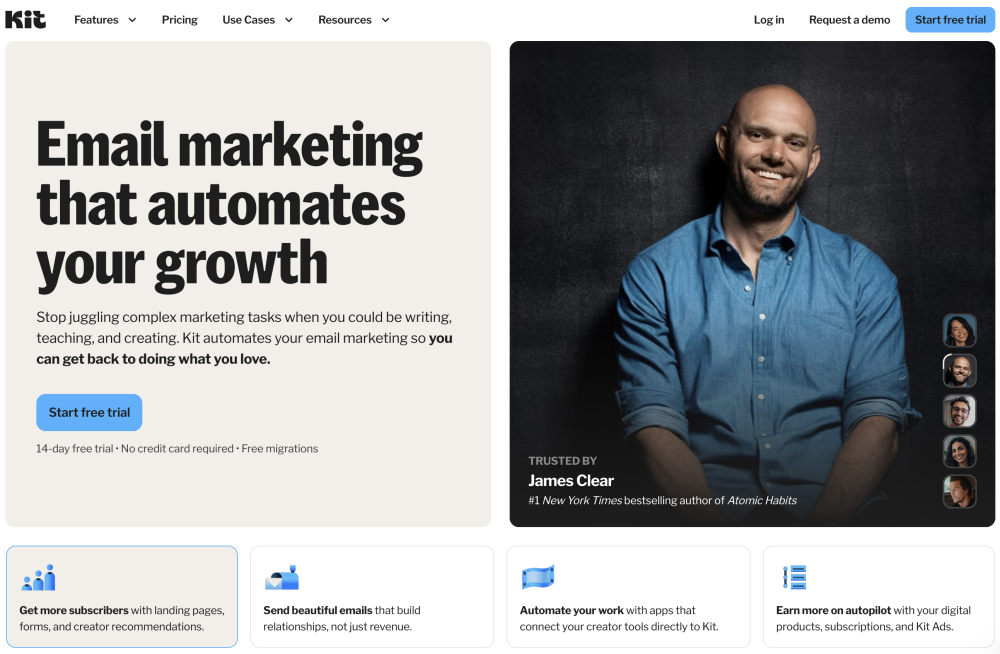
In simple terms, it helps you collect email subscribers, send emails, and build automated sequences that work in the background while you focus on creating content.
Unlike some email marketing tools that feel built for large corporations, Kit was created with creators in mind.
That means it focuses on things bloggers actually need, such as:
- Email signup forms
- Lead magnet delivery
- Welcome sequences
- Subscriber tagging
- Email broadcasts
- Landing pages
- Simple automations
For a parent blogger, that can be incredibly useful.
Imagine someone reads one of your blog posts and downloads your free guide.
Instead of manually sending emails, Kit can automatically:
- Deliver the freebie
- Welcome the subscriber
- Introduce your blog
- Share your best content
- Recommend useful resources
All without you having to remember to do anything.
That is why email marketing becomes so powerful over time.
You create the system once, and it continues working for every new subscriber who joins your list.
Why Kit Is Different From Traditional Email Platforms
Many email marketing tools were originally built for businesses and sales teams.
Kit feels different.
The dashboard is cleaner.
The setup is simpler.
The language makes sense for bloggers and creators.
You do not need to understand complicated marketing terminology just to send a welcome email.
For busy parents who are already learning blogging, SEO, Pinterest, and affiliate marketing, that simplicity can be a huge advantage.
Why Every Parent Blogger Needs an Email List
If there is one thing I wish more new bloggers understood, it is this:
Your email list is one of the most valuable assets you can build.
Many beginners focus entirely on traffic.
They obsess over:
- Google rankings
- Pinterest views
- Social media followers
- Website visitors
Those things matter.
But there is a problem.
You do not own any of them.
- Google can change its algorithm.
- Pinterest can reduce your reach.
- Facebook can stop showing your posts.
Your email list is different.
The people on your list chose to hear from you.
That relationship belongs to you.
Traffic Comes and Goes
Imagine your blog receives 1,000 visitors this month.
Sounds great.
But what happens when they leave?
Most of them never come back.
Without an email list, you have no way to continue helping them.
No way to tell them about:
- New blog posts
- Helpful resources
- Products you recommend
- Your latest content
They simply disappear.
Even a Small Email List Matters
Many new bloggers think they need thousands of subscribers before email marketing becomes important.
You do not.
Even 50 engaged subscribers can be valuable.
Those are 50 people who:
- Know who you are
- Trust your advice
- Want to hear from you again
I would rather have 100 engaged email subscribers than 10,000 random social media followers.
Why I Started Building My List Early
One reason I chose Kit was because I wanted to start building my email list before traffic became a problem.
My thinking was simple.
If someone downloads my Parent Blogging Starter Kit today, I want a way to continue helping them tomorrow.
Email allows me to do that.
As Flex For Families grows, I expect my email list to become one of the most important parts of the business.
Not because it generates instant income.
But because it creates relationships.
And relationships are what eventually turn readers into loyal followers and customers.
The Real Goal
The goal is not to collect thousands of email addresses.
The goal is to build trust.
Email gives you a direct way to help people, answer questions, share resources, and stay connected long after they leave your website.
That is why I believe every parent blogger should start building an email list from day one.
Even if your blog is brand new.
What Can You Do With Kit?
At its core, Kit helps you turn website visitors into email subscribers and then stay connected with them over time.
That sounds simple, but it is one of the most important parts of building a successful blog.
Here are the main things you can do with Kit.
Create Email Signup Forms
Kit allows you to create forms that can be embedded directly into your website.
You can use them to:
- Offer a free guide
- Deliver a checklist
- Share a resource library
- Grow your email list
For example, when someone downloads my Parent Blogging Starter Kit, Kit handles the subscriber side of that process automatically.
Deliver Lead Magnets Automatically
Instead of manually emailing files to people, Kit can automatically send:
- PDFs
- Checklists
- Workbooks
- Guides
- Free resources
The moment someone subscribes.
This saves a huge amount of time as your audience grows.
Build Welcome Sequences
A welcome sequence is a series of emails sent automatically after someone joins your list.
For example:
- Email 1: Welcome
- Email 2: Your blogging roadmap
- Email 3: Choosing a niche
- Email 4: Building your website
And so on.
Once created, Kit handles the delivery automatically.
Send Email Broadcasts
Broadcasts are one-off emails sent to your subscribers.
You might use them to:
- Share a new blog post
- Announce a free resource
- Recommend a useful tool
- Send a weekly newsletter
This is one of the easiest ways to stay connected with readers.
Organise Subscribers
As your list grows, Kit helps you organise people using tags and segments.
For example, you could separate:
- New bloggers
- Affiliate marketers
- People interested in Pinterest
- Subscribers who downloaded specific resources
This helps you send more relevant emails.
Create Landing Pages
Kit also includes simple landing pages.
These are standalone pages designed to:
- Collect email subscribers
- Promote lead magnets
- Share offers
While I still prefer using WordPress and Elementor for most pages, it is useful having this option built into the platform.
Sell Digital Products
Kit now includes tools for creators who want to sell:
- eBooks
- Courses
- Templates
- Digital downloads
This is not something I currently use, but it is nice knowing the option is available as Flex For Families grows.
The Big Benefit
The real benefit is not any single feature.
It is having everything in one place.
- Forms.
- Emails.
- Automations.
- Subscribers.
- Lead magnets.
Instead of stitching together multiple tools, Kit keeps the essentials under one roof.
If you’re new to email marketing, seeing Kit in action is often easier than reading about it. This walkthrough gives you a guided tour of the platform, including forms, automations, broadcasts, and subscriber management.
As you can see, one of Kit’s biggest strengths is simplicity. The platform is designed for creators rather than large marketing teams, which makes it much easier for busy parent bloggers to get started without feeling overwhelmed.
Kit Features That Save Busy Parents Time
As parents, we are always looking for ways to save time.
That is one of the reasons I like Kit.
It is not trying to be the most advanced email marketing platform on the market.
Instead, it focuses on making the important things easy.
Here are the features I think busy parent bloggers will appreciate most.
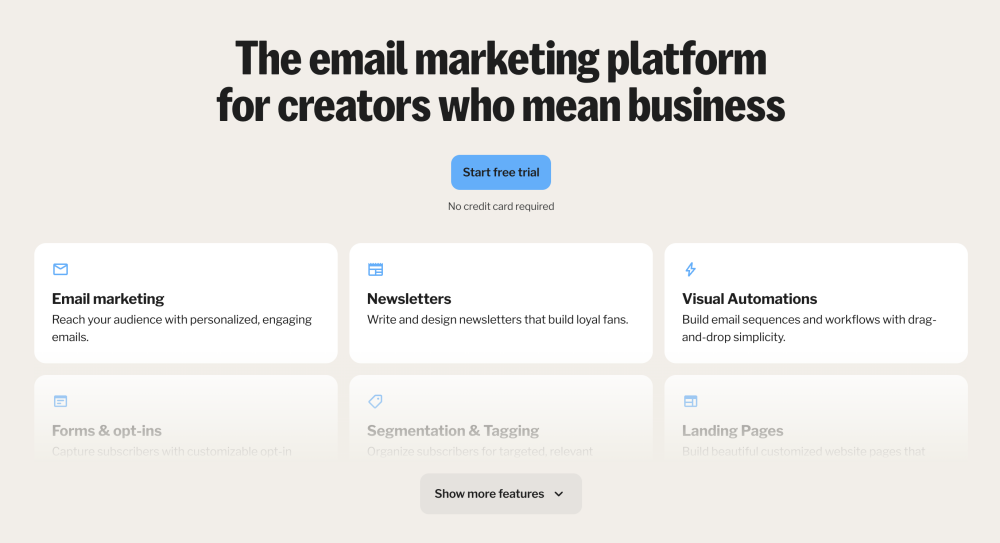
Visual Automations
One of my favourite features is the visual automation builder.
Instead of trying to understand complicated workflows, you can see the entire subscriber journey on screen.
You can quickly understand:
- What happens when someone subscribes
- Which emails they receive
- Where they go next
That makes building simple automations much less intimidating.
Easy Form Creation
Creating forms takes minutes.
Choose a design.
Add your text.
Connect it to your email sequence.
Publish it.
For beginners, that simplicity is a huge advantage.
Subscriber Tagging
Tags help you organise your audience without creating multiple email lists.
For example, you could tag people who:
- Downloaded your starter kit
- Joined from Pinterest
- Signed up through a specific blog post
As your blog grows, this becomes incredibly useful.
Automated Lead Magnet Delivery
This is one of the biggest time savers.
Someone subscribes.
Kit sends the resource automatically.
- No manual work required.
- No forgotten emails.
- No chasing files.
Just a smooth experience for your reader.
Email Sequences
Rather than sending every email manually, you can create a sequence once and let Kit handle the rest.
This means every new subscriber receives:
- The same welcome experience
- The same helpful resources
- The same introduction to your blog
Whether they join today or six months from now.
Creator-Friendly Dashboard
Some email marketing platforms feel like they were built for marketing agencies.
Kit feels like it was built for bloggers.
The interface is clean.
The navigation is straightforward.
Most features are exactly where you expect them to be.
That means less time learning software and more time creating content.
Integrations With Blogging Tools
Kit connects with many tools bloggers already use.
For example, I use it alongside Poptin on Flex For Families.
This makes it easier to:
- Capture subscribers
- Deliver lead magnets
- Grow an email list automatically
Without needing complicated technical setups.
Why This Matters
As parents, we do not have unlimited time.
Every tool should either:
- Save time
- Simplify a process
- Help grow the business
Kit does all three.
That is one of the biggest reasons it has become part of my blogging toolkit.
How I Use Kit on Flex For Families
One of the reasons I wanted to review Kit is because I actually use it as part of the Flex For Families setup.
This is not a case of signing up for a free trial and writing a review after 20 minutes.
Kit plays a real role behind the scenes of the blog.
Delivering the Parent Blogging Starter Kit
The biggest use case right now is delivering my Parent Blogging Starter Kit.
When someone requests the starter kit, Kit handles the subscriber side of the process.
That means:
- Capturing the subscriber
- Adding them to my email list
- Delivering the resource automatically
- Starting the welcome sequence
Without me needing to manually do anything.
Running My Welcome Email Sequence
I have created a series of emails designed to help new parent bloggers get started.
These emails introduce:
- The Parent Blogging Roadmap
- Choosing a niche
- Building a website
- Creating content
- Growing traffic
- Monetisation options
Once someone joins the list, Kit takes care of the delivery.
That creates a more consistent experience for every subscriber.
Working Alongside Poptin
One of the reasons I upgraded to the paid version was to make integration easier with Poptin.
This allows me to:
- Show popups across the website
- Capture subscribers automatically
- Connect everything directly into Kit
As a result, visitors can move from discovering the site to joining the email list without any complicated setup on my end.
Building an Asset I Own
This is probably the biggest reason I use Kit.
Traffic is great.
But traffic comes and goes.
An email list is different.
Every subscriber represents someone who has chosen to hear from you again.
That is an asset you own.
As Flex For Families grows, I expect the email list to become one of the most important parts of the business.
What I Like Most So Far
The biggest thing is simplicity.
Everything feels organised.
The automations are easy to understand.
The forms are straightforward to create.
And I never feel like I need a marketing degree just to make something work.
For a busy parent trying to build a blog around family life, that matters.
Kit Free vs Paid: Which Version Do Parent Bloggers Actually Need?
One of the best things about Kit is that you can start for free.
That makes it easy to begin building your email list before you are making money from your blog.
The real question is whether the paid version is worth it.
What You Get With Kit Free
For most new bloggers, the free plan offers enough to get started.
You can:
- Create signup forms
- Build landing pages
- Collect subscribers
- Send email broadcasts
- Start growing your list
If your goal is simply to start building an audience, the free plan is a great place to begin.
What You Get With Kit Paid
The paid plans unlock more advanced features that become useful as your blog grows.
These include:
- Visual automations
- Email sequences
- Advanced subscriber management
- More powerful segmentation
- Additional integrations
- Greater flexibility for growing businesses
This is where Kit starts becoming more than just an email collection tool.
It becomes a complete email marketing platform.
Why I Upgraded
At the time of writing, I am using the paid version.
Not because I have thousands of subscribers.
Not because the site is generating huge revenue.
I upgraded because I wanted to build the foundations properly from the beginning.
The paid plan made it easier to:
- Connect Kit with Poptin
- Deliver lead magnets automatically
- Create subscriber journeys
- Future-proof the blog as it grows
For me, it was an investment in the long-term vision of Flex For Families.
My Recommendation
If you are brand new to blogging:
- Start with the free plan.
- Learn the platform.
- Create your first form.
- Begin collecting subscribers.
Once you start offering lead magnets, building automations, or creating email sequences, that is usually the point where upgrading makes sense.
The Parent Blogger Verdict
If money is tight, the free version is more than enough to get started.
If you are serious about building a blog business and want to create a better subscriber experience from day one, the paid version is worth considering.
That is ultimately why I made the jump.
Building Your First Email List With Kit
One of the biggest misconceptions in blogging is that you need lots of traffic before you start building an email list.
You do not.
In fact, I would argue the opposite.
The best time to start building your list is from day one.
Step 1: Create a Simple Free Resource
The easiest way to encourage people to join your list is by offering something helpful in return.
This is often called a lead magnet.
Examples include:
- Checklists
- Workbooks
- Templates
- Resource guides
- Quick-start guides
For Flex For Families, I created the Parent Blogging Starter Kit.
The goal was simple.
Give new bloggers something useful while also giving them a reason to stay connected.
Step 2: Create a Signup Form in Kit
Kit makes this process surprisingly straightforward.
You can create a form in minutes by:
- Choosing a template
- Adding a headline
- Writing a short description
- Connecting your lead magnet
Once published, the form can be added to:
- Blog posts
- Sidebars
- Landing pages
- Popups
Step 3: Place Forms Where People Will See Them
A common mistake is hiding signup forms where nobody notices them.
Instead, place them in locations such as:
- Within blog posts
- At the end of articles
- On dedicated landing pages
- In popups
- On your Start Here page
The easier you make it for people to subscribe, the more opportunities you create to grow your list.
Step 4: Focus on Quality, Not Quantity
When you are starting out, it is easy to obsess over subscriber numbers.
Try not to.
The goal is not thousands of subscribers.
The goal is attracting the right subscribers.
I would rather have 100 parent bloggers genuinely interested in my content than 1,000 people who never open an email.
Step 5: Stay Consistent
Email lists grow slowly at first.
That is completely normal.
Most bloggers do not wake up with hundreds of subscribers overnight.
The important thing is to:
- Keep creating content
- Keep offering value
- Keep promoting your lead magnet
Small numbers eventually become larger numbers.
The Real Benefit
Building an email list is not about collecting email addresses.
It is about creating a way to continue helping people after they leave your website.
That is why I believe every parent blogger should start building their list as early as possible.
Once you have your email platform set up, the next challenge is getting visitors to actually subscribe. That’s where popup tools can help. Here’s how I’m using Poptin to promote my Parent Blogging Starter Kit and grow my email list.
Creating a Simple Welcome Sequence
Once someone joins your email list, what happens next?
This is where a welcome sequence comes in.
A welcome sequence is a series of automated emails that introduce new subscribers to you, your blog, and your best content.
It is one of the most valuable automations you can create.
Why Welcome Sequences Matter
Imagine two scenarios.
In the first, someone downloads your free guide and never hears from you again.
In the second, they receive a series of helpful emails that guide them through the next steps.
Which experience is more likely to build trust?
That is why welcome sequences work so well.
They help new subscribers:
- Get to know you
- Understand your story
- Discover your best content
- Take the next step
My Parent Blogging Sequence
At Flex For Families, new subscribers receive a series of emails designed to help them start their blogging journey.
The sequence covers topics such as:
- Getting started
- Choosing a niche
- Building a website
- Creating content
- Growing traffic
- Monetisation options
Each email focuses on solving one problem at a time.
A Simple Beginner Sequence
If you are creating your first sequence, keep it simple.
For example:
Email 1: Welcome and deliver the free resource
Email 2: Introduce yourself and your story
Email 3: Share your most helpful blog post
Email 4: Solve a common beginner problem
Email 5: Recommend a useful tool or next step
That is enough to create a solid foundation.
Kit Makes This Easy
One thing I like about Kit is that creating sequences feels straightforward.
You can:
- Write your emails
- Set the order
- Choose delays between messages
- Turn the sequence on
After that, Kit handles everything automatically.
Why This Saves Time
Without automations, every new subscriber would need manual attention.
With a welcome sequence:
- Everyone receives the same experience
- No one gets forgotten
- New subscribers are helped immediately
That means you can focus on creating content while Kit works quietly in the background.
For busy parents, that is exactly the kind of automation that makes blogging feel more manageable.
Kit for Lead Magnets and Freebies
If you are planning to grow an email list, lead magnets are one of the most effective tools you can use.
A lead magnet is simply a free resource someone receives in exchange for their email address.
Examples include:
- Checklists
- Workbooks
- Templates
- Printables
- Resource guides
- Mini courses
This is one area where Kit really shines.
Delivering Freebies Automatically
Before using an email marketing platform, many bloggers try to deliver resources manually.
That works for a while.
Then someone downloads your freebie at 11pm.
Or while you are at work.
Or during the school run.
Kit solves this problem by automating the entire process.
When someone subscribes:
- Their email is captured.
- They are added to your list.
- The free resource is delivered automatically.
- The welcome sequence begins.
Everything happens without you lifting a finger.
How I Use It at Flex For Families
My Parent Blogging Starter Kit is delivered through Kit.
When someone signs up, they immediately receive access to the resource and are added to my email sequence.
That creates a smoother experience for readers while saving me a huge amount of time.
Why This Matters
Lead magnets are often the bridge between a casual visitor and a long-term reader.
Without a system like Kit, managing this manually quickly becomes difficult.
With Kit, the process feels seamless.
You create the resource once.
Set up the automation.
Then let the system handle the rest.
For busy parents, that is exactly how technology should work.
Kit vs MailerLite
MailerLite is often one of the first alternatives bloggers consider when looking at Kit.
Both platforms are beginner-friendly and both offer free plans.
So which one is better?
Where MailerLite Wins
MailerLite is often cheaper.
It also includes:
- Attractive email templates
- Website builders
- Landing pages
- Competitive pricing
For bloggers on a very tight budget, that can be appealing.
Where Kit Wins
In my opinion, Kit is easier for bloggers.
The platform was built specifically for creators and content creators.
As a result:
- Automations feel more intuitive
- Subscriber management is cleaner
- Lead magnet delivery is simple
- The overall workflow feels creator-focused
I also find the interface easier to navigate.
Which Would I Choose?
If your primary goal is building a blog and growing an audience, I would choose Kit.
If your biggest concern is keeping costs as low as possible, MailerLite is worth considering.
Winner for Parent Bloggers
Kit
Not because it is the cheapest option.
But because it removes friction and makes email marketing easier to understand when you are already learning a hundred other blogging skills.
Kit vs ActiveCampaign
ActiveCampaign sits at the other end of the spectrum.
While Kit focuses on simplicity, ActiveCampaign focuses on power.
It is one of the most advanced email marketing platforms available.
Where ActiveCampaign Wins
ActiveCampaign offers:
- Advanced automations
- Complex customer journeys
- Deep segmentation
- CRM functionality
- Sales pipeline tools
For large businesses, these features can be incredibly valuable.
Where Kit Wins
For most bloggers, ActiveCampaign is overkill.
The platform has a steeper learning curve and far more complexity than many new bloggers need.
Kit focuses on doing the basics extremely well:
- Growing your list
- Delivering lead magnets
- Sending broadcasts
- Building automations
- Nurturing subscribers
Without overwhelming you.
Which Would I Choose?
For Flex For Families, Kit is the clear winner.
I want a platform that helps me:
- Capture subscribers
- Deliver resources
- Build relationships
I do not need enterprise-level automation workflows.
At least not right now.
Winner for Parent Bloggers
Kit
Unless you are running a large online business with complex marketing requirements, Kit provides everything most parent bloggers need without the additional complexity.
Sometimes simpler really is better.
Kit Pricing: Is It Worth Paying For Before You Have Traffic?
One of the biggest questions new bloggers ask is:
“Should I pay for email marketing before my blog is getting traffic?”
It is a fair question.
After all, most new bloggers are trying to keep costs under control while they learn the basics.
That is exactly where I found myself with Flex For Families.
The Free Plan Is a Great Starting Point
The good news is that Kit offers a free plan.
For most beginners, that is more than enough to:
- Create signup forms
- Start collecting subscribers
- Build an email list
- Send email broadcasts
- Learn the platform
If your blog is brand new, I would usually recommend starting there.
There is no point paying for features you are not ready to use.
Why I Decided to Upgrade
In my case, I chose to upgrade before I had a large email list.
Not because I was making lots of money.
Not because I had thousands of subscribers.
I upgraded because I wanted to build the right foundations from the beginning.
Specifically, I wanted to:
- Deliver my Parent Blogging Starter Kit automatically
- Create a structured welcome sequence
- Integrate more smoothly with Poptin
- Build automations that could grow with the blog
For me, it was about future-proofing the site.
The Real Cost Question
The mistake many bloggers make is focusing only on the monthly price.
A better question is:
“What problem does this solve?”
For me, Kit solves several important problems:
- It saves time.
- It automates repetitive tasks.
- It helps me build an audience I own.
- It creates a better experience for subscribers.
Those things have value.
When I Would Stay on the Free Plan
I would probably stick with the free version if:
- You have not created a lead magnet yet
- You are still setting up your website
- You are not ready to build email automations
- You simply want to learn the platform first
There is no rush.
When Upgrading Starts Making Sense
The paid plan becomes easier to justify when you start:
- Offering free resources
- Building welcome sequences
- Using automations
- Growing multiple signup forms
- Taking email marketing more seriously
At that point, the extra functionality can save a lot of manual work.
My Honest Take
If you are brand new, start with the free plan.
- Learn how email marketing works.
- Create your first form.
- Get your first subscribers.
Then upgrade when you reach the point where the paid features solve a real problem.
That said, I do not regret upgrading early.
For Flex For Families, it gave me confidence that the systems were in place before the traffic arrived.
And as a parent blogger, I would much rather spend my time creating content than manually managing email subscribers.
Kit Review: Pros and Cons
No email marketing platform is perfect.
Kit does a lot of things well, but there are a few limitations worth knowing about before you sign up.
Pros
Beginner-Friendly Interface
Kit is one of the easiest email marketing platforms I’ve used.
The dashboard is clean, the navigation makes sense, and most features are easy to find.
For busy parents who are already learning blogging, SEO, and affiliate marketing, that simplicity matters.
Excellent for Bloggers and Creators
Unlike some email tools that feel built for large businesses, Kit feels designed specifically for bloggers.
Everything revolves around:
- Growing an audience
- Delivering lead magnets
- Building email sequences
- Nurturing subscribers
Easy Automation Setup
The visual automation builder makes it easy to understand what happens when someone joins your list.
You can create subscriber journeys without needing technical skills.
Great Lead Magnet Delivery
This is one of Kit’s strongest features.
Once someone subscribes, Kit can automatically deliver your free resource and start your welcome sequence.
That saves a huge amount of time.
Free Plan Available
You can start building an email list without spending anything.
That makes Kit accessible for new bloggers who are still testing the waters.
Integrates With Popular Blogging Tools
Kit works well with tools many bloggers already use, including:
- WordPress
- Elementor
- Poptin
- Landing page builders
- Various creator tools
Cons
Paid Features Can Get Expensive as You Grow
Like most email platforms, pricing increases as your subscriber count grows.
This is not unusual, but it is something to keep in mind.
Email Templates Are Relatively Simple
If you love highly visual newsletter designs, Kit may feel limited compared to some alternatives.
Personally, I prefer simple emails, but some users may want more design flexibility.
Less Advanced Than Enterprise Platforms
Tools like ActiveCampaign offer deeper automation and segmentation options.
For most bloggers that is not a problem, but larger businesses may eventually outgrow Kit.
Learning Email Marketing Still Takes Time
Kit makes email marketing easier.
It does not remove the need to learn email marketing.
You still need to:
- Write emails
- Create lead magnets
- Understand your audience
- Build trust
The tool helps, but it cannot do the work for you.
My Overall Take
The strengths far outweigh the weaknesses.
For parent bloggers and beginners, Kit hits a sweet spot between simplicity and functionality.
It gives you everything you need without overwhelming you with features you may never use.
Who Is Kit Best For?
One thing I have learned over the years is that there is no single “best” email marketing platform.
The best tool depends on where you are in your journey.
That said, Kit is a particularly strong fit for certain types of bloggers.
Kit Is Perfect For:
New Bloggers
If you are building your first blog, Kit makes email marketing feel far less intimidating.
You can start collecting subscribers and learning the basics without getting lost in complicated settings.
Parent Bloggers
This is arguably Kit’s biggest strength from a Flex For Families perspective.
If your blogging time is squeezed between school runs, work, family commitments, and everything else life throws at you, Kit keeps things simple.
The automations save time and the platform stays out of your way.
Affiliate Marketers
Email remains one of the best ways to build trust and recommend products naturally.
Kit makes it easy to:
- Share content
- Recommend resources
- Build long-term relationships
All of which are important for affiliate marketing.
Content Creators
Whether you create blog posts, videos, podcasts, or digital products, Kit was built with creators in mind.
That focus shows throughout the platform.
Bloggers Using Lead Magnets
If you plan to offer:
- Checklists
- Workbooks
- Guides
- Freebies
- Resource libraries
Kit makes delivery and follow-up straightforward.
Kit May Not Be Ideal For:
Businesses Needing Complex Automations
If you need advanced customer journeys, sales pipelines, and CRM functionality, ActiveCampaign may be a better fit.
Large Marketing Teams
Kit is designed more for creators and small businesses than large organisations.
People Looking for the Cheapest Possible Option
MailerLite can sometimes work out cheaper, particularly in the early stages.
Budget-conscious bloggers may want to compare both.
Bloggers Who Love Highly Designed Emails
Kit favours simplicity.
If your priority is creating heavily designed newsletters, there are platforms with more visual editing options.
My Recommendation
For most parent bloggers, Kit sits in a very comfortable middle ground.
It is powerful enough to grow with your blog.
Simple enough not to overwhelm you.
And focused on the things that matter most when you are building an audience from scratch.
That is a big reason why it has become part of the Flex For Families toolkit.
Final Verdict: Is Kit Worth It for Parent Bloggers?
If you are serious about building a blog, then sooner or later you will need an email list.
The question is not whether email marketing matters.
The question is which platform makes it easiest to get started.
For me, Kit has been exactly what I needed.
It helps me:
- Deliver my Parent Blogging Starter Kit
- Build my email list
- Create welcome sequences
- Automate subscriber journeys
- Future-proof Flex For Families as it grows
Most importantly, it does all of this without feeling overwhelming.
As a busy parent, that matters.
I do not want to spend hours learning complicated software.
I want tools that help me work smarter and create systems that continue working in the background.
Kit does that exceptionally well.
Is It Perfect?
No.
There are cheaper tools.
There are more advanced tools.
There are platforms with more visual email builders.
But for bloggers, creators, and parent entrepreneurs, Kit strikes a fantastic balance between simplicity and power.
My Recommendation
If you are just starting out:
Start with the free plan.
Create your first form.
Begin building your email list.
Then upgrade when your blog reaches the point where automations and advanced features save you more time.
My Rating
⭐⭐⭐⭐⭐ 4.8/5
Kit is one of the easiest email marketing tools I’ve used and one I am happy to recommend to parent bloggers building a long-term online business.
FAQ: Kit Review for Busy Parents
What is Kit?
Kit is an email marketing platform designed for bloggers, creators, and online business owners. It helps you collect subscribers, send emails, create automations, and deliver lead magnets automatically.
Is Kit free?
Yes. Kit offers a free plan that allows you to start building an email list, create forms, and send email broadcasts. Most new bloggers can comfortably start with the free version.
Is Kit better than MailerLite?
Both platforms are excellent for beginners. MailerLite is often cheaper, while Kit is generally easier for bloggers and creators who want simple automations and lead magnet delivery.
Do I need an email list as a new blogger?
Yes. Even if your traffic is still small, building an email list early allows you to stay connected with readers and build relationships over time.
Can Kit deliver lead magnets automatically?
Yes. When someone subscribes, Kit can automatically send checklists, PDFs, workbooks, guides, and other free resources without any manual work.
Is Kit worth paying for?
For many bloggers, yes. The paid plans become worthwhile when you start using automations, email sequences, lead magnets, and more advanced subscriber management.
What do I use Kit for at Flex For Families?
I use Kit to deliver my Parent Blogging Starter Kit, manage subscribers, run welcome sequences, and build an email list that supports the long-term growth of Flex For Families.
Is Kit good for affiliate marketing?
Yes. Email marketing is one of the best ways to build trust with readers and recommend products naturally. Kit makes it easy to stay connected with subscribers and share useful resources over time.
Let’s Chat
Are you currently building an email list for your blog?
Or is email marketing one of those things you keep meaning to get around to later?
I’d love to know where you are in your blogging journey.
Have you tried Kit, MailerLite, ActiveCampaign, or another email platform?
What has been your biggest challenge so far?
- Getting subscribers?
- Creating a lead magnet?
- Writing emails consistently?
- Choosing the right platform?
Drop a comment below and let me know.
Every successful blog starts with a single subscriber, and I’d love to hear how you’re building yours.


This is a detailed and helpful review—thank you for sharing it. I hadn’t heard about Kit before, but it looks like a great tool for bloggers who prefer content simplicity over heavy design features. I didn’t realize it integrates so easily with WordPress and includes built-in monetization options like selling digital products—that’s a big plus.
I also appreciate how you compared Kit with other tools like MailerLite and ActiveCampaign. It really helps readers make decisions based on their experience level and goals. I’ve used ClickFunnels before, but I ended up quitting due to the high monthly cost. Kit seems more affordable and even offers more useful options for creators like me.
A question though:
Do you think the free plan offers enough for someone who’s just starting to build a list, or would you recommend jumping into the paid plan once automations are part of the strategy?
Thanks again—this review gave me a lot to think about!
Thanks so much! I really appreciate your thoughtful comment! I’m glad the review helped you get a clear picture of what Kit offers. You’re absolutely right — it’s a breath of fresh air for bloggers who want simplicity and focus without getting bogged down in overly complex design or pricing.
And I completely agree about ClickFunnels – great tool, but it can get expensive fast, especially when you’re just starting out. Kit definitely fills that gap for creators who want something affordable but still powerful.
As for your question, I’d say the free plan is perfect for getting started. It gives you everything you need to grow your list and start sending emails confidently. The single automation (or sequence) is usually enough in the early days while you’re finding your rhythm and building a small, engaged audience. Once your list grows and you’re ready to add more advanced automations or segmenting, then upgrading to the paid plan starts making sense.
Out of curiosity, what kind of content or products are you thinking of promoting through your email list?
John
Thanks for the helpful breakdown, John! That really clarified things. I’m not focused on building an email list just yet, but I still found your review valuable for understanding what Kit offers. It’s good to know there’s a simple and affordable option out there if I decide to go that route in the future. Appreciate your insight!
You’re welcome Mohammed.
All the best with your plans,
John
I especially enjoyed the “Kit Features Explained” section because it highlights how well Kit balances simplicity and functionality for busy parent bloggers. The focus on practical tools like tagging, automations, and easy WordPress integration shows that you don’t need to be a tech expert to run a professional email setup. I love how the platform helps creators stay consistent, even with limited time, and how its clean editor encourages writing-focused content rather than overdesigned emails. The built-in ability to sell digital products and paid newsletters directly from the same dashboard makes Kit stand out as a true all-in-one tool. It’s clear Kit was designed with real creators in mind. How customizable are Kit’s automations for different audience segments? And does Kit plan to expand its visual editor without losing its simplicity?
Hey Ravin,
Thanks so much! I really appreciate your thoughtful comment! You’ve summed up exactly what makes Kit so appealing, especially for parent bloggers. It strikes that sweet spot between ease of use and enough functionality to feel professional without being overwhelming.
You’re spot on about the clean editor, too. It keeps the focus on writing, which is perfect when you’re short on time and just want to connect with your audience without overthinking design.
As for your questions, Kit’s automations are quite straightforward but surprisingly flexible. You can segment your audience using tags and set up simple branching based on actions like link clicks or form signups, though it’s not as advanced as something like ActiveCampaign. For most creators, though, it’s more than enough to personalise messages and keep things running smoothly.
And yes, the team behind Kit has mentioned plans to enhance the visual editor in future updates, but they’ve been clear about keeping the minimalist feel that users love. They’re aiming for “cleaner, not cluttered,” which is good news for those of us who prefer simplicity that still looks sharp.
Are you currently using any email platform right now, or thinking of switching over to Kit soon?
John