Email marketing can quickly become expensive, especially when your blog is still finding its audience.
MailerLite has long been one of the first tools recommended to beginners because it combines email campaigns, automations, forms and landing pages in a fairly simple platform. However, its free plan changed in 2026 and now supports only 250 active subscribers.
That makes the decision less straightforward than it once was.
In this research-based MailerLite review, I will look at the current plans, important limitations, support, account approval and the strongest alternatives. The aim is to help you decide whether MailerLite is a sensible starting point for your blog, rather than simply recommending the cheapest-looking option.
Heads Up: MailerLite changed its plans in 2026. The Free plan now includes up to 250 active subscribers and 2,500 emails every 30 days. Check the current price and limits before joining because software plans can change.
Research Disclosure: I have not personally used MailerLite. This review is based on current company information, independent customer feedback and my experience using other email platforms, including Kit and AWeber. I currently use Kit with Poptin for the Flex For Families email funnel.
MailerLite Quick Verdict
What It Is: An email marketing platform with campaigns, automations, forms, landing pages, websites and selling tools
Current Price: Free for up to 250 active subscribers and 2,500 monthly emails. Comfort starts at $12 per month and Power starts at $25 per month
Best fit: Beginner bloggers and small businesses wanting a relatively simple all-in-one email tool.
Poor fit: Creators who expect to exceed 250 subscribers quickly, need extensive free automation or want a creator network.
Main strength:A good balance of approachable design, useful automation and affordable entry-level paid plans .
Main drawback: The 250-subscriber free limit is restrictive, and paid subscriptions are generally non-refundable.
Overall rating: 4.3 out of 5
Overall Verdict: A strong budget email platform, but compare the likely paid cost before building your whole funnel on the free plan
MailerLite is legitimate and remains a credible choice for beginner bloggers. Its Free plan is useful for testing the platform, but it is now more of a short starting runway than a long-term free solution.
If you want a clean interface, basic automations, forms and landing pages in one place, MailerLite deserves a place on your shortlist. If you want to remain on a free plan while growing a larger audience, Kit may offer more room, although the two platforms structure their free features differently.
MailerLite at a Glance
| Feature | What You Need to Know |
|---|---|
| Free Allowance | Up to 250 active subscribers and 2,500 emails every 30 days |
| Free Automations | Up to 3 automations with a maximum of 5 steps each |
| Paid Plans | Comfort from $12 per month, Power from $25 per month, Enterprise by quotation |
| Free Trial | 14-day trial of premium features without a card |
| Email Editors | Drag-and-drop, rich-text-style Simple editor and custom HTML |
| Landing Pages and Forms | Included, with limits depending on the plan |
| Digital Products | Selling and booking tools are available, with plan-based limits |
| Support | Community support on Free after the trial, email support on Comfort, chat and email support on Power |
| Refunds | MailerLite generally does not refund unused time, mistaken plan purchases or renewals you forgot to cancel |
| Best Alternative for Creators | Kit |
| Best Alternative for Broader Marketing | GetResponse |
| Best Alternative for Funnels and Courses | Systeme.io |
What Is MailerLite?
MailerLite is an email marketing platform for creating newsletters, automated email sequences, signup forms, popups, landing pages and simple websites. It also includes tools for selling digital products, taking bookings and running paid newsletters.
In practical terms, it can manage much of a beginner blogger’s email journey:
- A reader finds your blog.
- They enter their email address into a form or landing page.
- MailerLite adds them to the correct group.
- An automation delivers your free resource and sends a welcome sequence.
- You continue sending useful newsletters and relevant offers.
The software does not create traffic or guarantee sales. It gives you the system for collecting permission-based subscribers and communicating with them after they join.
Who Created MailerLite?
According to the company, the business began as a web design agency in 2005 and launched MailerLite in 2010. It now operates with a distributed international team.
That history matters because MailerLite is not an unknown tool built around a short-lived launch. It is an established platform with a long operating record. However, longevity does not automatically make it the right choice for your blog. Pricing, limits and workflow fit are still more important than brand familiarity.
You can read the MailerLite company story here.
Quick Note: I’m John Crossley, founder of Flex For Families. I review online business opportunities through the lens of family life, focusing on costs, time commitments, risks, and whether they genuinely help parents create more flexibility.
How Does MailerLite Work?
MailerLite organises your audience around subscribers, groups, segments and forms.
- Subscribers are the people on your list.
- Groups are manually or automatically assigned labels you can use to organise people.
- Segments update according to rules, such as engagement or signup behaviour.
- Forms and landing pages collect subscriber information and consent.
- Campaigns are one-off emails or newsletters.
- Automations send emails or perform actions when a trigger occurs.
A beginner might create a form for a lead magnet, place subscribers into a group called “Starter Kit”, and trigger a five-email welcome sequence. Later, they could send a weekly newsletter to active subscribers or build a segment for readers interested in a particular topic.
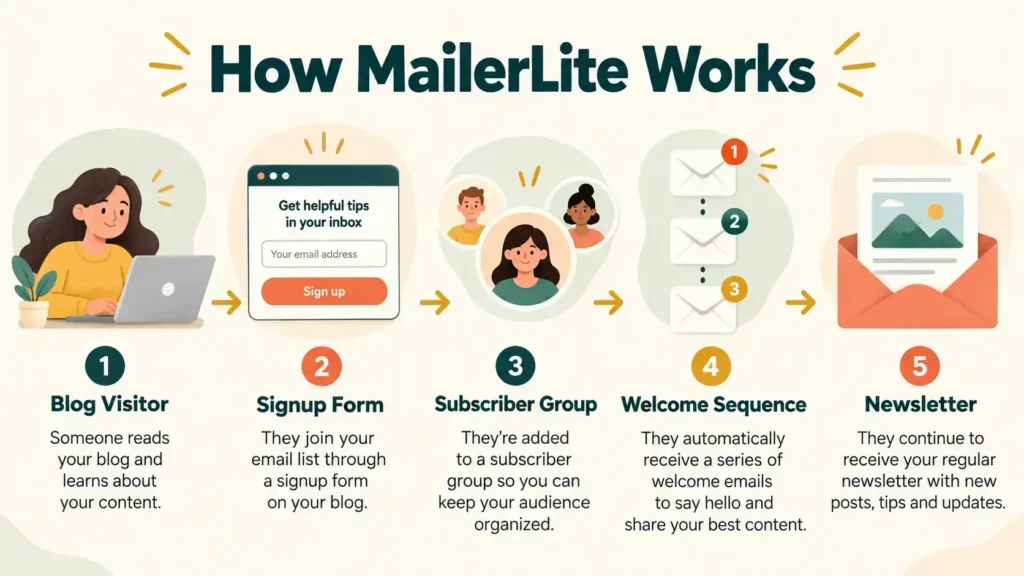
This is broadly similar to the workflow I use with Poptin and Kit. Poptin captures a subscriber, Kit delivers the Parent Blogging Starter Kit and the first email in the welcome sequence begins. MailerLite can handle the capture and email stages inside one platform if you prefer fewer moving parts.
MailerLite’s Main Features
Email Campaigns and Editors
MailerLite includes drag-and-drop, Simple and custom HTML editors. Most beginner bloggers will use the drag-and-drop editor for designed newsletters or the Simple editor for a cleaner, more personal email.
You can create regular campaigns, schedule emails and use segmentation to avoid sending everything to everyone. That is important as your list grows. A smaller relevant list is usually more useful than a larger disengaged one.
Email Automations
Automations allow you to send messages and take actions without manually managing every subscriber.
Common blogging uses include:
- Delivering a lead magnet
- Sending a welcome sequence
- Following up after a link click
- Moving a subscriber into a relevant group
- Re-engaging inactive readers
- Sending product or course information
The Free plan currently allows up to three automations, each with no more than five steps. That is enough for a short welcome sequence, but a growing blog can reach the limit surprisingly quickly.
Comfort raises this to 50 automations with up to 100 steps each. Power removes those automation limits and adds multiple triggers.
Signup Forms, Popups and Landing Pages
MailerLite lets you build forms, promotional popups and landing pages without buying a separate page builder. This can keep a beginner’s system simpler and reduce the number of subscriptions to manage.
The Free plan includes one website, one landing page and three signup forms. That may be sufficient for one main lead magnet. It becomes restrictive if you plan several content upgrades, separate topic funnels or dedicated campaign pages.
Websites, Digital Products and Bookings
MailerLite has expanded beyond newsletters. You can build simple websites, sell digital products, accept paid newsletter subscriptions and offer bookings.
These tools may save money if your needs are basic. They should not automatically replace a dedicated website, ecommerce platform or course system. Check transaction fees, payment processing, design control and customer-management needs before moving an important product into any all-in-one platform.
HeyLite and AI Features
MailerLite promotes AI-assisted writing, landing-page creation, testing and sending features. It also offers limited connections for using MailerLite through AI assistants on some plans.
These can speed up a first draft or help generate variations, but they do not replace audience knowledge, fact-checking or a clear offer. I would still review every email in your own voice before sending it.
MailerLite Pricing in 2026
MailerLite currently offers Free, Comfort, Power and Enterprise plans. Prices rise as your active subscriber count increases.
| Plan | Starting Price | Main Allowance and Features |
|---|---|---|
| Free | $0 | 250 active subscribers, 2,500 emails every 30 days, 2 users, 3 automations with up to 5 steps, 1 website, 1 landing page and 3 forms |
| Comfort | From $12/month | 3 users, up to 50 automations, removal of MailerLite branding, 10 websites or landing pages, 10 forms, AI writing and email support |
| Power | From $25/month | Unlimited users, automations, websites, landing pages and forms, multiple automation triggers, and chat plus email support |
| Enterprise | Custom price | Designed for very large lists, with additional deliverability and account support |
Annual billing currently gives a 10% saving. Taxes may be added depending on your location.
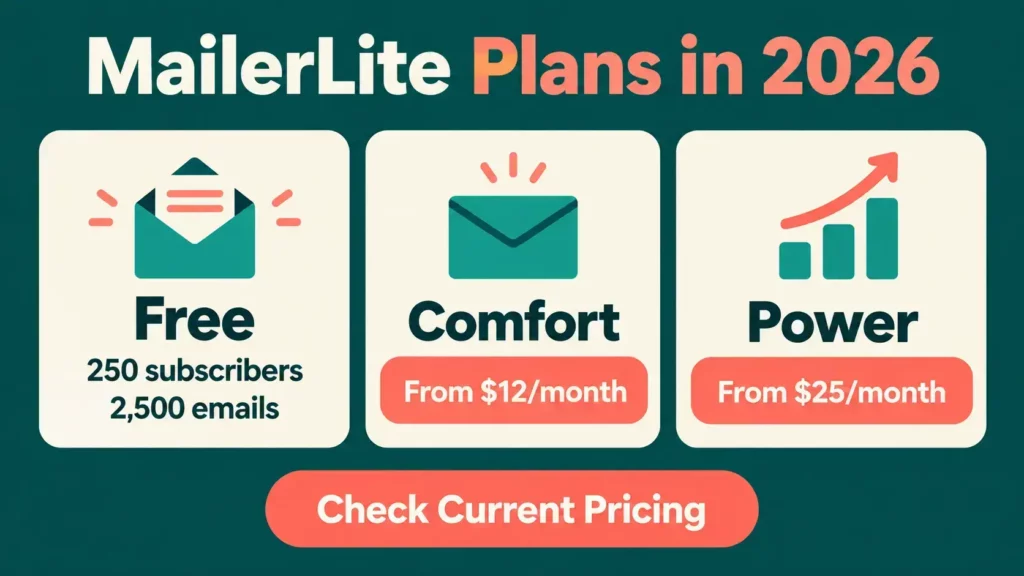
These are starting prices, not a promise of what you will always pay. Your cost can rise with your subscriber count. Check the official MailerLite pricing page with your expected list size before committing.
Which MailerLite Plan Is Best for a Beginner Blogger?
The Free plan is best for testing MailerLite and setting up one simple funnel. It is not generous enough to assume you can remain free for years.
Comfort is likely to be the practical paid option for a solo blogger who needs more forms, longer automations and removal of MailerLite branding. Power makes more sense when you need multiple automation triggers, unlimited assets, more users or live chat.
Do not choose only by today’s subscriber number. Map the system you expect to need over the next year:
- How many lead magnets will you offer?
- How many automated sequences will you build?
- How often will you email?
- Will you sell products or take bookings?
- When are you likely to pass 250 subscribers?
- What will the next subscriber tier cost?
The cheapest starting plan can become an expensive migration if it is a poor long-term fit.
Is MailerLite’s Free Plan Still Good?
MailerLite’s Free plan is still useful, but it is now a trial-sized starting point for many bloggers.
In June 2026, MailerLite reduced the Free plan from 500 to 250 active subscribers and reduced the sending allowance from 12,000 to 2,500 emails every 30 days. It also unlocked some features and increased the account-user allowance to two.
For a brand-new blog, 250 subscribers can provide enough space to learn the platform, create a lead magnet and test a welcome sequence. If your list grows steadily, however, you will need a paid plan quite soon.

At 250 subscribers, one weekly newsletter would use roughly 1,000 sends over four weeks before automation emails are counted. The 2,500-email allowance is workable, but it is not unlimited breathing room.
Read MailerLite’s Free plan update before relying on older comparisons that still quote 500 or 1,000 free subscribers.
What Happens If You Exceed the Free Limit?
If you exceed 250 active subscribers on the Free plan, MailerLite can restrict campaign and automation sending until you upgrade or reduce the number of active subscribers.
Paid plans are also tiered by subscriber count. MailerLite states that a paid account can move to the next subscriber tier and charge the saved payment method if the limit is exceeded.
There is another detail worth understanding. Subscriber usage can be calculated cumulatively during a billing period. People who were active earlier in that period may still count even if you later unsubscribe or delete them, until the usage resets.
This is not necessarily unreasonable, but it can surprise someone who assumes deleting contacts immediately reduces the bill. Read the plan and billing guidance before importing a large list.
Does MailerLite Offer Refunds?
MailerLite generally does not offer refunds for unused or partly used plans, buying the wrong plan, forgetting to cancel before renewal or deciding that the functionality does not suit you after purchase.
That is one of the most important limitations to understand before paying annually. Use the 14-day premium trial, test the functions you need and set a renewal reminder before choosing a longer billing period.
You can review the current MailerLite Terms of Use for the full conditions and any limited legal exceptions.
Does MailerLite Approve Every Account?
No. MailerLite reviews accounts and requires users to follow its anti-spam and acceptable-use rules. Sending-domain authentication is also required after the initial trial period.
Approval checks are normal for reputable email providers because poor-quality or non-consensual lists can damage deliverability for everyone sharing the infrastructure. However, some independent reviewers report frustration when an account is rejected or suspended and the explanation feels limited.
Before joining:
- Use your real website and business details
- Publish a privacy policy and contact information
- Explain clearly how subscribers join your list
- Use a professional sending-domain email address
- Never import a bought, scraped or borrowed list
- Authenticate your sending domain
- Keep evidence of consent for imported contacts
- Read the prohibited-content and acceptable-use rules
If you operate in a sensitive or restricted niche, ask for clarification before building your whole system on the platform.
Is MailerLite Easy to Use?
Ease of use is one of MailerLite’s strongest selling points. The interface and drag-and-drop tools are designed to be approachable for people who do not want to learn a complex marketing suite.
That does not mean every task is instant. Groups, segments, triggers and domain authentication still take time to understand. A beginner should expect a setup session for the account, another for the first form and automation, and proper testing before sharing the signup page.
The useful question is not whether a tool has a learning curve. It is whether the learning is proportionate to what the tool enables. MailerLite appears to strike that balance well for straightforward blogging funnels.
What Support Does MailerLite Provide?
Support depends on the plan.
- Free users receive community support after the premium trial.
- Comfort includes 24/7 email support.
- Power includes 24/7 live chat and email support.
- Enterprise adds more direct account assistance.
MailerLite also provides a help centre, tutorials and educational content. That may be enough when everything is working normally. If your email list is central to your income and you want immediate live support, include the Power plan cost in your comparison rather than assuming chat comes with the cheapest plan.
What About Email Deliverability?
MailerLite provides the infrastructure and tools needed to send legitimate email, but no provider can guarantee that every message will reach the inbox.
Deliverability also depends on:
- Proper domain authentication
- Genuine subscriber consent
- List quality
- Complaint and bounce rates
- Sending consistency
- Email content
- Subscriber engagement
Do not choose a provider solely because one review reports an impressive deliverability percentage. Testing methods vary and results can change by sender. Start with a clean permission-based list, authenticate your domain and monitor your own results.
MailerLite Complaints and Disadvantages
No email platform is right for everyone. The main MailerLite drawbacks are:
The Free Subscriber Limit Is Small
Two hundred and fifty subscribers is enough for testing, but a focused lead magnet could reach that point faster than expected.
Automation Limits Can Appear Early
Three short automations may work for one funnel. Several lead magnets, topic-specific sequences or product launches will require more capacity.
Refund Terms Are Strict
The general no-refund position makes annual payment something to consider carefully.
Account Reviews Can Be Frustrating
MailerLite must protect its sending network, but negative customer feedback shows that approval or compliance decisions can feel disruptive when explanations are limited.
Subscriber-Based Pricing Still Increases
The initial price may look inexpensive, but the meaningful comparison is the price at your expected list size, with the features you need.
Free Support Is Limited
Community support may not feel sufficient if a launch or important automation stops working.
MailerLite Pros and Cons
Pros
- Clean, beginner-friendly interface
- Useful email, forms, landing pages and automation in one platform
- Free plan available without a card
- Affordable starting price for Comfort
- Three email editors for different writing styles
- Digital products, paid newsletters and booking tools available
- GDPR controls and EU data hosting
- Established company with a long operating history
Cons
- Free plan limited to 250 active subscribers
- Only three short automations on Free
- Prices increase with subscriber count
- General policy of no refunds for unused plans or missed cancellations
- Account approval and compliance complaints appear in independent feedback
- Live chat requires Power rather than Comfort
- It lacks Kit’s creator network and GetResponse’s broader webinar toolkit
Is MailerLite Legitimate or a Scam?
MailerLite is a legitimate email marketing company, not a scam. It has operated since 2010 and provides functioning email marketing, automation, landing-page and audience-management tools.
Calling it legitimate does not mean every customer will be approved, every support experience will be positive or every plan will represent good value. The right decision depends on your list size, niche, automation needs and tolerance for the platform’s billing and refund rules.
Is MailerLite Good for Beginners?
Yes, MailerLite is well suited to beginners who want to build a simple email funnel without starting with a complex marketing system.
Its editor, forms and basic automations cover the tasks most new bloggers need. The 14-day premium trial also gives you a chance to test paid features before choosing a plan.
The caveat is the Free plan’s 250-subscriber ceiling. Beginners should not confuse “free to start” with “likely to remain free”. Work out what the first paid tier will cost before investing time in templates and automations.
Is MailerLite Good for Busy Parents?
MailerLite can be a good fit for busy parents because it keeps several useful tools in one place and does not require coding for a normal setup.
Once your welcome sequence is built, it can deliver your lead magnet and follow up while you are working or dealing with family life. That is where automation genuinely helps. It removes repetitive administration, not the need to create useful emails.
It is a poor fit if you are likely to spend scarce time repeatedly rebuilding systems to avoid paying. Choose a platform you can realistically afford at the next list tier and keep the initial funnel small.

MailerLite vs Kit
MailerLite is likely to appeal to bloggers who prioritise an approachable editor, landing pages and lower entry-level paid pricing. Kit is built more directly around creators and currently offers a much larger subscriber allowance on its free Newsletter plan.
Kit also includes creator-focused features such as recommendations through the Creator Network. Its paid Creator plan becomes more expensive than MailerLite’s starting Comfort price, so the best value depends on which features you need and when.
I use Kit with Poptin for Flex For Families. Kit delivers my Parent Blogging Starter Kit and starts the welcome sequence after Poptin captures the subscriber. That first-hand experience makes Kit a known fit for my workflow, but it does not automatically make it the best option for every beginner.
Choose MailerLite if you prefer its editor, built-in page tools and paid-price structure. Choose Kit if creator-specific audience growth and more room on the free subscriber allowance matter more.
MailerLite vs GetResponse
MailerLite is the simpler and usually lower-cost option for straightforward newsletters, forms and blogging automations.
GetResponse is a broader marketing platform. Depending on the plan, it can include webinars, course tools, advanced automation and wider ecommerce functionality. That breadth can be useful for a more developed business, but it can also mean paying for tools a new blogger does not need.
For a basic lead magnet and welcome sequence, MailerLite is likely to feel more focused. For webinars, advanced campaigns or a broader marketing stack, read my full GetResponse review and compare the exact plans.
MailerLite vs Systeme.io
MailerLite is primarily an email marketing platform with additional selling tools. Systeme.io is built more around sales funnels, courses, memberships and online-business workflows.
Choose MailerLite if email editing, newsletters and list management are your priority. Consider Systeme.io if your main aim is to build funnels and sell courses or digital products within one low-cost system. Its email experience may feel less polished, but the broader funnel tools can offer better value for that particular use. Read my Systeme.io Review.
Who Is MailerLite Best For?
MailerLite is best suited to:
- Beginner bloggers building their first email funnel
- Small businesses that want campaigns, forms and pages in one place
- Solo creators who value a clean interface
- People prepared to move onto a paid plan after 250 subscribers
- Users who need modest automation without an enterprise-level platform
Who Should Avoid MailerLite?
MailerLite may be the wrong fit for:
- Creators who want to keep several thousand subscribers on a free plan
- Businesses needing advanced webinars or complex ecommerce automation
- Users who require live chat on the cheapest paid plan
- People in a restricted niche who have not checked the acceptable-use rules
- Anyone likely to buy an annual plan without first testing the workflow
- Bloggers who specifically want a creator recommendation network
MailerLite Readiness Checklist

Before joining, answer these questions:
- Do I have a professional sending-domain email address?
- Is my website live with a privacy policy and contact information?
- Do I know exactly how people will consent to join my list?
- What is my first lead magnet or signup offer?
- How many emails will my first automation contain?
- When could I reach 250 active subscribers?
- Can I afford the appropriate paid tier at that point?
- Have I checked whether my niche and content are permitted?
- Have I tested the whole signup and delivery journey?
- Have I recorded the renewal date if I pay annually?
If several answers are “not yet”, prepare those basics before spending money.
Is MailerLite Worth It in 2026?
MailerLite is worth considering in 2026 if you want a capable, relatively simple email platform and understand that the Free plan is now limited to 250 subscribers.
The strongest value is not that it is free forever. It is that the platform provides a manageable route from a basic signup form to useful automations and paid features without immediately becoming an oversized marketing suite.
The reduced free allowance weakens its position for creators who want a long free runway. Its strict refund approach and account-review complaints also deserve attention. Test the system, check your niche and compare the price at your expected list size before committing.

About the Reviewer
Hi, I’m John Crossley, founder of Flex For Families.
I’m a parent, blogger, and online business owner who helps families find realistic ways to create more flexibility through blogging, affiliate marketing, and online business.
Like many people, I’ve spent years researching online opportunities, testing platforms, and learning how to separate genuine business models from expensive hype. I’ve also experienced the frustration of chasing opportunities that promised freedom but demanded more time away from family.
Today, I use that experience to review courses, side hustles, AI opportunities, and online business programmes through a simple lens:
Will this genuinely help parents create more flexibility, or will it create more pressure?
Every review on Flex For Families focuses on costs, time commitments, risks, and realistic expectations, so you can make informed decisions before investing your time or money.
Final Verdict: MailerLite Scores 4.3 out of 5
MailerLite remains one of the stronger budget email tools for beginner bloggers. It combines an approachable interface with useful automation, forms, landing pages and selling features.
The Free plan is now best treated as a place to test and launch, not a permanent solution. Two hundred and fifty subscribers can disappear quickly once a lead magnet gains traction. Compare Comfort with Kit and any broader platform you are considering before building a complicated funnel.
For the right beginner, MailerLite offers a sensible balance of simplicity and capability. Just go in with a realistic plan for the first upgrade.
If you are still working out how email marketing fits into your blog, download the Parent Blogging Starter Kit. It will help you choose a realistic direction, organise your ideas and build around the time you actually have.
Frequently Asked Questions
Is MailerLite Legitimate?
Yes. MailerLite is a legitimate email marketing platform that launched in 2010. It provides newsletters, automation, signup forms, landing pages and audience-management tools. Like other reputable email providers, it reviews accounts and applies anti-spam rules, so approval is not guaranteed for every business or type of content.
Is MailerLite Really Free?
Yes. MailerLite has a Free plan for up to 250 active subscribers and 2,500 emails every 30 days. It includes campaigns, limited automations, forms, one website and one landing page. You will need to upgrade or reduce active subscribers if your list exceeds the free limit.
How Many Subscribers Can You Have on MailerLite Free?
The current MailerLite Free plan supports up to 250 active subscribers. The limit was reduced from 500 in June 2026. Older reviews may therefore show an outdated allowance. When you exceed 250 active subscribers, sending can be restricted until you upgrade or bring the list back within the limit.
How Much Does MailerLite Cost?
MailerLite’s Free plan costs $0. Comfort currently starts at $12 per month and Power starts at $25 per month, with Enterprise priced by quotation. Paid costs rise with subscriber numbers, and taxes may apply. Annual billing currently provides a 10% saving, but always check the official pricing calculator for your list size.
Does MailerLite Offer Refunds?
MailerLite generally does not refund unused or partly used subscriptions, purchases of the wrong plan, renewals you forgot to cancel or cancellations made after a new billing period begins. Test the features during the 14-day premium trial and review the current terms before choosing annual billing.
Is MailerLite Good for Beginner Bloggers?
Yes. MailerLite is a strong beginner option because it combines email editing, signup forms, landing pages and basic automation in a relatively approachable interface. The main limitation is the 250-subscriber Free plan. Beginners should compare the likely paid cost before investing significant time in their setup.
Is MailerLite Better Than Kit?
Neither platform is better for everyone. MailerLite may suit bloggers who prefer its editors, built-in page tools and lower starting paid price. Kit is more creator-focused and currently gives eligible users a much larger free subscriber allowance. Compare automation limits, support and your expected list size before choosing.
Let’s Chat
Have you used MailerLite for your blog? Did you find the setup simple, and how did the pricing feel once your list grew? Share your experience in the comments. It could help another parent make a more informed decision.