
Building an email list can start with a simple goal. You want a form that collects an email address and sends a helpful free resource.
The setup often becomes more complicated as your blog grows. You may want landing pages, automated email sequences, subscriber tags, sales funnels, webinars or somewhere to host a course.
GetResponse attempts to provide all of those tools in one platform.
That could save you from connecting several subscriptions. It could also leave you paying for a collection of features you do not need.
So, is GetResponse a good email marketing platform for bloggers in 2026?
My short answer is that GetResponse is a capable and established platform. Its email marketing, automation and wider business tools give it more range than a basic newsletter service. However, its best automation features require the $59-per-month Marketer plan, while its webinar and course tools sit on the $69 Creator plan.
If you only need a lead magnet, welcome sequence and regular newsletter, a creator-focused platform such as Kit may provide a simpler route.
Research Disclosure: I have not personally used GetResponse. I currently use Kit for Flex For Families and previously used AWeber. This review is based on official GetResponse documentation, current pricing, published terms and independent user feedback. I have separated confirmed facts from my own assessment.
GetResponse Quick Verdict
Product: GetResponse
What It Is: Email marketing, automation and online marketing platform
Company: GetResponse S.A.
Starting Price: $19 per month for up to 1,000 contacts
Free Option: 14-day trial with no credit card required
Best fit: Bloggers and small businesses that will use several marketing tools.
Poor fit: Beginners who only need basic email capture and a short welcome sequence.
Main strength: Email, automation, funnels, webinars and course tools in one platform.
Main drawback: Advanced features require a large jump from the entry plan.
Refund Policy: Paid subscriptions are generally non-refundable
Overall rating: 4 out of 5
Overall Verdict: GetResponse is a legitimate and feature-rich marketing platform. It offers strong value when its automation, funnels, ecommerce or webinar tools replace other subscriptions.
A new blogger who mainly wants to deliver a lead magnet and send newsletters may find Kit simpler or Systeme.io more affordable as a wider business platform.
GetResponse at a Glance
| Area | Details |
|---|---|
| Email Sends | Unlimited on paid standard plans |
| Visual Automation | Limited on Starter, unlimited workflows on Marketer and Creator |
| Landing Pages | Included |
| Forms and Popups | Included |
| Sales Funnels | Marketer and above |
| Webinars | Creator and Enterprise |
| Course Builder | Creator and Enterprise |
| Paid Newsletters | Creator and Enterprise |
| Ecommerce Automation | Marketer and above |
| Support | Email and chat on standard plans |
| Phone Support | Enterprise only |
| Annual Discount | 18% at the time of research |
What Is GetResponse?
GetResponse is an email marketing and automation platform for creators, marketers, ecommerce businesses and small organisations.
Its core tools let you collect subscribers, send newsletters, build autoresponder sequences and create behaviour-based automations. The platform has expanded to include landing pages, popups, sales funnels, ecommerce tools, websites, webinars, courses and paid newsletters.
This places GetResponse between two types of service.
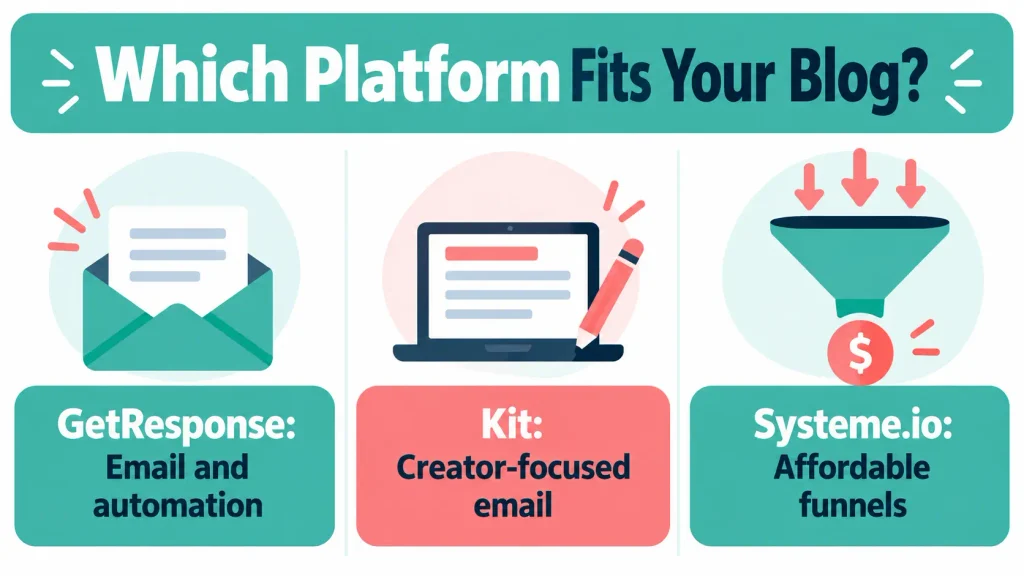
It competes with email-first platforms such as Kit, AWeber and MailerLite. It also competes with broader business platforms such as Systeme.io.
That distinction matters. GetResponse may be excessive if you want nothing beyond newsletters. It becomes more appealing when you can replace several separate tools.
Who Created GetResponse?
Simon Grabowski founded GetResponse in 1998. What began as an email marketing service has developed into a wider marketing platform.
The service is operated by GetResponse S.A. Its privacy policy identifies the company’s registered office in Gdańsk, Poland.
GetResponse’s long operating history does not guarantee that it is the best platform for every user. It does show that this is an established software business rather than an untested email tool.
Quick Note: I’m John Crossley, founder of Flex For Families. I review online business opportunities through the lens of family life, focusing on costs, time commitments, risks, and whether they genuinely help parents create more flexibility.
How Does GetResponse Work?
GetResponse manages the journey from website visitor to email subscriber and, if required, paying customer.
A simple subscriber journey might work like this:
- A visitor reaches your blog or GetResponse landing page.
- They complete a form or popup to request your lead magnet.
- GetResponse adds them to the correct list or segment.
- A welcome email delivers the resource.
- An autoresponder sequence introduces your content and offers.
- Their clicks and behaviour can trigger tags or different emails.
- You monitor sends, opens, clicks and conversions.
More advanced users can add funnels, purchase triggers, ecommerce data, webinars and course access.
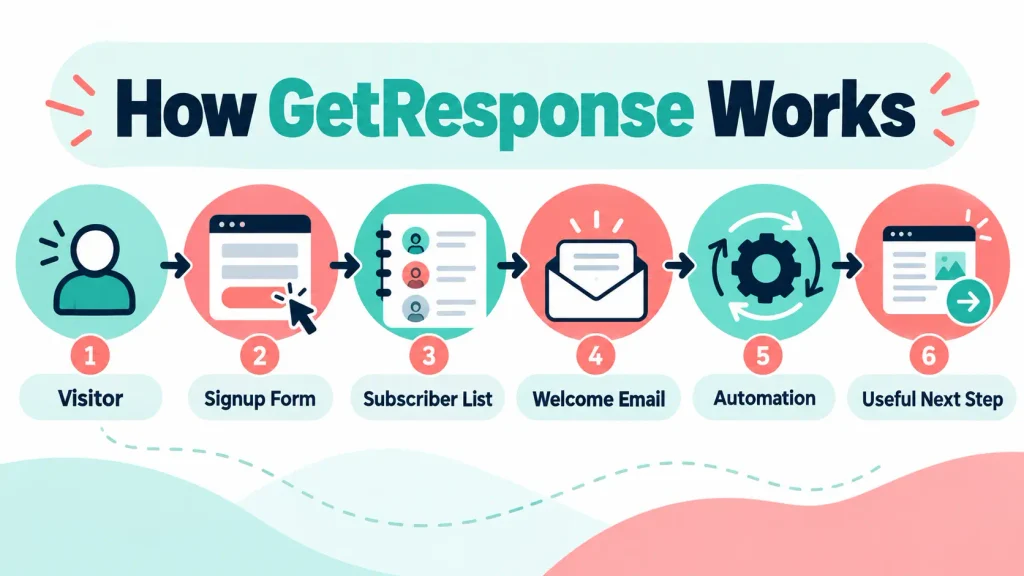
The benefit is that the information remains inside one platform. The drawback is that every additional feature adds setup work and another opportunity to create a complicated subscriber journey.
What Does GetResponse Offer?
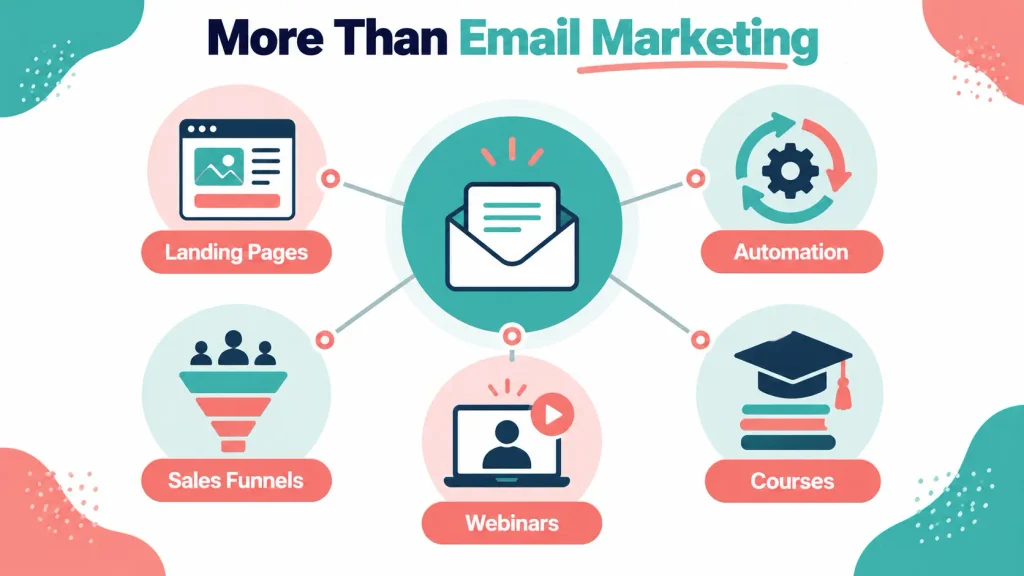
Email Marketing
GetResponse includes the main tools required to create and send email campaigns.
These include:
- A visual email editor
- Predesigned templates
- An HTML editor
- Scheduling
- Click tracking
- Spam checking
- RSS-to-email campaigns
- Mobile previews
- Google Analytics integration
- AI email and subject-line generators
Paid plans include unlimited monthly sends. This is useful if you email regularly, although acceptable-use and anti-spam rules still apply.
The Starter plan limits the AI email generator and AI subject-line generator to three uses, according to the current plan comparison.
AI can help create a first draft, but you still need to check the message. An automated email represents your business every time it reaches a subscriber.
Autoresponders
Autoresponders send messages according to a schedule. For example, you could send your lead magnet immediately, an introductory email the following day and a useful guide three days later.
This is enough for many beginner bloggers.
GetResponse includes welcome and thank-you emails, drip campaigns, birthday emails and follow-ups based on opens or clicks.
An autoresponder sequence should not become a collection of unrelated promotions. Each email should help the subscriber take a useful next step.
Marketing Automation
GetResponse’s visual automation builder allows you to create workflows based on conditions and actions.
Depending on the plan, you can use:
- Contact tags
- Contact scoring
- Link-click triggers
- Page-visit triggers
- Purchase activity
- Dynamic segments
- Split paths
- Abandoned-cart triggers
- Event-based automation
- Automated web push notifications
The Starter plan includes one custom automation workflow. Marketer and Creator include unlimited workflows.
This is one of the most important plan differences. A beginner can build a basic journey on Starter. Someone who wants separate sequences for several lead magnets, customer types or products may soon need Marketer.
Landing Pages
GetResponse includes a landing-page builder on its paid plans.
You can use landing pages to:
- Promote a lead magnet
- Register people for a webinar
- Test an offer
- Collect enquiries
- Sell a product
- Build a focused campaign outside your main website
This may reduce the need for a separate landing-page tool. It does not mean you need to rebuild a working WordPress site inside GetResponse.
Forms and Popups
The platform includes signup forms, popups, banners and display rules.
For a new blogger, this could combine email capture and email delivery in one account. An existing Poptin user would need to compare trigger controls, targeting, design flexibility and conversion data before replacing a working setup.
I currently use Poptin with Kit. That journey already works, so switching would need to solve a clear problem rather than simply reduce the number of brand names in the setup.
Sales Funnels
The Marketer plan and above include sales funnels.
A funnel can connect:
- A landing page
- A form
- An email sequence
- A sales page
- A checkout
- Follow-up messages
This is useful when selling a product or running a planned campaign. It offers limited value if you have no validated offer or traffic.
Ecommerce Tools
GetResponse provides ecommerce integrations and automation on its higher plans.
Features include:
- Abandoned-cart recovery
- Product boxes inside emails
- Purchase automation
- Payment-gateway integrations
- Order confirmations
- Promo codes
- Revenue tracking
- Product recommendations on suitable plans
These tools make Marketer more relevant to an online shop than a new content blog.
Webinars
Webinar hosting is included with Creator and Enterprise.
This could suit:
- Coaches
- Consultants
- Course creators
- Software demonstrations
- Live workshops
- Product launches
Native webinars are one of GetResponse’s clearer differences from Kit and many email-only platforms.
Do not pay for Creator because you might host a webinar one day. Choose it when webinars already form part of your business plan.
Website Builder
The Creator plan includes a website builder.
This may help someone who wants to create a basic online presence without WordPress. It is unlikely to justify moving an established content website away from WordPress.
Your website decision should consider ownership, SEO, content management and long-term flexibility. The fact that a website builder is included does not make it the best website platform for your business.
Course Creator
Creator includes course creation and support for up to 500 students.
GetResponse promotes AI-assisted tools that can help organise course material. This could save setup time for someone who already understands the subject and the student’s required outcome.
AI cannot validate whether the course solves a paid problem. It also cannot replace the creator’s expertise, examples or student support.
Premium Newsletters
The Creator plan allows users to sell premium newsletter subscriptions.
This can suit a creator with an established audience and specialist information. It is unlikely to provide immediate value to a new blogger who is still trying to attract free subscribers.
AI Tools
GetResponse has added AI to several parts of the platform, including:
- Email creation
- Subject lines
- Campaign setup
- Landing pages
- Website creation
- Course development
- Product recommendations on advanced plans
These tools can speed up a blank-page task. They do not remove the need to review facts, tone, links, offers and automation logic.
For a busy parent, AI is useful when it reduces a defined task. It becomes a distraction when it encourages you to create more campaigns than you can manage.
GetResponse Pricing in 2026
GetResponse prices its standard plans according to the number of contacts and chosen feature level.
The official pricing page showed the following entry prices for up to 1,000 contacts when this review was researched:
| Plan | Monthly Billing | Annual Equivalent | Best Fit |
|---|---|---|---|
| Starter | $19 per month | $15.58 per month | Basic email and list building |
| Marketer | $59 per month | $48.38 per month | Automation, funnels and ecommerce |
| Creator | $69 per month | $56.58 per month | Courses, webinars and paid newsletters |
| Enterprise | Custom | Custom | Large organisations and specialist requirements |
Annual billing saves 18% at the listed rate. Prices are shown before applicable taxes.
UK visitors may see localised pricing in euros rather than pounds. Check the currency, VAT and final card amount before paying.
The price also rises as your contact count increases. An entry price based on 1,000 contacts does not show what the same plan will cost after your list grows.
Which GetResponse Plan Do You Need?
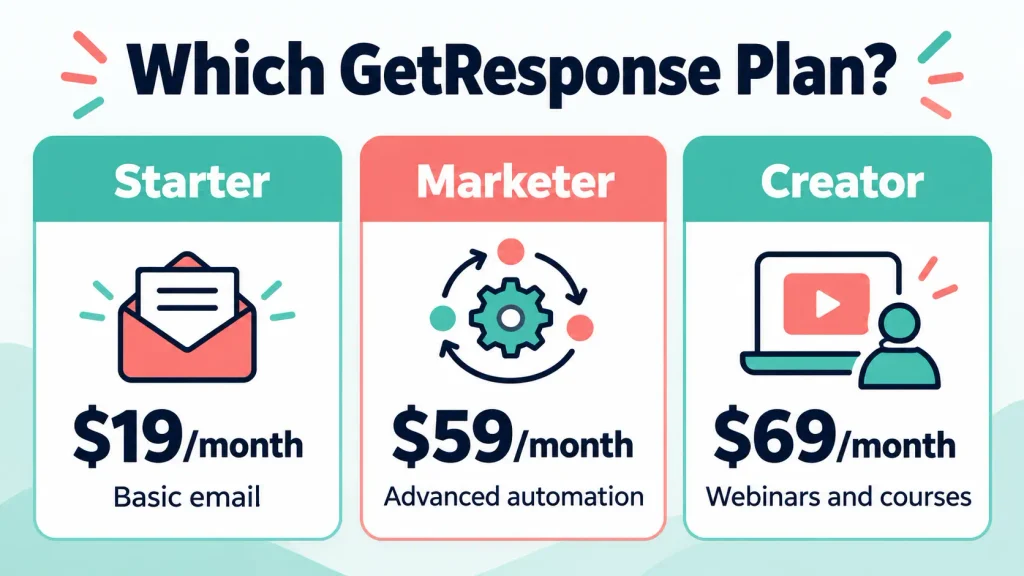
Choose Starter If:
- You are building your first email list.
- You need newsletters and a welcome sequence.
- One custom automation workflow is enough.
- You want landing pages, forms and popups.
- You are not running advanced ecommerce campaigns.
Starter provides a reasonable introduction to the platform. Its main limitation is the single custom automation workflow.
Choose Marketer If:
- You need several automated subscriber journeys.
- You want contact tagging and scoring.
- You run an ecommerce business.
- You need abandoned-cart recovery.
- You want sales funnels and revenue tracking.
- You need A/B testing and advanced segmentation.
Marketer is likely to be the real starting point for someone choosing GetResponse because of its automation strength.
Choose Creator If:
- You will host webinars.
- You are building or selling courses.
- You plan to offer a paid newsletter.
- These tools will replace separate subscriptions.
- You can use the student and creator features now.
Creator costs only $10 more than Marketer at the entry level. That does not make it better value if you will not use its additional tools.
Choose Enterprise If:
- You manage a large list or organisation.
- You require a dedicated sending domain or IP address.
- You need SMS or transactional email.
- You need premium support and account management.
- You require single sign-on or advanced team controls.
Enterprise uses custom pricing and is unlikely to be relevant to a new blogger.
Does GetResponse Have a Free Plan?
The current official pricing page promotes a 14-day free trial with no credit card required. It does not currently show a permanent free plan among the standard options.
Some older reviews still mention a free plan for a limited number of contacts. You should not rely on that information unless the option appears during your current signup process.
The 14-day trial is still useful. It gives you time to build a real test journey before paying.
During the trial, try to:
- Import or create a small test list.
- Build a form or landing page.
- Create a welcome email.
- Build the automation you expect to use.
- Test it with a fresh email address.
- Check the mobile version.
- Confirm which plan supports every step.
Exploring the dashboard without completing a real workflow will tell you very little.
Does GetResponse Offer Refunds?
GetResponse generally does not refund paid subscription periods.
Its terms of service describe the service as pay-as-you-go. If you cancel after a monthly or annual renewal has been charged, you remain responsible for that billing period.
Subscriptions renew automatically unless you delete the account before the renewal date.
This is especially important with annual billing. The 18% saving may look attractive, but an annual payment creates a larger financial commitment and does not normally come with a refund for unused time.
If you subscribe:
- Record the renewal date.
- Set a calendar reminder several weeks before it.
- Export your contacts before cancelling.
- Save important reports and campaign copy.
- Read the checkout terms before confirming payment.
How Easy Is GetResponse to Use?
GetResponse appears approachable for basic email campaigns. Independent reviews commonly praise its interface, templates and email-sending process.
G2 displayed a rating of 4.3 out of 5 from more than 1,100 reviews during this research. Its review summary highlighted ease of use, templates, email sending and customer support as recurring positives.
The learning curve increases when you move into:
- Branching automation
- Ecommerce tracking
- Funnel setup
- Contact scoring
- Webinars
- Course creation
Ease of sending one newsletter is different from ease of building a complete marketing system.
A beginner should start with the shortest subscriber journey that works. Add complexity when the data shows a reason for it.
GetResponse Support
The standard plans include email and chat support. The Enterprise plan adds premium support options, including phone and Slack support according to the current plan table.
GetResponse also provides:
- A help centre
- Tutorials
- API documentation
- Webinars
- GetResponse Academy courses
- Onboarding resources
Independent reviewers frequently mention support positively. There are also individual complaints about delayed or unsatisfactory handling of account and billing issues.
Research-based reviews cannot predict how support will handle your specific case. Save important billing and support correspondence in case you need to refer back to it.
GetResponse Deliverability
GetResponse promotes high deliverability, but no platform can guarantee that every message will reach the inbox.
Deliverability depends on:
- Domain authentication
- The quality of your subscriber consent
- Bounce rates
- Spam complaints
- Sending consistency
- List engagement
- Email content
- The reputation of the sending infrastructure
GetResponse supports custom DKIM and automatically manages unsubscribe requests. Its anti-spam policy prohibits unsolicited email and allows the company to restrict accounts that breach its rules.
Do not purchase an old contact list or upload addresses without valid consent. A reputable email platform will protect its sending infrastructure, even when that creates inconvenience for an account owner.
GetResponse Complaints and Disadvantages
GetResponse receives strong ratings overall, but several limitations deserve attention.
The Best Features Require Higher Plans
Starter costs $19 per month at the entry level. Marketer costs $59.
That $40 jump unlocks much of the behaviour-based automation, ecommerce and funnel functionality that makes GetResponse distinctive.
The entry price can therefore understate the cost for someone with advanced plans.
Prices Increase With Your Contact Count
GetResponse uses contact-based pricing. Your bill can rise as the list grows, even if your sending frequency stays the same.
Calculate the expected price at your next subscriber milestone, not only at 1,000 contacts.
Billing and Refund Complaints
Billing is the most important complaint theme found during the research.
Some Trustpilot reviewers report disputes about renewals, charges and access after cancellation. These are individual accounts rather than verified findings about every customer. However, the official no-refund terms confirm why cancelling before renewal matters.
The Platform Can Feel Overwhelming
Email, automation, funnels, ecommerce, webinars, websites and courses create a broad menu.
That breadth helps a growing business. It can distract a beginner from the simple goal of attracting the first subscribers and sending useful emails.
Starter Automation Is Limited
One custom workflow may handle a first welcome sequence. It may not support several lead magnets, interest paths and product sequences without upgrading.
Standard Plans Lack Phone Support
Email and chat will be enough for many customers. Someone running time-sensitive launches may prefer phone access when a serious problem occurs.
It Is Not a Full CRM
GetResponse includes contact records, tags, scoring and ecommerce data. It is not a complete replacement for a dedicated sales CRM with detailed pipelines and account management.
You May Pay for Unused Tools
An included course builder or webinar platform has no value if you do not use it.
Judge the platform by the tools you expect to use during the next six to twelve months.
GetResponse Pros and Cons
Pros
- Established email marketing provider
- Unlimited sends on standard paid plans
- Strong visual automation on Marketer and above
- Landing pages, forms and popups included
- Sales funnels and ecommerce automation available
- Native webinars and course tools on Creator
- 14-day trial without a credit card
- Email and chat support on standard plans
- Could replace several separate subscriptions
- Useful range of AI-assisted setup tools
Cons
- No permanent free plan shown on the current pricing page
- Advanced automation requires a jump to Marketer
- Prices rise with contact count
- Paid subscriptions are generally non-refundable
- Annual plans renew automatically
- Broad feature set can overwhelm beginners
- Phone support is reserved for Enterprise
- Some independent users report billing or cancellation frustrations
- Included tools provide poor value if they remain unused
Is GetResponse Legitimate or a Scam?
GetResponse is a legitimate email marketing and automation platform. It is operated by an identifiable company and has published pricing, legal terms, privacy information and anti-spam rules.
Independent review platforms also contain a large number of verified user reviews. The overall evidence describes a real and widely used software service.
That does not invalidate individual billing complaints. It means those complaints should be considered alongside the written renewal and refund terms, rather than used to describe the entire platform as fraudulent.
Is GetResponse Suitable for Beginners?
Yes, GetResponse is suitable for beginners who want email tools with room to grow.
The Starter plan provides newsletters, autoresponders, landing pages, forms and a custom automation workflow. That is enough to build a basic lead-magnet funnel.
The main risk is paying for future plans rather than current needs. A new blogger does not need to configure funnels, scoring, webinars and courses before attracting consistent visitors.
Start with one useful resource, one signup route and one welcome sequence.
Is GetResponse Good for Busy Parents?
GetResponse can suit a busy parent when it reduces the number of platforms they need to manage.
It may save time if you use the same account for:
- Email delivery
- Landing pages
- Forms
- Automation
- A webinar
- A small course
It may waste time if the number of available features encourages you to build a complicated system before you have traffic or subscribers.
The best busy-parent setup is not the one with the most automation. It is the smallest reliable system that supports the next stage of the business.
GetResponse vs Kit
Kit is the most relevant comparison for bloggers and independent creators.
| Area | GetResponse | Kit |
|---|---|---|
| Main Audience | Marketers, ecommerce businesses and creators | Independent creators |
| Permanent Free Plan | Not shown on current standard pricing | Up to 10,000 subscribers, subject to plan terms |
| Paid Entry for 1,000 Subscribers | $19 monthly on Starter | $33 monthly on Creator when billed annually |
| Advanced Automation | Strong on Marketer and above | Unlimited visual automations on Creator |
| Landing Pages and Forms | Included | Included |
| Funnels | Built in on Marketer and above | More limited |
| Ecommerce Automation | Broader | Simpler creator commerce |
| Webinars | Creator plan | Not a core feature |
| Course Builder | Creator plan | Not a core feature |
| Creator Network | No direct equivalent | Core growth feature |
| Best Fit | Businesses wanting several marketing tools | Bloggers and creators focused on email and audience |
Kit’s current free plan supports up to 10,000 subscribers, although users should check its conditions and included recommendation features. Its Creator plan is listed at $33 per month for 1,000 subscribers when billed yearly.
GetResponse Starter costs less than Kit Creator at the entry level. However, GetResponse Marketer costs more and is the closer comparison if you need several advanced automation workflows.
Why I Currently Use Kit
My existing setup works:
- Poptin captures the subscriber.
- Kit delivers the Parent Blogging Starter Kit.
- The subscriber enters my welcome sequence.
- I can send broadcasts and develop the relationship.
Moving to GetResponse would require migration, testing and new integrations. At my current stage, I do not need native webinars, course hosting or ecommerce automation enough to justify that work.
GetResponse could become more relevant if I wanted several of those wider tools in the same account.
GetResponse vs AWeber
I have used AWeber in the past, although that experience does not represent its complete 2026 platform.
Broadly, AWeber remains closely associated with traditional email marketing, newsletters and autoresponders. GetResponse has developed further into funnels, ecommerce, webinars and course creation.
GetResponse is likely to appeal more to someone who wants a broader marketing platform. AWeber may suit a user who wants to keep the focus on email.
Any final choice should be based on current features and pricing rather than my historical AWeber experience.
GetResponse vs Systeme.io
Systeme.io is the strongest lower-cost all-in-one comparison.
| Area | GetResponse | Systeme.io |
|---|---|---|
| Main Strength | Email marketing and automation | Affordable funnels and online business tools |
| Email Features | More advanced | Sufficient for many beginners |
| Funnels | Marketer and above | Central feature |
| Courses | Creator plan | Included within the wider platform |
| Webinars | Creator plan | Available on suitable plans |
| Ecommerce Automation | Stronger | More limited |
| Beginner Cost | Starts at $19 | Permanent free option available |
| Best Fit | Email-first business needing broader tools | Budget-conscious creator building funnels and courses |
GetResponse provides deeper email and automation features. Systeme.io may offer better value if your priority is building a basic funnel, selling a course and managing email on a small budget.
Other GetResponse Alternatives
MailerLite
MailerLite may suit bloggers looking for straightforward email marketing, landing pages and automation without such a broad business platform.
Brevo
Brevo uses sending volume as an important part of its pricing rather than relying entirely on contact count. This may suit businesses with larger lists that send less frequently.
Mailchimp
Mailchimp is widely recognised and connects with many external services. Its plan limits and rising costs need careful comparison as a list grows.
AWeber
AWeber remains a relevant option for traditional email campaigns and autoresponders.
Who Is GetResponse Best For?
GetResponse is most likely to suit:
- Bloggers who need advanced email automation
- Ecommerce businesses
- Coaches running webinars
- Course creators
- Businesses building sales funnels
- Creators selling paid newsletters
- Small teams consolidating several marketing tools
- Users who want room to develop beyond basic newsletters
Who Should Avoid GetResponse?
You should probably choose another platform if:
- You only need a simple newsletter.
- You want a permanent free email plan.
- You are unlikely to use automation or funnels.
- You want a platform built primarily around independent creators.
- You require phone support on a standard plan.
- An annual renewal would create financial pressure.
- You are tempted to build complex systems before finding readers.
- You need a full sales CRM.
Is GetResponse Worth It in 2026?
GetResponse is worth considering if it will replace several tools you already need.
For example, Creator may offer reasonable value to someone who would otherwise pay separately for:
- Email marketing
- Landing pages
- Webinar software
- Course hosting
- Paid newsletter tools
It offers weaker value if most of those features remain unused.
The $19 Starter plan is competitive for basic email marketing. The more important decision is whether one custom automation workflow will remain enough. If not, compare the $59 Marketer price rather than being guided by the entry figure.
GetResponse Readiness Check
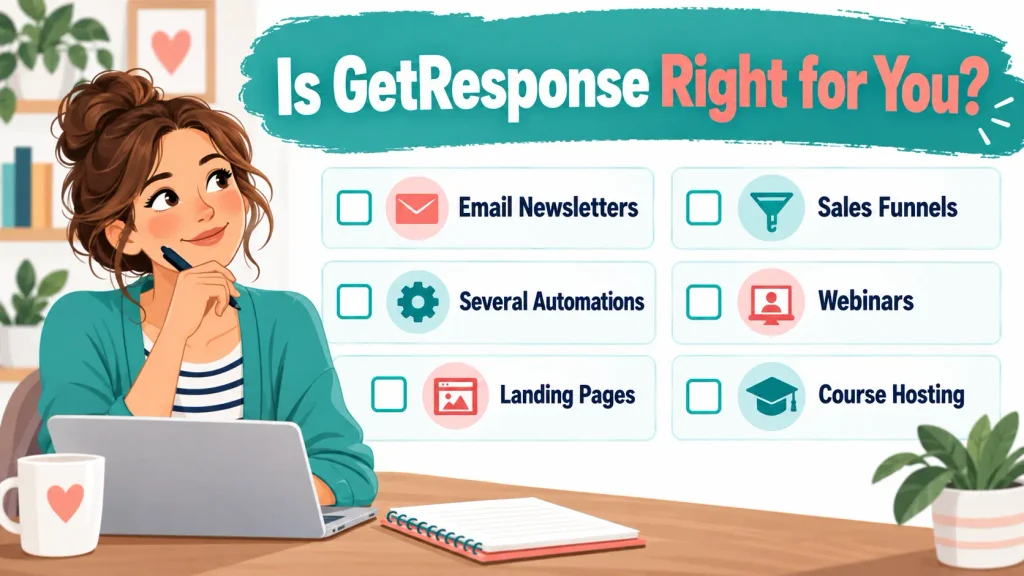
Give yourself one point for each feature you expect to use during the next twelve months:
- Regular email newsletters
- An automated welcome journey
- Several behaviour-based workflows
- Landing pages
- Popups and forms
- Sales funnels
- Ecommerce automation
- Webinars
- Course hosting
- Paid newsletters
| Score | Practical Direction |
|---|---|
| 1 to 2 | A simpler email platform may be enough. |
| 3 to 5 | Starter or Marketer could provide useful consolidation. |
| 6 to 10 | Creator may replace several separate subscriptions. |
This is not a product recommendation by itself. It helps you distinguish present requirements from features that merely sound useful.

About the Reviewer
Hi, I’m John Crossley, founder of Flex For Families.
I’m a parent, blogger, and online business owner who helps families find realistic ways to create more flexibility through blogging, affiliate marketing, and online business.
Like many people, I’ve spent years researching online opportunities, testing platforms, and learning how to separate genuine business models from expensive hype. I’ve also experienced the frustration of chasing opportunities that promised freedom but demanded more time away from family.
Today, I use that experience to review courses, side hustles, AI opportunities, and online business programmes through a simple lens:
Will this genuinely help parents create more flexibility, or will it create more pressure?
Every review on Flex For Families focuses on costs, time commitments, risks, and realistic expectations, so you can make informed decisions before investing your time or money.
My Final Verdict
GetResponse has developed into a strong email marketing and automation platform with a useful range of wider business tools.
Its main advantage is consolidation. You can manage subscribers, landing pages, forms, funnels, webinars and courses without connecting a separate provider for every task.
Its main weakness is that the $19 starting price does not represent the plan many growing businesses will need. Advanced automation requires Marketer at $59 per month, while webinars and course tools require Creator at $69.
I rate GetResponse 4 out of 5.
It looks like a good choice for businesses that will use several parts of the platform. It is harder to recommend to a new blogger who only wants a simple lead-magnet funnel.
Use the 14-day trial to build one complete subscriber journey. Check the required plan, future contact pricing and renewal terms before paying. Do not leave the decision until the trial expires or assume you will receive a refund after renewal.
Build Your Email Strategy Before Adding More Tools
The right email platform can support your strategy, but it cannot decide what your audience needs from you.
My free Parent Blogging Starter Kit can help you choose your direction, organise your ideas and plan the next useful steps around the time you have available.
Get the Free Parent Blogging Starter Kit
GetResponse FAQs
Is GetResponse Legitimate?
Yes. GetResponse is an established email marketing and automation platform operated by GetResponse S.A. It has published pricing, legal terms, privacy policies and anti-spam rules. This does not mean every plan will suit every blogger.
Is GetResponse Free?
GetResponse currently promotes a 14-day free trial with no credit card required. Its standard pricing page does not show a permanent free plan. Some older reviews describe a previous free option, so check the current signup page before relying on it.
How Much Does GetResponse Cost?
For up to 1,000 contacts, GetResponse starts at $19 per month for Starter, $59 for Marketer and $69 for Creator. Annual billing reduces the effective monthly price by 18%. Prices increase with contact count, and local taxes may apply.
Does GetResponse Offer Refunds?
GetResponse generally does not refund paid billing periods. Monthly and annual subscriptions renew automatically unless cancelled before the renewal date. Test the platform during the free trial and record your renewal date before choosing a paid plan.
Is GetResponse Good for Beginners?
Yes. Starter includes newsletters, autoresponders, landing pages, forms, popups and one custom automation workflow. Beginners should focus on one simple subscriber journey and avoid upgrading for features they may use later.
Is GetResponse Better Than Kit?
GetResponse provides broader funnels, ecommerce, webinar and course tools. Kit is more closely focused on independent creators, audience growth and email. GetResponse may suit a broader business, while Kit may feel simpler for a blogger focused mainly on subscribers and newsletters.
Is GetResponse Worth It for Bloggers?
GetResponse can be worth it for bloggers who will use its automation, landing pages, funnels or creator tools. It provides weaker value when the user only needs a newsletter and basic welcome sequence. Test a real workflow before committing to an annual plan.
Let’s Chat
Have you used GetResponse for your blog or small business?
Which plan did you choose, and did the wider marketing tools replace any of your other subscriptions? Share your experience in the comments to help other readers make a realistic decision.