
Email marketing can sound like one more complicated system a parent blogger needs to build.
You may already be trying to publish useful articles, improve your search traffic, create social posts and fit the work around employment and family life. Adding forms, welcome sequences, newsletters and automations can feel like another full-time job.
It does not need to become one.
A simple email system has one purpose: it gives interested readers a clear way to hear from you again. You can continue helping them, guide them towards relevant content and make an occasional recommendation when it genuinely fits their needs.
You do not need to email every day. You do not need a complicated funnel. You do not need thousands of subscribers before your emails become worthwhile.
You need a clear reason to subscribe, a working welcome journey and a schedule you can realistically maintain.
My Experience: I use Kit for the Flex For Families email list. Readers can discover the Parent Blogging Starter Kit through Poptin or forms on the website. Kit delivers the resource and starts a seven-part welcome sequence. The system is working, but my traffic and subscriber numbers are still developing. I am not presenting it as a high-converting case study or claiming results that the data cannot support.
Quick Answer: How Should Bloggers Use Email Marketing?
Bloggers should use email marketing to continue helping people who have chosen to hear from them. A practical beginner system consists of one relevant signup offer, a confirmation process, one welcome email or short sequence and regular emails with a clear purpose.
Email can support traffic, trust and income. It does not produce those results automatically. The quality of the audience, signup promise, emails and recommendations matters more than building an elaborate automation.
If you need the practical setup process, read my guide to building an email list as a parent blogger. It follows the journey from the signup form to the first email. This guide focuses on the wider strategy.
What Is Email Marketing for Bloggers?
Email marketing is the use of permission-based emails to communicate with readers who have subscribed to hear from you.
For a blogger, those emails might:
- Welcome a new subscriber.
- Deliver a promised resource.
- Explain a useful idea.
- Direct someone towards a relevant article.
- Ask a question and invite a reply.
- Recommend a product, service or course.
- Introduce a new resource or offer.
Several parts usually sit inside the system:
| Part | What It Does |
|---|---|
| Signup Form | Gives a reader a clear way to subscribe |
| Confirmation | Verifies the address and subscription where used |
| Welcome Email | Sets expectations and provides the first useful step |
| Email Sequence | Sends a planned series of automated messages |
| Broadcast or Newsletter | Sends a one-off message to selected subscribers |
| Tags and Segments | Organise subscribers when there is a useful reason |
| Unsubscribe Process | Lets someone stop future marketing emails easily |
The software manages delivery and subscriber records. Your job is to decide who the emails help, what you will send and why somebody should continue opening them.
Why Should Parent Bloggers Build an Email List?
An email list gives readers a voluntary next step after visiting your website.
Without that step, someone might find a useful article, get their answer and leave. They may intend to return but forget the website name. Search and social platforms may never show them your content again.
Email allows you to continue the relationship, provided the reader has knowingly subscribed and can leave whenever they choose.
You Can Help Readers Find Relevant Content
Your newest article is not always the best article for every subscriber. An email can bring an older guide back to the surface when it answers the problem you are discussing.
For example, a subscriber who is struggling to choose an income idea may benefit from your side-hustle guide. Someone who has chosen blogging may need your beginner roadmap instead.
You Can Learn From Real Questions
Replies can reveal where readers feel stuck. One thoughtful reply may provide more useful insight than a dashboard full of impressions.
You should never expose a subscriber’s private information. You can still use recurring themes to improve an article, clarify an email or plan a new guide.
You Can Make Relevant Recommendations
Email can support affiliate marketing, products and services. The recommendation needs to follow naturally from the help you have already provided.
A subscriber who joined for beginner blogging help may welcome a carefully explained blogging-platform recommendation. They did not necessarily join to receive unrelated daily promotions.
You Reduce Reliance on a Single Traffic Source
Email creates another route back to your website. It does not remove your dependence on technology. You still use an email provider, and inbox providers still decide whether a message reaches the inbox.
It is more accurate to say you are building a permission-based contact channel than claiming you completely own the audience.
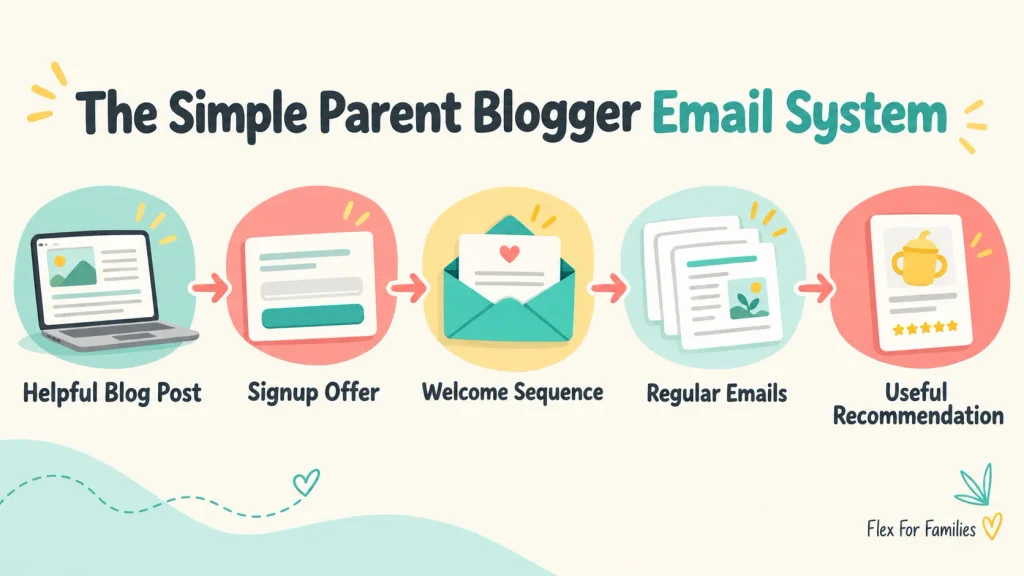
The Simple Parent Blogger Email System
A useful beginner system can follow five stages:
- Publish helpful content. Answer a question your intended reader genuinely has.
- Offer a relevant next step. Invite the reader to join a newsletter or receive a useful resource.
- Welcome the subscriber. Deliver what you promised and explain what they can expect.
- Stay in touch. Send useful emails on a schedule you can maintain.
- Recommend carefully. Share a relevant article, tool or offer when it helps the reader move forward.
The sequence looks simple because it should be simple at the beginning.
You can add tags, branches and extra automations later. Those additions should solve a real problem. They should not exist because a marketing diagram made them look essential.
What Should You Offer People for Joining?
A reader needs a reason to give you their email address and permission to contact them.
That reason could be the newsletter itself. You might promise one practical blogging task every fortnight or a monthly summary of family-friendly side-hustle ideas.
You could also offer:
- A checklist.
- A planner.
- A worksheet.
- A short guide.
- A template.
- A resource library.
- A relevant email course.
- A content upgrade connected to the article.
The best offer is not automatically the biggest download. It is the offer that attracts the people your future emails are designed to help.
Flex For Families uses the Parent Blogging Starter Kit. It contains practical resources for parents who want to start and organise a blog around family life. That subject connects directly with the welcome emails and the website’s wider content.
An unrelated competition might collect more addresses, but many of those people may only want the prize. Subscriber count alone does not show whether the right people joined.
Make the Signup Promise Clear
Tell the reader:
- What they will receive.
- Who it is designed to help.
- What sort of future emails you will send.
- Who is sending them.
- How they can unsubscribe.
Do not describe the signup as a one-off download if you intend to add the person to ongoing marketing without clearly explaining that arrangement.
What Should Parent Bloggers Send Their Subscribers?
You do not need to invent a completely new subject every time you email your list. Your blog already contains questions, lessons, examples and useful next steps.
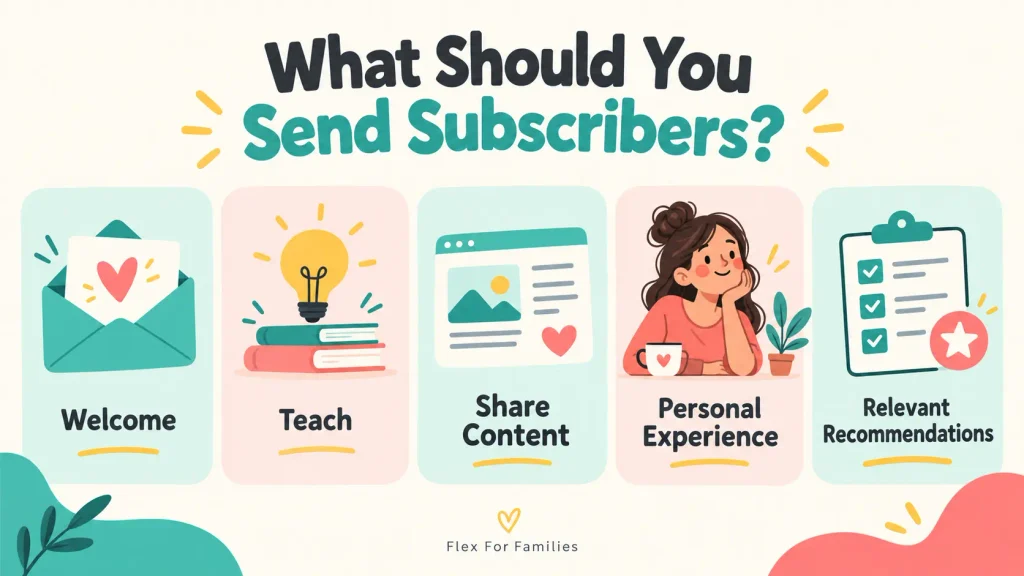
Most emails can fit into five practical categories.
Welcome Emails
A welcome email confirms that the subscription worked. It should deliver anything you promised, introduce your approach and give the reader one sensible next action.
Avoid overwhelming a new subscriber with ten links. Help them receive the resource or understand the next step first.
Educational Emails
Teach one focused idea. A useful educational email could explain:
- How to choose one blog topic.
- Why early traffic is inconsistent.
- How to evaluate a side hustle.
- What to check before buying a blogging tool.
- How to improve one existing article.
The email does not need to contain an entire 3,000-word guide. Explain enough to be useful, then link to deeper information where appropriate.
Blog-Content Emails
You can introduce a new or existing article, but give the reader a reason to care.
“I published a new post” focuses on the blogger. “If you only have three hours this week, this comparison will help you choose where to spend them” focuses on the reader.
Personal Experience Emails
Your experience can help readers understand a decision, mistake or realistic timeline.
The lesson matters more than a long diary entry. Explain what happened, what you learned and how the reader can apply it.
For example, I can explain why I returned to a simpler WordPress setup after spending too much time styling posts with a page builder. That experience supports a useful decision for a time-poor blogger.
Recommendation Emails
A recommendation should answer a relevant need. Explain:
- What the product is.
- Who it may suit.
- Who should avoid it.
- What it costs.
- Whether you have used it.
- Whether the link is an affiliate link.
Useful context makes the recommendation stronger than artificial urgency.
Do You Need a Welcome Sequence?
A welcome sequence helps introduce new subscribers to your work in a planned order. You do not need a long sequence before you can start.
Use this progression:
| Stage | Sensible Setup |
|---|---|
| Starting | One strong welcome email |
| Developing | A three-email introduction |
| Established | A five to seven-email sequence |
| Advanced | Relevant branches based on genuine interests or actions |
One working welcome email is more valuable than ten draft emails trapped inside an inactive automation.
My Flex For Families sequence contains seven stages. It moves from mindset and choosing a realistic direction through to blogging, traffic and monetisation. A Wealthy Affiliate recommendation appears later in the journey where it is relevant. The early emails focus on helping the reader understand their options.
That sequence developed from the website’s audience and content. A new blogger could begin with:
- Deliver the promised resource and welcome the reader.
- Help them solve one immediate problem.
- Share the next useful guide and invite a reply.
Test the complete sequence with a fresh email address. A saved sequence will not help anybody if the form, confirmation or automation is not connected correctly.
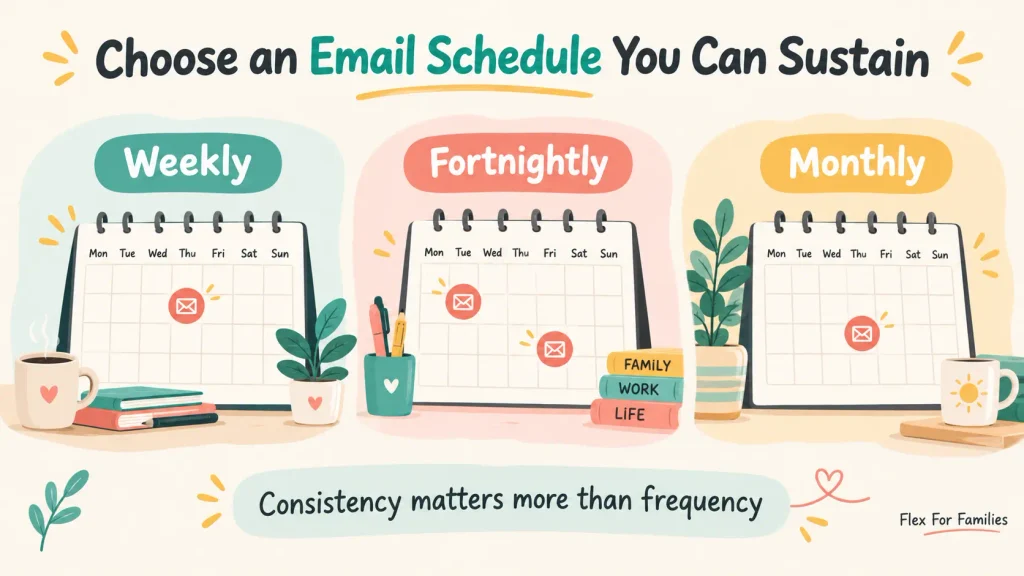
How Often Should Parent Bloggers Send Emails?
There is no single schedule that suits every blogger.
Choose a frequency you can maintain without resenting the list or sending weak emails to meet a deadline.
| Schedule | Potential Fit | Main Risk |
|---|---|---|
| Weekly | A blogger with a reliable writing routine | It can become another weekly pressure |
| Fortnightly | A busy parent who wants a consistent rhythm | Fewer opportunities to learn what resonates |
| Monthly | An early-stage or seasonal newsletter | Readers may struggle to remember the signup |
| Irregular | Important occasional updates | Expectations become unclear |
Tell subscribers what to expect. If you promise a weekly email, make sure that commitment fits your real week.
Missing one email does not require an apology essay. Resume with something useful. If the original schedule is consistently unrealistic, change the expectation rather than forcing rushed messages.
A Realistic Weekly Email Workflow
A straightforward email can take 30 to 60 minutes once the basic system is working.
1. Choose One Reader Problem
Use a question from a comment, search query, reply or existing content cluster. Keep the scope small enough for one email.
2. Give One Useful Answer
Explain the central point directly. Add a short example or personal observation if it helps.
3. Choose One Main Link
Link to the most relevant article, resource or recommendation. You can include necessary footer links, but the email should still have one clear direction.
4. Add One Next Step
Ask the reader to read, reply, try an exercise or compare an option. Do not stack several competing calls to action.
5. Test the Email
Send a test to yourself. Check:
- Subject line.
- Sender name.
- Links.
- Mobile formatting.
- Images and alternative text.
- Affiliate disclosure where needed.
- Unsubscribe link.
6. Schedule or Send
Choose a sensible time, but do not spend hours searching for a universal perfect sending time. Your own audience data will become more useful as the list grows.
7. Review Useful Signals
Check clicks, replies, unsubscribes and conversions. Avoid making major decisions from one small send.
How Can Bloggers Make Money Through Email?
Bloggers can earn money through email by connecting subscribers with relevant offers. Common routes include:
- Affiliate products and services.
- Digital downloads.
- Courses or memberships.
- Coaching or freelance services.
- Sponsored email placements.
- Product launches.
- Links to useful monetised articles.
Email does not create income simply because a list exists. Results depend on audience fit, trust, the offer, timing, traffic and the subscriber’s reason for joining.
If somebody downloads a beginner blogging planner, a carefully explained blogging platform may be relevant. An unrelated expensive product is unlikely to become helpful because it pays a higher commission.
Help Before You Promote
There is no fixed number of helpful emails you must send before making a recommendation. The important question is whether the promotion fits the promise and solves a genuine problem.
You can mention a relevant tool in the first email if the resource requires it. You can also send several educational emails before introducing a broader offer. Be transparent and give readers enough information to decide.
How Large Does Your Email List Need to Be?
There is no subscriber number that guarantees traffic or income.
A smaller relevant list can generate useful replies and sales. A large disengaged list may produce little activity and create higher software costs.
Percentages also become unstable when the sample is small:
- Two clicks from 20 delivered emails equal a 10% click rate.
- Twenty clicks from 1,000 delivered emails equal a 2% click rate.
The first percentage is higher, but the second send generated ten times as many clicks. Neither figure shows whether the clicks led to a useful result.
When your list is small, focus first on whether:
- The form receives relevant visits.
- Subscribers can confirm successfully.
- The promised resource arrives.
- The welcome email sends once.
- Links work.
- Replies reach an inbox you monitor.
- Unsubscribes are honoured.
Which Email Marketing Metrics Matter?
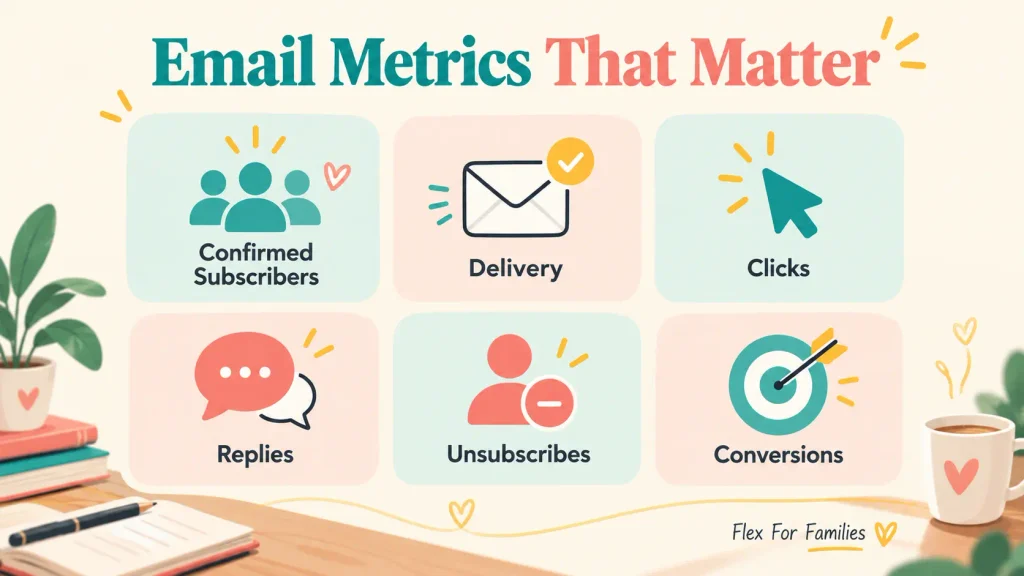
Use a small group of metrics connected to decisions.
Confirmed Subscribers
Track people who completed the required subscription process, rather than counting every incomplete form submission as an active reader.
Delivery and Bounces
Check whether emails reach receiving servers and whether addresses fail. Delivery does not prove inbox placement, but repeated failures need attention.
Clicks
Clicks show that someone followed a link. Look at which subject and destination attracted the action, while remembering that privacy and security systems can sometimes inspect links automatically.
Replies
Replies can reveal questions, objections and reader language that a percentage cannot provide.
Unsubscribes and Complaints
An unsubscribe is a normal subscriber choice. Spam complaints are more concerning and may indicate unclear permission, unexpected content or excessive sending.
Conversions
A conversion should match the email’s goal. It might be a download, completed signup, product purchase or another meaningful action.
Treat Open Rates Carefully
Privacy features and automatic image loading can make open data unreliable. Use it as a directional signal, not proof that a person read or valued the email.
Email Deliverability Basics
Deliverability is the ability to get legitimate email accepted and placed where subscribers can see it.
Start with these practices:
- Use a recognisable sender name.
- Send from an address on your own domain.
- Authenticate the sending domain as instructed by your provider.
- Keep SPF, DKIM and DMARC correctly configured where required.
- Never buy an email list.
- Send what subscribers expected.
- Make unsubscribing easy.
- Remove invalid addresses and respect suppression lists.
- Avoid misleading subject lines.
- Monitor complaints and delivery errors.
Google’s email sender guidelines require authentication for mail sent to personal Gmail accounts. Senders reaching around 5,000 messages to Gmail accounts in one day face additional requirements, including DMARC and one-click unsubscribe for marketing and subscribed messages.
Yahoo’s sender guidance also recommends authentication, relevant permission-based email and a visible unsubscribe route.
Your email provider should handle parts of the infrastructure, but you still need to configure your domain and follow its current instructions. Do not assume that verifying the visible From address completes domain authentication.
Consent, Privacy and UK Email Rules
Email marketing involves personal information and direct-marketing rules. This section provides general information, not legal advice.
For UK-facing bloggers, the Privacy and Electronic Communications Regulations and UK GDPR are important. The Information Commissioner’s Office explains that organisations normally need consent before sending unsolicited marketing emails to individual subscribers, unless a valid exception applies.
Where you rely on consent, it should be freely given, specific, informed and unambiguous. It should involve a clear positive action.
Practical steps include:
- Explain who is collecting the address.
- Explain the type of emails the person will receive.
- Do not use pre-ticked consent boxes.
- Keep a record of how and when consent was obtained.
- Link to an accessible privacy notice.
- Identify yourself in the emails.
- Provide a working unsubscribe option.
- Honour withdrawals promptly.
- Do not add commenters, contacts or unrelated downloaders without permission.
Read the ICO guidance on electronic mail marketing and obtain professional advice if you are uncertain about your situation.
Which Email Marketing Platform Do Bloggers Need?
An email platform should make the basic subscriber journey reliable without adding unnecessary work.
Popular blogging options include:
- Kit: Creator-focused forms, landing pages, broadcasts, sequences, tags and visual automations.
- MailerLite: Email campaigns, automation, forms and landing pages with a beginner-friendly approach.
- GetResponse: Email marketing combined with automation, landing pages, webinars and wider marketing tools.
- AWeber: An established email platform with newsletters, automation and signup tools.
- Systeme.io: Email features inside a broader funnel, course and online-business platform.
I currently use Kit. It suits the way the Starter Kit, welcome sequence and content journey connect. Kit’s current free Newsletter Plan advertises support for up to 10,000 subscribers, unlimited forms, landing pages and email sends. Check the current Kit plan details before choosing it because features and limits can change.
The platform with the longest feature list is not automatically the best choice. Consider:
- Current subscriber count.
- Expected growth.
- Automation needs.
- Ease of use.
- Form and landing-page options.
- Integrations.
- Support.
- Pricing at your likely future list size.
Switching later takes work, but paying for advanced functions you do not use also has a cost.
Common Email Marketing Mistakes
Building Too Much Before Testing the Basics
A complicated funnel can hide a broken form or inactive sequence. Test one complete subscriber journey first.
Attracting the Wrong Subscribers
An unrelated freebie may increase signups without building the audience your blog is meant to serve.
Collecting Addresses and Never Emailing
Subscribers may forget the signup if months pass before the first newsletter. Set a sustainable expectation and begin using the list.
Sending Every Article Without Context
Explain why the article matters and what problem it helps solve. A title and link alone provide little reason to click.
Promoting Too Often
Repeated offers without useful context can damage trust and increase complaints.
Hiding the Unsubscribe Link
Making it difficult to leave is poor practice and can encourage people to mark your message as spam.
Creating Too Many Lists and Tags
Organisation should make the system clearer. Do not build complex segments before you have a practical reason to treat subscribers differently.
Overreacting to Small Samples
One click or unsubscribe can change a small list’s percentages sharply. Check that the system works, then watch for repeated patterns.
Treating Open Rate as the Whole Story
Opens do not show whether somebody followed the advice, clicked, replied or bought anything.
Promising an Unrealistic Schedule
A schedule should fit your available time. Consistency matters, but family circumstances can change.
Is Email Marketing Suitable for Busy Parent Bloggers?
Email marketing can suit a busy parent because one useful message can reconnect readers with work you have already created.
It is a good fit if you:
- Understand the audience you want to help.
- Can make a clear signup promise.
- Want to build a longer-term reader relationship.
- Can maintain a modest email schedule.
- Will test the complete journey.
- Will respect subscriber choices.
It is a poor fit if you:
- Plan to buy addresses.
- Only want to send promotions.
- Cannot explain what subscribers will receive.
- Keep adding automation instead of publishing useful content.
- Are unwilling to maintain consent, privacy and unsubscribe processes.
The system should support your available time. It should not pressure you to write every evening.
My Email Marketing Setup on Flex For Families
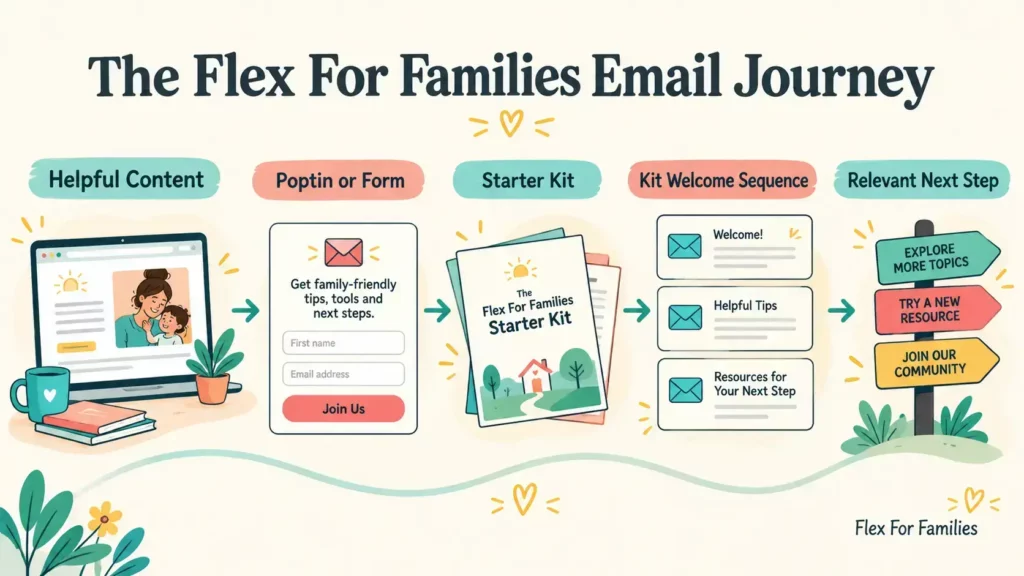
My current journey works like this:
- A reader finds helpful content on Flex For Families.
- Poptin or a form introduces the Parent Blogging Starter Kit.
- The reader submits and confirms their details through the configured journey.
- Kit delivers the resource.
- The subscriber enters a seven-part welcome sequence.
- The emails move from mindset and direction towards practical blogging and monetisation.
- Relevant guides and resources provide the next steps.
I use Poptin for the popup layer and Kit for subscriber management and email delivery. My wider Poptin data has shown that the campaigns function and send people into the system, but the traffic is still too limited for strong conversion conclusions.
That matters because a working funnel and a proven high-performing funnel are different things.
My current priority is to make the journey useful, keep the promises accurate and improve it as genuine data becomes available. I would rather run a straightforward system I understand than create numerous branches that receive too little traffic to evaluate.
A Simple 30-Day Email Marketing Plan
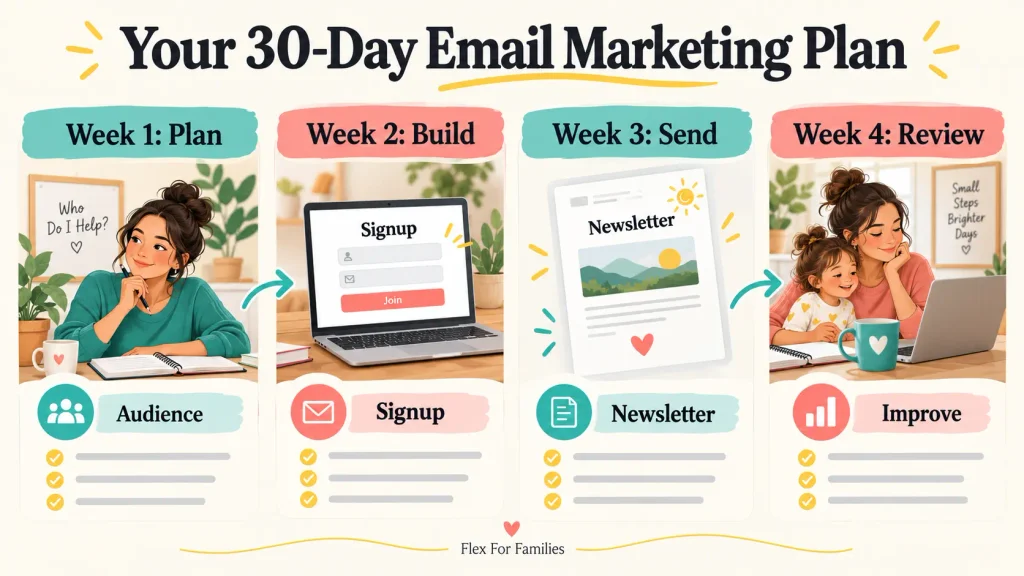
Week 1: Plan
- Define the reader you want to help.
- Write one clear email promise.
- Choose a newsletter or relevant resource.
- Select an email platform.
- Set up a recognisable sender identity.
Week 2: Build
- Create one signup form.
- Add clear consent and privacy information.
- Configure confirmation where appropriate.
- Write one welcome email.
- Connect the form to the welcome journey.
- Test it with a fresh address.
Week 3: Send
- Add the form to one relevant article.
- Write the first regular email.
- Give it one main purpose and link.
- Send a test to yourself.
- Check the mobile version.
- Send or schedule it.
Week 4: Review
- Check form visits and confirmed signups.
- Review delivery, clicks, replies and unsubscribes.
- Fix any broken stage.
- Plan the next two emails.
- Avoid rebuilding the system from one small set of results.
At the end of 30 days, success means one reader can understand the offer, subscribe, receive what was promised and hear from you again. It does not require a large list or immediate income.
Final Verdict: Is Email Marketing Worth It for Parent Bloggers?
Email marketing is worth building if you want to continue helping readers after they leave your website. It can support returning traffic, reader research and relevant income opportunities.
It only remains useful when the system matches your capacity.
Start with:
- One clear audience.
- One relevant signup promise.
- One working welcome journey.
- One sustainable email schedule.
- One useful purpose for each message.
You can add more automation when your audience and data provide a reason.
If you are still choosing what type of blog or flexible-income route fits your family, download the free Flex For Families Parent Blogging Starter Kit. It will help you organise the first steps without expecting you to build everything at once.
Frequently Asked Questions
Is Email Marketing Worth It for Bloggers?
Yes, email marketing can be worthwhile because it gives interested readers a permission-based way to hear from you again. It can support returning traffic, reader relationships and relevant offers. It still requires a clear signup promise, useful emails and a sustainable routine. Building a list alone does not guarantee traffic or income.
How Do Bloggers Start Email Marketing?
Choose an email platform, define what subscribers will receive and create one clear signup form. Connect that form to a confirmation process and welcome email, then test the full journey with a fresh address. Begin with one working system before adding extra automations, tags or lead magnets.
What Should Bloggers Send Their Email Subscribers?
Bloggers can send welcome messages, focused lessons, relevant articles, personal experiences and carefully explained recommendations. Each email should have one main purpose and match the promise made at signup. Avoid sending links without context or turning every message into a promotion.
How Often Should a Blogger Send Emails?
A blogger should choose a schedule they can maintain. Weekly, fortnightly and monthly emails can all work when subscribers know what to expect. Busy parent bloggers may find a fortnightly schedule more manageable than forcing a weekly message. Consistent usefulness matters more than copying another creator’s frequency.
Can Bloggers Make Money Through Email Marketing?
Bloggers can earn through affiliate recommendations, products, courses, services, sponsorships and links to monetised content. Income is not automatic. Results depend on the audience, offer, trust, relevance and traffic. Promotions should fit the reason people subscribed and include appropriate disclosures.
What Is the Best Email Marketing Platform for Beginner Bloggers?
The best platform is one that makes forms, welcome emails, broadcasts and unsubscribes easy to manage at a sustainable price. Kit, MailerLite, AWeber, GetResponse and Systeme.io are possible options. I use Kit for Flex For Families, but beginners should compare current features and pricing against their actual needs.
Let’s Chat
Have you started an email list for your blog? Which part feels hardest to manage around family life: attracting subscribers, writing the welcome emails or deciding what to send regularly?
Share your experience in the comments, but please leave out subscriber details or private account information.