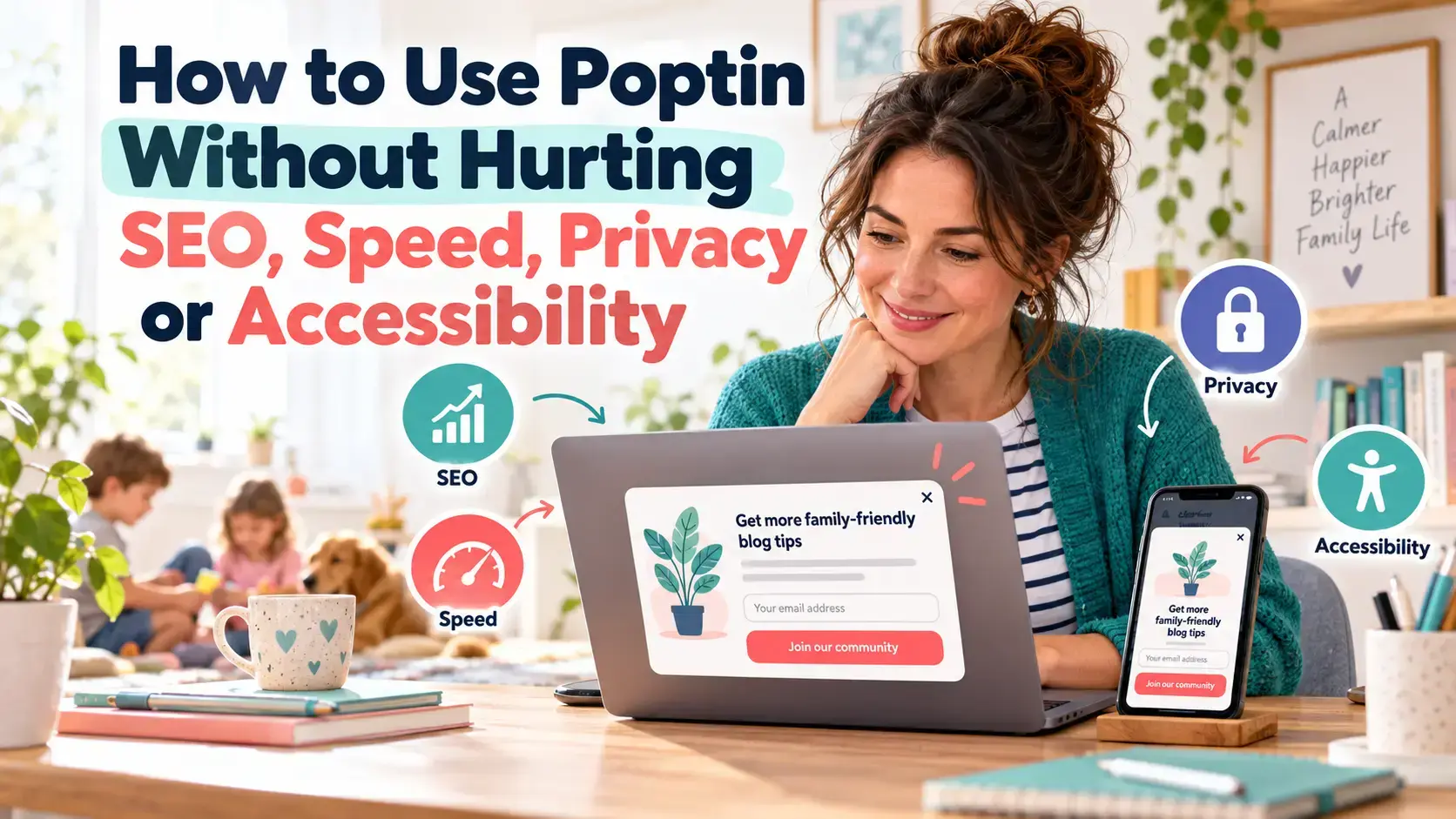
Popups can help you grow an email list. They can also frustrate readers, cover important content and add another script to your website.
That does not mean you need to avoid them completely.
I use Poptin on Flex For Families to introduce my free Parent Blogging Starter Kit. The popup collects the subscriber’s details, then Kit delivers the resource and begins the welcome sequence.
The important part is how the popup is configured. A useful offer shown at a sensible point can support the reader. A large popup that immediately blocks the article can have the opposite effect.
This guide explains how to use Poptin while protecting your search visibility, website speed, readers’ privacy and accessibility.
Transparency note: I use Poptin on Flex For Families and I am a Poptin affiliate. If you join through one of my affiliate links, I may earn a commission at no extra cost to you. My advice is based on my own use of Poptin and the results available to me. This article provides general information and is not legal advice.
Quick Answer: Can You Use Poptin Without Damaging Your Website?
Yes. Poptin does not automatically damage your SEO, speed, privacy or accessibility. Problems usually come from intrusive designs, aggressive display rules, unclear consent or a lack of testing.
A responsible setup should:
- Let visitors access the page content
- Use a relevant offer
- Wait for a useful sign of engagement
- Work properly on mobile
- Make the close option easy to find
- Explain what happens after someone subscribes
- Collect only the information you need
- Work with a keyboard and assistive technology
- Avoid adding unnecessary weight to the page
- Limit how often the same visitor sees the campaign
You do not need the most aggressive popup to build an email list. You need an offer that helps the right reader at the right time.
The Four Areas You Need to Protect
| Area | Main Risk | Practical Response |
|---|---|---|
| SEO | The popup obscures the main content | Avoid immediate, full-screen interruptions |
| Speed | Extra scripts, images and animations add work | Keep the design lightweight and test it |
| Privacy | The visitor does not understand what they agreed to | Use clear wording, appropriate consent and a privacy link |
| Accessibility | The popup cannot be operated by every visitor | Test the keyboard, focus, contrast, labels and close controls |
These areas overlap. A popup that is hard to close on a phone creates a poor experience. It may also reduce engagement, make the page less accessible and weaken the value you hoped to gain from the campaign.

Do Poptin Popups Hurt SEO?
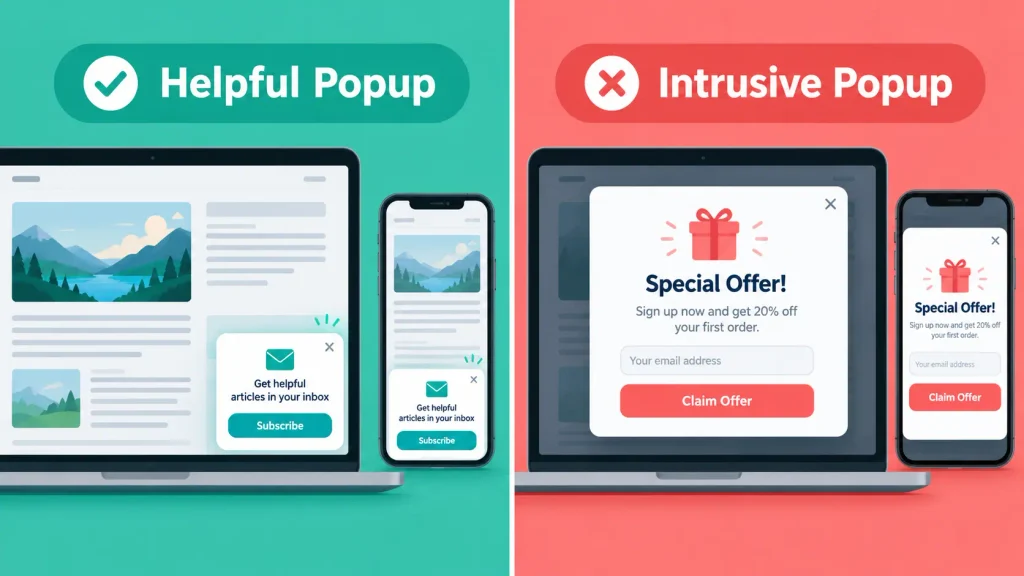
Poptin popups do not automatically hurt SEO. Google’s concern is with intrusive interstitials and dialogs that obstruct the content or make it harder for search engines and visitors to understand the page.
Google’s guidance on intrusive interstitials states that intrusive dialogs can lead to poor search performance. Google recommends designs that let people access the content without being interrupted.
Google also asks whether pages avoid intrusive interstitials within its wider page experience guidance.
The risk increases when a popup:
- Covers most or all of the page immediately
- Appears as soon as someone arrives from a search result
- Hides the main article before the reader can access it
- Has a close button that is difficult to see or tap
- Reappears after the visitor has dismissed it
- Creates a particularly poor experience on mobile
- Looks like a forced advert rather than a relevant offer
The simple answer is that implementation matters more than the name of the popup tool.
Avoid Intrusive Interstitials
An interstitial covers much or all of the page. A dialog or popup may cover a smaller part of it. Either can become intrusive if the reader cannot easily access what they came to see.
For an ordinary blog post, avoid displaying a full-screen email offer the moment the page loads. The reader has not had time to decide whether your content is useful.
A better approach is to use a meaningful trigger, such as:
- Reaching a set scroll percentage
- Spending a reasonable amount of time on the page
- Moving to leave the page on desktop
- Clicking a button to request the resource
Legal notices, such as suitable cookie controls or age checks, can serve a different purpose. They should still be clear, proportionate and easy to use.
How I Currently Use Poptin on Flex For Families
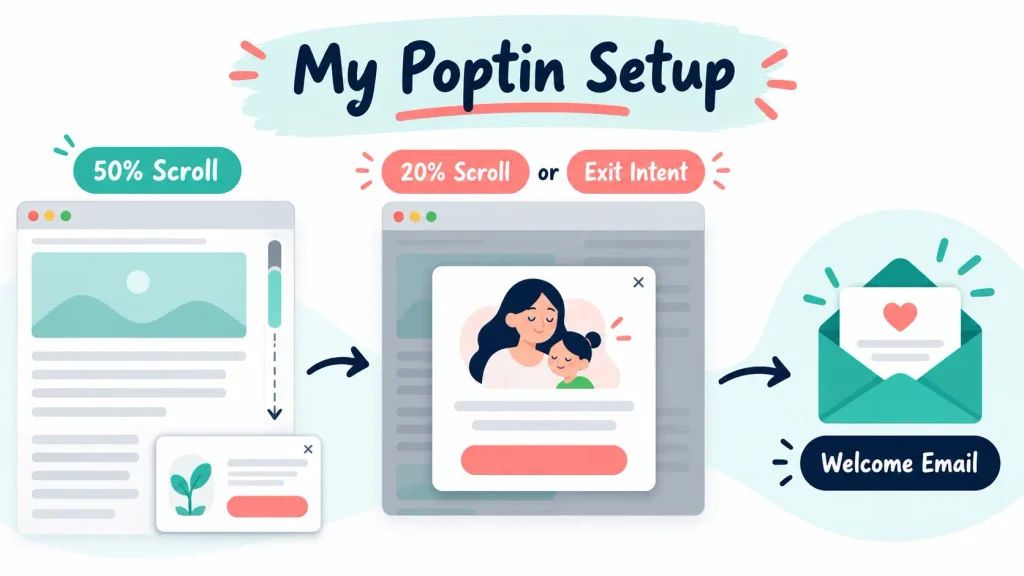
I use two Poptin campaigns with different levels of interruption.
The bottom-corner popup appears after a visitor scrolls through 50% of the page. It provides a smaller prompt after the reader has engaged with the content.
The main popup uses exit intent and a 20% scroll trigger. It introduces the Parent Blogging Starter Kit. When someone subscribes, Poptin sends the subscriber into Kit. Kit then delivers the first email and starts the welcome sequence.
My last recorded 30-day snapshot showed:
- 744 website visitors
- 237 popup views
- 2 conversions
- A 0.84% conversion rate
This tells me the funnel functions. It does not prove that these are the perfect triggers or that another website will get the same result.
Two conversions are too small a sample for a strong conclusion. I need more traffic and more conversions before treating a variation as a winner.
That is an important distinction. You can use your early data to spot technical problems, but you should not turn a tiny sample into a confident conversion claim.
Choose a Less Intrusive Trigger
Poptin offers several trigger and targeting options. The right choice depends on the page, offer and visitor.
| Trigger | Interruption Level | Best Use |
|---|---|---|
| Immediate page load | High | Usually avoid for normal blog content |
| Time delay | Medium | When the delay reflects likely engagement |
| Scroll percentage | Low to medium | Relevant resources within longer articles |
| Exit intent | Lower on desktop | A final relevant offer before someone leaves |
| Corner slide-in | Low | A subtle reminder after engagement |
| Click trigger | Very low | When the reader actively requests the popup |
Exit intent works differently on mobile. Poptin explains that mobile exit intent may react when a visitor uses the browser’s back control. Poptin also notes that mobile browser behaviour can make this less reliable and suggests time or scroll triggers as alternatives.
Do not assume a desktop rule will create the same experience on a phone.
Use Frequency and Audience Controls
A sensible trigger does not help if the popup appears on every page.
Poptin’s display-frequency controls can distinguish between new and returning visitors. You can also choose options such as once per day, once per session, once every few days or once every few visits.
Poptin states that someone who converts will not see the same popup again unless you enable the option to show it to converted visitors.
For a typical lead magnet, I would usually avoid showing the same signup campaign to someone who has already subscribed.
You should also consider:
- Limiting how often a visitor sees the campaign
- Excluding your thank-you page
- Excluding pages where the popup interrupts a task
- Targeting only articles relevant to the offer
- Avoiding repeated prompts during one session
- Suppressing the campaign for existing subscribers where possible
Poptin allows campaigns to target or exclude specific URLs. Its page-targeting guide explains the available URL rules.
This is usually more useful than showing one generic popup across the entire website.
Can Poptin Slow Down Your Website?
Poptin adds a third-party script, so it can contribute to the work a browser must do. That does not mean it will create a serious speed problem on every website.
The effect depends on:
- Your popup design
- Image file sizes
- Animations and effects
- The number of active campaigns
- Other scripts already running
- Your WordPress theme and plugins
- Your hosting
- The visitor’s device and connection
Google’s guidance on third-party JavaScript explains that third-party scripts can delay page loading and interaction. Your aim should be to keep each marketing tool useful enough to justify its cost.
How to Reduce Poptin’s Effect on Website Speed
Start with a simple design.
You rarely need a large background image, several fonts, video and multiple animations to explain a lead magnet. A clear headline, short description, simple image and one button can do the job.
Use these practical checks:
- Compress images before uploading them
- Use an appropriate image format and dimensions
- Avoid video backgrounds and large animated files
- Limit decorative effects
- Remove campaigns you no longer use
- Avoid running several overlapping campaigns
- Test the live page on mobile data as well as Wi-Fi
- Compare performance with the popup enabled and disabled
If a lighter version delivers a similar conversion rate, keep the lighter version.

Which Core Web Vitals Could Be Affected?
Core Web Vitals measure parts of the real visitor experience.
Largest Contentful Paint
Largest Contentful Paint, or LCP, looks at how quickly the main visible content loads. A heavy popup image or extra script can compete for resources during the initial load.
Delay promotional elements where appropriate and keep their media lightweight.
Interaction to Next Paint
Interaction to Next Paint, or INP, looks at how responsive the page feels after a visitor interacts with it. Complex scripts and animations can create more work for the browser.
Test whether the visitor can open, complete and close the popup without lag.
Cumulative Layout Shift
Cumulative Layout Shift, or CLS, measures unexpected movement on the page. Late-loading content can cause a visible shift.
A popup overlay should sit above the page. It should not push the article, navigation or buttons into a different position when it loads.
How to Test Poptin’s Effect on Speed
Use a combination of automated and manual checks.
PageSpeed Insights
PageSpeed Insights gives you laboratory test results and, where available, real-user data. Test a representative page before and after enabling a campaign.
One test is not enough. Results can vary between runs, so repeat the test and look for a pattern.
Google Search Console
The Core Web Vitals report can show wider issues based on real visits. A smaller website may not have enough field data for every individual URL, so a missing result does not prove that everything is perfect.
Chrome DevTools
Chrome’s developer tools can help you inspect loading, layout shifts and script activity. You do not need to become a developer to make basic comparisons between the campaign being active and inactive.
Manual Testing
Open the page in a private browser window. Test it on a phone and computer.
Check:
- How quickly the article becomes usable
- When the popup appears
- Whether the page jumps
- Whether you can close the popup easily
- Whether the form submits correctly
- Whether the popup returns too soon
Design Poptin Separately for Mobile Visitors
A popup that looks modest on a laptop can cover most of a phone screen.
Check the actual mobile design rather than relying only on the desktop editor.
Your mobile popup should have:
- Short copy
- Readable text
- A clear close control
- Large enough buttons and form fields
- Space between interactive elements
- As few form fields as possible
- No text or button hidden behind the mobile keyboard
Test portrait and landscape views where relevant. Increase the browser’s text size or zoom level and check that the popup remains usable.
Avoid displaying a large promotional popup as soon as a visitor arrives from Google. Let them see the content they selected first.
Are Poptin Popups GDPR Compliant?
Poptin provides tools that can support a privacy-conscious setup. It does not make your entire website automatically compliant.
Poptin provides a consent checkbox option and guidance for creating a cookie-consent popup. You still need to decide what data you collect, why you collect it and how each connected service uses it.
For a UK website, you should consider the UK GDPR and the Privacy and Electronic Communications Regulations. The Information Commissioner’s Office guidance explains that valid consent for email marketing needs to cover the specific method of communication.
Your circumstances may require professional advice. Treat this section as a practical starting point, not legal advice.
Cookie Consent and Email Consent Are Different
Accepting website cookies does not automatically mean someone has agreed to receive marketing emails.
These actions serve different purposes:
- Cookie consent may cover storing or accessing information on the visitor’s device.
- Email consent may cover sending marketing messages to the subscriber.
- A privacy notice explains how you collect and use personal information.
Do not hide important marketing wording inside a privacy policy. The ICO says an opt-out hidden within a privacy policy is not a simple way for someone to refuse email marketing.
Your signup form should make clear:
- What the person will receive
- Who will send it
- How their information will be used
- That they can unsubscribe
- Where they can read your privacy notice
Avoid pre-ticked marketing boxes. Give people a genuine choice.
If your popup uses non-essential cookies or tracking, make sure your cookie controls account for them where required. The ICO’s cookies and similar technologies guidance explains that consent information needs to be clear and accessible.
Only Collect the Information You Need
Each additional form field adds friction and creates more personal data to manage.
For a lead magnet, an email address may be enough. You might also collect a first name if you genuinely use it to personalise emails.
Avoid asking for a phone number, address or other information without a clear purpose.
The simplest question is:
Do I need this information to deliver what I have promised?
If the answer is no, consider removing the field.
Check the Complete Poptin and Kit Journey
Do not stop testing when the Poptin success message appears. That only confirms one part of the process.
Use a fresh email address and test:
- The Poptin form appears under the right conditions.
- The form accepts and submits the details.
- The subscriber reaches the correct Kit form or tag.
- Kit sends the first email in the sequence.
- The lead magnet link works.
- The privacy information is available.
- The unsubscribe link works.
- The popup does not continue appearing after conversion.
This follows the same process I use for the Parent Blogging Starter Kit. Poptin handles the initial capture. Kit handles the email delivery and sequence.
If you need help with that connection, read How to Connect Poptin to Kit for Email List Building.
How to Make a Poptin Popup More Accessible
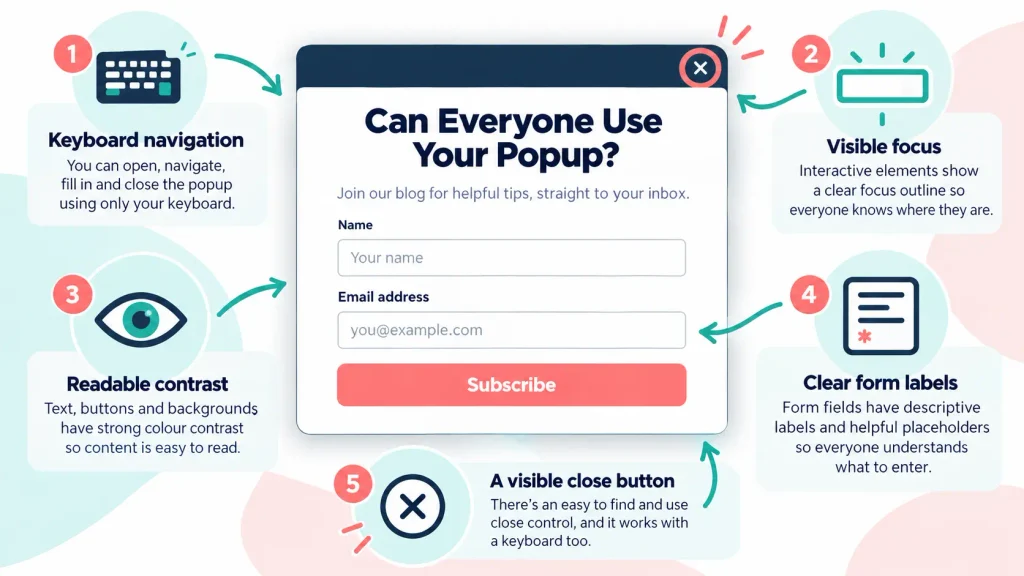
An accessible popup should let visitors understand, operate and dismiss it without relying on a mouse.
Poptin says its popups support tab navigation and can be closed with the Escape key. Its accessibility options guide covers the available settings.
Do not assume that selecting a template completes the work. Your colours, copy, field labels and other edits can change the result.
Test Keyboard Navigation
Put your mouse aside and use the keyboard.
Check that you can:
- Reach every interactive element using Tab
- See which element currently has focus
- Move through the elements in a logical order
- Submit the form
- Close the popup using the visible close control
- Close it using Escape
- Return to a sensible place on the page
The W3C modal-dialog pattern explains that focus should move into a modal when it opens and remain within it until it closes. A visible close or cancel button is strongly recommended.
Use Clear Labels and Instructions
Do not rely on placeholder text as the only label for a form field. Placeholder text can disappear when the visitor types.
Use visible labels where possible. Explain errors clearly, such as an invalid email address, instead of relying on a red outline alone.
Check Colour Contrast
Teal, coral or any other brand colour can work, but the text and button combination must remain readable.
Check:
- Body text against the background
- Button text against the button colour
- Links against surrounding text
- Form borders and error messages
- The visibility of the close control
Do not use colour as the only way to communicate an error or status.
Keep the Close Control Easy to Use
The close button should be visible, large enough to select and clearly labelled for assistive technology.
A tiny pale cross in the corner creates problems for many visitors. It is especially difficult for someone using a small touchscreen, magnification or limited hand movement.
What to Measure Beyond Conversion Rate
Conversion rate matters, but it does not tell you whether the overall experience improved.
Monitor:
- Popup views
- Form submissions
- Conversion rate
- Mobile and desktop performance
- Close or dismissal behaviour where available
- Bounce and engagement changes
- Core Web Vitals
- Form errors
- Unsubscribe rates
- Spam complaints
- Direct feedback from readers
A higher conversion rate is not automatically a better result. Aggressive wording can produce more signups from people who did not understand what they joined. Those subscribers may quickly unsubscribe or ignore every email.
Focus on informed, relevant subscribers.
Do Not Trust Tiny A/B Tests
Poptin can help you compare campaign variations, but an A/B test needs enough activity to become useful.
With 237 views and two conversions in my recorded 30-day period, splitting traffic between several versions would produce very little evidence. One extra conversion could make a variation appear far stronger than it really is.
If your traffic is limited:
- Confirm that the funnel works
- Fix obvious usability problems
- Test one meaningful change at a time
- Run the test for a reasonable period
- Avoid declaring a winner from a handful of conversions
Your first goal is a reliable setup. Optimisation comes after you have enough information.
Poptin Pre-Publish Checklist
Use this checklist before publishing a new campaign:
- The visitor can access the main content
- The offer matches the page or audience
- The trigger allows time for engagement
- The mobile design has been checked
- The close button is visible and easy to use
- Keyboard navigation works
- Escape closes the popup
- Focus remains clear and logical
- Form labels and errors make sense
- Text and buttons have readable contrast
- The signup wording explains what the reader will receive
- The privacy notice is linked
- Cookie and email consent are treated separately
- Only necessary information is collected
- The Poptin and Kit connection works
- The first email and lead magnet arrive
- Images are compressed
- The page does not shift when the popup appears
- Speed has been tested before and after activation
- Frequency rules prevent repeated interruptions
- Converted visitors are excluded where appropriate
- Analytics record the campaign correctly

Common Poptin Mistakes to Avoid
Showing a Full-Screen Popup Immediately
The visitor clicked because they wanted the page. Let them access it before presenting another decision.
Using the Same Campaign Everywhere
A blogging Starter Kit may fit a blogging guide. It may feel unrelated on a page with a different purpose. Use page targeting to keep the offer relevant.
Asking for Too Much Information
Extra fields make the form harder to complete and increase your data responsibilities.
Hiding the Close Button
Making a popup difficult to dismiss may force a few more interactions, but it damages trust and accessibility.
Ignoring Mobile Visitors
Always test the campaign on a real phone. Check the popup, keyboard, form, close control and page behind it.
Assuming the Template Is Automatically Accessible
Your edits can introduce contrast, labelling or focus problems. Test the completed campaign.
Treating Cookie Consent as Email Consent
These permissions are not interchangeable. Explain each purpose clearly.
Adding Heavy Media Without a Purpose
A large image or animation must justify its effect on loading and usability. Simple often works better.
Repeating the Popup Too Often
Respect dismissal and conversion. Use frequency settings to avoid asking the same person on every page.
Making Claims From Tiny Samples
Early figures can confirm that a campaign works. They cannot always tell you why it worked or predict long-term performance.
Is Poptin a Responsible Choice for Bloggers?
Poptin gives bloggers useful control over triggers, targeting, frequency and design. Those controls make a responsible setup possible.
They do not make every setup responsible by default.
For Flex For Families, I prefer engagement-based rules to an immediate full-screen interruption. My smaller corner popup waits until the visitor has scrolled 50%. The main campaign uses exit intent and a 20% scroll trigger.
I will continue reviewing those settings as more data becomes available. If the popup creates a poor reader experience, the answer is not always to remove Poptin. It may be to change the design, offer, trigger or frequency.
You can read my full Poptin Review 2026 for a wider look at its features, pricing, strengths and limitations.
Final Thoughts
Poptin can help you build an email list without taking control away from your readers.
Keep the offer relevant. Wait for a sensible sign of engagement. Use a lightweight design. Explain what the subscriber will receive. Test the keyboard, mobile layout and complete email journey.
Your conversion rate is one measure of success. Reader trust, usability and the quality of the subscribers you attract matter too.
If you want to start building an email list around a practical lead magnet, the Parent Blogging Starter Kit shows you the wider foundations for building a flexible blog around family life.
Frequently Asked Questions
Do Poptin Popups Hurt SEO?
Poptin popups do not automatically hurt SEO. The main risk comes from intrusive implementation, such as covering the content immediately, making the popup difficult to close or creating a poor mobile experience. Use delayed, scroll, exit-intent or click triggers where appropriate, and make sure the main page remains accessible.
Can Poptin Slow Down a WordPress Website?
Poptin adds a third-party script, so it can contribute to page loading and browser work. The effect depends on your design, images, animations, other plugins and hosting. Use a lightweight popup and compare PageSpeed Insights results with the campaign enabled and disabled. Test the live page on a phone too.
Are Poptin Popups GDPR Compliant?
Poptin provides features that can support a privacy-conscious setup, including consent fields. It cannot make your website automatically compliant. You remain responsible for your signup wording, privacy notice, lawful handling of personal data, cookie controls and connected services. Seek professional advice if you are unsure about your obligations.
How Can I Make a Poptin Popup Accessible?
Use clear form labels, readable contrast and a visible close button. Test the popup using only a keyboard. Visitors should be able to see the current focus, move through the form logically and close the popup with Escape. Also test zoom, text resizing, form errors and a screen reader where possible.
Should a Popup Appear as Soon as Someone Visits My Website?
Usually not on a normal blog article. An immediate popup interrupts the reader before they have accessed the content they selected. A scroll, time, exit-intent or click trigger can provide a less intrusive experience. The right choice depends on the page and offer, so test the complete experience on desktop and mobile.
What Is the Best Poptin Trigger for a Blog?
There is no single best trigger for every blog. Scroll triggers suit relevant resources in longer articles. Exit intent can provide a final prompt on desktop. Click triggers give the reader the most control. Start with the least intrusive option that fits your offer, then use meaningful data and reader feedback to improve it.
Let’s Chat
Do you use popups on your blog? Have they helped your email list, or do you worry that they interrupt your readers?
Share your experience in the comments. It may help another parent blogger decide how to approach their first campaign.