
Creating a lead magnet can quickly become a project of its own.
You start planning a simple checklist. Before long, it has become a 50-page ebook, a workbook, a video course and a complicated automation that still is not ready to publish.
Most parent bloggers do not need that much content.
A useful lead magnet solves one recognisable problem for the type of reader you want to keep helping. It should be easy to understand, realistic to use and connected to the emails you plan to send afterwards.
The goal is not to collect the highest possible number of email addresses. It is to attract readers who genuinely want the help your blog and future emails provide.
This guide compares 15 practical lead-magnet ideas. You will see which are easiest to create, which need more maintenance and how to choose an idea that fits your blog.
My Experience: Flex For Families uses a Parent Blogging Starter Kit containing seven practical resources. Poptin and forms introduce the offer, while Kit handles delivery and the welcome sequence. The system works, but my traffic and subscriber data are still developing. I do not treat the toolkit as proof that a larger bundle always converts better than a simple checklist.
Quick Answer: What Is the Best Lead Magnet for a Blogger?
A checklist, reusable template or one-page planner is usually the best first lead magnet for a beginner blogger. Each format can solve a focused problem without requiring weeks of production or a complicated delivery system.
The best choice depends on the reader, article and future emails. A simple resource closely connected to the content will normally attract more suitable subscribers than a large generic ebook.
What Is a Lead Magnet?
A lead magnet is a resource or benefit offered when somebody provides contact information and, where clearly requested, agrees to receive future emails.
Lead magnets can include:
- Checklists.
- Planners.
- Templates.
- Trackers.
- Short guides.
- Printables.
- Email courses.
- Quizzes.
- Calculators.
- Resource libraries.
The resource is often described as free because the reader does not pay money. The reader is still sharing personal information and making a decision about contact. That exchange should be clear and respectful.
A lead magnet has two jobs:
- Help the reader take a useful next step.
- Attract people who are likely to value your future emails.
If the resource does the first job but attracts people unrelated to your blog, the list may grow without helping your longer-term strategy.
What Makes a Good Lead Magnet?
The strongest lead magnets are normally specific, relevant and easy to use.
It Solves One Clear Problem
“Everything you need to know about parenting” is too broad. “A five-minute school-morning checklist” gives the reader a recognisable outcome.
It Matches the Reader’s Current Interest
A reader comparing family-friendly side hustles may want a scoring worksheet. They are less likely to want an unrelated social-media calendar.
It Provides Value Quickly
Parents often download resources during a short break. The main value should be obvious without reading a long introduction.
It Leads Naturally Into Future Emails
The next emails should continue the same conversation. A blog-planning checklist can lead into emails about choosing topics, creating content and building traffic.
It Is Manageable to Maintain
A timeless worksheet may need few changes. A directory containing current prices and links needs regular reviews.
It Is Accessible
Use readable text, clear instructions, descriptive links and suitable contrast. Do not rely on colour alone to communicate meaning.
The Lead Magnet Fit Filter
Use these seven questions before you create the resource.
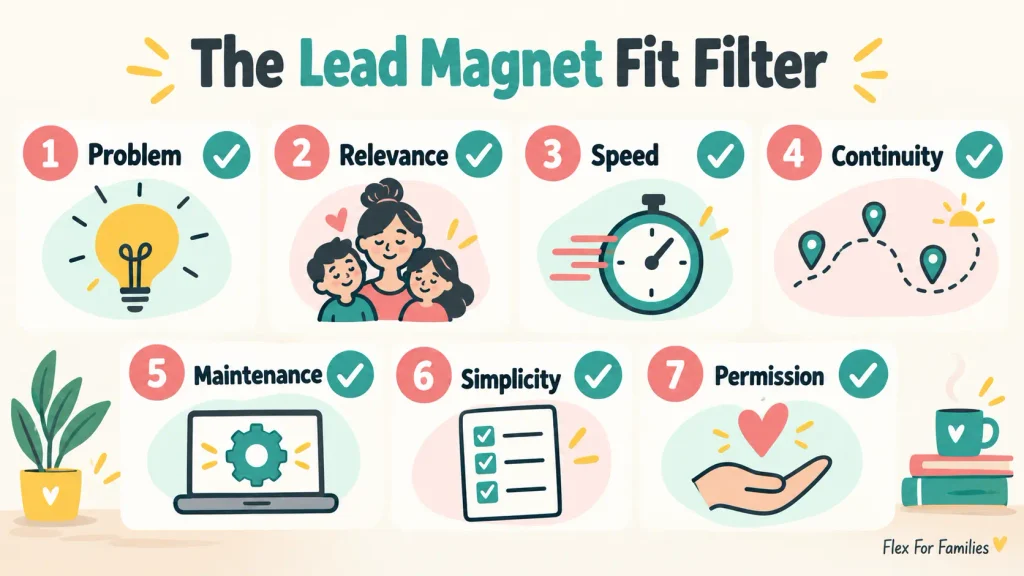
1. Problem
Does it solve one problem the reader already recognises?
2. Relevance
Does it connect directly with the article, content cluster and intended subscriber?
3. Speed
Can the reader understand and use it without a large time commitment?
4. Continuity
Can your welcome emails continue helping with the same subject?
5. Maintenance
Can you keep every link, fact and instruction accurate?
6. Simplicity
Can you create, deliver and test it with the tools and time available?
7. Permission
Does the signup explain what the person will receive and whether they are joining ongoing emails?
Give each answer a score:
- Yes: 2 points.
- Partly: 1 point.
- No: 0 points.
| Total Score | What It Suggests |
|---|---|
| 12 to 14 | Strong idea worth testing |
| 8 to 11 | Promising, but simplify or clarify it |
| 4 to 7 | Weak connection or too much work |
| 0 to 3 | Choose a more relevant idea |
This is a planning tool, not a conversion formula. A high score does not guarantee signups. It helps you identify avoidable weaknesses before investing more time.
15 Lead Magnet Ideas at a Glance
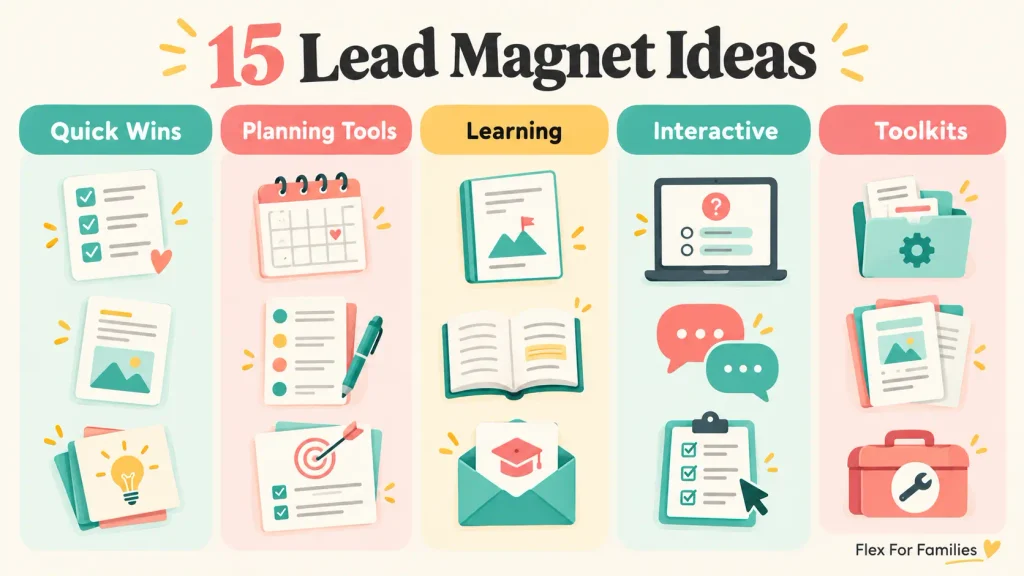
| Lead Magnet | Creation Effort | Reader Effort | Maintenance | Best Use |
|---|---|---|---|---|
| Checklist | Low | Low | Low | Processes and quick wins |
| Cheat Sheet | Low | Low | Low | Reference information |
| One-Page Planner | Low | Low | Low | Organisation and routines |
| Template | Low to Medium | Low | Low | Repeated writing or planning tasks |
| Tracker | Medium | Low | Medium | Progress, money or habits |
| Content Upgrade | Low | Low | Medium | One specific article |
| Resource List | Low | Low | Medium to High | Tools and trusted sources |
| Mini Guide | Medium | Medium | Medium | Focused beginner subjects |
| Email Course | Medium | Medium | Medium | Multi-step learning |
| Short Challenge | Medium | Medium | Medium | Guided action |
| Quiz | High | Low | Medium | Choosing an option |
| Printable Pack | Medium to High | Medium | Medium | Activities and family resources |
| Spreadsheet or Calculator | Medium to High | Medium | Medium | Budgets and comparisons |
| Sample or Preview | Low | Low | Low | Paid resources and courses |
| Starter Toolkit | High | Medium | High | A broader cornerstone journey |
These effort levels are relative. A checklist with original research may take longer than a short template based on a system you already use.
1. A One-Page Checklist
A checklist turns a process into a series of actions the reader can follow or verify.
Examples include:
- Blog Post Publishing Checklist.
- School Morning Checklist.
- Family Holiday Packing Checklist.
- Side-Hustle Suitability Checklist.
Checklists work because they reduce the mental effort needed to remember every step. They are especially useful after a tutorial or process article.
The resource still needs to add value. Copying the article headings onto a page may not give the reader enough reason to download it. Add a sensible order, checkboxes, brief reminders or a decision that makes the process easier.
Best feature: Fast to understand and reuse.
Main limitation: It can feel thin if it does not improve the process.
2. A Cheat Sheet
A cheat sheet collects information the reader may need to reference repeatedly.
Examples include:
- Common WordPress Terms.
- Affiliate Disclosure Reminders.
- Family Meal Substitutions.
- Toddler Activity Supplies.
Keep the information concise. Use categories, short explanations and clear labels rather than reducing the font size to fit more onto one page.
Best feature: Useful information in a quick-reference format.
Main limitation: Facts, rules and platform details can become outdated.
3. A One-Page Planner
A planner helps the reader decide what to do and when.
Examples include:
- Weekly Blogging Planner.
- School-Holiday Work Planner.
- Family Meal Planner.
- Monthly Content Planner.
Leave enough space for somebody to use it. A visually impressive planner with tiny writing areas is less practical than a simple page with clear sections.
Parent-focused planners should also allow disruption. Children become unwell, school dates change and work becomes busy. Include a priority box, a carry-forward area or space for a smaller backup plan.
Best feature: Turns information into an organised next step.
Main limitation: A rigid layout may not fit different family routines.
4. A Reusable Template
A template gives the reader a structure they can adapt.
Examples include:
- Blog Post Outline.
- Newsletter Template.
- Product Review Framework.
- Family Routine Builder.
- Household Budget Layout.
Templates reduce the blank-page problem. Add brief instructions and one completed example so the reader understands which sections to change.
Do not imply that following the template guarantees a search ranking, conversion rate or income result.
Best feature: Saves time on a repeated task.
Main limitation: It needs enough guidance to avoid becoming an empty document.
5. A Tracker
A tracker helps readers record progress or activity over time.
Examples include:
- Blogging Income Tracker.
- Affiliate Link Tracker.
- Family Savings Tracker.
- Publishing Consistency Tracker.
- Household Habit Tracker.
Ask only for information that supports the purpose. A parenting tracker should not collect sensitive details about a child unless there is a clear, safe and necessary reason.
Explain how the reader can use the completed information. Recording figures without a review step may create data without a decision.
Best feature: Encourages repeated use and reflection.
Main limitation: It may collect information without helping the reader act on it.
6. A Content Upgrade
A content upgrade is created for one specific article.
Examples include:
- A side-hustle scorecard attached to a comparison guide.
- An email subject-line worksheet attached to an email-marketing article.
- An SEO audit checklist attached to an optimisation tutorial.
- A packing list attached to a family travel guide.
Kit’s content-upgrade guidance recommends creating a bonus that complements a popular post, such as a checklist, resource guide or additional material.
The close match can make the offer feel like a natural next step. The limitation is scale. Creating and maintaining a different resource for every post can become unmanageable.
Start with a popular or strategically important article rather than building an upgrade for every page.
Best feature: Closely matches the reader’s current interest.
Main limitation: Multiple upgrades create extra maintenance and automation.
7. A Curated Resource List
A resource list saves the reader from researching tools, services or trusted information sources independently.
Examples include:
- Free Blogging Tools for Beginners.
- Rainy-Day Family Activity Resources.
- UK Additional-Needs Support Organisations.
- Beginner Affiliate-Marketing Resources.
Explain why each item is included. A list of links with no context transfers the research task back to the reader.
Review it regularly. Products close, prices change and advice becomes outdated. Link to reliable primary sources where possible.
Best feature: Saves research and decision time.
Main limitation: Links and recommendations require ongoing checks.
8. A Focused Mini Guide
A mini guide provides more context than a checklist while remaining focused on one outcome.
Examples include:
- Choose Your First Blog Topic.
- Prepare for Your First Family Camping Trip.
- Plan a Household Decluttering Weekend.
- Add Your First Affiliate Disclosure.
Five useful pages can be more effective than 30 padded pages. Remove background information already covered in the blog post and concentrate on the action the reader wants to take.
Best feature: Combines explanation and action.
Main limitation: It can quietly turn into a large ebook.
9. A Short Email Course
An email course delivers the resource as a series of messages rather than one large file.
Examples include:
- Five Days to Plan Your First Blog.
- Seven Days to Organise a Family Budget.
- Five Small Steps to Prepare for School Holidays.
This format introduces subscribers to your emails immediately. Each lesson should provide a complete small step and make sense even if the reader opens it later than planned.
Avoid pressuring parents to keep pace. Describe the days as a delivery schedule, not a deadline.
Best feature: Builds the email relationship through useful lessons.
Main limitation: Requires reliable automation and several maintained emails.
10. A Short Challenge
A challenge encourages the reader to complete a defined action over several days.
Examples include:
- Five-Day Blog Clarity Challenge.
- Seven-Day Family Meal Planning Challenge.
- Five-Day Decluttering Sprint.
Give each day one achievable action. Include a way to restart or continue without guilt if family life interrupts the schedule.
A challenge differs from an email course because participation and action are central. If the tasks require too much time, completion will become difficult.
Best feature: Encourages action and momentum.
Main limitation: Fixed schedules can create pressure for busy parents.
11. A Quiz or Self-Assessment
A quiz helps readers identify an option, category or next step.
Examples include:
- Which Side Hustle Fits Your Family?
- What Type of Parent Blog Should You Start?
- Which Email Platform Features Do You Need?
The result should follow from meaningful questions. Avoid assigning a result arbitrarily to create the appearance of personalisation.
Quizzes often need specialised software, result logic, testing and several follow-up routes. They can work well, but they are rarely the simplest first lead magnet.
Best feature: Gives the reader a personalised direction.
Main limitation: Higher technical and testing workload.
12. A Printable Activity Pack
Printable packs fit parenting, education, travel and family-activity blogs.
Examples include:
- Rainy-Day Activity Cards.
- Road-Trip Games.
- Simple Sensory Activities.
- School-Holiday Planning Pages.
State the intended age range, required materials and adult involvement clearly. Consider choking hazards, allergies, supervision and accessibility where relevant.
Test the pack in black and white as well as colour. Some families will use a basic home printer.
Best feature: Provides an offline activity families can use together.
Main limitation: Design, printing and safety considerations add work.
13. A Spreadsheet or Calculator
A spreadsheet helps readers work with their own figures.
Examples include:
- Side-Hustle Profit Calculator.
- Blogging Cost Planner.
- Family Holiday Budget.
- Freelance Rate Calculator.
Protect formula cells where appropriate, label every input and explain what the result means. Test zero values, blank fields, negative figures and unusual inputs.
If the result is an estimate, say so. A calculator should not present uncertain projections as guaranteed outcomes.
Best feature: Produces a result based on the reader’s circumstances.
Main limitation: Formulas and sharing permissions require careful testing.
14. A Sample or Preview
A sample gives the reader part of a larger paid resource, book, course or collection.
Examples include:
- One chapter from an ebook.
- One worksheet from a paid planner.
- A sample lesson from a course.
- A small collection from a printable pack.
The sample should be useful independently. Removing the final step simply to force a purchase can damage trust.
This format is most relevant when you already have a larger product. It is less useful for a beginner who has not yet created the paid offer.
Best feature: Lets the reader assess the quality before buying.
Main limitation: It depends on a suitable larger resource.
15. A Starter Toolkit
A toolkit combines several resources that support different stages of one journey.
The Flex For Families Parent Blogging Starter Kit includes:
- Nap-Time Blogging Checklist.
- Niche Finder.
- 50 Blog Post Ideas.
- Weekly Planner.
- Income Tracker.
- Success Roadmap.
- Flexibility Planner.
The items connect because they help a busy parent move from choosing a direction to planning and tracking a blog.
A toolkit can provide a strong cornerstone offer. It also takes longer to produce, explain, deliver and update. A beginner should not assume that seven resources will attract more suitable subscribers than one focused worksheet.
Best feature: Supports a broader multi-stage journey.
Main limitation: Highest creation and maintenance commitment in this list.
Which Lead Magnets Are Easiest to Create?

The easiest sensible starting options are normally:
- Checklist.
- Cheat sheet.
- One-page planner.
- Simple template.
- Curated resource list.
You may already have the source material inside an article. The job is to turn it into a resource that is easier to apply or revisit.
Easy does not mean rushed. Check the wording, links, layout, mobile download and accessibility before publishing.
Which Lead Magnets Take the Most Work?
Interactive quizzes, calculators, large printable packs, multi-day courses and starter toolkits normally demand more work.
The additional tasks can include:
- Testing logic and formulas.
- Creating several files or emails.
- Setting up automation.
- Checking mobile and print layouts.
- Writing result pages.
- Maintaining current links and facts.
- Supporting readers when delivery fails.
Choose one of these formats when the reader need justifies the workload, not because it appears more impressive.
Match the Lead Magnet to the Blog Post
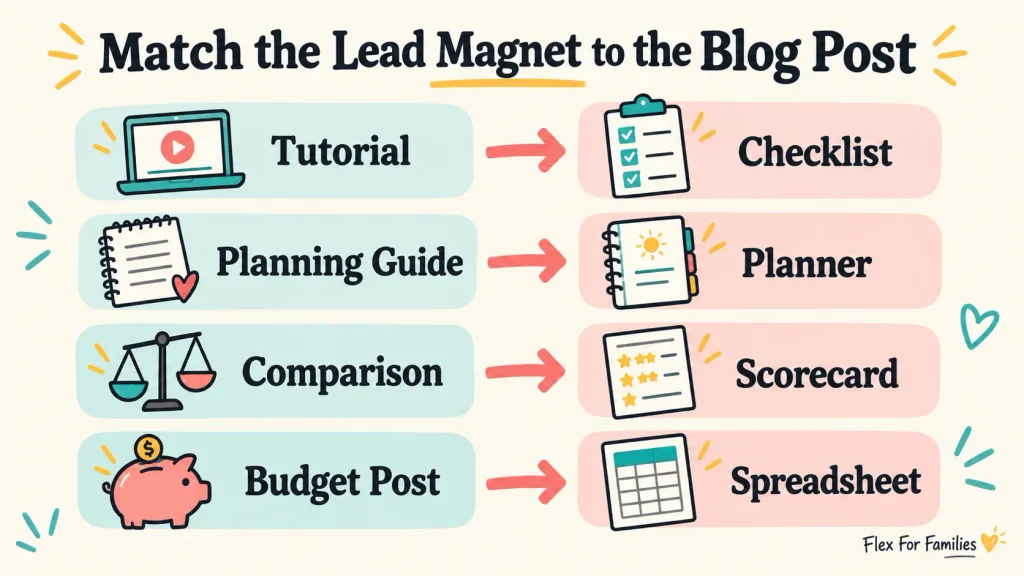
The lead magnet should feel like the next step after the article.
| Article Type | Natural Lead Magnet |
|---|---|
| Step-by-Step Tutorial | Checklist |
| Planning Guide | Planner |
| Comparison Article | Scorecard |
| Beginner Explanation | Cheat Sheet |
| Long Process | Email Course |
| Budget Article | Spreadsheet |
| Parenting Activity Post | Printable Pack |
| Product Review | Buyer Checklist |
| Side-Hustle Ideas Post | Suitability Worksheet |
| Resource Roundup | Curated List |
For example, a reader finishing your side-hustle comparison does not need another general list of opportunities. A scoring sheet can help them compare time, cost, income speed and schedule control.
My guide to growing an email list with authentic freebies explores why the resource should feel like genuine help rather than an unrelated funnel tactic.
Should You Create One Lead Magnet or Several?
Start with one core lead magnet.
Add another when:
- A major content cluster attracts a different reader need.
- The core offer does not fit the article’s intent.
- You can maintain both resources.
- Segmentation will change the help you send.
- You have enough traffic to evaluate the difference.
Several resources can be useful, but each one adds forms, links, files, emails and tests. Fifteen ideas in this article do not mean you need 15 downloads.
How to Create a Lead Magnet From Existing Content
Find a Relevant Article
Start with content that attracts the audience you want on the email list. Traffic alone is not enough if the visitors are interested in an unrelated subject.
Identify the Next Action
Ask what the reader needs to do after understanding the article. That action often reveals the format.
Extract the Useful Process
Turn the process, decision or reference information into a standalone resource.
Remove Unnecessary Explanation
The article can hold the detailed background. The lead magnet should make the next action easier.
Add Instructions
Explain what the resource is, how to use it and what the reader should do when it is complete.
Test Everything
Open the file on a phone and computer. Test the links, form, confirmation, download and first follow-up email with a fresh address.
How Should You Deliver a Lead Magnet?
Common delivery methods include:
- A confirmation email.
- A welcome email.
- A thank-you page.
- A protected download page.
- An automated email course.
Kit forms and landing pages contain incentive settings that can send a confirmation email and deliver a promised file or URL. Follow Kit’s confirmation email guidance for the current process.
Whichever route you choose, make access clear. Do not make the reader search through several emails for the resource.
My guide to building an email list as a parent blogger covers the practical journey from form submission to confirmation and welcome email.
Does a Lead Magnet Signup Give Permission for Marketing?
Downloading a resource does not automatically mean somebody has agreed to every future marketing email.
The signup should clearly explain whether the person is joining ongoing emails, what those emails will contain and who is sending them.
For UK-facing bloggers, the Information Commissioner’s Office explains that consent for electronic marketing should be freely given, specific, informed and unambiguous. It should require clear positive action.
Practical steps include:
- Use clear signup wording.
- Do not use pre-ticked marketing consent.
- Link to your privacy notice.
- Explain the future emails.
- Keep appropriate consent records.
- Include an unsubscribe option.
- Collect only the information you need.
Read the ICO guidance on electronic mail marketing and seek professional advice where necessary.
How to Test Whether a Lead Magnet Is Working
Track the complete journey rather than focusing on the number of downloads.
Useful checks include:
- Visits to the form or landing page.
- Form submissions.
- Confirmed subscribers.
- Confirmation completion.
- Successful resource delivery.
- Welcome-email clicks.
- Replies.
- Unsubscribes.
- Relevant later actions.
Avoid treating a universal conversion benchmark as a promise. Traffic source, article intent, offer, placement and audience can all change the result.
My Poptin campaigns send subscribers into Kit correctly. Recent Poptin data has still involved a small number of conversions, so it would be unreasonable to use that sample as proof that the Starter Kit or a particular trigger will work for everybody.
At an early stage, confirm that the system functions. Use larger and repeated samples before making strong performance conclusions.
Lead Magnet Mistakes to Avoid
Creating a Large Ebook Before Testing Demand
Start with a smaller version of the idea. Reader questions can show you what deserves expansion.
Solving Too Many Problems
A broad resource can become hard to explain and difficult to finish.
Using the Same Offer Everywhere
One core resource can work across related content. It will feel misplaced on articles serving a different need.
Attracting the Wrong Audience
Competitions and generic bundles may increase signups from people who do not value your future content.
Hiding Ongoing Marketing
Explain the subscription clearly rather than describing ongoing emails as a one-off download.
Sending the Wrong or Inaccessible File
Test the live link outside your logged-in account. A personal cloud file may ask readers for permission they cannot obtain.
Ignoring Mobile and Print Use
Check small screens, page breaks, margins and black-and-white printing where relevant.
Collecting Unnecessary Information
An email address may be enough. Do not ask for private family information without a specific reason.
Failing to Continue the Conversation
Delivering the file is only the beginning. Send the useful welcome and follow-up emails promised at signup.
My Parent Blogging Starter Kit
I chose a toolkit because Flex For Families supports parents through several connected early blogging decisions.
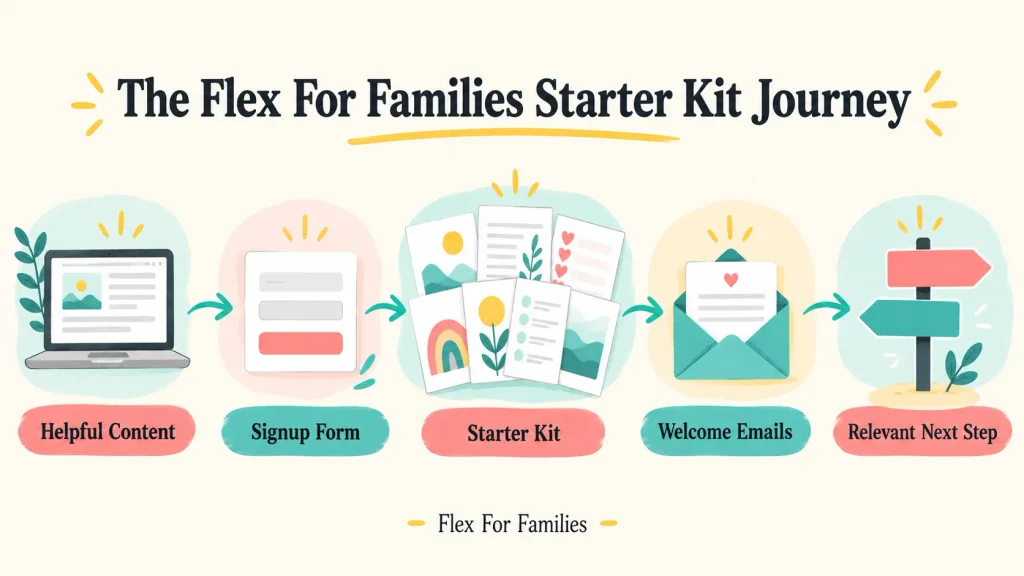
The seven resources cover choosing a niche, finding content ideas, planning time, tracking income and understanding the longer journey. They connect with the website’s parent-blogging roadmap rather than serving as unrelated bonuses.
The journey works like this:
- A reader finds relevant Flex For Families content.
- Poptin or an embedded form introduces the Starter Kit.
- The subscriber completes the configured signup and confirmation journey.
- Kit delivers the resource.
- A seven-part welcome sequence continues the subject.
- Relevant articles and recommendations provide later steps.
The bundle took more work than a one-page checklist. That choice made sense because the wider journey was already defined. I would still advise a new blogger to test one focused resource before creating a seven-item pack.
Your 60-Minute Lead Magnet Planning Session

This exercise helps you plan the resource. It does not promise that the finished lead magnet will take only 60 minutes to create.
First 15 Minutes: Choose a Problem
- Select one relevant article.
- Write down the reader’s immediate next problem.
- Describe the useful outcome in one sentence.
Next 15 Minutes: Pick a Format
- Choose the simplest format that supports the outcome.
- Decide whether it needs to be printed, edited or used on a phone.
- Check that you can deliver it reliably.
Next 15 Minutes: Outline the Resource
- List the essential sections.
- Add instructions and one clear next step.
- Remove anything that does not support the promised outcome.
Final 15 Minutes: Score and Plan
- Use the Lead Magnet Fit Filter.
- Plan the signup wording.
- Decide how the resource will be delivered.
- Outline the first welcome email.
- List every part that needs testing.
You should finish with a clear brief, not necessarily a completed resource.
Final Verdict: Which Lead Magnet Should You Create?
Most parent bloggers should begin with a checklist, template or one-page planner connected to a relevant article.
These formats are quick for readers to understand, realistic to create and easy to improve. A quiz, course or toolkit may become worthwhile when your audience and content justify the extra work.
Use the Lead Magnet Fit Filter before you begin. Choose one clear problem, one useful outcome and one sensible connection to your future emails.
If you need to build the signup and delivery journey, read How to Build an Email List as a Parent Blogger.
If you want to see a working multi-resource example, explore the free Flex For Families Parent Blogging Starter Kit.
Frequently Asked Questions
What Is the Best Lead Magnet for a Blogger?
A checklist, reusable template or one-page planner is usually a strong first lead magnet. These formats solve focused problems without requiring a complicated production process. The best choice is the one that matches the article, attracts the intended reader and connects naturally with future emails.
Do Bloggers Need a Lead Magnet?
No. A blogger can invite readers to join a newsletter without offering a download. A clear promise of useful regular emails can be enough. A lead magnet may help when it provides a relevant immediate result, but an unrelated freebie can attract subscribers who do not value the future content.
How Long Should a Lead Magnet Be?
A lead magnet should be only as long as needed to deliver its promised outcome. A one-page checklist may be more useful than a 30-page ebook. Focus on clarity, usability and relevance rather than page count. Remove background information that the supporting article already explains.
Can a Lead Magnet Be an Email Course?
Yes. A short email course can deliver one manageable lesson at a time and introduce subscribers to your emails immediately. Make every lesson useful, connect the automation correctly and allow readers to progress at their own pace rather than creating pressure to keep up.
How Many Lead Magnets Should a Blog Have?
Start with one core lead magnet. Add another when a major content cluster serves a different need and you can maintain the extra forms, files and emails. Several closely matched resources can work, but creating a separate download for every post may become difficult to manage.
Does a Lead Magnet Signup Give Permission for Marketing Emails?
Not automatically. The signup wording should clearly explain whether the person is agreeing to ongoing marketing emails as well as receiving the resource. For UK audiences, consent should be freely given, specific, informed and unambiguous. Provide privacy information and an easy way to unsubscribe.
Let’s Chat
Which lead magnet are you considering for your blog? Is it a checklist, planner, template or something more involved?
Share the idea and the problem it will solve in the comments. Please leave out subscriber information or other private details.