Building an email list involves more than placing a form on your website.
You need something that catches the reader’s attention, collects their details and sends those details to the right place. You then need a system that delivers the resource or emails you promised.
Poptin can manage the first part of that journey.
I use Poptin on Flex For Families to promote my free Parent Blogging Starter Kit. It displays the offer, captures the subscriber’s email address and sends that person into Kit.
Kit then delivers the Starter Kit and begins my welcome sequence.
This guide explains what Poptin is, how it works and where it fits into a simple email funnel. I will also show you the two campaigns I use and the setup issue that taught me why every stage needs testing.
Transparency note: I use Poptin on Flex For Families and am a member of its affiliate programme. This article may contain affiliate links, which means I may earn a commission if you sign up through them, at no extra cost to you. My guidance is based on my own experience using Poptin’s free plan.
What Is Poptin? The Quick Answer
Poptin is a website conversion and email-marketing platform. It lets you create popups and forms, decide when they appear, collect visitor information and connect those leads with other marketing tools.
You can use Poptin to:
- Build an email list.
- Promote a lead magnet.
- Display an announcement.
- Offer a discount.
- Collect enquiries or feedback.
- Direct visitors towards another page.
- Reduce abandoned visits with exit-intent campaigns.
Poptin started as a popup and form builder. Its current platform also includes contact management, segmentation, email campaigns and automations.
The broader platform may allow some businesses to manage more of their marketing in one place. I continue to use Poptin for website capture and Kit for email delivery and follow-up.
How Does Poptin Work?
Poptin works by adding a campaign to your website and applying rules that control when, where and to whom it appears.
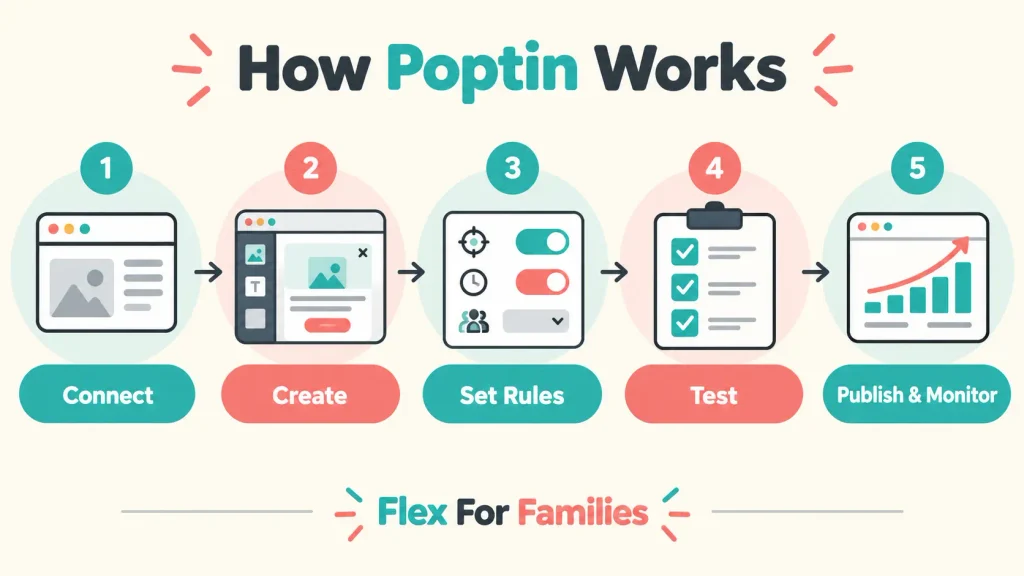
The basic process is:
- Connect Poptin to your website.
- Choose a popup or form format.
- Select a template.
- Add your offer, copy and form fields.
- Choose when the campaign should appear.
- Decide which pages and visitors should see it.
- Connect your email or customer-management platform.
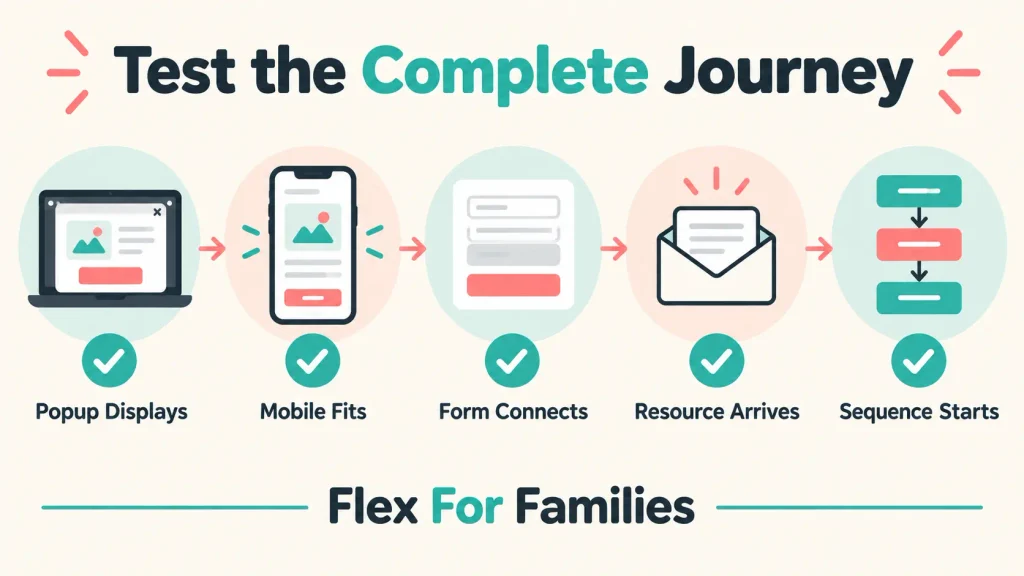
- Test the complete visitor journey.
- Publish the campaign.
- Monitor views and conversions.
You do not normally need to write code. Poptin provides a visual editor, templates and dashboard controls for the main settings.
What Can You Create With Poptin?
Poptin supports several campaign formats. The right choice depends on your offer, website and how much attention the message needs.
Lightbox Popups
A lightbox appears over the page content and places the offer at the centre of the visitor’s attention.
This format can work well for a lead magnet, newsletter invitation or limited promotion. It can also feel intrusive if it appears too quickly or repeatedly.
Slide-Ins
A slide-in enters from the side or corner of the screen.
It usually takes up less space than a central popup. I use a smaller bottom-corner campaign for readers who reach 50% of an article.
Floating Bars
A floating bar sits at the top or bottom of the page.
It can work for announcements, discounts or a short call to action without covering much of the content.
Full-Screen Popups
A full-screen campaign covers most or all of the page.
It creates a strong interruption and should be used carefully. A routine newsletter invitation rarely needs this much space.
Embedded Forms
An embedded form sits permanently inside the page rather than appearing over it.
This can suit landing pages, article endings and dedicated sign-up sections where the reader expects to see a form.
Contact and Feedback Forms
Poptin can also collect enquiries, feedback and additional visitor information.
Keep the number of fields proportionate to what you are offering. Asking only for an email address usually creates less friction than requesting several personal details for a simple download.
Gamified and Coupon Campaigns
Poptin supports campaign formats designed around coupons and interactive offers.
These may suit ecommerce websites. A content-led blog should use them only when the style fits its audience and offer.

How I Use Poptin on Flex For Families
I installed Poptin approximately three months ago to promote my free Parent Blogging Starter Kit.
I currently use two campaigns.
My Main Starter Kit Popup
The main campaign uses a larger popup and can appear when:
- A visitor shows exit intent.
- A visitor reaches 20% scroll depth.
Exit intent gives me an opportunity to present the Starter Kit when someone appears ready to leave. The scroll trigger can reach someone who has started engaging with the page.
My Bottom-Corner Popup
The smaller campaign appears in the bottom corner after a visitor reaches 50% scroll depth.
Someone who has reached the middle of an article has shown more interest than somebody who has just arrived. The smaller format also avoids blocking most of the page.
Neither approach guarantees a conversion. The offer still needs to match what the visitor wants.

How Does My Poptin and Kit Funnel Work?
Poptin captures the subscriber on my website. Kit manages what happens after that person submits the form.
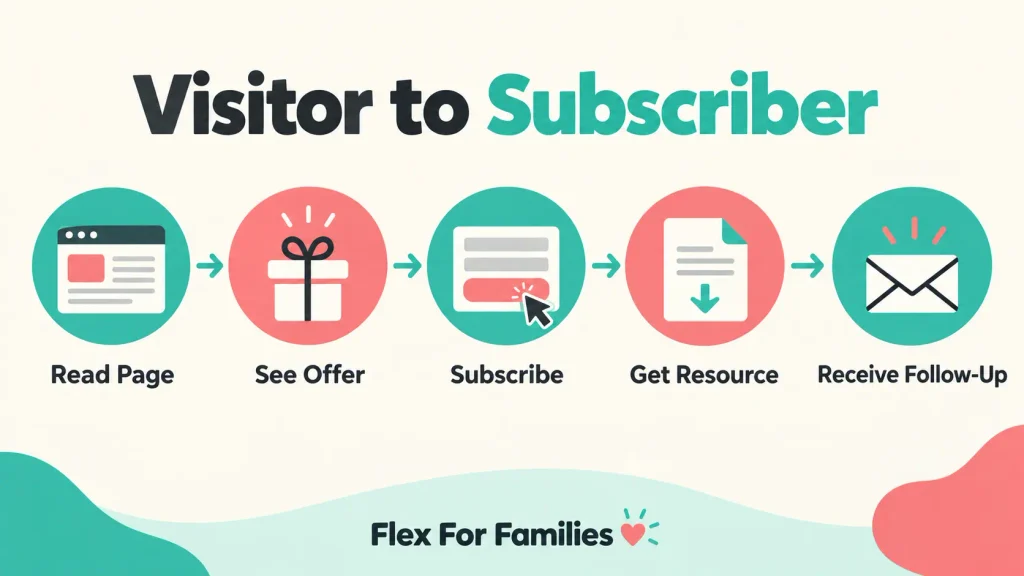
The complete journey is:
- A reader visits Flex For Families.
- Poptin displays the Parent Blogging Starter Kit offer.
- The reader submits their email address.
- Poptin sends the subscriber to a selected Kit form.
- Kit delivers the Starter Kit.
- Kit begins the welcome sequence.
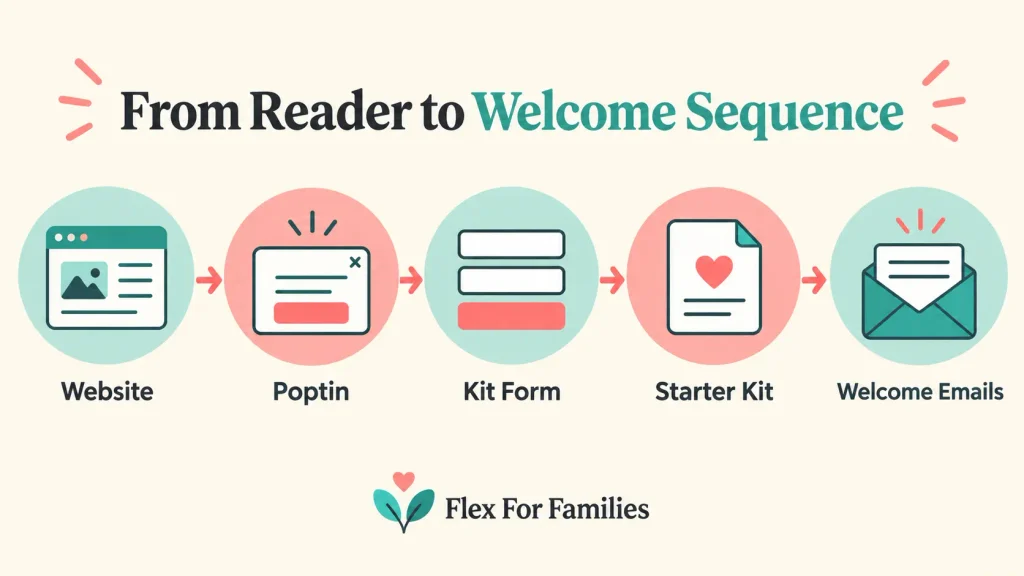
This distinction matters because a popup submission does not prove that the complete funnel works.
During my initial setup, the subscriber reached Kit but did not enter the intended Starter Kit sequence. Poptin had transferred the email address successfully. The missing connection was between the selected Kit form and the Kit automation.
I created and connected the correct form, then tested the journey again with a fresh email address. The Starter Kit arrived and the welcome sequence began.
That experience changed how I check integrations. I now test what the reader receives, rather than stopping when the popup displays a success message.
What Is the Difference Between a Trigger and a Targeting Rule?
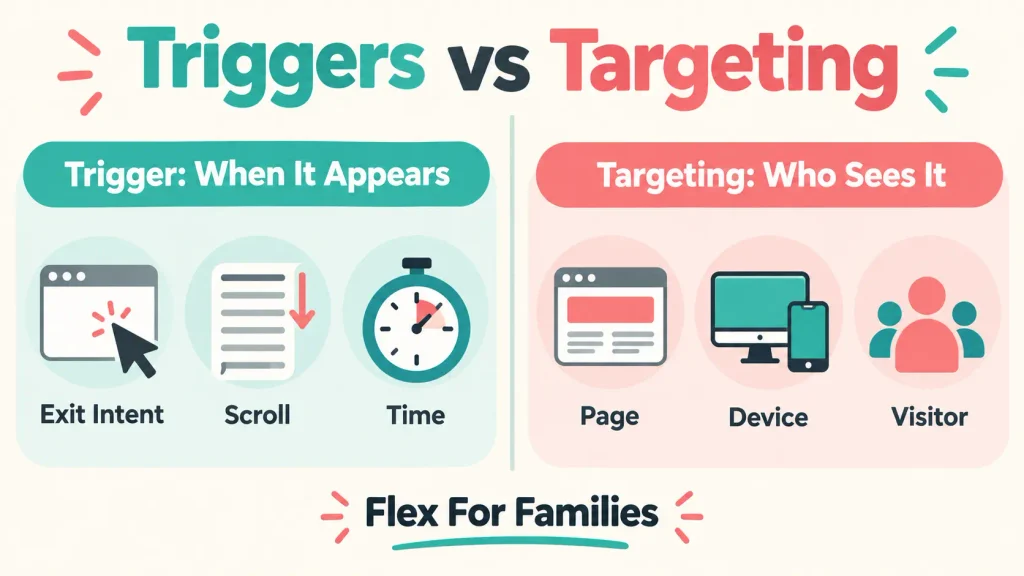
A trigger controls when a Poptin campaign appears. A targeting rule controls where it appears or which visitors can see it.
Poptin Triggers
Common triggers include:
- Exit intent.
- Scroll depth.
- Time spent on the page.
- Visitor inactivity.
- A click on a selected element.
A trigger should reflect the offer and the reader’s likely level of interest.
Poptin Targeting Rules
Targeting can consider factors such as:
- Page URL.
- Device.
- Traffic source.
- Location.
- New or returning visitor status.
- Previous activity.
- Date and time.
- Display frequency.
The official Poptin website currently describes more than 15 targeting rules. You do not need to use all of them.
A beginner can start with one relevant page rule, one sensible trigger and a frequency limit. More complicated targeting can wait until there is a clear reason for it.
What Happens After Someone Subscribes?
What happens next depends on how you configure the campaign.
Poptin can send the captured information to a connected email-marketing or customer-management platform. The Poptin integrations directory currently lists Kit, Mailchimp, MailerLite, ActiveCampaign, HubSpot, WordPress and many other services.
Possible next steps include:
- Adding the subscriber to a form or list.
- Applying a tag.
- Delivering a lead magnet.
- Starting a welcome sequence.
- Sending the details to a customer-management system.
- Managing the contact through Poptin’s own audience and email tools.
The popup platform and receiving platform still need compatible settings. Check both sides of the connection.
Does Poptin Require Coding?
You do not normally need coding skills to create and publish a Poptin campaign.
The standard process uses:
- A visual campaign editor.
- Customisable templates.
- Dashboard controls for triggers and targeting.
- Native integrations.
- A WordPress plugin for a normal WordPress installation.
Advanced customisation may need technical knowledge. Most beginners can create a standard popup, connect it and control its display without writing code.
The later guide on adding Poptin to WordPress will cover the installation and connection process in detail.
Does Poptin Replace an Email Marketing Platform?
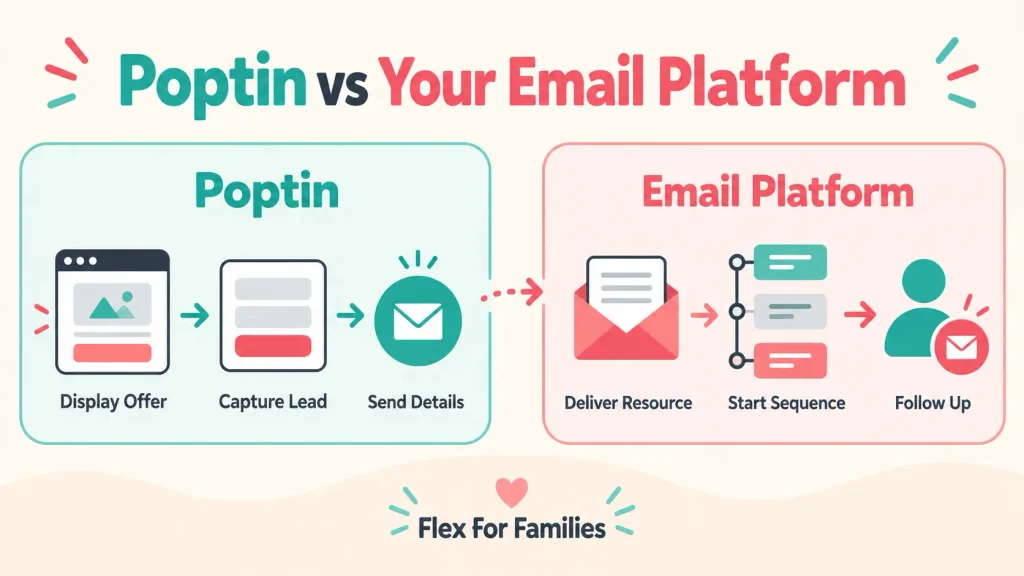
Poptin can now handle more than popups, but it does not have to replace your existing email platform.
Its current platform includes:
- Contact management.
- Audience segmentation.
- Email campaigns.
- Email automations.
- Behaviour-based journeys.
I have not tested these newer email features. I use Kit because my forms, lead magnet delivery and welcome sequence already operate there.
A beginner should avoid moving tools simply because a platform adds more features. Decide which system will store subscribers and send emails, then build a journey you can understand and test.
Which Poptin Features Matter Most for Beginners?
Poptin includes many features, but a new blogger only needs a small number to launch a useful campaign.
Templates
A template provides the initial layout. Change the colours, copy, fields and image so the finished campaign fits your website.
Visual Editor
The editor lets you adjust the campaign without coding. Keep the design simple and make the close button easy to find.
Scroll and Exit-Intent Triggers
These triggers let the reader engage with the page before the offer appears.
Page Targeting
Page rules help you match the offer with the content. A blogging Starter Kit makes more sense on a blogging guide than an unrelated page.
Frequency Controls
Frequency settings prevent the same visitor from seeing the campaign too often.
Mobile Preview
A popup that looks good on a laptop can cover too much of a phone screen. Check both versions before publishing.
Integrations
The integration sends the subscriber to the next tool. Select the correct destination and test it.
Analytics
Poptin records views, conversions and conversion rates. These figures can confirm that a campaign is working, although a small sample does not support strong conclusions.
A/B Testing
A/B testing can compare headlines, designs, offers and triggers. It becomes more useful when the campaign receives enough traffic and conversions.
Is Poptin Free?
Yes. Poptin offers a free plan that lets a small website create and test a working campaign.
At the time of writing, the free popup plan includes:
- Up to 1,000 monthly visitors.
- One domain.
- Unlimited popups.
- Core templates and editing tools.
- Triggers and targeting.
- Integrations.
- Analytics and A/B testing.
- Poptin branding.
No credit card is required to start. Plans and limits can change, so check the official Poptin pricing page before making a decision.
My full Poptin Review 2026 covers the current paid plans, pros, cons, alternatives and my verdict.
Common Poptin Mistakes Beginners Should Avoid
Publishing Without Testing the Complete Journey
Submit a fresh email address and confirm every promised email or download arrives.
Connecting the Wrong Form
Check which form, list or tag receives the subscriber. Similar names can make the wrong destination easy to select.
Assuming the Automation Starts Automatically
An email address can reach the platform without entering the intended sequence. Confirm the automation trigger separately.
Showing the Popup Too Quickly
Give the reader a chance to understand the page before interrupting them.
Displaying the Campaign Too Often
Use frequency controls so a returning visitor is not repeatedly shown the same message.
Using One Offer Across Every Page
Match the offer with the visitor’s likely reason for reading the page.
Ignoring Mobile Design
Check the size, fields, button and close control on a phone.
Asking for Too Much Information
Collect only the details you genuinely need. Extra fields create extra effort for the reader.
Expecting the Tool to Fix a Weak Offer
Poptin can display and capture. It cannot make an irrelevant lead magnet useful.
Is Poptin Suitable for a New Blog?
Poptin can suit a new blog when the blogger has a relevant offer and a clear plan for new subscribers.
It may be useful when:
- You have a lead magnet that solves a specific problem.
- You want to start building an email list.
- Your traffic fits the free-plan allowance.
- You need more control over triggers and targeting.
- You are prepared to test the complete funnel.
It may be unnecessary when:
- You do not have a clear offer.
- Your email platform already provides the forms you need.
- You have no plan for following up with subscribers.
- The popup would distract from the page’s main purpose.
Installing another tool should solve a real problem. It should not become another dashboard you feel obliged to manage.
My Final Thoughts
Poptin gives you the tools to display an offer, collect visitor details and send those details into the next part of your marketing system.
For a beginner, the easiest way to understand it is to separate the jobs:
- Poptin controls what appears on the website.
- The trigger controls when it appears.
- Targeting controls where and to whom it appears.
- The integration sends the captured details to the selected destination.
- Your email setup controls delivery and follow-up.
I have found Poptin straightforward for creating professional campaigns on WordPress. The part that required more attention was the connection between the Kit form and automation.
Start with one offer, one campaign and one clear follow-up journey. Test it from the reader’s perspective before adding more formats or rules.
Build the Offer Behind Your Popup
My free Parent Blogging Starter Kit helps busy parents choose a niche, organise ideas, plan realistic work blocks and understand the route towards flexible blogging income.
Get the Free Parent Blogging Starter Kit
It is the offer behind my live Poptin campaigns, so you can see the reader journey for yourself.
Frequently Asked Questions
What Is Poptin Used For?
Poptin is used to create website popups and forms, capture leads and direct visitors towards an action. Campaigns can promote lead magnets, newsletter subscriptions, discounts, announcements, contact forms and other offers. Poptin also includes targeting, analytics, integrations and newer email-marketing features.
How Does Poptin Work?
You connect Poptin to your website, create a campaign and choose its triggers and targeting rules. When an eligible visitor meets those conditions, Poptin displays the campaign. It can then capture the visitor’s details and send them to Poptin’s audience tools or a connected platform such as Kit.
Is Poptin Free?
Yes. Poptin currently offers a free popup plan for one domain and up to 1,000 monthly visitors. It includes unlimited popups, core targeting, integrations, analytics and A/B testing. Free campaigns carry Poptin branding, and larger websites may need a paid plan.
Does Poptin Work With WordPress?
Yes. Poptin works with WordPress and provides a plugin for connecting a website. Campaigns are created and managed through Poptin, then displayed on the connected WordPress site according to the chosen triggers and targeting rules.
Does Poptin Integrate With Kit?
Yes. Poptin can send captured subscribers to a selected Kit form. You still need to make sure that the correct form connects with the intended Kit automation. Test the journey with a fresh email address and confirm that the promised delivery and follow-up emails arrive.
Do You Need Coding Skills to Use Poptin?
No coding is normally required for a standard Poptin campaign. The platform provides templates, a visual editor and dashboard settings for triggers, targeting and integrations. Advanced customisation may need technical knowledge, but a beginner can create and publish a basic campaign without writing code.
Can Poptin Send Emails?
Yes. Poptin’s current platform includes email campaigns, contact management, segmentation and automations. You can also connect Poptin with an external email platform. I use Poptin for website capture and Kit for delivering my Starter Kit and welcome sequence.
Let’s Chat
Are you currently building an email list, or are you still deciding which tools you need?
If you already use a popup, what part of the setup caused the most confusion?
Share your experience in the comments. It may help another beginner avoid the same problem.