Display advertising sounds simple. Add some code to your website, let ads appear and earn money when people view or interact with them.
Google AdSense is one of the best-known ways to do this. It is free to join, Google does not publish a universal minimum traffic requirement, and Auto ads can handle much of the placement work. That makes it look accessible to a new blogger.
However, accessible does not mean instantly profitable. A small blog may earn very little, the £60 UK payment threshold can take time to reach, and Google takes invalid traffic and policy breaches seriously. Ads can also slow a website or distract readers from email sign-ups and affiliate links.
So, is AdSense a useful first display-ad network, or should a small blogger wait?
Heads up: I have not used Google AdSense on Flex For Families or a previous website. This review is based on current Google documentation, published policies and wider publisher feedback. Where I discuss what I would do, that is my personal judgement rather than first-hand experience with the platform.
Google AdSense Quick Verdict
Google AdSense is a legitimate and relatively accessible display advertising platform. It can suit a content-rich blog with genuine traffic, but it is unlikely to transform the income of a new or low-traffic website.
What Is It: A display advertising platform that lets publishers place ads on websites.
Cost: Free to join and use.
Best fit: Established content websites with genuine, consistent traffic.
Poor fit: Very new sites, thin-content sites or blogs where ads would undermine a more valuable conversion goal.
Main strength: Familiar advertiser ecosystem, flexible controls and no published universal traffic minimum.
Main drawback: Small sites may earn little, while strict traffic and content policies still apply.
UK Payment Threshold: £60
Overall rating: 4 out of 5
My Verdict: AdSense is one of the more sensible display-ad options for a beginner to investigate, but I would not rush to add it to a small blog simply because approval may be possible. Build useful content and real traffic first, then decide whether the likely income is worth the effect on speed, design and reader attention.
Google AdSense at a Glance
| Feature | What Bloggers Need to Know |
|---|---|
| Owner | |
| Platform Type | Contextual and personalised display advertising |
| Entry Cost | Free |
| Published Minimum Traffic | No universal minimum stated by Google |
| Application | Site and account review required |
| Ad Placement | Auto ads or manual ad units |
| Publisher Share | 80% of revenue after the advertiser platform fee for AdSense for Content |
| Typical Share When Google Ads Buys the Ad | About 68% of the advertiser’s original spend, according to Google |
| UK Payment Threshold | £60 |
| Suitable for WordPress | Yes |
| Beginner Friendly | Technically yes, but policies and optimisation need care |
| Free Trial | Not applicable because the service is free |
What Is Google AdSense?
Google AdSense is a free advertising service that allows eligible website owners to earn revenue by displaying ads alongside their content. Google matches advertising to a page and its visitors, manages the advertiser relationship and reports the publisher’s estimated earnings.
The publisher supplies the website and audience. Google supplies the advertising marketplace and the technology used to serve the ads. Depending on the ad and auction, revenue may be generated from impressions, clicks or other advertiser outcomes.
This is not the same as affiliate marketing. With affiliate marketing, you normally recommend a particular product and earn a commission after a qualifying action or sale. With AdSense, you provide space for advertising and receive a share of the advertising revenue.
Google explains the basic process on its How AdSense Works page.
Who Owns Google AdSense?
Google AdSense is owned and operated by Google, which is part of Alphabet Inc. The service has been available since 2003 and sits within Google’s wider advertising business.
That history does not guarantee approval or earnings, but it does distinguish AdSense from an unknown network with limited company information. The platform itself is legitimate. The real questions are whether your site qualifies and whether display advertising is the right monetisation choice for your audience.
Quick Note: I’m John Crossley, founder of Flex For Families. I review online business opportunities through the lens of family life, focusing on costs, time commitments, risks, and whether they genuinely help parents create more flexibility.
How Does Google AdSense Work?
AdSense connects your website to demand from advertisers. Once your account and site are approved, you add the required code or use a suitable WordPress integration. Google can then display eligible ads on your pages.
The basic journey is:
- You create original content and attract genuine visitors.
- Google analyses the page, visitor and available advertising demand.
- An eligible ad wins the auction and appears on the page.
- Valid impressions or interactions generate advertising revenue.
- Google records estimated earnings in your account.
- Finalised earnings are paid once the relevant conditions and payment threshold are met.
You do not negotiate with each advertiser. You can, however, choose placement methods, exclude certain areas, block some advertiser categories and review individual ads through the available controls.

What Do You Need to Join Google AdSense?
You need original content, control of your website, compliance with Google’s programme policies and an applicant who is at least 18. Google does not publish one universal traffic number that every website must reach.
Google’s eligibility guidance says applicants need their own content, must comply with policies and must be able to access the HTML source code of the site. If you are under 18, a parent or guardian can sign up using their own Google Account and receive the payments.
Before applying, I would make sure a blog has:
- Several substantial, original posts that serve a clear audience.
- Easy navigation and no unfinished sections.
- A clear About page and contact route.
- An appropriate privacy policy and cookie or consent setup.
- Ownership or sufficient control of the domain and website.
- No scraped, copied or automatically published low-value content.
- No prohibited content or misleading navigation.
- A reasonable mobile experience.
There is no magic post count that guarantees approval. A smaller site with a coherent purpose and genuinely useful content may present a stronger case than a larger site filled with shallow pages.

How Do You Apply for Google AdSense?
You create an AdSense account, enter your website and payment details, connect the site to AdSense and submit it for review. Google then checks the account and website before ads can begin serving normally.
The broad process is:
- Visit AdSense and start an application.
- Sign in with a Google Account.
- Add your website address and country or territory.
- Enter the requested customer information accurately.
- Connect the website using the provided method.
- Confirm that required privacy and consent arrangements are in place.
- Request a review.
- Resolve any issues Google identifies.
Approval is not guaranteed, even if another website in the same niche was accepted. Google does not promise one fixed review time for every application. Allow for the possibility that you may need to improve the website and apply again.
Why Might an AdSense Application Be Rejected?
AdSense applications can be rejected when a site does not yet provide enough original value, is difficult to navigate, appears unfinished, breaches a policy or cannot be properly reviewed. A rejection does not automatically mean the site can never qualify.
The most useful response is not to repeatedly resubmit without changing anything. Read the message, audit the whole site and improve the underlying issue.
Common areas to inspect include:
- Thin, repetitive or lightly rewritten content.
- Large numbers of pages with little independent value.
- Missing or confusing navigation.
- Broken pages and placeholder content.
- Policy-sensitive topics or prohibited material.
- Poor mobile usability.
- Missing privacy information.
- A domain or connection that Google cannot verify.
I would focus on making the site genuinely better for a reader, not trying to find a technical loophole around the review.
What Are Auto Ads?
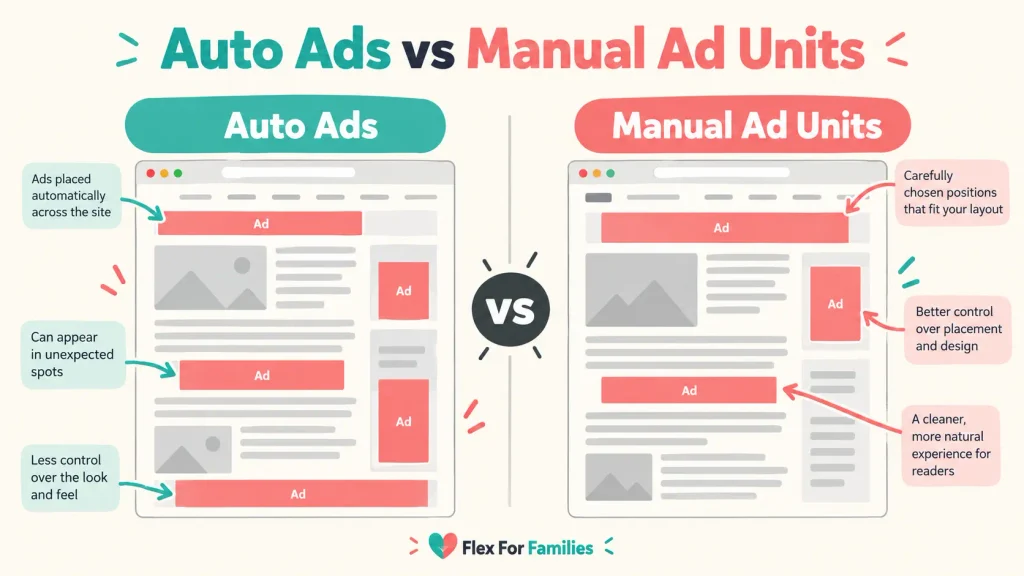
Auto ads use one piece of code and Google’s systems to choose suitable placements and formats across a website. They reduce the need to create and position every ad unit manually.
Google’s Auto ads guidance lists in-page, overlay and intent-driven formats. Publishers can preview settings, control formats and exclude areas or pages.
The attraction for a busy parent is clear: less manual placement work. The trade-off is that automated choices may not match the reading experience you want. A technically valid placement can still feel too intrusive for your audience.
Start conservatively. Preview the placements, check important pages on mobile and desktop, and do not assume more ads will always produce the best overall result.
Auto Ads vs Manual Ad Units
Auto ads are easier to manage, while manual ad units give you more direct control over where advertising appears. Neither option is automatically best for every blog.
| Auto Ads | Manual Ad Units |
|---|---|
| Faster initial setup | More placement control |
| Google tests available locations | You decide where units appear |
| Can adapt across page types | Easier to protect specific content areas |
| May create placements you dislike | Takes more time to set up and review |
| Useful for testing | Useful for a deliberate page design |
A balanced approach may work best. You can use automation without surrendering every decision, then remove formats or locations that interfere with the reader’s journey.
How Much Does Google AdSense Cost?
Google AdSense is free for publishers to join and use. There is no monthly AdSense subscription charge.
That does not make it cost-free in a wider sense. Display advertising can affect:
- Page speed and Core Web Vitals.
- The visual appearance of the site.
- Reader attention.
- Affiliate link clicks.
- Email sign-ups.
- The time needed for consent, testing and policy checks.
The important calculation is not simply whether AdSense charges a fee. It is whether the advertising revenue is greater than the value or experience you may lose elsewhere.
What Percentage Does Google AdSense Pay Publishers?
For AdSense for Content, publishers receive 80% of revenue after the advertiser platform has taken its fee. When Google Ads purchases the display ad, Google says publishers retain about 68% of the advertiser’s original spend.
Google explains the structure in its AdSense revenue-share documentation. The precise amount a publisher earns still depends on factors such as advertiser demand, topic, audience location, device, season and ad format.
This is why a simple claim that AdSense pays a fixed amount per click or per 1,000 page views is misleading.
How Much Can You Realistically Earn With AdSense?
There is no reliable universal AdSense earnings figure. Two sites with the same number of page views can earn very different amounts because the value of the audience and advertising auction can differ.
The variables include:
- Reader location.
- Content topic and commercial intent.
- Advertiser competition.
- Number of viewable ad impressions.
- Mobile and desktop mix.
- Page depth and time on site.
- Seasonality.
- Consent choices.
- Ad placement and format.
- Invalid traffic deductions.
A small blog may earn pennies or a few pounds over a period where a larger, commercially focused site earns much more. Any article promising a fixed income from a fixed number of page views should be treated cautiously unless it clearly explains the data, country, niche and period involved.
My practical view is that AdSense should not be the business plan. It is one monetisation layer that becomes more meaningful after a site has useful content and repeatable traffic.
How Do Google AdSense Payments Work in the UK?
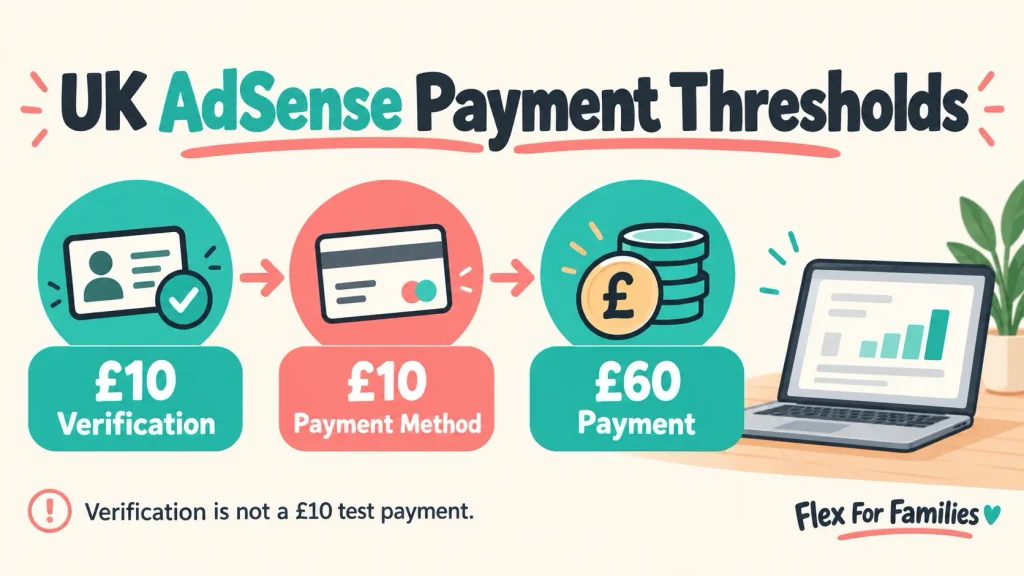
UK publishers normally need to reach the relevant verification and payment setup thresholds before receiving money, then reach £60 in finalised earnings for a payment. The threshold applies to the account balance, not each individual website.
Google’s current payment-threshold table lists these GBP amounts:
| Stage | GBP Threshold |
|---|---|
| Verification | £10 equivalent |
| Payment Method Selection | £10 |
| Payment | £60 |
| Cancellation | £10 |
The verification threshold means Google may ask you to complete identity or address verification once the balance reaches that level. It does not mean Google sends a £10 test payment.
Payment timing also depends on finalised earnings, account holds, verification and the selected payment method. If a small blog earns slowly, it may take many months to reach £60.
What Is Invalid Traffic?
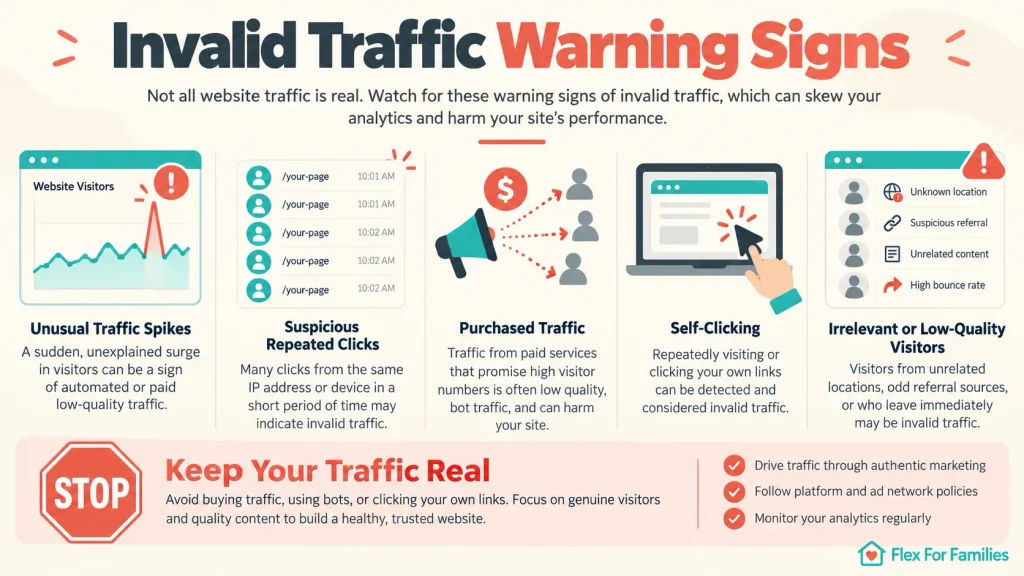
Invalid traffic includes clicks or impressions that do not result from genuine user interest. It can include accidental clicks, repeated self-clicking, automated traffic and traffic generated to inflate advertising earnings.
Google’s publisher traffic-quality guidance makes clear that publishers are responsible for the traffic reaching their ads. Google may limit ad serving, deduct revenue, suspend an account or close it when it detects serious or repeated problems.
Never:
- Click your own ads to test them.
- Ask friends, family or readers to click ads.
- Buy low-quality traffic packages.
- Place ads where accidental clicks are likely.
- Use misleading labels that encourage clicks.
- Ignore a sudden unexplained traffic spike.
No traffic system is completely free of bots or accidents. The reasonable aim is to avoid creating or encouraging invalid activity, monitor analytics and investigate unusual patterns.
Can AdSense Close or Limit Your Account?
Yes. Google can limit ad serving, suspend an account or disable it for policy breaches or invalid traffic. This is one of the most important drawbacks because a publisher can lose access to future advertising revenue.
Google’s terms and programme policies should be treated as operating rules, not small print to read after a problem occurs.
Publisher complaints online often mention unclear rejection messages, limited support and unexpected account action. These reports are anecdotal and do not prove that every complaint was handled incorrectly, but they do highlight the risk of relying on a single platform.
If Google closes an account, final payment can be subject to eligibility checks and a hold while invalid activity is assessed. Its disabled-account guidance explains the available process.
What Ad Controls Do Publishers Get?
Publishers can control formats and placements, exclude areas, block certain categories or advertisers and use the Ad Review Centre to review individual ads. The exact controls available can change over time.
Controls are useful, but they are not a reason to stop checking the live website. Review your highest-traffic pages regularly, especially after changing Auto ads settings.
Look for:
- Ads that push the main content too far down.
- Too many interruptions on mobile.
- Overlays that are difficult to close.
- Advertising that clashes with the site’s values.
- Layout movement while ads load.
- Pages where an ad competes with an important call to action.
Can You Use AdSense on WordPress?
Yes. WordPress site owners can add AdSense using Google’s code, a suitable plugin or theme-supported placement areas. You do not need to rebuild the website on a different platform.
The main tasks are connecting the site correctly, managing consent where required, placing ads responsibly and checking performance. A plugin can simplify implementation, but it does not remove your responsibility for the result.
Back up the site before making wider code changes. After publishing ads, test on different devices and use a speed-testing tool to identify any significant effect.
Can Google AdSense Hurt SEO or Website Speed?
AdSense does not automatically damage SEO, but poor implementation can harm page experience. Too many ads, intrusive interstitials, slow scripts and unstable layouts can make a page less useful and harder to read.
Keep the content easy to reach. Reserve space for ad units where possible, compress other assets, avoid excessive formats and pay particular attention to mobile screens.
The goal is not to maximise the number of ad boxes. It is to find a level that produces useful revenue without making the website feel built for ads instead of readers.
Is Google AdSense Suitable for Beginners?
AdSense can be suitable for beginners because there is no subscription fee and Auto ads reduce the technical workload. However, beginners still need a credible website, original content and a basic understanding of privacy, consent, traffic and programme policies.
I would not recommend applying before the website looks ready for a real visitor. Approval is not the first milestone in blogging. Helpful content, a clear audience and genuine traffic matter more.
Is Google AdSense a Good Fit for Busy Parents?
AdSense can be relatively low-maintenance after setup, which may appeal to busy parents. The difficulty is that worthwhile income normally needs traffic, and building that traffic is not passive.
It may suit you if:
- You already publish substantial informational content.
- Your traffic is genuine and reasonably consistent.
- You want a monetisation method that does not require individual product recommendations.
- You can review the site and policies regularly.
- Advertising will not undermine a more important funnel.
It may be a poor fit if:
- Your blog is still very small.
- Your main goal is to build an email list from every visit.
- You promote higher-value affiliate offers that ads could distract from.
- Your site depends on a calm, ad-free experience.
- You need quick, predictable income.
The setup may be manageable in a pocket of time. Building the useful content and audience that make it worthwhile is the longer job.

Google AdSense Pros and Cons
Pros
- Free to join.
- Operated by an established company.
- No published universal minimum traffic requirement.
- Auto ads can reduce manual setup.
- Manual placements and blocking controls are available.
- Works with WordPress.
- Can monetise informational content without a direct product sale.
- Clear published UK payment threshold.
Cons
- Low-traffic blogs may earn very little.
- Approval is not guaranteed.
- The £60 threshold may take a small site a long time to reach.
- Ads can affect speed, design and reader trust.
- Strict policy and invalid-traffic rules apply.
- Support can feel limited when an account problem occurs.
- Revenue varies and is difficult to predict.
- Ads may compete with email sign-ups or affiliate links.
What Are the Main AdSense Complaints?
The most common publisher complaints concern rejected applications, account restrictions, difficulty getting individual support, low earnings and the effect of ads on the website. These complaints are real concerns, but online accounts rarely provide enough evidence to judge every decision.
It is useful to separate three issues:
- Platform rules: Google openly reserves the right to review sites, traffic and policy compliance.
- Publisher experience: Automated messages can feel frustrating when the precise problem is unclear.
- Business risk: Even a legitimate platform should not be the only income source a family depends on.
The practical response is to keep your website compliant, retain your own traffic data and build more than one realistic income route.
Is Google AdSense Legitimate or a Scam?
Google AdSense is legitimate, not a scam. It is an established Google advertising product used by website publishers around the world.
That does not mean every applicant is accepted or every publisher earns meaningful money. It also does not protect you from impersonation scams. Only use official Google pages, never pay a third party for guaranteed approval and be cautious of messages asking for login or payment details.
Who Is Google AdSense Best For?
AdSense is best for publishers with original informational content, genuine traffic and enough page views for small advertising amounts to accumulate. It is especially relevant when visitors are not always ready to buy a recommended product.
Good candidates include:
- General information blogs.
- Reference and tutorial sites.
- Content archives with many page views.
- Publishers who want a simple advertising layer.
- Site owners willing to monitor user experience.
Who Should Avoid Google AdSense?
You should delay or avoid AdSense if the site is unfinished, traffic is extremely low, content is thin, you cannot meet the policies or advertising would undermine the website’s main goal.
It is also a poor choice if you are tempted to buy traffic, click your own ads or encourage other people to do so. Those shortcuts can put the account at risk.
Google AdSense Alternatives
The strongest alternative depends on your traffic, audience and business model.
Affiliate Marketing
Affiliate marketing may earn more from fewer visitors when the content has strong buying intent and you can recommend a genuinely relevant product. It needs careful disclosure and useful recommendations, but it gives you more control over the offer.
Email List Building
An email list does not provide immediate ad revenue, but it creates an audience you can contact again. For a small blog, asking a reader to join a useful email sequence may be more valuable than earning a tiny amount from an ad impression.
Premium Display-Ad Networks
Networks such as Journey by Mediavine, Mediavine and Raptive may become relevant as traffic and site quality grow. Entry requirements and commercial terms change, so check each provider’s current information rather than relying on an old traffic figure.
Adsterra
Adsterra offers a wider range of formats and may be easier for some publishers to test, but I would be more cautious about ad experience and network fit. For a mainstream family blog, AdSense would usually be my first network to investigate. A full Google AdSense vs Adsterra comparison will follow.
No Display Ads Yet
Doing nothing is a valid option. A small website can focus on content, internal links, email subscribers and suitable affiliate relationships until display advertising has a clearer purpose.
Google AdSense vs Adsterra: My Early View
AdSense looks like the stronger first choice for a mainstream content blogger who can gain approval and follow its policies. Adsterra may offer easier access and more varied formats, but those advantages need to be weighed against brand fit and reader experience.
| Google AdSense | Adsterra | |
|---|---|---|
| Best Known For | Mainstream contextual display ads | Broad range of ad formats and global reach |
| Entry | Site review and approval | Often positioned as accessible to smaller publishers |
| Brand Fit | Usually stronger for mainstream blogs | Requires careful format and quality controls |
| Main Risk | Approval, invalid traffic and policy enforcement | Intrusive formats or weaker fit for a family audience |
| My Research Rating | 4 out of 5 | 3 out of 5 |
This is a high-level view. The planned comparison will examine approval, formats, payments, support, user experience and suitability for a family-focused blog in more detail.
My Take on Google AdSense
I can see why AdSense is a common milestone for bloggers. It offers a recognisable route from page views to income, does not charge a subscription and can run without you negotiating individual partnerships.
However, I would not place ads on Flex For Families simply to say the site is monetised. At an early stage, a reader joining the email list, discovering a helpful resource or trusting a recommendation may be worth more than a small display-ad return.
If the site reaches a level where display ads can make a meaningful contribution, I would investigate AdSense before Adsterra. I would start with restrained placements, protect the reading experience and measure the effect on speed, engagement, affiliate clicks and email conversions.
That is not a criticism of AdSense. It is a reminder that the right monetisation method depends on the stage and purpose of the website.

About the Reviewer
Hi, I’m John Crossley, founder of Flex For Families.
I’m a parent, blogger, and online business owner who helps families find realistic ways to create more flexibility through blogging, affiliate marketing, and online business.
Like many people, I’ve spent years researching online opportunities, testing platforms, and learning how to separate genuine business models from expensive hype. I’ve also experienced the frustration of chasing opportunities that promised freedom but demanded more time away from family.
Today, I use that experience to review courses, side hustles, AI opportunities, and online business programmes through a simple lens:
Will this genuinely help parents create more flexibility, or will it create more pressure?
Every review on Flex For Families focuses on costs, time commitments, risks, and realistic expectations, so you can make informed decisions before investing your time or money.
Final Verdict: Is Google AdSense Worth It in 2026?
Google AdSense is worth considering in 2026 if you have an established, policy-compliant content site with genuine traffic and you want a relatively simple way to test display advertising. It is not a shortcut to meaningful blogging income.
I rate it 4 out of 5 based on its accessibility, established advertiser ecosystem, published controls and suitability for mainstream websites. It loses a point because small-site earnings can be limited, approval and enforcement can be frustrating, and ads may work against other goals.
My recommendation is simple: do not add AdSense because your blog feels incomplete without ads. Add it when the numbers and reader journey suggest display advertising has a useful role.
If you are still building the foundations, the free Flex For Families Online Income Starter Kit can help you choose a realistic route, avoid expensive distractions and plan your next steps around family life.
Frequently Asked Questions
Is Google AdSense Legitimate?
Yes. Google AdSense is a legitimate advertising platform operated by Google. Approved publishers can display ads and receive a share of valid advertising revenue. Legitimate does not mean guaranteed approval or income, so use official Google pages and avoid anyone selling guaranteed acceptance.
Does AdSense Require Minimum Traffic?
Google does not publish a universal minimum traffic requirement for AdSense. Your site still needs original content, policy compliance and enough substance to pass review. Low traffic can also mean very low earnings, even if the site is approved.
How Much Does AdSense Pay per 1,000 Views?
There is no fixed payment for 1,000 views. Earnings vary by reader location, niche, advertiser demand, device, season, viewability, ad format and other factors. Treat online income estimates as examples, not promises.
What Is the AdSense Payment Threshold in the UK?
The UK payment threshold is £60. Google’s current GBP table also lists £10 for verification, £10 for choosing a payment method and £10 as the cancellation threshold. Account verification and holds must be resolved before payment.
Is AdSense Suitable for Beginner Bloggers?
AdSense can suit beginners because it is free and Auto ads can simplify placement. A beginner should still wait until the website has original, useful content, clear navigation, appropriate privacy information and genuine traffic. Approval alone does not make it profitable.
Can AdSense Hurt SEO or Website Speed?
AdSense does not automatically hurt SEO, but excessive or poorly placed ads can slow pages, shift layouts and frustrate visitors. Use restrained placements, test mobile pages and monitor performance so advertising does not overwhelm the main content.
Is AdSense Better Than Adsterra?
For a mainstream family or information blog, I would investigate AdSense first because of its brand familiarity and contextual advertising ecosystem. Adsterra may be easier to test and offers more formats, but it requires careful control of ad experience. The best choice depends on approval, audience and site goals.
Let’s Chat
Have you used Google AdSense on a small blog? How long did approval and the first £60 payment take, and did the income justify the effect on your website? Share your experience in the comments. It may help another parent make a more informed decision.