
Google AdSense and Adsterra both let publishers earn money from website traffic. They do not serve exactly the same type of publisher.
AdSense has stricter approval and a higher UK payment threshold, but it is the stronger fit for most conventional blogs. Adsterra is easier to access, offers more advertising formats and can pay from a lower balance, but some of its formats need careful consideration on a family-focused website.
The right choice depends on your traffic, content, audience and wider business goal. For a new blog, the best answer may be to use neither yet.
Heads up: I have not used Google AdSense or Adsterra on Flex For Families. This comparison is based on current information from both platforms, their published policies and wider publisher feedback. Any recommendation is my judgement based on the needs of a mainstream family and blogging website, not a claim based on personal earnings.
Google AdSense & AdsTerra Quick Verdict
Google AdSense is the better advertising network for most mainstream bloggers in 2026. Its familiar advertising ecosystem, contextual placements and publisher controls make it a more natural fit for a content website.
Adsterra is a legitimate alternative with faster access, broader format choice and lower payment thresholds. It may suit entertainment, streaming, download, gaming, social or direct-link traffic better than a parent blog.
| Google AdSense | Adsterra | |
|---|---|---|
| Best For | Mainstream content websites | Alternative traffic and format-led monetisation |
| Joining | More demanding site review | Faster and generally more accessible |
| Published Traffic Minimum | No universal minimum | No large minimum promoted |
| Main Formats | Auto ads and manual ad units | Banners, native, Social Bar, Popunder and Smartlink |
| Lowest Relevant Threshold | £60 payment for UK GBP accounts | From $5, depending on payment method |
| Reader Experience | Easier to keep conventional | Varies significantly by chosen format |
| Flex For Families Rating | 4 out of 5 | 3 out of 5 |
| Overall Winner | Google AdSense | Best only for specific needs |
AdSense vs Adsterra at a Glance
| Comparison | Google AdSense | Adsterra | Winner |
|---|---|---|---|
| Ease of Approval | Stricter | Faster and easier | Adsterra |
| Mainstream Blog Fit | Strong | Mixed | AdSense |
| Ad Format Choice | Good | Extensive | Adsterra |
| Lower Payment Threshold | £60 in the UK | From $5 | Adsterra |
| Reader Trust | Stronger starting position | Depends heavily on format | AdSense |
| WordPress Suitability | Strong | Good | AdSense |
| Social Traffic Monetisation | Limited | Smartlink available | Adsterra |
| Predictable Earnings | No | No | Draw |
| Beginner Suitability | Good after site preparation | Easy to start, harder to choose safely | AdSense |
| Busy Parent Fit | Lower maintenance after approval | More format decisions | AdSense |

What Is Google AdSense?
Google AdSense is a display advertising platform that allows approved website publishers to earn a share of advertising revenue. Google manages the advertiser marketplace, serves eligible ads and reports estimated earnings.
Publishers can use Auto ads, manual ad units or a combination. Auto ads use Google’s systems to identify placements, while manual units give the publisher more direct control.
AdSense is free to join. Google does not publish one universal minimum traffic requirement, but it reviews the website and requires original content, site control and policy compliance.
Read my full Google AdSense Review 2026 for a detailed look at approval, UK payments, invalid traffic and realistic earnings.
What Is Adsterra?
Adsterra is an advertising network for website publishers, social traffic owners, affiliates and advertisers. It offers conventional banners alongside formats such as Native Banners, Social Bar, Popunder and Smartlink.
Adsterra promotes fast publisher approval and supports monetisation without a conventional website through Smartlink. That makes it accessible to traffic sources that may not fit AdSense.
The platform states that it works with more than 45,000 publishers and uses its own security systems to monitor advertising. Those figures and claims come from Adsterra, so they should be treated as company-provided information rather than independent evidence.
Read my full Adsterra Review 2026 for the complete research-based verdict.
Who Owns AdSense and Adsterra?
Google AdSense is operated by Google, part of Alphabet Inc. It launched in 2003 and forms part of Google’s wider advertising business.
Adsterra launched in 2013. Its website identifies AD MARKET LIMITED in Limassol, Cyprus, as the business behind the service.
Both are established operating advertising platforms. Neither should be judged solely by its age. The important comparison is how its approval, formats, policies and payments fit your website.
Quick Note: I’m John Crossley, founder of Flex For Families. I review online business opportunities through the lens of family life, focusing on costs, time commitments, risks, and whether they genuinely help parents create more flexibility.
How Do AdSense and Adsterra Work?
Both platforms connect publishers with advertisers and share part of the advertising revenue. The main difference is the type of inventory and traffic each platform is designed to monetise.
With AdSense:
- You apply with an eligible website.
- Google reviews the account and site.
- You add the required code or integration.
- Google serves ads through Auto ads or manual units.
- Valid impressions and interactions generate revenue.
- Google pays once your account meets the threshold and payment requirements.
With Adsterra:
- You create a publisher account.
- You submit a website or choose an eligible traffic solution.
- Adsterra reviews the property or traffic source.
- You select formats and add the relevant code or link.
- Adsterra measures valid impressions, clicks and conversions through an effective CPM model.
- It pays once your chosen payment method’s threshold is reached.
Neither platform pays simply because code exists on a website. Revenue depends on genuine traffic, advertiser demand, location, topic, placement and performance.
Which Network Is Easier to Join?
Adsterra is easier and faster to join than Google AdSense. Adsterra promotes publisher approval in around 10 minutes, although an advertised timeframe is not a guarantee for every application.
AdSense performs a more detailed review of the account and website. Google expects original content, clear navigation, policy compliance and sufficient site access. Approval can take longer, and rejection is common enough that publishers should prepare before applying.
Adsterra’s easier access is useful, but it is not proof that it is the better network. A low barrier matters only if the available advertising suits your readers.
Winner: Adsterra

Do AdSense or Adsterra Require Minimum Traffic?
Neither platform publishes one large universal traffic threshold for ordinary publisher entry. A lack of a stated minimum does not mean traffic is irrelevant.
AdSense can approve a smaller website if it meets the content and policy requirements. Low traffic will still restrict earnings and may make the £60 UK threshold slow to reach.
Adsterra positions itself as accessible to small publishers and different traffic sources. Its Smartlink can monetise social or direct traffic without conventional ad placements. Earnings will still depend on traffic quality and advertiser demand.
The practical minimum is the level where revenue justifies the effect on your website and the time needed to manage the account.
Winner: Draw
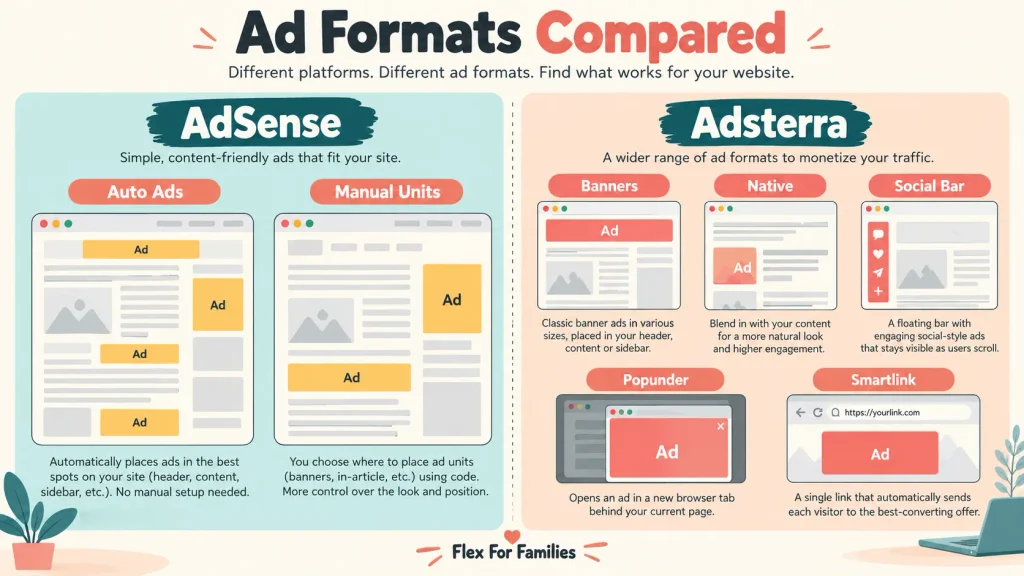
AdSense vs Adsterra Ad Formats
Adsterra offers more format variety. AdSense provides the stronger set of options for a conventional informational blog.
Google AdSense Formats
AdSense offers Auto ads and manual units. Its current Auto ads options include in-page, overlay and intent-driven formats. Publishers can preview settings, exclude areas and pages, and control available formats.
These tools allow a blogger to start with restrained display placements and add other formats only when they improve results without damaging the page.
Adsterra Formats
Adsterra offers:
- Display banners.
- Native Banners.
- Social Bar.
- Popunder advertising.
- Smartlink.
- In-page push-style formats.
- Interstitial-style Social Bar templates.
Social Bar is an on-page format that can resemble notifications, messages or other interactive elements. Popunder opens an advertising page in another tab or window after a user interaction. Smartlink sends traffic through one monetised link to an offer selected by the system.
These options give publishers flexibility. They also make it easier to choose something that does not suit the audience.
Winner for variety: Adsterra
Winner for ordinary bloggers: Google AdSense
Which Network Offers Better Ad Quality?
AdSense has the stronger starting position for a mainstream blog, but neither network can guarantee that every advertisement will suit every reader.
Google gives publishers category blocking, advertiser controls and the Ad Review Centre. Its wider brand familiarity may also make conventional display units feel less unexpected.
Adsterra states that it uses a three-level security system and has a zero-tolerance approach to malware and fraudulent activity. Publishers can report problematic advertising. However, a network can screen ads while still serving legitimate offers or formats that feel wrong for a family audience.
The issue is not simply whether an ad contains malware. It includes:
- Whether the offer suits your audience.
- Whether the format appears deceptive.
- Whether the ad interrupts reading.
- Whether it weakens trust in your recommendations.
- Whether children might use the device or view the page.
For Flex For Families, I would be more comfortable starting with restrained AdSense placements than Popunder or notification-style formats.
Winner: Google AdSense
Google AdSense vs Adsterra Payment Thresholds
Adsterra offers the lower payment threshold. The exact amount depends on the payment service.
Google AdSense UK Payments
For a UK AdSense account reporting in GBP, Google’s published thresholds include:
| Stage | Threshold |
|---|---|
| Verification | £10 equivalent |
| Payment Method Selection | £10 |
| Payment | £60 |
| Cancellation | £10 |
The £10 verification threshold does not mean Google sends a £10 test payment. It is the balance at which verification action may become necessary.
Adsterra Payments
Adsterra’s published 2026 guidance lists thresholds that vary by method. Examples include:
| Payment Method | Published Minimum |
|---|---|
| Paxum and some supported wallets | From $5 |
| PayPal | $25 |
| Wire Transfer | $1,000 |
Methods depend on country and account availability. Publishers should confirm the dashboard options before relying on a particular service.
The lower threshold helps a small publisher receive early earnings sooner. It does not mean Adsterra generates more earnings.
Winner: Adsterra

Which Pays More, AdSense or Adsterra?
There is no reliable universal winner. Neither network publishes a fixed rate that applies to every blog, country, topic and format.
AdSense earnings depend on factors including:
- Reader location.
- Topic and advertiser competition.
- Ad viewability.
- Device type.
- Season.
- Page depth.
- Consent choices.
- Placement and format.
Adsterra uses an effective CPM model that also considers impressions, clicks and conversions. Its rates vary by location, placement, traffic performance, advertiser competition and season.
A Popunder campaign may show a higher CPM than a restrained display unit, but that does not automatically make it more profitable for your business. You need to consider what happens to:
- Time on page.
- Return visits.
- Email sign-ups.
- Affiliate clicks.
- Reader trust.
- Website speed.
The better measure is total value per visitor, not the highest number shown in one advertising dashboard.
Winner: No universal winner
AdSense vs Adsterra Revenue Models
AdSense for Content pays publishers 80% of revenue after the advertiser platform has taken its fee. When Google Ads buys the display advertisement, Google says the publisher receives about 68% of the advertiser’s original spend.
Adsterra does not present one simple public revenue-share percentage across every format. It reports publisher performance using effective CPM. This means you should compare the final earnings produced by the same traffic rather than comparing two percentages that measure different things.
Any test needs enough traffic and time to reduce the effect of daily variation. A few hundred visits will rarely provide a reliable network comparison.
Reader Experience: The Most Important Difference
AdSense is easier to use without dramatically changing the browsing experience. Adsterra gives publishers more ways to monetise attention, including formats that some readers may find intrusive.
This distinction matters more than a small difference in CPM.
Lower-Risk Formats
Conventional display and native placements can sit alongside content without taking over the visit. They still need spacing, clear labelling and sensible frequency.
Higher-Risk Formats
Popunders and notification-style creatives can surprise readers. An advertisement opening in another tab may be acceptable on some entertainment or download websites, but it may feel inappropriate on a trusted parenting resource.
I would judge each format against three questions:
- Does the reader understand that this is advertising?
- Can the reader continue without difficulty?
- Is the possible income worth the effect on trust?
If the answer to any question is no, remove the format.
Winner: Google AdSense

Which Is Better for Website Speed and SEO?
Neither network is automatically good or bad for SEO. Any advertising code can affect loading, layout stability and interaction performance.
AdSense Auto ads can create too many placements when left unchecked. Google allows publishers to preview and adjust settings, so the sensible approach is to start conservatively.
Adsterra’s banners and native units create similar performance considerations. Interactive Social Bar formats or scripts may add extra demands. Popunders may not occupy page space, but their effect on user satisfaction still matters.
For either network:
- Reserve space for display units.
- Limit the number of scripts.
- Test mobile and desktop pages.
- Monitor Core Web Vitals.
- Avoid covering the main content.
- Keep closing controls clear.
- Compare engagement before and after installation.
AdSense has a small advantage because its controls and conventional formats make a restrained setup easier to plan.
Winner: Google AdSense, by a small margin
Which Has Better Publisher Controls?
AdSense gives mainstream bloggers stronger controls over placements, excluded areas, ad formats, categories and individual advertising through the Ad Review Centre.
Adsterra allows publishers to choose formats and work with its support or partner-care team. The format choice provides control at campaign level, but the platform is less focused on the detailed editorial environment of a conventional content blog.
Controls only work when you use them. Check the live site regularly rather than assuming the original settings remain appropriate.
Winner: Google AdSense
Invalid Traffic and Account Risk
Both platforms prohibit manipulated traffic, automated activity and attempts to inflate advertising earnings.
Google can restrict ad serving, deduct invalid earnings, withhold payment, suspend an account or close it. Publishers must not click their own ads, ask others to click or buy low-quality traffic.
Adsterra also prohibits fraud, malware and invalid traffic. Its terms allow account action when traffic or activity fails to meet requirements.
An easier application does not remove your responsibility for traffic quality.
Avoid:
- Clicking your own advertising.
- Asking family or readers to interact with ads.
- Buying cheap traffic packages.
- Using bots or traffic exchanges.
- Placing units where accidental clicks are likely.
- Ignoring unexplained traffic spikes.
Winner: Draw
Support and Publisher Complaints
Google provides a detailed help centre, community support and account-specific options that vary by eligibility. A frequent publisher complaint is that automated rejection or enforcement messages can feel difficult to resolve.
Adsterra promotes Partner Care and direct publisher support. This can feel more accessible. Complaints found online include low rates for some traffic, payment delays and concerns about particular advertising formats. These accounts are anecdotal and cannot establish what happened in every case.
We should not treat positive testimonials on either company’s website as typical results. We should also avoid assuming that every negative comment proves wrongdoing.
The safest approach is to:
- Read the terms before installing code.
- Keep screenshots and reports.
- Test payments before becoming dependent on the platform.
- Maintain more than one income route.
- Contact support promptly when data changes unexpectedly.
Winner: Adsterra for accessible support positioning, but evidence varies
Which Is Easier to Use on WordPress?
Both networks can work on WordPress. AdSense has the stronger beginner ecosystem because it is widely supported by themes, plugins and tutorials.
You can add AdSense through approved code, suitable plugins or theme placement areas. Auto ads reduce manual work.
Adsterra provides code for its website formats. A publisher can add it through an appropriate WordPress method, but more format choices mean more testing and judgement.
For both networks, back up the website before significant code changes. Test logged-out pages on mobile and desktop after publishing.
Winner: Google AdSense
Which Is Better for Beginner Bloggers?
Google AdSense is better for a beginner who already has a complete, useful blog. Adsterra is easier to join, but its wider format choice creates more room for a beginner to harm the reader experience.
This does not mean a brand-new blogger should apply for AdSense immediately. Focus first on:
- Original content.
- Clear navigation.
- Genuine traffic.
- Email capture.
- Suitable affiliate relationships.
- Privacy and consent.
- A fast mobile experience.
When display advertising has a clear purpose, AdSense is the better first application for a mainstream blogger.
Winner: Google AdSense
Which Is Better for Busy Parents?
AdSense is the better fit for most busy parent bloggers because it can run with limited management after a careful setup. The work is in earning approval, monitoring performance and protecting the reader experience.
Adsterra may approve faster, but choosing between banners, Social Bar, Popunder and Smartlink requires more strategic judgement. A parent blogger also needs to inspect the offers reaching a family audience.
Neither network removes the main workload. You still need to publish useful content and attract genuine visitors.
For a busy parent with limited time, I would choose the simplest setup that supports the website’s main goal. That may mean a restrained AdSense test. It may also mean no ads while you build traffic and an email list.
Winner: Google AdSense
Who Should Choose Google AdSense?
Choose AdSense if you have a conventional content website, original articles and genuine search or social traffic. It is the stronger option when brand trust and a familiar reader experience matter.
AdSense may suit you if:
- You run an information, parenting, lifestyle or tutorial blog.
- Your site is ready for a formal review.
- You can wait to reach the £60 UK threshold.
- You want Auto ads or manual display units.
- You prefer detailed blocking and placement controls.
- Your traffic complies with Google’s policies.
Who Should Choose Adsterra?
Consider Adsterra if AdSense does not fit your traffic model or you specifically need its formats. Do not choose it only because approval is faster.
Adsterra may suit you if:
- You monetise entertainment, streaming, downloads or gaming content.
- You have social or direct-link traffic.
- You want Smartlink.
- You can test Popunder or Social Bar responsibly.
- A lower payment threshold is important.
- You will monitor advertising quality and reader behaviour.
When Should You Choose Neither?
Choose neither network when your traffic is too low for display advertising to make a meaningful contribution or when ads would distract from a more valuable goal.
Waiting may be sensible if:
- Your blog is unfinished.
- You receive only a small number of visits.
- Your main goal is building an email list.
- Affiliate content produces more value per visitor.
- Page speed is already weak.
- Advertising would conflict with your brand.
- You need predictable income quickly.
No adverts can be a strategic choice. You can introduce them later when you have enough data to measure the trade-off.
AdSense vs Adsterra Pros and Cons
Google AdSense Pros
- Stronger fit for mainstream blogs.
- Familiar advertising ecosystem.
- Auto ads and manual units.
- Detailed placement and blocking controls.
- No subscription fee.
- No universal published traffic minimum.
- Strong WordPress support.
Google AdSense Cons
- Stricter approval.
- £60 UK payment threshold.
- Small sites may earn very little.
- Strict invalid-traffic enforcement.
- Ads can affect speed and attention.
- Support may feel impersonal during account problems.
Adsterra Pros
- Faster and easier publisher access.
- Payouts can start from $5 with supported methods.
- More advertising formats.
- Smartlink can monetise social traffic.
- Direct publisher support positioning.
- Relevant to traffic that may not suit AdSense.
Adsterra Cons
- Some formats may feel intrusive.
- Less natural fit for a family or parenting blog.
- Published income examples are not typical guarantees.
- Payment thresholds vary significantly by method.
- Reader trust needs closer monitoring.
- Easier access can encourage premature monetisation.

My Take: AdSense, Adsterra or Neither?
For Flex For Families, I would apply to Google AdSense before considering Adsterra. AdSense offers the stronger match for a mainstream parent-blogging audience and gives me more confidence that conventional display formats can be introduced carefully.
I would not add either network while traffic is too low to make the likely income meaningful. The website currently benefits more when a reader explores another useful article, joins the email list or follows a relevant recommendation.
Adsterra is not a scam or a useless network. It serves a different range of publishers. Smartlink, Popunder and Social Bar can make sense for traffic models where the format is expected and the audience fit has been tested.
The decision should not be based on which account is easiest to open. It should be based on which option supports the long-term value of the website.

About the Reviewer
Hi, I’m John Crossley, founder of Flex For Families.
I’m a parent, blogger, and online business owner who helps families find realistic ways to create more flexibility through blogging, affiliate marketing, and online business.
Like many people, I’ve spent years researching online opportunities, testing platforms, and learning how to separate genuine business models from expensive hype. I’ve also experienced the frustration of chasing opportunities that promised freedom but demanded more time away from family.
Today, I use that experience to review courses, side hustles, AI opportunities, and online business programmes through a simple lens:
Will this genuinely help parents create more flexibility, or will it create more pressure?
Every review on Flex For Families focuses on costs, time commitments, risks, and realistic expectations, so you can make informed decisions before investing your time or money.
Final Verdict: AdSense vs Adsterra
Google AdSense wins this comparison for most bloggers. It earns 4 out of 5, compared with 3 out of 5 for Adsterra.
AdSense has stricter approval and a higher payment threshold, but it offers the stronger balance of ad controls, WordPress support, reader familiarity and suitability for mainstream content.
Adsterra wins for easier access, format variety and lower payment thresholds. It remains a valid option for publishers with social traffic, alternative niches or a specific need for Smartlink, Social Bar or Popunder formats.
For a new or low-traffic blog, I would delay both. Build the audience first, then test display advertising when the potential return can justify the effect on speed, trust and other conversions.
If you are deciding how to build income around family life, the free Flex For Families Online Income Starter Kit can help you compare realistic options and choose a manageable next step.
Frequently Asked Questions
Is Adsterra Better Than Google AdSense?
Adsterra is better for faster approval, lower payment thresholds and formats such as Smartlink, Social Bar and Popunder. Google AdSense is better for most mainstream blogs because its controls and conventional advertising ecosystem provide a stronger fit for readers.
Which Pays More, AdSense or Adsterra?
Neither network always pays more. Earnings depend on reader location, niche, traffic quality, advertiser demand, format and season. Compare total value per visitor, including the effect on email sign-ups, affiliate clicks and return visits.
Can I Use AdSense and Adsterra Together?
It may be technically possible to use ads from more than one network, provided every platform’s current policies are followed. That does not mean it is sensible. Too many scripts and placements can slow the site and overwhelm readers. Check both sets of terms before combining them.
Does Adsterra Have a Minimum Traffic Requirement?
Adsterra does not promote a large minimum traffic requirement for ordinary publishers. It supports websites and some forms of social traffic. Low traffic will still produce limited earnings, regardless of how easily the account is approved.
What Is the Minimum Payout for AdSense and Adsterra?
The Google AdSense payment threshold for a UK GBP account is £60. Adsterra thresholds vary by payment method, with published examples starting from $5 for some wallets, $25 for PayPal and $1,000 for wire transfers.
Is Adsterra Safe for a Family Blog?
Adsterra states that it screens advertising and prohibits malware and fraud. A family-blog publisher should still test every format carefully. Popunders and notification-style Social Bar ads may be a poor match even when the advertisements are technically legitimate.
Which Ad Network Is Best for Beginner Bloggers?
Google AdSense is the better first choice for a beginner with a complete mainstream blog and genuine traffic. Adsterra is easier to access, but its wider range of formats demands more judgement. Very small blogs may benefit more from waiting and building traffic first.
Let’s Chat
Have you used AdSense, Adsterra or both? Which formats did you test, how long did your first payment take and what happened to your reader engagement? Share your experience in the comments to help other bloggers make a realistic choice.