
Landing pages are supposed to make online marketing simpler.
You create one focused page, give the visitor one clear action and measure how many people respond.
Leadpages has offered this type of software since 2012. In 2026, the company rebuilt its platform around AI page creation, testing, heatmaps and automated conversion optimisation.
The new platform looks capable. It is also far more expensive than many older Leadpages reviews suggest.
The current Grow plan starts at $99 per month. That creates an important question for bloggers: does Leadpages offer enough value to justify another substantial monthly subscription?
This Leadpages review examines what the rebuilt platform includes, the current pricing, reported customer experiences and how it compares with WordPress, ClickFunnels and Systeme.io.
Heads Up: I have not personally used Leadpages. This is a research-based review using current Leadpages documentation, pricing information, independent customer feedback and comparisons with tools available to bloggers. Features and pricing can change, so check the official website before subscribing.
Leadpages Quick Verdict
Leadpages is a legitimate landing-page and conversion optimisation platform. Its strongest features include AI page creation, unlimited traffic, A/B testing, heatmaps and campaign analytics.
It is best suited to established marketers, agencies and businesses running regular campaigns. These users are more likely to have enough traffic and commercial activity to benefit from its testing tools.
I would find it difficult to recommend Leadpages to a new blogger at $99 per month.
If you already use WordPress, Elementor Pro, an email platform and a tool such as Microsoft Clarity, you may already have most of the basic functions you need. Leadpages becomes easier to justify when improved conversion data could recover more than the subscription costs.
Overall rating: 3.5 out of 5
Leadpages at a Glance
| Detail | Finding |
|---|---|
| Product | AI landing-page and conversion optimisation platform |
| Launched | 2012 |
| Owner | Redbrick portfolio company |
| CEO | Michael Sacca |
| Grow | $99 per month |
| Optimize | $199 per month |
| Scale | $399 per month |
| Annual Discount | 20% |
| Free Plan | No |
| Publicly Advertised Trial | 7 days |
| Traffic Limits | No traffic caps |
| Best For | Established marketers, agencies and active paid campaigns |
| Poor Fit | New or low-traffic bloggers watching their costs |
| Main Strength | Testing and optimisation tools in one platform |
| Main Drawback | High starting price |
| First-Hand Experience | None, research-based review |
| Overall Rating | 3.5/5 |
What Is Leadpages?
Leadpages is software for creating landing pages, websites and focused marketing campaigns without coding.
A landing page is a standalone page built around one action. That action might be joining an email list, registering for a webinar, booking a call or buying a product.
The rebuilt Leadpages platform can help users create, publish, measure and test these pages. Its current feature set includes:
- AI page creation
- Landing pages
- Marketing websites and blogs
- Lead-capture forms
- A/B testing
- Smart Traffic
- Heatmaps
- Campaign analytics
- Stripe checkout
- Custom domains and SSL
- Connections with email, CRM and advertising tools
Leadpages is not an email marketing platform in the same sense as Kit. It is not a complete sales-funnel environment in the same sense as ClickFunnels. Its main focus is creating and improving the pages where conversions happen.
How Does Leadpages Work?
The typical Leadpages workflow is:
- Describe the campaign you want to create.
- Let the AI builder generate a page or start with an existing design.
- Edit the copy, images, colours and layout.
- Add a form, checkout or other conversion action.
- Connect your domain and relevant marketing tools.
- Review the mobile version, privacy wording and tracking.
- Publish the page.
- Monitor visits, clicks and conversions.
- Test changes when you have enough traffic.
Leadpages says its AI builder can produce a branded page from a written prompt in about 60 seconds.
That can reduce the time required to create the first version. It does not remove the need to review the offer, copy, layout, integrations and privacy settings before publishing.
Who Owns Leadpages?
Leadpages launched in Minneapolis in 2012. Clay Collins and Tracy Simmons were among its original founders.
Redbrick acquired the company in 2020. Michael Sacca became CEO in 2024, following leadership roles at technology companies including Dribbble and Crew.
Leadpages says it has served more than 400,000 businesses since launching. The company rebuilt the platform for 2026 with a new technical foundation and a stronger focus on AI and conversion optimisation.
Quick Note: I’m John Crossley, founder of Flex For Families. I review online business opportunities through the lens of family life, focusing on costs, time commitments, risks, and whether they genuinely help parents create more flexibility.
What Does Leadpages Include?
AI Page Creation
The AI builder generates a page from a description of your campaign. Leadpages says it can apply a brand kit from your website and produce the initial copy, layout, forms and images.
This can accelerate the first draft. You still need to check:
- Whether the claims are accurate
- Whether the wording sounds like your business
- Whether the offer is clear
- Whether the form sends data to the correct place
- Whether mobile visitors can use the page easily
- Whether the privacy and consent wording is suitable
Fast creation is helpful. A page still needs strategy and human review.
Landing Pages, Websites and Blogs
Leadpages can publish individual landing pages and multi-page marketing sites. The rebuilt platform also supports blogs.
This may suit a small business that wants its campaigns and main website in one place.
For an established WordPress blogger, moving the entire website would be a much larger decision. Leadpages may make more sense as a campaign tool alongside WordPress rather than as an automatic replacement.
A/B Testing
A/B testing compares two or more versions of a page. You might test a different headline, image, offer or call to action.
Leadpages includes A/B testing from its $99 Grow plan. Users can run a simple split test, use AI assistance or allow more of the process to run automatically on higher plans.
Testing can be valuable. It also needs sufficient traffic and conversions.
If each page version receives only a few visitors, a small difference in results could be random. The software cannot create a reliable conclusion from an inadequate sample.
Smart Traffic
Smart Traffic starts with the Optimize plan at $199 per month.
It attempts to route each visitor to the page version most likely to convert, using signals such as traffic source, device and previous performance.
That could be useful for a business sending regular paid traffic to several page variations. It is unlikely to justify a $199 subscription for a new blogger receiving limited traffic.
Heatmaps and Analytics
Heatmaps show where visitors click and how far they scroll. Leadpages combines this information with page views, conversions and other campaign data.
Heatmaps begin with the Optimize plan.
This is useful information, but it is worth checking what you already have. Microsoft Clarity provides heatmaps and session recordings without a monthly fee. Google Analytics and your email platform may provide other parts of the picture.
The value of Leadpages is having more of this data attached directly to the campaign-building and testing process.
Self-Improving Pages
The Scale plan includes the fullest automation. Leadpages can generate challengers, run tests, choose winners and begin another test.
At $399 per month, this is designed for marketing teams and agencies with enough traffic, campaigns and revenue to act on continual testing.
It is not a realistic starting point for most parent bloggers.
Stripe Checkout
Leadpages can embed Stripe checkout into a page. This allows a business to accept one-time and recurring payments without sending the buyer to a separate cart.
You will still need to consider Stripe processing charges, refunds, customer support, tax and delivery of the product or service.
Integrations
Leadpages lists integrations with services including HubSpot, Salesforce, Mailchimp, ActiveCampaign, Stripe, Shopify, Google Analytics and major advertising platforms.
Zapier can connect Leadpages with thousands of other applications. Webhooks and API access provide additional options.
Kit does not appear on the current main list of native connections. A Kit user should confirm the current setup before subscribing because Zapier, a webhook or another connection method may be required.
How Much Does Leadpages Cost in 2026?
Leadpages currently offers three main plans.
| Plan | Monthly Price | Main Positioning |
|---|---|---|
| Grow | $99 | AI page creation and A/B testing |
| Optimize | $199 | Smart Traffic, heatmaps and more advanced optimisation |
| Scale | $399 | Full automated optimisation for teams and agencies |
Annual billing provides a 20% discount. That makes the approximate monthly equivalents $79.20, $159.20 and $319.20, paid annually.
Every plan includes unlimited pages, unlimited traffic, custom domains with SSL and access to the core platform. The number of active integrations and the speed of data syncing vary by plan.
There is no permanent free plan.
Why Do Some Websites Still Show Leadpages at $37?
You may find older Leadpages pages and reviews showing Standard at $37 per month and Pro at $74 per month when billed annually.
Those prices belong to the previous version of the platform.
Leadpages’ current main website says the rebuilt platform starts with Grow at $99 per month. Always check the live pricing and checkout pages before subscribing.
This matters because a review based on the old price could reach a very different value judgement.
Does Leadpages Have a Free Trial or Refund Guarantee?
The current Leadpages website advertises a seven-day free trial.
However, the legal terms updated in April 2026 still refer to a 14-day trial followed by a seven-day money-back guarantee for new accounts. The same terms say renewals do not qualify for that guarantee.
This is an important inconsistency. Check the exact trial and billing terms shown at checkout and keep a copy before entering payment details.
The legal terms also state that subscriptions renew automatically. You can cancel before the next subscription term, but Leadpages does not provide prorated refunds for unused time. A charge caused by missing the renewal cancellation deadline is also described as non-refundable.
Are There Additional Costs?
The Leadpages subscription may not be your only expense.
Depending on your setup, you may also pay for:
- An email marketing platform
- A custom domain
- Paid advertising
- Zapier or another integration tool
- Stripe processing fees
- Premium images or creative work
- Copywriting
- Customer relationship software
- UK VAT or other applicable tax
The Grow plan costs $1,188 across 12 monthly payments before any of these additions.
That does not make it poor value automatically. It means the platform needs to save or generate enough money to cover a meaningful fixed cost.
Does Leadpages Work With WordPress?
Yes. You can use Leadpages for focused campaign pages while keeping the main website on WordPress.
The more useful question is whether that arrangement improves your workflow.
WordPress users may already have a page builder, forms, popups, analytics and email connections. Adding Leadpages could provide better centralised testing, but it also creates another platform to configure and maintain.
If your current setup produces effective landing pages, the main reason to add Leadpages would be its integrated conversion testing and optimisation.
Do Bloggers Need Leadpages?
Most new bloggers do not need Leadpages.
A blogger using WordPress and Elementor Pro can build focused landing pages. Poptin can manage popups. Kit can collect subscribers and run email sequences. Microsoft Clarity can provide heatmaps and session recordings.
That setup may not be as centralised as Leadpages, but it covers the main functions at a lower incremental cost for someone who already pays for the tools.
Leadpages becomes more compelling when:
- You run regular paid campaigns
- Landing pages directly generate revenue
- You create campaigns frequently
- You have enough traffic to test changes
- Several disconnected tools are slowing the team down
- Better conversion performance has measurable financial value
Buying a conversion platform before you have a clear offer and steady traffic can put the tools ahead of the business.
Is Leadpages Easy to Use?
Leadpages is designed for users without coding skills. Ease of use is one of the more consistent positives in independent customer reviews.
The AI builder can remove the blank page and drag-and-drop editing should make visual changes accessible.
The complete setup still involves more than creating a page. You may need to connect a domain, email service, analytics, advertising pixels, payment processing and consent wording.
A beginner can learn this. It is not a single-click route to a complete campaign.
Is Leadpages Good for Beginners?
Leadpages is technically suitable for beginners but financially difficult to recommend to many of them.
The platform can help a non-technical user publish a professional page. The starting price assumes that the user has a serious campaign and a reason to test performance.
Someone still choosing a niche, creating their first articles or building an initial audience will usually benefit more from investing time in content, an email offer and understanding the reader.
Ease of use does not make every tool a sensible early purchase.
Is Leadpages a Good Fit for Busy Parents?
Leadpages could save a busy parent time when they regularly create landing pages and want testing, analytics and checkout in one place.
It can also add:
- Another monthly subscription
- Another dashboard
- Another integration to maintain
- More campaign data to review
- Pressure to use advanced features to justify the cost
The Family Flexibility Filter asks whether a tool gives you more control over your time and workload.
For a parent with an established offer and active campaigns, Leadpages may pass that test. For a new blogger, it is more likely to add cost before the advanced features become useful.
Busy Parent Fit: 2.5 out of 5
How Much Traffic Do You Need Before Testing Helps?
There is no useful universal traffic number for every A/B test.
The required sample depends on your current conversion rate, the size of the change you want to detect and how confident you need to be in the result.
The practical lesson is simpler: a page with very little traffic will take longer to produce useful evidence.
Do not declare a winner because one version generated two signups and another generated one. Continue gathering data and focus first on material changes such as the offer, headline or call to action.
Can Leadpages Increase Your Conversions?
Leadpages can give you the tools to measure and improve conversion performance. Installing it does not automatically increase conversions.
The outcome still depends on:
- The offer
- Audience relevance
- Traffic quality
- Page copy
- Design clarity
- Trust
- Mobile performance
- Follow-up emails
- The product or service
Testing a weak offer more efficiently does not turn it into a strong one.
What Do Leadpages Customers Say?
Customer feedback is mixed across review platforms.
G2 showed a rating of 4.3 out of 5 from 231 reviews when this article was researched. Users frequently praised the ease of creating mobile-ready pages, speed and helpful support. Reported drawbacks included price, limited flexibility, editing problems and missing features.
Capterra showed 4.5 out of 5 from approximately 302 reviews.
Trustpilot presented a less positive picture, with historical scores around 2.5 to 3 out of 5 across more than 400 reviews. Complaints included billing, cancellation, support and product frustrations.
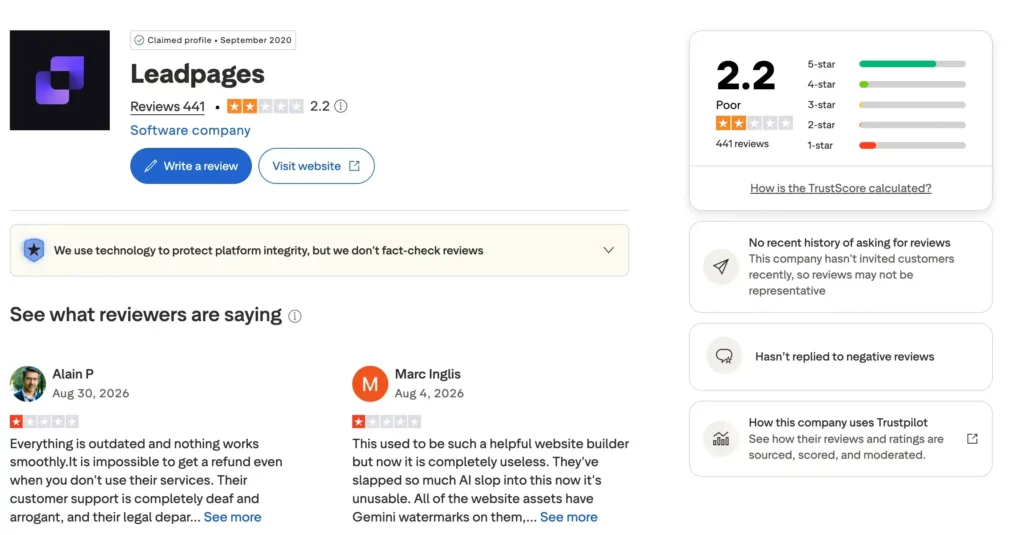
These scores need context. Some reviews relate to the previous Leadpages platform, while the rebuilt product arrived in 2026. Review platforms also use different verification and collection methods.
The fairest conclusion is that Leadpages has many satisfied users, but price and account management deserve careful attention.
What Are the Main Leadpages Complaints?
The Price Feels High
At $99 per month, Leadpages now competes for a meaningful share of a small business budget.
The value may be clear for a team spending thousands on advertising. It is harder to establish for a low-traffic blog.
Design and Editing Limitations
Some users report wanting more flexibility or finding parts of the editing process frustrating.
No page builder provides unlimited freedom. Users who want detailed control may prefer their existing WordPress builder.
Billing and Cancellation
Some public reviews describe frustration with charges, renewals or cancellation.
The official terms state that subscriptions renew automatically, renewal charges are not covered by the money-back guarantee and unused time is not refunded on a prorated basis.
Set a reminder before the renewal date if you decide to test the platform.
The New Platform Has Limited History
Leadpages has operated since 2012, but its rebuilt 2026 product is new.
Older reviews may not reflect the current interface. Equally, the new platform has not had years of independent testing at the time of writing.
Is Leadpages Legitimate or a Scam?
Leadpages is a legitimate software company, not a scam.
It has operated since 2012, has served a large customer base and is owned within the Redbrick portfolio.
That does not mean it is suitable for every user. Legitimacy and value are different questions.
The price, automatic renewal and limited refund terms mean you should understand the commitment before subscribing.
Leadpages Pros and Cons
Pros
- AI-assisted page creation
- No coding required
- Unlimited pages and traffic
- Built-in A/B testing
- Heatmaps and Smart Traffic on higher plans
- Campaign analytics
- Stripe checkout
- Custom domains and SSL
- Established company
- Useful integrations and API options
Cons
- $99 monthly starting price
- Best optimisation features require $199 or $399 plans
- No permanent free plan
- Does not create traffic or a compelling offer
- Other subscriptions may still be required
- Limited value for low-traffic beginners
- Trial information differs between the website and legal terms
- Some reported billing, editing and support complaints
Leadpages vs WordPress and Elementor Pro
Leadpages and WordPress solve overlapping but different problems.
| Area | Leadpages | WordPress and Elementor Pro |
|---|---|---|
| Main Strength | Campaign creation and optimisation | Website ownership and content publishing |
| Landing Pages | Yes | Yes |
| Blogging | Yes | Stronger established ecosystem |
| A/B Testing | Built in | Usually needs another tool |
| Heatmaps | Optimize plan and above | Available through tools such as Clarity |
| Email Marketing | Requires integration | Requires integration |
| Design Control | Campaign focused | Broad control through themes and plugins |
| Best Fit | Active marketing campaigns | Content-led websites and blogs |
If you already use WordPress and Elementor Pro, Leadpages needs to improve campaign speed or performance enough to justify duplicating some functionality.

Leadpages vs ClickFunnels vs Systeme.io
These products overlap, but they are not identical.
| Platform | Best For | Main Limitation for Beginners |
|---|---|---|
| Leadpages | Focused landing pages and conversion testing | Starts at $99 per month |
| ClickFunnels | Complex sales funnels, upsells and customer journeys | Cost and learning curve |
| Systeme.io | Budget-conscious users wanting funnels, email and courses together | Less specialised conversion optimisation |
Choose Leadpages when landing-page testing and campaign data are the priority.
Choose ClickFunnels when you need a more complex sales-funnel system and can justify the expense.
Choose Systeme.io when you want several core tools in one lower-cost platform.
For a beginner blogger, Systeme.io or an existing WordPress setup will usually be easier to justify financially.
Who Is Leadpages Best For?
Leadpages is best suited to:
- Businesses running paid advertising
- Agencies managing several campaigns
- Coaches launching offers regularly
- Established creators with proven products
- Marketers who need testing and heatmaps
- Teams able to act on conversion data
- Businesses where small conversion improvements have measurable value
Who Should Avoid Leadpages?
You may want to avoid Leadpages if:
- You are still choosing your niche
- Your blog has very little traffic
- You already build suitable pages with Elementor Pro
- You expect the software to find customers
- You cannot comfortably justify $99 per month
- You want email marketing included
- You prefer fewer subscriptions and dashboards
My Take on Leadpages
Leadpages looks like a capable platform for a business that treats landing pages as a regular and measurable part of its marketing.
The rebuilt platform has a clearer purpose than a basic page builder. It combines creation, testing, visitor behaviour and optimisation in one place.
However, I would not add it to Flex For Families at this stage.
My current setup already includes WordPress, Elementor Pro, Poptin, Kit and Microsoft Clarity. Together, these cover page building, popups, email capture, automation and visitor behaviour.
Leadpages could centralise some of that work. It would still need to save enough time or improve enough conversions to justify at least $1,188 across 12 monthly payments.
That calculation will be different for a business running paid advertising or selling a proven high-value offer.
For a beginner blogger, the better priority is usually a useful offer, consistent content, steady traffic and an email follow-up process.

About the Reviewer
Hi, I’m John Crossley, founder of Flex For Families.
I’m a parent, blogger, and online business owner who helps families find realistic ways to create more flexibility through blogging, affiliate marketing, and online business.
Like many people, I’ve spent years researching online opportunities, testing platforms, and learning how to separate genuine business models from expensive hype. I’ve also experienced the frustration of chasing opportunities that promised freedom but demanded more time away from family.
Today, I use that experience to review courses, side hustles, AI opportunities, and online business programmes through a simple lens:
Will this genuinely help parents create more flexibility, or will it create more pressure?
Every review on Flex For Families focuses on costs, time commitments, risks, and realistic expectations, so you can make informed decisions before investing your time or money.
Is Leadpages Worth It in 2026?
Leadpages is worth considering if you have proven offers, active campaigns and enough traffic to use its testing tools properly.
It is difficult to justify for a new or low-traffic blogger.
The $99 Grow plan includes useful features, but the more distinctive heatmaps and Smart Traffic begin at $199 per month. Many bloggers can build landing pages and collect subscribers with tools they already own.
My overall rating is 3.5 out of 5.
It is a strong specialist platform for the right business. It is not an essential blogging expense.
Before adding another subscription, calculate what the tool must save or generate each month. If you cannot identify a clear use case, keep building the fundamentals first.
Start With the Blogging Fundamentals
You do not need an expensive conversion platform to take your first step.
The free Parent Blogging Starter Kit helps you choose a direction, plan content and build around the time your family actually gives you.
Get the Free Parent Blogging Starter Kit
Frequently Asked Questions
Is Leadpages Legitimate?
Yes. Leadpages is an established landing-page and conversion software company that has operated since 2012. Redbrick acquired the business in 2020, and Leadpages says it has served more than 400,000 businesses. It is legitimate, but its $99 starting price will not offer good value for every blogger.
How Much Does Leadpages Cost?
Leadpages currently costs $99 per month for Grow, $199 for Optimize and $399 for Scale. Annual billing provides a 20% discount. There is no permanent free plan. Check the live pricing page because older Leadpages pages may still show the previous $37 and $74 plans.
Does Leadpages Offer a Free Trial?
The current Leadpages website advertises a seven-day free trial. Its April 2026 legal terms still mention a 14-day trial followed by a seven-day money-back guarantee for new accounts. Because these sources differ, confirm the exact trial, payment date and refund terms shown during checkout.
Is Leadpages Good for Beginners?
Leadpages is designed to be accessible without coding, so a beginner can use it. The bigger problem is value. Someone without a proven offer or regular traffic may struggle to justify at least $99 per month, especially when WordPress and lower-cost tools can create effective landing pages.
Does Leadpages Work With WordPress?
Yes. You can keep your main website on WordPress and use Leadpages for specific campaigns. This can add centralised testing and conversion data, but it also creates another subscription and platform. WordPress users should first check whether their existing page builder, forms and analytics already meet their needs.
Can Leadpages Replace an Email Marketing Platform?
No. Leadpages can collect leads and send their details to connected services, but it is not a complete replacement for an email platform such as Kit or ActiveCampaign. You may still need separate software for broadcasts, welcome sequences, segmentation and ongoing subscriber management.
Is Leadpages Worth $99 per Month?
Leadpages may be worth $99 per month for an established business running campaigns with enough traffic to test and improve conversions. It is usually difficult to justify for a new or low-traffic blogger. The answer depends on whether the platform saves or generates more value than its subscription and related costs.
Let’s Chat
Have you tried the rebuilt version of Leadpages?
I would be interested to know which plan you used, whether it saved you time and whether the testing tools justified the price.
Share your experience in the comments. It may help another reader decide whether Leadpages fits their business.