You can find your main campaign analytics from the Popups area of your Poptin dashboard. The figures show how many people visited your site, saw a campaign and completed its conversion action.
Poptin also lets you create campaign variants and rotate them between eligible visitors. This can help you compare offers, headlines, triggers and designs without relying entirely on guesswork.
The feature is easy to start. Knowing when the result is reliable enough to influence a decision is harder.
I use Poptin on Flex For Families with WordPress and Kit. My current figures provide a useful example of why you should establish a baseline before dividing your traffic between several versions.
Transparency Note: I use Poptin on Flex For Families and am a member of its affiliate programme. This article contains affiliate links, which means I may earn a commission if you sign up through them, at no extra cost to you. My guidance is based on my own experience using Poptin’s free plan.
Where Can You Find Poptin Analytics?
Your campaign figures are available from the Poptin dashboard.
The basic route is:
- Sign in to Poptin.
- Open Popups.
- Find the campaign you want to assess.
- Select the relevant date range.
- Review the visitors, views, conversions and conversion rate.
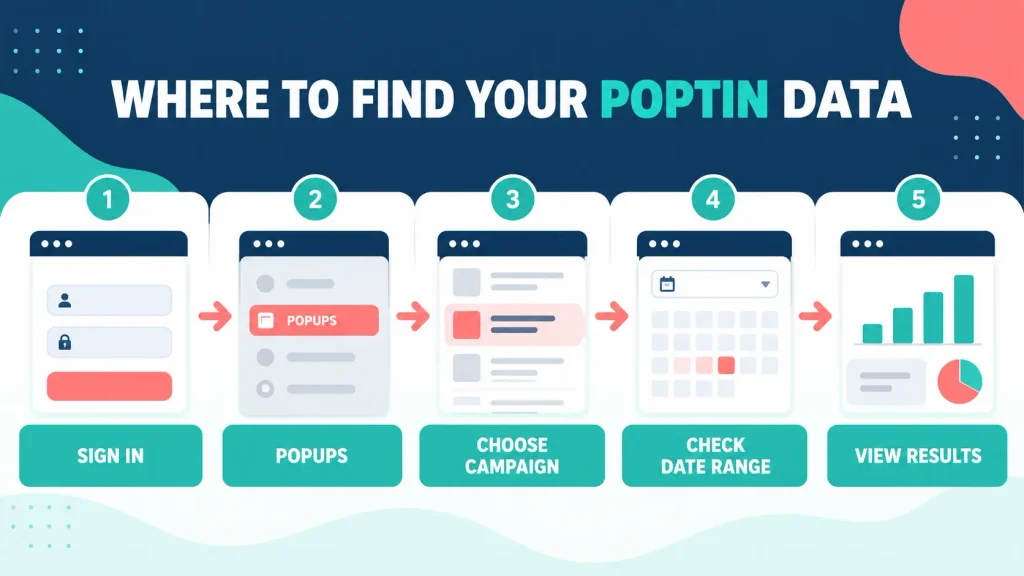
Poptin may update its dashboard wording or icon positions. The important starting point is the Popups summary, where each campaign and its performance data are brought together.
Use a campaign name that tells you what the popup does. “Starter Kit, 50% Scroll, Bottom Corner” is more useful than “Popup 3” when you return several months later.
Which Poptin Metrics Should You Check?
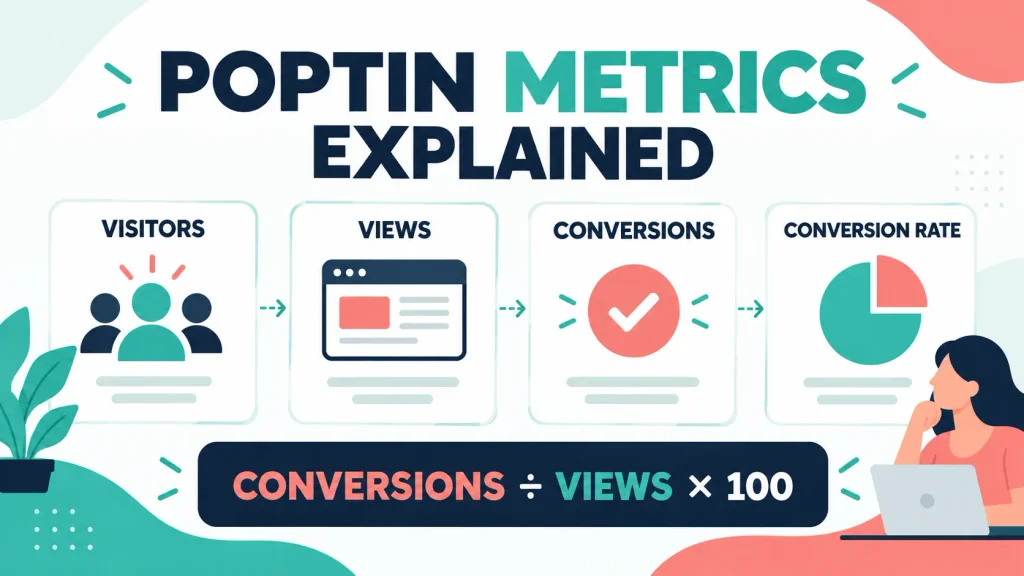
The four figures you will use most often are visitors, views, conversions and conversion rate.
Visitors
Visitors represent the people reaching pages where your Poptin installation is active under the platform’s counting rules.
This number will normally be higher than campaign views because not every visitor meets the trigger and targeting conditions.
A reader may leave before reaching your scroll percentage. They may visit an excluded page, use a device you have excluded or fall under a display-frequency rule.
Views
A view is recorded when Poptin displays the popup or form.
Views matter because they show how many people had the opportunity to complete the campaign action. Poptin uses views when calculating the conversion rate.
If a website receives plenty of visitors but very few popup views, check the page targeting, trigger, device rules and display frequency.
Conversions
Poptin records two main conversion types:
- Lead conversion: A visitor submits a campaign containing form fields.
- Click conversion: A visitor clicks a qualifying button on a campaign without form fields.
Poptin states that conversions are counted when the submit or additional conversion button is clicked. A link button must have the relevant conversion-counting setting enabled if you want that action recorded.
For my Starter Kit campaign, the meaningful conversion is a completed form that sends the subscriber into Kit.
Conversion Rate
Poptin calculates conversion rate using this formula:
Conversions divided by views multiplied by 100.
For example:
2 conversions divided by 237 views multiplied by 100 = 0.84%.
That calculation is straightforward. Interpreting whether 0.84% is good, poor or temporary requires more context.
My Current Poptin Analytics
My latest 30-day snapshot showed:
| Metric | Result |
|---|---|
| Website visitors | 744 |
| Popup views | 237 |
| Conversions | 2 |
| Conversion rate | 0.84% |
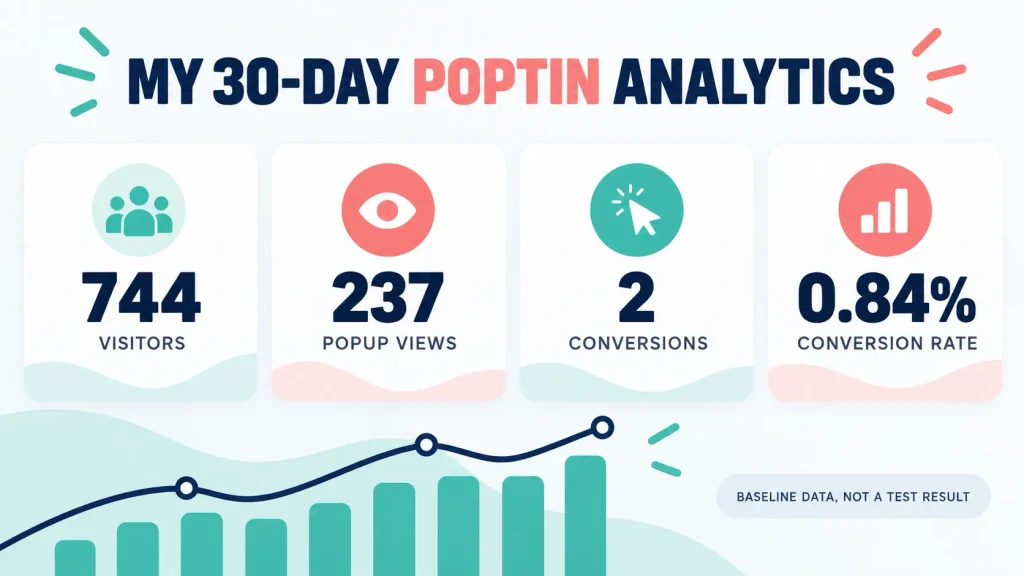
The main popup uses exit intent and a 20% scroll trigger. A smaller bottom-corner popup appears after someone scrolls through 50% of the page.
Poptin sends completed forms into Kit. Kit delivers the Parent Blogging Starter Kit and begins the welcome sequence.
These numbers confirm that:
- The campaigns are displaying.
- Visitors can complete the form.
- Poptin is recording conversions.
- The Poptin and Kit integration works.
- Kit sends the promised resource.
They do not confirm:
- Which campaign performs best
- Whether 20% or 50% scroll is stronger
- Whether exit intent improves results
- Whether another headline would convert better
- Whether 0.84% is the stable long-term rate
One additional conversion would increase the rate from 0.84% to approximately 1.27%. The percentage moves quickly when it is based on only two conversions.
Choose the Right Date Range
Always confirm the date range before comparing campaigns.
Useful periods include:
- Last seven days
- Last 30 days
- Current month
- Previous month
- Full campaign lifetime
- A defined A/B testing window
Avoid comparing seven days from one campaign with 30 days from another. Also consider whether a traffic spike, promotion, technical problem or seasonal change affected the period.
A monthly review is normally enough for a lower-traffic blog. Checking the dashboard every day can make normal movement feel more important than it is.
How to Find Leads Captured by Poptin
Poptin’s current guidance directs users to Audience, then Conversions, to access captured leads.
From there, you can:
- Set the date range.
- Search for a specific campaign.
- Review captured contact details.
- Check when the conversion occurred.
- Export the information if required.
Compare the Poptin lead with the contact in Kit. This helps identify cases where Poptin recorded the form submission but the subscriber did not reach the intended Kit form, tag or automation.
When troubleshooting, use a fresh email address and test the complete journey. Confirm that the contact reaches Kit, the first email arrives and the Starter Kit link works.
How to Download a Manual Poptin Report
Poptin allows you to download an XLS report from the campaign area.
Its current help instructions direct users to the small report-download icon near the campaign search area. The exported table can include visitors, views, conversions and conversion percentages across your Poptins.
A manual monthly export can help you:
- Keep a historical snapshot
- Compare campaigns over time
- Record changes to triggers or offers
- Avoid relying on memory
- Share results with a client or collaborator
Add a note beside each report explaining any substantial campaign change. The numbers are more useful when you know what was active during the period.
How to Set Up Automatic Poptin Reports
Poptin supports automatic conversion and statistics reports.
To create one:
- Open Settings.
- Select Automatic Reports.
- Choose a conversion or statistics report.
- Select daily, weekly or monthly delivery.
- Set the delivery time and timezone.
- Enter the receiving email address.
- Save the report.
You can create more than one scheduled report. Poptin also provides an option that affects whether click conversions are included, so check that setting before comparing totals.
For a busy parent blogger, a monthly report is usually enough while traffic remains modest. A weekly report may become useful when you are running an active test. Daily reports can encourage overreaction to small movements.
What Should You Monitor Outside Poptin?
Poptin measures the popup action. It does not provide the whole subscriber journey.
Poptin Data
- Campaign views
- Leads or tracked clicks
- Conversion rate
- Captured contact details
Kit Data
- Successful contact arrival
- Email delivery
- Opens and clicks
- Unsubscribes
- Welcome-sequence engagement
Website Data
- Traffic source
- Landing page
- Device
- Engagement
- Returning visitors
A popup with a high conversion rate could attract people who never read an email. A more specific campaign might generate fewer leads but produce stronger engagement.
The real result is not merely a form submission. It is a subscriber who receives the promised resource and continues to find your content useful.
What Is Poptin A/B Testing?
Poptin A/B testing divides eligible traffic between two or more campaign variants so you can compare performance.
For a simple two-version test:
- One group sees Version A.
- Another group sees Version B.
- Poptin records views and conversions for each.
- You compare the conversion rates and wider lead quality.
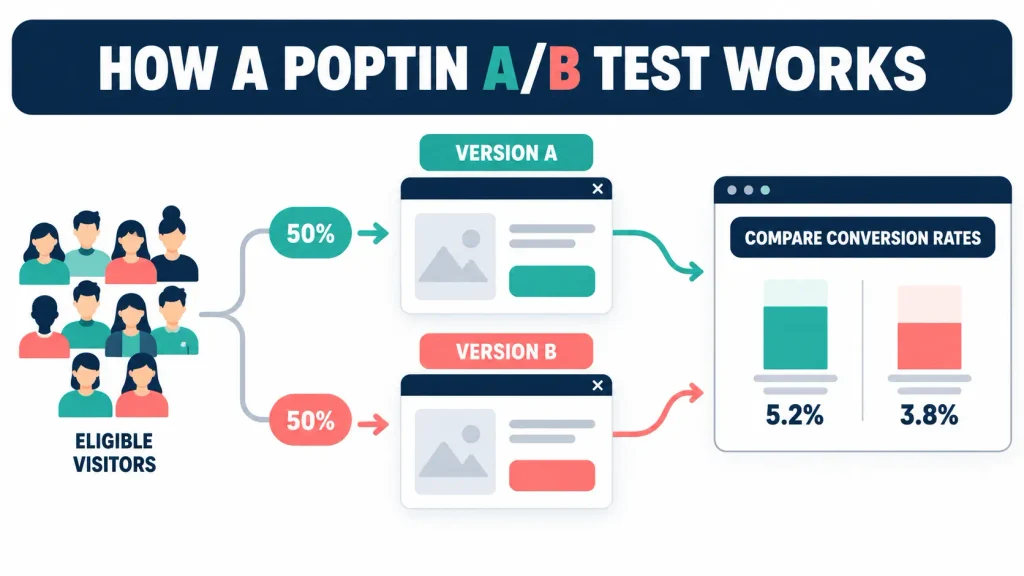
Poptin rotates the variants between visitors. Its documentation states that a visitor will continue to see the same selected version during that visit.
This simultaneous comparison is generally more useful than running Version A in one month and Version B during a completely different traffic period.
How to Create a Poptin A/B Test
The current Poptin process is:
- Sign in to your Poptin dashboard.
- Open Popups.
- Find the campaign you want to test.
- Select the A/B Test icon.
- Choose Same Template or New Template.
- Create the new variant.
- Change the element you want to test.
- Review the display rules.
- Publish the variant.
- Monitor both versions during the planned test period.
Poptin can support more than two variants. That does not mean a lower-traffic blog should create versions A, B, C and D. Each extra variation divides the available traffic again.
Same Template or New Template?
Choose Same Template when you want to isolate a smaller change, such as:
- Headline
- CTA wording
- Image
- Form length
- Offer wording
- Button design
Choose New Template when you want to compare substantially different formats, such as:
- Lightbox versus slide-in
- Large popup versus bottom-corner campaign
- Image-led versus text-led layout
- Different campaign structures
For a first test, the same template is usually easier to interpret because fewer elements change.
What Should You Test First?
Test the changes most likely to influence the reader’s decision before spending time on minor styling.
My recommended order is:
- Offer
- Audience and page match
- Trigger or timing
- Headline
- CTA
- Form fields
- Image
- Smaller design details
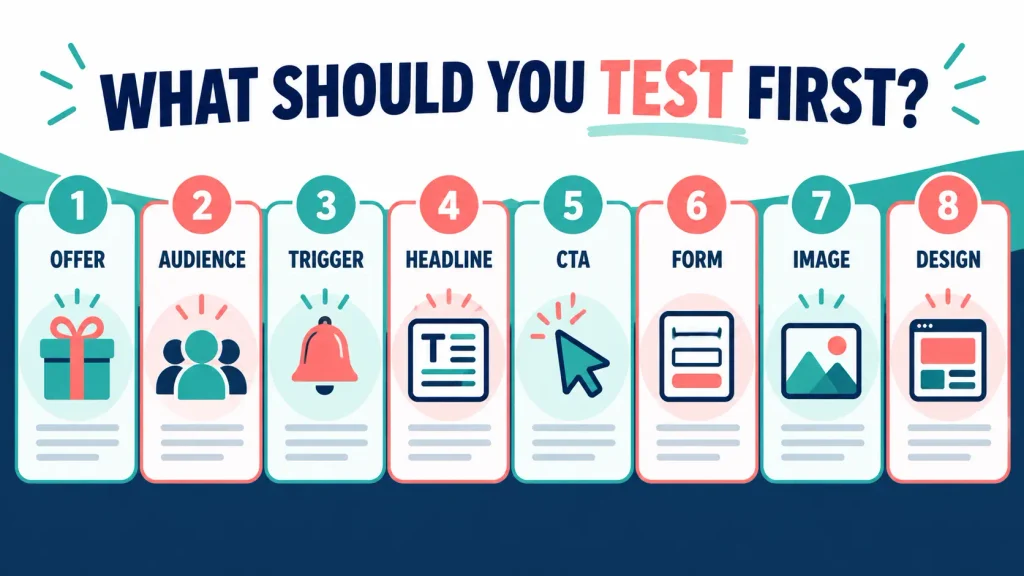
A button-colour test may be easy to create. It is unlikely to rescue an offer that the visitor does not want.
Test One Meaningful Variable at a Time
A useful test changes one major element while keeping the rest of the campaign consistent.
For example:
Version A: Get the Free Parent Blogging Starter Kit
Version B: Start Your Parent Blog With This Free Starter Kit
The design, offer, fields, targeting and trigger remain the same. If one version performs consistently better, the headline is the most likely reason.
An unclear test changes the headline, image, offer, CTA and trigger at the same time. Even if Version B wins, you will not know which change influenced the result.
Can You A/B Test Poptin Triggers?
Yes. Poptin lets you create variants with different display rules.
Possible trigger tests include:
- 20% scroll versus 50% scroll
- Ten-second delay versus scroll depth
- Exit intent versus time delay
- Lightbox versus bottom-corner slide-in
If the trigger is the variable, keep the offer, design, fields and page targeting unchanged.
Poptin generally recommends using the same display rules when you are testing another element. Different rules are appropriate when the trigger itself is the subject of the test.
When Should You Start A/B Testing?
Start when the result can support a useful decision, not simply because the feature is available.
A worthwhile test needs:
- A clear conversion goal
- A working campaign
- A reliable baseline
- Enough traffic
- Enough conversions
- Comparable traffic quality
- A planned stopping rule
- No major redesign during the test
My current 237 popup views and two conversions do not provide enough activity for a meaningful split test.
Dividing 237 views equally would give each variant approximately 118 or 119 views. If one version received a single conversion and the other received none, the apparent difference would look substantial despite being based on one person.
How Much Traffic Does a Poptin A/B Test Need?
There is no universal number that makes every test reliable.
The sample required depends on:
- Baseline conversion rate
- Size of the improvement you want to detect
- Traffic consistency
- Required confidence
- Number of variants
- How traffic is divided
For a lower-traffic blog:
- Establish a baseline first.
- Test larger meaningful differences.
- Use two versions rather than several.
- Let the test cover full weekly cycles.
- Avoid changing other major site elements.
- Treat low-volume findings as directional.
- Do not claim statistical certainty from a handful of conversions.
If a site cannot supply enough traffic for formal testing, qualitative checks still matter. Review the mobile layout, ask whether the offer matches the page and test the full delivery journey.
How Long Should a Test Run?
Run the test until it reaches the planned sample and covers normal traffic patterns.
Do not stop as soon as one variant moves ahead. Early results can change quickly, especially when conversion volume is low.
A sensible test should usually cover at least one complete weekly cycle. A small blog may need several weeks or longer.
Decide the stopping rule before publishing the variant. This reduces the temptation to finish when the preferred version happens to be winning.
How to Read A/B Test Results
Compare more than the headline conversion rate.
Review:
- Views for each version
- Conversions
- Conversion rate
- Traffic distribution
- Device and page context
- Lead quality
- Email engagement
- Unsubscribes
- Downstream actions
For example:
| Variant | Views | Conversions | Conversion Rate |
|---|---|---|---|
| A | 500 | 10 | 2.0% |
| B | 500 | 14 | 2.8% |
Version B appears stronger. Before adopting it permanently, check that both versions received comparable traffic and that Version B’s subscribers engaged after signing up.
Do not use this example as a universal benchmark. It only demonstrates how the calculation works.
What Should You Do With the Winning Variant?
Use a simple review process:
- Confirm the test ran for the planned period.
- Check for technical or traffic anomalies.
- Review lead quality and email engagement.
- Keep the stronger version if the evidence supports it.
- Record what you tested.
- Write down what you learned.
- Use that learning to form the next test.
A useful testing process produces a record of decisions. Without that record, it is easy to repeat the same test or forget which version changed.
Common Poptin A/B Testing Mistakes
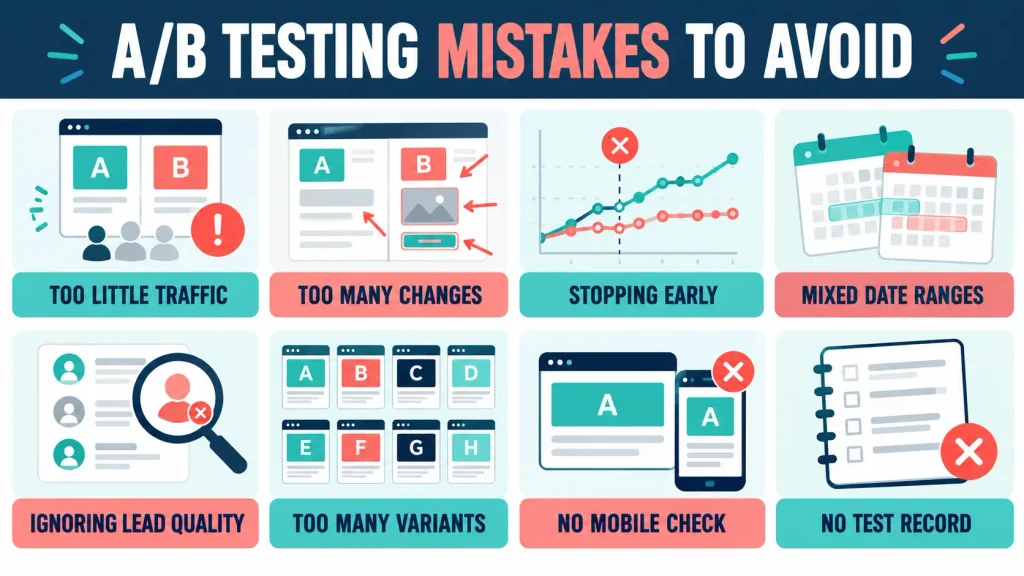
Testing With Too Little Traffic
A handful of views or conversions can make one version appear stronger by chance.
Changing Several Variables
You cannot identify the cause when the offer, image, headline and trigger all change together.
Stopping Too Early
An early lead can disappear as more visitors enter the test.
Comparing Mixed Date Ranges
Different periods may contain different traffic sources, promotions or seasonal behaviour.
Ignoring Lead Quality
More form submissions are not automatically better if the subscribers immediately disengage.
Creating Too Many Variants
Each extra version divides the available traffic and slows learning.
Forgetting Mobile
A campaign may perform differently on mobile because the layout and exit behaviour change.
Failing to Record the Test
Write down the hypothesis, variable, dates, results and decision.
What I Will Do With My Flex For Families Campaigns
I am not launching a formal A/B test after two conversions.
My next steps are:
- Continue collecting baseline data.
- Review each campaign separately.
- Monitor the 20% and 50% scroll experiences.
- Check mobile and desktop presentation.
- Confirm every test lead reaches Kit.
- Monitor engagement with the Starter Kit email.
- Wait for more traffic and conversions.
- Test one meaningful variable first.
- Record the result before changing anything else.
The first test is likely to focus on the offer, headline or trigger. These elements can change the visitor’s decision more than a minor design adjustment.
Final Verdict
Poptin makes it straightforward to monitor views, conversions and conversion rate. Its downloadable reports, scheduled reports and built-in A/B testing give bloggers practical ways to improve campaigns without adding another analytics platform.
The difficult part is knowing when the data is strong enough to support a decision.
For Flex For Families, the next step is continued measurement rather than immediate split testing. Two conversions prove that the funnel works. They do not identify a winning campaign.
If you are deciding whether the platform suits your website, read my full Poptin Review 2026 for its free plan, features, limitations and busy-parent verdict.
Frequently Asked Questions
Where Can I Find Poptin Analytics?
Sign in to Poptin, open the Popups area and locate the campaign you want to assess. Set the required date range and review the available visitor, view, conversion and conversion-rate figures. Poptin may adjust dashboard labels or icon positions as the interface develops.
What Statistics Does Poptin Track?
Poptin reports website visitors, campaign views, conversions and conversion rate. It also stores captured leads and provides manual or scheduled reports. Use your email platform and website analytics alongside Poptin to assess delivery, engagement, traffic source and lead quality.
How Does Poptin Calculate Conversion Rate?
Poptin divides the number of leads or qualifying clicks by the number of campaign views, then multiplies the result by 100. For example, two conversions from 237 popup views produce a conversion rate of approximately 0.84%.
How Do I Download a Poptin Report?
Open the campaign area and use the report-download icon near the search tools to export an XLS report. Poptin also allows scheduled reports from Settings under Automatic Reports, with daily, weekly or monthly delivery options.
How Does Poptin A/B Testing Work?
Poptin rotates two or more campaign variants between eligible visitors and records their views and conversions. You can compare the conversion rates, but you should also assess lead quality and downstream email engagement before selecting a winner.
How Much Traffic Do I Need for a Poptin A/B Test?
There is no fixed number for every test. The requirement depends on your baseline conversion rate, expected improvement, traffic consistency and number of variants. Low-traffic blogs should establish a baseline, test two meaningfully different versions and avoid claiming certainty from a few conversions.
What Should I Test First in a Poptin Campaign?
Start with the offer, audience match or trigger because these can materially change the visitor’s decision. Then consider the headline, CTA and form fields. Test one major variable at a time so you can understand what influenced the result.
Let’s Chat
Have you checked your Poptin analytics or run an A/B test yet? Which campaign element would you test first?
Share your experience in the comments. Real examples can help other bloggers avoid drawing conclusions from small samples.