You have joined Amazon Associates, logged in successfully and found a product that fits your content.
There is just one problem: how do you turn an ordinary Amazon product page into an affiliate link that can track eligible purchases?
The process is relatively simple once you know where Amazon keeps its link-building tools. In this guide, I will show you how to create an Amazon affiliate link using SiteStripe, add it to a WordPress post and check the important details before publishing.
This is a research-based guide using current Amazon Associates documentation. Amazon can change its tools and rules, so always check the agreement and help pages for the marketplace you use.
If you have not opened your account yet, begin with my Guide to Amazon Associates for Parents.
Quick Answer: How Do You Create an Amazon Affiliate Link?
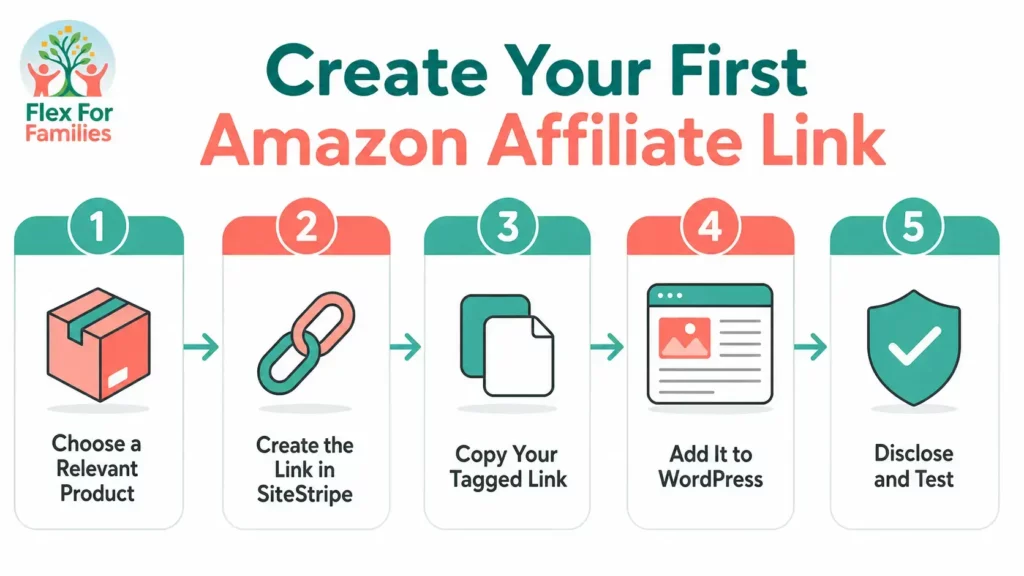
The simplest desktop method is:
- Sign in to the Amazon account connected to your Associates account.
- Visit the appropriate Amazon marketplace, such as Amazon.co.uk or Amazon.com.
- Open the product page you want to recommend.
- Find the Amazon Associates SiteStripe at the top of the page.
- Select Get Link: Text.
- Check that the correct Store ID or tracking ID is selected.
- Choose the available short or full link and copy it.
- Add the link to relevant text in your blog post.
- Include a clear affiliate disclosure before publishing.
That generated URL is your tagged affiliate link. If a reader follows it and completes an eligible purchase, Amazon can attribute the referral to your account under the applicable programme terms.
Before You Create Your First Amazon Affiliate Link
Make sure you have the following in place:
- An Amazon Associates account for the marketplace you intend to use.
- Access to the Amazon login connected to that Associates account.
- A website, app or social channel that has been declared to Amazon where required.
- A relevant product or Amazon page that genuinely helps your audience.
- An appropriate disclosure for your website and the content containing the link.
Do not choose products simply because they are popular. A link works best when it supports the content around it.
For example, a parent blogger writing a guide to organising children’s craft supplies might naturally recommend the storage boxes used in the process. Dropping an unrelated appliance link into the same post would be less helpful, even if that product offered a commission.
What is an Amazon Affiliate Link?
An Amazon affiliate link is a specially tagged URL created through the Amazon Associates programme.
An ordinary Amazon link takes a visitor to a product or page. An affiliate link does the same thing but also contains information that enables Amazon to associate the visit with an Associates account and, where selected, a tracking ID.
Associate ID, Store ID and Tracking ID
These terms can feel confusing when you are new:
- Your Associate or Store ID identifies the relevant Associates account or store.
- A tracking ID helps separate the performance of different websites, content types or promotional strategies within the account.
- The affiliate link contains the tagging information needed to attribute eligible activity.
Tracking IDs can be useful later if you want to compare different websites or strategies. You do not need to create a complicated tracking structure before publishing your first link. Start with an ID you recognise and document where you use it.
How to Create An Amazon Affiliate Link with SiteStripe
SiteStripe is Amazon’s built-in desktop toolbar for creating affiliate links while browsing Amazon.
Step 1: Sign in with the correct Amazon account
Go to the Amazon marketplace connected to your Associates account and sign in.
If you use one Amazon account for shopping and another for your affiliate activity, double-check which one is active. SiteStripe may not appear if Amazon does not recognise the signed-in account as the one connected to Associates.
Step 2: Open the correct Amazon marketplace
Use the marketplace you intend to link to, such as:
- Amazon.co.uk for a UK link.
- Amazon.com for a US link.
These are not interchangeable simply because both are Amazon. International visitors and marketplace linking need separate consideration, which we will cover later.
Step 3: Find a relevant product
Use Amazon’s normal search tools and open the product-detail page.
Before recommending it, consider:
- Does it genuinely match the article?
- Is it available in the marketplace you are targeting?
- Would following the link help the reader take the next step?
- Can you describe it accurately without pretending you have used it?
If you have not personally tested a product, write from research and make that distinction clear where it affects the recommendation.
Step 4: Find SiteStripe
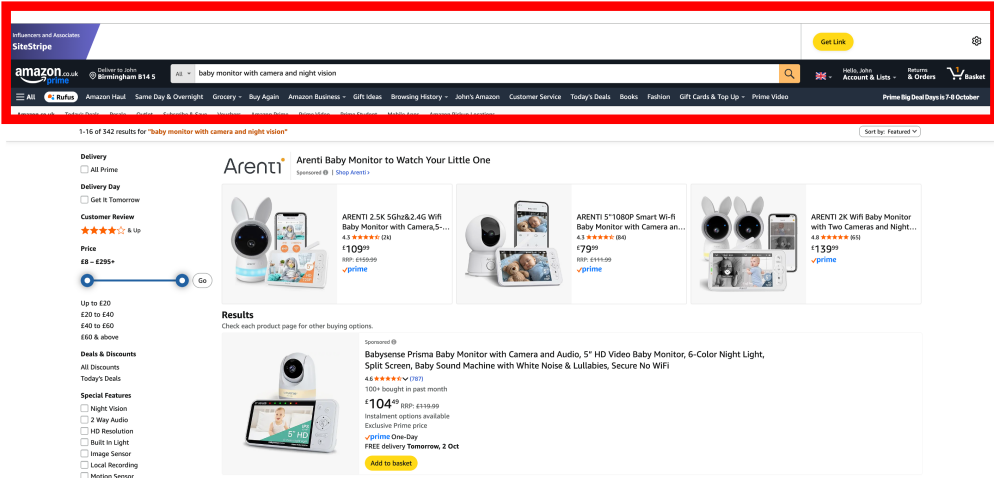
When you are signed in correctly, the Amazon Associates SiteStripe should appear across the top of the Amazon page.
Amazon currently presents SiteStripe as a quick way to create links without returning to Associates Central.
Step 5: Select “Get Link: Text”
On the product page, select the text-link option in SiteStripe.
Amazon can generate a tagged link to a product-detail page, and SiteStripe may also support links to other Amazon pages. To create a product-specific link, make sure you are viewing that product’s own detail page.
Step 6: Select the correct tracking ID
If your account has more than one Store ID or tracking ID, check the selection before copying the link.
Use a simple naming system that will still make sense in six months. For example, you might separate links by website or broad strategy rather than creating a new ID for every article.
Step 7: Choose a short or full link
Where Amazon offers both formats, either can contain the required tracking information:
- A short Amazon link is cleaner and easier to copy.
- A full link makes more of the URL and its parameters visible.
For beginners, an Amazon-generated short link is usually convenient. The important distinction is that it comes from Amazon’s own tool.
Do not pass Amazon links through an unrelated cloaking or shortening service just to disguise the destination. Amazon’s programme policies state that links must not be presented in a way that makes it unclear that the visitor is going to Amazon, and the referral source must not be obscured.
Step 8: Copy the generated link
Copy the link to your clipboard. Do not remove unfamiliar sections of the URL or replace the tracking tag manually unless you fully understand the applicable link format.
You are now ready to add the link to your content.
What if Amazon SiteStripe is Not Showing?
If you cannot see SiteStripe, work through these checks:
- Check your login. Make sure you are signed in with the account connected to Amazon Associates.
- Check the marketplace. An account or login issue can become more confusing when you are browsing a different country’s Amazon site.
- Check SiteStripe settings. Amazon allows SiteStripe to be enabled or disabled through Associates account settings.
- Open a product-detail page. This gives you the clearest place to look for the product link option.
- Review browser interference. Privacy tools or browser extensions can sometimes affect page elements, although you should confirm the account and SiteStripe settings first.
- Consult the marketplace’s help centre. The interface may have changed since a tutorial or screenshot was published.
Avoid following an old tutorial that tells you to use a SiteStripe control that no longer exists. Amazon has retired several link formats and tools over time.
How to Create an Amazon Affiliate Link on Mobile
Amazon also offers Mobile GetLink through its shopping app.
The current process is:
- Open the Amazon shopping app on an iPhone or Android phone.
- Sign in using the credentials connected to your Associates account.
- Open the product-detail page.
- Tap the Share control.
- Select the relevant Store ID or tracking ID if more than one is available.
- Choose Copy Associates Link.
Amazon’s current help documentation says Mobile GetLink works on product-detail pages and is available for most product categories, with some exclusions. If the option is missing, check the product category, marketplace and signed-in account.
Mobile GetLink is useful when you find a relevant product away from your desk. For building and reviewing a complete WordPress article, the desktop workflow may still be easier.
How to Add An Amazon Affiliate Link to WordPress
Once you have copied the tagged link, add it as you would any normal hyperlink.
Using the WordPress Block Editor
- Open the relevant post or page in WordPress.
- Find the sentence where the recommendation genuinely fits.
- Highlight the words you want readers to click.
- Select the link icon in the block toolbar, or use
Ctrl+Kon Windows orCmd+Kon a Mac. - Paste the Amazon affiliate URL.
- Apply the link.
- Preview the article and test the destination.
Use Descriptive Anchor Text
Tell readers what will happen when they follow the link.
Weak:
Click here.
Better:
View the current price and product details on Amazon.
Or, within a natural recommendation:
A divided craft organiser can help keep pens, paper and small supplies together between activities. You can [view this style of organiser on Amazon]().
Descriptive wording is clearer for the reader and makes the link feel like a useful next step rather than an interruption.
Do not add a link to every mention of the product. One or two well-placed links may be more useful than repeatedly asking the reader to leave the article.
Where Should You Place Amazon Affiliate Links?
Good placements include:
- A relevant product inside a practical tutorial.
- A resource mentioned in a checklist.
- A product comparison where Amazon is a suitable purchase destination.
- A carefully selected recommendation within a gift or resource guide.
- A clear button after the reader understands what is being recommended.
Avoid:
- Unrelated products added only to create another affiliate link.
- Links before the reader has enough context to understand the recommendation.
- Repeating the same link in every paragraph.
- Buttons that disguise the fact that the destination is Amazon.
- Claims that imply you have used a product when you have only researched it.
The link should serve the reader first. Commission is a possible outcome, not the reason for forcing a recommendation.
Amazon Affiliate Disclosures: What Beginners Need to Know
Affiliate disclosure is not an optional finishing touch.
Amazon’s current guidance separates two responsibilities:
- A clear and conspicuous disclosure associated with affiliate content or links.
- The identification required by the Operating Agreement: “As an Amazon Associate I earn from qualifying purchases.”
The identification statement should appear clearly on your site or other authorised location. Amazon also gives examples of short link-level disclosures such as “(paid link)”, “#ad” or “#CommissionsEarned”, but you must also comply with the advertising rules that apply to your location and platform.
A practical disclosure near the beginning of a blog article could say:
Disclosure: This post contains Amazon affiliate links. If you buy through one of these links, I may earn a commission at no extra cost to you. As an Amazon Associate I earn from qualifying purchases.
Do not hide the disclosure at the bottom of a long page or rely only on a general disclosure page that readers may never see.
Because requirements can change, confirm the current wording and placement guidance for your Amazon marketplace before publishing.
If you want to understand more about the rules you need to follow as an Amazon Associate, read my Amazon Associates Rules Bloggers Need to Know guide.
How to Check Whether Your Amazon Affiliate Link Works
You cannot prove that a commission will be paid simply by clicking a link. You can, however, check the setup.
Before publishing:
- Confirm that you selected the intended tracking ID.
- Preview the page rather than relying only on the WordPress editor.
- Follow the link and check that it reaches the correct Amazon product or page.
- Confirm that the reader can tell the destination is Amazon.
- Check that the disclosure is easy to notice.
- Test the page on mobile as well as desktop.
After publishing, use Amazon Associates reporting to review legitimate activity. Tracking IDs can help you compare different websites or strategies without creating separate accounts.
Do not buy through your own affiliate link to test it. Amazon’s policies prohibit Associates from purchasing through their own Special Links and from encouraging friends, relatives or business associates to make purchases through those links for their benefit.
Can you use Pretty Links or Another Link Shortener?
Amazon provides its own short-link option, which is the simplest choice for most beginners.
Amazon’s policies do not allow you to hide the referral source or use a shortener, button or hyperlink in a way that makes the Amazon destination unclear. A redirecting system can therefore create unnecessary compliance risk, particularly if it cloaks the URL or prevents Amazon from determining the referring site.
The safest beginner approach is:
- Generate the link through SiteStripe or another current Amazon linking tool.
- Use Amazon’s own short format where available.
- Make the destination clear in the surrounding wording.
- Do not disguise or manipulate the link.
Can You Use Amazon Product Images?
Do not assume that being an Associate gives you permission to download any image from an Amazon product page and upload it to your media library.
Amazon controls the use of its programme content, including product images, prices, ratings and other data. Approved tools such as the Product Advertising API or other Amazon-provided link formats may make certain content available subject to detailed licence requirements.
For a beginner creating a simple text affiliate link, the sensible approach is to:
- Use your own original product photography when you own the product and have the right to photograph it.
- Use manufacturer images only when you have permission.
- Use Amazon-supplied programme content only through a currently approved method and in accordance with its licence.
- Avoid copying ratings, reviews or live prices manually.
Amazon can change product details and prices at any time. Avoid hard-coding a price unless you are certain your method and update process comply with the current programme rules.
UK, US and International Visitors
An Amazon.co.uk link takes the reader to the UK marketplace. An Amazon.com link takes the reader to the US marketplace.
If your audience spans several countries, one link does not automatically create the best shopping experience for everyone. Amazon offers international linking features, including OneLink in supported situations, but setup and eligibility should be checked inside the relevant Associates account.
For your first link:
- Decide which marketplace serves the article’s main audience.
- Generate the link through that marketplace’s Associates setup.
- Make the destination clear.
- Review international linking once you have enough traffic to justify the additional setup.
Do not present a US rule, tool or account screen as universal. Always check the documentation for the programme you actually joined.
Common Amazon Affiliate-Link Mistakes
Here are some of the most common mistakes Amazon Associates members could make, which would hinder your progress.
Copying the Ordinary Product URL
An ordinary URL may reach the correct product without containing your affiliate tracking information. Generate the link with an Amazon Associates tool.
Selecting the Wrong Tracking ID
The link may still work, but your reports will be harder to interpret. Check the selection before copying.
Forgetting the Disclosure
Add the disclosure before publishing, not after somebody points out that it is missing.
Hiding the Amazon Destination
Do not disguise Amazon links through unclear buttons, redirects or third-party cloaking.
Using your Own Link to Shop
Your own purchases are not a legitimate way to test or earn through the programme.
Copying Amazon Images or Reviews
Programme content is licensed under specific conditions. Do not treat it as free website content.
Linking Every Product Mention
Too many links make an article less useful and can weaken trust. Link where the reader is likely to benefit.
Recommending Products You Have Not Assessed
You do not need to own every product you mention, but research-based recommendations should not be presented as personal tests.
Ignoring Marketplace Differences
Check whether you are building an Amazon UK, US or other country link and whether that matches the intended reader.
Your first Amazon Affiliate-Link Checklist
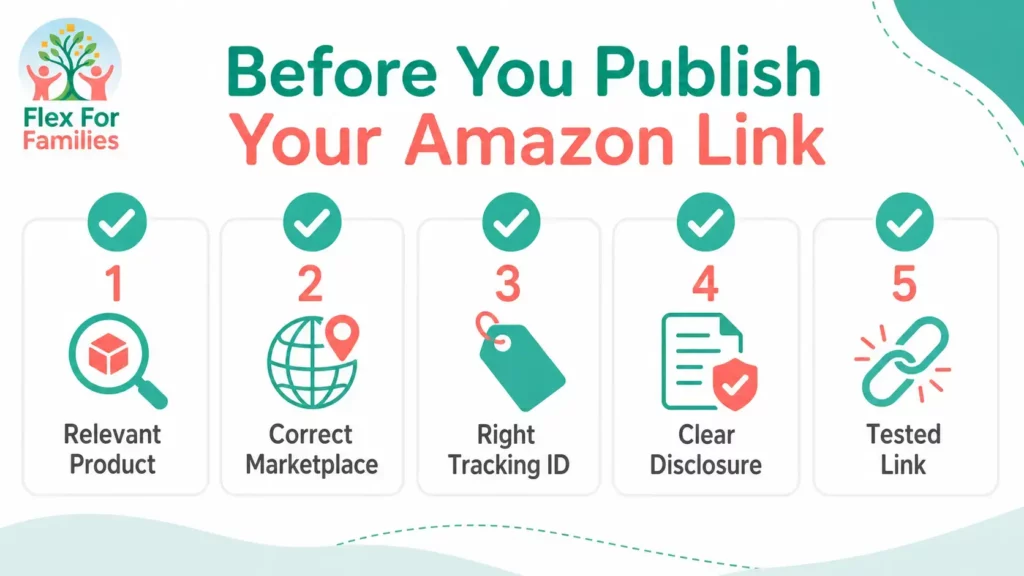
Before you publish, confirm:
- [ ] The product is relevant to the article and reader.
- [ ] You generated the link through a current Amazon Associates tool.
- [ ] The correct marketplace is being used.
- [ ] The intended Store ID or tracking ID is selected.
- [ ] The link opens the correct page.
- [ ] The anchor text explains where the reader is going.
- [ ] The affiliate disclosure is clear and easy to find.
- [ ] The required Amazon Associate identification appears on the site.
- [ ] You have checked the current programme rules.
- [ ] The link works on mobile and desktop.
Practical next steps
Keep your first implementation small:
- Choose one useful article that already mentions a relevant product.
- Generate one Amazon affiliate link.
- Add it where it helps the reader.
- Include the correct disclosure.
- Preview and test the page.
- Record which tracking ID you used.
You do not need to monetise every article immediately. Building a useful library of content is more important than filling a new blog with links before it has earned trust.
If you are building affiliate marketing around a busy family schedule, my guide to starting affiliate marketing in small pockets of time can help you choose manageable next steps.
Final Thoughts
Creating an Amazon affiliate link is the easy part. The more important skill is knowing when that link genuinely improves the article.
Use Amazon’s current link-building tools, select the right marketplace and tracking ID, disclose the relationship clearly and recommend products because they fit the reader’s problem—not simply because they could produce a commission.
One accurate, relevant link inside a genuinely useful article is a better start than dozens of links added without purpose.
Ready to Build Your Blog one Useful Step at a Time?
Creating your first affiliate link is one small part of building a useful parent blog.
Download my free Parent Blogging Starter Kit for practical worksheets, planning tools and a realistic roadmap you can use around work and family life.
Download the free Parent Blogging Starter Kit
Frequently Asked Questions
Why can’t I see Amazon SiteStripe?
Make sure you are signed in with the Amazon account connected to Associates and check that SiteStripe is enabled in your Associates account settings. Also confirm that you are browsing the expected Amazon marketplace.
Can I create an Amazon affiliate link on my phone?
Yes. Amazon’s Mobile GetLink feature is available through the Amazon shopping app for supported product-detail pages. Sign in with your associated account, open a product, use the Share control and select Copy Associates Link.
Can I use a normal Amazon link and add my tracking ID?
Amazon affiliate URLs can contain tracking parameters, but beginners should use SiteStripe or another current Amazon-provided tool instead of editing URLs manually. This reduces the risk of using an incorrect format.
Should I use a short or full Amazon affiliate link?
Either Amazon-generated option can work. A short Amazon link is easier to copy, while a full link exposes more of the URL. Do not use an unrelated shortener to disguise the Amazon destination.
Can I use Amazon product images on my blog?
Only use Amazon programme content through methods permitted by the current programme licence. Do not assume you can download product images from an Amazon page and re-upload them. Original photographs or properly licensed manufacturer images may be simpler alternatives.
Can I buy through my own Amazon affiliate link?
No. Amazon’s programme policies prohibit Associates from purchasing through their own affiliate links. You should not ask friends, relatives or associates to use your links for your benefit either.
Do I need a disclosure for Amazon links?
Yes. Amazon requires clear identification of the affiliate relationship, including the required Amazon Associate statement, and its guidance calls for clear and conspicuous link-level disclosure. You must also follow the advertising rules that apply to your country and platform.
Will an Amazon UK affiliate link work for US readers?
It will take the reader to Amazon UK rather than automatically becoming an Amazon.com link. International audiences require marketplace planning and, where appropriate, Amazon’s supported international-linking tools.
How do I know whether my Amazon affiliate link is tracking?
Check that the intended tracking ID was selected when the link was created, verify that it reaches the correct Amazon page and use Associates reporting to review legitimate activity after publication. Do not place an order through your own link as a test.
Let’s Chat
Which part of creating your first Amazon affiliate link feels least clear: SiteStripe, adding the link to WordPress, disclosures, tracking IDs or international visitors?
Share your question below and I will point you towards the most useful next step.