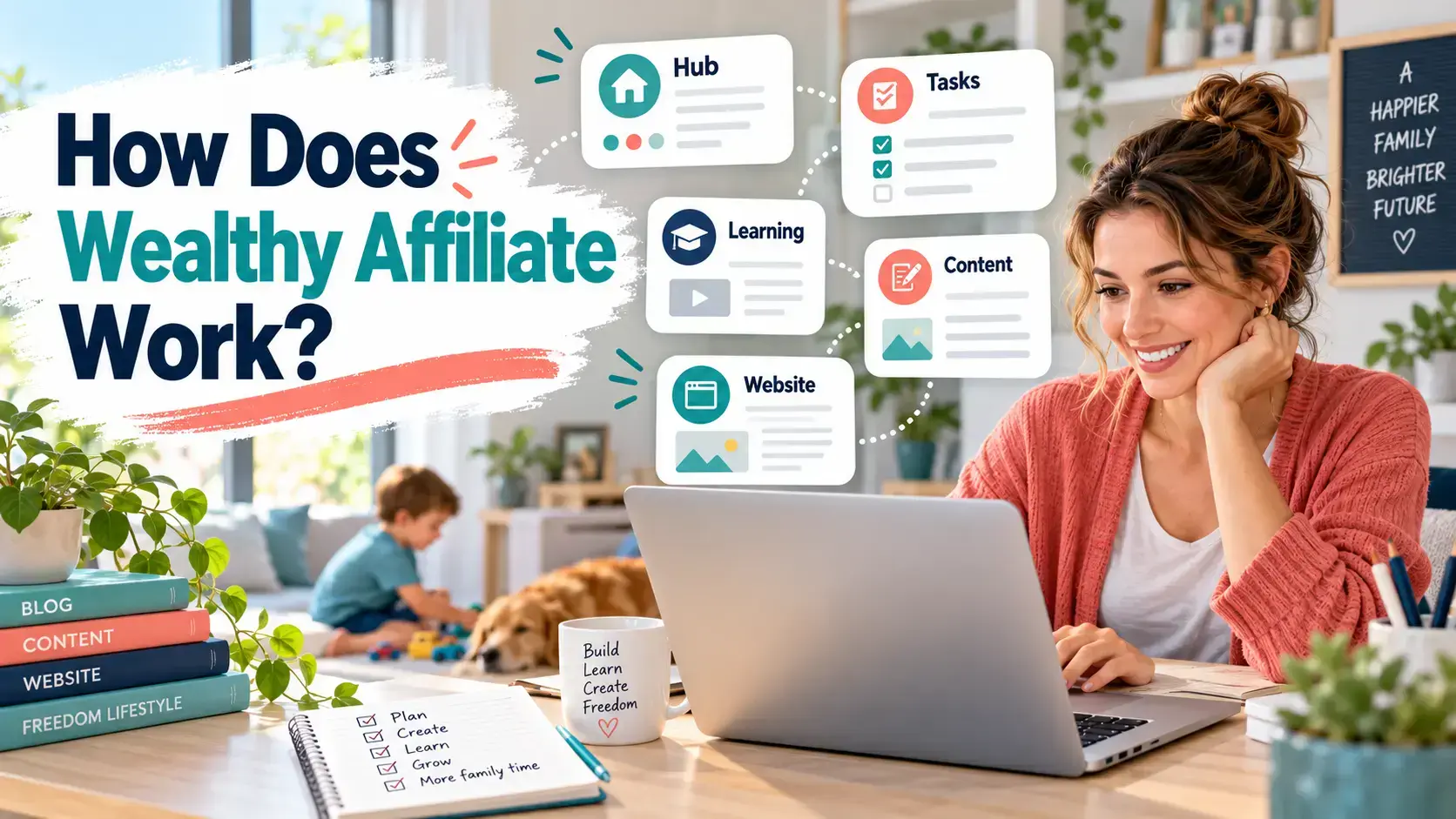
Wealthy Affiliate can be difficult to explain in one sentence. It combines online business training, website hosting, research, content creation, artificial intelligence and community support inside one membership.
The platform also received a complete overhaul in October 2026. If you have seen an older walkthrough, the screen you find after joining may look very different.
I have been a Wealthy Affiliate member since September 2016. I used the previous training, Jaaxy, SiteContent and the old community-led dashboard. I have also used the rebuilt platform since its launch. This guide explains how Wealthy Affiliate works now and what you still need to do yourself.
Affiliate transparency: This article contains affiliate links to Wealthy Affiliate. If you join through one of my links, I may earn a commission at no extra cost to you. I have been a member since 2016, and the opinions here are based on my own experience.
How Does Wealthy Affiliate Work? The Quick Answer
Wealthy Affiliate helps you plan, build and grow an online business from one platform. You create a Business Hub, connect the channels you want to use, follow relevant tasks and use its learning, AI, content, website and community tools when you need support.
It does not give you a finished profitable business. You still need to choose a sensible direction, create useful content, attract an audience and recommend suitable products or services.
The practical journey looks like this:
- Decide what type of business you want to build.
- Create a Business Hub around that idea.
- Connect a website, YouTube or social media channel.
- Work through tasks connected to your business.
- Use Ace when you need help, research or direction.
- Learn skills relevant to your current goals.
- Research, create and publish content through Studio.
- Join suitable affiliate programmes.
- Build traffic and earn commissions when readers take qualifying actions.
That process takes work and time. Wealthy Affiliate can organise the work, but it cannot guarantee the result.
What Is Wealthy Affiliate?
Wealthy Affiliate is an online business platform founded by Kyle Loudoun and Carson Lim in 2005. It originally focused heavily on affiliate marketing websites. It now supports a broader range of online business and content channels.
The platform brings together:
- Business planning and task management
- Affiliate marketing and online business learning
- AI-assisted research and content creation
- WordPress websites and managed hosting
- Keyword and audience research
- Image creation
- YouTube and social media content planning
- Community discussions and live chat
- Technical website support
- An optional Wealthy Affiliate affiliate programme
Affiliate blogging remains a natural way to use WA, but it is no longer the only route. You can build a Hub around a website, YouTube channel, social presence or another online business direction.
The important point is that Wealthy Affiliate is an environment for building a business. It is not an employer and it does not pay everyone simply for completing the training.
What Changed in the New Wealthy Affiliate Platform?
The October 2026 release was a full rebuild rather than a visual refresh.
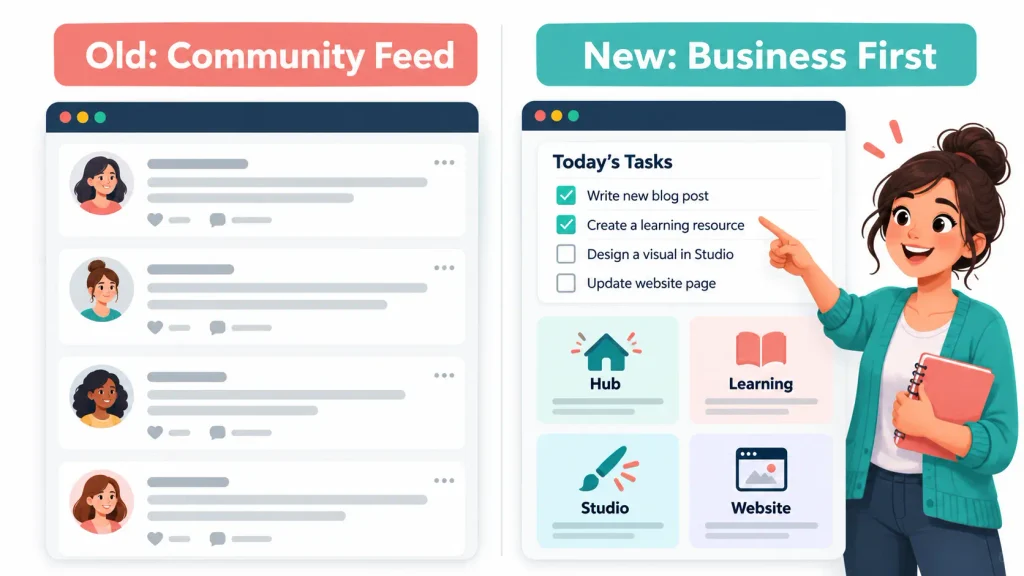
The old dashboard placed the latest community posts in front of you when you logged in. That made the community easy to access, but it could also encourage you to read and scroll instead of working on your own business.
The new dashboard takes you directly to the business end of the platform. You see tasks connected to your Business Hub, a simplified menu and tools related to what you are building.
The major changes include:
- A business-first dashboard
- Simpler navigation
- Task lists connected to each Business Hub
- Ace, an integrated AI assistant
- Studio, which combines research and creation
- Different content channels within a Hub
- Personalised learning instead of one fixed training route
- A powerful platform-wide search function
- A dedicated Community area with a more relevant feed
- A new four-tier membership structure
It took me some time to get my head around the changes because I had used the previous system for years. A new member will not have those old habits. I think the new onboarding should make it much clearer where to begin and what to do next.
Step 1: Create Your Business Hub
A Business Hub is the central workspace for an online business or niche.
It connects your business idea with its audience, channels, tasks, research, learning and content. Instead of treating training, keyword research and writing as separate activities, the Hub helps place them within the same business plan.
For example, a parent blogger could create a Hub around helping busy parents start flexible side hustles. The Hub could then support:
- A WordPress website
- Blog post concepts
- Relevant audience questions
- YouTube scripts
- Social media content
- Images
- Learning connected to the current stage of the business
You can add more than one Hub if your membership allows it, but beginners should avoid creating several businesses at once. One focused Hub gives you a better chance of learning what works without splitting your limited time.
A Hub also does not prove that a niche will be profitable. You still need to consider the audience, competition, suitable products, traffic opportunities and whether you can create genuinely useful content.
Step 2: Choose the Channels You Want to Use
The rebuilt platform recognises that an online business may use more than blog posts.
You can connect different channels to your Business Hub and create content suited to each one. Depending on your strategy, this could include:
- Website articles
- YouTube videos
- Social media posts
- Supporting images
This does not mean you should start every channel on your first day.
A busy parent may be better starting with a website and adding one social platform later. Someone who is more comfortable speaking than writing might build around YouTube and use a website to support it.
The channel should fit your available time, skills and audience. Adding more platforms increases the work, even when AI helps you adapt the same idea.
Step 3: Follow the Tasks Connected to Your Business
When you log in, the task list gives you a clearer route into your work.
This is one of the most useful changes for beginners. Many new bloggers lose time deciding whether they should research, write, redesign their website or watch another lesson. A task connected to the Business Hub can reduce that indecision.
A typical task might involve:
- Clarifying who you want to help
- Developing a content concept
- researching a reader question
- Creating a useful article
- Preparing content for another channel
- Publishing or improving an existing asset
The task list is guidance rather than a guarantee. You still need to judge whether the suggested action supports your audience and wider plan.
For parents working in short time blocks, the main benefit is focus. You can log in, see what relates to your business and continue without starting from an empty screen.

Step 4: Ask Ace for Help
Ace is Wealthy Affiliate’s built-in AI assistant. It works across the platform and uses the context of what you are building.
You can use Ace to:
- Understand a task
- Research a business or content idea
- Explore your target audience
- Find suitable learning
- Work through a problem
- Navigate the platform
- Start creating an asset
If you do not know what to learn next, Ace can help direct you towards a relevant topic. If you are working inside a Hub, it can provide help connected to that business rather than giving only a generic answer.
Ace is still an assistant. It can misunderstand a request, produce weak suggestions or present information that needs checking. You remain responsible for the business decisions, factual accuracy and anything you publish.
The current plans also limit how many Ace messages you can send each day. As of 10 October 2026, Starter includes up to 20 messages per day, Builder and Premium include up to 100, and Premium Plus+ includes up to 200.
Step 5: Research and Create Content in Studio
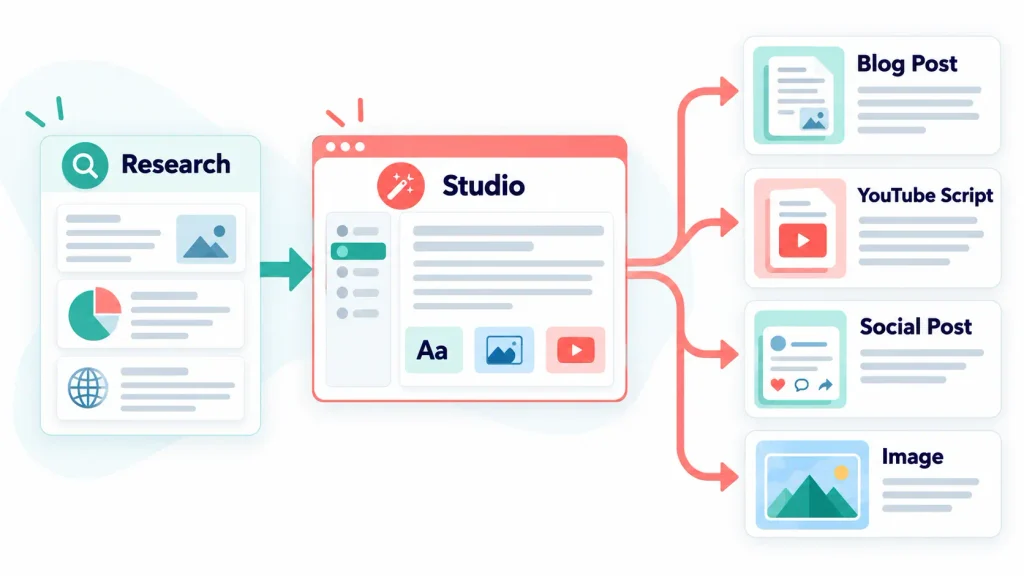
Studio brings the main creation tools into one area.
Under the previous platform, a member might move between Jaaxy for keywords, SiteContent for writing and Image Studio for graphics. These functions now connect through the wider Studio workflow.
You can use Studio to work on:
- Blog articles
- Social media content
- YouTube scripts
- Research briefs
- Images
- Related assets for the same business concept
This makes content creation less fragmented. You can start with a reader problem, research the idea and turn it into the formats your chosen channels need.
That is a better way to think about content than publishing isolated articles because a keyword tool displayed an attractive number. Search data still matters, but the content needs to answer a real question and fit the wider business.
What Happened to Jaaxy?
Jaaxy has been retired from the new integrated experience. Keyword and market research now sit within the wider business and content workflow.
This does not mean keyword research has disappeared. It means research begins with the concept, audience and content goal rather than requiring you to open a separate tool.
I previously used Jaaxy to build clusters of connected article ideas. I would then develop those ideas into content designed to give the reader the answers they needed. The new process supports that broader approach within the Hub and Studio.
You should still check search intent, competition and relevance. An AI-generated content plan can save time, but it cannot replace judgement.
Step 6: Learn What You Need Through the Learning Tab
The Learning tab replaces the traditional idea of following the same training route as every other member.
You can focus on what you currently want to learn. This might include:
- Choosing a niche
- Starting an affiliate website
- Understanding content strategy
- Creating YouTube videos
- Developing a social media channel
- Finding affiliate programmes
- Improving an existing business
The benefit is relevance. A member building a YouTube-led business does not need every lesson to assume that a blog is the only route.
If you are unsure what you should learn next, Ace can help identify a suitable direction based on your Hub and current tasks.
This flexibility also carries a responsibility. Beginners can still jump between subjects without completing anything. Use Learning to solve the problem in front of you, then apply what you learn.
Step 7: Build and Manage Your WordPress Website
If blogging is part of your business, Wealthy Affiliate can host and manage your WordPress website.
Its website tools include:
- A practice site on the free Starter plan
- WordPress hosting on paid plans
- Domain registration, connection and transfer options
- Direct access to the WordPress dashboard
- Scheduled publishing from a Hub
- Staging copies for testing changes
- Website email accounts
- Technical support
As of 10 October 2026, Builder includes one website, Premium includes three and Premium Plus+ includes five. Paid members can add more websites for $9 per month each. The allowances may change, so check the official Wealthy Affiliate pricing page before paying.
You do not need to understand server management to begin. You should still learn the basics of WordPress, including pages, posts, links, images, plugins, backups and updates.
I use Wealthy Affiliate hosting for Flex For Families, but I manage the content through the WordPress back office. Keeping the publishing process simple saves me time.
Step 8: Use the Community and Support
The community is still an important part of Wealthy Affiliate. It is no longer the first thing placed in front of you after login.
The Community tab leads to a feed designed to be more relevant to the member. You can use it to:
- Ask questions
- Learn from other members
- Read platform announcements
- Discuss problems
- Share progress
- Find live conversations
Live chat also remains available. Technical website support sits alongside the community help.
The new placement makes sense to me. The old homepage could encourage members to scroll through posts while their own task list remained untouched. The rebuilt platform keeps the business work visible and lets you visit the community with a purpose.
Community advice varies in quality. Check important claims and remember that another member’s success does not prove that the same method will work for you.
Step 9: Join Suitable Affiliate Programmes
Wealthy Affiliate teaches affiliate marketing, but it does not automatically arrange every commercial relationship for you.
An affiliate programme allows you to earn a commission when someone uses your tracked link and completes the required action. That might be a purchase, paid subscription or another defined conversion.
You normally need to:
- Choose products or services relevant to your audience.
- Apply to the appropriate affiliate programmes.
- Read their terms and promotional rules.
- Create useful content around genuine reader needs.
- Add tracked affiliate links.
- Disclose the commercial relationship clearly.
Wealthy Affiliate has its own affiliate programme, but promoting WA is optional. You can use the platform to build a business in parenting, hobbies, technology, travel or another suitable niche without recommending Wealthy Affiliate.
Step 10: Build Traffic and Work Towards Commissions
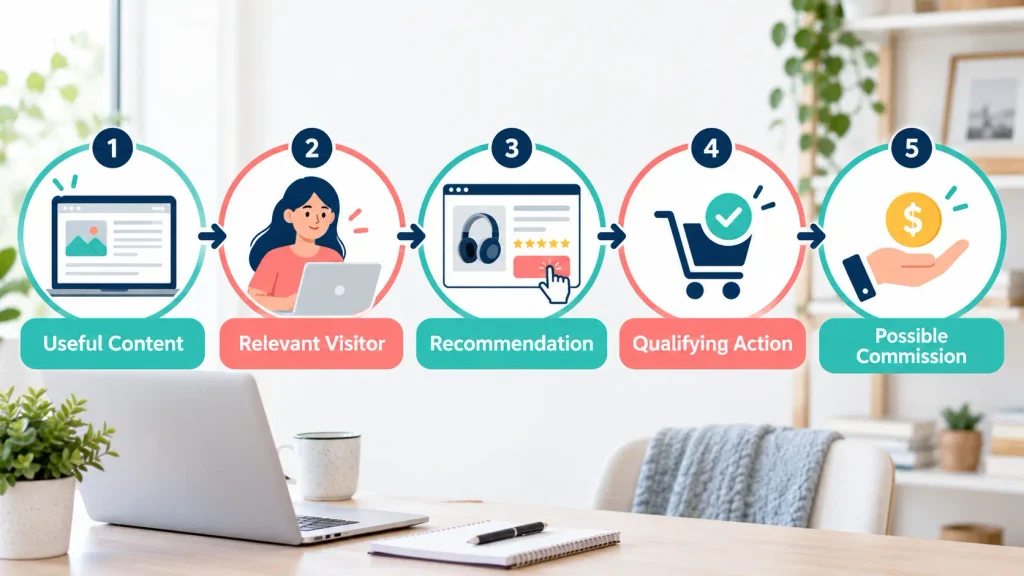
Affiliate income only becomes possible when the right people find your content and act on a recommendation.
The basic route is:
Useful content → relevant visitor → product recommendation → qualifying action → possible commission
Each stage can fail. A published article might receive no traffic. A visitor might not need the product. A reader might click but decide not to buy. The affiliate programme may also apply conditions before paying a commission.
Wealthy Affiliate can help you research and build the content, but it cannot guarantee rankings, views or sales.
It took me around six months to earn my first affiliate commission through Wealthy Affiliate. That is my experience, not a promise or standard result. Some people earn sooner, some take longer and some never make a profit.
Your result will depend on factors such as:
- The niche and audience
- The time you can commit
- The usefulness of your content
- Competition
- Your traffic strategy
- The products you recommend
- Trust with your audience
- Your consistency over time
Does Wealthy Affiliate Do the Work for You?
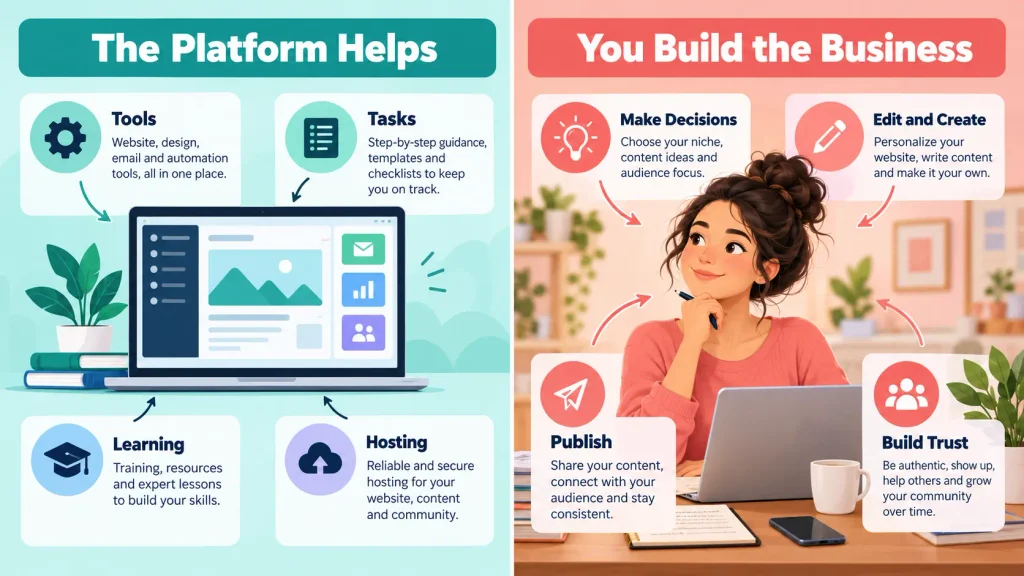
No. Wealthy Affiliate organises the tools and gives you guidance, but you remain responsible for building the business.
The platform can help you:
- Decide what to do next
- Research ideas
- Learn new skills
- Create first drafts
- Host a website
- Publish content
- Get support
It cannot replace:
- Understanding your audience
- Choosing a sensible direction
- Checking AI-generated information
- Adding personal experience
- Editing content before publication
- Building trust
- Promoting your work
- Reviewing performance
- Making difficult decisions
Be cautious of any claim that joining WA will automatically produce passive income. The tools may make parts of the work faster, but the business still needs your input.
How Long Does It Take to Make Money With Wealthy Affiliate?
There is no reliable fixed timeframe for making money with Wealthy Affiliate.
A beginner may need to learn WordPress, understand affiliate marketing, publish enough useful content and build traffic before earning a commission. That can take months. Reaching consistent profit will usually take longer than making one sale.
Your available time matters. Someone working five hours each week will build at a different pace from someone working thirty hours. That does not mean the parent with limited time cannot succeed. It means the plan and expectations must fit the available hours.
Focus first on creating a useful foundation. Track published content, traffic, clicks and conversions before judging progress only by income.
Is the New Wealthy Affiliate Platform Easier for Beginners?
I believe the rebuilt platform should make the starting process clearer for a new member.
The main advantages are:
- You land on your business rather than a general feed.
- Tasks connect to the Hub you are building.
- Research and creation sit closer together.
- Learning adapts to what you want to achieve.
- Ace can help when you do not know what to do next.
- Search can direct you to the relevant part of the platform.
Existing members may need time to adjust because familiar tools and menus have changed. That was my experience.
There have also been early bugs. Kyle and Carson openly asked the community to test the platform and report problems rather than leaving it in a closed beta for months. By 10 October 2026, member updates reported that 41 items had already been resolved.
That responsiveness is encouraging, but the platform is still new. Features, limits and workflows may continue to change. I will update this guide as the system develops.
How Much Does Wealthy Affiliate Cost?
As of 10 October 2026, Wealthy Affiliate has four membership levels:
| Plan | Monthly Price | Annual Price | Included Websites | Monthly AI Credits |
|---|---|---|---|---|
| Starter | $0 | $0 | 1 practice site | 4,000 starter credits |
| Builder | $29 | $290 | 1 | 20,000 |
| Premium | $49 | $490 | 3 | 40,000 |
| Premium Plus+ | $99 | $990 | 5 | 100,000 |
Annual prices provide twelve months for the price of ten. AI usage, including Ace replies, consumes credits. Extra websites cost $9 per month on a paid plan, and additional credit packs are available.
Prices and allowances can change. Visit the official pricing page for the current terms.
For a detailed look at the costs, advantages, drawbacks and the plan I believe suits most beginners, read my complete Wealthy Affiliate review.
Who Is Wealthy Affiliate Best For?
Wealthy Affiliate may suit you if:
- You are new to affiliate marketing.
- You want training and tools in one place.
- You need a clear task to work on next.
- You want to build a WordPress website.
- You value access to a community and support.
- You want to create across a website, YouTube or social channels.
- You prefer one subscription over several disconnected tools.
For a busy parent, the business-first dashboard could reduce time lost moving between tools and deciding what to do. You still need to protect your time and avoid trying every available channel at once.

Who Should Look Elsewhere?
Wealthy Affiliate may not suit you if:
- You expect an automatic income system.
- You want guaranteed traffic or commissions.
- You already have established tools and systems you prefer.
- You only need a specialist keyword or SEO tool.
- You do not want a recurring subscription.
- You are unwilling to create, edit and promote content.
- You want somebody else to make every business decision.
The free Starter plan gives you a way to inspect the system before paying. Use that time to assess whether the workflow suits how you want to build.
Is Wealthy Affiliate Worth Trying?
Wealthy Affiliate is worth considering if you want business planning, learning, AI creation, WordPress hosting and community support within one platform.
The 2026 rebuild makes the experience more business-focused. I particularly like that members now see their tasks first instead of landing in a feed that could become a distraction.
It will not suit everyone. Experienced marketers may prefer separate specialist tools, and no membership can remove the time needed to build an audience.
Start with the free option if you want to explore the new workflow. Before upgrading, compare the plan limits with the tools and websites you will genuinely use.
My Wealthy Affiliate review covers the membership in more depth, including pricing, pros, cons, realistic expectations and who I think should avoid it.
You can also read Is Wealthy Affiliate a Scam? and Why Do Some People Fail With Wealthy Affiliate? for a more balanced view before joining.
If you are still deciding what type of blog or flexible income project to start, download the free Parent Blogging Starter Kit.
Frequently Asked Questions
How Does Wealthy Affiliate Work?
Wealthy Affiliate helps you create a Business Hub, choose content channels, follow relevant tasks and use its learning, AI, website and community tools. You then create useful content, attract an audience and recommend relevant products through affiliate programmes. The platform supports the work but does not guarantee traffic or income.
Does Wealthy Affiliate Build a Website for You?
Wealthy Affiliate provides WordPress hosting, a practice website for Starter members and tools that simplify setup and publishing. It can help generate and schedule content, but you remain responsible for the website, editorial decisions, fact-checking and overall quality. Paid plans include different numbers of hosted websites.
How Do You Make Money With Wealthy Affiliate?
Most members aim to earn by joining relevant affiliate programmes and creating content that helps an audience choose suitable products or services. A commission may be paid when a reader uses a tracked link and completes the required action. Members can promote Wealthy Affiliate itself, but this is optional.
Do You Have to Promote Wealthy Affiliate?
No. You can use Wealthy Affiliate to build a website or content business in another niche. Promoting the WA membership is one available affiliate opportunity, not a requirement. Your chosen products should match the audience and subject of the business you are building.
Is Wealthy Affiliate Suitable for Beginners?
Yes, it can suit beginners who want structured tasks, learning, website tools and support in one place. The rebuilt platform makes the business and its next tasks more visible. Beginners must still allow time to learn, test ideas and create useful content. Joining does not guarantee that the business will earn money.
What Happened to Jaaxy?
Jaaxy has been retired from the rebuilt Wealthy Affiliate experience. Keyword and market research now form part of the integrated Hub and Studio workflow. Members can research a concept, understand the audience and develop connected content without moving into a separate keyword platform.
Does Wealthy Affiliate Guarantee You Will Make Money?
No. Wealthy Affiliate provides tools, hosting, learning and support, but it cannot guarantee traffic, sales or profit. Results depend on the niche, available time, content, promotion, competition and decisions made by the member. It took me around six months to earn my first affiliate commission, but individual results vary.
Let’s Chat
Have you tried the rebuilt Wealthy Affiliate platform, or are you considering joining for the first time?
Tell me which part of the process you want to understand. I am happy to share what I have learned from using Wealthy Affiliate since 2016.