

Blogging sounds simple.
Write posts. Share ideas. Build income over time.
But when you’re a parent, the biggest challenge isn’t knowing what to do.
It’s finding the time to do it.
You might have:
- 30 minutes in the evening
- An hour when things are quiet
- A few small pockets across the week
And when you sit down, you’re faced with:
- What should I write about?
- How do I structure this?
- How long is this going to take?
This is where AI tools are changing things.
Not by doing everything for you.
But by removing the parts that slow you down.
How does AI help with blogging?
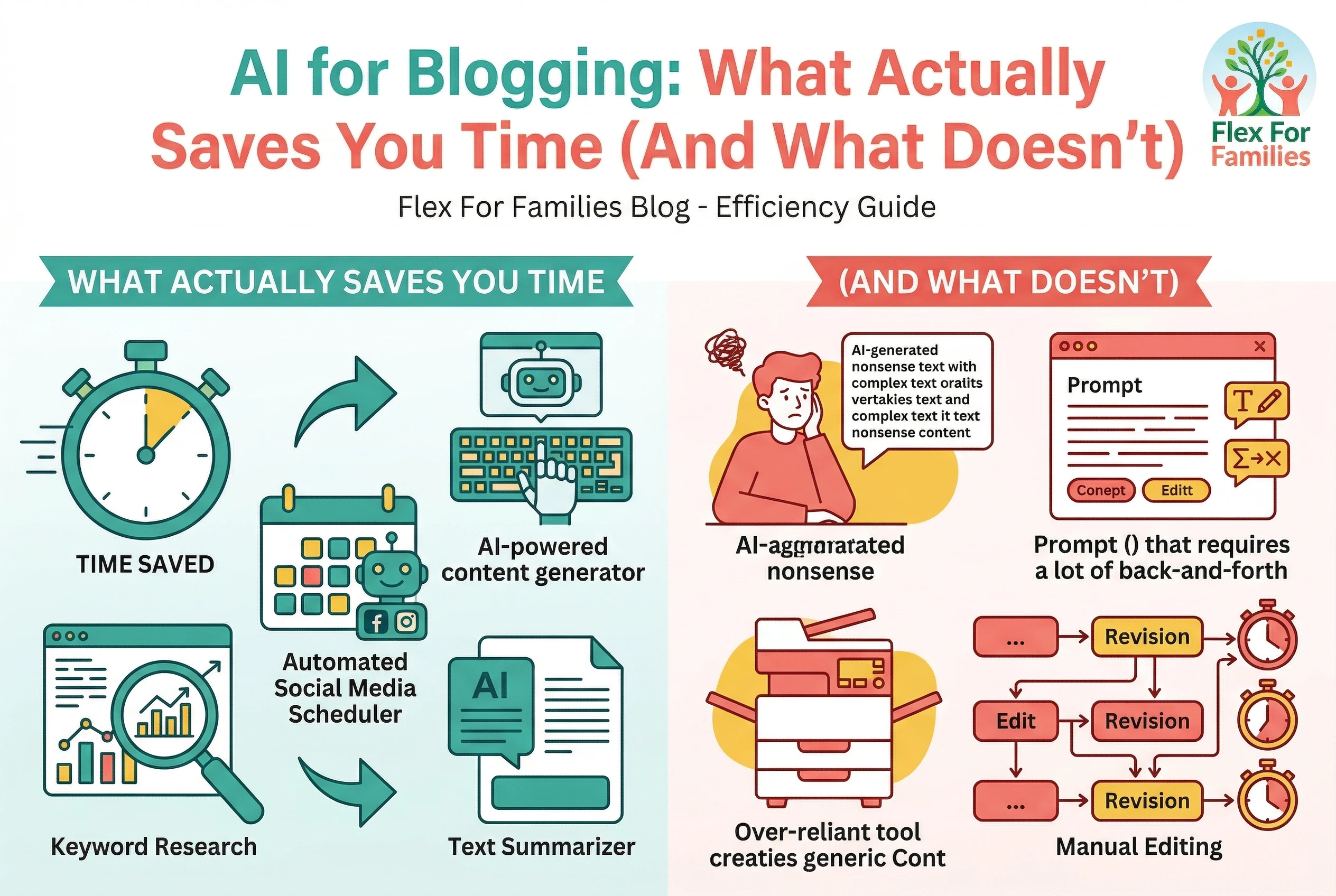
AI helps with blogging by speeding up tasks like idea generation, outlining, drafting, editing, and creating visuals. It reduces the time needed to create content, but it does not replace strategy, audience understanding, or the need to build traffic.
Quick Answer: What Does AI Actually Save You Time On?

AI can save you hours each week when used in the right parts of your blogging workflow.
The biggest time savings come from:
- Generating blog post ideas
- Creating outlines quickly
- Drafting content faster
- Designing simple visuals
- Streamlining your workflow
What AI does not do:
- Replace your voice
- Build trust with your audience
- Bring traffic on its own
That’s why some bloggers feel like AI is a game changer.
And others feel like it doesn’t work.
What You’ll Learn in This Guide
In this post, we’ll break down:
- Where blogging usually takes the most time
- How AI tools actually help in each step
- What still needs your input
- How to build a simple workflow that fits around family life
So you can spend less time stuck… and more time making real progress.
Where Blogging Actually Takes the Most Time (And Why)

Most people don’t struggle with blogging because it’s difficult.
They struggle because it takes longer than expected.
Especially when you’re fitting it around family life.
If you’ve ever sat down to “quickly write a post” and it turned into an hour or more, you’re not alone.
Here’s where the time really goes.
1. Coming Up With Ideas
This is where many people get stuck before they even begin.
You sit down and think:
- What should I write about?
- Will anyone even search for this?
- Is this worth my time?
Without a system, you can lose 10 to 20 minutes just trying to decide.
Why it takes time
You’re trying to balance:
- What people want
- What you know
- What might work
2. Structuring the Post
Once you have an idea, the next challenge is:
- How do I organise this?
- What headings should I use?
- What should come first?
This step is often underestimated.
Why it takes time
Without structure:
- You second guess yourself
- You rewrite sections
- You lose flow
3. Writing the First Draft
This is the biggest time drain.
You’re:
- Starting from a blank page
- Trying to get the words right
- Stopping and starting constantly
Even a simple post can take 45 to 90 minutes.
Why it takes time
- Overthinking
- Editing while writing
- Losing momentum
4. Editing and Improving
Once the draft is done, you still need to:
- Check clarity
- Improve wording
- Fix structure
- Make it easier to read
Why it takes time
Good content isn’t just written. It’s refined.
And that takes another 15 to 30 minutes.
5. Creating Images and Visuals
Now you need:
- Blog images
- Pinterest pins
- Social graphics
Why it takes time
- Designing from scratch
- Choosing layouts
- Getting everything to look right
This can easily take another 20 to 30 minutes.
6. Publishing and Formatting
The final step still includes:
- Formatting headings
- Adding links
- Uploading images
- Writing meta descriptions
Why it takes time
It’s detail-focused work that slows you down at the end.
The Real Problem
None of these steps are difficult on their own.
But together, they add up.
A single blog post can take:
- 2 to 4 hours without a system
That’s why so many parents struggle to stay consistent.
Where AI Changes Things
AI doesn’t remove these steps.
It reduces the time each one takes.
Instead of:
- Staring at a blank page
- Guessing your structure
- Spending hours drafting
You can:
- Move faster
- Stay focused
- Keep momentum
And that’s what actually makes blogging fit into real life.
How AI Helps at Each Stage of Blogging (Real Examples)
Now you’ve seen where the time goes.
Let’s look at how AI actually helps at each step, and where it makes the biggest difference.
The goal is not to remove the process.
It’s to make each step faster and easier.
1. Idea Generation

This is often where the biggest delay happens before you even start writing.
Without AI
You sit there trying to think of something worth writing.
This can take 10 to 20 minutes, sometimes longer.
How AI changes this
Instead of starting from scratch, you can generate ideas quickly and move straight into writing.
With AI
Tools like ChatGPT can help you:
- Brainstorm topics
- Turn ideas into angles
- Identify what your audience might search for
What this saves
10 to 15 minutes per post
2. Structuring Your Post

Most bloggers lose time here before they even get into the content.
Without AI
You figure it out as you go.
This often leads to:
- Rewriting sections
- Losing flow
- Wasting time
How AI changes this
You can build a clear structure upfront, which makes writing much smoother.
With AI
AI can:
- Suggest headings
- Organise your content
- Build a logical flow
What this saves
10 to 20 minutes and a lot of frustration
3. Writing the First Draft

This step sounds simple, but it’s where many people get stuck.
Without AI
You start from a blank page.
This is where most time disappears.
How AI changes this
You no longer have to fight the blank page, which helps you keep momentum.
With AI
You can:
- Generate a rough draft quickly
- Expand sections easily
- Keep your writing moving
What this saves
30 to 60 minutes depending on the post
4. Editing and Improving

If this part takes too long, it slows everything else down.
Without AI
You manually refine everything.
This can feel slow and repetitive.
How AI changes this
You can speed up the refinement process and focus on improving clarity rather than fixing everything from scratch.
With AI
You can:
- Simplify sentences
- Improve clarity
- Adjust tone
What this saves
10 to 20 minutes
5. Creating Images and Visuals

Getting started is usually the hardest part of the process.
Without AI
You design everything from scratch.
This often takes longer than expected.
How AI changes this
You can create visuals much faster using templates and simple tools.With AI tools like Canva
You can:
- Use ready-made templates
- Generate visuals quickly
- Create Pinterest pins faster
What this saves
15 to 25 minutes
6. SEO and Optimisation

Getting your content found on Search Engines is so important…
Without AI
You rely on guesswork or spend time researching what might work.
How AI changes this
You get guidance on structure and content, which reduces uncertainty.
With AI tools like Surfer SEO
You can:
- Improve structure
- Align with search intent
- Optimise content more efficiently
What this saves
Time and guesswork
Where This All Leads
When you combine these small time savings, something important happens.
A blog post that used to take:
- 2 to 4 hours
Can start to take:
- 45 to 90 minutes
That’s the difference between:
- Struggling to stay consistent
- Actually building momentum
The Important Bit
AI helps you move faster.
It does not replace:
- Your ideas
- Your voice
- Your understanding of your audience
The real advantage comes from combining:
- A simple system
- The right tools
- Consistent effort
Where This Gets Even Simpler
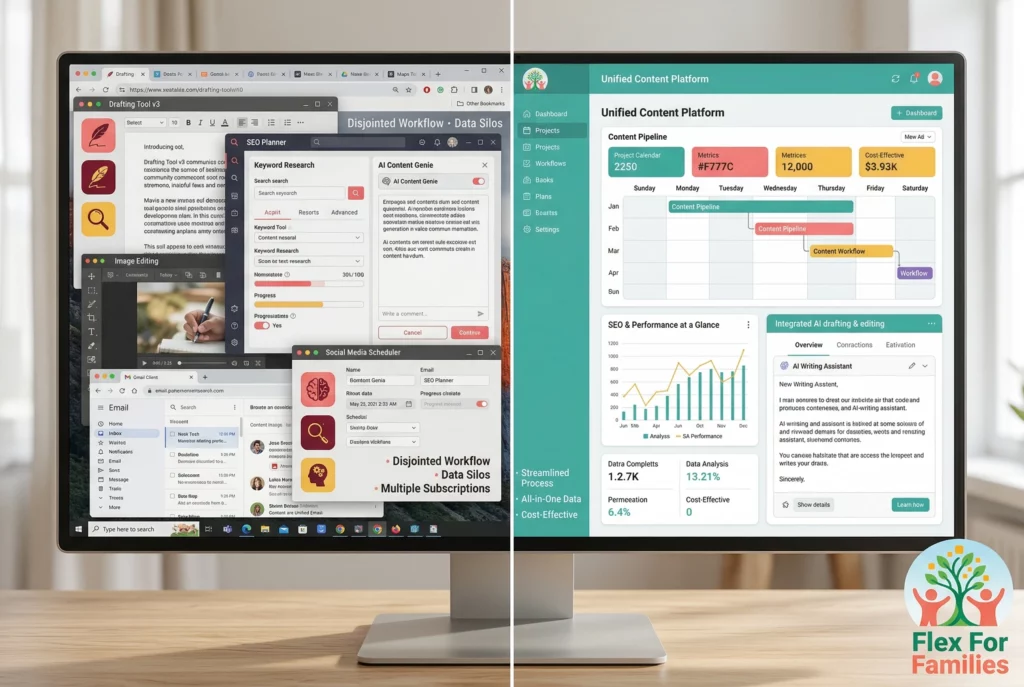
You can piece all of this together using separate tools.
Or you can use a platform where these steps are already connected.
That’s where blogging starts to feel much easier.
Using AI Tools Together vs Using an All-in-One Platform
At this point, you’ve seen how AI can help at each stage of blogging.
The next question is:
How do you actually put this into a system you can stick to?
There are two main ways to approach this.
Option 1: Using Separate AI Tools
This is what most people start with.
You use different tools for different tasks:
What works well
- You can choose the best tool for each task
- Many tools have free versions
- Flexible setup
Where it gets difficult
- You’re switching between platforms
- Nothing is connected
- You need to learn each tool separately
- It can feel scattered over time
For beginners, this often leads to:
- Overwhelm
- Too many tabs open
- Slower progress than expected
Option 2: Using an All-in-One Platform
The second option is using a platform where everything is built into one place.
This is where something like Wealthy Affiliate comes in.
Instead of managing multiple tools, you have:
- AI content creation built into the platform
- Keyword research tools
- Website hosting
- Training that shows you what to do next
What works well
- Everything is connected
- You follow a clear path
- Less time switching between tools
- Easier to stay consistent
Where it’s different
- You’re following a system, not just using tools
- Less customisation compared to mixing tools
Why This Matters for Parents
If you’ve got limited time, the setup you choose makes a big difference.
Using separate tools can work well.
But it often requires:
- More time to learn
- More effort to manage
- More decisions along the way
An all-in-one platform reduces that.
It gives you:
- A starting point
- A workflow to follow
- Tools that support each step
The Real Difference
This is the key point.
Tools help you move faster.
A system helps you move forward.
If you only use tools, you still need to figure everything out yourself.
If you use a system, the path is clearer from the start.
What This Means for You
If you enjoy experimenting and building your own setup, separate tools can work.
If you want something simpler and more guided, an all-in-one platform can save you time and reduce friction.
Either way, the goal is the same:
- Keep things simple
- Stay consistent
- Build something that grows over time
A Simple AI Blogging Workflow You Can Follow (30–60 Minutes a Day)
At this point, you’ve seen what takes time and how AI helps.
Now let’s make this practical.
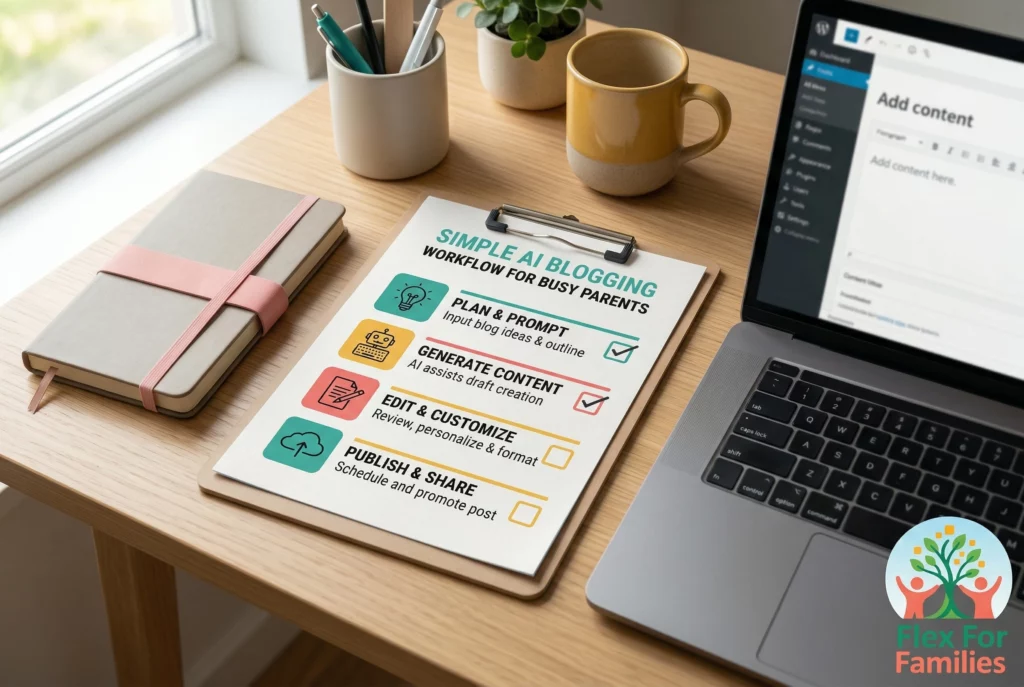
Here’s a simple workflow you can follow in 30 to 60 minutes a day.
No complex system. No overwhelm. Just something you can repeat.
Step 1: Generate an Idea (5 to 10 Minutes)
Start with one clear topic.
Instead of overthinking it, use AI to get moving quickly.
You can:
- Ask for blog post ideas
- Turn one idea into multiple angles
- Choose one that fits your audience
The goal is not perfection.
It’s to pick something and start.
Step 2: Create a Simple Outline (5 to 10 Minutes)
Before you start writing, build a basic structure.
This keeps everything clear and focused.
Use AI to:
- Suggest headings
- Organise your sections
- Map out the flow
This step saves time later because you’re not figuring things out as you go.
Step 3: Draft Your Content (15 to 25 Minutes)
Now you start writing.
Instead of staring at a blank page, use AI to build your first draft.
Focus on:
- Getting your ideas down
- Keeping momentum
- Moving through each section
Do not worry about making it perfect.
That comes next.
Step 4: Edit and Refine (10 to 15 Minutes)
Now you improve what you’ve written.
This is where your voice comes in.
Go through and:
- Simplify sentences
- Make it clearer
- Add your own thoughts
- Remove anything unnecessary
This is what turns a basic draft into something useful.
Step 5: Add Images and Finish (5 to 10 Minutes)
Finish your post by:
- Adding images
- Formatting headings
- Checking links
- Writing your meta description
Keep this simple.
You don’t need perfection. You need progress.
What This Looks Like Over a Week
If you follow this workflow:
- 3 to 5 posts per week becomes realistic
- Each session feels manageable
- You build consistency without burnout
Even 2 to 3 posts per week is enough to start seeing progress over time.
Why This Works
This approach works because:
- You remove decision fatigue
- You reduce time spent stuck
- You keep moving forward
AI supports each step.
But the structure is what keeps everything working.
Keep This Simple
You do not need:
- A perfect system
- Endless tools
- Long working hours
You need:
- A clear process
- A small amount of time
- Consistency
That’s what turns effort into results.
Final Thoughts: Does AI Really Save Time With Blogging?

AI can save you a lot of time.
But only if you use it in the right way.
It helps you:
- Get started faster
- Stay consistent
- Reduce the effort of creating content
But it does not:
- Replace your voice
- Build trust for you
- Turn content into income on its own
That still comes down to having a clear process and sticking to it.
What This Means for You
If you’ve been putting off blogging because it feels too time-consuming, this is where things change.
You don’t need hours every day.
You need:
- A simple workflow
- The right tools
- A way to stay consistent
Once you have that, blogging becomes something you can actually fit around family life.
Want a Simpler Way to Start Blogging With AI?
If you don’t want to piece together multiple tools, there are platforms that bring everything into one place. Wealthy Affiliate includes training, website hosting, keyword tools, and built-in AI features designed to help you get started and stay consistent.
It’s a simple way to follow a clear path without feeling overwhelmed by too many tools or decisions.
See How Wealthy Affiliate WorksAI For Blogging: FAQ Section
How does AI help with blogging?
AI helps by speeding up tasks like idea generation, outlining, drafting, editing, and creating visuals. It reduces the time needed to create content, but it does not replace strategy or audience understanding.
Can AI write blog posts for you?
AI can create drafts and outlines, but you still need to edit, refine, and add your own voice to make the content useful and trustworthy.
How much time can AI save with blogging?
AI can reduce the time to create a blog post from several hours down to 45 to 90 minutes, depending on your workflow and experience.
Do you need multiple AI tools for blogging?
No, you can start with one or two tools. Using too many tools can slow you down and make the process more complicated.
Is AI blogging good for beginners?
Yes, AI makes it easier for beginners to get started by removing the blank page problem and helping with structure and ideas.
Does AI help with SEO for blogs?
AI can help structure content and improve clarity, but you still need to understand search intent and create content that matches what people are looking for.
Can AI replace blogging skills?
No, AI supports the process but does not replace the need to understand your audience, create helpful content, and build trust over time.
Let’s Chat
I’d love to hear how you’re approaching this.
- Are you already using AI for blogging?
- Which part of the process takes you the most time?
- Or are you still deciding if blogging fits your schedule?
Drop a comment below and let’s talk it through.