SEO is changing.
For years, the main question was fairly simple:
Where does my website rank on Google?
Now there is another question appearing alongside it:
Does ChatGPT, Gemini, Claude or another AI search platform actually mention or recommend my brand?
Rankability is built around that shift.
Created by Nathan Gotch and his team, Rankability has evolved from an SEO content optimisation tool into a broader platform for agencies that want to track traditional search performance and AI visibility in one place.
It can monitor mentions and citations across AI platforms, audit websites, optimise existing content, help create new content, track rankings, connect with Google Search Console and GA4, and provide client reporting.
That makes it a powerful platform.
It also makes it potentially excessive for the average beginner blogger.
The cheapest plan currently costs $99 per month.
For an SEO agency managing multiple clients, that could be perfectly reasonable.
For a parent blogger running one website and still learning keyword research, content creation and affiliate marketing, it is a much bigger decision.
That is what I want to explore in this review.
Rankability looks impressive.
But impressive software is only good value if you genuinely need what it does.
Transparency Note
I am not an affiliate for Rankability and I do not earn a commission if you sign up.
This is a research-based review looking at the current Rankability platform, pricing, features, AI-search tools and how I think it fits bloggers, freelancers and SEO professionals.
Where I recommend other platforms later in the review, I will clearly disclose any affiliate relationship.
Quick Verdict
Rankability looks like a strong SEO and AI-search platform, but I think it is much better suited to SEO agencies and professionals than beginner bloggers.
The platform combines traditional SEO tools with newer AI visibility tracking across platforms such as ChatGPT, Google AI Mode and Claude.
You also get content research, optimisation, site audits, rank tracking, reporting, integrations and AI-assisted workflows.
The Starter plan currently costs $99 per month, with higher plans at $199 and $399 per month.
For an agency managing client campaigns, that pricing can make sense.
For a parent blogger running one site, I think it will usually be more than you need.
My Rating: 4.3/5 for SEO professionals
My Rating: 3/5 for beginner bloggers
Platform: Rankability
Co-Founder and CEO: Nathan Gotch
Focus: SEO, AI search visibility, content optimisation and agency workflows
Starter Price: $99 per month
Core Price: $199 per month
Team Price: $399 per month
Free Trial: 7 days on monthly plans
Best For: SEO agencies, consultants, freelancers and experienced marketers
Beginner-Friendly? The interface may be accessible, but the overall platform is more advanced than most beginner bloggers need
Affiliate Link: No
Recommended? Yes for the right user
What Is Rankability?
Rankability describes itself as an AI SEO platform for agencies.
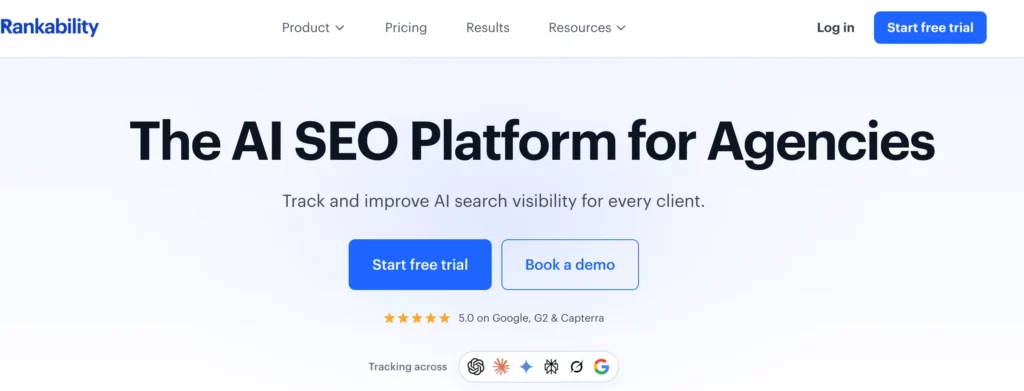
That tells you quite a lot about who it is built for.
The platform is designed to help SEO teams understand where their clients appear across traditional and AI-driven search, identify what needs improving and then take action.
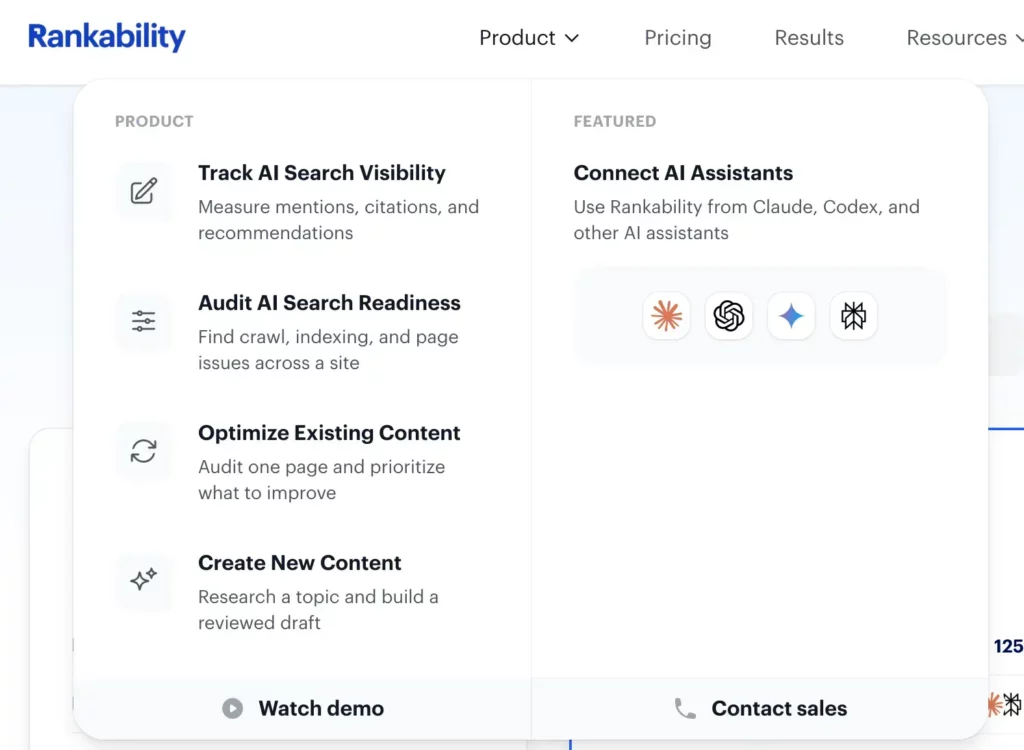
The current workflow covers four broad areas:
- Tracking AI search visibility
- Auditing websites
- Optimising existing content
- Researching and creating new content
Rankability can track whether a brand is mentioned, cited or recommended across AI platforms.
It can also analyse traditional search performance, carry out technical and page-level audits, build content briefs, assist with content creation and connect performance data from platforms such as Google Search Console and Google Analytics 4.
That means it is trying to replace several disconnected SEO workflows with one platform.
For an agency, that is attractive.
Instead of using one tool for rankings, another for content optimisation, another for AI visibility and spreadsheets for client reporting, Rankability attempts to bring those jobs together.
The question for bloggers is whether you actually need that level of infrastructure.
What Happened to Gotch SEO Academy?
This is important because some readers will know Nathan Gotch through Gotch SEO Academy rather than Rankability.
Gotch SEO Academy was Nathan’s SEO training business.
It focused heavily on teaching marketers how to improve SEO results, retain clients and build or scale SEO agencies.
Over time, Nathan’s business moved further into software, systems and professional SEO workflows.
Today, the old GotchSEO.com About page redirects directly to Rankability.
That is a pretty strong indication of where the business has moved.
Rankability itself says it originally started as a content optimisation tool, but agencies became its strongest customer base.
As search changed and clients started asking agencies about visibility inside AI platforms as well as Google, the product expanded around that problem.
So I would not think of Rankability as simply a renamed SEO course.
It is a much broader business now.
The training heritage is still relevant because Nathan’s experience building Gotch SEO Academy clearly influences the educational side of Rankability.
But the current product is software first.
Is Rankability Academy Still Part of the Picture?
Yes, although the branding has evolved.
You will still see references to Rankability Academy, training, certifications and agency education across Nathan Gotch’s wider ecosystem.
That makes sense.
Rankability is aimed at SEO professionals, and software alone does not necessarily teach someone how to run an effective SEO campaign.
The training side helps users understand the systems behind the tool.
This is one of the differences between Rankability and a standard SEO SaaS product.
You are not simply being given dashboards and data.
There is a wider education ecosystem behind it.
For someone who wants to become an SEO professional, freelancer or agency owner, that can add significant value.
For somebody trying to rank their first parenting blog, it may be far more than necessary.
Who Is Nathan Gotch?
Nathan Gotch is an SEO entrepreneur and educator who has worked in the industry for many years.
He originally became widely known through Gotch SEO and Gotch SEO Academy, where he taught SEO strategy, agency systems and client delivery.
He is now the co-founder and CEO of Rankability.
Nathan’s background matters because Rankability is clearly built around professional SEO workflows rather than being another generic AI writing tool that added the letters “SEO” to its marketing.
The current company says Rankability is led by search practitioners who have experience running client campaigns, building search visibility and growing agencies.
That agency experience is visible throughout the product.
The pricing is agency-oriented.
The reporting tools are agency-oriented.
The workspace structure is agency-oriented.
And even the homepage talks about helping agencies show clients where they appear in AI search.
That is useful context before deciding whether Rankability belongs in your own blogging toolkit.
Quick Note: I’m John Crossley, founder of Flex For Families. I review online business opportunities through the lens of family life, focusing on costs, time commitments, risks, and whether they genuinely help parents create more flexibility.
Who Is Rankability Really Built For?
The clearest answer is SEO agencies.
Rankability says that directly.
Its current mission is to help agencies improve their clients’ visibility in AI search.
That affects almost every part of the platform.
- You can create separate brand workspaces.
- You can give teams unlimited user access.
- You can create client portals.
- You can generate shareable reports.
- You can connect client Google Search Console and Analytics data.
- You can track hundreds of AI prompts every day.
- You can monitor multiple AI platforms.
- You can audit sites and pages.
- You can publish through WordPress and Webflow.
- You can even work through GitHub pull requests.
Those are serious professional capabilities.
A solo blogger might use some of them.
An agency can potentially use almost all of them.
That is why I think understanding the intended user is critical before looking at the feature list.
Rankability may be very good software without being the right software for you.
What Does Rankability Include?
There is a lot here.
Even the $99 Starter plan currently includes full access to Rankability’s main tools.
The limits mainly relate to how many brands, prompts and AI platforms you can track.
Some of the main capabilities include:
- AI visibility tracking
- Traditional organic rank tracking
- Search and content research
- Content briefs
- AI-assisted content creation
- On-page optimisation
- Technical SEO audits
- Page-level audits
- Google Business Profile audits
- Local visibility tracking
- Video visibility tracking
- WordPress publishing
- Webflow publishing
- Google Search Console integration
- GA4 integration
- Client portals
- Shareable reporting
- AI strategy assistance
- Unlimited users
That is an impressive package.
But I want to go through the important features individually because simply having lots of tools does not automatically make a platform good value.
The bigger question is:
Which of these features would you actually use?
For an agency, the answer could be most of them.
For a busy parent blogger, the answer may be considerably fewer.
New to Blogging?
If you’re still learning how blogging, SEO, keyword research, and affiliate marketing work, you may not need a dedicated keyword research tool just yet.
Before investing in SEO software, it’s worth building a solid foundation so you understand how to choose a niche, create helpful content, and optimise your blog for Google.
That’s why I often recommend Wealthy Affiliate to beginners. It teaches blogging, SEO, website building, and affiliate marketing in one place, helping you develop the skills you’ll need before investing in more advanced tools like LowFruits.
AI Visibility Tracking
This is probably the feature that makes Rankability most interesting in 2026.
Traditional SEO tools tell you where pages rank in Google.
Rankability also tracks whether AI platforms mention, cite or recommend a brand.
That includes platforms such as:
- ChatGPT
- Google AI Mode
- Claude
- Perplexity
- Gemini
- Grok
- Microsoft Copilot
The exact platforms included depend on your plan.
The Starter plan currently includes ChatGPT, Google AI Mode and Claude.
Core adds Google AI Overviews and Perplexity.
Team adds Gemini, Grok and Microsoft Copilot.
Rankability also tracks things such as mentions, citations, recommendations, sentiment and visibility over time.
That is genuinely useful for agencies.
If a client asks:
“Are we showing up in ChatGPT?”
You can give them something more useful than:
“I think so.”
You can actually track prompts and monitor changes.
For a solo blogger, though, I would be more cautious.
AI visibility is becoming important.
But that does not automatically mean a new blogger needs to pay $99 per month to monitor it.
If your site is still building authority, publishing content and trying to earn its first consistent traffic, I would put most of my attention into creating genuinely useful content first.
You need something worth citing before you worry too much about measuring every citation.
Search and Content Research
Rankability also includes search and content research across every paid plan.
This is much closer to the type of SEO work most bloggers will recognise.
The platform can help identify opportunities, research topics and build content briefs.
That can reduce the amount of jumping between separate tools.
Instead of:
- Keyword tool.
- Competitor research.
- Content brief tool.
- AI assistant.
- Spreadsheet.
Rankability is trying to connect those jobs inside one workflow.
For an agency producing content across several clients, that could save a significant amount of time.
For a blogger, it is useful too.
But again, the question becomes whether it saves enough time to justify $99 every month.
That is a higher bar.
Content Briefs and AI-Assisted Content Creation
Rankability includes content briefs and AI-assisted content creation on all three plans.
This is an area where I would want bloggers to use the platform carefully.
AI can make research and drafting faster.
- It can help organise ideas.
- It can identify gaps.
- It can help you get past the blank page.
But faster content is not automatically better content.
If everyone feeds the same search results into similar AI systems and publishes similar articles, you quickly end up with pages that say roughly the same thing.
That is not what I would aim for.
The value of an AI SEO tool should be helping you identify what needs covering while leaving room for your own experience, judgement and perspective.
For a parent blogger, that might mean adding:
- Your actual experience
- Things that went wrong
- Screenshots
- Examples
- Costs you genuinely paid
- Results you actually achieved
- Decisions you made
- Advice specific to family life
That is what turns SEO research into useful content.
The software can help with the structure.
You still need to provide the reason somebody should trust your article.
On-Page Content Optimisation
Rankability also includes on-page optimisation across every plan.
The idea is to analyse an existing page and identify areas that could be improved.
That might include:
- Topic coverage
- Missing concepts
- Search relevance
- Structure
- Content depth
- Potential optimisation opportunities
This can be particularly useful once a website has been running for a while.
New bloggers often think SEO is entirely about publishing new articles.
It is not.
Updating something that is already ranking on page two can sometimes be a better use of time than publishing another article from scratch.
That is one area where a tool like Rankability could genuinely become more valuable as your site grows.
You have more data.
You have more existing content.
You have more opportunities to improve.
The problem is that a brand-new blogger may not have enough existing content or traffic for these advanced workflows to justify the cost yet.
Technical SEO and Site Auditing
Rankability includes technical SEO audits and page-level audits on every paid plan.
It also includes Google Business Profile audits and prioritised recommendations.
That is useful because technical SEO can become overwhelming quickly.
You can end up staring at hundreds of warnings without knowing which ones actually matter.
A good audit tool should help answer:
What needs fixing first?
That prioritisation matters more than simply producing a long list of errors.
For agencies, this is particularly valuable because they may be auditing multiple client sites.
For a parent blogger managing one WordPress site, I would still question whether Rankability is the most cost-effective way to solve technical problems.
Google Search Console, your hosting platform and lower-cost SEO tools can already identify many common issues.
Again, it is not that Rankability lacks value.
It is whether you need the whole platform to get that value.
Serena: Rankability’s AI Search Expert
One of the more interesting parts of the current platform is Serena.
Rankability describes Serena as an AI search expert that works from client-specific context.
It can investigate Google and AI-search performance, support research and prioritisation, and work across an agency workspace.
This is where Rankability starts moving beyond traditional SEO software.
Instead of simply showing you numbers, Serena is designed to help interpret those numbers.
That potentially reduces one of the biggest problems with advanced SEO tools.
Too much data.
A dashboard can tell you that visibility changed.
A useful assistant should help you work out why and what to do next.
For agencies with multiple clients, I can see the appeal immediately.
For a beginner blogger, I would be more careful.
You do not want to become dependent on an AI assistant before you understand the fundamentals yourself.
- You still need to know why content ranks.
- You still need to understand search intent.
- You still need to recognise good advice from bad advice.
AI should help you make decisions faster.
It should not replace your understanding of the decision.
Rank Tracking Beyond Google
Rankability also includes organic rank tracking, local grid visibility and video visibility tracking.
That broadens the platform beyond standard blog SEO.
An agency may be managing:
- Organic search
- Local businesses
- YouTube visibility
- AI search mentions
- Multiple client websites
Having those signals inside one platform can be useful.
For most solo bloggers, the local-grid features probably will not matter unless the blog supports a local business.
Video tracking may become more interesting if YouTube forms part of your content strategy.
But this illustrates the same pattern throughout Rankability.
The tool is built to solve a wide set of professional SEO problems.
You may only have three of them.
Integrations and Publishing
Rankability currently integrates with:
- Google Search Console
- Google Analytics 4
- Google Business Profile
- YouTube
- WordPress
- Webflow
- GitHub
There is also API access and hosted MCP access on all paid plans.
For agencies and teams, that is impressive.
You can research, draft, optimise, approve and publish without moving through as many separate systems.
There are also approval workflows, client portals and shareable reports.
That is where Rankability starts making more financial sense for agencies.
If one platform replaces several subscriptions and reduces team admin, $199 or $399 per month does not look nearly as expensive.
For one blogger publishing a couple of articles each week, those savings are much harder to realise.
Rankability Pricing in 2026
Rankability currently has three standard plans.
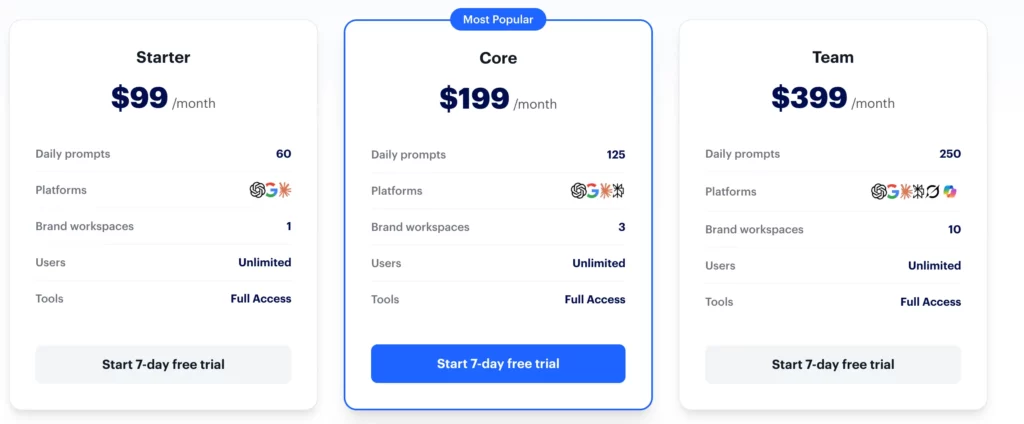
Starter: $99 Per Month
Starter includes:
- 60 daily tracked prompts
- ChatGPT
- Google AI Mode
- Claude
- One brand workspace
- Unlimited users
- Full access to Rankability’s tools
It also includes the research, content, audit, reporting, publishing and integration features available on the higher plans.
The annual price is currently $990.
Core: $199 Per Month
Core increases the allowance to:
- 125 daily prompts
- Three brand workspaces
- ChatGPT
- Google AI Mode
- Google AI Overviews
- Claude
- Perplexity
- Unlimited users
- Full tool access
The annual price is $1,990.
This feels much more like the agency sweet spot.
Three workspaces allow you to manage multiple brands or clients, and the additional AI platforms make visibility tracking more comprehensive.
Team: $399 Per Month
Team includes:
- 250 daily prompts
- Ten brand workspaces
- Eight included AI platforms
- Unlimited users
- Full tool access
The included platforms extend to Gemini, Grok and Microsoft Copilot.
The annual price is $3,990.
This is clearly aimed at teams managing a larger client portfolio.
Is There a Free Trial?
Yes.
All three monthly plans currently include a 7-day free trial.
The free trial does not apply to annual billing.
I like that.
At these prices, I would absolutely test the platform before committing.
Seven days should at least give you enough time to explore the interface, connect your data and decide whether the workflows genuinely replace tools or tasks you are already paying for.
Is the $99 Starter Plan Good Value?
For the right person, yes.
You are getting a lot for $99.
Rankability does not cripple the Starter plan by removing the core SEO tools.
You still get full tool access.
The limitations mainly relate to the number of brands, tracked prompts and AI platforms.
That is much better than a pricing model where the interesting features only appear once you reach the $399 tier.
But value depends entirely on what you are doing.
If you run an SEO consultancy with one major client, $99 could be excellent value.
If you operate a profitable website where SEO is responsible for a large portion of revenue, it could also be sensible.
If you started your first blog three weeks ago?
I would keep the $99.
At that stage, your biggest SEO problems are unlikely to be:
“How do I track my citation share across multiple AI engines?”
They are much more likely to be:
“What should I write about?”
“How do I choose a keyword?”
“How do I create useful content?”
“How do I link my articles together?”
“How long does SEO take?”
“How do I eventually make money from this traffic?”
Those are fundamentally different problems.
And that is why I think Rankability’s price needs to be judged against your stage, rather than simply against its feature list.
Rankability Pros and Cons
Rankability has a lot going for it, especially if SEO is already a serious part of your business.
Pros
- Combines traditional SEO and AI-search tracking
- Tracks visibility across multiple AI platforms
- Includes content research and optimisation
- Includes technical and page-level audits
- Integrates with Google Search Console and GA4
- Supports WordPress and Webflow publishing
- Unlimited users on paid plans
- Client portals and reporting tools
- Strong fit for agencies and consultants
- Includes AI-assisted workflows
- 7-day free trial on monthly plans
- Current product with active development
- Built by people with real SEO experience
Cons
- Starts at $99 per month
- More advanced than most beginner bloggers need
- Many features are agency-focused
- AI visibility tracking may be unnecessary for a new site
- Can create information overload if you do not understand SEO fundamentals
- A solo blogger may only use a fraction of the platform
- Cheaper tools can cover many beginner SEO needs
- You still need to create useful content and make good decisions
Who Is Rankability Best For?
I think Rankability is strongest for people who already treat SEO as a serious commercial activity.
SEO Agencies
This is the clearest fit.
You can create separate workspaces, monitor multiple search environments, produce client reports and bring several SEO tasks into one system.
If you are billing clients for SEO every month, the subscription cost becomes much easier to justify.
SEO Consultants and Freelancers
Rankability could also work well for someone managing a smaller number of clients.
The $99 Starter plan gives you one brand workspace, while Core expands that to three.
That could suit a freelancer who wants professional-level tools without immediately jumping to the highest plan.
Experienced Site Owners
A profitable website with significant organic traffic is another sensible use case.
Once search is responsible for meaningful revenue, better diagnostics and monitoring can justify a larger software budget.
At that point, Rankability may help you protect and improve something that already has commercial value.
Businesses Taking AI Search Seriously
If people discovering your brand through ChatGPT, Gemini and other AI platforms has become commercially important, Rankability becomes much more interesting.
The AI visibility side is one of its main differentiators.
You are not simply checking Google rankings.
You are trying to understand how your brand appears across a changing search landscape.
Is Rankability Too Advanced for Beginner Bloggers?
For most beginners, I think it is.
That does not mean the software is impossible to use.
It means the problems it solves are often not the problems a beginner should be concentrating on yet.
If you have just started a blog, you probably do not need to monitor dozens of AI prompts every day.
- You probably do not need client portals.
- You do not need ten brand workspaces.
- You may not need advanced technical audits.
- You definitely do not need to worry about every search platform at once.
You need foundations.
That means understanding:
- Who you are helping
- What they search for
- How to choose realistic topics
- How to write useful content
- How internal linking works
- How search engines understand your site
- How to improve existing articles
- How monetisation fits into your strategy
Once those skills are in place, advanced tools become much more useful.
Without them, you risk paying for data you do not yet know how to use.
Could a Beginner Still Use Rankability?
Yes.
If money is not a concern and you are committed to learning SEO properly, there is nothing stopping a beginner from using it.
But I would still ask whether that is the smartest use of your budget.
Imagine you spend $99 every month.
That is $1,188 over a year.
Before spending that much on one SEO platform, I would want a clear reason for needing it.
Not:
“It looks impressive.”
Something more like:
“I manage several sites and this replaces three other tools.”
Or:
“My website already earns enough from search that improving performance by a few percentage points would pay for the software.”
That is a much stronger reason.
Is Rankability a Good Fit for Busy Parents?
This one is mixed.
There are parts of Rankability that could save a busy parent a lot of time.
- The research tools can reduce manual work.
- The content briefs can speed up planning.
- The optimisation features can highlight areas to improve.
- The AI assistant can help interpret data.
- The integrations can reduce tool switching.
All of that is useful.
But there is another side.
Rankability gives you a lot to monitor.
- Rankings.
- AI visibility.
- Audits.
- Prompts.
- Content scores.
- Technical issues.
- Multiple search platforms.
- Analytics.
That can become another rabbit hole.
For someone squeezing a blog into evenings, weekends or a few hours around family responsibilities, more data is not always the solution.
Sometimes you need fewer decisions.
A simpler workflow may be:
- Find one useful topic.
- Write the best article you can.
- Link it properly.
- Publish it.
- Review the results later.
Then repeat.
Rankability makes more sense once the complexity of your business creates a genuine need for the extra data.
Until then, I think simplicity usually wins.
A Better Starting Point for New Bloggers
This is where I think Wealthy Affiliate becomes a more relevant alternative.
Rankability and Wealthy Affiliate are not direct competitors.
They solve different problems.
Rankability is primarily an advanced SEO and AI-search platform.
Wealthy Affiliate is designed to help people learn how to build and grow an online business.
That distinction matters.
If your goal is to become an SEO consultant, I would look much more seriously at Rankability.
If your goal is:
“I want to start a blog, learn SEO and eventually make money from it.”
I think Wealthy Affiliate is the more logical starting point.
Why I Think Wealthy Affiliate Makes More Sense for Beginners
I joined Wealthy Affiliate back in 2016.
The biggest value for me was never one individual tool.
It was learning how the pieces fit together.
- Keyword research.
- Content.
- SEO.
- Affiliate marketing.
- Website building.
- Traffic.
- Monetisation.
Those foundations matter more than having access to an advanced dashboard.
Wealthy Affiliate now also includes AI tools that can help beginners with areas such as content planning and workflow.
That means you can learn how to use AI alongside the fundamentals rather than treating AI as a replacement for them.
That is particularly important now.
AI can help you work faster.
But you still need to understand what good content looks like.
Rankability vs Wealthy Affiliate
I would think of the decision like this.
Choose Rankability If:
- You already understand SEO
- You manage client websites
- You sell SEO services
- You run an agency
- You need advanced AI visibility tracking
- You want detailed reporting
- You manage multiple sites
- SEO already generates meaningful revenue
Choose Wealthy Affiliate If:
- You are learning SEO
- You are building your first blog
- You want help choosing a niche
- You need keyword research guidance
- You want to learn affiliate marketing
- You want AI tools alongside broader training
- You need website-building support
- You want a more complete beginner environment
Choose Free Tools If:
Your budget is extremely tight.
Google Search Console, Google Analytics, free keyword tools and free educational resources can take you surprisingly far.
You can always add paid tools when the need becomes obvious.
Why More Tools Are Not Always Better
This is one lesson I think new bloggers learn fairly quickly.
It is easy to think the missing ingredient is another tool.
- Another SEO platform.
- Another AI assistant.
- Another keyword tool.
- Another course.
Sometimes the real problem is simply that you need to publish more useful content and give it time.
Rankability can help an experienced user work more efficiently.
It cannot replace the experience required to know which recommendations matter.
That is why I would rather see a beginner spend the first year building skills and content than spending heavily on professional SEO software.
Once your blog grows, your toolkit can grow with it.
My Beginner Recommendation
If you are starting from scratch, I would not begin with Rankability.
I would learn the fundamentals first.
Use a broader beginner platform such as Wealthy Affiliate if you want structured training and support.
Use free tools if your budget is limited.
Then revisit Rankability once you have enough traffic, content or client work to benefit from what it actually does.
That way, you are buying the tool because you need it.
Not because you hope it will solve everything.
Rankability vs SEO That Works
Rankability and SEO That Works both sit at the more advanced end of SEO, but they solve very different problems.
SEO That Works is Brian Dean’s premium SEO training programme.
It teaches a structured approach to areas such as:
- Search intent
- Content strategy
- Link building
- Content promotion
- On-page SEO
- Competing for more difficult keywords
Rankability is software.
It helps you research, optimise, audit, track and report on SEO campaigns while also monitoring visibility across AI search platforms.
That means the choice largely comes down to what you are missing.
Choose SEO That Works If You Need Better SEO Knowledge
If your biggest limitation is your understanding of SEO, structured training may provide more value than another software subscription.
SEO That Works is designed to improve how you approach SEO.
You learn the methodology and then apply it using whatever tools you already have.
The downside is availability.
SEO That Works is not permanently open for enrolment, and the official site currently directs interested users to a waiting list.
Choose Rankability If You Already Know SEO
Rankability makes more sense when you already understand the fundamentals and need better systems for implementing them.
- You can research opportunities.
- Optimise pages.
- Audit websites.
- Track rankings.
- Monitor AI visibility.
- Manage different brands.
- Report results.
That is particularly useful when you are carrying out SEO repeatedly across several websites.
Which Would I Choose for a Blogger?
For a beginner, neither would be my first purchase.
Learn SEO fundamentals first.
For an established blogger who understands SEO but wants stronger workflows and data, Rankability becomes more interesting.
For someone who understands the basics but specifically wants advanced SEO education, SEO That Works may be the better fit when enrolment is available.
For an agency or consultant managing client campaigns, I would lean towards Rankability because the software can become part of the day-to-day business.
They solve different stages of the problem.
SEO That Works teaches you how to think about SEO.
Rankability helps you execute and monitor SEO at scale.
Rankability vs Surfer SEO
This is a much closer comparison.
Both platforms can help you research and optimise content.
But their emphasis is different.
Surfer SEO has built much of its reputation around content optimisation.
Its Content Editor analyses competing search results and helps writers create pages with stronger topical coverage.
Surfer has also expanded beyond basic content scoring and now includes areas such as content auditing, keyword research, AI writing and AI visibility.
Rankability goes further into the wider agency workflow.
Alongside content optimisation, it includes:
- Traditional rank tracking
- AI mentions and citations
- Technical audits
- Local visibility
- Video visibility
- Client portals
- Shareable reporting
- Multiple brand workspaces
- Publishing workflows
- Agency-focused AI assistance
Choose Surfer SEO If Your Main Problem Is Content Optimisation
If you mainly want help creating and improving search-focused content, Surfer is probably the simpler comparison to make.
It has a mature content optimisation workflow and even positions its lower plans towards solo content creators and smaller businesses.
That may make it easier to justify if you are primarily a blogger rather than an agency.
Choose Rankability If You Need a Wider SEO System
Rankability becomes stronger when your requirements extend beyond individual articles.
If you need to monitor several clients or brands, track Google and AI search, conduct audits and produce reports, its broader approach makes more sense.
This is another example of why I would not choose SEO software purely by asking:
“Which one has more features?”
Ask:
“Which one solves the problems I actually have?”
A blogger writing and improving content may prefer Surfer.
An agency managing the entire SEO process may prefer Rankability.
What About a Beginner Blogger?
I would probably choose neither initially.
Both platforms can be useful.
But useful does not mean necessary.
You can learn keyword research, search intent, content structure and basic optimisation without immediately adding another substantial monthly subscription.
Build the skills first.
Add specialist software when it starts saving you enough time or improving enough results to pay for itself.
Is Rankability Worth It in 2026?
For SEO professionals, I think it can be.
Rankability is tackling a genuine problem.
Search visibility is becoming harder to measure because discovery is no longer confined to traditional Google results.
Businesses increasingly want to know:
- Are we ranking on Google?
- Are we appearing in AI Overviews?
- Does ChatGPT mention us?
- Does Claude cite us?
- What does Perplexity recommend?
- Which websites are being used as sources?
Rankability brings those questions into the same environment as traditional SEO research, optimisation, auditing and reporting.
That is valuable.
For an agency managing several clients, the subscription becomes relatively easy to understand as a business expense.
If Rankability saves several hours each month, replaces other tools or helps demonstrate value to clients, it can potentially pay for itself very quickly.
Is It Worth It for a Solo Blogger?
This is where my answer changes.
Probably not for most.
A solo blogger may genuinely enjoy using Rankability.
They may learn interesting things from the AI visibility reports.
They may improve articles using the optimisation tools.
They may find technical issues through the audits.
But enjoying a tool and getting enough commercial value from it to justify an ongoing subscription are different things.
If your blog earns £100 per month, spending around that amount on one SEO platform makes very little sense.
If your blog earns £5,000 per month and organic search drives most of that income, the calculation looks very different.
The tool has not changed.
Your business has.
My Rule for SEO Tools
I like paid tools when they solve a problem I already have.
I am much less enthusiastic about paying for tools because I hope they will create the business for me.
Rankability belongs firmly in the first category.
It can make a serious SEO operation better.
It does not remove the need to build that operation first.
Rankability’s Biggest Strength
The strongest thing about Rankability is probably its timing.
Nathan Gotch and his team have recognised that SEO is expanding.
Traditional rankings still matter.
Google traffic still matters.
But AI recommendations, citations and visibility are becoming another part of how people discover websites and brands.
Rankability has built that into the core platform rather than treating it as a small add-on.
For agencies trying to explain this changing landscape to clients, that could be extremely useful.
Rankability’s Biggest Weakness for FFF Readers
It solves too many problems that many beginner bloggers do not have yet.
That sounds strange as a criticism.
But it matters.
A parent starting their first blog does not need:
- Client portals
- Ten brand workspaces
- Hundreds of daily AI prompts
- Local grid tracking
- Agency reporting
- Complex technical workflows
They need to understand the basics and create something useful.
That is why I rate Rankability highly as professional SEO software while giving it a much lower score for beginner suitability.

About the Reviewer
Hi, I’m John Crossley, founder of Flex For Families.
I’m a parent, blogger, and online business owner who helps families find realistic ways to create more flexibility through blogging, affiliate marketing, and online business.
Like many people, I’ve spent years researching online opportunities, testing platforms, and learning how to separate genuine business models from expensive hype. I’ve also experienced the frustration of chasing opportunities that promised freedom but demanded more time away from family.
Today, I use that experience to review courses, side hustles, AI opportunities, and online business programmes through a simple lens:
Will this genuinely help parents create more flexibility, or will it create more pressure?
Every review on Flex For Families focuses on costs, time commitments, risks, and realistic expectations, so you can make informed decisions before investing your time or money.
Final Verdict: Is Rankability Worth It?
Rankability is one of the more interesting SEO platforms I have looked at because it reflects where search appears to be heading.
It combines traditional SEO with AI visibility tracking, content optimisation, auditing, research, reporting and workflow tools.
For agencies, consultants and SEO professionals, I can see a strong argument for using it.
You can manage multiple brands.
You can track traditional and AI search.
You can optimise content.
You can audit websites.
You can report results to clients.
And you can bring several tasks into one platform.
That can justify a substantial monthly subscription.
For the average beginner blogger, I would not recommend starting here.
Not because Rankability is poor.
Because it is solving the wrong problems for that stage of the journey.
My Rating for SEO Professionals: 4.3/5
The feature set is strong, the AI-search focus is timely and the agency workflows have genuine commercial value.
My Rating for Beginner Bloggers: 3/5
There is plenty a blogger could use, but the cost and complexity are difficult to justify when you are still learning the fundamentals.
My Recommendation
Choose Rankability if SEO is already part of your business.
Consider it if you manage clients, run several sites or need serious visibility tracking across Google and AI search.
Leave it for later if you are building your first blog.
You do not need the most advanced SEO platform.
You need the right foundations.
A Better Starting Point for Beginner Bloggers
If you are reading this review because you want to learn SEO rather than run an SEO agency, I would take a different route.
That is where Wealthy Affiliate makes more sense to me.
I joined Wealthy Affiliate in 2016, and it helped me understand how SEO fits into the bigger blogging picture.
You are learning more than rankings.
You can learn how to:
- Build a website
- Choose a niche
- Research keywords
- Create useful content
- Understand SEO
- Use AI tools within your workflow
- Learn affiliate marketing
- Monetise your audience
- Build an online business gradually
That is a much more relevant set of problems for someone starting from scratch.
Rankability may eventually become useful.
But you will get far more from advanced SEO software once you understand what you are asking it to do.
Rankability or Wealthy Affiliate?
If you want to build or scale an SEO service:
Choose Rankability.
If you want to build your first blog and learn SEO as part of that process:
I would start with Wealthy Affiliate.
New to Blogging and SEO?
If Rankability feels like more SEO software than you need right now, that is completely understandable.
I recommend Wealthy Affiliate for beginners who want to learn how SEO, content, affiliate marketing and AI tools fit together while building an actual website.
I first joined in 2016, and I still use the platform today.
There is a free option, so you can explore the platform before deciding whether it is right for you.
Transparency: This is an affiliate recommendation. If you join Wealthy Affiliate through my link, I may earn a commission at no additional cost to you. I only recommend it where I believe it is a genuine fit for the reader.
Not Ready for a Paid Platform?
You do not need to buy anything today.
If you are still trying to work out your niche, content plan and how blogging could fit around family life, start there.
My free Parent Blogging Starter Kit is designed to help you organise those first steps.
Start Your Blog Around Family Life
My free Parent Blogging Starter Kit gives you practical tools to help you plan your blog, find content ideas and build a realistic schedule around the time you actually have.
Inside you’ll get:
- Niche Finder
- 50 Blog Post Ideas
- Weekly Blogging Planner
- Income Tracker
- Blogging Success Roadmap
- Flexibility Planner
- Nap Time Blogging Checklist
Let’s Chat
Have you tried Rankability, Gotch SEO Academy or another advanced SEO platform?
I would be interested to hear where you think tools like this become worth the investment.
If you run an agency, has AI visibility tracking become something clients are actively asking about?
And if you are building your first blog, which part of SEO currently feels the most confusing?
Drop a comment below and share your experience.
Your perspective could help another blogger decide whether they need a tool like Rankability now or whether their money is better spent elsewhere.