Seeing an Amazon Associates rejection email can feel like a major setback, especially after you have already created content and generated your first sales.
However, the right next step depends on what Amazon has actually done. An application rejection, a withdrawal after the initial 180-day period, and the closure of an established account are not the same thing.
In this guide, I will help you identify what happened, understand the likely reason, and prepare properly before you reapply or contact Amazon.
This is a research-based guide using current Amazon Associates documentation. Amazon operates separate country programmes and can change its requirements. Check the message sent to you and the rules for the marketplace you joined before acting.
If you have not applied yet, start with my Amazon Associates Guide for Parents.
Quick Answer: What Should You Do If Amazon Associates Rejects Your Application?
Do not immediately submit the same website again.
First, read Amazon’s email and identify whether your application was rejected, withdrawn because you did not complete the initial sales requirement, or closed for another reason.
Then:
- Identify the reason Amazon supplied.
- Check the rules for your Amazon marketplace.
- Audit every website or social account listed in your application.
- Correct the specific problem.
- Confirm whether you are allowed to reapply or need to contact Amazon.
- If you reapply, replace old Amazon links with links carrying the new Associates ID.
Amazon UK says it cannot reassess an application after it has been rejected. Its guidance does discuss reapplying once your site is properly established, but reapplication rights can depend on the reason and programme involved.
Was Your Application Rejected, Withdrawn, or Your Account Closed?
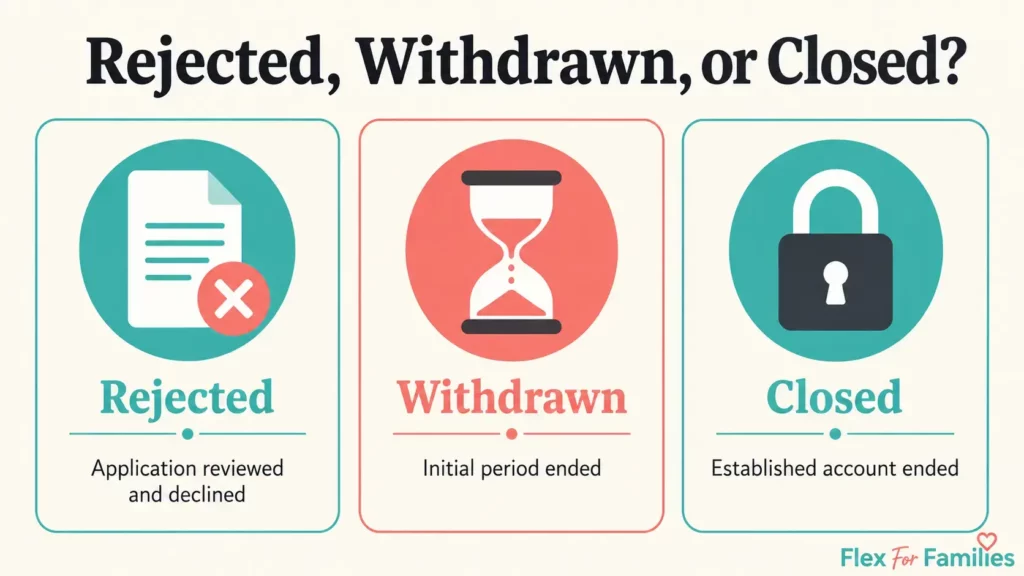
Start by checking the wording in Amazon’s message:
| Situation | What It Usually Means | Likely Next Step |
|---|---|---|
| Application rejected | Amazon reviewed the sites or social pages you supplied and did not approve them | Correct the stated problem and check whether reapplication is permitted |
| Application withdrawn after 180 days | You did not complete the qualifying-sales requirement during the initial period | Build stronger content and traffic before submitting a new application |
| Established account closed | Amazon identified inactivity, a compliance problem, or another account issue | Follow the closure or appeal instructions in Amazon’s message |
Do not assume that advice about appealing a closed account applies to an initial application rejection.
Amazon US, for example, publishes a specific appeal route for certain closed accounts. It separately states that rejected applicants may reapply once the relevant programme requirements are met. Amazon UK says rejected applications cannot be reassessed and directs applicants towards correcting the problem before reapplying where appropriate.
Your rejection email and marketplace rules should determine your response.
How the Amazon Associates Approval Process Works
Signing up does not always mean that Amazon has fully approved your website.
Under Amazon UK’s current application process, Amazon reviews your application after you have referred three qualifying sales. Those sales must be generated during the first 180 days, and personal orders do not qualify.
Amazon then reviews every website, app or social media page listed in your application.
Its current UK guidance says:
- Sites must contain robust original content.
- At least 10 posts is a useful rule of thumb.
- Websites should contain recent content, generally published within the previous 60 days.
- Sites and eligible social pages must be publicly accessible.
- The URLs supplied in the application must identify the exact properties Amazon should review.
Three qualifying sales trigger the review. They do not guarantee acceptance.
This is an important distinction. A blogger can complete the sales requirement and still be rejected because the website, content, disclosures, links or application details do not satisfy Amazon’s standards.
Common Reasons Amazon Associates Applications Get Rejected
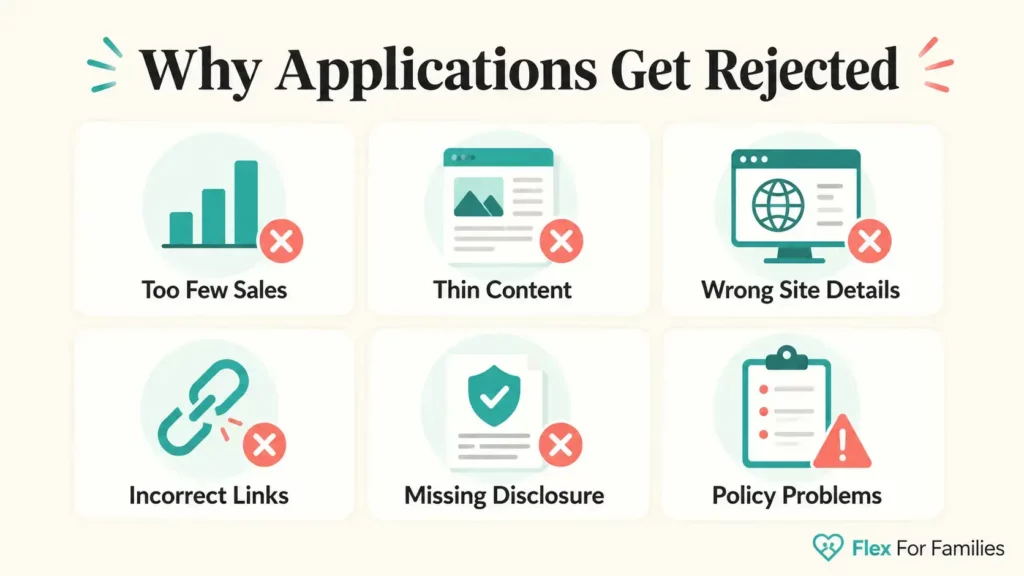
Amazon should provide a reason in its email. Use that explanation as your starting point rather than trying to fix every possible issue at once.
You Did Not Generate Enough Qualifying Sales
Amazon UK currently gives new applicants 180 days to refer the required qualifying activity.
Your own purchases do not count. You should not ask relatives, friends or business associates to use your links for your benefit either.
If the initial period expires before you meet the requirement, Amazon says the application and Associates ID cannot be reinstated. You may be able to submit a new application when your website has become better established.
Before reapplying, ask whether your site now receives enough relevant traffic to make three genuine sales realistic.
Your Website Has Too Little Content
Amazon UK describes at least 10 posts as a useful rule of thumb. This is guidance, not a promise that any website with 10 articles will pass.
Ten thin articles written to reach a number are unlikely to be as persuasive as 10 useful articles created for a clear audience.
Before reapplying, check whether your website demonstrates:
- A defined subject and audience.
- Original information or commentary.
- Useful product context.
- Clear navigation.
- Enough depth to give visitors a reason to return.
- Recent publishing activity.
If you need to strengthen your recommendations, my guide to writing product reviews that convert explains how to help readers make a decision without turning every article into a sales pitch.
Your Content Is Unoriginal or Adds Little Value
Amazon says an Associate site should give customers insight they cannot easily obtain elsewhere.
Problems may include:
- Copying product descriptions.
- Repeating information already available on Amazon.
- Publishing generic product lists without useful selection criteria.
- Using manufacturer material without meaningful commentary.
- Publishing large amounts of unedited AI content.
- Recommending products without explaining who they suit.
AI can help you research and organise content, but it does not remove your responsibility to add judgement, accuracy and a reason for the article to exist.
Your Website Does Not Look Active
Amazon UK says website content should be recent, generally within the previous 60 days.
You do not need to publish every day. You should show that the site is active and being maintained.
For a busy parent, that could mean publishing or substantially updating one useful article each week before reapplying. Consistent progress is more valuable than rushing out several weak posts in one weekend.
Your Site List Is Incomplete or Incorrect
Amazon reviews the websites, apps and social pages declared in your application.
Check that you supplied:
- The complete website address.
- Every site where your Amazon links appear.
- The exact URL of any social media page.
- Current information for properties you own and control.
Do not list only facebook.com or youtube.com. Amazon needs the exact public page or channel it should assess.
Your Social Media Account Does Not Meet the Requirements
Amazon UK currently accepts applications using specified social networks, including Facebook public group or fan pages, Instagram, X/Twitter, YouTube, TikTok and Twitch.
The page must be public and established. Amazon UK says social pages should have a substantive number of organic followers or likes, in most cases at least 500. Posts and follower numbers must remain visible to non-followers.
A personal Facebook profile or private group does not satisfy the published UK criteria.
These platform and follower requirements can change, so check your marketplace’s application page before reapplying.
Your Amazon Links Are Not Properly Tagged
Amazon Special Links contain the Associates ID or tracking tag used to connect legitimate activity with your account.
If Amazon says your links were not tagged correctly, check every Amazon link on the sites listed in your application.
My guide to creating Amazon affiliate links explains how to generate them with Amazon’s current tools and add them to WordPress.
If you submit a new application, do not assume links from the rejected account will transfer across. Amazon UK tells reapplicants to update product links so that they use tagged links from the new application.
Your Affiliate Disclosure or Amazon Identification Is Missing
Amazon requires the following identification:
As an Amazon Associate I earn from qualifying purchases.
Affiliate content also needs a clear disclosure that readers can notice and understand. Do not rely only on a disclosure page hidden in the footer.
Check:
- The required Amazon statement appears clearly on your site or authorised account.
- Individual articles identify affiliate links where required.
- Readers can understand that you may earn from qualifying purchases.
- Your disclosure follows the advertising rules that apply in your location.
You Misused Amazon’s Trademarks or Content
Amazon restricts how Associates use its names, marks, product images, reviews and other programme content.
Potential problems include:
- Using an Amazon trademark in your domain name or social username.
- Copying Amazon customer reviews.
- Downloading product images without an approved right or method.
- Altering an approved Amazon logo.
- Presenting your site as though Amazon sponsors or endorses it.
If Amazon mentions a trademark violation, correct the exact use and review its current brand guidance before reapplying.
Your Site Contains Unsuitable Content
Amazon excludes sites containing certain illegal, deceptive, harmful, infringing or otherwise unsuitable material.
This is more serious than simply having too few posts. Read the suitability rules for your marketplace and follow any instructions Amazon provides.
Do not assume you can open another account to bypass a policy decision. Some rejection or termination reasons require Amazon’s authorisation before you attempt to rejoin.
What to Do After Amazon Rejects Your Application
Here are the steps you need to take if your Amazon Application is rejected.
Step 1: Read the Entire Rejection Email
Do not work from the subject line alone.
Record:
- The marketplace involved.
- Whether Amazon says rejected, withdrawn, or closed.
- The reason given.
- Any deadline.
- Any contact or appeal instructions.
Keep the original email until the matter is resolved.
Step 2: Check the Rules for Your Marketplace
Amazon Associates programmes operate separately.
Advice for Amazon.com may not match Amazon.co.uk. Sign in to the Associates help centre for the programme you joined and check its current application-review, participation and policy pages.
Step 3: Audit Every Property in Your Application
Review your site as somebody who has never seen it before.
Can they quickly understand:
- Who the site helps?
- What topics it covers?
- Why its content is useful?
- Who publishes it?
- How affiliate relationships are disclosed?
- Whether the content is current?
Also confirm that every declared site is accessible without a login or paywall.
Step 4: Fix the Specific Rejection Reason
Focus on the issue Amazon identified.
If the problem is thin content, improve the content. If links are missing their tags, replace them correctly. If the wrong social URL was supplied, make your application details accurate.
Avoid cosmetic changes that leave the actual problem untouched.
Step 5: Strengthen the Site Before Reapplying
Do not treat Amazon’s 10-post guideline as a box-ticking exercise.
Before submitting a new application, aim to have:
- A clear niche.
- A useful group of related articles.
- Recent publishing activity.
- Original explanations and examples.
- Natural product recommendations.
- A visible About page and contact information.
- Clear affiliate disclosures.
The site should make sense even if every Amazon link is temporarily removed.
Step 6: Confirm Whether You Can Reapply
Amazon UK’s help material discusses reapplying once a site has been established and the rejection reason has been corrected. It also says an old application cannot simply be reassessed.
Amazon US policies contain more specific restrictions for some rejection and termination reasons. If your email says you need prior authorisation, or the reason involves unsuitable content, abuse or a serious policy violation, contact Amazon before opening a new application.
Do not use a different email address or account to work around a restriction.
Step 7: Replace Links From the Old Application
If Amazon accepts a new application, it will provide a new Associates ID or tracking setup.
Create an inventory of your existing Amazon links. Replace the old tagged links with links generated through the new application, then preview and test each page.
An ordinary link audit can be managed in small groups. You do not need to repair an entire website in one evening.
Can You Appeal an Amazon Associates Rejection?
Usually, an initial application rejection is handled differently from an established-account closure.
Amazon UK currently says it cannot reassess a rejected application. The practical route is normally to correct the stated problem and determine whether you can submit a new application.
Amazon US publishes an appeal process for certain closed accounts. Its current help page says eligible closure appeals should be submitted through its contact form within five business days. That does not mean every rejected application qualifies for an appeal.
Use the route named in your email. If the message is unclear, contact Associates support and ask whether Amazon considers the case an application rejection or an account closure.
Can You Reapply for Amazon Associates?
Often, but not automatically in every situation.
If your application was withdrawn because your website did not generate the required activity, Amazon UK says you are welcome to reapply once the site is established.
If Amazon rejected the quality of the website, correct the content, site-list, tagging, disclosure or trademark problem before reapplying.
If the rejection involved unsuitable content, abuse or a serious policy breach, check whether Amazon requires advance authorisation.
There is little value in applying again with the same website and expecting a different result.
What Happens to Your Old Amazon Affiliate Links?
Links containing an old or rejected Associates ID should not be treated as active links for a new application.
Use this process:
- Make a list of every page containing an Amazon link.
- Note the old tracking ID used on each page.
- Submit the new application only when the site is ready.
- Generate fresh links through the new Associates account.
- Replace the old tagged URLs.
- Preview each page on desktop and mobile.
- Confirm that the disclosure remains visible.
Do not edit unfamiliar parts of the URL manually unless you fully understand the required link format.
Amazon Associates Reapplication Checklist
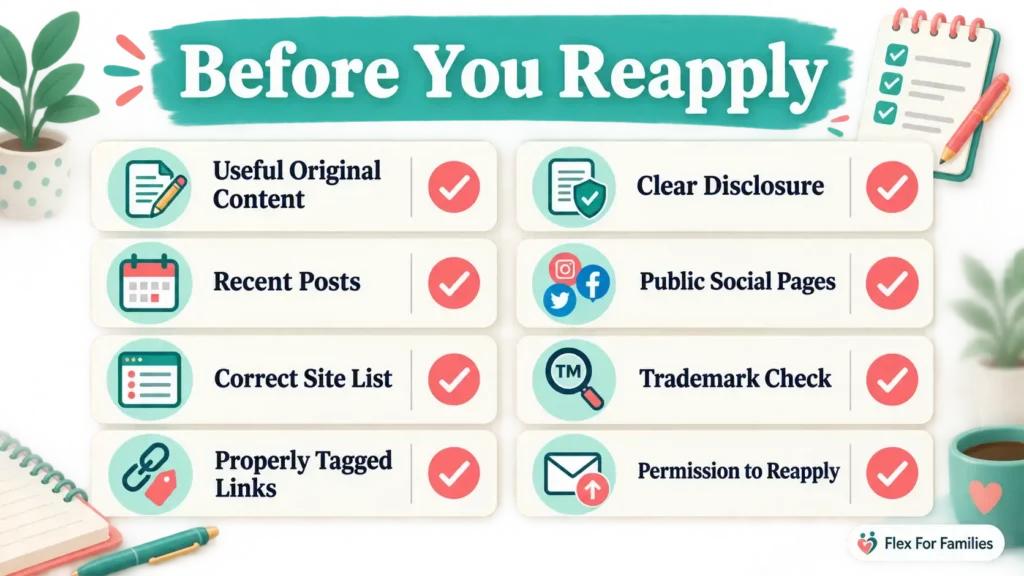
Before reapplying, confirm:
- [ ] I understand the reason Amazon supplied.
- [ ] I have identified the correct Amazon marketplace.
- [ ] My website is publicly accessible.
- [ ] I own and control the website.
- [ ] Every website and social page is listed accurately.
- [ ] My site contains a useful body of original content.
- [ ] I have considered Amazon’s guideline of at least 10 posts.
- [ ] My website contains recent content.
- [ ] My articles add commentary or insight beyond product descriptions.
- [ ] My Amazon links use the correct tags.
- [ ] My affiliate disclosure is clear.
- [ ] The required Amazon Associate identification appears on the site.
- [ ] My domain, usernames and graphics follow Amazon’s trademark rules.
- [ ] Any social account is public and meets the current marketplace requirements.
- [ ] I know which old links will need replacing.
- [ ] I have confirmed that I am permitted to reapply.
This checklist cannot guarantee acceptance. Amazon makes the final decision.
What If You Cannot Reapply?
Amazon Associates is one affiliate programme. It is not the only way to monetise useful content.
You could:
- Build more traffic before applying to another programme.
- Look for brands that closely match your audience.
- Join another established affiliate network.
- Contact relevant companies about direct partnerships.
- Improve your review and comparison content.
- Focus on growing an email audience or developing your own resource.
My comparison of Amazon Associates and other affiliate programmes explains where Amazon is useful and where another programme may offer a better fit.
Do not let one rejection push you into joining every available programme. Choose partners that genuinely serve your readers.
A One-Week Recovery Plan for Busy Parents
You can complete the first review in five focused sessions.
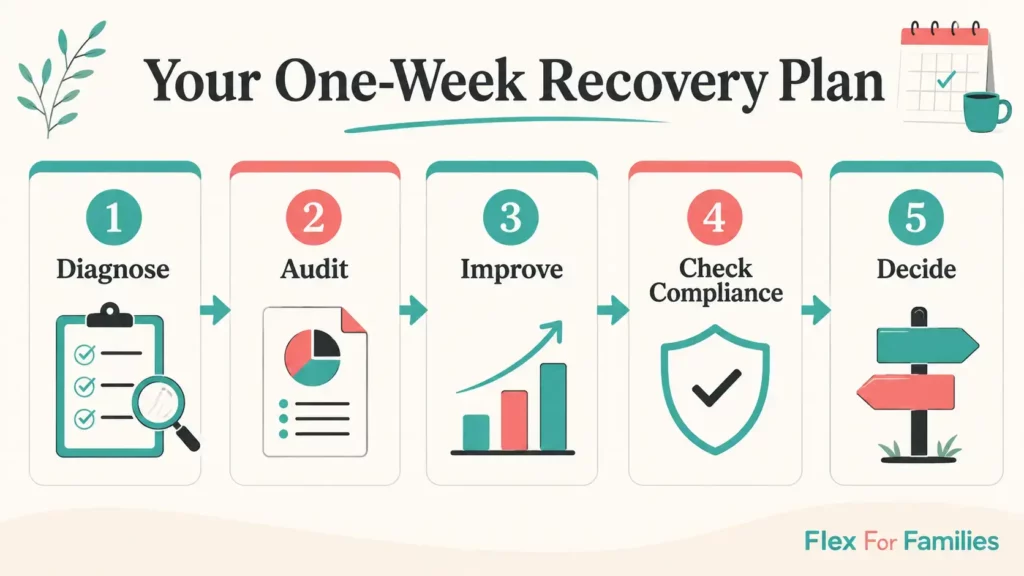
Session 1: Diagnose
Read the email, identify the marketplace and write down the rejection reason.
Session 2: Audit
Check every website or social page listed in the application.
Session 3: Improve
Update one or two weak articles with clearer explanations, original examples and better reader value.
Session 4: Check Compliance
Review tagged links, disclosures, site ownership, social visibility and Amazon trademark use.
Session 5: Decide
Ask whether the site is genuinely ready or whether another month of useful content would give it a stronger foundation.
Reapplying quickly is not the goal. Reapplying with a stronger site is.
Final Thoughts
An Amazon Associates rejection is frustrating, but it can expose a fixable weakness in your application or website.
Start with Amazon’s stated reason. Confirm whether the application was rejected, withdrawn or closed. Correct the underlying issue, check whether reapplication is allowed, and replace the old tagged links if you receive a new Associates ID.
Most importantly, build a website that helps its audience even when the affiliate links are removed. That foundation matters far beyond one programme.
Strengthen Your Blog Before You Reapply
If Amazon’s decision has exposed gaps in your niche, content plan or website foundations, the free Parent Blogging Starter Kit can help.
It includes practical worksheets, planning tools and a realistic roadmap you can use around work and family life.
Download the free Parent Blogging Starter Kit
Frequently Asked Questions
Can I Reapply After Amazon Associates Rejects Me?
In many cases, you can reapply after correcting the problem, but this depends on the marketplace and rejection reason. Amazon UK discusses reapplication after establishing the site, while some US rejection or termination reasons require advance authorisation. Follow the instructions in Amazon’s email.
How Soon Can I Reapply for Amazon Associates?
Amazon does not publish one universal waiting period for every rejection. Reapply only after correcting the reason and confirming that the relevant programme permits it. Submitting the same site again immediately is unlikely to help.
Do I Need Three Qualifying Sales?
Amazon UK currently requires at least three qualifying sales within the first 180 days before completing its application review. Personal orders do not qualify. Check the current rules for your marketplace.
How Many Posts Do I Need for Amazon Associates?
Amazon UK describes at least 10 posts as a useful rule of thumb. Ten posts do not guarantee approval. The content must also be original, useful, publicly accessible and sufficiently established.
Can Amazon Reject Me After I Make Three Sales?
Yes. The sales trigger Amazon’s review. Amazon then assesses the websites, apps or social pages included in the application. Completing the sales requirement does not guarantee acceptance.
What Happens to My Old Affiliate Links?
Links associated with the rejected application should be replaced with tagged links from the new application if you successfully reapply. Amazon UK specifically tells reapplicants to update their product links with the new tags.
Can I Appeal a Rejected Application?
Amazon UK says it cannot reassess a rejected application. Closed accounts can have a different appeal process. Read the wording in your email and contact Amazon if you are unsure which situation applies.
Can I Apply Using Social Media Instead of a Blog?
Amazon accepts certain established public social accounts. Supported platforms and eligibility requirements vary by marketplace. Amazon UK currently expects exact profile URLs, public content and, in most cases, at least 500 organic followers or likes.
Will Amazon Tell Me Why I Was Rejected?
Amazon normally supplies a reason or category in its email. If the message is unclear, contact Associates support for the marketplace involved. Do not publish your Associates ID or private account information when asking for help elsewhere.
Let’s Chat
Has Amazon rejected or withdrawn your Associates application?
What reason did the email provide, and which part of the recovery process feels unclear?
Share the general reason in the comments, but do not post your Associates ID, email address, earnings or other private account information.