Creating images for your blog has never been easier.
The difficult part is deciding which AI tool deserves a place in your workflow.
Over the last few months I’ve spent a lot of time using ChatGPT and, more recently, Wealthy Affiliate’s new Kre8or platform. I’ve used them to create blog hero images, Pinterest Pins, Facebook graphics, comparison tables, workflow diagrams, product mockups and illustrations for Flex For Families.
The interesting thing is that I don’t see them as direct competitors.
They solve different problems.
ChatGPT is brilliant at helping me think through ideas, develop prompts and plan an entire content campaign.
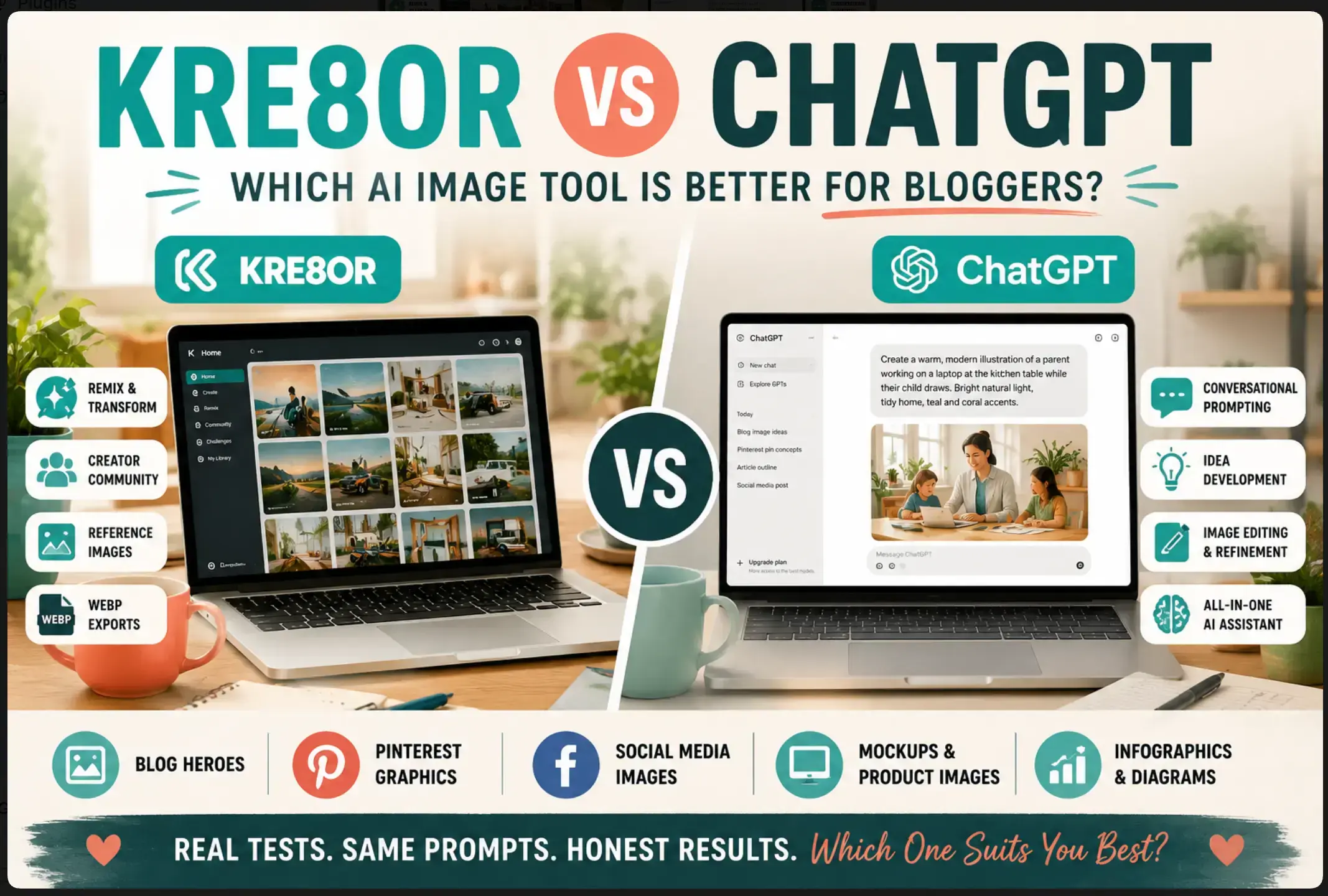
Kre8or focuses on turning those ideas into polished visuals quickly, with useful features like reference images, Remix, mockups, community challenges and direct WEBP exports.
So which one should bloggers actually choose?
If you’re wondering whether Kre8or is worth paying for when you already have ChatGPT, or whether ChatGPT’s image generation is all you need, this guide will help you make that decision.
Rather than comparing technical specifications, I’m looking at both tools from the perspective of a busy blogger who wants to create better content without spending hours designing graphics.
By the end, you’ll know:
- Which tool creates the better blog images.
- Which offers the best value.
- Whether you actually need both.
- How I use them together every week.
- Which one I’d recommend depending on where you are in your blogging journey.
Heads Up
I’ve used ChatGPT extensively as part of my blogging workflow for planning articles, developing prompts, creating images, writing social posts and brainstorming content ideas.
I’ve also spent time testing Kre8or across a range of blogging tasks, including hero images, Pinterest graphics, mockups, Remix projects and community challenges.
This comparison is based on that hands-on experience, combined with my own workflow as the creator of Flex For Families.
Neither platform has influenced this review, and my recommendations are based on what I believe genuinely saves time for bloggers rather than simply offering the longest list of features.
As always, my focus is on helping busy parents and beginner bloggers choose tools that make blogging easier, more enjoyable and more sustainable over the long term.
ChatGPT is the better overall blogging tool because it supports planning, writing, prompting, editing, strategy, and image creation. Kre8or is the stronger dedicated image platform, with Remix, community features, mockups, reference images, and direct WEBP exports. Most beginners should choose ChatGPT first and add Kre8or when visual content becomes a regular part of their workflow.
Quick Verdict
Kre8or vs ChatGPT
Which AI Image Tool Is Better for Bloggers?
If you only want one AI tool for your wider blogging business, ChatGPT is the better overall choice. It helps with planning, writing, prompting, social content, strategy, troubleshooting, and image creation.
If your priority is creating blog and social images through a dedicated visual workflow, Kre8or is the stronger specialist option. It offers Remix, reference images, community features, creative challenges, mockups, and direct WEBP exports.
Overall Winner
ChatGPT
Best when you want one tool to support the full blogging workflow, including ideas, prompts, writing, planning, and images.
Best Dedicated Image Tool
Kre8or
Best when image creation is a regular part of your workflow and you want more focused visual tools and export options.
My recommendation: Use ChatGPT to develop the idea and improve the prompt. Use Kre8or to generate, Remix, and export the final image when visual content has become a regular part of your blogging routine.
You probably do not need both when you are starting. ChatGPT is the stronger first purchase. Kre8or becomes easier to justify once you regularly create blog heroes, Pinterest Pins, Facebook graphics, and branded visuals.
Best for beginners
ChatGPT
Best for regular image creation
Kre8or
Best for prompt development
ChatGPT
Best for Remix and WEBP
Kre8or
Bottom line: ChatGPT wins as the broader blogging tool. Kre8or wins as the dedicated image platform.
At a Glance
| Feature | ChatGPT | Kre8or |
|---|---|---|
| Best For | Planning, writing and AI assistance | Dedicated image generation |
| Ease of Use | ⭐⭐⭐⭐⭐ | ⭐⭐⭐⭐⭐ |
| Image Quality | ⭐⭐⭐⭐☆ | ⭐⭐⭐⭐⭐ |
| Prompt Development | ⭐⭐⭐⭐⭐ | ⭐⭐⭐⭐☆ |
| Blog Hero Images | Excellent | Excellent |
| Pinterest Graphics | Very Good | Excellent |
| Facebook Graphics | Very Good | Excellent |
| Mockups | Good | Excellent |
| Reference Images | Good | Excellent |
| Community Features | No | Yes |
| Remix Features | Limited | Yes |
| WEBP Export | No | Yes |
| Overall Winner | ChatGPT | Best Dedicated Image Tool |

Do You Actually Need Both?
This is probably the biggest question readers have.
The answer surprised me.
When I first started testing Kre8or, I assumed one tool would quickly replace the other.
That hasn’t happened.
Instead, they’ve naturally settled into different roles within my workflow.
ChatGPT helps me decide what to create.
Kre8or helps me create it.
For example, before generating an image I might ask ChatGPT to suggest:
- Three hero-image concepts.
- A Pinterest-friendly visual.
- A Facebook version.
- A stronger prompt.
- Different artistic styles.
- Ways to better match the Flex For Families brand.
Once I know exactly what I want, I move over to Kre8or and generate the image.
The result is faster than trying to invent prompts from scratch inside an image generator.
If you only create the occasional image, ChatGPT may be enough.
If you’re producing several blog posts, social graphics and Pinterest Pins every week, Kre8or starts earning its place as a dedicated image tool.
That’s why I don’t really see this as an either-or decision.
It’s more a question of whether image creation has become a regular part of your blogging workflow.
What Do Kre8or and ChatGPT Have in Common?
Kre8or and ChatGPT approach image creation differently, but they share several important strengths.
Both can help bloggers create original visuals without relying entirely on stock photography.
Both can also support:
- Blog hero images
- Pinterest graphics
- Facebook posts
- Product mockups
- Editorial illustrations
- Infographics
- Brand visuals
- Supporting article images
The quality of the final result depends heavily on the prompt in both platforms.
Neither tool can automatically understand your audience, visual identity, or intended message unless you provide that context.
You still need to explain:
- Who or what should appear
- The setting
- The mood
- The colours
- The composition
- The format
- The intended platform
- What should be avoided
That is why one vague prompt can produce a generic result, while one detailed prompt can produce something far more useful.
Both tools can also make mistakes.
You still need to check:
- Hands
- Faces
- Text
- Screens
- Logos
- Product details
- Background objects
- Reflections
- Unwanted visual changes
Neither platform removes the need for human judgement.
Both Can Produce High-Quality Blog Images
In my testing, both ChatGPT and Kre8or produced polished images suitable for real blog content.
That included:
- Realistic family scenes
- Editorial-style illustrations
- Social graphics
- Mockups
- Concept images
- More imaginative creative briefs
The differences were often more about interpretation than basic quality.
For the same prompt, ChatGPT might preserve the central concept more literally.
Kre8or might take a slightly more visual or lifestyle-led direction.
Neither approach is automatically better.
The better result depends on what the image is supposed to achieve.
Both Work Better With Clear Brand Direction
Neither tool knows the Flex For Families brand by default.
I need to specify details such as:
- Teal and coral accents
- Warm family-home settings
- Realistic parent imagery
- Calm, practical scenes
- No luxury-office clichés
- No fake income dashboards
- No money flying from laptops
- No overdone futuristic effects
ChatGPT has an advantage here because I use it across the wider content workflow.
It already understands more about the audience, tone, and visual direction from previous conversations.
Kre8or needs more of that context included inside the prompt.
That does not mean Kre8or cannot create on-brand visuals.
It simply means the brief needs to carry more of the brand knowledge.
Both Can Use Reference Images
Both platforms can work from uploaded images.
That opens up useful possibilities such as:
- Uploading a logo
- Using an existing brand graphic
- Referencing a product
- Showing a particular person
- Adapting a previous image
- Creating a visual in a similar direction
- Building a mockup
Reference images improve control, but they do not guarantee a perfect copy.
The tool may still alter:
- Colours
- Facial details
- Logo shapes
- Product proportions
- Layout
- Small text
The result needs checking before publication.
Both Can Help Reduce Reliance on Stock Photography
Stock images remain useful.
However, they often struggle to match a very specific blogging message.
A search for “parent blogger working from home” may return:
- Overly polished home offices
- Generic smiling models
- Unconvincing family scenes
- Images already used across hundreds of websites
Both ChatGPT and Kre8or allow you to describe the exact visual you need.
That gives bloggers more control over:
- The type of parent shown
- The family setting
- The emotional tone
- The composition
- The colour palette
- The level of realism
- The space needed for text
This can make the final image feel more connected to the article.
Both Can Become a Distraction
Both platforms make it very easy to keep experimenting.
You can always ask for:
- Another version
- A warmer version
- A more realistic version
- A different composition
- A cleaner layout
- One tiny change
- One more attempt
That can turn a ten-minute task into an entire evening.
The real benefit of AI image generation comes from using it with a clear purpose.
Decide:
- What the image needs to do
- What format is required
- How many options you will generate
- Which details matter most
- When the result is good enough
Then stop.
The article still needs publishing.
The Main Difference Between Kre8or and ChatGPT
The main difference is not image quality.
It is the role each tool plays.
ChatGPT is a wider creative and strategic assistant.
Kre8or is a dedicated image platform.
ChatGPT helps with:
- Planning the article
- Developing visual concepts
- Improving prompts
- Writing captions
- Creating social posts
- Editing content
- Refining images
- Solving wider blogging problems
Kre8or focuses more heavily on:
- Image generation
- Remixing
- Visual exploration
- Community challenges
- Creator discovery
- Reference-based creation
- Export options
- WEBP downloads
That distinction explains why the two tools can work so well together.
One helps shape the idea.
The other provides a more focused environment for creating and exporting it.
My Early Take
I would not choose between Kre8or and ChatGPT based only on which one creates the more attractive first image.
Both can produce strong results.
The better question is:
Which part of your workflow needs the most help?
If you struggle to decide what to create, write prompts, or connect visuals to the article, ChatGPT is stronger.
If you already know what you want and need a dedicated place to create, Remix, explore, and export images, Kre8or has the advantage.
That is why the feature-by-feature comparison matters.
The overall winner changes depending on the job.
Quick Note: I’m John Crossley, founder of Flex For Families. I review online business opportunities through the lens of family life, focusing on costs, time commitments, risks, and whether they genuinely help parents create more flexibility.
Feature-by-Feature Comparison
Ease of Use
Winner: ChatGPT (Just)
Both ChatGPT and Kre8or are easy to use.
Neither requires coding knowledge or an understanding of complicated AI terminology before you can start creating images.
That makes them both approachable for beginner bloggers.
However, they take different approaches.
ChatGPT feels like having a conversation.
Kre8or feels like using a dedicated creative platform.
Using ChatGPT
With ChatGPT, I rarely think about “using an image generator.”
Instead, I simply explain what I’m trying to achieve.
For example, I might say:
“I’m writing an article about blogging consistency for busy parents. Can you suggest three hero image ideas?”
ChatGPT immediately starts helping me think through the problem.
It might suggest:
- A realistic home workspace
- A visual metaphor
- An editorial illustration
- Different moods
- Alternative compositions
- Platform-specific variations
Once I’ve chosen a direction, I simply continue the conversation.
“Can you make it warmer?”
“Leave space for the headline.”
“Make it feel more realistic.”
It feels natural.
I don’t have to keep rewriting prompts from scratch because ChatGPT remembers the conversation.
That conversational workflow is one of its biggest strengths.
Using Kre8or
Kre8or is different.
It assumes you’ve already decided what you want.
Once you have a prompt, generating images is extremely straightforward.
The interface is clean.
You can quickly:
- Enter your prompt
- Upload reference images
- Choose the image quality
- Generate
- Remix
- Download
- Export as WEBP
I particularly liked how little friction there was.
Nothing felt hidden.
Within a few minutes I was creating:
- Blog hero images
- Facebook graphics
- Pinterest Pins
- Magazine covers
- Mockups
- Creative challenge entries
without needing to learn a complicated interface.
Learning Curve
Neither platform has a steep learning curve.
The biggest challenge with both is actually learning how to write better prompts.
That’s true whether you’re using:
- ChatGPT
- Kre8or
- Midjourney
- Leonardo AI
- Adobe Firefly
The better your prompt becomes, the better your images become.
The software itself is rarely the difficult part.
Which Is Easier?
If someone has never used AI before, I think ChatGPT feels slightly more approachable.
People naturally know how to ask questions.
That makes the interface almost disappear.
Kre8or is still very beginner-friendly, but it expects you to arrive with a clearer visual idea already in mind.
My Verdict
If we’re judging pure ease of use, ChatGPT wins by a small margin.
Its conversational approach makes refining ideas feel effortless.
Kre8or is extremely easy once you know what you want, but ChatGPT does a better job of helping you discover what that should be.
Winner: ChatGPT ⭐
Image Quality
Winner: Draw (Depends on the Image)
This was the category I expected to produce a clear winner.
It didn’t.
Both platforms consistently created high-quality images.
The difference was usually in interpretation rather than technical quality.
ChatGPT’s Image Style
ChatGPT tends to follow the brief very closely.
When I asked it to create images for Flex For Families, it generally captured:
- The realistic family atmosphere
- The practical home environment
- The warm lighting
- The calmer emotional tone
- The branding direction
Because ChatGPT already understands my wider brand and previous conversations, it often needs less explanation.
That makes the first result surprisingly close to what I had imagined.
Kre8or’s Image Style
Kre8or impressed me with how polished many of its outputs looked.
The lighting often felt excellent.
The composition was strong.
The images had a polished editorial quality that works particularly well for:
- Blog hero images
- Lifestyle illustrations
- Social graphics
- Mockups
- Promotional visuals
I also found myself using the Remix feature quite regularly.
Instead of starting again, I could take an image I already liked and push it in another creative direction.
That encouraged experimentation without completely abandoning the original concept.
The Family Explorer Challenge
One of my favourite tests involved creating a futuristic exploration vehicle for my family.
The prompt described:
- A hybrid exploration vehicle
- Designed for me, Gem and Will
- Comfortable enough to travel anywhere
- Futuristic but believable
- Autonomous while remaining drivable
- Built for exploration rather than speed
Both ChatGPT and Kre8or produced remarkably similar concepts.
The overall design language was almost identical.
The differences came in the details.
Kre8or chose to place people inside the vehicle and interpreted the environment slightly differently.
ChatGPT focused more on the vehicle itself as the hero.
Neither version was objectively better.
They simply told the same story in slightly different ways.
That experience reinforced something I’d already started noticing.
The prompt often influences the result more than the platform.
Brand Consistency
One area where ChatGPT currently has an advantage for me is brand familiarity.
Because we’ve spent months developing the Flex For Families style together, ChatGPT already understands things like:
- Teal and coral accents
- Warm family homes
- Realistic parents
- Practical blogging
- Honest online income
- Avoiding “guru” imagery
Kre8or can absolutely produce those same styles.
I simply have to include them within the prompt.
Once I do that, the results become very close.
Realism
Both platforms now produce realistic human images that are a huge improvement over earlier AI generations.
Hands.
Faces.
Lighting.
Expressions.
Clothing.
All felt much more natural than they did even a year ago.
That said, I still inspect every image carefully.
AI occasionally introduces:
- Strange fingers
- Odd reflections
- Distorted background objects
- Incorrect logos
- Small text errors
Those checks remain important regardless of which platform you use.
Does One Produce Better Images?
Not consistently.
Sometimes I preferred ChatGPT.
Sometimes I preferred Kre8or.
If you removed the names from many of the images and asked me to identify which tool had created them, I genuinely don’t think I’d get every answer right.
That says a lot about how capable both systems have become.
My Verdict
This category finishes as a draw.
Both tools can produce excellent images.
The deciding factor is usually:
- The prompt.
- The amount of refinement.
- How well the image supports the article.
The platform itself is only one part of the equation.
Winner: Draw 🤝
Prompting Experience
Winner: ChatGPT
This is where ChatGPT starts to separate itself.
Not because it necessarily creates better images.
Because it creates better prompts.
ChatGPT Helps You Think
One of the biggest advantages of ChatGPT is that prompting becomes collaborative.
Instead of trying to write the perfect prompt immediately, I can simply explain the goal.
For example:
“I need a Pinterest image for an article about blogging consistency.”
ChatGPT will often respond with:
- Alternative concepts
- Better wording
- Different artistic directions
- Suggestions for composition
- Colour ideas
- Platform-specific improvements
That conversation gradually develops into a much stronger prompt than I would probably have written alone.
Prompt Refinement
If something isn’t working, I don’t start again.
I simply say things like:
- Make it warmer.
- Remove the luxury office.
- Make the family home feel more realistic.
- Leave space for a headline.
- Use a softer colour palette.
- Add subtle teal accents.
The conversation evolves naturally.
That makes prompt writing feel much less intimidating.
Kre8or’s Approach
Kre8or assumes you’ve already done most of that thinking.
Once you’ve written the prompt, it does an excellent job of turning it into an image.
It isn’t trying to coach you through the creative process.
That’s simply a different design philosophy.
The Combination I Prefer
Interestingly, my favourite workflow uses both.
I develop the prompt inside ChatGPT.
Then I paste the finished version into Kre8or.
That gives me the best of both worlds.
ChatGPT becomes the creative director.
Kre8or becomes the visual artist.
It’s a workflow I’ve found myself using repeatedly while creating content for Flex For Families.
My Verdict
If prompting feels difficult, ChatGPT makes it dramatically easier.
It doesn’t simply generate images.
It teaches you how to think about them.
Winner: ChatGPT ⭐
Editing and Refinement
Winner: ChatGPT
Both tools allow you to improve an image after the first generation.
The difference is how that refinement happens.
ChatGPT treats editing as a conversation.
Kre8or treats it more like a dedicated creative workflow.
Editing in ChatGPT
With ChatGPT, I can continue working on the same image using ordinary language.
For example:
- Move the parent further to the right.
- Make the room feel less polished.
- Remove the floating icons.
- Add more space above the laptop.
- Change the coral accents to teal.
- Keep the same scene but make it vertical.
- Replace the businesswoman with a dad blogger.
- Make the lighting feel warmer.
That is easy to understand.
I do not need to know which editing feature to select or how the underlying image model works.
I simply explain what needs changing.
This is particularly helpful when the image is almost right.
Instead of rebuilding the prompt from the beginning, I can focus on the one detail that is not working.
The Risk With Conversational Editing
ChatGPT does not always change only the requested detail.
You may ask it to alter the colour of a notebook and discover that it has also:
- Changed the person’s clothing
- Moved the furniture
- Rewritten the headline
- Added another plant
- Adjusted the lighting
- Redesigned half the room
That can be frustrating.
The safest approach is to keep each request focused and check the entire image after every edit.
You should never assume the unchanged areas have remained unchanged.
Editing in Kre8or
Kre8or offers a more image-focused refinement experience.
You can:
- Generate another version
- Use an existing image as a reference
- Remix the creation
- Explore alternative styles
- Transform the image into a different concept
- Export the result in different formats
The Remix feature is the clearest difference.
It encourages you to ask:
What else could this image become?
That might mean turning:
- A family scene into a magazine cover
- A blog image into a social campaign
- A normal photograph into an illustration
- A visual concept into a mockup
- A simple scene into something more unusual
This is less about fixing one small detail and more about taking the image in another direction.
Which Tool Is Better for Small Corrections?
ChatGPT.
The conversational approach is more natural when I already know what needs adjusting.
I can describe the problem directly and continue refining the same concept.
Which Tool Is Better for Creative Transformation?
Kre8or.
Remix is stronger when I want to repurpose or reinterpret an image rather than simply correct it.
My Verdict
ChatGPT wins for practical editing because the conversational workflow is easier when an image is nearly right.
Kre8or wins the more creative side of refinement through Remix.
For everyday blogging, precise corrections are likely to matter more often.
Winner: ChatGPT ⭐
Brand Consistency
Winner: ChatGPT for Context, Kre8or for Repeatable Prompts
Brand consistency is one of the most important parts of creating AI images for a blog.
You do not want every article to look as though it belongs to a different website.
A recognisable visual style may include:
- Consistent colours
- Similar lighting
- Familiar settings
- Repeatable character types
- A particular illustration style
- Similar compositions
- The same emotional tone
- Consistent logo placement
Neither ChatGPT nor Kre8or guarantees perfect consistency automatically.
Both need direction.
ChatGPT’s Context Advantage
ChatGPT has a major advantage in my own workflow because it already understands Flex For Families.
It knows that I prefer:
- Teal and coral accents
- Warm, realistic family homes
- Practical workspaces
- Parents who look believable
- Calm, encouraging visuals
- Honest online-income messaging
- No luxury-office clichés
- No piles of money
- No exaggerated success imagery
- No generic robots unless the topic genuinely needs one
That context reduces the amount of information I need to repeat.
I can say:
Create this in the usual Flex For Families style.
and ChatGPT already has a strong idea of what that means.
That is difficult for a standalone image tool to match.
Kre8or Needs the Brand Inside the Prompt
Kre8or can create the same visual direction.
It simply needs more explicit instructions.
For example:
Use the Flex For Families palette of teal #3BB4A6 and coral #F77C7C, warm natural lighting, realistic family-home details, approachable parents, clean editorial composition, and an honest practical atmosphere. Avoid luxury offices, money imagery, robotic technology clichés, and exaggerated influencer styling.
Once I include those details, the results become far more consistent.
Saved Prompt Templates
The most effective way to build consistency in Kre8or is to create reusable prompt templates.
You could have separate templates for:
- Blog hero images
- Pinterest Pins
- Facebook graphics
- Product mockups
- Editorial illustrations
- Infographics
- Personal-experience images
Each template would include the recurring brand instructions.
You then change only:
- The subject
- The article topic
- The setting
- The required format
- The specific action
That reduces the chance of forgetting important details.
Canva Still Plays a Role
Neither ChatGPT nor Kre8or should be expected to handle every part of branding perfectly.
I would still use Canva for:
- The exact Flex For Families logo
- Brand fonts
- Accurate colour values
- Headline placement
- Recurring layouts
- Final spacing
- Social-media templates
The image generator creates the visual style.
Canva provides the final consistency.
My Verdict
This category depends on how the tools are used.
ChatGPT wins for ongoing brand context because it understands the wider project.
Kre8or can match that consistency through carefully built prompt templates.
For my current workflow, ChatGPT has the advantage.
Winner: ChatGPT ⭐
Reference Images
Winner: Kre8or
Reference images allow you to guide the AI using an existing visual rather than relying on text alone.
That can be useful when you want to include:
- A logo
- A product
- A previous design
- A person
- A website screenshot
- A particular composition
- A brand style
- A device mockup
Both ChatGPT and Kre8or can work with uploaded images.
However, I think reference-based creation feels more central to Kre8or’s visual workflow.
Using Reference Images in ChatGPT
ChatGPT works well when I want to discuss the reference first.
I can upload an image and explain:
- What I like about it
- What should remain
- What should change
- How it connects to the article
- Which format I need
- Which brand details should be added
That conversational analysis is useful.
For example, I might upload an existing Flex For Families image and ask:
Keep the warm family-home feel and the teal and coral accents, but create a completely different scene for an article about Pinterest traffic.
ChatGPT can understand the broader intention.
Using Reference Images in Kre8or
Kre8or is particularly useful when the visual itself is the starting point.
You can use reference images for:
- Products
- Mockups
- Branded scenes
- Transformations
- Visual variations
- Remix ideas
- Creative campaigns
It feels more focused on taking something visual and turning it into another visual asset.
That makes it useful when you already have:
- A lead magnet cover
- A product screenshot
- A logo
- A photograph
- A previous campaign image
and want to build something new from it.
Reference Images Are Not Exact Instructions
Neither platform should be treated as a photocopier.
The AI may change:
- Facial details
- Product shape
- Colour
- Logo design
- Proportions
- Text
- Composition
That means reference-based images still need checking.
If the exact product or logo must remain accurate, I would add the genuine asset manually during the final design stage.
My Verdict
ChatGPT is stronger for discussing and interpreting a reference.
Kre8or is stronger when reference-based creation is part of a dedicated visual workflow.
For bloggers creating mockups, product scenes, and remixed assets, Kre8or has the edge.
Winner: Kre8or ⭐
Product and Device Mockups
Winner: Kre8or
Mockups help turn a digital product or website asset into something that feels more tangible.
A blogger might create:
- A lead magnet shown on a laptop
- A workbook displayed on a tablet
- A course shown across several devices
- A website displayed inside a realistic home-office scene
- A printable shown as physical pages
- A product shown in a lifestyle setting
Both tools can create mockups.
Kre8or feels more naturally suited to this type of visual work.
My Flex For Families Starter Kit Mockup
For the Kre8or review, I created a device mockup for the Flex For Families Parent Blogging Starter Kit.
The brief included:
- A laptop
- A tablet
- A smartphone
- Printed worksheets
- Teal and coral branding
- A realistic home workspace
- Small family-life details
- A premium but achievable atmosphere
Kre8or handled the overall composition well.
It understood that the devices needed to feel like part of one coordinated product presentation.
The result looked much closer to a promotional asset than a normal AI illustration.
Where ChatGPT Helps
ChatGPT remains useful during the planning stage.
It can help decide:
- Which devices should appear
- What each screen should display
- How the composition should be arranged
- Which background details support the audience
- Where the logo should sit
- Which wording should be visible
- What should be added later in Canva
It can also generate a mockup directly.
However, Kre8or feels more focused on the visual production side.
Text and Screen Accuracy
Mockups often contain small text and interface details.
That creates a risk.
The AI may invent:
- Worksheet titles
- Screen text
- Logos
- Menu items
- Product details
For a finished promotional mockup, I would normally:
- Generate the device arrangement and overall scene.
- Export the strongest image.
- Replace important screen content in Canva or another design tool.
- Add the genuine logo.
- Proofread every visible word.
This gives you the polished AI composition without relying on generated text for the important details.
My Verdict
Kre8or wins because mockups fit naturally within its dedicated visual workflow, reference-image support, and creative transformation features.
ChatGPT remains valuable for developing the brief.
Winner: Kre8or ⭐
Blog Hero Images
Winner: Draw
Blog hero images are one of the most important visual assets I create.
They need to:
- Match the article
- Represent the wider message
- Work in a wide format
- Leave enough space for the title
- Look professional on desktop and mobile
- Fit the Flex For Families brand
Both ChatGPT and Kre8or perform extremely well here.
Creating Hero Images With ChatGPT
ChatGPT’s biggest advantage is context.
If we have already developed the article together, it understands:
- The central topic
- The audience
- The tone
- The conclusion
- The sections included
- The visual style used across the website
That makes it easier to move from the article to a suitable hero concept.
For example, I could say:
Create a hero image for the article we have just written.
ChatGPT can use the wider conversation rather than relying only on the title.
That helps avoid obvious, surface-level ideas.
An article about why blogging feels slow at first does not necessarily need another frustrated person staring at analytics.
ChatGPT can suggest something that reflects the actual message, such as steady progress, small steps, or long-term growth.
Creating Hero Images With Kre8or
Kre8or performs particularly well once the concept and prompt are clear.
I found it capable of producing:
- Polished lighting
- Clean wide compositions
- Realistic home-office scenes
- Editorial illustrations
- Strong focal points
- Useful headline space
The dedicated generation workflow also makes it easy to create the image in the required format from the beginning.
That reduces the need for awkward cropping later.
Which Produces the Better Hero?
This depends on the starting point.
If I only have an article idea and need help developing the visual concept, ChatGPT is stronger.
If I already have a detailed prompt and want to generate several polished wide options, Kre8or may feel smoother.
The final image quality is close enough that I would not choose one platform solely on that basis.
My Verdict
ChatGPT is better at deciding what the hero image should communicate.
Kre8or is excellent at producing the finished visual once the brief is clear.
This category ends as a draw.
Winner: Draw 🤝
Pinterest Graphics
Winner: Kre8or
Pinterest images need to work harder than ordinary blog graphics.
They must:
- Stop someone scrolling
- Communicate the topic quickly
- Use a vertical format
- Leave room for a readable headline
- Feel connected to the blog’s brand
- Create enough curiosity to earn a click
Both tools can create strong Pinterest visuals.
Kre8or has a slight advantage because the dedicated visual workflow feels better suited to producing and adapting several creative concepts.
ChatGPT for Pinterest
ChatGPT is excellent during the planning stage.
It can help me create:
- Different headline angles
- Alternative visual concepts
- Several Pin descriptions
- Problem-focused versions
- Benefit-led designs
- Comparison Pins
- Infographic ideas
For one article, I might ask for three very different Pin concepts rather than three versions of the same image.
That helps avoid creating a social feed where everything looks repetitive.
ChatGPT can also generate the complete Pin.
Its ability to create structured layouts and readable headline text has improved considerably.
However, I still inspect every word carefully.
Kre8or for Pinterest
Kre8or is particularly useful for creating the main portrait artwork.
It can handle:
- Realistic scenes
- Editorial illustrations
- Comparison concepts
- Product mockups
- Workflow visuals
- Poster-style graphics
The Remix feature is useful when one concept works well and I want to explore a different treatment without starting from a completely blank prompt.
The platform also encourages visual experimentation through its community and challenge features.
That can provide useful inspiration for social content.
Accurate Text Still Matters
Whichever platform creates the image, I usually prefer to add the final Pinterest headline inside Canva.
That gives me complete control over:
- Spelling
- Font
- Line breaks
- Logo placement
- Contrast
- Layout
- Brand consistency
An AI-generated Pin may look excellent and still contain one small wording error.
That single error is enough to make the finished asset unusable.
The Most Practical Workflow
My preferred Pinterest workflow is:
- Develop three distinct concepts with ChatGPT.
- Create the main visuals in Kre8or.
- Add the exact headline and logo in Canva.
- Export the finished Pins.
- Write the titles and descriptions with ChatGPT.
That approach gives each tool a clear role.
My Verdict
Kre8or wins for the actual visual-generation stage.
Its portrait formats, Remix options, and dedicated image workflow make it well suited to producing regular Pinterest content.
ChatGPT remains essential for the strategy behind the Pins.
Winner: Kre8or ⭐
Facebook and Social Media Images
Winner: Kre8or
Social media requires variety.
Posting the same blog hero image several times is easy, but it does not give people many different reasons to engage.
For one article, I may want:
- A review graphic
- A question post
- A comparison image
- A practical tip
- A humorous visual
- A quote-style takeaway
- A workflow graphic
Both platforms can support that process.
Kre8or has the advantage when creating multiple polished visuals.
ChatGPT for Social Strategy
ChatGPT is stronger at planning the campaign.
It can review the article and suggest:
- The strongest discussion points
- Questions likely to attract comments
- Educational post ideas
- Inspirational angles
- Short captions
- Long captions
- Calls to action
- Hashtags
It can also ensure the social campaign reflects the article rather than merely announcing that a new post exists.
That is important for Flex For Families because I want social content to provide value even when someone does not click through immediately.
Kre8or for Social Creation
Kre8or feels better suited to producing the image set once the campaign has been planned.
It can quickly create:
- Square Facebook graphics
- Instagram-style posts
- Illustrated storytelling scenes
- Mockups
- Comparison visuals
- Creative transformations
- More unusual concepts
Remix is particularly useful here.
One main image can become:
- A magazine cover
- A campaign poster
- A different artistic style
- A promotional mockup
- A more playful social asset
That helps create variety around the same article.
Community Inspiration
Kre8or’s community is also more relevant for social creation than for some other blogging tasks.
Browsing challenge entries and other creations can spark:
- New content series
- Visual jokes
- Unusual compositions
- Campaign themes
- Alternative styles
The danger, as always, is spending the evening admiring other people’s imaginary vehicles instead of scheduling your Facebook post.
Use the inspiration.
Then return to the task.
My Verdict
ChatGPT wins the planning side.
Kre8or wins the production side.
Because this category judges the creation of social images, Kre8or takes the overall point.
Winner: Kre8or ⭐
Infographics
Winner: ChatGPT
Infographics are more complicated than ordinary images because they need to combine visual design with accurate information.
A successful infographic may include:
- A title
- Several stages
- Labels
- Arrows
- Icons
- Comparisons
- Statistics
- A logical reading order
- A final takeaway
This is where ChatGPT’s ability to understand and organise information becomes particularly valuable.
Planning the Information
Before generating the graphic, ChatGPT can help decide:
- Which information belongs in the visual
- What should be removed
- How many stages are practical
- Which wording needs shortening
- How the reader should move through the content
- What the main takeaway should be
That planning stage matters.
An infographic should simplify information.
It should not squeeze an entire article into one overcrowded image.
Creating Infographics With ChatGPT
ChatGPT can turn a structured process into a visual brief.
For example:
Create a five-step infographic showing the AI image workflow for busy parent bloggers.
It can help define:
- Choose the purpose.
- Build the prompt.
- Generate the image.
- Check the details.
- Finish and publish.
Because the information already exists inside the conversation, ChatGPT understands how each step connects to the wider article.
It can also generate the infographic directly.
Creating Infographics With Kre8or
Kre8or can produce visually polished infographics.
It handled the infographic examples for the Kre8or review well, particularly when the prompt clearly described:
- The number of sections
- The reading direction
- The icons
- The brand colours
- The final takeaway
- The required format
The results can be impressive.
However, the more detailed the wording becomes, the greater the risk of:
- Misspellings
- Repeated labels
- Missing stages
- Awkward information flow
- Small unreadable text
My Preferred Infographic Workflow
For important educational graphics, I would:
- Structure the information with ChatGPT.
- Generate the visual concept in ChatGPT or Kre8or.
- Rebuild or correct the final wording in Canva.
- Check every label and arrow.
- Explain the key points in the surrounding article.
The image should not be the only place where essential information appears.
My Verdict
ChatGPT wins because infographic creation begins with information design.
It is better at understanding the source material, simplifying the message, and building a logical structure.
Kre8or remains excellent for visual polish.
Winner: ChatGPT ⭐
Text Accuracy
Winner: ChatGPT
AI-generated text has improved dramatically.
Both platforms can now produce images containing:
- Headlines
- Labels
- Short phrases
- Magazine-cover wording
- Poster text
- Basic infographic sections
Neither platform is completely dependable.
ChatGPT’s Advantage
ChatGPT has the advantage because the wording already exists inside the conversation.
It understands exactly what the headline should say.
That reduces the risk of the model inventing alternative phrasing.
It also performs well with:
- Short headlines
- Simple labels
- Poster-style layouts
- Product-cover wording
- Clear instructional text
During editing, I can ask it to correct a specific word or recreate the layout with shorter wording.
Kre8or’s Text Results
Kre8or can produce convincing text-based designs.
My Remote Life magazine Remix was a good example.
The overall concept looked polished and felt suitable for social media.
However, it still needed checking and would have benefited from final typography adjustments.
That is typical of AI image tools.
The design may look finished before the words are truly ready to publish.
Where Both Tools Struggle
Problems become more likely with:
- Long headlines
- Small text
- Several paragraphs
- Dense comparison tables
- Detailed charts
- Multiple labels
- Repeated branding
- Exact logos
Later edits can also change words that were previously correct.
You need to proofread the entire image after every revision.
Do I Trust Either Tool With Important Text?
Not completely.
For a simple visual with one short headline, I may use the generated text if every word is correct.
For Pinterest Pins, product mockups, comparison tables, and infographics, I normally add the final text in Canva.
That gives me control over:
- Accuracy
- Typography
- Spacing
- Accessibility
- Brand consistency
My Verdict
ChatGPT wins because it understands the intended wording and handles structured text more reliably.
The margin is not large enough to remove the need for proofreading.
Winner: ChatGPT ⭐
Score So Far
| Category | Winner |
|---|---|
| Ease of Use | ChatGPT |
| Image Quality | Draw |
| Prompting Experience | ChatGPT |
| Editing and Refinement | ChatGPT |
| Brand Consistency | ChatGPT |
| Reference Images | Kre8or |
| Product and Device Mockups | Kre8or |
| Blog Hero Images | Draw |
| Pinterest Graphics | Kre8or |
| Facebook and Social Images | Kre8or |
| Infographics | ChatGPT |
| Text Accuracy | ChatGPT |
At this stage, ChatGPT leads on the broader creative process.
Kre8or performs particularly well once the job becomes focused on producing, repurposing, and exporting visual content.
That matches the central theme of the comparison:
ChatGPT helps shape the idea. Kre8or gives the image a dedicated place to develop.
Community and Inspiration
Winner: Kre8or
This is one of the clearest differences between the two platforms.
ChatGPT is primarily a private creative workspace.
Kre8or combines image generation with a visible creator community.
Inside Kre8or, you can:
- Browse creations from other users
- Discover different visual styles
- View challenge entries
- Vote for your favourites
- Enter creative competitions
- Remix existing ideas
- Build a creator profile
- Share your own work
That makes Kre8or feel more like a creative platform than a single-purpose tool.
ChatGPT’s Approach
ChatGPT can provide plenty of creative inspiration.
I can ask it for:
- Five different image concepts
- Alternative compositions
- New artistic styles
- Social campaign ideas
- Visual metaphors
- Prompt improvements
- Ways to repurpose an existing image
It is excellent at generating ideas through conversation.
What it does not provide is the same browsable environment where creators are publicly making, sharing, and voting on visual work.
ChatGPT’s current image system focuses on generating and editing images through conversation, with improved text rendering, flexible formats, multilingual content, and structured designs. It is powerful, but the core experience remains centred on the user’s own conversation rather than a built-in public creator feed.
Why the Kre8or Community Can Be Useful
Sometimes the hardest part of image creation is not writing the prompt.
It is having the original idea.
Browsing other creators’ work can help you notice:
- New visual styles
- Better lighting choices
- Stronger compositions
- Interesting prompt details
- Unusual campaign ideas
- Ways to interpret an ordinary topic differently
The challenges are particularly useful because everyone works from the same broad brief.
You can see how dramatically different the results become depending on the creator’s:
- Concept
- Prompt
- Setting
- Mood
- Camera angle
- Visual style
That can teach you a lot about prompting without sitting through another tutorial.
The Creative Challenge Experience
The family exploration vehicle challenge was a good example.
The brief encouraged users to design a dream vehicle with no practical or physical limitations.
It had nothing to do with my normal blogging content.
That was exactly why it was useful.
It pushed me to think about:
- Purpose
- Engineering
- Comfort
- Terrain
- Lighting
- Movement
- Camera position
- Environmental storytelling
The finished image was fun, but the more valuable result was learning how a detailed creative brief influenced the final output.
I could then apply those lessons to more practical blog visuals.
The Downside of Community Features
Kre8or’s community can also become a distraction.
You may log in intending to create one blog hero image and end up browsing:
- Impossible vehicles
- Fantasy cities
- Tiny houses
- Magazine covers
- Cinematic portraits
- Challenge entries
for considerably longer than planned.
That does not make the community a bad feature.
It means you need to use it deliberately.
Browse for inspiration.
Create what you came for.
Then leave before another challenge convinces you that your blog urgently needs a steampunk submarine.
My Verdict
ChatGPT provides excellent personalised brainstorming.
Kre8or offers both inspiration and participation through its community, challenges, voting, and Remix culture.
That gives Kre8or a clear advantage in this category.
Winner: Kre8or ⭐
Export Options
Winner: Kre8or
Export options may not sound like the most exciting part of an AI image comparison.
For bloggers, they can make a meaningful difference.
Once an image is generated, it may still need to be:
- Downloaded
- Resized
- Converted
- Compressed
- Branded
- Uploaded to WordPress
Every additional step creates friction.
ChatGPT Exports
ChatGPT allows you to save the generated image and continue editing it through the conversation.
The current image system supports flexible image sizes and high-quality visual creation, but ChatGPT does not currently provide the same direct blogger-focused WEBP export workflow that I have used inside Kre8or.
In my normal workflow, ChatGPT images often download as PNG files.
Before uploading them to WordPress, I may need to:
- Resize the image.
- Convert it to WEBP.
- Compress the file.
- Save the optimised version.
- Upload it.
None of those steps is difficult.
They are still extra steps.
Kre8or Exports
Kre8or allows me to choose the export quality and download images directly as WEBP.
That is genuinely useful for blogging.
WEBP is already suitable for web publishing and can reduce the need to open a separate conversion tool.
I would still check:
- The dimensions
- The final file size
- The visual quality
- Whether further compression is worthwhile
But removing the conversion stage makes the workflow smoother.
Why This Matters Over Time
Saving one extra minute is not transformational.
Saving that minute across:
- Hundreds of blog images
- Multiple Pinterest Pins
- Facebook graphics
- Supporting illustrations
- Product mockups
adds up.
This is one of those features that sounds minor until you use it repeatedly.
My Verdict
ChatGPT creates excellent images, but Kre8or provides the more practical export workflow for a website owner.
Direct WEBP downloads give it the clear advantage.
Winner: Kre8or ⭐
Generation Speed
Winner: Draw
Both tools are fast enough for normal blogging use.
During my Kre8or testing, most images appeared within about a minute.
ChatGPT is also capable of producing images quickly, although timing can vary depending on:
- The complexity of the request
- The type of image
- The number of elements
- Current system demand
- Whether an edit is being made
- The selected plan and available usage
OpenAI describes GPT Image 2 as a fast, high-quality image-generation and editing model.
Kre8or’s Speed
Kre8or feels fast because the workflow is focused.
You enter the prompt, choose the settings, generate the image, and review the result.
There is very little between the idea and the finished output.
That makes it suitable for short blogging sessions.
A busy parent could realistically:
- Open Kre8or
- Paste a prepared prompt
- Generate the image
- Export the result
without turning it into a lengthy design task.
ChatGPT’s Speed
ChatGPT’s generation speed is also strong.
However, the full process may feel longer because I often use it to:
- Discuss the concept
- Compare ideas
- Improve the prompt
- Generate the image
- Request edits
- Create platform variations
That additional time is not necessarily inefficiency.
ChatGPT is doing more of the creative thinking.
Kre8or may generate the image faster once I already know exactly what I want.
ChatGPT may help me reach the right idea faster when I do not.
First Image vs Usable Image
The most useful measurement is not:
Which platform produces the first image fastest?
It is:
Which platform gets me to a publishable image fastest?
A fast first generation is not valuable if it needs five further attempts.
A slightly slower generation may save time when it follows the prompt more accurately.
In my testing, both platforms produced usable results quickly enough that speed was never a serious problem.
My Verdict
Kre8or feels slightly more direct.
ChatGPT may spend more time developing the idea, but that process can reduce wasted generations.
The difference is not significant enough to crown a meaningful winner.
Winner: Draw 🤝
Pricing and Credits
Winner: ChatGPT for Overall Value, Kre8or for Dedicated Image Spending
Pricing is difficult to compare directly because the two subscriptions include very different things.
ChatGPT is a general AI platform.
Kre8or is a dedicated visual-creation platform.
That means the real comparison is not simply:
Which monthly fee is lower?
It is:
What work does each subscription replace?
Kre8or Pricing
As of August 2026, Kre8or lists its Spark membership at $9 per month, with 2,000 credits refilled monthly.
It also offers larger plans, including a $29-per-month option for higher-volume creators, alongside permanent credit top-ups that do not expire. Kre8or’s pricing page currently shows a top-up rate of $0.0045 per credit for the example 25,000-credit package.
I purchased the Spark annual membership for $99.
That felt like the sensible starting level for my own use.
I expect to use Kre8or for:
- Blog hero images
- Pinterest graphics
- Facebook campaigns
- Mockups
- Infographics
- Remix projects
- Creative experiments
The monthly credit allowance makes more sense when image creation is already a regular task.
How Far Do Kre8or Credits Go?
That depends on how you use the platform.
Credits may be used across:
- Image generations
- Remix actions
- Creative experiments
- Challenge activity
- Different quality settings
A blogger who prepares strong prompts and creates a few purposeful images each week may find Spark sufficient.
Someone who generates twenty alternatives for every Facebook post will use the allowance much faster.
Permanent top-up credits can help occasional heavy users because those purchased credits do not expire.
The important thing is to track your real usage rather than guessing.
ChatGPT Pricing
OpenAI currently offers several consumer tiers.
The published US prices include:
- ChatGPT Go at $8 per month
- ChatGPT Plus at $20 per month
- ChatGPT Pro at $200 per month
ChatGPT also offers a free tier with limited image creation. OpenAI notes that free users can hit an image-creation limit and then need to wait for access to reset or move to a paid plan.
Usage limits can vary by plan and system conditions rather than translating into a simple permanent monthly image-credit balance.
That makes ChatGPT’s image allowance less transparent than Kre8or’s visible credit model.
Why ChatGPT Can Still Offer Better Overall Value
ChatGPT Plus costs more than the Kre8or Spark monthly plan.
However, I do not use ChatGPT solely for images.
I also use it for:
- Article planning
- Research support
- Editing
- Prompt development
- Social media posts
- Email content
- Image concepts
- Technical help
- Website problem-solving
- Content strategy
That broader usefulness changes the value calculation.
If I could keep only one subscription for my entire blogging business, I would keep ChatGPT.
It supports far more of the workflow.
Why Kre8or Can Offer Better Image Value
Kre8or may offer better dedicated value when someone regularly creates visual content.
The Spark plan is cheaper than ChatGPT Plus and focuses its allowance on image creation.
It also includes features ChatGPT does not package in the same way:
- Creator community
- Challenges
- Voting
- Remix workflows
- Direct WEBP export
- Dedicated image discovery
- Permanent credit top-ups
That makes the subscription easier to justify when visual production is the main requirement.
The Risk of Paying for Both
Using both can be powerful.
It also creates another annual cost.
Before paying for two platforms, I would ask:
- Do I create images every week?
- Is ChatGPT already meeting my image needs?
- Does Kre8or reduce enough design work to justify the cost?
- Am I using Remix and the community features?
- Do direct WEBP exports genuinely improve my workflow?
- Is my blog earning enough to support another subscription?
- Am I paying for capability or actual use?
A tool does not become good value simply because it is affordable.
It becomes good value when it earns a repeated place in your workflow.
My Verdict
ChatGPT wins overall value because one subscription supports far more than image creation.
Kre8or offers stronger dedicated image value for bloggers who regularly produce visual content.
For a beginner choosing one paid tool, I would choose ChatGPT.
For a blogger who already uses ChatGPT and needs a better dedicated visual workflow, Kre8or is reasonably priced.
Winner: ChatGPT for overall value ⭐
Winner: Kre8or for dedicated image value ⭐
Overall Value for Bloggers
Winner: ChatGPT
When everything is considered, ChatGPT offers the strongest overall value for most bloggers.
That does not mean it wins every image category.
It does not.
Kre8or wins for:
- Community and inspiration
- Reference-led visual creation
- Mockups
- Pinterest production
- Social image production
- Remix
- WEBP export
- A dedicated creative environment
ChatGPT wins because its usefulness stretches across the entire blogging business.
ChatGPT’s Wider Value
For one monthly subscription, a blogger can use ChatGPT to help with:
- Niche development
- Content planning
- Article structure
- Editing
- Brainstorming
- Prompt writing
- Image generation
- Social promotion
- Email campaigns
- Technical troubleshooting
- Strategy
- Research support
That is difficult for a specialist image platform to match.
Kre8or’s Specialist Value
Kre8or earns its place when image creation becomes a repeated production task.
A specialist tool can improve:
- Speed
- Focus
- Visual experimentation
- Repurposing
- Exports
- Creative consistency
- Social campaign development
That can be worth paying for even when ChatGPT can also generate images.
The question is whether the specialist workflow creates a meaningful advantage for you.
Who Gets Better Value From ChatGPT?
ChatGPT offers better value for:
- New bloggers
- Bloggers controlling costs
- People who need help with writing and planning
- Creators who make images occasionally
- Anyone who wants one main AI subscription
- Bloggers who struggle with visual concepts and prompts
- Busy parents who want fewer tools to manage
Who Gets Better Value From Kre8or?
Kre8or offers better value for:
- Bloggers publishing several times per week
- Pinterest-focused creators
- Social media managers
- People producing frequent campaigns
- Bloggers creating mockups
- Creators who enjoy Remix and community challenges
- Website owners who value direct WEBP export
- People who already have a strong planning process
My Verdict
ChatGPT wins the overall value category because it supports more parts of blogging.
Kre8or remains excellent value as a dedicated visual companion when image creation has become frequent enough to justify it.
The difference is simple:
ChatGPT helps run the blogging workflow. Kre8or improves one important part of it.
Winner: ChatGPT ⭐
Updated Scorecard
| Category | Winner |
|---|---|
| Ease of Use | ChatGPT |
| Image Quality | Draw |
| Prompting Experience | ChatGPT |
| Editing and Refinement | ChatGPT |
| Brand Consistency | ChatGPT |
| Reference Images | Kre8or |
| Product and Device Mockups | Kre8or |
| Blog Hero Images | Draw |
| Pinterest Graphics | Kre8or |
| Facebook and Social Images | Kre8or |
| Infographics | ChatGPT |
| Text Accuracy | ChatGPT |
| Community and Inspiration | Kre8or |
| Export Options | Kre8or |
| Generation Speed | Draw |
| Pricing and Credits | Split Decision |
| Overall Value | ChatGPT |
What the Scores Really Mean
ChatGPT wins more categories because this comparison includes the wider thinking and content workflow around image creation.
Kre8or remains the stronger dedicated image platform.
That distinction matters more than the raw number of category wins.
A blogger deciding between them should ask:
Do I need a broader AI assistant, or do I need a specialist visual-production platform?
For many people, that answer will make the choice immediately clearer.
The Same Prompt Challenge
Reading feature lists is useful.
Seeing two AI image generators tackle exactly the same prompt is far more interesting.
To make this comparison as fair as possible, I used identical prompts in both ChatGPT and Kre8or.
Rather than trying to “catch one out,” I wanted to see how each platform interpreted the same creative brief.
The results were surprisingly close.
Challenge 1: The Parent Blogger
The first prompt reflected the type of images I regularly create for Flex For Families.
The Prompt
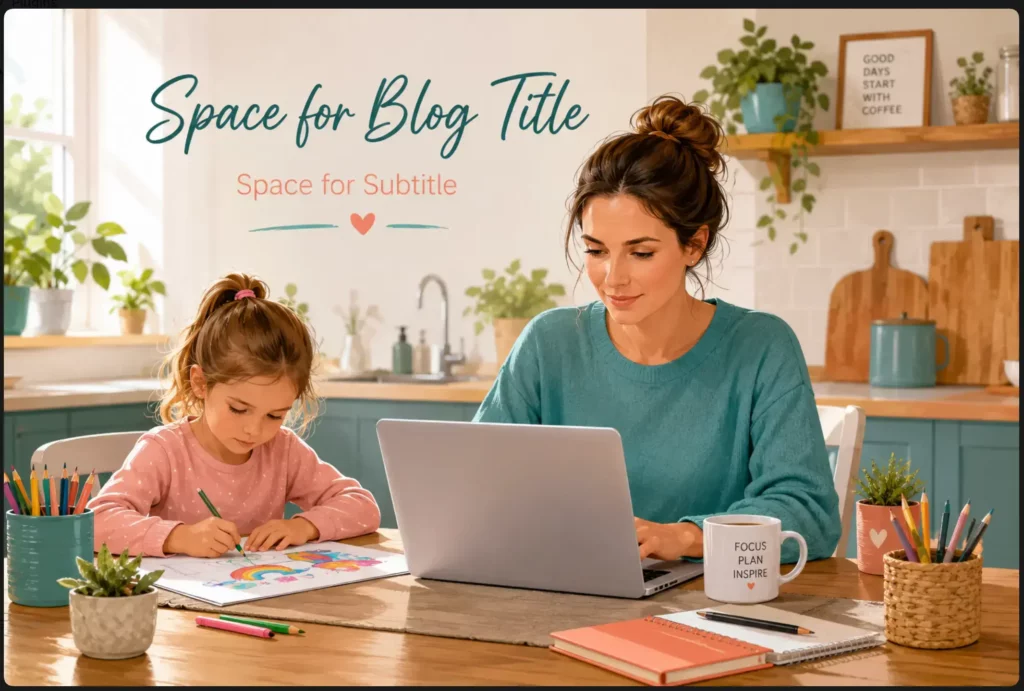
A warm, modern illustration of a parent working on a laptop at the kitchen table while their child colours beside them. Bright natural light, tidy home, realistic family life, calm atmosphere, teal and coral accents, suitable for a family blogging website.
ChatGPT:
Kre8or:

What I Noticed
Both platforms immediately understood the overall scene.
They produced:
- A realistic parent working from home.
- A warm family atmosphere.
- Natural lighting.
- A modern kitchen workspace.
- Calm, encouraging colours.
- Images suitable for a blogging website.
The differences appeared in the interpretation rather than the quality.
ChatGPT
ChatGPT stayed very close to the written prompt.
The scene felt exactly like the image I had described.
It also reflected the wider Flex For Families style because ChatGPT already understands my brand and previous conversations.
The result felt very deliberate.
Kre8or
Kre8or produced an equally attractive image but interpreted the brief slightly differently.
The composition shifted.
Some environmental details changed.
The overall atmosphere remained the same, but it felt like another photographer had been standing in the same room.
Neither result was wrong.
They simply represented two creative interpretations of the same idea.
Winner
Draw.
If someone showed me both images without revealing which platform created them, I honestly don’t think I could confidently choose the better one.
The deciding factor would simply be which version suited the article best.
Challenge 2: The Family Explorer Vehicle
For the second challenge, I wanted something completely different.
Instead of a practical blogging image, I chose a highly imaginative creative brief.
This was also inspired by one of Kre8or’s own community challenges.
The Prompt
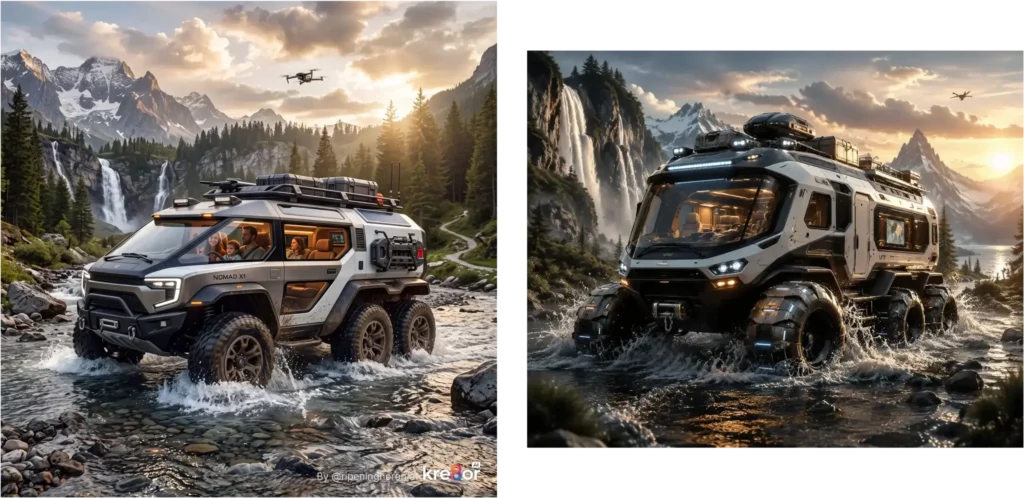
Design a futuristic hybrid exploration vehicle for a family of three that can travel across deserts, mountains, forests, oceans, and frozen landscapes. The vehicle should combine luxury, comfort, advanced autonomous technology, and believable engineering while remaining drivable. Show the vehicle in motion with dramatic cinematic lighting and make the machine the hero of the scene.
What I Noticed
Again, the similarities were remarkable.
Both AI models imagined:
- A futuristic exploration vehicle.
- Large panoramic windows.
- Rugged off-road capability.
- Premium styling.
- A believable science-fiction design.
- Cinematic lighting.
The overall concept was almost identical.
ChatGPT
ChatGPT focused heavily on the vehicle itself.
It looked like a concept vehicle ready for an automotive exhibition.
The machine dominated the image.
That suited the brief perfectly.
Kre8or
Kre8or introduced a little more story.
It included the family inside the vehicle and gave the scene a slightly stronger sense of travel.
It felt more like a promotional image from an adventure magazine.
Again, neither approach was better.
They simply told the story differently.
Winner
Another draw.
This surprised me.
Before running the prompt, I expected one platform to produce a noticeably stronger result.
Instead, I found myself choosing between two genuinely excellent interpretations.
What These Challenges Taught Me
The biggest lesson wasn’t about either platform.
It was about prompting.
A detailed prompt produces dramatically better results than a vague one.
Compare these two requests.
Prompt 1
Create a family blogging image.
Prompt 2
Create a warm editorial illustration of a parent working on a laptop at a kitchen table while their child colours beside them. Bright natural light, realistic family home, calm atmosphere, subtle teal and coral accents, wide composition with clean space for a blog title, suitable for a family blogging website. Avoid luxury offices, money imagery, robots and futuristic technology.
The second prompt gives the AI far more useful direction.
That matters more than switching between image generators.
The Real Winner
After completing both challenges, my conclusion became much clearer.
I do not think one platform consistently creates better images than the other.
Instead:
- ChatGPT is better at helping me develop the idea.
- Kre8or is better at giving image creation its own dedicated workspace.
That is exactly why my current workflow combines both.
I use ChatGPT to think.
I use Kre8or to create.
For me, that has produced the best results.
Try It Yourself
If you’re deciding between these platforms, I’d encourage you to run your own challenge.
Choose one prompt that reflects the type of content you actually create.
Generate it in both tools.
Then ask yourself:
- Which image better matches your brand?
- Which workflow felt easier?
- Which platform got you to a publishable image faster?
- Which result would you actually use?
The answers may surprise you as much as they surprised me.
The biggest difference may not be the image at all.
It may be how each platform helps you get there.
My Real Workflow
If you’ve read this far, you’ve probably noticed something.
I don’t actually choose between ChatGPT and Kre8or.
I use both.
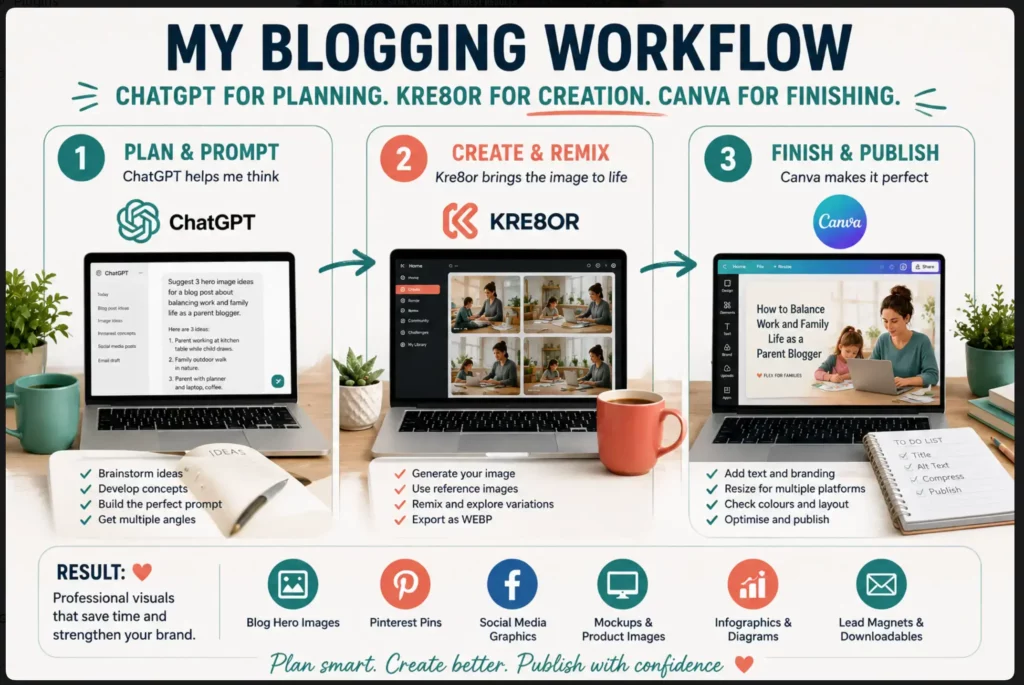
That wasn’t my plan when I started testing Kre8or.
I assumed one platform would quickly replace the other.
Instead, each naturally found its own place in my blogging workflow.
Today, this is how I create almost every visual for Flex For Families.
Step 1: Finish the Article First
I rarely start by creating an image.
Instead, I write the article.
Only once I know exactly what message I’m trying to communicate do I begin thinking about the visuals.
That gives every image a clear purpose.
Instead of asking:
What image would look good?
I ask:
What image would help the reader understand this article?
That small change makes a huge difference.
Step 2: Brainstorm With ChatGPT
This is where ChatGPT shines.
Rather than trying to invent a prompt from scratch, I ask it questions like:
- What hero image would suit this article?
- Suggest three Pinterest concepts.
- What would work well for Facebook?
- How could I visualise this comparison?
- What infographic would help explain this section?
- What prompt would produce the strongest result?
Very quickly, the conversation develops into something much stronger than my original idea.
Sometimes ChatGPT even suggests an image concept I hadn’t considered.
Step 3: Build the Prompt Together
Once we’ve chosen a direction, we refine the prompt.
That might include details such as:
- Warm family-home atmosphere
- Realistic parent blogger
- Teal and coral accents
- Editorial style
- Bright natural lighting
- Wide composition
- Space for the article title
- Clean background
- Suitable for a family blogging website
By the time we’ve finished, the prompt is usually far more detailed than anything I would have written on my own.
That often matters more than the image generator itself.
Step 4: Generate the Image in Kre8or
Now I move into Kre8or.
Instead of experimenting endlessly, I already know what I’m trying to create.
That makes the process much quicker.
I’ll usually generate several versions, compare them, and sometimes use Remix to explore a slightly different direction.
If I find something better than my original idea, I’ll happily use it.
The goal isn’t to prove the prompt was perfect.
The goal is to create the strongest image for the article.
Step 5: Finish Everything in Canva
Even when the AI image looks finished, I nearly always make a few final adjustments.
That might include:
- Adding the Flex For Families logo
- Placing the article title
- Checking the colours
- Adjusting spacing
- Cropping for Pinterest
- Creating Facebook versions
- Ensuring everything feels consistent with the rest of the website
AI creates the foundation.
Canva gives me complete control over the final presentation.
Step 6: Optimise Before Publishing
The final step is one that’s easy to overlook.
Before uploading the image to WordPress, I check:
- File size
- Dimensions
- Alt text
- Compression
- Mobile appearance
- Overall readability
A beautiful image that slows your website down isn’t helping your readers.
Why This Workflow Works for Me
The biggest lesson I’ve learnt isn’t that one AI tool is better than another.
It’s that each tool has a different job.
ChatGPT helps me think.
Kre8or helps me create.
Canva helps me finish.
Each platform contributes something different.
Trying to force one tool to do everything usually creates more work rather than less.
Could You Skip Kre8or?
Absolutely.
If you’re already happy with ChatGPT’s image generation, you can build an entire blogging workflow around it.
Many bloggers will never need a second image platform.
Could You Skip ChatGPT?
Personally, I wouldn’t.
Even if Kre8or became my only image generator, I’d still use ChatGPT every day for:
- Planning articles
- Brainstorming
- Writing prompts
- Solving blogging problems
- Creating social posts
- Reviewing content
- Developing ideas
It has become much more than an image tool.
My Recommendation
If you’re just starting out, keep things simple.
One good workflow is far better than collecting lots of subscriptions you barely use.
If you already have ChatGPT, learn how to write better prompts before buying another platform.
Once image creation becomes a regular part of your blogging routine, Kre8or becomes much easier to justify.
That’s exactly where I am today.
I don’t see ChatGPT and Kre8or as competitors anymore.
I see them as teammates.
One helps me develop the idea.
The other helps me bring it to life.
For my workflow, that’s been the biggest surprise of all.
Good blogging isn’t about finding one perfect tool. It’s about building a workflow that helps you publish consistently while still creating content that genuinely helps people.
Can ChatGPT Replace Kre8or?
The short answer is:
Yes.
But only up to a point.
If you already subscribe to ChatGPT Plus and you’re happy with the images it creates, there is no rule that says you also need a dedicated image generator.
In fact, many bloggers will never outgrow ChatGPT’s image capabilities.
You can use it to create:
- Blog hero images
- Pinterest Pins
- Facebook graphics
- Illustrations
- Comparison graphics
- Concept art
- Social media visuals
Alongside that, you’re also getting help with:
- Writing articles
- Brainstorming ideas
- Improving SEO
- Developing prompts
- Editing content
- Creating lead magnets
- Planning email campaigns
That makes ChatGPT an excellent all-round blogging assistant.
Where ChatGPT Starts to Feel Limiting
The more visual content you create, the more you begin to notice areas where a dedicated image platform offers a smoother experience.
For me, those areas include:
- Remixing existing images
- Building creative variations
- Community inspiration
- Image-focused workflows
- Direct WEBP exports
- Creative challenges
None of those are essential.
They simply become useful once images form a bigger part of your weekly workflow.
My Verdict
Could ChatGPT replace Kre8or?
Absolutely.
Would I personally stop using Kre8or now?
Probably not.
The dedicated visual workflow has become valuable enough that I would miss it.
Can Kre8or Replace ChatGPT?
For me…
No.
That isn’t a criticism of Kre8or.
It simply reflects the different roles these tools play.
ChatGPT helps me with almost every part of running Flex For Families.
Before I create an image, I’ve often already used ChatGPT to:
- Research the topic
- Plan the article
- Improve the structure
- Develop the SEO
- Brainstorm image ideas
- Build the prompt
- Write social posts
- Draft the email
By the time I open Kre8or, ChatGPT has already helped shape most of the project.
Kre8or Does One Job Very Well
Kre8or doesn’t try to replace a wider AI assistant.
Its focus is visual creativity.
That’s exactly what makes it appealing.
The interface isn’t filled with unrelated tools.
Everything encourages you to explore images.
That focus creates a different creative experience.
My Verdict
If I could only keep one subscription for my blogging business, I would keep ChatGPT.
If I wanted to improve one specific part of my workflow, I’d happily add Kre8or alongside it.
Who Should Choose ChatGPT?
I think ChatGPT is the better choice if you:
- Are starting your first blog.
- Want one AI subscription.
- Need help writing as well as creating images.
- Want support with SEO, prompts and planning.
- Publish occasionally.
- Prefer conversational workflows.
- Like refining ideas through discussion.
- Want an AI assistant rather than simply an image generator.
For most beginner bloggers, this is where I would start.
Who Should Choose Kre8or?
Kre8or becomes much more attractive if you:
- Already use ChatGPT.
- Create images every week.
- Publish several blog posts each month.
- Produce Pinterest Pins regularly.
- Share lots of Facebook content.
- Enjoy experimenting with visuals.
- Like Remix and creative challenges.
- Want direct WEBP exports.
- Prefer working inside a dedicated image platform.
At this point, the subscription starts feeling easier to justify.
Who Should Use Both?
This is the option I now recommend most often.
Not because everyone needs two subscriptions.
Because each tool naturally complements the other.
My workflow looks like this:
- Plan the article.
- Brainstorm with ChatGPT.
- Build the prompt.
- Generate in Kre8or.
- Finish in Canva.
- Publish.
Each tool focuses on what it does best.
That reduces frustration and speeds up the overall process.
If you’re creating several articles every week, this combination works extremely well.
Does Your Choice Really Matter?
Here’s something I kept reminding myself while writing this comparison.
It’s very easy to spend days researching AI tools.
It’s much harder to publish your next article.
I’ve seen bloggers spend weeks deciding between platforms when they haven’t actually created any content.
The reality is this.
Neither ChatGPT nor Kre8or will build your blog.
Neither platform will:
- Find your niche.
- Publish consistently.
- Earn readers’ trust.
- Write from your experience.
- Build relationships.
- Create authority.
Only you can do that.
AI simply helps remove some of the repetitive work.
So before worrying about whether one image generator is 5% better than another, ask yourself a different question.
Will choosing this tool help me publish more helpful content?
If the answer is yes, it’s probably the right choice.
If the answer is no, I’d spend less time comparing software and more time writing the next article.
That’s usually where the biggest progress comes from.
For me, AI has never replaced blogging.
It has simply helped me spend more time doing the part that matters most:
Helping real people.
My Recommendation
My recommendation depends on where you are in your blogging journey.
If you are starting out and want one AI subscription, choose ChatGPT.
It gives you help with:
- Article planning
- Prompt development
- Writing
- Editing
- Social media
- SEO support
- Image creation
- Problem-solving
That broader value makes it the stronger first purchase.
If you already use ChatGPT and regularly create blog images, Pinterest Pins, Facebook graphics, mockups, or visual campaigns, Kre8or becomes much easier to justify.
It gives image creation its own dedicated space.
You gain:
- Remix
- Community inspiration
- Challenges
- Reference-based creation
- Mockup workflows
- Direct WEBP exports
- A more focused visual process
For my own workflow, I use both.
ChatGPT helps me develop the idea.
Kre8or helps me turn it into a polished visual.
Canva gives me final control over text, branding, and layout.
That combination works well because each tool has a clear job.
Which Would I Buy First?
It supports far more of the blogging process.
Which Would I Add Next?
Kre8or, once image creation becomes a frequent enough task to justify a dedicated platform.
Which Creates Better Images?
Neither consistently wins.
Both can produce excellent results.
The prompt, context, and intended use often matter more than the platform.
My Practical Recommendation
Use ChatGPT on its own until you regularly notice one of these problems:
- You create several images every week
- You want more visual experimentation
- You need regular mockups
- You want direct WEBP downloads
- You use Pinterest or Facebook heavily
- You want a dedicated image community
- Your current image workflow feels scattered
That is the point where Kre8or can add genuine value.
Do not add another subscription simply because the tool looks fun.
Add it when it solves a repeated problem.

About the Reviewer
Hi, I’m John Crossley, founder of Flex For Families.
I’m a parent, blogger, and online business owner who helps families find realistic ways to create more flexibility through blogging, affiliate marketing, and online business.
Like many people, I’ve spent years researching online opportunities, testing platforms, and learning how to separate genuine business models from expensive hype. I’ve also experienced the frustration of chasing opportunities that promised freedom but demanded more time away from family.
Today, I use that experience to review courses, side hustles, AI opportunities, and online business programmes through a simple lens:
Will this genuinely help parents create more flexibility, or will it create more pressure?
Every review on Flex For Families focuses on costs, time commitments, risks, and realistic expectations, so you can make informed decisions before investing your time or money.
Final Verdict: Kre8or vs ChatGPT
ChatGPT wins this comparison overall.
That does not mean it is the better dedicated image platform.
It wins because it supports more of the work involved in running a blog.
ChatGPT can help with:
- Planning
- Writing
- Editing
- Prompt development
- Social posts
- Strategy
- Troubleshooting
- Image creation
If I could only keep one subscription, I would keep ChatGPT.
Kre8or wins a different category.
It is the better dedicated image environment.
It gives bloggers a focused place to:
- Generate images
- Remix concepts
- Explore ideas
- Join challenges
- Use reference images
- Create mockups
- Export directly as WEBP
That makes Kre8or a strong companion rather than a direct replacement.
Final Winner by Use Case
| Use Case | Winner |
|---|---|
| Best overall blogging tool | ChatGPT |
| Best dedicated image platform | Kre8or |
| Best for beginners | ChatGPT |
| Best for prompt development | ChatGPT |
| Best for community and inspiration | Kre8or |
| Best for mockups | Kre8or |
| Best for Pinterest production | Kre8or |
| Best for infographics | ChatGPT |
| Best for WEBP exports | Kre8or |
| Best value as one subscription | ChatGPT |
| Best combined workflow | ChatGPT + Kre8or |
My Final Take
The most important lesson from testing both tools was not that one consistently creates better images.
It was that they solve different parts of the same problem.
ChatGPT helps me decide what the image should communicate.
Kre8or gives me a dedicated place to create, adapt, and export it.
That is why my current workflow is:
ChatGPT for planning. Kre8or for creation. Canva for finishing.
You do not need all three when you are starting.
Use the simplest setup that helps you publish consistently.
Add more tools only when they reduce work rather than create more of it.
My final verdict is:
Choose ChatGPT first. Add Kre8or when visual content becomes a regular part of your blogging workflow.
The winning tool is not the one that produces the most impressive demonstration.
It is the one that helps you create useful content faster and gives you more time to help real people.
Free Parent Blogging Resource
Build Your Blog Around the Time You Actually Have
Choosing an AI tool can help with images, but you still need a clear niche, useful content ideas, a realistic schedule, and a plan that fits around family life.
Choose a blog topic you can sustain.
Start creating helpful content faster.
Build around work and family commitments.
Focus on the steps that matter first.
Start with the time you have. Build around your family. Grow one useful step at a time.
Continue Your AI Blogging Journey
This comparison is part of my growing series about using AI realistically as a blogger.
The goal is not to collect every new tool or automate the entire creative process.
It is to find practical ways to save time, improve your content, and keep your judgement at the centre of the workflow.
You may also find these guides useful:
- Kre8or AI Review 2026: Is It Worth It for Busy Parent Bloggers? – Want a closer look at Kre8or before deciding whether it deserves a place in your workflow? My full hands-on review covers the image quality, Spark membership, credits, Remix, community challenges, mockups, WEBP exports, referral programme, strengths, and limitations.
- Best AI Image Generators for Bloggers in 2026: Which Tool Should You Use? – Kre8or and ChatGPT are only two of the available options. This wider comparison also looks at Canva, Midjourney, Leonardo AI, Adobe Firefly, and WA ImageStudio, including which tool fits each stage of blogging.
- Best Blogging Resources for Busy Parent Bloggers – AI image tools are only one part of a complete blogging setup. This resource guide covers the platforms, training, research tools, and services I use or recommend for building Flex For Families.
- Wealthy Affiliate Review 2026: Is It Worth It for Beginners? – Kre8or was created by the team behind Wealthy Affiliate, although it operates as a separate platform and membership. My full Wealthy Affiliate review explains the training, hosting, keyword research, Business Hub, AI tools, community, pricing, and who the platform is best suited to.
- Best Kre8or Prompts for Bloggers (Coming Soon) – A strong image usually starts with a strong prompt. This upcoming guide will include practical Kre8or prompts for blog heroes, Pinterest Pins, Facebook graphics, infographics, mockups, lead magnets, and branded content.
The right AI tool should make your workflow simpler.
Start with the problem you are trying to solve, choose one main tool, and add another only when it creates a clear practical benefit.
Frequently Asked Questions
Is Kre8or better than ChatGPT?
Kre8or is better as a dedicated image platform.
It offers Remix, community features, challenges, reference-led creation, mockups, and direct WEBP exports.
ChatGPT is better as an overall blogging tool because it supports planning, writing, prompting, editing, strategy, and image creation.
Does ChatGPT create images?
Yes.
ChatGPT can generate and edit images through conversation.
It is particularly useful for developing visual concepts, improving prompts, requesting changes, and connecting the image to the wider article.
Do I need Kre8or if I already have ChatGPT?
Not necessarily.
ChatGPT may be enough if you only create images occasionally or are happy with its current results.
Kre8or becomes more useful when image creation is a regular part of your workflow and you want a dedicated environment with Remix, mockups, community features, and WEBP exports.
Can I use ChatGPT and Kre8or together?
Yes.
That is my preferred workflow.
I use ChatGPT to plan the concept and develop the prompt, then use Kre8or to create, Remix, and export the image.
I usually finish important text and branding in Canva.
Which tool creates better blog images?
Both can produce excellent blog images.
In my same-prompt testing, the results were often remarkably similar.
The better result usually depended on the prompt, creative interpretation, and how well the image suited the article.
Which tool is easier for beginners?
ChatGPT is slightly easier because the workflow feels like a normal conversation.
Kre8or is also beginner-friendly, particularly once you already know what image you want to create.
Which tool is better for Pinterest?
Kre8or has the advantage for producing portrait visuals, variations, and creative Remixes.
ChatGPT is stronger for developing Pin ideas, headlines, descriptions, and the wider content strategy.
I would still add final text and branding in Canva.
Which tool is better for mockups?
Kre8or is my preferred option for product and device mockups.
Its reference-image and visual-creation workflow feels better suited to presenting lead magnets, websites, digital products, and promotional assets.
Which tool is better for infographics?
ChatGPT has the advantage because it can organise and simplify the information before generating the design.
Kre8or can produce polished infographic concepts, but detailed text and labels still need careful checking.
Which tool gives better value?
ChatGPT offers better overall value because it supports many parts of blogging beyond images.
Kre8or offers strong value for bloggers who regularly create visual content and want a dedicated image platform.
Do I still need Canva?
Canva remains useful for accurate text, logos, fonts, layouts, templates, and final brand consistency.
My practical workflow is ChatGPT for planning, Kre8or for image creation, and Canva for finishing.
Which tool should I buy first?
For most beginner bloggers, I would buy ChatGPT first.
Add Kre8or later when you regularly create blog and social images and can clearly identify the value of a dedicated platform.
Let’s Chat
Have you tried creating images with ChatGPT, Kre8or, or both?
I would love to know:
- Which tool produced the better first result?
- Which one felt easier to use?
- Did a dedicated image platform improve your workflow?
- Do you prefer planning and creating inside one conversation?
- Are you using Canva to finish your graphics?
You could also try the same-prompt challenge yourself.
Use one real prompt from your own niche, create it in both tools, and compare the results.
Leave a comment below and let me know which one you preferred.
The most interesting answer may not be which image looked better.
It may be which tool helped you reach a publishable result faster.